ESP MASERATI GRANTURISMO 2020 Owner's Manual
[x] Cancel search | Manufacturer: MASERATI, Model Year: 2020, Model line: GRANTURISMO, Model: MASERATI GRANTURISMO 2020Pages: 286, PDF Size: 6.7 MB
Page 85 of 286
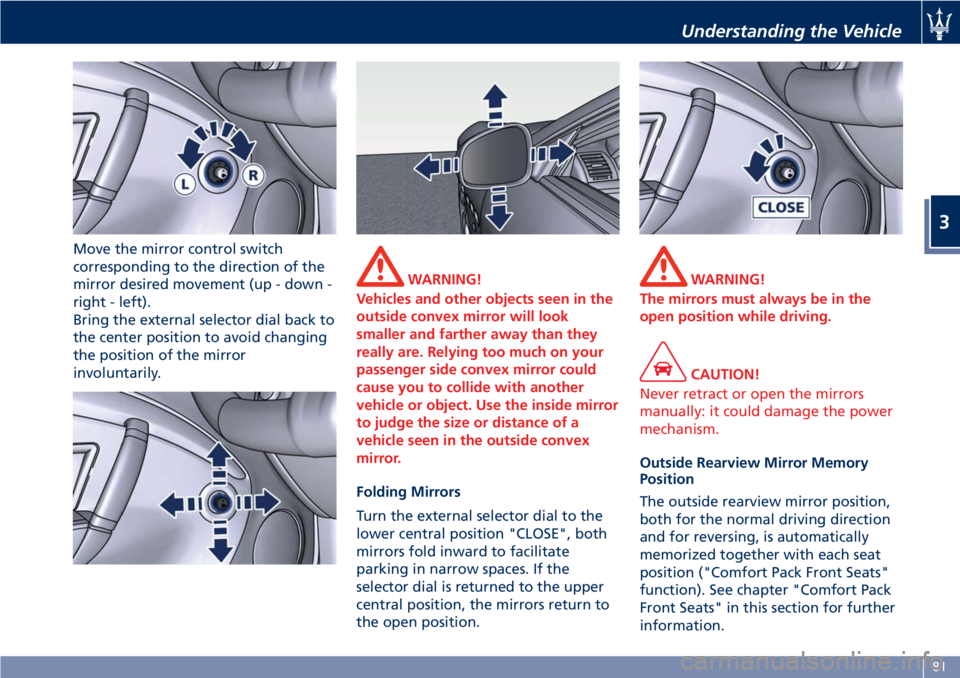
Move the mirror control switch
corresponding to the direction of the
mirror desired movement (up - down -
right - left).
Bring the external selector dial back to
the center position to avoid changing
the position of the mirror
involuntarily.
WARNING!
Vehicles and other objects seen in the
outside convex mirror will look
smaller and farther away than they
really are. Relying too much on your
passenger side convex mirror could
cause you to collide with another
vehicle or object. Use the inside mirror
to judge the size or distance of a
vehicle seen in the outside convex
mirror.
Folding Mirrors
Turn the external selector dial to the
lower central position "CLOSE", both
mirrors fold inward to facilitate
parking in narrow spaces. If the
selector dial is returned to the upper
central position, the mirrors return to
the open position.
WARNING!
The mirrors must always be in the
open position while driving.
CAUTION!
Never retract or open the mirrors
manually: it could damage the power
mechanism.
Outside Rearview Mirror Memory
Position
The outside rearview mirror position,
both for the normal driving direction
and for reversing, is automatically
memorized together with each seat
position ("Comfort Pack Front Seats"
function). See chapter "Comfort Pack
Front Seats" in this section for further
information.
Understanding the Vehicle
3
81
Page 88 of 286
Daytime Running Lights (DRL)
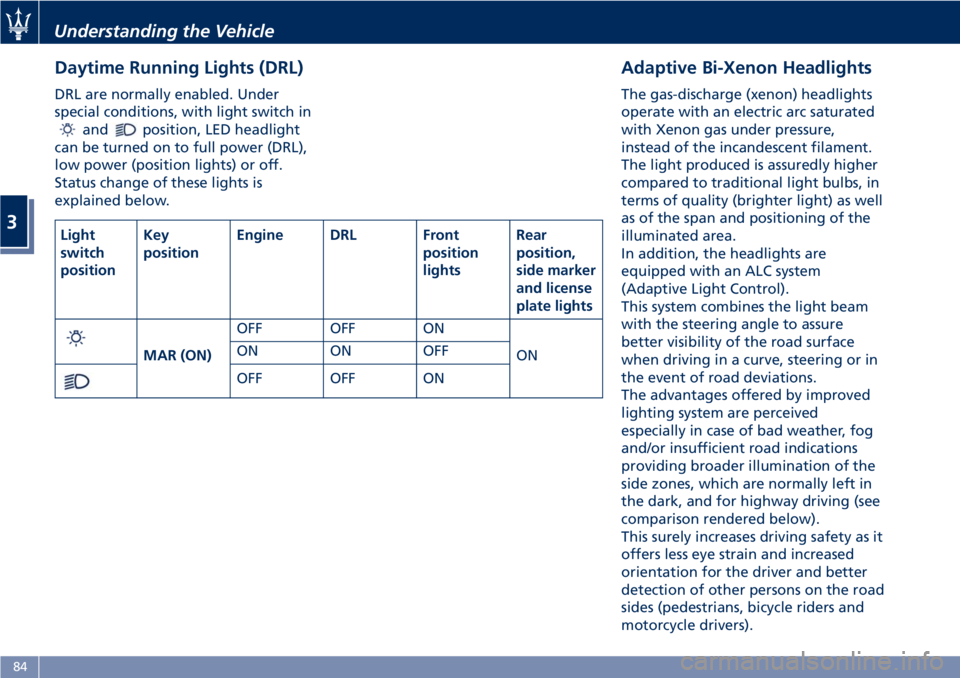
DRL are normally enabled. Under
special conditions, with light switch in
andposition, LED headlight
can be turned on to full power (DRL),
low power (position lights) or off.
Status change of these lights is
explained below.
Adaptive Bi-Xenon Headlights
The gas-discharge (xenon) headlights
operate with an electric arc saturated
with Xenon gas under pressure,
instead of the incandescent filament.
The light produced is assuredly higher
compared to traditional light bulbs, in
terms of quality (brighter light) as well
as of the span and positioning of the
illuminated area.
In addition, the headlights are
equipped with an ALC system
(Adaptive Light Control).
This system combines the light beam
with the steering angle to assure
better visibility of the road surface
when driving in a curve, steering or in
the event of road deviations.
The advantages offered by improved
lighting system are perceived
especially in case of bad weather, fog
and/or insufficient road indications
providing broader illumination of the
side zones, which are normally left in
the dark, and for highway driving (see
comparison rendered below).
This surely increases driving safety as it
offers less eye strain and increased
orientation for the driver and better
detection of other persons on the road
sides (pedestrians, bicycle riders and
motorcycle drivers).
Light
switch
positionKey
positionEngine DRL Front
position
lightsRear
position,
side marker
and license
plate lights
MAR (ON)OFF OFF ON
ON ON ON OFF
OFF OFF ON
Understanding the Vehicle
3
84
Page 89 of 286
The electric arc requires very high
voltage for activation, but afterward
power is supplied at a lower voltage.
The headlights reach maximum
brightness about 0,5 seconds after
being turned on.
The strong light produced by this type
of headlight requires the use of an
automatic system to keep the position
of the headlights constant and to
prevent dazzling approaching cars, in
the case of braking, acceleration or
load transport.
WARNING!
If xenon headlamp replacement is
necessary, contact the Authorized
Maserati Dealer only: DANGER - RISK
OF ELECTRICAL SHOCK.
Parking Lights
The parking lights only work with the
key in the ignition switch turned to
STOP (OFF)orACCposition, or with
the key removed.
They are activated by turning the light
switch to
position.
It is harder to turn the switch to
position than to the other
positions. This is to avoid activatingthe parking lights unintentionally and
wasting power.
When the parking lights are on, the
warning light on the instrument
cluster illuminates.
With parking lights on, move down
left-hand multifunction lever to switch
on position lights on left-hand side,
and move it up to switch on only the
ones on right-hand side.
Automatic Headlights
When the light switch is turned to
"AUTO" position and the key in the
ignition switch is inMAR (ON)
position, the position lights, low beam
lights and license plate lights turn on
and off automatically, depending on
the light outside.
NOTE:
The high beams can only be turned on
manually by pushing the left-hand
multifunction lever forward.
WARNING!
•If the low beams are activated, they
will come on automatically every
time the lights are turned on. You
are therefore advised to turn off the
high beams every time the twilightsensor deactivates the external
lights.
•In case of fog during the day,
position lights and low beam lights
are not turned on automatically. The
driver must always be ready to turn
the lights on manually, including
rear fog lights, if necessary.
•The driver is always responsible for
turning on the external lights,
depending on the light outside and
in compliance with the applicable
legislation in the country of use. The
automatic system for activating/
deactivating the external lights must
be considered an aid for the driver.
If necessary, turn the lights on and
off manually.
NOTE:
After external lights turn on
automatically, driver can always
manually turn on rear fog lights.
When external lights turn off
automatically, rear fog lights will turn
off automatically too, if on. Upon the
following automatic switch-on driver
must manually turn on rear fog lights,
if necessary.
Understanding the Vehicle
3
85
Page 90 of 286
Rear Fog Lights
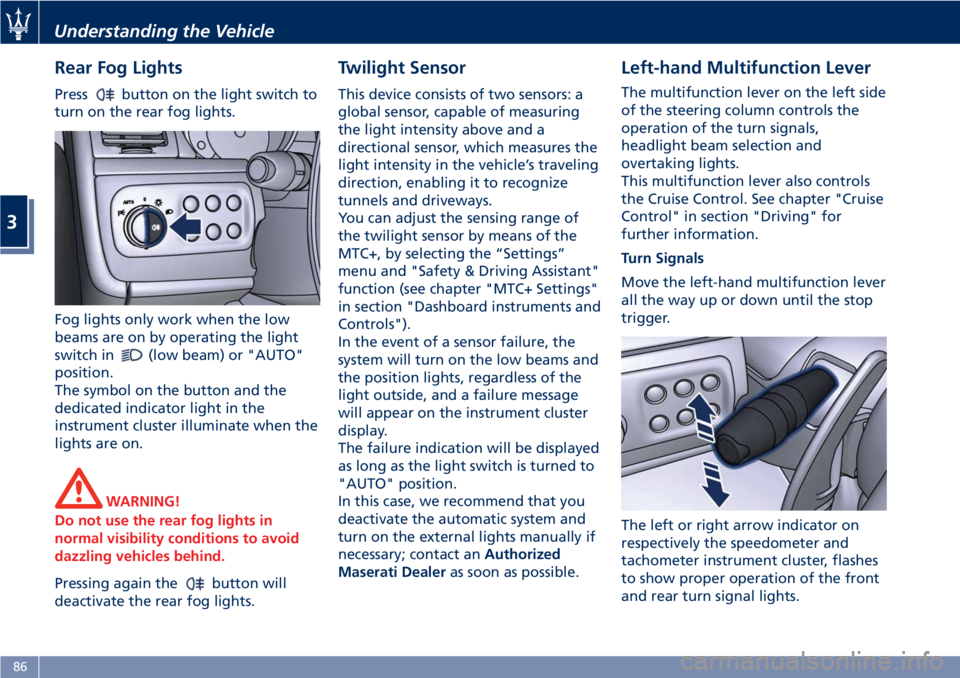
Pressbutton on the light switch to
turn on the rear fog lights.
Fog lights only work when the low
beams are on by operating the light
switch in
(low beam) or "AUTO"
position.
The symbol on the button and the
dedicated indicator light in the
instrument cluster illuminate when the
lights are on.
WARNING!
Do not use the rear fog lights in
normal visibility conditions to avoid
dazzling vehicles behind.
Pressing again thebutton will
deactivate the rear fog lights.
Twilight Sensor
This device consists of two sensors: a
global sensor, capable of measuring
the light intensity above and a
directional sensor, which measures the
light intensity in the vehicle’s traveling
direction, enabling it to recognize
tunnels and driveways.
You can adjust the sensing range of
the twilight sensor by means of the
MTC+, by selecting the “Settings”
menu and "Safety & Driving Assistant"
function (see chapter "MTC+ Settings"
in section "Dashboard instruments and
Controls").
In the event of a sensor failure, the
system will turn on the low beams and
the position lights, regardless of the
light outside, and a failure message
will appear on the instrument cluster
display.
The failure indication will be displayed
as long as the light switch is turned to
"AUTO" position.
In this case, we recommend that you
deactivate the automatic system and
turn on the external lights manually if
necessary; contact anAuthorized
Maserati Dealeras soon as possible.
Left-hand Multifunction Lever
The multifunction lever on the left side
of the steering column controls the
operation of the turn signals,
headlight beam selection and
overtaking lights.
This multifunction lever also controls
the Cruise Control. See chapter "Cruise
Control" in section "Driving" for
further information.
Turn Signals
Move the left-hand multifunction lever
all the way up or down until the stop
trigger.
The left or right arrow indicator on
respectively the speedometer and
tachometer instrument cluster, flashes
to show proper operation of the front
and rear turn signal lights.
Understanding the Vehicle
3
86
Page 92 of 286
CAUTION!
The high beams can only be switched
on manually by pushing the left-hand
multifunction lever forward.
WARNING!
If the high beams are activated, they
will turn on automatically every time
the low beams are switched on either
manually or automatically. We
recommend therefore that you switch
them off when they are no longer
necessary and every time the twilight
sensor deactivates the external lights.
“Follow me Home” Function
This function allows you to set a
timing for activation of the position
lights and low beams, so that they may
remain on for a set time after turning
off the vehicle.
This function is activated by pushing
the left-hand multifunction lever on
the steering column, used to flash the
headlights.
The position lights and low beams turn
on for 30 seconds, the message
“Follow me” appears on the
instrument cluster display for 20seconds, and the light activation time
is displayed.
When this function is active, every
time the left-hand multifunction lever
for flashing the headlights is operated,
the time the lights remain on is
increased by 30 seconds, with a
maximum total time of 210 seconds.
The display will show the time set.
If the left-hand multifunction lever for
flashing the headlights is operated for
more than 2 seconds, the function is
deactivated, and the indicator on the
instrument cluster display goes off.
When the function is active, turning
the key in the ignition switch back to
MAR (ON)position deactivates the
system.Front Domelights
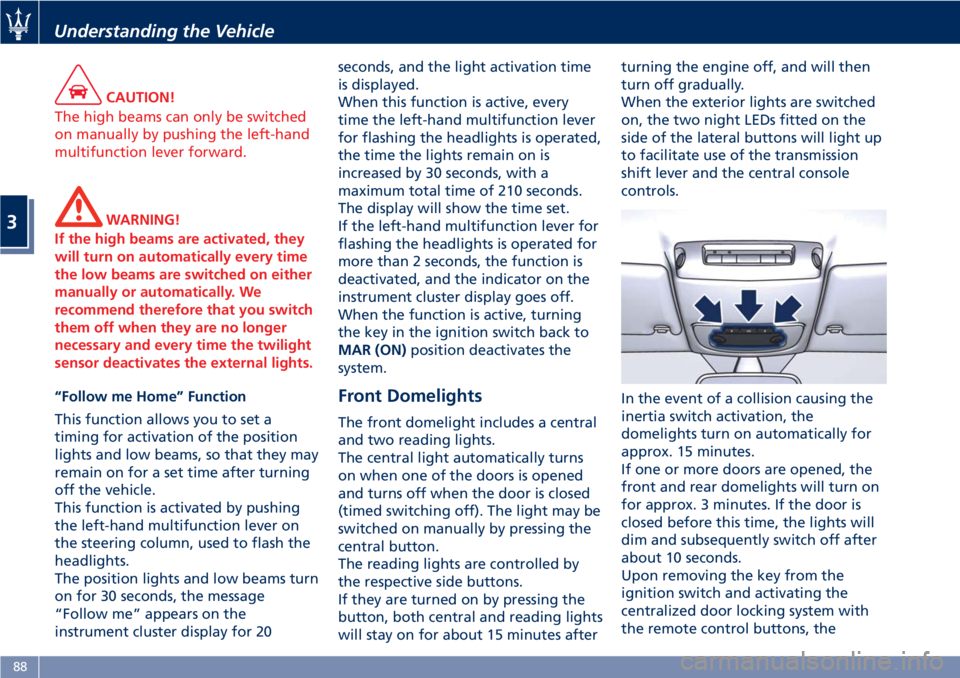
The front domelight includes a central
and two reading lights.
The central light automatically turns
on when one of the doors is opened
and turns off when the door is closed
(timed switching off). The light may be
switched on manually by pressing the
central button.
The reading lights are controlled by
the respective side buttons.
If they are turned on by pressing the
button, both central and reading lights
will stay on for about 15 minutes afterturning the engine off, and will then
turn off gradually.
When the exterior lights are switched
on, the two night LEDs fitted on the
side of the lateral buttons will light up
to facilitate use of the transmission
shift lever and the central console
controls.
In the event of a collision causing the
inertia switch activation, the
domelights turn on automatically for
approx. 15 minutes.
If one or more doors are opened, the
front and rear domelights will turn on
for approx. 3 minutes. If the door is
closed before this time, the lights will
dim and subsequently switch off after
about 10 seconds.
Upon removing the key from the
ignition switch and activating the
centralized door locking system with
the remote control buttons, the
Understanding the Vehicle
3
88
Page 103 of 286
General Information
While programming HomeLink®,itis
advisable to disconnect the drive
motor of the gate/door to be remote
controlled, since the numerous driving
pulses launched for this operation
might damage it.
If the battery fails or is disconnected,
the stored settings are not deleted.
If the gate/door was manufactured
prior to April 1982 (not equipped with
safety systems or automatic stop in the
event of an obstacle in the range of
action), the gate/door cannot be
controlled by HomeLink
®.
If you have questions, call (800)
355-3515.
WARNING!
California Proposition 65
Operating, servicing and maintaining
a passenger vehicle or off-road vehicle
can expose you to chemicals including
such as, engine exhaust, carbon
monoxide, phthalates and lead, that
which are know to the State of
California to cause cancer and birth
defects or other reproductive harm. To
minimize exposure, avoid breathing
exhaust, do not idle the engine except
as necessary, service your vehicle in awell-ventilated area and wear gloves
or wash your hands frequently when
servicing your vehicle. For more
information go to:
www.P65Warnings.ca.gov/passenger-
vehicle
Programming
• Press and hold buttons "1" and "3".
• After about 20 seconds, the LED
starts flashing.
• Release the buttons.
• Hold the remote control for the
device to be controlled close to the
HomeLink
®control panel (0-30 cm/
0-12 in).
• Simultaneously press and hold the
button on the hand-held remote
control and one of the three
HomeLink
®buttons "1", "2" or "3".
• Successful programming is signaled
by the LED flashing faster.
• Release the buttons.
To program the other buttons, repeat
the operations skipping the first three
steps.
Use
• When the signal of the device to be
activated reaches its operatingrange, press the dedicated
HomeLink
®button.
• The LED remains on while the signal
is being transmitted.
The devices controlled through the
HomeLink
®function can always be
activated using the original remote
controls.
Should the so programmed
HomeLink
®not activate the system to
be controlled, this may be due to the
fact that this system is controlled by a
remote control with a rolling code.
A rolling activation code can be
recognized in the following ways:
• consulting the instruction manual
provided with the device to be
controlled;
• despite the fact that the HomeLink
®
programming procedure has been
carried out correctly, the HomeLink®
function does not activate the
device;
• holding the dedicated HomeLink
®
button pressed down, the LED
briefly flashes fast and then remains
on for 2 seconds; this sequence is
repeated for about 20 seconds.
Understanding the Vehicle
3
99
Page 104 of 286
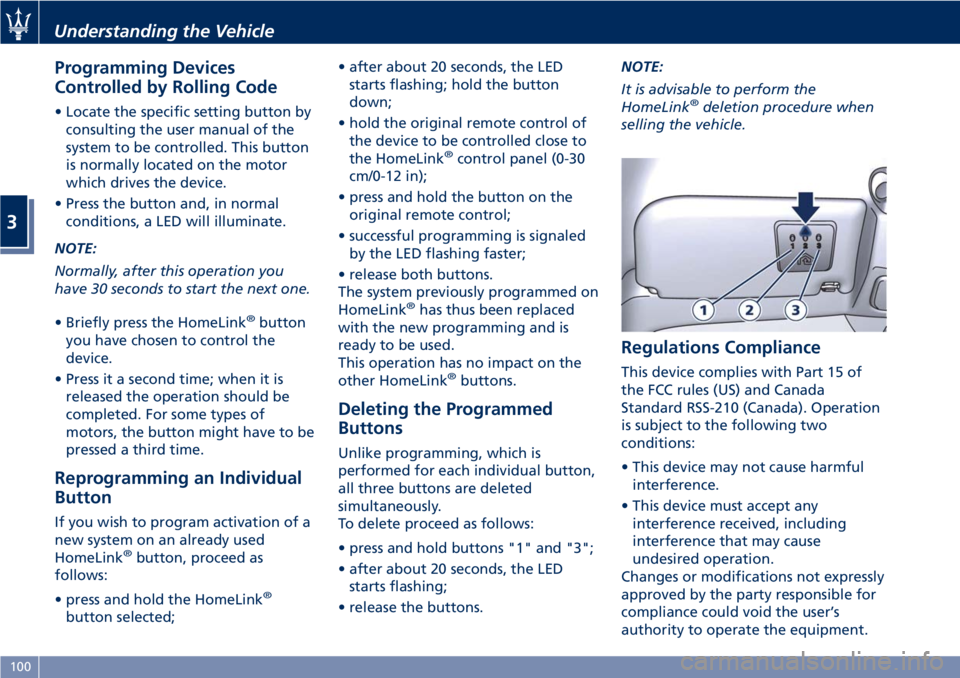
Programming Devices
Controlled by Rolling Code
• Locate the specific setting button by
consulting the user manual of the
system to be controlled. This button
is normally located on the motor
which drives the device.
• Press the button and, in normal
conditions, a LED will illuminate.
NOTE:
Normally, after this operation you
have 30 seconds to start the next one.
• Briefly press the HomeLink
®button
you have chosen to control the
device.
• Press it a second time; when it is
released the operation should be
completed. For some types of
motors, the button might have to be
pressed a third time.
Reprogramming an Individual
Button
If you wish to program activation of a
new system on an already used
HomeLink
®button, proceed as
follows:
• press and hold the HomeLink
®
button selected;• after about 20 seconds, the LED
starts flashing; hold the button
down;
• hold the original remote control of
the device to be controlled close to
the HomeLink
®control panel (0-30
cm/0-12 in);
• press and hold the button on the
original remote control;
• successful programming is signaled
by the LED flashing faster;
• release both buttons.
The system previously programmed on
HomeLink
®has thus been replaced
with the new programming and is
ready to be used.
This operation has no impact on the
other HomeLink
®buttons.
Deleting the Programmed
Buttons
Unlike programming, which is
performed for each individual button,
all three buttons are deleted
simultaneously.
To delete proceed as follows:
• press and hold buttons "1" and "3";
• after about 20 seconds, the LED
starts flashing;
• release the buttons.NOTE:
It is advisable to perform the
HomeLink
®deletion procedure when
selling the vehicle.
Regulations Compliance
This device complies with Part 15 of
the FCC rules (US) and Canada
Standard RSS-210 (Canada). Operation
is subject to the following two
conditions:
• This device may not cause harmful
interference.
• This device must accept any
interference received, including
interference that may cause
undesired operation.
Changes or modifications not expressly
approved by the party responsible for
compliance could void the user’s
authority to operate the equipment.
Understanding the Vehicle
3
100
Page 107 of 286
Sport Skyhook Suspension
(for versions/markets,
where provided)
The electronic system controlling the
vehicle suspension uses the
sophisticated on board sensors and is
aimed at optimizing vehicle
performance.
The system is capable of constantly
monitoring suspension damping by
means of the actuator fitted on each
shock absorber (Skyhook type). This
way, the shock absorber setting is
suited to the road surface conditions
and vehicle dynamics, thus improving
passenger comfort and road-holding.
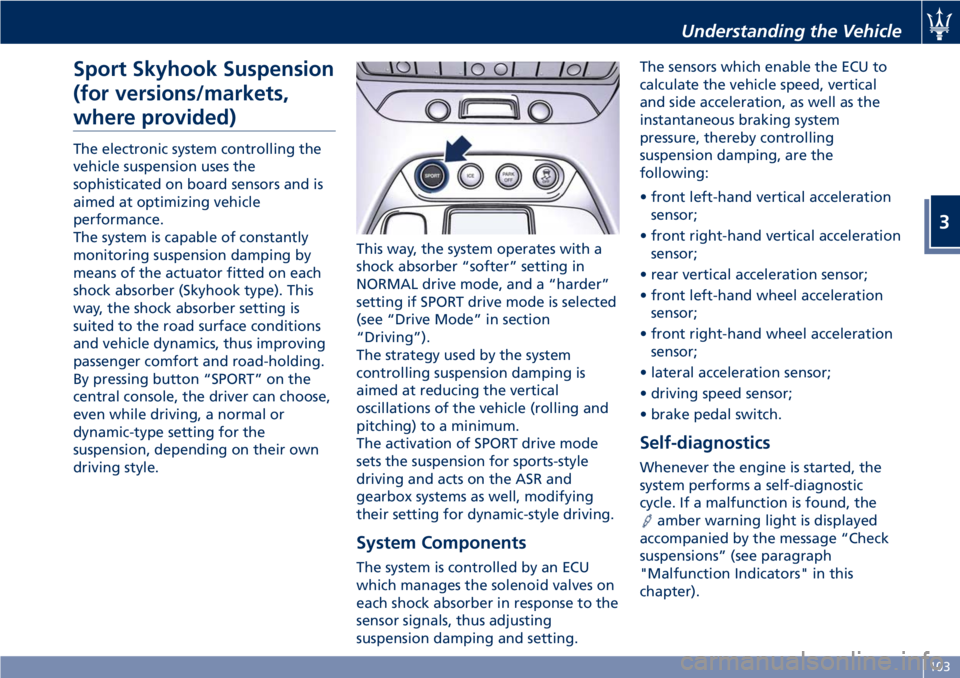
By pressing button “SPORT” on the
central console, the driver can choose,
even while driving, a normal or
dynamic-type setting for the
suspension, depending on their own
driving style.This way, the system operates with a
shock absorber “softer” setting in
NORMAL drive mode, and a “harder”
setting if SPORT drive mode is selected
(see “Drive Mode” in section
“Driving”).
The strategy used by the system
controlling suspension damping is
aimed at reducing the vertical
oscillations of the vehicle (rolling and
pitching) to a minimum.
The activation of SPORT drive mode
sets the suspension for sports-style
driving and acts on the ASR and
gearbox systems as well, modifying
their setting for dynamic-style driving.
System Components
The system is controlled by an ECU
which manages the solenoid valves on
each shock absorber in response to the
sensor signals, thus adjusting
suspension damping and setting.The sensors which enable the ECU to
calculate the vehicle speed, vertical
and side acceleration, as well as the
instantaneous braking system
pressure, thereby controlling
suspension damping, are the
following:
• front left-hand vertical acceleration
sensor;
• front right-hand vertical acceleration
sensor;
• rear vertical acceleration sensor;
• front left-hand wheel acceleration
sensor;
• front right-hand wheel acceleration
sensor;
• lateral acceleration sensor;
• driving speed sensor;
• brake pedal switch.
Self-diagnostics
Whenever the engine is started, the
system performs a self-diagnostic
cycle. If a malfunction is found, the
amber warning light is displayed
accompanied by the message “Check
suspensions” (see paragraph
"Malfunction Indicators" in this
chapter).
Understanding the Vehicle
3
103
Page 121 of 286
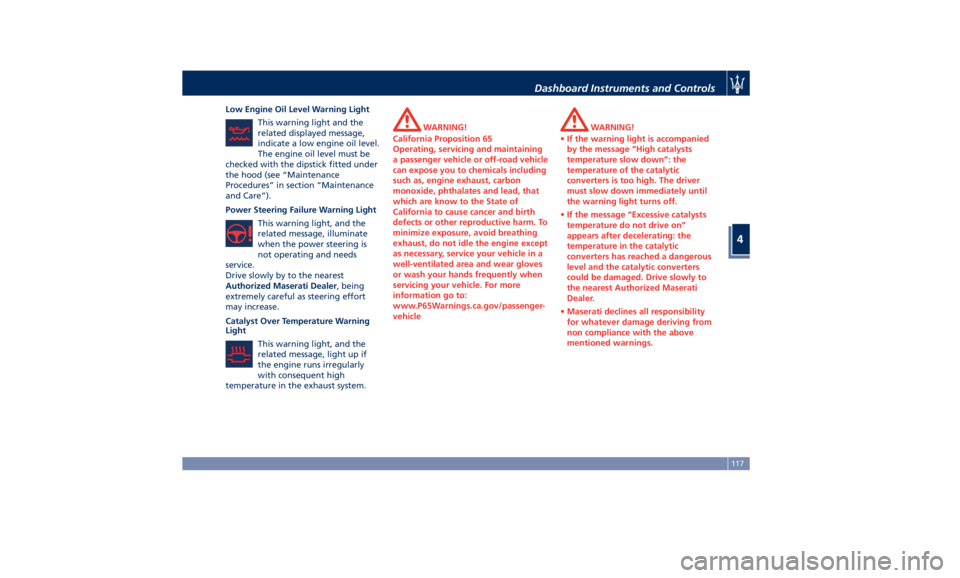
Low Engine Oil Level Warning Light
This warning light and the
related displayed message,
indicate a low engine oil level.
The engine oil level must be
checked with the dipstick fitted under
the hood (see “Maintenance
Procedures” in section “Maintenance
and Care”).
Power Steering Failure Warning Light
This warning light, and the
related message, illuminate
when the power steering is
not operating and needs
service.
Drive slowly by to the nearest
Authorized Maserati Dealer, being
extremely careful as steering effort
may increase.
Catalyst Over Temperature Warning
Light
This warning light, and the
related message, light up if
the engine runs irregularly
with consequent high
temperature in the exhaust system.
WARNING!
California Proposition 65
Operating, servicing and maintaining
a passenger vehicle or off-road vehicle
can expose you to chemicals including
such as, engine exhaust, carbon
monoxide, phthalates and lead, that
which are know to the State of
California to cause cancer and birth
defects or other reproductive harm. To
minimize exposure, avoid breathing
exhaust, do not idle the engine except
as necessary, service your vehicle in a
well-ventilated area and wear gloves
or wash your hands frequently when
servicing your vehicle. For more
information go to:
www.P65Warnings.ca.gov/passenger-
vehicleWARNING!
•If the warning light is accompanied
by the message “High catalysts
temperature slow down”: the
temperature of the catalytic
converters is too high. The driver
must slow down immediately until
the warning light turns off.
•If the message “Excessive catalysts
temperature do not drive on”
appears after decelerating: the
temperature in the catalytic
converters has reached a dangerous
level and the catalytic converters
could be damaged. Drive slowly to
the nearest Authorized Maserati
Dealer.
•Maserati declines all responsibility
for whatever damage deriving from
non compliance with the above
mentioned warnings.
Dashboard Instruments and Controls
4
117
Page 124 of 286
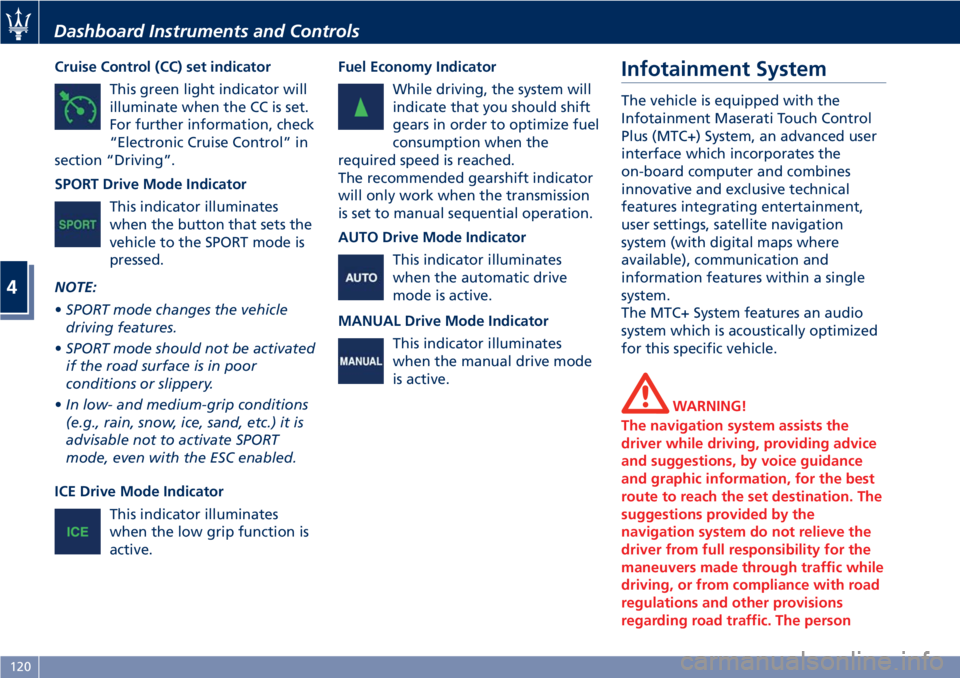
Cruise Control (CC) set indicator
This green light indicator will
illuminate when the CC is set.
For further information, check
“Electronic Cruise Control” in
section “Driving”.
SPORT Drive Mode Indicator
This indicator illuminates
when the button that sets the
vehicle to the SPORT mode is
pressed.
NOTE:
•SPORT mode changes the vehicle
driving features.
•SPORT mode should not be activated
if the road surface is in poor
conditions or slippery.
•In low- and medium-grip conditions
(e.g., rain, snow, ice, sand, etc.) it is
advisable not to activate SPORT
mode, even with the ESC enabled.
ICE Drive Mode Indicator
This indicator illuminates
when the low grip function is
active.Fuel Economy Indicator
While driving, the system will
indicate that you should shift
gears in order to optimize fuel
consumption when the
required speed is reached.
The recommended gearshift indicator
will only work when the transmission
is set to manual sequential operation.
AUTO Drive Mode Indicator
This indicator illuminates
when the automatic drive
mode is active.
MANUAL Drive Mode Indicator
This indicator illuminates
when the manual drive mode
is active.Infotainment System
The vehicle is equipped with the
Infotainment Maserati Touch Control
Plus (MTC+) System, an advanced user
interface which incorporates the
on-board computer and combines
innovative and exclusive technical
features integrating entertainment,
user settings, satellite navigation
system (with digital maps where
available), communication and
information features within a single
system.
The MTC+ System features an audio
system which is acoustically optimized
for this specific vehicle.
WARNING!
The navigation system assists the
driver while driving, providing advice
and suggestions, by voice guidance
and graphic information, for the best
route to reach the set destination. The
suggestions provided by the
navigation system do not relieve the
driver from full responsibility for the
maneuvers made through traffic while
driving, or from compliance with road
regulations and other provisions
regarding road traffic. The person
Dashboard Instruments and Controls
4
120