instrument cluster MASERATI GRANTURISMO 2020 Owner's Manual
[x] Cancel search | Manufacturer: MASERATI, Model Year: 2020, Model line: GRANTURISMO, Model: MASERATI GRANTURISMO 2020Pages: 286, PDF Size: 6.7 MB
Page 111 of 286
4 – Dashboard Instruments and Controls
Instrument Cluster...................................... 108
Infotainment System.................................... 120
Audio Controls......................................... 128
Audio System.......................................... 130
MTC+ “Controls” Screen................................. 131
MTC+ Settings......................................... 131
Glove Compartments.................................... 139
Analog Clock.......................................... 140
Air Conditioning Controls................................ 140
Phone and Voice Controls on Steering Wheel................. 144
107
Page 112 of 286
Instrument Cluster
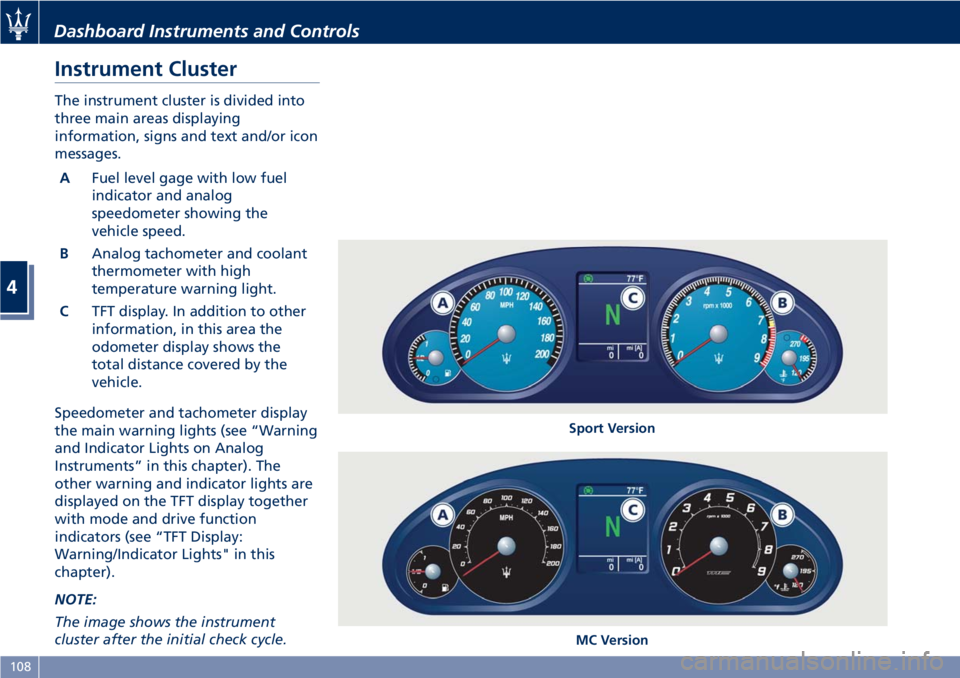
The instrument cluster is divided into
three main areas displaying
information, signs and text and/or icon
messages.
AFuel level gage with low fuel
indicator and analog
speedometer showing the
vehicle speed.
BAnalog tachometer and coolant
thermometer with high
temperature warning light.
CTFT display. In addition to other
information, in this area the
odometer display shows the
total distance covered by the
vehicle.
Speedometer and tachometer display
the main warning lights (see “Warning
and Indicator Lights on Analog
Instruments” in this chapter). The
other warning and indicator lights are
displayed on the TFT display together
with mode and drive function
indicators (see “TFT Display:
Warning/Indicator Lights" in this
chapter).
NOTE:
The image shows the instrument
cluster after the initial check cycle.
Sport Version
MC Version
Dashboard Instruments and Controls
4
108
Page 116 of 286
After the bulb check or while driving,
if driver or front passenger seat belt is
unbuckled, together with the acoustic
signal the seat belt reminder light will
light up.
WARNING!
Maserati urges you to use the seat
belts correctly fastened and adjusted
at all times. Correct use of the seat
belts can help reduce the risk of
serious injury in the event of an
accident. Do not pass seat belts over
sharp edges: they could tear. Do not
pin anything to the seat belts. This
could reduce their initial strength and
cause them to tear in the event of a
crash.
Refer to “Occupants Restraint
Systems” in section “Before Starting”
for further information.
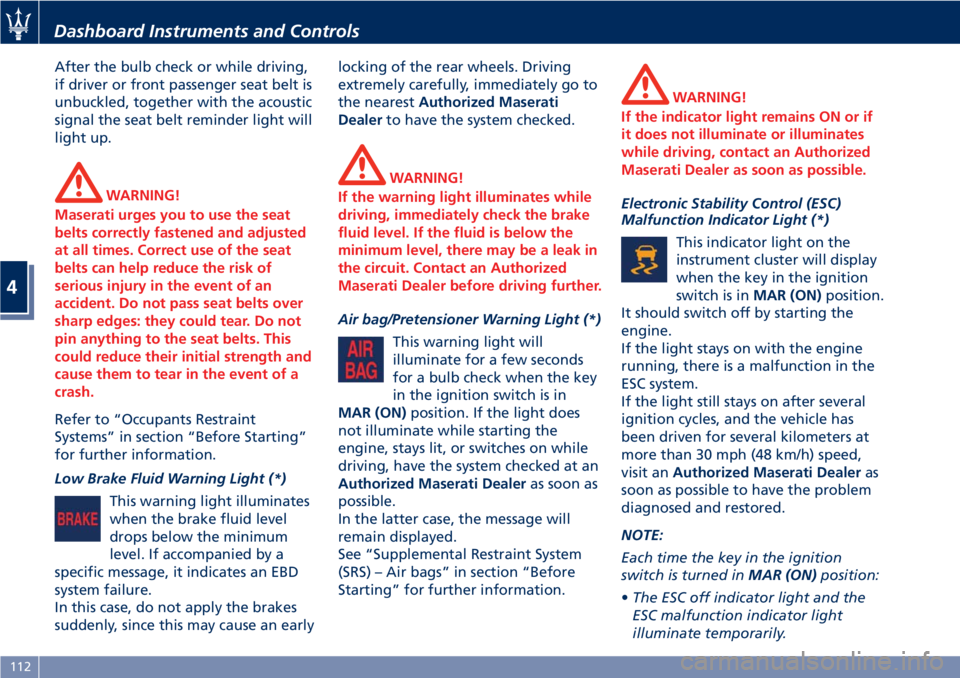
Low Brake Fluid Warning Light (*)
This warning light illuminates
when the brake fluid level
drops below the minimum
level. If accompanied by a
specific message, it indicates an EBD
system failure.
In this case, do not apply the brakes
suddenly, since this may cause an earlylocking of the rear wheels. Driving
extremely carefully, immediately go to
the nearestAuthorized Maserati
Dealerto have the system checked.
WARNING!
If the warning light illuminates while
driving, immediately check the brake
fluid level. If the fluid is below the
minimum level, there may be a leak in
the circuit. Contact an Authorized
Maserati Dealer before driving further.
Air bag/Pretensioner Warning Light (*)
This warning light will
illuminate for a few seconds
for a bulb check when the key
in the ignition switch is in
MAR (ON)position. If the light does
not illuminate while starting the
engine, stays lit, or switches on while
driving, have the system checked at an
Authorized Maserati Dealeras soon as
possible.
In the latter case, the message will
remain displayed.
See “Supplemental Restraint System
(SRS) – Air bags” in section “Before
Starting” for further information.
WARNING!
If the indicator light remains ON or if
it does not illuminate or illuminates
while driving, contact an Authorized
Maserati Dealer as soon as possible.
Electronic Stability Control (ESC)
Malfunction Indicator Light (*)
This indicator light on the
instrument cluster will display
when the key in the ignition
switch is inMAR (ON)position.
It should switch off by starting the
engine.
If the light stays on with the engine
running, there is a malfunction in the
ESC system.
If the light still stays on after several
ignition cycles, and the vehicle has
been driven for several kilometers at
more than 30 mph (48 km/h) speed,
visit anAuthorized Maserati Dealeras
soon as possible to have the problem
diagnosed and restored.
NOTE:
Each time the key in the ignition
switch is turned inMAR (ON)position:
•The ESC off indicator light and the
ESC malfunction indicator light
illuminate temporarily.
Dashboard Instruments and Controls
4
112
Page 117 of 286
•The ESC system will be on, even if it
was turned off previously. The ESC
system will make buzzing or clicking
sounds when active. This is normal;
the sounds will stop when ESC
becomes inactive by solving the
problem that caused the ESC
activation.
Air Bag Malfunction Warning Light (*)
The warning light flashes to
indicate a malfunction of the
warning light.
WARNING!
•Turning the key in the ignition
switch to MAR (ON) position, the air
bag malfunction warning light
illuminates but should go off after a
few seconds with the engine
running.
•If the air bag malfunction warning
light remains on or stays on or if it
does not illuminate or if it
illuminates while driving, contact
your Authorized Maserati Dealer as
soon as possible.
Right Turn Signal Indicator
This indicator lights up when
the right turn signals or the
hazard flashers are switched
on.
The indicator will flash at the same
frequency of the turn signals and is
controlled by the left multifunction
lever.
If the vehicle electronics sense that the
vehicle drives for more than 1 mile
(1.6 km) with either turn signal on, a
continuous sound will advise the
driver to turn the signal off.
If the indicator flashes at a fast rate,
check for a defective outside indicator
light bulb.
Maserati CODE Warning Light (*)
With the key in the ignition
switch inMAR (ON)position,
the amber warning light in
the instrument cluster and on
the display illuminates when the
system detects the following faults:
• alarm system not available;
• electronic key not detected;
• have the vehicle protection system
checked.
Or when the user is informed of the
following events:
• vehicle break-in detected;• electronic key not recognized.
Electronic Stability Control (ESC) OFF
Indicator Light
This indicator notifies that the
Electronic Stability Control
(ESC) is disabled; the linked
message will be displayed.
Parking Brake Engaged Indicator
This indicator light illuminates
when the parking brake is
applied.
Brake Pads Worn Warining Light (*)
This warning light illuminates
on the instrument cluster
when the brake pads have
reached their wear limit.
Please contact anAuthorized Maserati
Dealer.
High Coolant Temperature Warning
Light
The thermometer in the instrument
cluster indicates the temperature of
the coolant. If the needle indicates
high temperatures and at the same
time the warning light comes on, stop
the vehicle immediately and have the
cooling system checked by an
Authorized Maserati Dealer.
Dashboard Instruments and Controls
4
113
Page 118 of 286
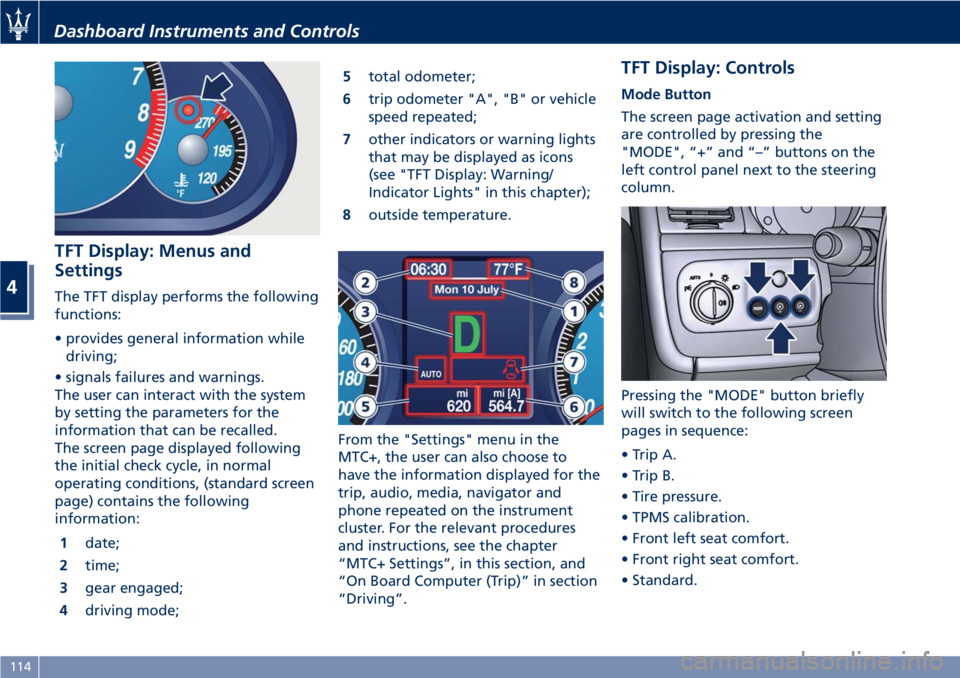
TFT Display: Menus and
Settings
The TFT display performs the following
functions:
• provides general information while
driving;
• signals failures and warnings.
The user can interact with the system
by setting the parameters for the
information that can be recalled.
The screen page displayed following
the initial check cycle, in normal
operating conditions, (standard screen
page) contains the following
information:
1date;
2time;
3gear engaged;
4driving mode;5total odometer;
6trip odometer "A", "B" or vehicle
speed repeated;
7other indicators or warning lights
that may be displayed as icons
(see "TFT Display: Warning/
Indicator Lights" in this chapter);
8outside temperature.
From the "Settings" menu in the
MTC+, the user can also choose to
have the information displayed for the
trip, audio, media, navigator and
phone repeated on the instrument
cluster. For the relevant procedures
and instructions, see the chapter
“MTC+ Settings”, in this section, and
“On Board Computer (Trip)” in section
“Driving”.
TFT Display: Controls
Mode Button
The screen page activation and setting
are controlled by pressing the
"MODE", “+” and “–” buttons on the
left control panel next to the steering
column.
Pressing the "MODE" button briefly
will switch to the following screen
pages in sequence:
• Trip A.
• Trip B.
• Tire pressure.
• TPMS calibration.
• Front left seat comfort.
• Front right seat comfort.
• Standard.
Dashboard Instruments and Controls
4
114
Page 119 of 286
“+“ and “–” Buttons
By means of the “+ “ and “–” buttons,
the user can adjust the instrument
cluster brightness.
When a screen page is viewed, these
buttons can be used to select the
available options (see paragraph "TFT
Display: Screen Pages" in this chapter).
TFT Display: Screen Pages
Trip Screen Page
The Trip screen page is recalled by
pressing the “MODE” button. Each
Trip screen page “A” or “B” is timed,
i.e. it is displayed for a maximum of 10
seconds, after which the screen page
previously active is displayed once
again.
Before the 10 second timing has
elapsed, pressing the “MODE” button
briefly (less than 2 seconds) will reset
the trip information relating to the
flashing odometer “A” or “B”.
When the “Trip A” or “Trip B” feature
is active, the following information is
viewed on the display:
• traveled distance (shown in the
lower right area);
• average fuel consumption (Avg.
cons.)
• average traveling speed (Avg.
speed);• trip time;
• fuel range (Range);
The unit for this data can be adjusted
by the user from the MTC+ Settings
menu.
NOTE:
Trip and Service information can be
viewed by accessing the “Trip” menu
on the MTC+ screen (see “On Board
Computer Trip (Trip)” in section
“Driving”).
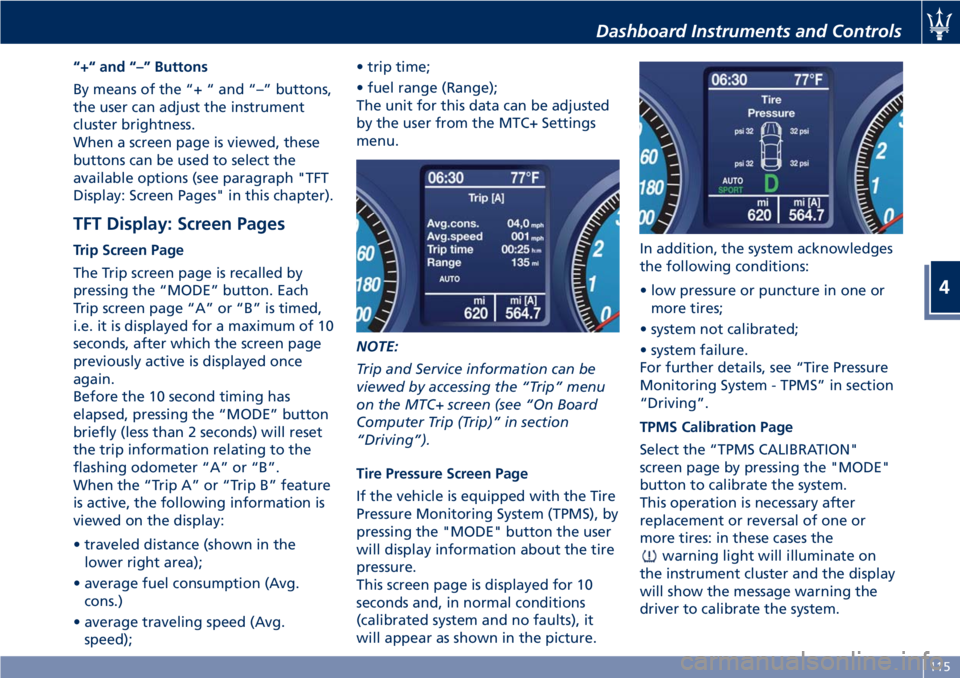
Tire Pressure Screen Page
If the vehicle is equipped with the Tire
Pressure Monitoring System (TPMS), by
pressing the "MODE" button the user
will display information about the tire
pressure.
This screen page is displayed for 10
seconds and, in normal conditions
(calibrated system and no faults), it
will appear as shown in the picture.In addition, the system acknowledges
the following conditions:
• low pressure or puncture in one or
more tires;
• system not calibrated;
• system failure.
For further details, see “Tire Pressure
Monitoring System - TPMS” in section
“Driving”.
TPMS Calibration Page
Select the “TPMS CALIBRATION"
screen page by pressing the "MODE"
button to calibrate the system.
This operation is necessary after
replacement or reversal of one or
more tires: in these cases the
warning light will illuminate on
the instrument cluster and the display
will show the message warning the
driver to calibrate the system.
Dashboard Instruments and Controls
4
115
Page 122 of 286
Engine Temperature Warning Light
This warning light coupled
with the light on the coolant
thermometer notifies when
the engine is overheated. If
the temperature reaches critical levels
this warning light will illuminate in red
color combined with the related
message on display.
If the indicator light switches on while
driving, safely pull over and stop the
vehicle. If the A/C system is on, turn it
off. Also, shift the transmission into N
(Neutral) and idle the vehicle. If the
temperature does not return to
normal, immediately turn the engine
off and contact anAuthorized
Maserati Dealer.
Check “Engine Overheating” in section
“In an Emergency” for more
information.
Doors and Lids Open Warning Light
This warning light indicates
that the doors or lids are open
or not properly closed. The
instrument cluster display also
shows an image of the vehicle with the
part not closed highlighted in red and
the related message.
WARNING!
Before starting off, close any doors
and lids that are open or not properly
closed.
Fuel Cutout Enabled Warning Light
This warning light illuminates
when a collision activates the
inertia switch, thus cutting off
the fuel supply.
WARNING!
After a collision, if you smell fuel or
note leakages from the fuel system,
do not reactivate the switch in order
to prevent the risk of fire.
Windshield and Headlights Washer
Low Fluid Indicator
This indicator will illuminate
for 10 seconds to indicate a
low level of the windshield
and headlights washer fluid. A
related message will be displayed.
See “Maintenance Procedures” in
section “Maintenance and Care” for
fluid filling.Lighting System Failure Warning Light
This warning light illuminates
in the case of a system failure
or burning-out of the position,
turn signal, rear fog and
license plate light bulbs.
See "Bulb Replacement" in section
"Maintenance and Care" for further
details.
Stop Light Failure Warning Light
This warning light illuminates
in the case of a system failure
or burning-out of the stop
light bulbs.
See "Bulb Replacement" in section
"Maintenance and Care" for further
details.
Twilight Sensor Failure Warning Light
This warning light illuminates
in the case of a failure of the
twilight sensor.
Contact anAuthorized
Maserati Dealerto have the vehicle
checked.
Dashboard Instruments and Controls
4
118
Page 137 of 286
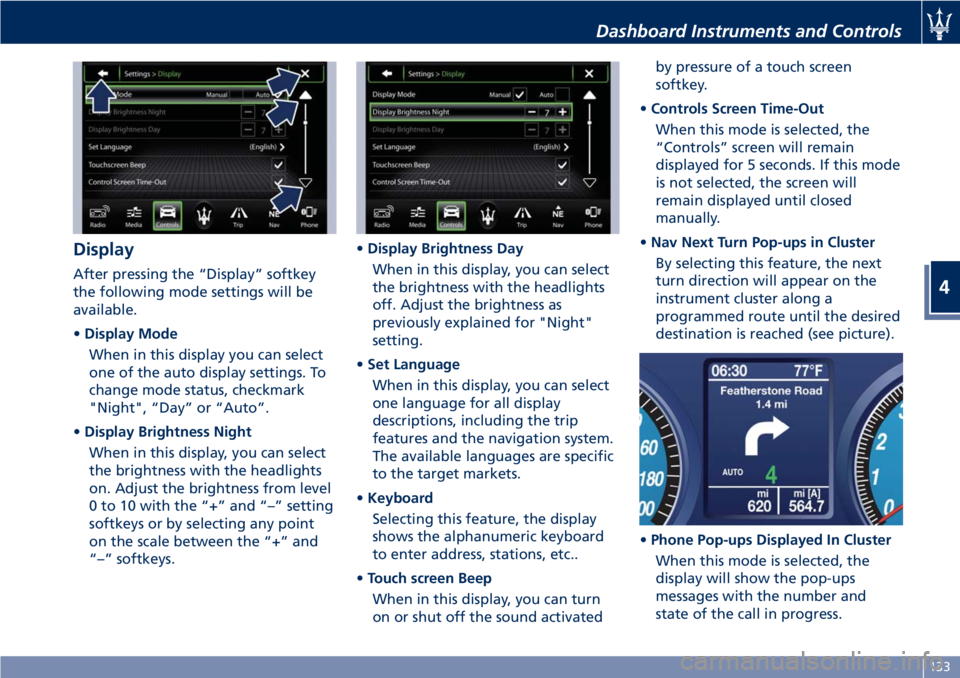
Display
After pressing the “Display” softkey
the following mode settings will be
available.
•Display Mode
When in this display you can select
one of the auto display settings. To
change mode status, checkmark
"Night", “Day” or “Auto”.
•Display Brightness Night
When in this display, you can select
the brightness with the headlights
on. Adjust the brightness from level
0 to 10 with the “+” and “–” setting
softkeys or by selecting any point
on the scale between the “+” and
“–” softkeys.•Display Brightness Day
When in this display, you can select
the brightness with the headlights
off. Adjust the brightness as
previously explained for "Night"
setting.
•Set Language
When in this display, you can select
one language for all display
descriptions, including the trip
features and the navigation system.
The available languages are specific
to the target markets.
•Keyboard
Selecting this feature, the display
shows the alphanumeric keyboard
to enter address, stations, etc..
•Touch screen Beep
When in this display, you can turn
on or shut off the sound activatedby pressure of a touch screen
softkey.
•Controls Screen Time-Out
When this mode is selected, the
“Controls” screen will remain
displayed for 5 seconds. If this mode
is not selected, the screen will
remain displayed until closed
manually.
•Nav Next Turn Pop-ups in Cluster
By selecting this feature, the next
turn direction will appear on the
instrument cluster along a
programmed route until the desired
destination is reached (see picture).
•Phone Pop-ups Displayed In Cluster
When this mode is selected, the
display will show the pop-ups
messages with the number and
state of the call in progress.
Dashboard Instruments and Controls
4
133
Page 138 of 286
•AutoShow Smartphone Display
Upon Connection
This feature allows to use the MTC+
display as a projection device
connected via USB port in order to
browse the Apple CarPlay and
Android Auto apps. By setting this
feature, automatic switch from
native screen to projection device
will happen every time you connect
your smartphone. For further details
refer to the “Maserati Touch Control
Plus (MTC+)” guide.
Units
After pressing the “Units” and then
“Custom” softkey on the touch screen
you may select between Metric and
Imperial units of measure. Each unit of
measure can be independently
displayed in the TFT Display and in the
navigation system. The following
selectable units of measure are listed
below:
•Speedunit:
select from: “mph” or “km/h”.
•Consumptionunit:
select from: “mpg US”, “mpg UK”,
“l/100km” and “km/l”.
•Distanceunit:
select from: “mi or km”.•Pressureunit:
select from: “PSI” or “BAR”.
•Temperatureunit:
select from: “°F” or “°C”.
Voice Commands
After pressing “Voice” softkey the
following modes will be available.
•Voice Response Length
When in this display, you can change
the voice response length settings.
To change the voice response
length, touch the “Brief” or
“Detailed” softkey.
•Show Command List
When this feature is selected, it is
possible to select options during a
voice control session. Options for
available controls are: “Always”,
“w/Help” or “Never”.
Clock
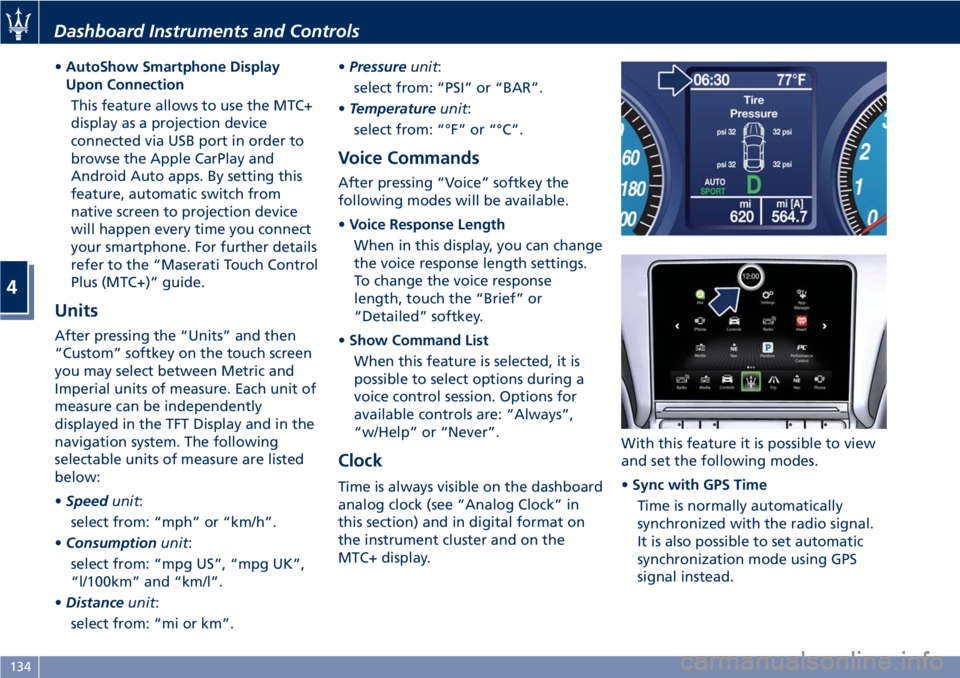
Time is always visible on the dashboard
analog clock (see “Analog Clock” in
this section) and in digital format on
the instrument cluster and on the
MTC+ display.With this feature it is possible to view
and set the following modes.
•Sync with GPS Time
Time is normally automatically
synchronized with the radio signal.
It is also possible to set automatic
synchronization mode using GPS
signal instead.
Dashboard Instruments and Controls
4
134
Page 139 of 286
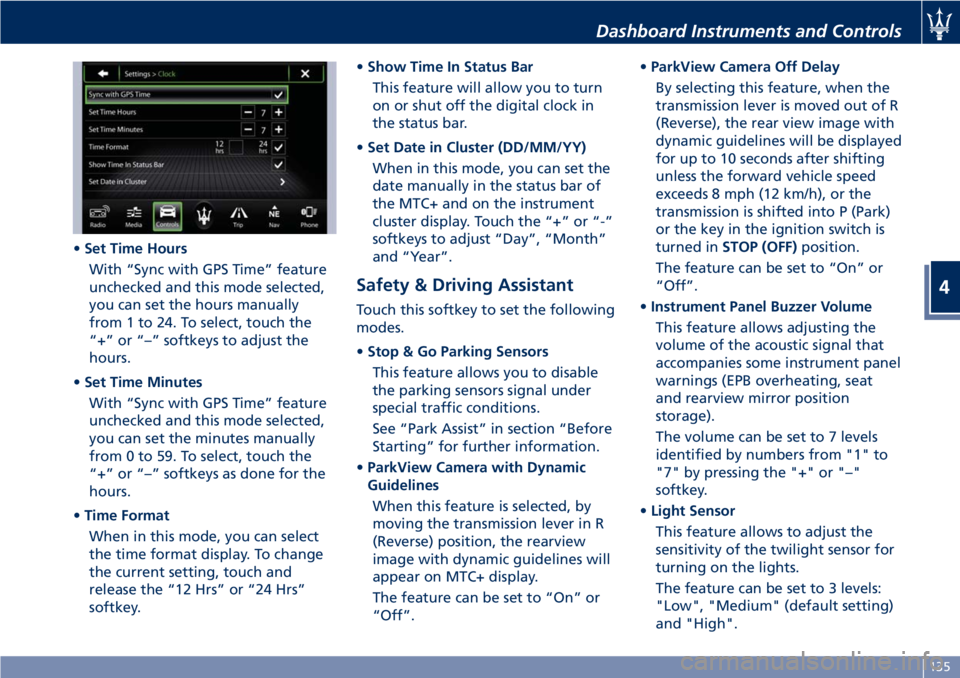
•Set Time Hours
With “Sync with GPS Time” feature
unchecked and this mode selected,
you can set the hours manually
from 1 to 24. To select, touch the
“+” or “–” softkeys to adjust the
hours.
•Set Time Minutes
With “Sync with GPS Time” feature
unchecked and this mode selected,
you can set the minutes manually
from 0 to 59. To select, touch the
“+” or “–” softkeys as done for the
hours.
•Time Format
When in this mode, you can select
the time format display. To change
the current setting, touch and
release the “12 Hrs” or “24 Hrs”
softkey.•Show Time In Status Bar
This feature will allow you to turn
on or shut off the digital clock in
the status bar.
•Set Date in Cluster (DD/MM/YY)
When in this mode, you can set the
date manually in the status bar of
the MTC+ and on the instrument
cluster display. Touch the “+” or “-”
softkeys to adjust “Day”, “Month”
and “Year”.
Safety & Driving Assistant
Touch this softkey to set the following
modes.
•Stop & Go Parking Sensors
This feature allows you to disable
the parking sensors signal under
special traffic conditions.
See “Park Assist” in section “Before
Starting” for further information.
•ParkView Camera with Dynamic
Guidelines
When this feature is selected, by
moving the transmission lever in R
(Reverse) position, the rearview
image with dynamic guidelines will
appear on MTC+ display.
The feature can be set to “On” or
“Off”.•ParkView Camera Off Delay
By selecting this feature, when the
transmission lever is moved out of R
(Reverse), the rear view image with
dynamic guidelines will be displayed
for up to 10 seconds after shifting
unless the forward vehicle speed
exceeds 8 mph (12 km/h), or the
transmission is shifted into P (Park)
or the key in the ignition switch is
turned inSTOP (OFF)position.
The feature can be set to “On” or
“Off”.
•Instrument Panel Buzzer Volume
This feature allows adjusting the
volume of the acoustic signal that
accompanies some instrument panel
warnings (EPB overheating, seat
and rearview mirror position
storage).
The volume can be set to 7 levels
identified by numbers from "1" to
"7" by pressing the "+" or "–"
softkey.
•Light Sensor
This feature allows to adjust the
sensitivity of the twilight sensor for
turning on the lights.
The feature can be set to 3 levels:
"Low", "Medium" (default setting)
and "High".
Dashboard Instruments and Controls
4
135