steering wheel MASERATI GRANTURISMO 2020 Owner's Manual
[x] Cancel search | Manufacturer: MASERATI, Model Year: 2020, Model line: GRANTURISMO, Model: MASERATI GRANTURISMO 2020Pages: 286, PDF Size: 6.7 MB
Page 129 of 286
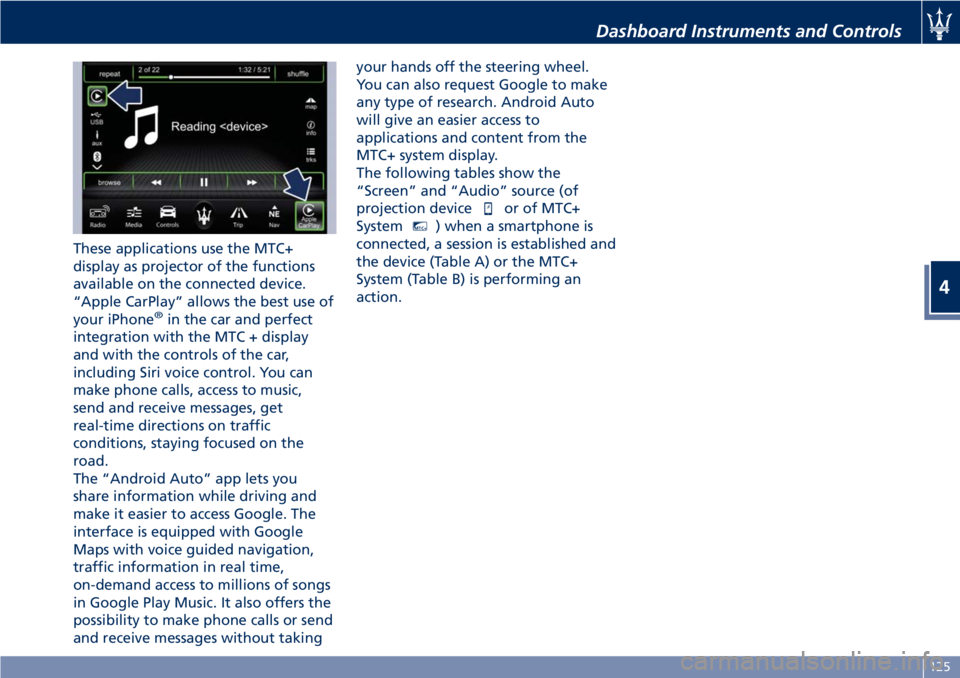
These applications use the MTC+
display as projector of the functions
available on the connected device.
“Apple CarPlay” allows the best use of
your iPhone
®in the car and perfect
integration with the MTC + display
and with the controls of the car,
including Siri voice control. You can
make phone calls, access to music,
send and receive messages, get
real-time directions on traffic
conditions, staying focused on the
road.
The “Android Auto” app lets you
share information while driving and
make it easier to access Google. The
interface is equipped with Google
Maps with voice guided navigation,
traffic information in real time,
on-demand access to millions of songs
in Google Play Music. It also offers the
possibility to make phone calls or send
and receive messages without takingyour hands off the steering wheel.
You can also request Google to make
any type of research. Android Auto
will give an easier access to
applications and content from the
MTC+ system display.
The following tables show the
“Screen” and “Audio” source (of
projection device
or of MTC+
System
MTC+) when a smartphone is
connected, a session is established and
the device (Table A) or the MTC+
System (Table B) is performing an
action.
Dashboard Instruments and Controls
4
125
Page 132 of 286
Audio Controls
The vehicle is equipped with audio
controls that allow both driver and
front passenger to operate the audio
system. These controls can be used to
adjust audio volume, change radio
station/channel or mode (FM, AM,
USB, etc).
Steering Wheel Audio Controls
On Front Side of Steering Wheel
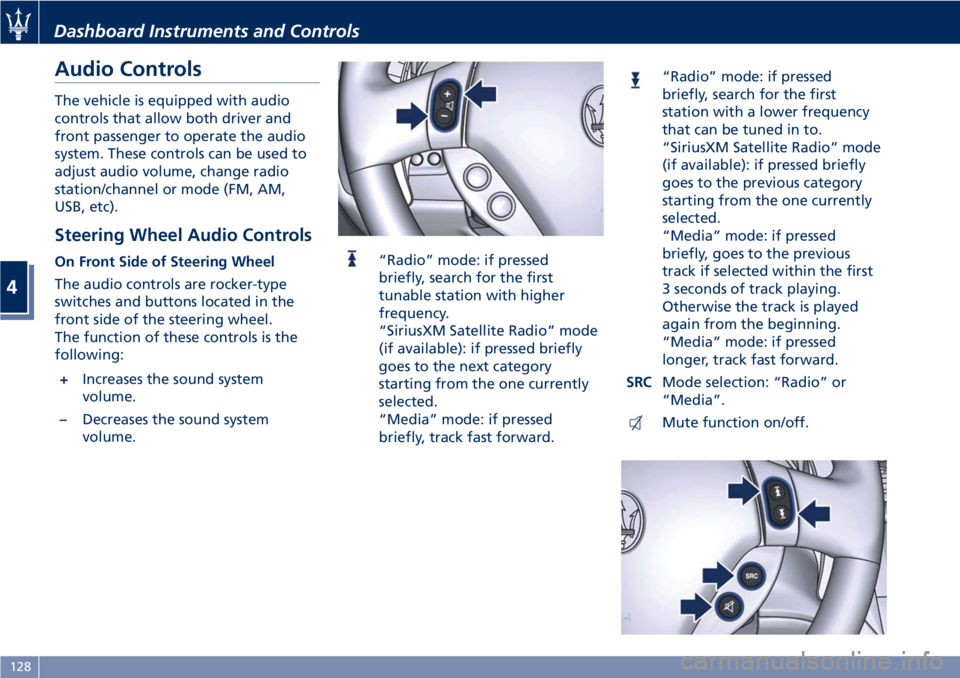
The audio controls are rocker-type
switches and buttons located in the
front side of the steering wheel.
The function of these controls is the
following:
+Increases the sound system
volume.
–Decreases the sound system
volume.“Radio” mode: if pressed
briefly, search for the first
tunable station with higher
frequency.
“SiriusXM Satellite Radio” mode
(if available): if pressed briefly
goes to the next category
starting from the one currently
selected.
“Media” mode: if pressed
briefly, track fast forward.
“Radio” mode: if pressed
briefly, search for the first
station with a lower frequency
that can be tuned in to.
“SiriusXM Satellite Radio” mode
(if available): if pressed briefly
goes to the previous category
starting from the one currently
selected.
“Media” mode: if pressed
briefly, goes to the previous
track if selected within the first
3 seconds of track playing.
Otherwise the track is played
again from the beginning.
“Media” mode: if pressed
longer, track fast forward.
SRCMode selection: “Radio” or
“Media”.
Mute function on/off.
Dashboard Instruments and Controls
4
128
Page 133 of 286
NOTE:
“SiriusXM Satellite Radio” is the US
service only available in the 48
Continental United States and
Canadian markets. Subscription is
required. For further details refer to
the Maserati Touch Controls Plus
(MTC+) guide.
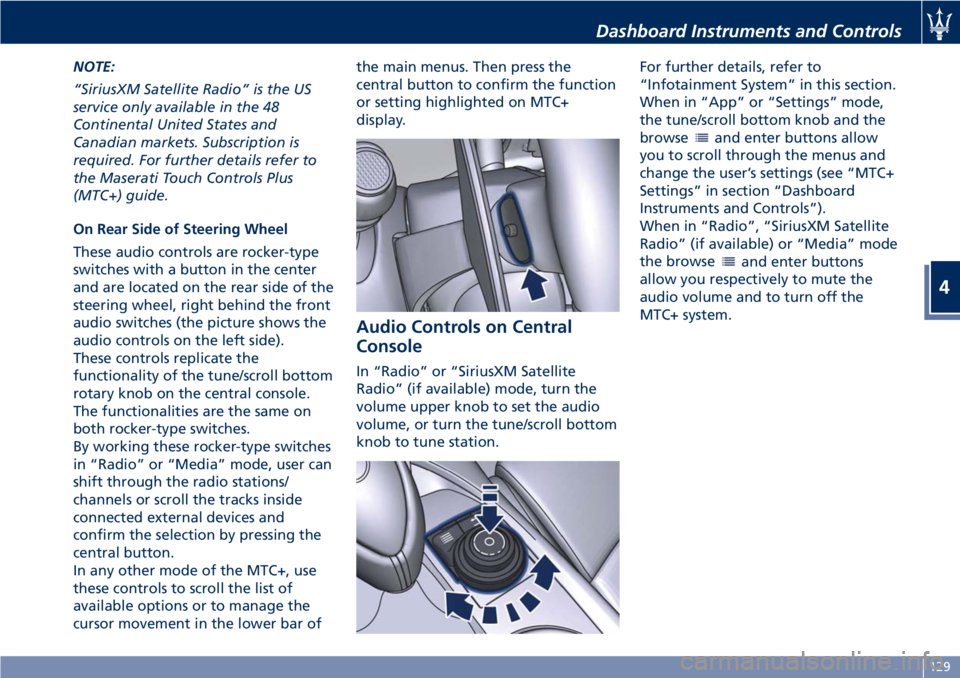
On Rear Side of Steering Wheel
These audio controls are rocker-type
switches with a button in the center
and are located on the rear side of the
steering wheel, right behind the front
audio switches (the picture shows the
audio controls on the left side).
These controls replicate the
functionality of the tune/scroll bottom
rotary knob on the central console.
The functionalities are the same on
both rocker-type switches.
By working these rocker-type switches
in “Radio” or “Media” mode, user can
shift through the radio stations/
channels or scroll the tracks inside
connected external devices and
confirm the selection by pressing the
central button.
In any other mode of the MTC+, use
these controls to scroll the list of
available options or to manage the
cursor movement in the lower bar ofthe main menus. Then press the
central button to confirm the function
or setting highlighted on MTC+
display.
Audio Controls on Central
Console
In “Radio” or “SiriusXM Satellite
Radio” (if available) mode, turn the
volume upper knob to set the audio
volume, or turn the tune/scroll bottom
knob to tune station.For further details, refer to
“Infotainment System” in this section.
When in “App” or “Settings” mode,
the tune/scroll bottom knob and the
browse
and enter buttons allow
you to scroll through the menus and
change the user’s settings (see “MTC+
Settings” in section “Dashboard
Instruments and Controls”).
When in “Radio”, “SiriusXM Satellite
Radio” (if available) or “Media” mode
the browse
and enter buttons
allow you respectively to mute the
audio volume and to turn off the
MTC+ system.
Dashboard Instruments and Controls
4
129
Page 148 of 286
• compressor enabled (the LED on the
button is illuminated);
• defrosting/defogging function (MAX
DEF) deactivated (the LED on the
button is off);
• heated rear window deactivated (the
LED on the button is off);
• open recirculation (the LED on the
button is off);
• air ventilation and distribution are
set by the system;
• REAR disabled (the LED on the
button is off), the air flows to the
rear vents.
A/C Filter
The climate control system filters
outside air containing dust, pollen and
some odors. Strong odors cannot be
totally removed by A/C filter at the
entrance of the air climate system. See
“Maintenance Procedures” in section
“Maintenance and Care” for filter
replacement instructions.
Phone and Voice Controls
on Steering Wheel
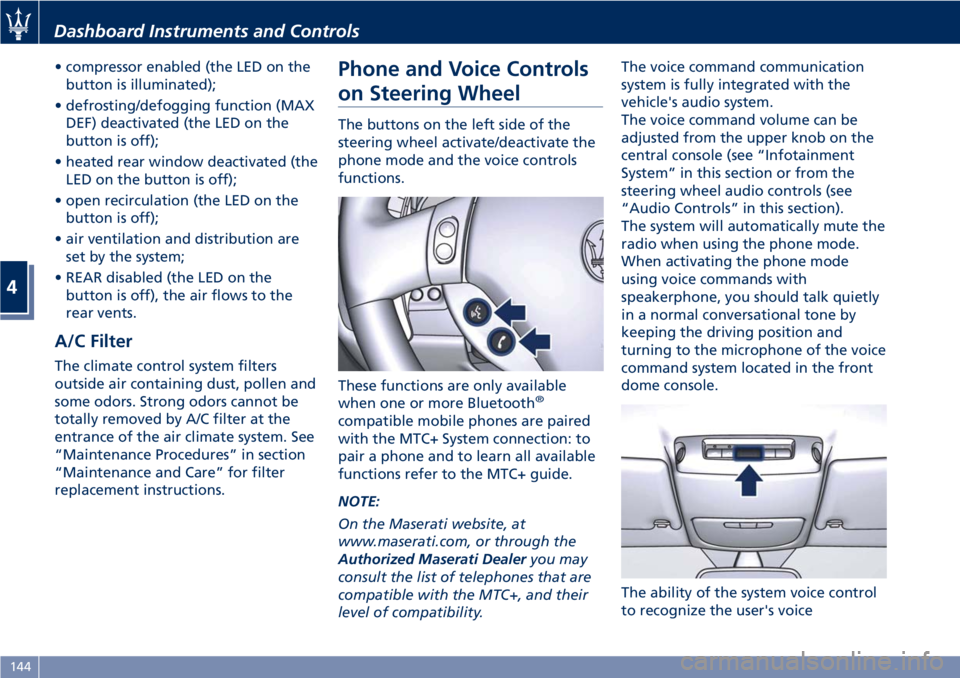
The buttons on the left side of the
steering wheel activate/deactivate the
phone mode and the voice controls
functions.
These functions are only available
when one or more Bluetooth
®
compatible mobile phones are paired
with the MTC+ System connection: to
pair a phone and to learn all available
functions refer to the MTC+ guide.
NOTE:
On the Maserati website, at
www.maserati.com, or through the
Authorized Maserati Dealeryou may
consult the list of telephones that are
compatible with the MTC+, and their
level of compatibility.The voice command communication
system is fully integrated with the
vehicle's audio system.
The voice command volume can be
adjusted from the upper knob on the
central console (see “Infotainment
System” in this section or from the
steering wheel audio controls (see
“Audio Controls” in this section).
The system will automatically mute the
radio when using the phone mode.
When activating the phone mode
using voice commands with
speakerphone, you should talk quietly
in a normal conversational tone by
keeping the driving position and
turning to the microphone of the voice
command system located in the front
dome console.
The ability of the system voice control
to recognize the user's voice
Dashboard Instruments and Controls
4
144
Page 149 of 286
commands can be invalidated when
speaking too quickly or too loudly.
WARNING!
Any voice-controlled system should be
used only in safe driving conditions
following all applicable regulations.
Full attention should be kept on
driving. Failure to do so may result in
a collision causing serious injury or
death.
Phone Mode
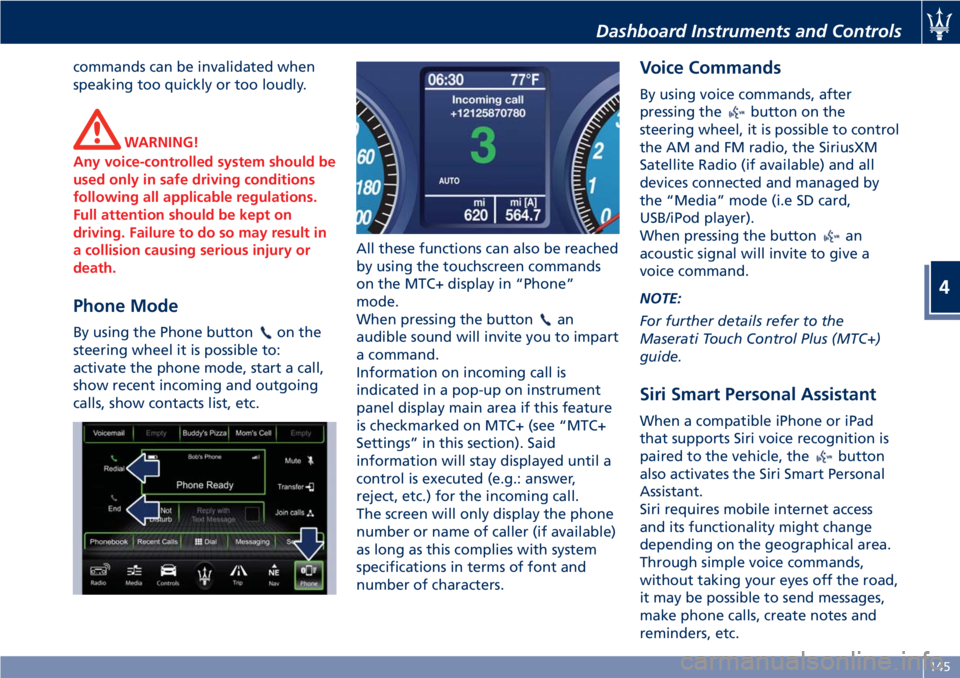
By using the Phone buttonon the
steering wheel it is possible to:
activate the phone mode, start a call,
show recent incoming and outgoing
calls, show contacts list, etc.All these functions can also be reached
by using the touchscreen commands
on the MTC+ display in “Phone”
mode.
When pressing the buttonan
audible sound will invite you to impart
a command.
Information on incoming call is
indicated in a pop-up on instrument
panel display main area if this feature
is checkmarked on MTC+ (see “MTC+
Settings” in this section). Said
information will stay displayed until a
control is executed (e.g.: answer,
reject, etc.) for the incoming call.
The screen will only display the phone
number or name of caller (if available)
as long as this complies with system
specifications in terms of font and
number of characters.
Voice Commands
By using voice commands, after
pressing the
button on the
steering wheel, it is possible to control
the AM and FM radio, the SiriusXM
Satellite Radio (if available) and all
devices connected and managed by
the “Media” mode (i.e SD card,
USB/iPod player).
When pressing the button
an
acoustic signal will invite to give a
voice command.
NOTE:
For further details refer to the
Maserati Touch Control Plus (MTC+)
guide.
Siri Smart Personal Assistant
When a compatible iPhone or iPad
that supports Siri voice recognition is
paired to the vehicle, the
button
also activates the Siri Smart Personal
Assistant.
Siri requires mobile internet access
and its functionality might change
depending on the geographical area.
Through simple voice commands,
without taking your eyes off the road,
it may be possible to send messages,
make phone calls, create notes and
reminders, etc.
Dashboard Instruments and Controls
4
145
Page 167 of 286
Sequential manual operation can only
be selected from the D (Drive) position
whatever the function (SPORT,
NORMAL) active at the time of the
request. The gear selected by the
automatic transmission will remain
engaged when the transmission shift
lever is moved.
Shifting the lever back to D (Drive),
automatic operation will instantly be
resumed, and a gear will be engaged
based on the driving style and mode
selected.
In the event of a failure of the
sequential manual gearshift system,
the transmission ECU will select
automatic operation.
Gearshift Paddles Operation
In sequential manual operating mode
(MANUAL), upshifting and
downshifting can be controlled not
only with the transmission shift lever
but also with the two paddles
positioned behind the steering wheel.
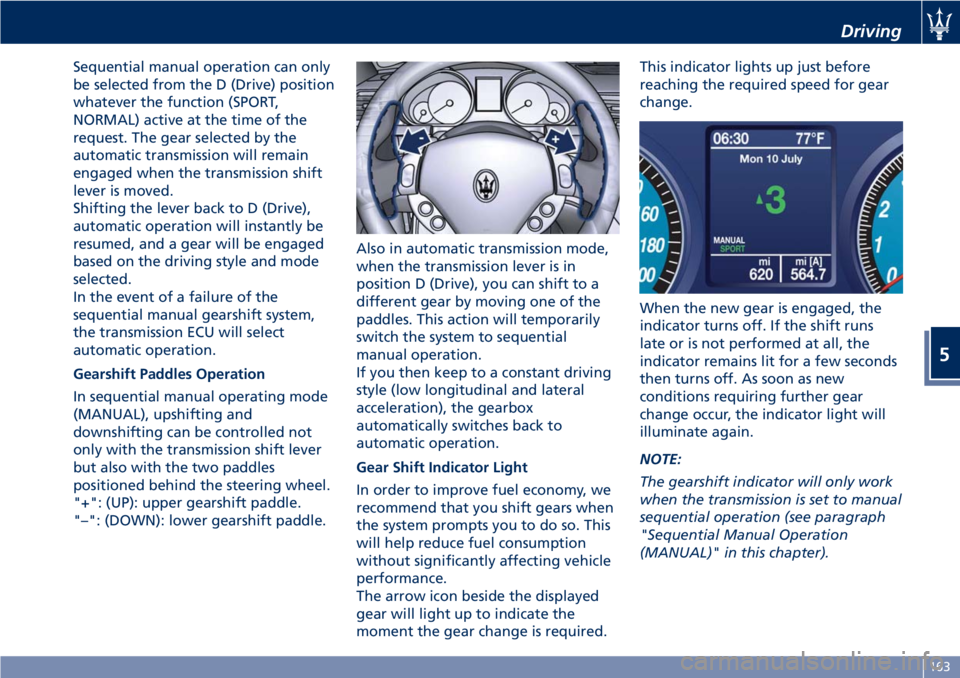
"+": (UP): upper gearshift paddle.
"–": (DOWN): lower gearshift paddle.Also in automatic transmission mode,
when the transmission lever is in
position D (Drive), you can shift to a
different gear by moving one of the
paddles. This action will temporarily
switch the system to sequential
manual operation.
If you then keep to a constant driving
style (low longitudinal and lateral
acceleration), the gearbox
automatically switches back to
automatic operation.
Gear Shift Indicator Light
In order to improve fuel economy, we
recommend that you shift gears when
the system prompts you to do so. This
will help reduce fuel consumption
without significantly affecting vehicle
performance.
The arrow icon beside the displayed
gear will light up to indicate the
moment the gear change is required.This indicator lights up just before
reaching the required speed for gear
change.
When the new gear is engaged, the
indicator turns off. If the shift runs
late or is not performed at all, the
indicator remains lit for a few seconds
then turns off. As soon as new
conditions requiring further gear
change occur, the indicator light will
illuminate again.
NOTE:
The gearshift indicator will only work
when the transmission is set to manual
sequential operation (see paragraph
"Sequential Manual Operation
(MANUAL)" in this chapter).
Driving
5
163
Page 171 of 286
engage the parking brake, but also to
shift the transmission shift lever to P
(Park) before leaving the vehicle.
When parking on hill roads, it is
important to turn the front wheels
toward the curb on a downhill grade
and away from the curb on an uphill
grade.
Apply the parking brake before
placing the shift lever in P (Park),
otherwise the load on the
transmission locking mechanism may
make it difficult to move the shift
lever out of P (Park).
In certain conditions, it is however
advisable to disengage the parking
brake manually and slightly apply the
service brake for starting off. This is
advisable when there are obstacles
very close to the vehicle in the
direction in which you intend to move.
Brake and Stability
Control System
The vehicle is equipped with an
Electronic Stability Control (ESC)
anti-yawing system, which helps to
maintain directional control in the event
of loss of grip of the tires. The system is
able to detect potentially dangerous
situations for the stability of the vehicle
and automatically sets the brakes on all
four wheels in a differentiated manner,
in order to provide a torque settlement
of the vehicle.
ESC includes the following subsystems:
• ASR (Anti-Slip Regulation)
• ABS (Anti-lock Braking System)
• EBD (Electronic Brake-force
Distribution)
• HBA (Hydraulic Brake Assistance)
• BOS (Brake Override System)
WARNING!
•These systems cannot prevent the
natural laws of physics from
affecting the vehicle, nor can they
increase traction, braking or steering
efficiency beyond that afforded by
the condition of the vehicle brakes
and tires.•These systems cannot prevent
collisions, including those resulting
from excessive speed in turns,
following another vehicle too
closely, or hydroplaning.
•The capabilities of a vehicle
equipped with these systems must
never be exploited in a reckless or
dangerous manner that could
jeopardize the driver’s and the
passenger’s safety or the safety of
others.
Electronic Stability Control
(ESC)
This system enhances directional
control and stability of the vehicle
under various driving conditions. The
ESC corrects over steering and under
steering of the vehicle by applying the
brake to the appropriate wheel.
Engine power may also be reduced to
assist in counteracting the conditions
of instability and maintain the right
direction. The system is also able to
reduce the engine power.
Through sensors fitted on the vehicle,
the ESC system detects the driver’s
chosen direction comparing it to the
one maintained while running. In case
of discrepancy between the required
trajectory and the current one, the
Driving
5
167
Page 172 of 286
ESC system brakes the appropriate
wheel to counteract over or under
steering.
• Oversteer - when the vehicle is
turning more than appropriate for
the steering wheel position.
• Understeer - when the vehicle is
turning less than appropriate for the
steering wheel position.
The ESC system has two available
operating modes:
ESC On
This is the normal ESC operating mode.
At each start-up of the vehicle, the ESC
system is set in this mode and should
be used for most driving conditions.
The ESC should only be turned off for
specific reasons as pointed out in the
following paragraphs.
ESC Off
The “ESC Off” mode is aimed for a
more spirited driving experience but
also purposeful for driving in deep
snow, sand, or gravel. The current
mode disables the traction control
portion of the ESC and raises the
threshold for ESC activation, allowing
higher wheel spin than normally
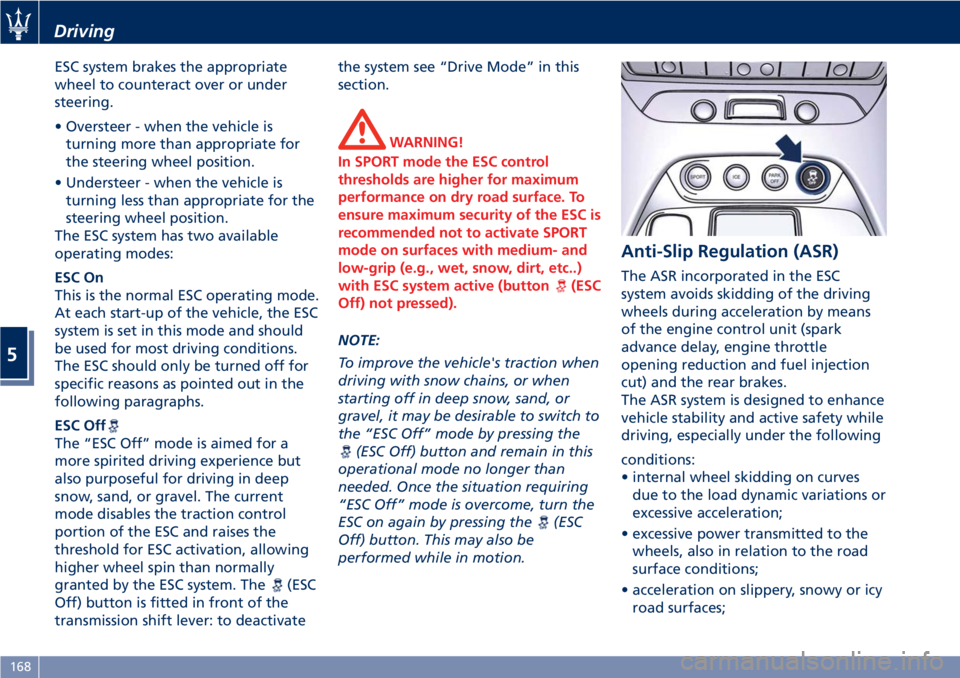
granted by the ESC system. The
(ESC
Off) button is fitted in front of the
transmission shift lever: to deactivatethe system see “Drive Mode” in this
section.
WARNING!
In SPORT mode the ESC control
thresholds are higher for maximum
performance on dry road surface. To
ensure maximum security of the ESC is
recommended not to activate SPORT
mode on surfaces with medium- and
low-grip (e.g., wet, snow, dirt, etc..)
with ESC system active (button
(ESC
Off) not pressed).
NOTE:
To improve the vehicle's traction when
driving with snow chains, or when
starting off in deep snow, sand, or
gravel, it may be desirable to switch to
the “ESC Off” mode by pressing the
(ESC Off) button and remain in this
operational mode no longer than
needed. Once the situation requiring
“ESC Off” mode is overcome, turn the
ESC on again by pressing the
(ESC
Off) button. This may also be
performed while in motion.
Anti-Slip Regulation (ASR)
The ASR incorporated in the ESC
system avoids skidding of the driving
wheels during acceleration by means
of the engine control unit (spark
advance delay, engine throttle
opening reduction and fuel injection
cut) and the rear brakes.
The ASR system is designed to enhance
vehicle stability and active safety while
driving, especially under the following
conditions:
• internal wheel skidding on curves
due to the load dynamic variations or
excessive acceleration;
• excessive power transmitted to the
wheels, also in relation to the road
surface conditions;
• acceleration on slippery, snowy or icy
road surfaces;
Driving
5
168
Page 179 of 286
exhaust, do not idle the engine except
as necessary, service your vehicle in a
well-ventilated area and wear gloves
or wash your hands frequently when
servicing your vehicle. For more
information go to:
www.P65Warnings.ca.gov/passenger-
vehicle
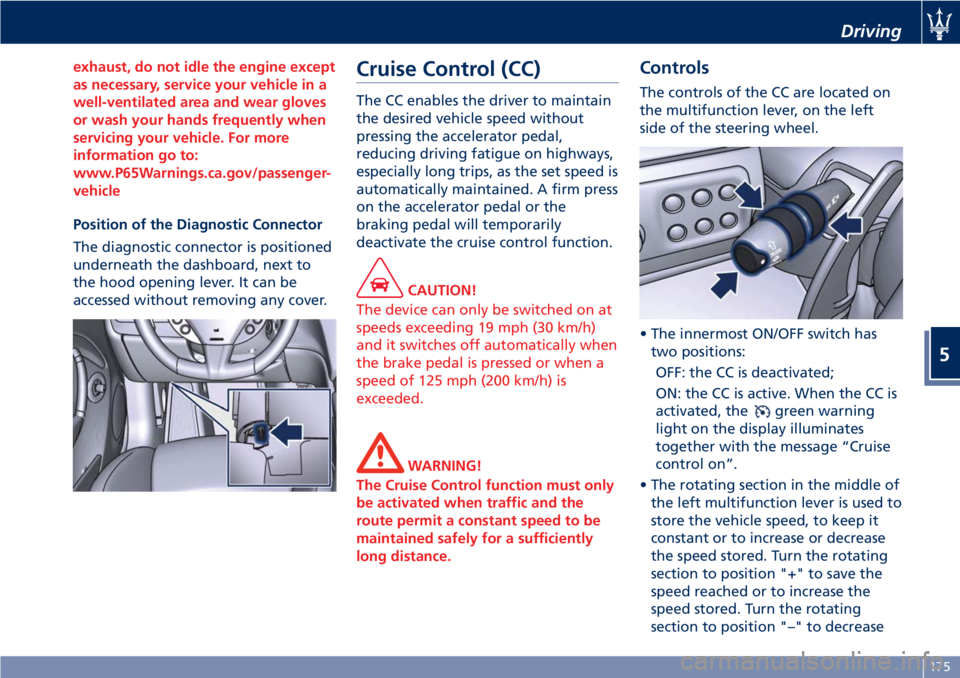
Position of the Diagnostic Connector
The diagnostic connector is positioned
underneath the dashboard, next to
the hood opening lever. It can be
accessed without removing any cover.
Cruise Control (CC)
The CC enables the driver to maintain
the desired vehicle speed without
pressing the accelerator pedal,
reducing driving fatigue on highways,
especially long trips, as the set speed is
automatically maintained. A firm press
on the accelerator pedal or the
braking pedal will temporarily
deactivate the cruise control function.
CAUTION!
The device can only be switched on at
speeds exceeding 19 mph (30 km/h)
and it switches off automatically when
the brake pedal is pressed or when a
speed of 125 mph (200 km/h) is
exceeded.
WARNING!
The Cruise Control function must only
be activated when traffic and the
route permit a constant speed to be
maintained safely for a sufficiently
long distance.
Controls
The controls of the CC are located on
the multifunction lever, on the left
side of the steering wheel.
• The innermost ON/OFF switch has
two positions:
OFF: the CC is deactivated;
ON: the CC is active. When the CC is
activated, the
green warning
light on the display illuminates
together with the message “Cruise
control on”.
• The rotating section in the middle of
the left multifunction lever is used to
store the vehicle speed, to keep it
constant or to increase or decrease
the speed stored. Turn the rotating
section to position "+" to save the
speed reached or to increase the
speed stored. Turn the rotating
section to position "–" to decrease
Driving
5
175
Page 186 of 286
WARNING!
The wet performance (aquaplaning
resistance) will decrease
proportionally to the thickness of the
tread.
Tires Durability
The service life of a tire depends on
various factors including, but not
limited to:
• driving style;
• tire pressure;
• distance driven.
WARNING!
Tires and the spare tire (if equipped)
should be replaced after six years,
regardless of the remaining tread.
Failure to follow this warning could
result in tire failure.
Replacement Tires
NOTE:
In order to maintain high performance
and safety level under all driving
conditions, Maserati strongly
recommends to use tires equivalent to
the originals in size, quality and
performance when replacement is
needed.
For the size designation of your tire
see the label on the driver's side rear
door pillar or see table “Wheels” in
section “Features and Specifications”.
The “Load Index” and “Speed Symbol”
for your tire will be found on the
original equipment tire sidewall.
It is recommended to replace the two
front tires or two rear tires as a pair.
Replacing just one tire can seriously
affect your vehicle’s handling.
If you ever replace a wheel assembly,
make sure that the wheel’s
specifications (valve, TPMS sensor and
tire) match those of the original
wheels. Failure to use equivalent
replacement tires may adversely affect
the safety, handling, and ride of your
vehicle.
YourAuthorized Maserati Dealeris
available to provide suggestions as tothe types of tires most suited to the
use foreseen by the Customer.
WARNING!
•Do not use a tire, wheel size or
rating other than that specified for
your vehicle. Some combinations of
unapproved tires and wheels may
change suspension dimensions and
performance characteristics,
resulting in altered steering,
handling, and braking operations of
the vehicle. This can cause
unpredictable handling and stress to
steering and suspension
components. Use only the tire and
wheel sizes with load ratings
appointed for your vehicle.
•Never use a tire with a smaller load
index or capacity, other than what
was originally equipped on your
vehicle. Using a tire with a smaller
load index could result in tire
overloading and failure.
•Always check the maximum speed
rating on the tire sidewall on any
tire on the vehicle.
•Never exceed the maximum speed
rating of the tires. Risk of accident
and serious personal injury due to
excessive speed.
Driving
5
182