ECU MASERATI GRANTURISMO 2020 Owner's Guide
[x] Cancel search | Manufacturer: MASERATI, Model Year: 2020, Model line: GRANTURISMO, Model: MASERATI GRANTURISMO 2020Pages: 286, PDF Size: 6.7 MB
Page 108 of 286
Calibration Selection
The driver can select, in relation to
road surface conditions, vehicle speed,
driving style and comfort, one of the
two calibration levels provided by the
system: normal or sports-style.
•Normal calibration, active when
SPORT drive mode is disabled
("SPORT" button not pressed), favors
comfort and higher driving stability
with low and average grip
conditions.
•Sport-style calibration, active when
SPORT drive mode is enabled
("SPORT" button pressed) , favors
wheel drive and permits a
dynamic-style driving with optimal
road holding.
Whenever the engine is started, the
system automatically activates
NORMAL drive mode, even if SPORT
drive mode was selected before the
engine was last turned off.
The sport-style calibration can be
selected only with the key in the
ignition switch inMAR (ON)position
and it is enabled by pressing button
"SPORT", even while driving.
When SPORT drive mode is activated,
the word “SPORT” on the instrument
cluster display and the LED on the
button illuminate.WARNING!
SPORT drive mode should not be
activated if the road surface is rough
or slippery.
The electronic suspension control
system works in combination with the
ESC system.
When the suspension is set to normal
calibration, stability is increased under
medium and low grip conditions, while
when it is set to sport-style calibration,
the ESC system optimizes a sportier
driving.
WARNING!
In low- and medium-grip conditions
(e.g., rain, snow, ice, sand, etc.) it is
advisable not to use SPORT drive
mode, even with the ESC system
enabled.
Malfunction Indicators
If one or more electric components in
the system prove to be malfunctioning
while driving, the ECU illuminates the
amber warning light accompanied
by the message “Check suspensions”
on the display. In addition, the ECU
calibrates the shock absorbers to apreset value, thus ensuring a safe
vehicle set up.
Should the malfunction involve one
shock absorber only, this will no longer
be controlled by the ECU and will
therefore remain set as it was when
the fault occurred. It is therefore
possible for one of the four shock
absorbers to work with a fixed
calibration, different from that of the
other ones.
In any case, safe and secure vehicle
driving is always ensured at low
speeds.
CAUTION!
In the event of a malfunction in the
suspension control electronic system,
which will be indicated by the
illumination of the amber warning
light on the display while driving, keep
a moderate speed and have the vehicle
checked as soon as possible by an
Authorized Maserati Dealer.
If a malfunction occurs while driving,
and this is signaled by the illumination
of the
amber warning light on the
display, it is advisable to stop the
vehicle as soon as possible, turn the
key in the ignition switch toSTOP
(OFF)position and then restart the
engine.
Understanding the Vehicle
3
104
Page 109 of 286
If the malfunction is no longer present
and the
amber warning light on the
display does not illuminate again, the
electronic suspension system will
resume normal operation. On the
other hand, if the problem persists,
the
amber warning light on the
instrument cluster display will turn on
again.
In both cases, the system must be
checked by theAuthorized Maserati
Dealer.
The fault found is memorized by the
ECU and can be diagnosed at an
Authorized Maserati Dealereven if it
has disappeared spontaneously.
Understanding the Vehicle
3
105
Page 135 of 286
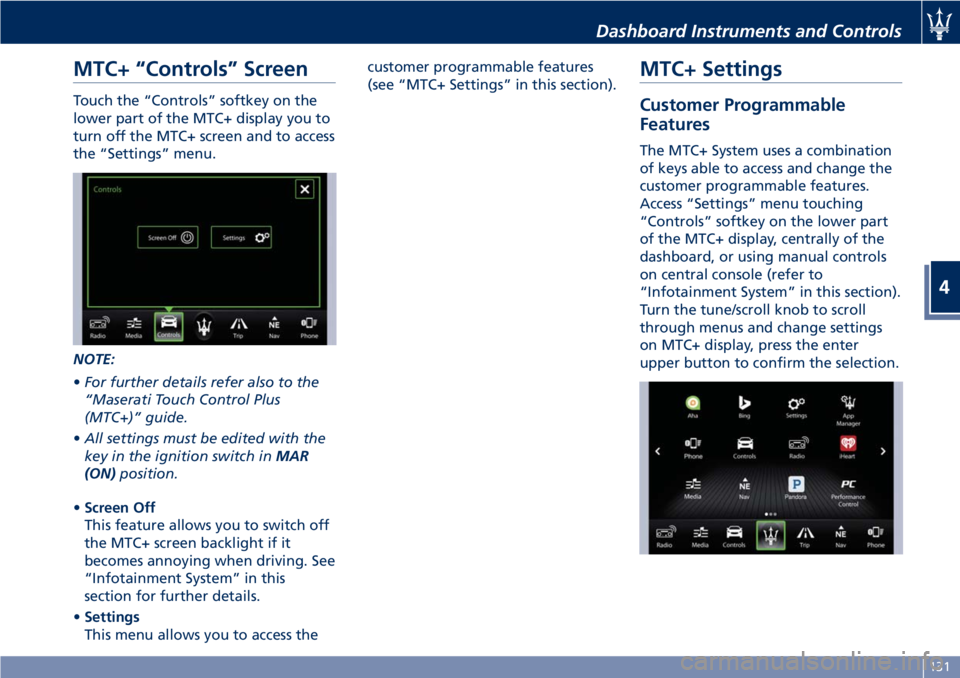
MTC+ “Controls” Screen
Touch the “Controls” softkey on the
lower part of the MTC+ display you to
turn off the MTC+ screen and to access
the “Settings” menu.
NOTE:
•For further details refer also to the
“Maserati Touch Control Plus
(MTC+)” guide.
•All settings must be edited with the
key in the ignition switch inMAR
(ON)position.
•Screen Off
This feature allows you to switch off
the MTC+ screen backlight if it
becomes annoying when driving. See
“Infotainment System” in this
section for further details.
•Settings
This menu allows you to access thecustomer programmable features
(see “MTC+ Settings” in this section).
MTC+ Settings
Customer Programmable
Features
The MTC+ System uses a combination
of keys able to access and change the
customer programmable features.
Access “Settings” menu touching
“Controls” softkey on the lower part
of the MTC+ display, centrally of the
dashboard, or using manual controls
on central console (refer to
“Infotainment System” in this section).
Turn the tune/scroll knob to scroll
through menus and change settings
on MTC+ display, press the enter
upper button to confirm the selection.
Dashboard Instruments and Controls
4
131
Page 149 of 286
commands can be invalidated when
speaking too quickly or too loudly.
WARNING!
Any voice-controlled system should be
used only in safe driving conditions
following all applicable regulations.
Full attention should be kept on
driving. Failure to do so may result in
a collision causing serious injury or
death.
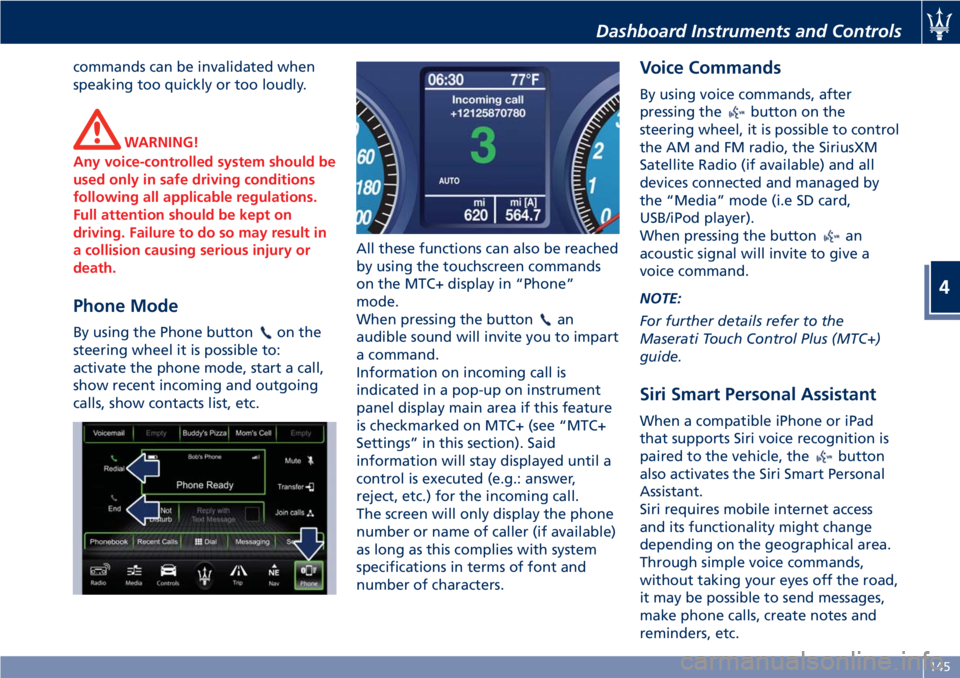
Phone Mode
By using the Phone buttonon the
steering wheel it is possible to:
activate the phone mode, start a call,
show recent incoming and outgoing
calls, show contacts list, etc.All these functions can also be reached
by using the touchscreen commands
on the MTC+ display in “Phone”
mode.
When pressing the buttonan
audible sound will invite you to impart
a command.
Information on incoming call is
indicated in a pop-up on instrument
panel display main area if this feature
is checkmarked on MTC+ (see “MTC+
Settings” in this section). Said
information will stay displayed until a
control is executed (e.g.: answer,
reject, etc.) for the incoming call.
The screen will only display the phone
number or name of caller (if available)
as long as this complies with system
specifications in terms of font and
number of characters.
Voice Commands
By using voice commands, after
pressing the
button on the
steering wheel, it is possible to control
the AM and FM radio, the SiriusXM
Satellite Radio (if available) and all
devices connected and managed by
the “Media” mode (i.e SD card,
USB/iPod player).
When pressing the button
an
acoustic signal will invite to give a
voice command.
NOTE:
For further details refer to the
Maserati Touch Control Plus (MTC+)
guide.
Siri Smart Personal Assistant
When a compatible iPhone or iPad
that supports Siri voice recognition is
paired to the vehicle, the
button
also activates the Siri Smart Personal
Assistant.
Siri requires mobile internet access
and its functionality might change
depending on the geographical area.
Through simple voice commands,
without taking your eyes off the road,
it may be possible to send messages,
make phone calls, create notes and
reminders, etc.
Dashboard Instruments and Controls
4
145
Page 157 of 286
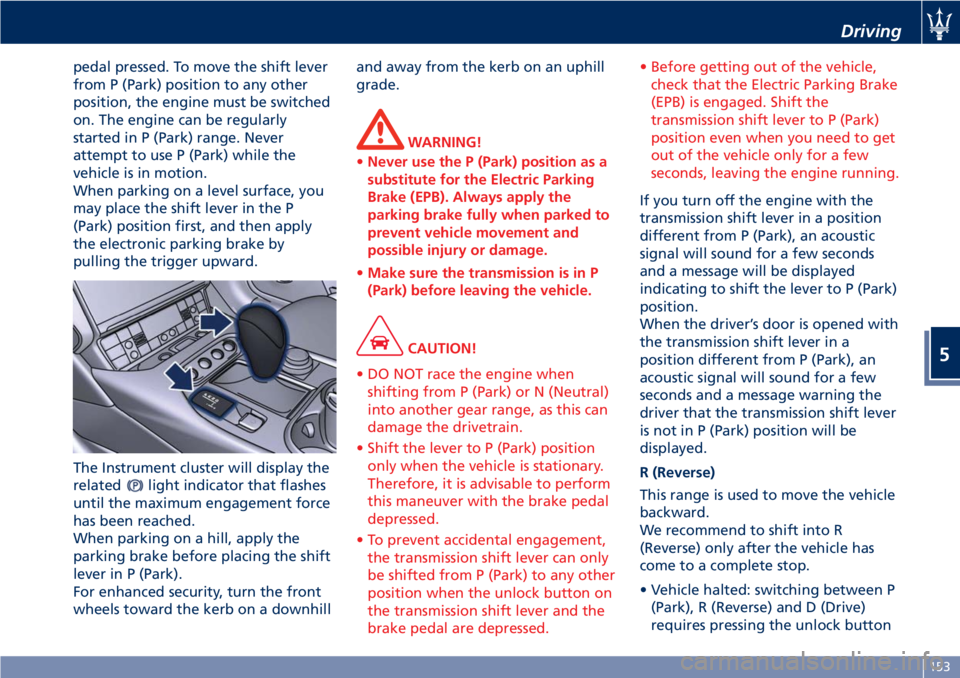
pedal pressed. To move the shift lever
from P (Park) position to any other
position, the engine must be switched
on. The engine can be regularly
started in P (Park) range. Never
attempt to use P (Park) while the
vehicle is in motion.
When parking on a level surface, you
may place the shift lever in the P
(Park) position first, and then apply
the electronic parking brake by
pulling the trigger upward.
The Instrument cluster will display the
related
light indicator that flashes
until the maximum engagement force
has been reached.
When parking on a hill, apply the
parking brake before placing the shift
lever in P (Park).
For enhanced security, turn the front
wheels toward the kerb on a downhilland away from the kerb on an uphill
grade.
WARNING!
•Never use the P (Park) position as a
substitute for the Electric Parking
Brake (EPB). Always apply the
parking brake fully when parked to
prevent vehicle movement and
possible injury or damage.
•Make sure the transmission is in P
(Park) before leaving the vehicle.
CAUTION!
• DO NOT race the engine when
shifting from P (Park) or N (Neutral)
into another gear range, as this can
damage the drivetrain.
• Shift the lever to P (Park) position
only when the vehicle is stationary.
Therefore, it is advisable to perform
this maneuver with the brake pedal
depressed.
• To prevent accidental engagement,
the transmission shift lever can only
be shifted from P (Park) to any other
position when the unlock button on
the transmission shift lever and the
brake pedal are depressed.• Before getting out of the vehicle,
check that the Electric Parking Brake
(EPB) is engaged. Shift the
transmission shift lever to P (Park)
position even when you need to get
out of the vehicle only for a few
seconds, leaving the engine running.
If you turn off the engine with the
transmission shift lever in a position
different from P (Park), an acoustic
signal will sound for a few seconds
and a message will be displayed
indicating to shift the lever to P (Park)
position.
When the driver’s door is opened with
the transmission shift lever in a
position different from P (Park), an
acoustic signal will sound for a few
seconds and a message warning the
driver that the transmission shift lever
is not in P (Park) position will be
displayed.
R (Reverse)
This range is used to move the vehicle
backward.
We recommend to shift into R
(Reverse) only after the vehicle has
come to a complete stop.
• Vehicle halted: switching between P
(Park), R (Reverse) and D (Drive)
requires pressing the unlock button
Driving
5
153
Page 160 of 286
the efficiency of engine braking
together with the standard braking
system.
ESC System Operations
In order to prevent unstable driving
conditions, the ESC system may request
the transmission system to deactivate
gearshifting. The system handles this
request depending on the gear
engaged and on the rpm, and decides
whether to accept it or not.
Driving with Cruise Control
With the Cruise Control function
activated, the transmission system
selects such settings as to provide
enhanced comfort and fuel-economy.
MC Start Strategy (for MC version
only)
With the aim of optimizing standing
starts for performance driving (only
recommended for use in areas closed
to traffic and in accordance with the
Highway Code), the automatic
transmission system is equipped with
quick start strategy.
This strategy is activated when the
following conditions occur
simultaneously:
• AUTO and SPORT modes active;
•
ESC mode off;
• brake pedal depressed.In these conditions, the driver has the
possibility to accelerate and, keeping
the brake pedal depressed, keep the
vehicle standing until reaching an
engine speed between 2300 an 2500
rpm. Then, upon releasing the brake
pedal, have the best standing start
performance.
WARNING!
This strategy must only be used on
vehicles in areas closed to traffic, in
accordance with the Highway Code
and only by skilled drivers.
Transmission Malfunction and
Overheating Conditions
Transmission Failure
Transmission function is electronically
monitored to detect abnormal
conditions. If a condition that could
result in transmission damage is
detected, Transmission Limp Home
Mode will be activated. In this
situation, the transmission may
operate only in certain gears, or may
not shift at all.
CAUTION!
In these conditions, we recommendedthat you stop the vehicle and turn off
the engine for at least one minute.
When restarting the engine, the
self-diagnosis system may cancel the
malfunction, which will in any case be
recorded by the ECU.
A message and thewarning light
in the instrument cluster will inform
the driver about the transmission
failure.
In failure conditions, the transmission
shift lever can however be shifted to R
(Reverse), N (Neutral) and D (Drive)
position.
When shifting to D (Drive) position,
only a few gears will be available,
depending on the malfunction found.
CAUTION!
If a transmission failure is signaled,
take your vehicle to the nearest
Authorized Maserati Dealeras soon as
possible to have the problem
corrected.
If the failure is signaled when the
engine is started, it means that the
transmission ECU detected a fault
when the vehicle was last used. Also in
this case, take your vehicle to the
nearest Center of theAuthorized
Driving
5
156
Page 162 of 286
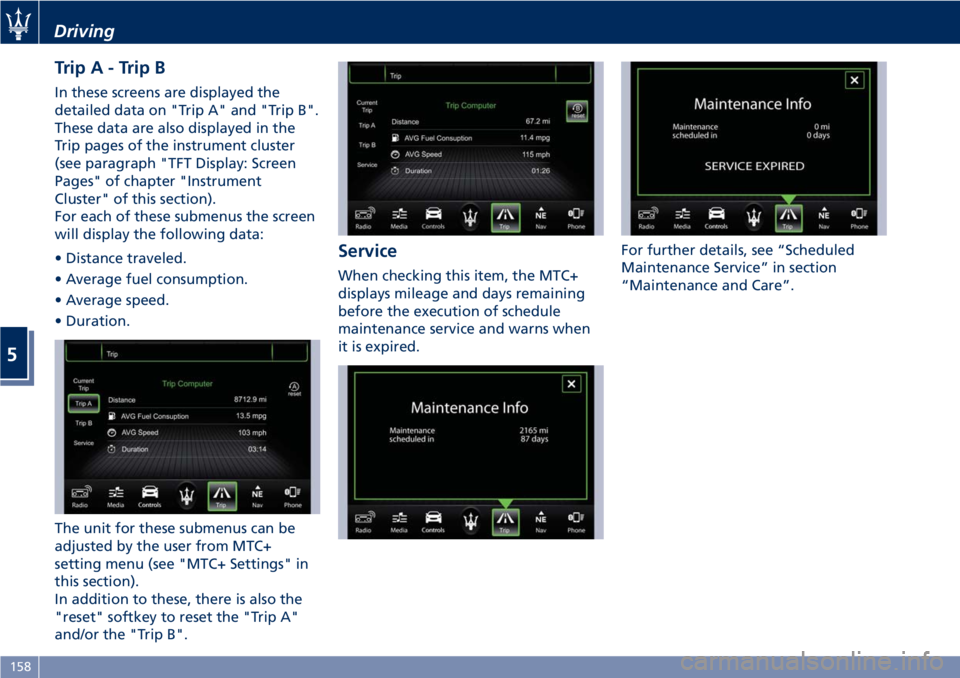
TripA-TripB
In these screens are displayed the
detailed data on "Trip A" and "Trip B".
These data are also displayed in the
Trip pages of the instrument cluster
(see paragraph "TFT Display: Screen
Pages" of chapter "Instrument
Cluster" of this section).
For each of these submenus the screen
will display the following data:
• Distance traveled.
• Average fuel consumption.
• Average speed.
• Duration.
The unit for these submenus can be
adjusted by the user from MTC+
setting menu (see "MTC+ Settings" in
this section).
In addition to these, there is also the
"reset" softkey to reset the "Trip A"
and/or the "Trip B".
Service
When checking this item, the MTC+
displays mileage and days remaining
before the execution of schedule
maintenance service and warns when
it is expired.For further details, see “Scheduled
Maintenance Service” in section
“Maintenance and Care”.
Driving
5
158
Page 166 of 286
(Continued)
• Driving on parabolic curves will
deactivate the system.
PARK OFF Mode
To deactivate manual operation of the
parking brake, with the engine on,
press the "PARK OFF" button on the
central console. The words “PARK
OFF” appear on the instrument cluster
display for 5 seconds, after which they
remain displayed but in smaller size.
To reactivate automatic operation,
press the "PARK OFF" button once
again, the words “PARK ON” appear
on the display for 5 seconds.
CAUTION!
• In certain conditions when the
battery voltage is low, the electric
parking brake system may
temporarily be deactivated for safety
reasons. Therefore, typically upon
starting the engine, when the
battery voltage drops, the message
“PARK OFF” may temporarily be
displayed on the instrument cluster,
indicating that automatic operation
is temporarily disabled.• In the case of performance starting,
check that the electric parking brake
is disengaged.
For further information see "Parking
Brake" in this section.
Sequential Manual Operation
(MANUAL)
In this mode, the transmission interacts
with the driver in order to allow
manual shift and ensure increased
control of the vehicle. The current
mode allows the gear system to
optimize the engine brake action,
remove undesired shifting into higher
and lower gears and improve the
overall performance of the vehicle.
With automatic transmission selected
(D (Drive) position), shift the
transmission shift lever to position “+”
o “–”.
When this mode is selected, the
symbol “+” or “–” illuminates on the
gear display, based on the position of
the transmission shift lever, and the
gear engaged is shown on the
instrument cluster display.
WARNING!
When sequential manual operation isselected, upshifting or downshifting
must be performed manually.
To engage the gears, shift the
transmission shift lever to one of the
following two positions:
"+" (UP) to engage a higher gear;
"–" (DOWN) to engage a lower gear.
CAUTION!
• However, some conditions will
remain automatically controlled, for
example, when the engine is
overrevving or underrevving, the
system automatically engages a
higher or lower gear.
• If you request a gearshift in
conditions where the engine is
overrevving or underrevving, the
system will not accept the command.
• The ECU is programmed to control
one gearshift at a time, therefore,
fast and repeated actions will not
necessarily result in a gearshift. A
higher or lower gear is engaged only
if the previous procedure requested
has been completed.
When the system refuses to engage a
gear, an acoustic signal will sound for a
few seconds.
Driving
5
162
Page 167 of 286
Sequential manual operation can only
be selected from the D (Drive) position
whatever the function (SPORT,
NORMAL) active at the time of the
request. The gear selected by the
automatic transmission will remain
engaged when the transmission shift
lever is moved.
Shifting the lever back to D (Drive),
automatic operation will instantly be
resumed, and a gear will be engaged
based on the driving style and mode
selected.
In the event of a failure of the
sequential manual gearshift system,
the transmission ECU will select
automatic operation.
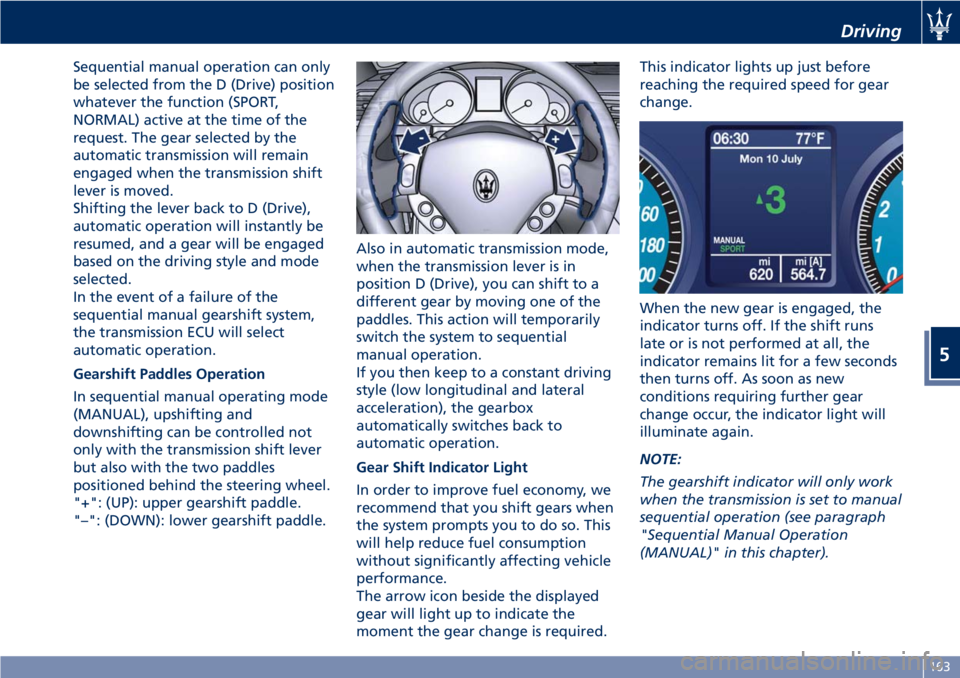
Gearshift Paddles Operation
In sequential manual operating mode
(MANUAL), upshifting and
downshifting can be controlled not
only with the transmission shift lever
but also with the two paddles
positioned behind the steering wheel.
"+": (UP): upper gearshift paddle.
"–": (DOWN): lower gearshift paddle.Also in automatic transmission mode,
when the transmission lever is in
position D (Drive), you can shift to a
different gear by moving one of the
paddles. This action will temporarily
switch the system to sequential
manual operation.
If you then keep to a constant driving
style (low longitudinal and lateral
acceleration), the gearbox
automatically switches back to
automatic operation.
Gear Shift Indicator Light
In order to improve fuel economy, we
recommend that you shift gears when
the system prompts you to do so. This
will help reduce fuel consumption
without significantly affecting vehicle
performance.
The arrow icon beside the displayed
gear will light up to indicate the
moment the gear change is required.This indicator lights up just before
reaching the required speed for gear
change.
When the new gear is engaged, the
indicator turns off. If the shift runs
late or is not performed at all, the
indicator remains lit for a few seconds
then turns off. As soon as new
conditions requiring further gear
change occur, the indicator light will
illuminate again.
NOTE:
The gearshift indicator will only work
when the transmission is set to manual
sequential operation (see paragraph
"Sequential Manual Operation
(MANUAL)" in this chapter).
Driving
5
163
Page 172 of 286
ESC system brakes the appropriate
wheel to counteract over or under
steering.
• Oversteer - when the vehicle is
turning more than appropriate for
the steering wheel position.
• Understeer - when the vehicle is
turning less than appropriate for the
steering wheel position.
The ESC system has two available
operating modes:
ESC On
This is the normal ESC operating mode.
At each start-up of the vehicle, the ESC
system is set in this mode and should
be used for most driving conditions.
The ESC should only be turned off for
specific reasons as pointed out in the
following paragraphs.
ESC Off
The “ESC Off” mode is aimed for a
more spirited driving experience but
also purposeful for driving in deep
snow, sand, or gravel. The current
mode disables the traction control
portion of the ESC and raises the
threshold for ESC activation, allowing
higher wheel spin than normally
granted by the ESC system. The
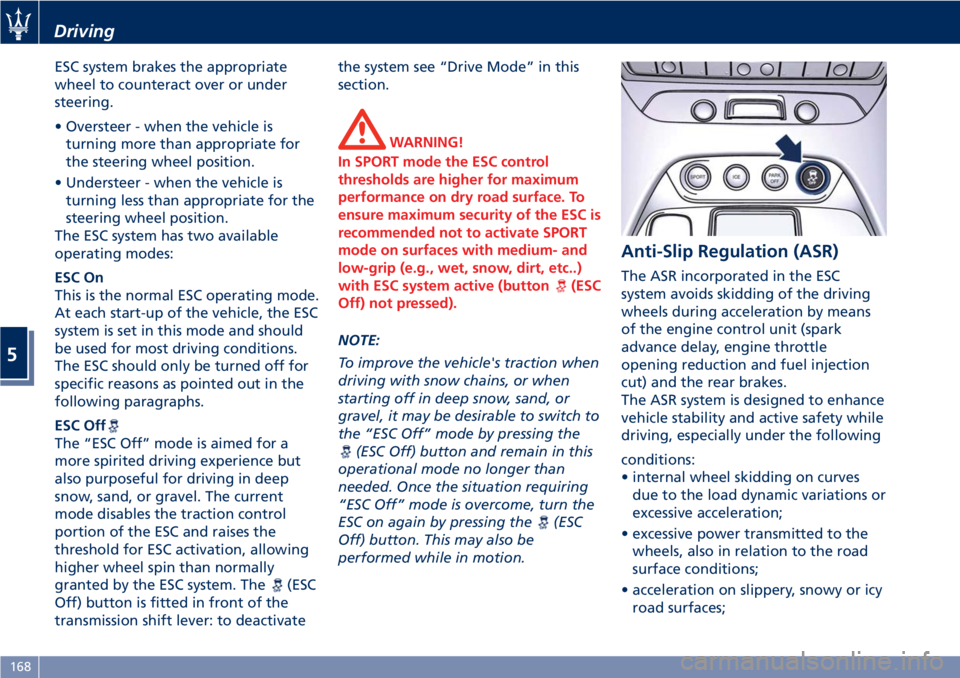
(ESC
Off) button is fitted in front of the
transmission shift lever: to deactivatethe system see “Drive Mode” in this
section.
WARNING!
In SPORT mode the ESC control
thresholds are higher for maximum
performance on dry road surface. To
ensure maximum security of the ESC is
recommended not to activate SPORT
mode on surfaces with medium- and
low-grip (e.g., wet, snow, dirt, etc..)
with ESC system active (button
(ESC
Off) not pressed).
NOTE:
To improve the vehicle's traction when
driving with snow chains, or when
starting off in deep snow, sand, or
gravel, it may be desirable to switch to
the “ESC Off” mode by pressing the
(ESC Off) button and remain in this
operational mode no longer than
needed. Once the situation requiring
“ESC Off” mode is overcome, turn the
ESC on again by pressing the
(ESC
Off) button. This may also be
performed while in motion.
Anti-Slip Regulation (ASR)
The ASR incorporated in the ESC
system avoids skidding of the driving
wheels during acceleration by means
of the engine control unit (spark
advance delay, engine throttle
opening reduction and fuel injection
cut) and the rear brakes.
The ASR system is designed to enhance
vehicle stability and active safety while
driving, especially under the following
conditions:
• internal wheel skidding on curves
due to the load dynamic variations or
excessive acceleration;
• excessive power transmitted to the
wheels, also in relation to the road
surface conditions;
• acceleration on slippery, snowy or icy
road surfaces;
Driving
5
168