esp MASERATI LEVANTE 2019 Workshop Manual
[x] Cancel search | Manufacturer: MASERATI, Model Year: 2019, Model line: LEVANTE, Model: MASERATI LEVANTE 2019Pages: 436, PDF Size: 15.24 MB
Page 236 of 436
Automatic Restarting of the
Engine The engine may automatically restart,
before the brake pedal has been
released, when one of the following
conditions occurs:
• The SPORT drive mode or
(ESC
OFF) drive mode is being activated.
• If the Start&Stop function has been
disabled through the main menu
voice “Start & Stop” (see chapter
“Instrument cluster” in section
“Dashboard Instruments and
Controls”) or via MTC+ in the
“Controls” page (see “MTC+
“Controls “Screen” in the section
“Dashboard Instruments and
Controls”).
• If shift lever is moved to R (Reverse).
• If the steering wheel is moved to
steer the wheels.
• When the temperature conditions
inside the vehicle do not correspond
to the air conditioning setting.
• When changing the temperature
setting on the air conditioning.
• When the defroster function is being
activated.
• When the battery charge is below
safety value. • When the accelerator pedal is being
pressed (together with the brake
pedal).
• If a long time has passed since the
last automatic stop of the engine.
Occupants Safety Function To enhance occupants safety, the
Start&Stop system monitors if the
driver is present and does not allow
automatic restarting of the engine if
one of the following maneuvers is
being performed while in “AutoStop”
condition:
• The driver unbuckles his/her seat belt
and releases the brake pedal.
• The driver opens the door and
releases the brake pedal.
• The driver unbuckles the seat belt
and opens the door.
• The driver opens the hood.
All the above-mentioned conditions
deactive the Start&Stop function (the
“AutoStart” is deactivated and the
engine remains off) and the
transmission shift automatically in P
(Park).
The
telltale will flash to indicate
the Start&Stop function disabling. To
restart the engine it is necessary to
press the brake pedal and push the
START/STOP button. Move the shift lever to D (Drive) to
drive away.
WARNING!
• Even when the vehicle is stopped in
the “Stop (AutoStop)” phase, the
driver is responsible for the vehicle
and the occupants and shall take
care of what happens inside and
outside the vehicle.
• Even when the vehicle is stopped
within the “Stop (AutoStop)” phase,
the vehicle driver is responsible for
the vehicle, the vehicle’s occupants
and the vehicle’s surrounding area.
Never leave the vehicle unattended
with the engine running; doing so
poses a risk of danger. It is a good
practice to always ensure to set the
parking brake and place the
transmission gear selector lever into
the P (Park) position, thereby
ensuring the vehicle will not move,
when performing any vehicle checks,
maintenance and/or service
procedures on the vehicle.
Start&Stop Function Disabling Under certain driving conditions, when
frequent stops and restarts of the
engine may become annoying, it isDriving
5
232
Page 243 of 436
WARNING!
• Never use the P (Park) mode as a
substitute for the electric parking
brake. Always apply the parking
brake fully when parked to prevent
vehicle movement and possible
injury or damage.
• Make sure the transmission is in P
(Park) before leaving the vehicle.
CAUTION!
• DO NOT race the engine when
shifting from P (Park) or N (Neutral)
into another gear range, as this can
damage the drivetrain.
• The following indicators should be
used to ensure that you have
engaged the shift lever into the “P”
position:
– when shifting into P (Park), push
the “P” button on the shift lever.
– with the brake pedal released,
verify that “P” position is
illuminated on the shift lever and
in the instrument cluster display. R (Reverse)
This
range is used to move the vehicle
backward.
Switching to R (Reverse) starting from
N (Neutral) is only possible if the
vehicle is moving backwards.
We recommend to shift into R
(Reverse) only after the vehicle has
come to a complete stop.
• Vehicle stationary: switching
between R (Reverse) and D (Drive),
passing from N (Neutral), requires
brake pedal pressed and action on
the lever.
• Vehicle moving: the driver can switch
from R (Reverse) to N (Neutral)
acting on the shift lever without
pressing the unlock button and the
brake pedal.
N (Neutral)
• Vehicle stationary and engine
started: switching from N (Neutral)
to P (Park) requires “P” button
pressed only. Switching from N
(Neutral) to R (Reverse) and/or D
(Drive) requires brake pedal and
unlock button pressed and the
action on the shift lever.
• Vehicle moving: switching from N
(Neutral) to R (Reverse) and/or D
(Drive) requires pressing the unlock button and the action on the shift
lever. Switching to R (Reverse)
starting from N (Neutral) is only
possible if the vehicle is moving
backwards, while switching to D
(Drive) starting from N (Neutral) is
only possible if the vehicle is moving
forwards.
Set the parking brake and shift the
transmission into P (Park) mode if you
must leave the vehicle.
WARNING!
Do not switch to N (Neutral) and/or
never turn off the ignition to coast
downhill. These are unsafe practices
that limit driver’s response to
changing traffic or road conditions.
CAUTION!
Towing the vehicle, coasting, or
driving for any other reason with the
transmission in N (Neutral) can result
in transmission damage. Refer to
“Towing a Disabled Vehicle” in section
“Emergency” for further information.
D (Drive)
This
range should be used for most
city and highway driving. It providesDriving
5
239
Page 245 of 436
automatic operation. The
transmission will also upshift
automatically once maximum engine
speed is reached.
• If in SPORT mode, the transmission
will remain in the selected gear even
when maximum engine speed is
reached. The transmission will
upshift only if enabled by the driver.
Manual upshift or downshift will be
maintained as long as SPORT mode is
selected, even by full stroke pedal
press.
• If in “M +/-“ or in SPORT mode, the
transmission will automatically
downshift as the vehicle slows to
halt (to prevent engine lugging) and
the current gear will display on the
instrument cluster. Shifting the shift
lever backward “+” or moving the
right shift paddle “+” towards the
steering wheel when stationary, will
cause the vehicle to start in second
gear. If the vehicle speed is too low,
the system will ignore further
upshifts. Avoid using speed control
when the M +/- (Manual) mode is
engaged.
When the car stops in M +/- (Manual)
mode, the transmission automatically
moves the shift lever and inserts P
(Park). If you enter the I.C.E. drive mode
when the gearshift is in “M +/-”
position, the system activates the
automatic return of the shift lever in D
(Drive) mode.
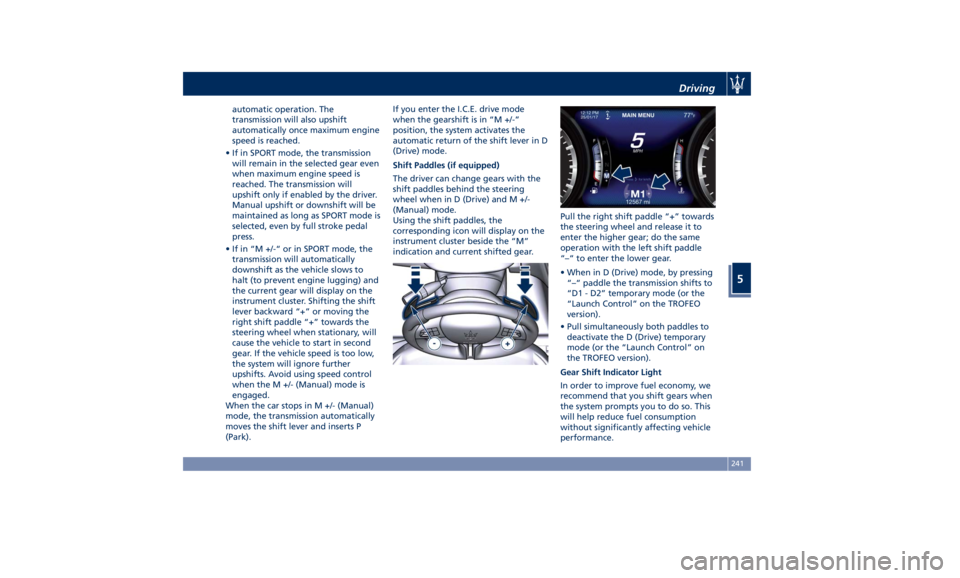
Shift Paddles (if equipped)
The driver can change gears with the
shift paddles behind the steering
wheel when in D (Drive) and M +/-
(Manual) mode.
Using the shift paddles, the
corresponding icon will display on the
instrument cluster beside the “M”
indication and current shifted gear. Pull the right shift paddle “+” towards
the steering wheel and release it to
enter the higher gear; do the same
operation with the left shift paddle
“–“ to enter the lower gear.
• When in D (Drive) mode, by pressing
“–“ paddle the transmission shifts to
“D1 - D2” temporary mode (or the
“Launch Control” on the TROFEO
version).
• Pull simultaneously both paddles to
deactivate the D (Drive) temporary
mode (or the “Launch Control” on
the TROFEO version).
Gear Shift Indicator Light
In order to improve fuel economy, we
recommend that you shift gears when
the system prompts you to do so. This
will help reduce fuel consumption
without significantly affecting vehicle
performance.Driving
5
241
Page 249 of 436
• SPORT (NOT for TROFEO version): to
activate/deactivate a sportier drive
mode. In this mode, the vehicle has a
faster throttle response and ESC
sport calibration (not recommended
on wet/slippery surfaces). Activating
this drive mode, will also change the
EPS setting.
• SPORT and CORSA (TROFEO version
only): to activate/deactivate the
sportier and the race drive mode.
When in "SPORT" drive mode, the
vehicle has a faster throttle response
and ESC sport calibration (not
recommended on wet/slippery
surfaces). Activating this drive mode,
will also change the EPS setting.
When in "CORSA" drive mode, in
addition to what indicated for the
sposts mode, the transmission use a
specific gear shift pattern and the
traction is shifted more on the rear
wheels with increased oversteering
behavior. Traction control with
dedicated calibration to maximize
traction vs stability and "Launch
Control" start mode.
•
(Suspension): to switch between
the two suspension setting modes:
soft (LED light off) and hard ("S" on
the cluster and LED light on).
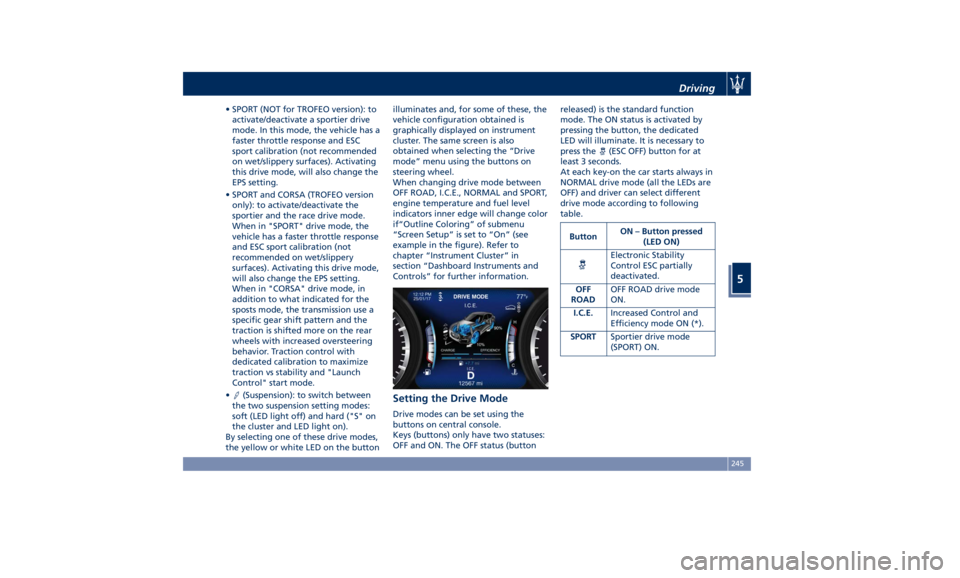
By selecting one of these drive modes,
the yellow or white LED on the button illuminates and, for some of these, the
vehicle configuration obtained is
graphically displayed on instrument
cluster. The same screen is also
obtained when selecting the “Drive
mode” menu using the buttons on
steering wheel.
When changing drive mode between
OFF ROAD, I.C.E., NORMAL and SPORT,
engine temperature and fuel level
indicators inner edge will change color
if“Outline Coloring” of submenu
“Screen Setup” is set to “On” (see
example in the figure). Refer to
chapter “Instrument Cluster” in
section “Dashboard Instruments and
Controls” for further information.
Setting the Drive Mode Drive modes can be set using the
buttons on central console.
Keys (buttons) only have two statuses:
OFF and ON. The OFF status (button released) is the standard function
mode. The ON status is activated by
pressing the button, the dedicated
LED will illuminate. It is necessary to
press the
(ESC OFF) button for at
least 3 seconds.
At each key-on the car starts always in
NORMAL drive mode (all the LEDs are
OFF) and driver can select different
drive mode according to following
table.
Button ON – Button pressed
(LED ON)
Electronic Stability
Control ESC partially
deactivated.
OFF
ROAD OFF ROAD drive mode
ON.
I.C.E. Increased Control and
Efficiency mode ON (*).
SPORT Sportier drive mode
(SPORT) ON.Driving
5
245
Page 258 of 436
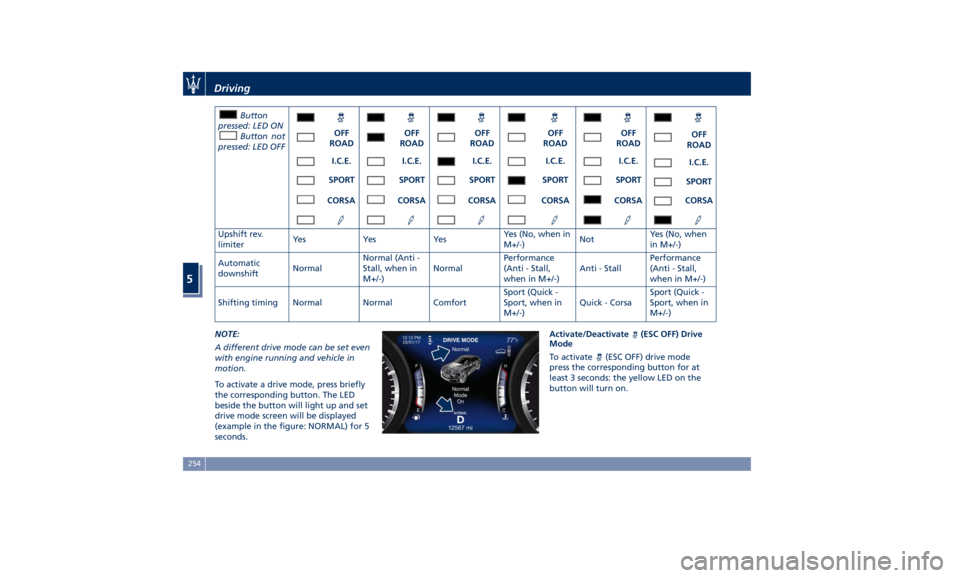
Button
pressed: LED ON
Button not
pressed: LED OFF OFF
ROAD OFF
ROAD OFF
ROAD OFF
ROAD OFF
ROAD OFF
ROAD
I.C.E. I.C.E. I.C.E. I.C.E. I.C.E.
I.C.E.
SPORT SPORT SPORT SPORT SPORT
SPORT
CORSA CORSA CORSA CORSA CORSA CORSA
Upshift rev.
limiter Ye s Ye s Ye s Yes (No, when in
M+/-) Not Yes (No, when
in M+/-)
Automatic
downshift Normal Normal (Anti -
Stall, when in
M+/-) Normal Performance
(Anti - Stall,
when in M+/-) Anti - Stall Performance
(Anti - Stall,
when in M+/-)
Shifting timing Normal Normal Comfort Sport (Quick -
Sport, when in
M+/-) Quick - Corsa Sport (Quick -
Sport, when in
M+/-)
NOTE:
A different drive mode can be set even
with engine running and vehicle in
motion.
To activate a drive mode, press briefly
the corresponding button. The LED
beside the button will light up and set
drive mode screen will be displayed
(example in the figure: NORMAL) for 5
seconds. Activate/Deactivate
(ESC OFF) Drive
Mode
To activate (ESC OFF) drive mode
press the corresponding button for at
least 3 seconds: the yellow LED on the
button will turn on.Driving
5
254
Page 259 of 436
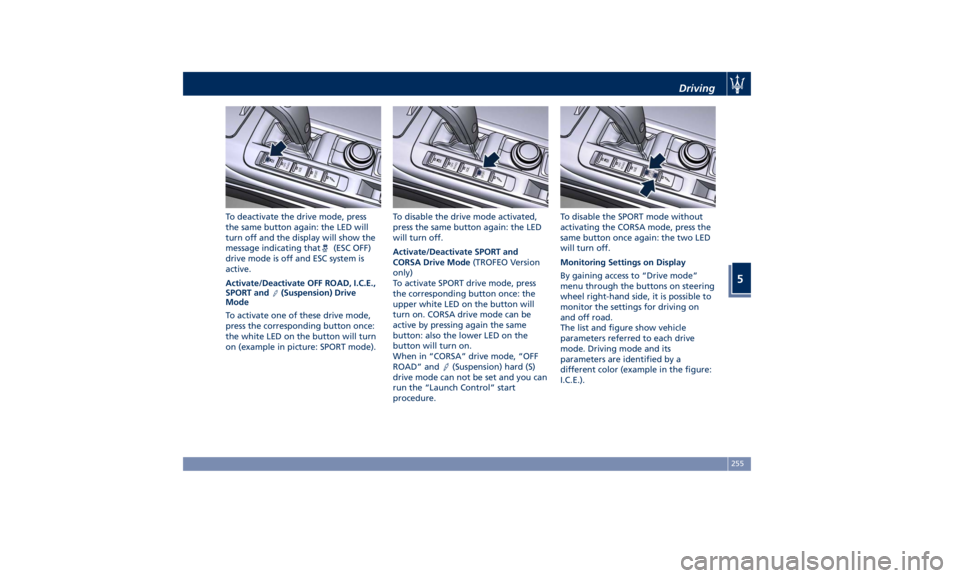
To deactivate the drive mode, press
the same button again: the LED will
turn off and the display will show the
message indicating that
(ESC OFF)
drive mode is off and ESC system is
active.
Activate/Deactivate OFF ROAD, I.C.E.,
SPORT and
(Suspension) Drive
Mode
To activate one of these drive mode,
press the corresponding button once:
the white LED on the button will turn
on (example in picture: SPORT mode). To disable the drive mode activated,
press the same button again: the LED
will turn off.
Activate/Deactivate SPORT and
CORSA Drive Mode (TROFEO Version
only)
To activate SPORT drive mode, press
the corresponding button once: the
upper white LED on the button will
turn on. CORSA drive mode can be
active by pressing again the same
button: also the lower LED on the
button will turn on.
When in “CORSA” drive mode, “OFF
ROAD” and
(Suspension) hard (S)
drive mode can not be set and you can
run the “Launch Control” start
procedure. To disable the SPORT mode without
activating the CORSA mode, press the
same button once again: the two LED
will turn off.
Monitoring Settings on Display
By gaining access to “Drive mode”
menu through the buttons on steering
wheel right-hand side, it is possible to
monitor the settings for driving on
and off road.
The list and figure show vehicle
parameters referred to each drive
mode. Driving mode and its
parameters are identified by a
different color (example in the figure:
I.C.E.).Driving
5
255
Page 262 of 436
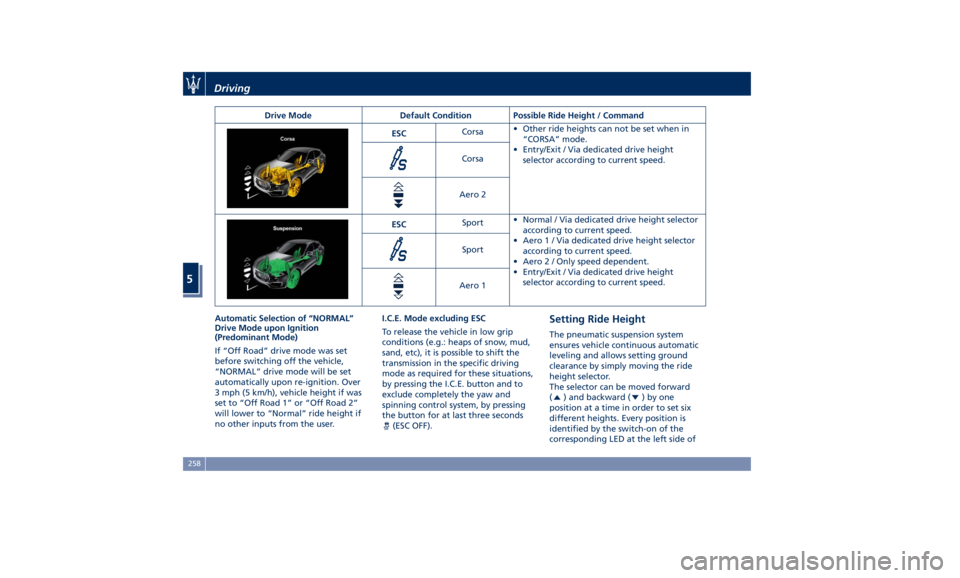
Drive Mode Default Condition Possible Ride Height / Command
ESC Corsa • Other ride heights can not be set when in
“CORSA” mode.
• Entry/Exit / Via dedicated drive height
selector according to current speed.Corsa
Aero 2
ESC Sport • Normal / Via dedicated drive height selector
according to current speed.
• Aero1/Via dedicated drive height selector
according to current speed.
• Aero 2 / Only speed dependent.
• Entry/Exit / Via dedicated drive height
selector according to current speed.Sport
Aero 1
Automatic Selection of “NORMAL”
Drive Mode upon Ignition
(Predominant Mode)
If “Off Road” drive mode was set
before switching off the vehicle,
“NORMAL” drive mode will be set
automatically upon re-ignition. Over
3 mph (5 km/h), vehicle height if was
set to “Off Road 1” or “Off Road 2”
will lower to “Normal” ride height if
no other inputs from the user. I.C.E. Mode excluding ESC
To release the vehicle in low grip
conditions (e.g.: heaps of snow, mud,
sand, etc), it is possible to shift the
transmission in the specific driving
mode as required for these situations,
by pressing the I.C.E. button and to
exclude completely the yaw and
spinning control system, by pressing
the button for at last three seconds
(ESC OFF). Setting Ride Height The pneumatic suspension system
ensures vehicle continuous automatic
leveling and allows setting ground
clearance by simply moving the ride
height selector.
The selector can be moved forward
(
) and backward ( )byone
position at a time in order to set six
different heights. Every position is
identified by the switch-on of the
corresponding LED at the left side ofDriving
5
258
Page 269 of 436

“Off Road 2” ride height is limited
instead up to a max speed of 25 mph
(40 km/h). In case the vehicle speed
should exceed this limit, ride height
will be put automatically to “Off Road
1” while driving mode will remain
“OFF ROAD”.
An advantage of the higher ground
clearance is a better view of the road,
allowing you to anticipate problems.
A higher clearance and the longer
travel of the suspension might allow
the vehicle to overcome some
obstacles.
A higher ground clearance means a
higher center of gravity. If at all
possible, avoid sharp turns or abrupt
maneuvers. Failure to operate this
vehicle correctly may result in loss of
control or vehicle rollover .
Although the pneumatic suspension
system contributes to limiting these
risks by setting precautionary speed
thresholds, the driver must always pay
utmost attention and drive carefully.
WARNING!
“Off Road 2” ride height must always
be selected in case of water fording.
Please remember water fording limits:
max depth of the water must be lower than 19 in (50 cm) and crossing
speed lower than 5 mph (8 km/h).
In “OFF ROAD” drive mode, also
engine,
transmission settings are
changed in order to provide the most
suitable level of torque and selected
gear to improve traction on
low-adherence condition and uphill
climbing.
WARNING!
In case of downhill, the use of the Hill
Descent Control (HDC) is
recommended, especially for relevant
slope and in case of low-adherence
conditions.
Also suspensions (Skyhook Continuous
Damping
Control) are set
to a specific
calibration in “OFF ROAD” drive
mode, in order to obtain the right
damping force provided by the shock
absorbers, combined with the
increased ride heights “Off Road 1”
and “Off Road 2”.
Driving Through Water Set maximum ride height “Off Road
2” before driving through water.
Although your vehicle is capable of
driving through water, a number precautions must be considered
before entering the water.
NOTE:
Your vehicle is capable of water
fording to a maximum of 19 in (50 cm)
of water. To maintain optimal
performance of your vehicle’s heating
and ventilation system it is
recommended to switch the system
into recirculation mode during water
fording.
CAUTION!
When driving through water, do not
exceed 5 mph (8 km/h). Always check
water depth before entering, as a
precaution. Check all fluids
afterwards: driving through water
may cause damage to engine and
driveline that may not be covered by
the new vehicle limited warranty.
Driving through water more than a
few
inches/centimeters deep will
require extra caution to ensure safety
and prevent damage to your vehicle. If
you must drive through water, try to
determine the depth and the bottom
condition (and location of any
obstacles) prior to entering. Proceed
with caution and maintain a steadyDriving
5
265
Page 270 of 436
controlled speed lower than 5 mph
(8 km/h) while in water to minimize
wave effects that might cause serious
damage to all components, especially
the engine.
WARNING!
Avoid driving through flowing or
standing water. Doing so can be
highly dangerous and can be very
difficult to determine the depth of the
water you are driving through. If
driving through water cannot be
avoided, and after driving through it,
apply the brakes lightly to ensure the
brakes are operating correctly.
Flowing Water
If
the water is
swift flowing and rising
(as in storm run-off), avoid crossing
until the water level recedes and/or
the flow rate is reduced. If you must
cross flowing water avoid depths in
excess of 9 in (25 cm).
Standing Water
Do not drive in standing water deeper
than 19 in (50 cm), and reduce speed
appropriately to minimize wave
effects. Maintenance
After driving through water, have your
vehicle fluids and lubricants inspected
at an Authorized Maserati Dealer to
assure the fluids have not been
contaminated.
Driving in Snow and Wet Grass In heavy snow, when pulling a load, or
for additional control at slower speeds,
set “I.C.E.” drive mode with
transmission in M +/- (Manual) and
shift the transmission to a low gear.
See “Drive Mode” in this section for
further details. Do not shift to a lower
gear than necessary to maintain
forward motion. Over-revving the
engine can spin the wheels and
traction will be lost.
Avoid abrupt downshifts on icy or
slippery roads, because engine braking
may cause skidding and loss of control.
Follow these instructions even when
driving through a path section covered
with wet grass.
Driving in Mud and Sand In general, when driving in mud and
sand, if your wheels spin, always
reduce the throttle in order to slow
the tires and regain traction. • When driving in mud, avoid using
low gear that could cause wheel
spin. Follow the tire and vehicle
manufacturer’s advice on tire
pressure.
• When driving in sand, adopt lowest
gear possible.
Hill Climbing Before climbing a hill, determine the
conditions at the crest and/or on the
other side and shift the transmission to
a lower gear.
The vehicle is equipped with Hill Start
Assist (HSA) that helps the driver to
manage the brake intervention in
acceleration when driving uphill (for
further details, refer to “Brake and
Stability Control System” in this
section).
WARNING!
If you lose forward motion, or cannot
make it to the top of a hill or grade,
never attempt to turn around. Always
back carefully straight down a hill in R
(Reverse) gear. Never back down a hill
in N (Neutral) using only the brake.
Remember, never drive diagonally
across
a hill; always
drive straight up or
down.Driving
5
266
Page 271 of 436
Traction Downhill When descending mountains or hills,
use Hill Descent Control (HDC) to
avoid repeated heavy braking (for
further details, refer to “Brake and
Stability Control System” in this
section).
When descending mountains or hills,
repeated braking can cause brake
fade with loss of braking power. Avoid
repeated heavy braking and
downshift the transmission whenever
possible in order to cool down the
brakes.
Warnings and Tips for Off-road
Driving When driving off-road, using the “OFF
ROAD” drive mode which is specific
for this use.
Before driving, always make sure that
the vehicle reached the ride height set
through the selector.
When driving, always:
• limit driving speed as much as
possible to tackle bends, bumpy
sections and slopes;
• increase visual control in front and
on the sides of the vehicle to quickly
spot any obstacles in your path
(potholes, branches, etc.); Always consider these tips further to
your experience gained in off-road
driving.
After Driving Off-road Off-road operation puts more stress
on your vehicle than does most
on-road driving. After going off-road,
it is always a good idea to check for
damage. That way you can get any
problems taken care of right away and
have your vehicle ready when you
need it.
• Completely inspect the underbody of
your vehicle. Check tires, body
structure, steering, suspension, and
exhaust system for damage.
• Inspect the radiator for mud and
debris that might decrease sinking
effect and clean as required.
• Check for accumulations of plants or
brush in underbody. These things
could be a fire hazard if they get in
contact with the exhaust system.
• After extended operation in mud,
sand, water, or similar dirty
conditions, have all parts that got in
contact with mud, sand and water
inspected and cleaned as soon as
possible. WARNING!
Abrasive material in any part of the
brakes may cause excessive wear or
unpredictable braking operation. Do
not drive if braking system is not
efficient: get your brakes checked and
cleaned as necessary by an
Authorized Maserati Dealer.
• If you experience unusual vibration
after
driving in mud, slush or similar
conditions, check the wheels and
suspension linkages for impacted
material. Impacted material can
cause wheel imbalance and affect
suspension response. Removing it
will correct the situation.Driving
5
267