dashboard MASERATI LEVANTE 2019 Repair Manual
[x] Cancel search | Manufacturer: MASERATI, Model Year: 2019, Model line: LEVANTE, Model: MASERATI LEVANTE 2019Pages: 436, PDF Size: 15.24 MB
Page 174 of 436
NOTE:
This strategy is also applicable in the
Transmission Temperature and Oil
Pressure information screen.
• Oil Pressure
Displays the current engine oil
pressure level.
• Battery Voltage
Displays the current battery voltage.
• Maintenance (service)
Displays mileage and days remaining
to the execution of scheduled
maintenance service.
Press and release the
button to
return to the main menu.
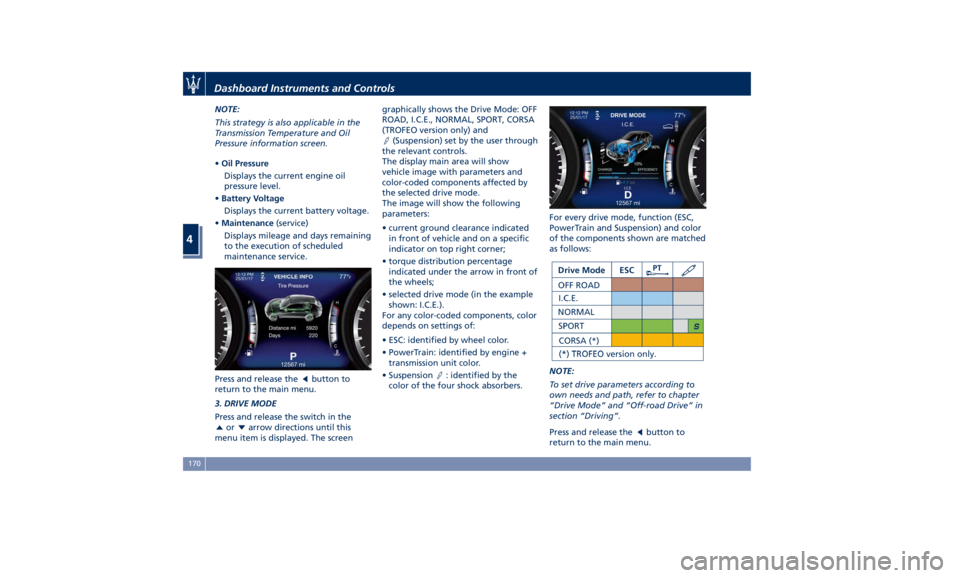
3. DRIVE MODE
Press and release the switch in the
or arrow directions until this
menu item is displayed. The screen graphically shows the Drive Mode: OFF
ROAD, I.C.E., NORMAL, SPORT, CORSA
(TROFEO version only) and
(Suspension) set by the user through
the relevant controls.
The display main area will show
vehicle image with parameters and
color-coded components affected by
the selected drive mode.
The image will show the following
parameters:
• current ground clearance indicated
in front of vehicle and on a specific
indicator on top right corner;
• torque distribution percentage
indicated under the arrow in front of
the wheels;
• selected drive mode (in the example
shown: I.C.E.).
For any color-coded components, color
depends on settings of:
• ESC: identified by wheel color.
• PowerTrain: identified by engine +
transmission unit color.
• Suspension
: identified by the
color of the four shock absorbers. For every drive mode, function (ESC,
PowerTrain and Suspension) and color
of the components shown are matched
as follows:
NOTE:
To set drive parameters according to
own needs and path, refer to chapter
“Drive Mode” and “Off-road Drive” in
section “Driving”.
Press and release the
button to
return to the main menu.Dashboard Instruments and Controls
4
170
Page 175 of 436
4. DRIVER ASSIST (if equipped)
Press and release the switch in the
or arrow directions until this
menu item is displayed.
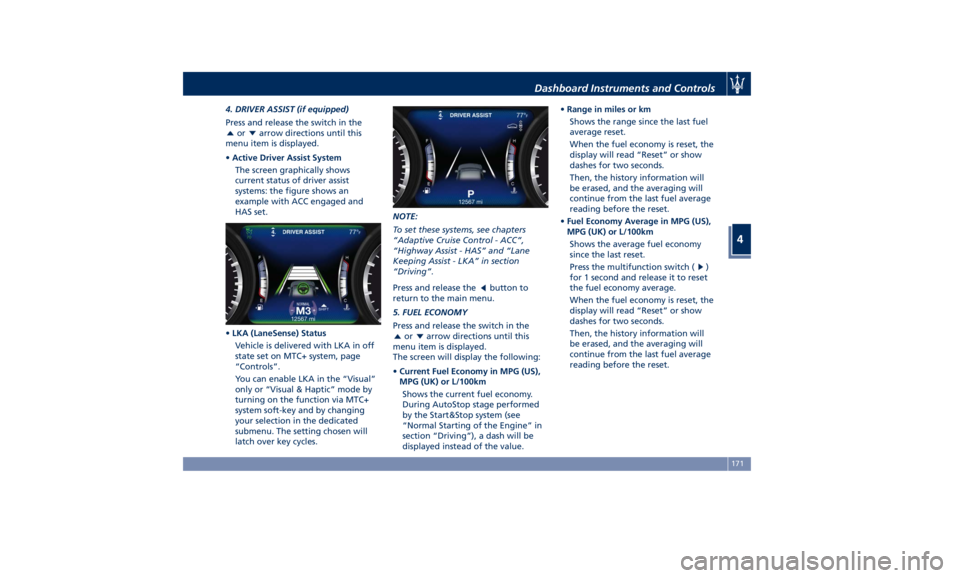
• Active Driver Assist System
The screen graphically shows
current status of driver assist
systems: the figure shows an
example with ACC engaged and
HAS set.
• LKA (LaneSense) Status
Vehicle is delivered with LKA in off
state set on MTC+ system, page
“Controls”.
You can enable LKA in the “Visual”
only or “Visual & Haptic” mode by
turning on the function via MTC+
system soft-key and by changing
your selection in the dedicated
submenu. The setting chosen will
latch over key cycles. NOTE:
To set these systems, see chapters
“Adaptive Cruise Control - ACC”,
“Highway Assist - HAS” and “Lane
Keeping Assist - LKA” in section
“Driving”.
Press and release the
button to
return to the main menu.
5. FUEL ECONOMY
Press and release the switch in the
or arrow directions until this
menu item is displayed.
The screen will display the following:
• Current Fuel Economy in MPG (US),
MPG (UK) or L/100km
Shows the current fuel economy.
During AutoStop stage performed
by the Start&Stop system (see
“Normal Starting of the Engine” in
section “Driving”), a dash will be
displayed instead of the value. • Range in miles or km
Shows the range since the last fuel
average reset.
When the fuel economy is reset, the
display will read “Reset” or show
dashes for two seconds.
Then, the history information will
be erased, and the averaging will
continue from the last fuel average
reading before the reset.
• Fuel Economy Average in MPG (US),
MPG (UK) or L/100km
Shows the average fuel economy
since the last reset.
Press the multifunction switch (
)
for 1 second and release it to reset
the fuel economy average.
When the fuel economy is reset, the
display will read “Reset” or show
dashes for two seconds.
Then, the history information will
be erased, and the averaging will
continue from the last fuel average
reading before the reset.Dashboard Instruments and Controls
4
171
Page 176 of 436
Press and release the button to
return to the main menu.
6. TRIP
Press and release the switch in the
or arrow directions until this
menu item is displayed.
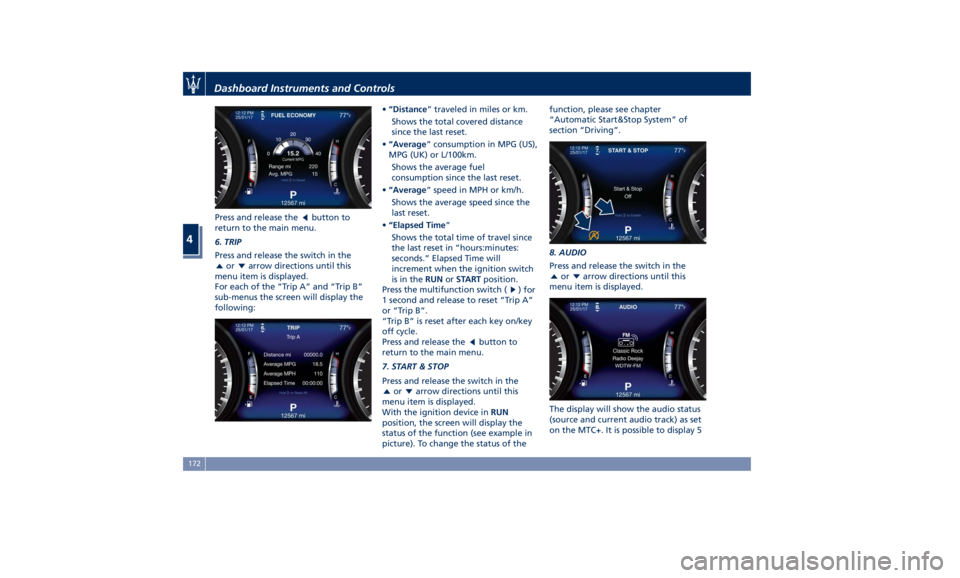
For each of the “Trip A” and “Trip B”
sub-menus the screen will display the
following: • “Distance ” traveled in miles or km.
Shows the total covered distance
since the last reset.
• “Average ” consumption in MPG (US),
MPG (UK) or L/100km.
Shows the average fuel
consumption since the last reset.
• “Average ” speed in MPH or km/h.
Shows the average speed since the
last reset.
• “Elapsed Time ”
Shows the total time of travel since
the last reset in “hours:minutes:
seconds.” Elapsed Time will
increment when the ignition switch
is in the RUN or START position.
Press the multifunction switch (
) for
1 second and release to reset “Trip A”
or “Trip B”.
“Trip B” is reset after each key on/key
off cycle.
Press and release the
button to
return to the main menu.
7. START & STOP
Press and release the switch in the
or arrow directions until this
menu item is displayed.
With the ignition device in RUN
position, the screen will display the
status of the function (see example in
picture). To change the status of the function, please see chapter
“Automatic Start&Stop System” of
section “Driving”.
8. AUDIO
Press and release the switch in the
or arrow directions until this
menu item is displayed.
The display will show the audio status
(source and current audio track) as set
on the MTC+. It is possible to display 5Dashboard Instruments and Controls
4
172
Page 177 of 436
lines of 15 alphanumeric characters.
Displays Audio Statuses are:
• AM : Station Number, provided with
one line of info (frequency);
• FM : Frequency, provided with 2 info
lines;
• SXM (SiriusXM Satellite radio):
number and station name, artist,
song;
• BTSA Bluetooth: folder, album,
artist, song;
• USB (Audio): USB, album, artist,
current track or, if available, previous
track, current track and next track;
• USB : folder, previous track, current
track and next track;
• SD Card (Audio): album, artist,
previous track, current track and
next track;
• SD Card : folder, previous track,
current track and next track;
• AUX : name of source, “Device
Connected” text;
• No Signal : “No Signal Available”
text;
• Mute : symbol “Mute”, the lines
remain those displayed before the
command “Mute”.
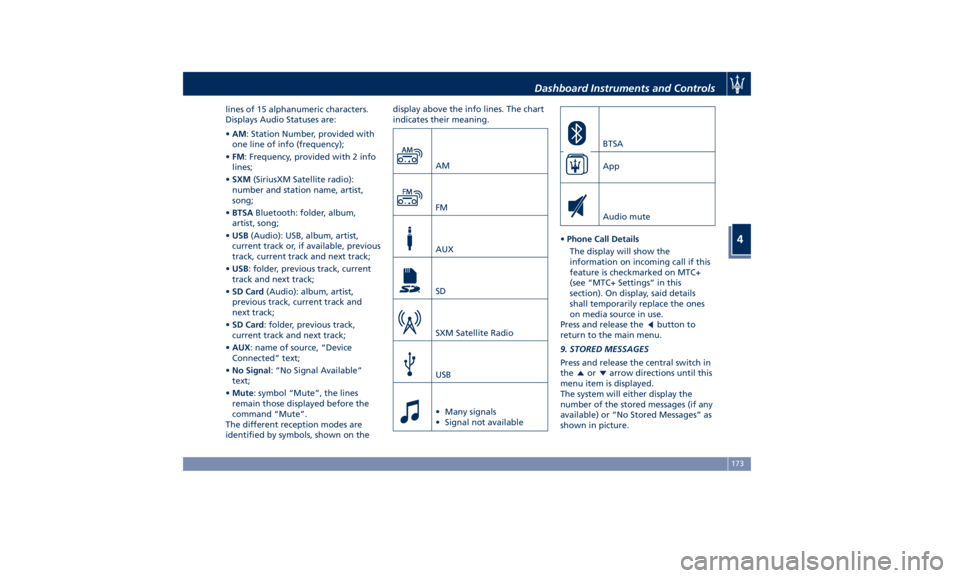
The different reception modes are
identified by symbols, shown on the display above the info lines. The chart
indicates their meaning.
AM
FM
AUX
SD
SXM Satellite Radio
USB
• Many signals
• Signal not available BTSA
App
Audio mute
• Phone Call Details
The display will show the
information on incoming call if this
feature is checkmarked on MTC+
(see “MTC+ Settings” in this
section). On display, said details
shall temporarily replace the ones
on media source in use.
Press and release the
button to
return to the main menu.
9. STORED MESSAGES
Press and release the central switch in
the or arrow directions until this
menu item is displayed.
The system will either display the
number of the stored messages (if any
available) or “No Stored Messages” as
shown in picture.Dashboard Instruments and Controls
4
173
Page 178 of 436
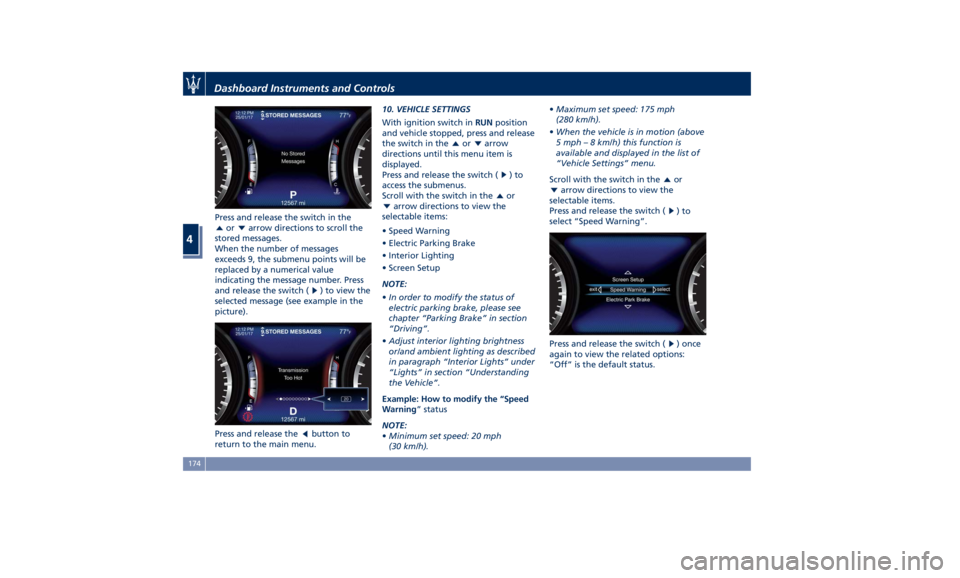
Press and release the switch in the
or arrow directions to scroll the
stored messages.
When the number of messages
exceeds 9, the submenu points will be
replaced by a numerical value
indicating the message number. Press
and release the switch (
) to view the
selected message (see example in the
picture).
Press and release the
button to
return to the main menu. 10. VEHICLE SETTINGS
With ignition switch in RUN position
and vehicle stopped, press and release
the switch in the
or arrow
directions until this menu item is
displayed.
Press and release the switch (
)to
access the submenus.
Scroll with the switch in the
or
arrow directions to view the
selectable items:
• Speed Warning
• Electric Parking Brake
• Interior Lighting
• Screen Setup
NOTE:
• In order to modify the status of
electric parking brake, please see
chapter “Parking Brake” in section
“Driving”.
• Adjust interior lighting brightness
or/and ambient lighting as described
in paragraph “Interior Lights” under
“Lights” in section “Understanding
the Vehicle”.
Example: How to modify the “Speed
Warning ” status
NOTE:
• Minimum set speed: 20 mph
(30 km/h). • Maximum set speed: 175 mph
(280 km/h).
• When the vehicle is in motion (above
5 mph – 8 km/h) this function is
available and displayed in the list of
“Vehicle Settings” menu.
Scroll with the switch in the
or
arrow directions to view the
selectable items.
Press and release the switch (
)to
select “Speed Warning”.
Press and release the switch (
) once
again to view the related options:
“Off” is the default status.Dashboard Instruments and Controls
4
174
Page 179 of 436
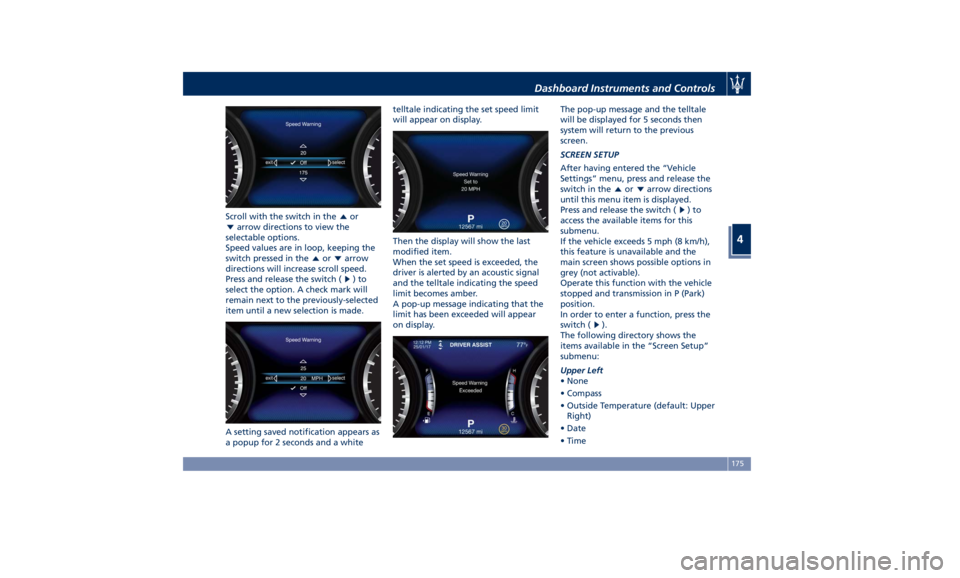
Scroll with the switch in the or
arrow directions to view the
selectable options.
Speed values are in loop, keeping the
switch pressed in the
or arrow
directions will increase scroll speed.
Press and release the switch (
)to
select the option. A check mark will
remain next to the previously-selected
item until a new selection is made.
A setting saved notification appears as
a popup for 2 seconds and a white telltale indicating the set speed limit
will appear on display.
Then the display will show the last
modified item.
When the set speed is exceeded, the
driver is alerted by an acoustic signal
and the telltale indicating the speed
limit becomes amber.
A pop-up message indicating that the
limit has been exceeded will appear
on display. The pop-up message and the telltale
will be displayed for 5 seconds then
system will return to the previous
screen.
SCREEN SETUP
After having entered the “Vehicle
Settings” menu, press and release the
switch in the
or arrow directions
until this menu item is displayed.
Press and release the switch (
)to
access the available items for this
submenu.
If the vehicle exceeds 5 mph (8 km/h),
this feature is unavailable and the
main screen shows possible options in
grey (not activable).
Operate this function with the vehicle
stopped and transmission in P (Park)
position.
In order to enter a function, press the
switch (
).
The following directory shows the
items available in the “Screen Setup”
submenu:
Upper Left
• None
• Compass
• Outside Temperature (default: Upper
Right)
• Date
• TimeDashboard Instruments and Controls
4
175
Page 180 of 436
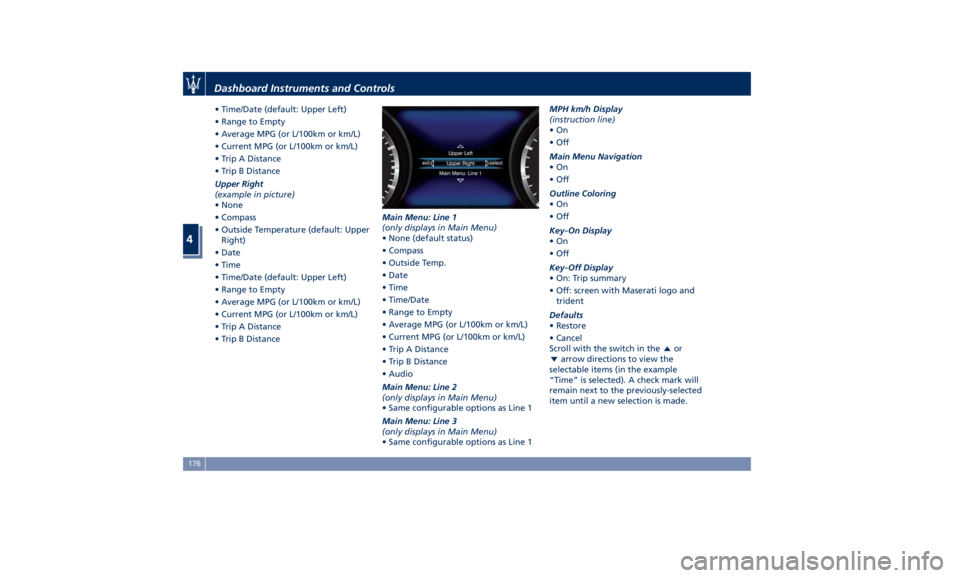
• Time/Date (default: Upper Left)
• Range to Empty
• Average MPG (or L/100km or km/L)
• Current MPG (or L/100km or km/L)
• Trip A Distance
• Trip B Distance
Upper Right
(example in picture)
• None
• Compass
• Outside Temperature (default: Upper
Right)
• Date
• Time
• Time/Date (default: Upper Left)
• Range to Empty
• Average MPG (or L/100km or km/L)
• Current MPG (or L/100km or km/L)
• Trip A Distance
• Trip B Distance Main Menu: Line 1
(only displays in Main Menu)
• None (default status)
• Compass
• Outside Temp.
• Date
• Time
• Time/Date
• Range to Empty
• Average MPG (or L/100km or km/L)
• Current MPG (or L/100km or km/L)
• Trip A Distance
• Trip B Distance
• Audio
Main Menu: Line 2
(only displays in Main Menu)
• Same configurable options as Line 1
Main Menu: Line 3
(only displays in Main Menu)
• Same configurable options as Line 1 MPH km/h Display
(instruction line)
•On
•Off
Main Menu Navigation
•On
•Off
Outline Coloring
•On
•Off
Key-On Display
•On
•Off
Key-Off Display
• On: Trip summary
• Off: screen with Maserati logo and
trident
Defaults
• Restore
• Cancel
Scroll with the switch in the
or
arrow directions to view the
selectable items (in the example
“Time” is selected). A check mark will
remain next to the previously-selected
item until a new selection is made.Dashboard Instruments and Controls
4
176
Page 181 of 436
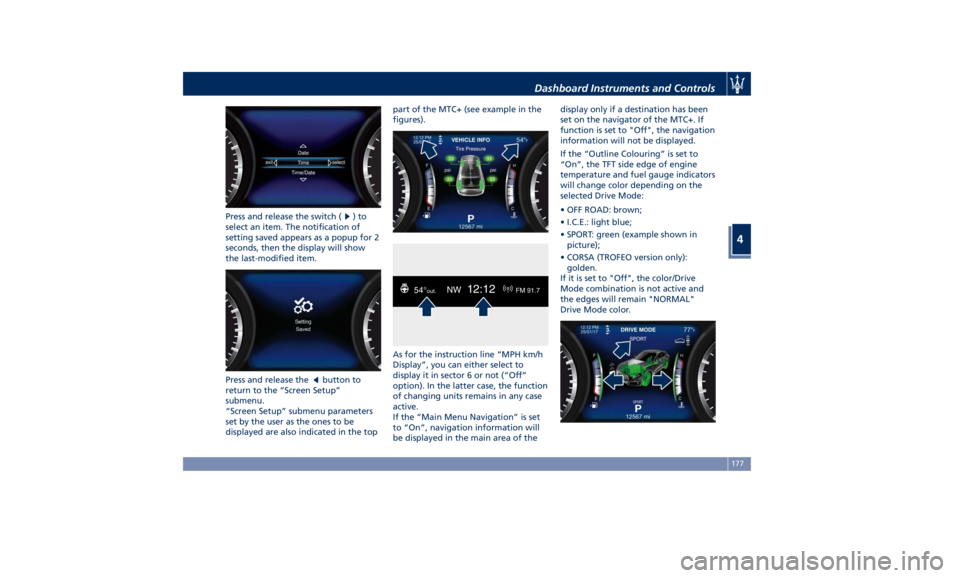
Press and release the switch ( )to
select an item. The notification of
setting saved appears as a popup for 2
seconds, then the display will show
the last-modified item.
Press and release the
button to
return to the “Screen Setup”
submenu.
“Screen Setup” submenu parameters
set by the user as the ones to be
displayed are also indicated in the top part of the MTC+ (see example in the
figures).
As for the instruction line “MPH km/h
Display”, you can either select to
display it in sector 6 or not (“Off”
option). In the latter case, the function
of changing units remains in any case
active.
If the “Main Menu Navigation” is set
to “On”, navigation information will
be displayed in the main area of the display only if a destination has been
set on the navigator of the MTC+. If
function is set to "Off", the navigation
information will not be displayed.
If the “Outline Colouring” is set to
“On”, the TFT side edge of engine
temperature and fuel gauge indicators
will change color depending on the
selected Drive Mode:
• OFF ROAD: brown;
• I.C.E.: light blue;
• SPORT: green (example shown in
picture);
• CORSA (TROFEO version only):
golden.
If it is set to "Off", the color/Drive
Mode combination is not active and
the edges will remain "NORMAL"
Drive Mode color.Dashboard Instruments and Controls
4
177
Page 182 of 436
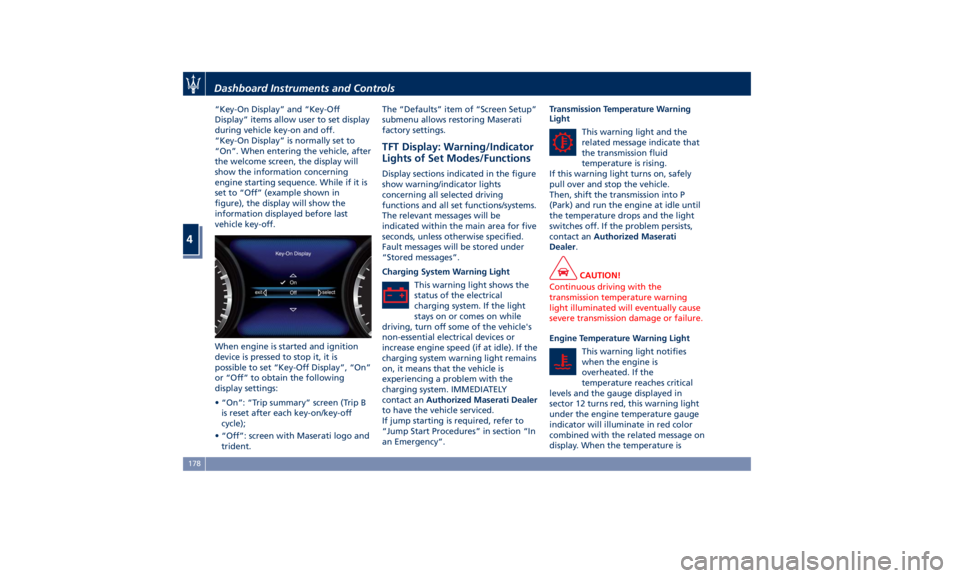
“Key-On Display” and “Key-Off
Display” items allow user to set display
during vehicle key-on and off.
“Key-On Display” is normally set to
“On”. When entering the vehicle, after
the welcome screen, the display will
show the information concerning
engine starting sequence. While if it is
set to “Off” (example shown in
figure), the display will show the
information displayed before last
vehicle key-off.
When engine is started and ignition
device is pressed to stop it, it is
possible to set “Key-Off Display”, “On”
or “Off” to obtain the following
display settings:
• “On”: “Trip summary” screen (Trip B
is reset after each key-on/key-off
cycle);
• “Off”: screen with Maserati logo and
trident. The “Defaults” item of “Screen Setup”
submenu allows restoring Maserati
factory settings.
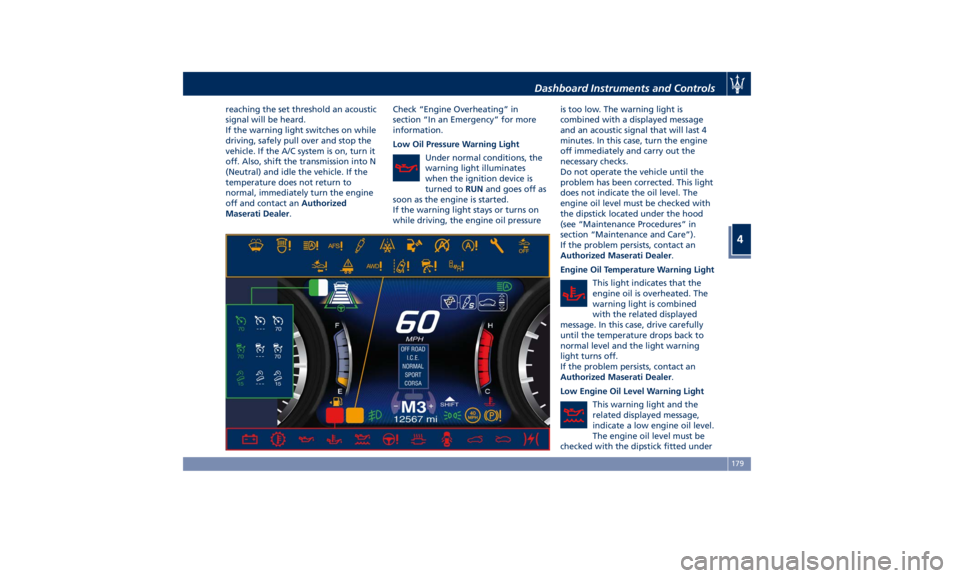
TFT Display: Warning/Indicator
Lights of Set Modes/Functions Display sections indicated in the figure
show warning/indicator lights
concerning all selected driving
functions and all set functions/systems.
The relevant messages will be
indicated within the main area for five
seconds, unless otherwise specified.
Fault messages will be stored under
“Stored messages”.
Charging System Warning Light
This warning light shows the
status of the electrical
charging system. If the light
stays on or comes on while
driving, turn off some of the vehicle's
non-essential electrical devices or
increase engine speed (if at idle). If the
charging system warning light remains
on, it means that the vehicle is
experiencing a problem with the
charging system. IMMEDIATELY
contact an Authorized Maserati Dealer
to have the vehicle serviced.
If jump starting is required, refer to
“Jump Start Procedures” in section “In
an Emergency”. Transmission Temperature Warning
Light
This warning light and the
related message indicate that
the transmission fluid
temperature is rising.
If this warning light turns on, safely
pull over and stop the vehicle.
Then, shift the transmission into P
(Park) and run the engine at idle until
the temperature drops and the light
switches off. If the problem persists,
contact an Authorized Maserati
Dealer .
CAUTION!
Continuous driving with the
transmission temperature warning
light illuminated will eventually cause
severe transmission damage or failure.
Engine Temperature Warning Light
This
warning light notifies
when
the engine is
overheated. If the
temperature reaches critical
levels and the gauge displayed in
sector 12 turns red, this warning light
under the engine temperature gauge
indicator will illuminate in red color
combined with the related message on
display. When the temperature isDashboard Instruments and Controls
4
178
Page 183 of 436
reaching the set threshold an acoustic
signal will be heard.
If the warning light switches on while
driving, safely pull over and stop the
vehicle. If the A/C system is on, turn it
off. Also, shift the transmission into N
(Neutral) and idle the vehicle. If the
temperature does not return to
normal, immediately turn the engine
off and contact an Authorized
Maserati Dealer . Check “Engine Overheating” in
section “In an Emergency” for more
information.
Low Oil Pressure Warning Light
Under normal conditions, the
warning light illuminates
when the ignition device is
turned to RUN and goes off as
soon as the engine is started.
If the warning light stays or turns on
while driving, the engine oil pressure is too low. The warning light is
combined with a displayed message
and an acoustic signal that will last 4
minutes. In this case, turn the engine
off immediately and carry out the
necessary checks.
Do not operate the vehicle until the
problem has been corrected. This light
does not indicate the oil level. The
engine oil level must be checked with
the dipstick located under the hood
(see “Maintenance Procedures” in
section “Maintenance and Care”).
If the problem persists, contact an
Authorized Maserati Dealer .
Engine Oil Temperature Warning Light
This light indicates that the
engine oil is overheated. The
warning light is combined
with the related displayed
message. In this case, drive carefully
until the temperature drops back to
normal level and the light warning
light turns off.
If the problem persists, contact an
Authorized Maserati Dealer .
Low Engine Oil Level Warning Light
This warning light and the
related displayed message,
indicate a low engine oil level.
The engine oil level must be
checked with the dipstick fitted underDashboard Instruments and Controls
4
179