light MAZDA CX30 2023 Owners Manual
[x] Cancel search | Manufacturer: MAZDA, Model Year: 2023, Model line: CX30, Model: MAZDA CX30 2023Pages: 595, PDF Size: 21.06 MB
Page 197 of 595

The engine is running.
The selector lever is in a position other than P or N.
If there is a problem with M Hybrid, a warning indication is displayed.
M Hybrid operation status is displayed on the system operation status display of
the fuel efficiency monitor.
Refer to the Information section in the Mazda Connect Owner's Manual.
▼Unique M Hybrid Handling
M Hybrid vehicles have a unique
sound and vibration which differ from
normal vehicles. The following may
o cc u r, h o we v e r, t h i s i s u n i q u e t o M
Hybrid and it does not indicate a
problem.
Characteristic Occurrence status/loca-
tion
Operation sound of
deceleration regen-
eration An operational sound
can be heard from the
engine compartment
during deceleration.
Relay operation
sound of M Hybrid
battery An operational sound
can be heard from the
vehicle underfloor when
the engine is started and
stopped.
Operation sound of
brake system Sound can be heard from
the front of the vehicle
under the following con-
ditions:
The driver's door is
opened.
The ignition is switch-
ed ON.
The brake pedal is op-
erated.
The brake system op-
erates automatically.
Several minutes have
passed since the en-
gine was stopped.
Characteristic
Occurrence status/loca-
tion
Operational feed-
back through brake
pedal Operational feedback
through brake pedal
might be felt under the
following conditions.
The ignition is switch-
ed ON.
The brake pedal is op-
erated.
▼
M Hybrid battery
M Hybrid is equipped with a special
battery.
WARNING
Heed the following cautions to
prevent burns and electrical shock:
Never remove and disassemble the
brackets and connectors securing the
terminal part, wiring harness, and
the M Hybrid battery.
Never touch the M Hybrid battery
because it becomes extremely hot
under direct sunlight or after driving.
Because the M Hybrid battery is
especially dangerous when wet,
never touch it.
NOTE
The M Hybrid battery has a certain
battery life. Battery life
differs
depending on how the vehicle is used
and the driving conditions.
When Driving
M Hybrid
4-50
CX-30_8LD3-EA-22J_Edition1_new 2022-6-7 13:06:59
Page 198 of 595
Charging the M Hybrid battery
The M Hybrid battery is charged
automatically during engine operation
and by deceleration regeneration.
Therefore, it is not necessary to charge
the battery from outside of the vehicle.
CAUTION
Drive the vehicle for about 30 minutes
once every few months because
self-discharge occurs gradually if the
vehicle is not driven for a long period
of time. If the M Hybrid battery
becomes completely discharged and
M Hybrid cannot be activated, contact
an Authorized Mazda Dealer.
▼M Hybrid Precautions
For vehicle maintenance or repairs, or
when scrapping the vehicle, consult an
Authorized Mazda Dealer.
Handling the M Hybrid battery
Technical knowledge and skill are
necessary in handling the M Hybrid
battery.
WARNING
To ensure safe and correct handling of
the M Hybrid battery, always heed the
following precautions:
Do not remove the M Hybrid battery.
Do not resell, transfer, or modify the
M Hybrid battery.
Do not use the battery on vehicles
other than those equipped with the
M Hybrid battery.
If the M Hybrid battery is not handled
properly, the following may occur and
cause serious injury:
Touching an unattended or illegally
abandoned M Hybrid battery may
cause electrocution.
If the M Hybrid battery is used on a
vehicle other than one equipped
with M Hybrid (including modified
vehicles), accidents such as
electrocution, heat generation,
smoking , combustion, and
explosions, or an electrolyte leakage
may occur.
Scrapping Your Vehicle and Disposing
of the M Hybrid battery
The M Hybrid battery must be recycled
to prevent accidents involving it. When
scrapping your vehicle, replacing the M
Hybrid battery, or disposing of the M
Hybrid battery, consult an Authorized
Mazda Dealer. Please cooperate in
ensuring that the vehicle's M Hybrid
battery is recycled.
WARNING
Dispose of the M Hybrid battery
appropriately:
If the M Hybrid battery is not recycled
appropriately, such as by leaving it
unattended or illegally abandoning it,
some other person may touch it which
could cause electrocution leading to
serious injury.
If an Accident Occurs
If the vehicle is involved in a collision,
M Hybrid may stop operating. In this
case, the charging sy stem warning light
turns on and M Hybrid cannot activate.
Park the vehicle in a safe place
immediately and contact an
Authorized Mazda Dealer.
When Driving
M Hybrid
4-51
CX-30_8LD3-EA-22J_Edition1_new 2022-6-7 13:06:59
Page 200 of 595

Lighting Control
▼Headlights
Turn the headlight switch to turn the headli
ghts and other exterior lights on or off.
When the taillights, parking lights, license plate lights, and the side-marker lights are
turned on, the lights-on indicator ligh t in the instrument cluster turns on.
NOTE
If the light switch is left on, the lights will automatically switch off approximately
30 seconds after switching the ignition off.
The time setting can be changed.
Refer to the Settings section in the Mazda Connect Owner's Manual.
To prevent discharging the battery, do not leave the lights on while the engine is
off unless safety requires them.
Without auto-light control
Ignition Position ACC or OFF ON
Switch Position OFF
OFF
Headlights Off Off
Off*1Off Off On
Daytime running
lights Off Off Off
On
*2On*2*3Off
Taillights
Parking lights
License plate lights
Side-marker lights Off
On
*1On*1Off On On
*1 The lights are turned on for the specified period by the auto headlight off function.
When Driving
Switches and Controls
4-53
CX-30_8LD3-EA-22J_Edition1_new
2022-6-7 13:06:59
Page 201 of 595
*2 When the light switch is switched to a different position from the OFF, position while the
vehicle is stopped, the daytime running lights turn off. When starting to drive the vehicle, the daytime
running lights turn on again.
*3 When the light switch is switched to the OFF position, and then to the position again, the
daytime running lights turn off directly after star ting the engine. The daytime running lights turn on
when you begin driving the vehicle.
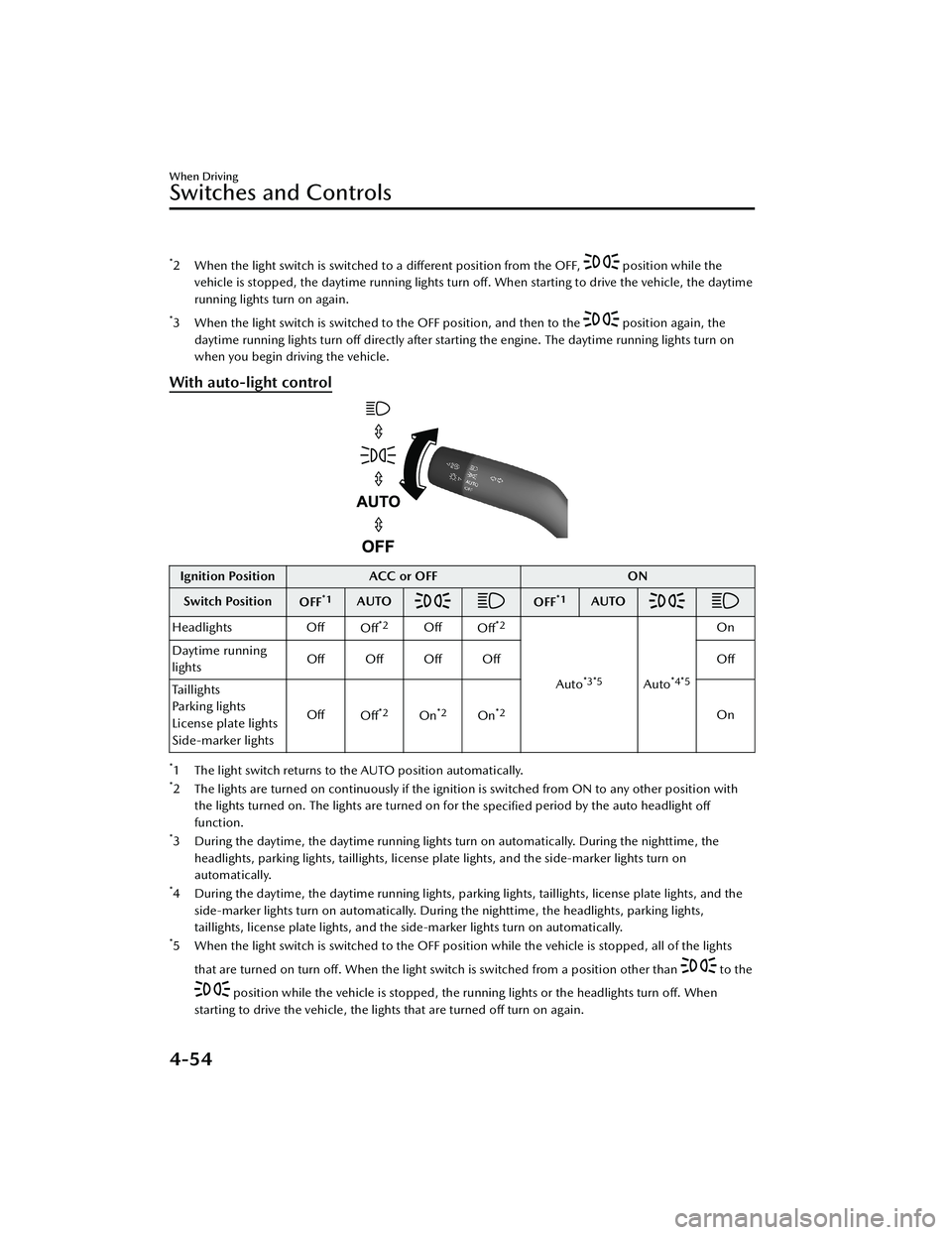
With auto-light control
Ignition Position ACC or OFF ON
Switch Position OFF
*1AUTOOFF*1AUTO
Headlights Off
Off*2OffOff*2
Auto*3*5Auto*4*5
On
Daytime running
lights Off Off Off Off
Off
Taillights
Parking lights
License plate lights
Side-marker lights Off
Off
*2On*2On*2On
*1 The light switch returns to the AUTO position automatically.*2 The lights are turned on continuously if the ignition is switched from ON to any other position with
the lights turned on. The lights are turned on for the specified period by the auto headlight
off
function.
*3 During the daytime, the daytime running lights turn on automatically. During the nighttime, the
headlights, parking lights, taillights, license plate lights, and the side-marker lights turn on
automatically.
*4 During the daytime, the daytime running lights, parking lights, taillights, license plate lights, and theside-marker lights turn on automatically. During the nighttime, the headlights, parking lights,
taillights, license plate lights, and the side-marker lights turn on automatically.
*5 When the light switch is switched to the OFF posit ion while the vehicle is stopped, all of the lights
that are turned on turn off. When the light switch is switched from a position other than
to the
position while the vehicle is stopped, the running lights or the headlights turn
off. When
starting to drive the vehicle, the lights that are turned off turn on again.
When Driving
Switches and Controls
4-54
CX-30_8LD3-EA-22J_Edition1_new 2022-6-7 13:06:59
Page 202 of 595

Auto-light control*
When the headlight switch is in a position other than and the ignition is
switched ON, the light sensor senses th e surrounding lightness or darkness and
automatically turns the headlights an d other exterior lights on or off.
CAUTION
Do not shade the light sensor by adhering a sticker or a label on the windshield.
Otherwise the light sensor will not operate correctly.
The light sensor also works as a rain sensor for the auto-wiper control. Keep hands
and scrapers clear of the windshield when the wiper lever is in the AUTO position
and the ignition is switched ON as fingers could be pinched or the wipers and
wiper blades could be damaged when the wipers activate automatically. If you are
going to clean the windshield, be sure the wipers are turned off completely when
it is particularly tempting to leave the engine running. This is particularly important
when clearing ice and snow.
NOTE
The headlights and other exterior lights may not turn off immediately even if the
surrounding area becomes well-lit because the light sensor determines that it is
night time if the surrounding area is cont inuously dark for several minutes such as
inside long tunnels, traffic jams inside tunnels, or in indoor parking lots.
If the headlight switch and the windshield wiper switch are in AUTO, and the
wipers are operated at low or high speed by the auto wiper control for several
seconds, bad weather conditions are determined and the headlights may be
turned on.
The sensitivity of the auto-light control may be changed.
Refer to the Settings section in the Mazda Connect Owner's Manual.
When Driving
Switches and Controls
*Some models.4-55
CX-30_8LD3-EA-22J_Edition1_new 2022-6-7 13:06:59
Page 203 of 595

▼Headlight High-Low Beam
The headlights switch between high
and low beams by moving the lever
forward or backward.
1. High beam
2. Low beam
When the headlight high-beams are
on, the headlight high-beam indicator
light is turned on.
▼Flashing the Headlights
When the ignition is switched ON, and
regardless of the headlight position,
the headlights switch to high beams
while the lever is being pulled.
1. OFF
2. Headlight flashing
The headlight high-beam indicator
light in the instrument cluster
illuminates simultaneously. The lever
will return to the normal position when
released.
▼ Coming Home Light
The coming home light turns on the
headlights (low beams) when the lever
is operated.
To turn on the lights
When the lever is pulled with the
ignition switched to ACC or OFF, the
low beam headlights turn on.
The headlights turn off after a certain
period of time has elapsed after all of
the doors are closed.
NOTE
The time until the headlights turn
off
after all of the doors are closed can
be changed.
Refer to the Settings section in the
Mazda Connect Owner's Manual.
If no operations are done for 3
minutes after the lever is pulled, the
headlights turn off.
The headlights turn off if the lever is
pulled again while the headlights are
illuminated.
When Driving
Switches and Controls
4-56
CX-30_8LD3-EA-22J_Edition1_new 2022-6-7 13:06:59
Page 204 of 595

▼Leaving Home Light
The leaving home light turns on the
lights when the transmitter unlock
button is pressed while away from the
vehicle.
The following lights turn on when the
leaving home light is operated.
Low beams, Parking lights, Taillights,
License plate lights.
To turn on the lights
When the ignition switch and the
headlight switch are in the following
conditions, the headlights will
illuminate when the transmitter unlock
button is pressed and the vehicle
receives the transmitter signal. The
headlights turn off after a certain
period of time has elapsed (30
seconds).
Ignition switch: off
Headlight switch: AUTO, , or
1. Lock button
2. Unlock button
NOTE
Operation of the leaving home light
can be turned on or off.
Refer to the Settings section in the
Mazda Connect Owner's Manual.
When the transmitter lock button is
pressed and the vehicle receives the
transmitter signal, the headlights turn
off.
When the headlight switch is turned
to the OFF position, the headlights
turn off.
▼ Headlight Leveling*
The number of passengers and weight
of cargo in the luggage compartment
change the angle of the headlights.
The angle of the headlights will be
automatically adjusted when turning
on the headlights.
A system malfunction or operation
conditions are indicated by a warning.
Refer to Exterior Light Warning
Indication/Warning Light on page
7-30.
▼Daytime Running Lights
Some countries require moving
vehicles to have their lights on
(daytime running lights) during the
daytime.
The daytime running lights turn on
automatically.
NOTE
(Except Canada)
The daytime running lights can be
deactivated.
Refer to the Settings section in the
Mazda Connect Owner's Manual.
When Driving
Switches and Controls
*Some models.4-57
CX-30_8LD3-EA-22J_Edition1_new
2022-6-7 13:06:59
Page 205 of 595
Turn and Lane-ChangeSignals
▼Turn and Lane-Change Signals
The ignition must be switched ON to
use the turn and lane-change signals.
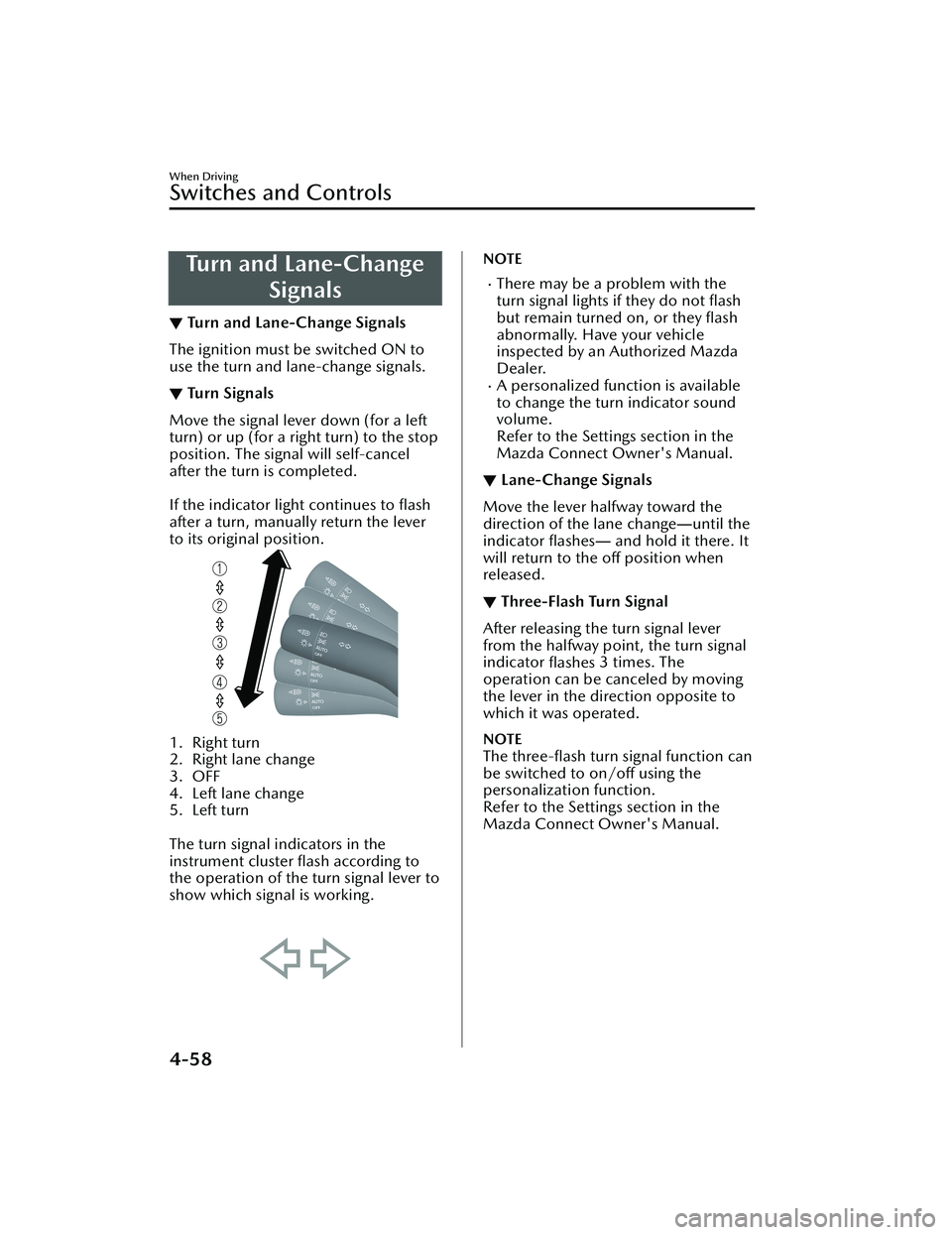
▼Tu r n S i g n a l s
Move the signal lever down (for a left
turn) or up (for a right turn) to the stop
position. The signal will self-cancel
after the turn is completed.
If the indicator light continues to flash
after a turn, manually return the lever
to its original position.
1. Right turn
2. Right lane change
3. OFF
4. Left lane change
5. Left turn
The turn signal indicators in the
instrument cluster flash according to
the operation of the turn signal lever to
show which signal is working.
NOTE
There may be a problem with the
turn signal lights if they do not flash
but remain turned on, or they flash
abnormally. Have your vehicle
inspected by an Authorized Mazda
Dealer.
A personalized function is available
to change the turn indicator sound
volume.
Refer to the Settings section in the
Mazda Connect Owner's Manual.
▼ Lane-Change Signals
Move the lever halfway toward the
direction of the lane change
―until the
indicator flashes― and hold it there. It
will return to the off position when
released.
▼ Three-Flash Turn Signal
After releasing the turn signal lever
from the halfway point, the turn signal
indicator
flashes 3 times. The
operation can be canceled by moving
the lever in the direction opposite to
which it was operated.
NOTE
The three-flash turn signal function can
be switched to on/off using the
personalization function.
Refer to the Settings section in the
Mazda Connect Owner's Manual.
When Driving
Switches and Controls
4-58
CX-30_8LD3-EA-22J_Edition1_new 2022-6-7 13:06:59
Page 207 of 595

Switch Posi-tion Wiper operation
MIST Operation while pulling up lev-
er
OFF Stop
INT Intermittent LO Low speedHI High speed
Variable-speed intermittent wipers
Set the lever to the intermittent
position and choose the interval timing
by rotating the switch.
Rotate the switch upward (FAST
direction) to shorten the interval time
of the wiper operation, and rotate the
switch downward (SLOW direction) to
lengthen it.
1. Switch
With auto-wiper control
1. Indicator light
Switch Posi- tion Wiper operation
MIST Operation while pulling up lev-
er
OFF Stop
AUTO
*1Auto control
LO Low speed HI High speed
*1 When the wiper lever is switched to the AUTO position, the indicator light turns on.
Auto-wiper control*
When the wiper lever is in the AUTO
position, the rain sensor senses the
amount of rainfall on the windshield
and turns the wipers on or off
automatically (off ―intermittent―low
speed ―high speed).
The sensitivity of the rain sensor can be
adjusted by turning the switch on the
wiper lever.
From the center position (normal),
rotate the switch upward (+ direction)
for higher sensitivity (faster response)
or rotate it downward (- direction) for
less sensitivity (slower response).
1. Switch
2. Higher sensitivity
3. Center position
4. Less sensitivity
When Driving
Switches and Controls
4-60*Some models.
CX-30_8LD3-EA-22J_Edition1_new 2022-6-7 13:06:59
Page 208 of 595

CAUTION
Do not shade the rain sensor by
adhering a sticker or a label on the
windshield. Otherwise the rain
sensor will not operate correctly.
When the ignition is switched ON
and the wiper lever is in the AUTO
position, the windshield wipers may
operate automatically in the
following cases:
The area of the windshield above
the rain sensor is touched or wiped
with a cloth.
The windshield or the rain sensor
area in the cabin is hit.
When the ignition is switched ON
and the wiper lever is in the AUTO
position, do not touch the
windshield or the windshield wipers
Otherwise, the windshield wipers
will operate automatically which
could catch your fingers or damage
the windshield wipers.
When removing ice or snow, or
cleaning the windshield, always
make sure the wiper lever is in the
OFF position.
NOTE
Switching the auto-wiper lever from
the OFF to the AUTO position while
driving activates the windshield
wipers once, after which they
operate according to the rainfall
amount.
The auto-wiper control may not
operate when the rain sensor
temperature is about -10 °C (14 °F)
or lower, or about 85 °C (185 °F) or
higher.
If the windshield is coated with
water repellent, the rain sensor may
not be able to sense the amount of
rainfall correctly and the auto-wiper
control may not operate properly.
If dirt or foreign matter (such as ice
or matter containing salt water)
adheres to the windshield above the
rain sensor, or if the windshield is
iced, it could cause the wipers to
move automatically. However, if the
wipers cannot remove this ice, dirt or
foreign matter, the auto-wiper
control will stop operation. In this
case, set the wiper lever to the low
speed position or high speed
position for manual operation, or
remove the ice, dirt or foreign matter
by hand to restore the auto-wiper
operation.
If the auto-wiper lever is left in the
AUTO position, the wipers could
operate automatically from the effect
of strong light sources,
electromagnetic waves, or infrared
light because the rain sensor uses an
optical sensor. It is recommended
that the auto-wiper lever be
switched to the OFF position other
than when driving the vehicle under
rainy conditions.
When Driving
Switches and Controls
4-61
CX-30_8LD3-EA-22J_Edition1_new 2022-6-7 13:06:59