ignition MAZDA CX30 2023 Owners Manual
[x] Cancel search | Manufacturer: MAZDA, Model Year: 2023, Model line: CX30, Model: MAZDA CX30 2023Pages: 595, PDF Size: 21.06 MB
Page 355 of 595

Cruise Control*
▼Cruise Control
With cruise control, you can set and
automatically maintain any speed of
more than about 30 km/h (19 mph).
WARNING
Do not use the cruise control under
the following conditions:
Using the cruise control under the
following conditions is dangerous and
could result in loss of vehicle control.
Hilly terrain
Steep inclines
Heavy or unsteady traffic
Slippery or winding roads
Similar restrictions that require
inconsistent speed
The vehicle speed may exceed the
set speed during sudden acceleration
or on steep down slopes.
In this case, depress the brake pedal
to adjust the vehicle speed.
▼ Cruise Control Switch
1. CANCEL switch
2. RES switch
3. Cruise switch
NOTE
If your Mazda has the following
steering switch, your Mazda is
equipped with the Mazda Radar
Cruise Control with Stop & Go
function (MRCC with Stop & Go
function) system.
Refer to Mazda Rada
r Cruise Control
with Stop & Go function (MRCC with
Stop & Go function) on page 4-127.
If the Mazda Radar Cruise Control with
Stop & Go function (MRCC with Stop
& Go function) is set to inoperable
using the personalization feature, the
system switches to the cruise control
function. In this case, the MRCC
functions as the cruise switch. In
addition, this personalization feature
setting is initialized by switching the
ignition OFF, and it turns back on
when the ignition is switched ON the
next time.
▼ Cruise Standby Indication
(White)/Cruise Set Indication
(Green)
Cruise standby Indication (White)
The indication turns on (white) when
the cruise control system is activated.
When Driving
Cruise Control
4-208*Some models.
CX-30_8LD3-EA-22J_Edition1_new
2022-6-7 13:06:59
Page 365 of 595
▼Switching to the Rear View Monitor Display
Shift the selector lever to reverse (R) po
sition with the ignition switched ON to
switch the display to the rear view monitor display.
NOTE
When the selector lever is shifted from reverse (R) position to another selector lever
position, the screen returns to the previous display.
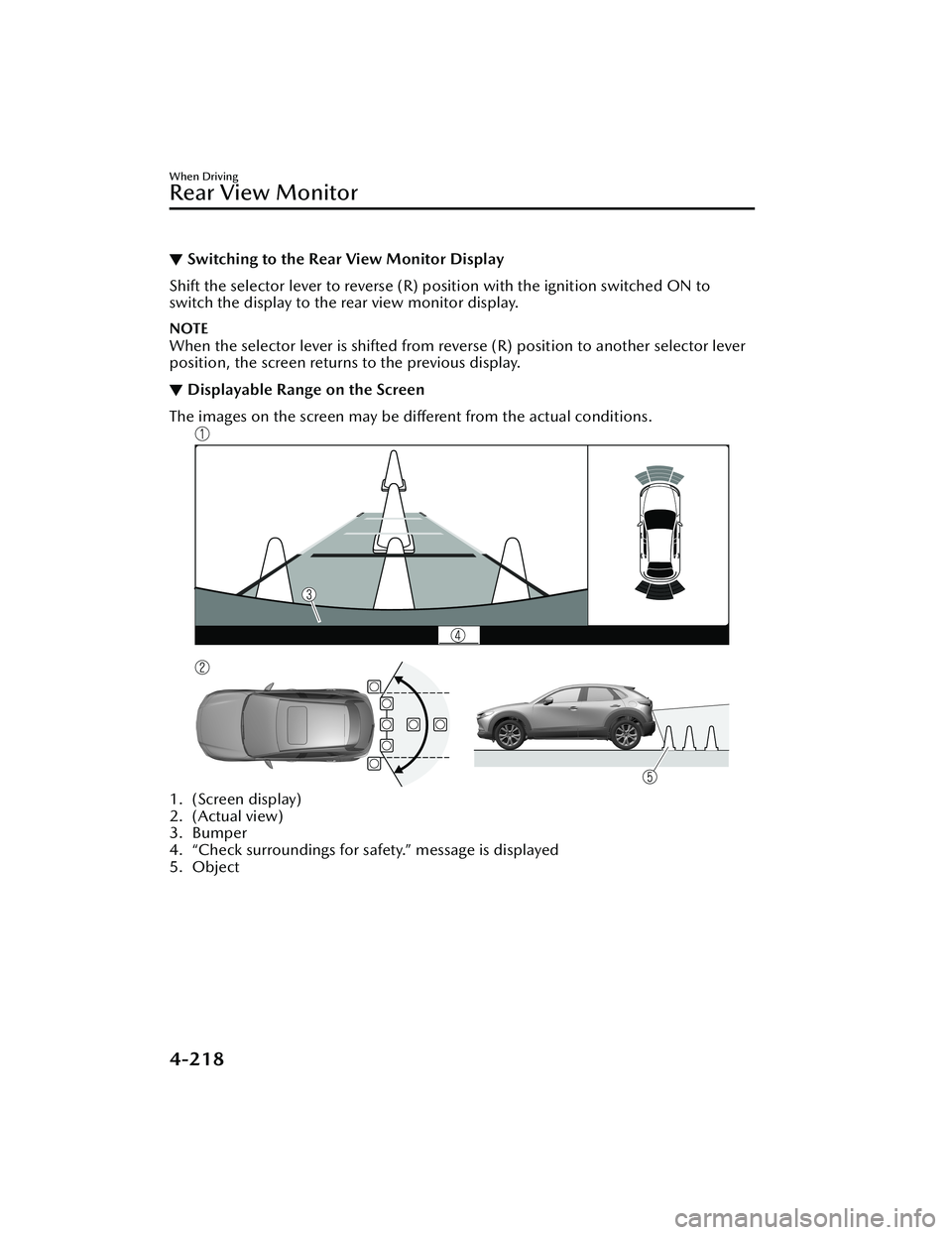
▼ Displayable Range on the Screen
The images on the screen may be different from the actual conditions.
1. (Screen display)
2. (Actual view)
3. Bumper
4. “Check surroundings for safety.” message is displayed
5. Object
When Driving
Rear View Monitor
4-218
CX-30_8LD3-EA-22J_Edition1_new
2022-6-7 13:06:59
Page 378 of 595

Pa r k i n g S e n s o r Sys te m*
▼Parking Sensor System
The parking sensors use ultrasonic sensors which detect obstructions around the
vehicle when the vehicle is driven at low speeds, such as during garage or parallel
parking , and a buzzer sound and detection indicator notify the driver of the
approximate distance from the vehicle to the surrounding obstruction.
WARNING
Do not rely completely on the park
ing sensor system and be sure to
confirm the
safety around your vehicle visually when driving:
This system can assist the driver in operating the vehicle in the forward and
backward directions while parking. The detection ranges of the sensors are limited,
therefore, driving the vehicle while relying only on the system may cause an
accident. Always confirm the safety around your vehicle visually when driving.
CAUTION
Do not install any accessories within the detection ranges of the sensors. It may
affect the system operation.
Depending on the type of obstruction and the surrounding conditions, the
detection range of a sensor may narrow, or the sensors may not be able to detect
obstructions.
When washing the vehicle, do not spra y highly pressurized water against the
sensor area, or rub it strongly. Otherwise, it may not be able to detect obstructions
correctly and the system may not operate normally.
NOTE
When the ignition is switched OFF, th e system status before it was turned
off is
maintained. For example, if the ignition is switched OFF while the parking sensor
is activated, the system will be activate d when the ignition is switched ON the
next time.
The system may not operate normally under the following conditions:
Mud, ice, or snow is adhering to the sensor area (Returns to normal operation
when removed).
The sensor area is frozen (Returns to normal operation when the ice is thawed).The sensor is covered by a hand.The sensor is excessively shocked.The vehicle is excessively tilted.Under extremely hot or cold weather conditions.The vehicle is driven on bumps, inclines, gravel, grating, or grass covered roads.
When Driving
Pa r k i n g S e n s o r Sys te m
*Some models.4-231
CX-30_8LD3-EA-22J_Edition1_new 2022-6-7 13:06:59
Page 387 of 595
Operating Tips
▼Operating Tips
Operate the climate control system
with the engine running.
To prevent the battery from being
discharged, do not leave the fan
control switch on for a long period of
time with the ignition switched ON
when the engine is not running.
(With i-stop)
The airflow amount may decrease
slightly while the i-stop function is
operating.
Clear all obstructions such as leaves,
snow and ice from the hood and the
air inlet in the cowl grille to improve
the system
efficiency.
Use the climate control system to
defog the windows and dehumidify
the air.
The recirculate mode should be used
when driving through tunnels or
while in a traffic jam, or when you
would like to shut off outside air for
quick cooling of the interior.
Use the outside air position for
ventilation or windshield defrosting.
If the vehicle has been parked in
direct sunlight during hot weather,
open the windows to let warm air
escape, then run the climate control
system.
Run the air conditioner about 10
minutes at least once a month to
keep internal parts lubricated.
Have the air conditioner checked
before the weather gets hot. Lack of
refrigerant may make the air
conditioner less efficient.
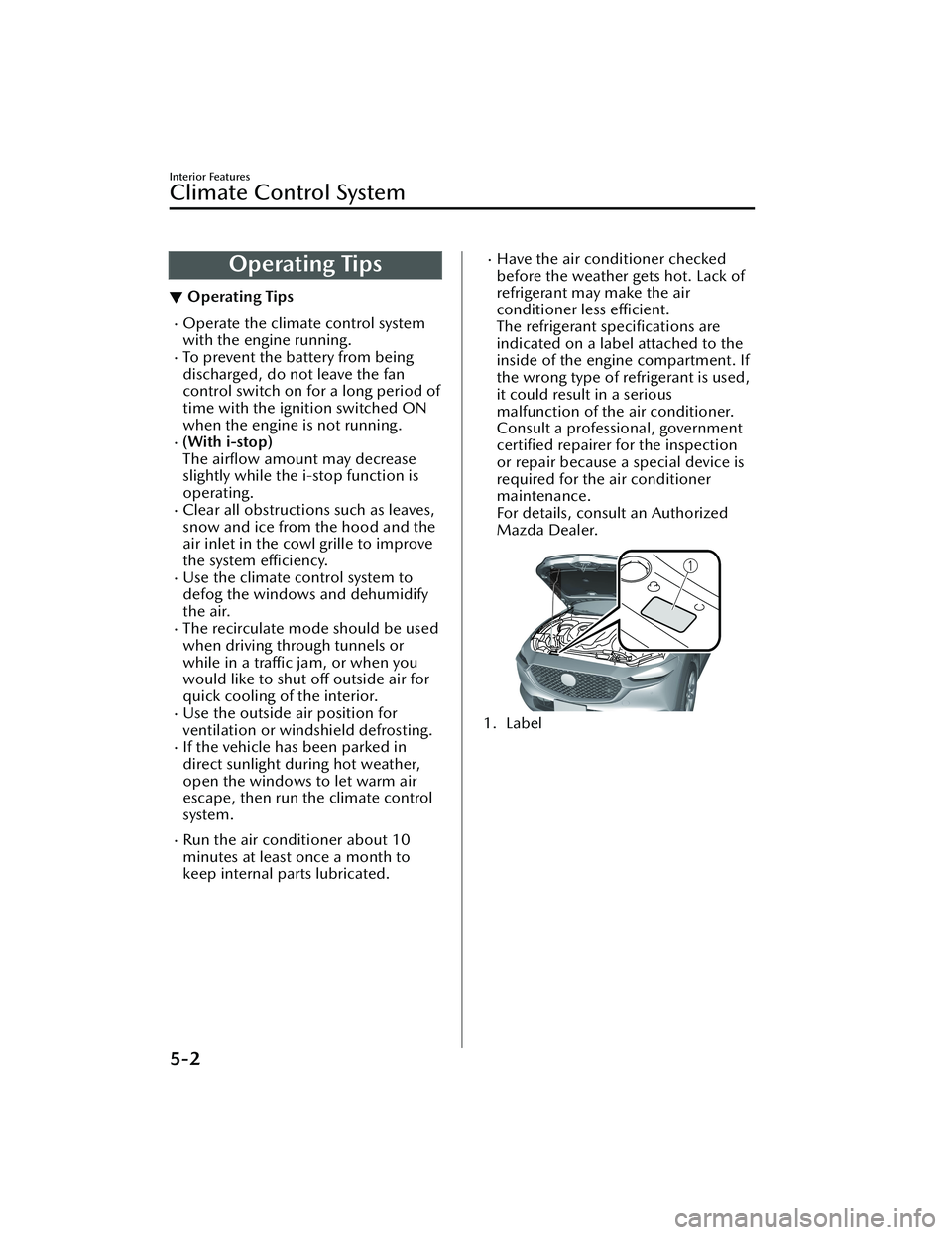
The refrigerant specifications are
indicated on a label attached to the
inside of the engine compartment. If
the wrong type of refrigerant is used,
it could result in a serious
malfunction of the air conditioner.
Consult a professional, government certified repairer for the inspection
or repair because a special device is
required for the air conditioner
maintenance.
For details, consult an Authorized
Mazda Dealer.
1. Label
Interior Features
Climate Control System
5-2
CX-30_8LD3-EA-22J_Edition1_new 2022-6-7 13:06:59
Page 392 of 595

Air intake selector switch
This switch controls the source of air
entering the vehicle.
Outside or recirculated air positions
can be selected. Press the switch to
select outside/recirculated air
positions.
Recirculated air position (indicator
light illuminated)
Outside air is shut off. Air within the
vehicle is recirculated. Use this
position when going through tunnels,
driving in congested traffic (high engine
exhaust areas), or when quick cooling
is desired.
Outside air position (indicator light
turned off)
Outside air is allowed to enter the
cabin. Use this position for ventilation
or windshield defrosting.
WARNING
Do not use the position (indicator
light turns on) in cold or rainy
weather:
Using the
position (indicator light
turns on) in cold or rainy weather is
dangerous as it will cause the windows
to fog up. Your vision will be
hampered, which could lead to a
serious accident.
NOTE
The recirculated air position is the
default position whenever the
ignition is switched ON, the climate
control system is on, and the outside
temperature exceeds about 73°F
(23 ℃).
To exit the default recirculated air
position, press the air intake selector
switch to select the outside air
position.
When the air intake selector switch is
set to the outside air position and
the outside temperature exceeds
about 73°F (23 ℃), the climate
control system may automatically
select the recirculated air position to
improve the efficiency of the climate
control system.
Windshield defroster switch
Press the switch to defrost the
windshield and front door windows.
Refer to Windshield Defrosting and
Defogging on page 5-9.
Rear window defogger switch
Press the rear window defogger switch
to defrost the rear window.
Refer to Rear Window Defogger on
page 4-63.
▼ Heating
1. Press the switch.
2. Set the air intake selector to the outside air position (indicator light
turns off).
3. Set the temperature control dial to
the hot position.
4. Set the fan control dial to the desired speed.
5. If dehumidified heating is desired, turn on the air conditioner.
NOTE
If the windshield fogs up easily, press
the
switch.If cooler air is desired at face level,
press the
switch and adjust the
temperature control dial to maintain
maximum comfort.
Interior Features
Climate Control System
5-7
CX-30_8LD3-EA-22J_Edition1_new 2022-6-7 13:06:59
Page 397 of 595

Air intake selector switch
Outside or recirculated air positions
can be selected. Press the switch to
select outside/recirculated air
positions.
Recirculated air position (
)
Outside air is shut off. Air within the
vehicle is recirculated. Use this
position when going through tunnels,
driving in congested traffic (high engine
exhaust areas), or when quick cooling
is desired.
Outside air position (
)
Outside air is allowed to enter the
cabin. Use this position for ventilation
or windshield defrosting.
WARNING
Do not recirculate the air in the cabin
during cold or rainy weather:
Recirculating the air in the cabin during
cold and rainy weather is dangerous as
it will cause the windows to fog up.
Your vision will be hampered, which
could lead to a serious accident.
NOTE
The recirculated air position is the
default position whenever the
ignition is switched ON, the climate
control system is on, and the outside
temperature exceeds about 73°F
(23 ℃).
To exit the default recirculated air
position, press the air intake selector
switch to select the outside air
position.
When the air intake selector switch is
set to the outside air position and
the outside temperature exceeds
about 73°F (23 ℃), the climate
control system may automatically
select the recirculated air position to
improve the efficiency of the climate
control system.
SYNC (Synchronized Temperature)
switch
Use the SYNC switch to change the
mode between the individual
operation (driver and passenger) and
interconnection (simultaneous)
modes.
Interconnection mode (indicator light
turns on)
The set temperature for the driver and
front passenger is controlled
simultaneously.
Individual operation mode (indicator
light turns off)
The set temperature can be controlled
individually for the driver and front
passenger.
Windshield defroster switch
Press the switch to defrost the
windshield and front door windows.
Refer to Windshield Defrosting and
Defogging on page 5-13.
Rear window defogger switch
Press the rear window defogger switch
to defrost the rear window.
Refer to Rear Window Defogger on
page 4-63.
Interior Features
Climate Control System
5-12
CX-30_8LD3-EA-22J_Edition1_new 2022-6-7 13:06:59
Page 424 of 595

Sunvisors
▼Sunvisors
Lower the sunvisor to block sunlight
from the front.
To block sunlight from the side, lower
and unhook the sunvisor, and then
swing it to the side.
▼
Side Extension Sunvisors*
The visor extender extends the
sunvisor's range of sun shading.
To u s e , p u l l i t o u t .
CAUTION
When moving the sunvisor, retract the
visor extender to it
s original position.
Otherwise, the visor extender could hit
the rearview mirror.
▼ Va n i t y M i r ro rs
To use the vanity mirror, lower the
sunvisor.
If your vehicle is equipped with a
vanity mirror light, it will illuminate
when you open the cover.
The vanity mirror will only illuminate in
the tilt range shown in the figure.
1. Vanity mirror light
2. On
3.
Off
NOTE
If a vanity mirror light is left on with the
ignition switched OFF, the light is
turned off automatically to prevent the
battery from being discharged.
The vanity mirror light can be turned
on again by doing any of the following
operations:
Opening/closing any door.Unlocking any door.Switching the ignition to ACC or ON.Switching an overhead light/front
map light on.
Interior Features
Interior Equipment
*Some models.5-39
CX-30_8LD3-EA-22J_Edition1_new 2022-6-7 13:06:59
Page 426 of 595

Map lights
Press the switch to illuminate the front
map lights, and then press the switch
again to turn them off.
NOTE
The front map lights will not turn off
even if the switch is pressed in the
following cases:
The overhead lights turn on by
operating the overhead light
ON/OFF switch (
).The overhead lights turn on in
conjunction with a door opening/
closing.
The illuminated entry system is on.
Luggage compartment light
The luggage compartment light is on
when the liftgate is open and off when
it is closed.
NOTE
Do not leave the liftgate open for long
periods while the engine is turned off.
Otherwise the battery power could be
depleted.
▼ Illuminated Entry System
The overhead lights turn on when any
of the following operations is done
with the overhead light switch in the
DOOR position.
The driver's door is unlocked with
the ignition is switched OFF.
The ignition is switched OFF with all
doors closed.
NOTE
The illumination time differs
depending on the operation.
The vehicle is equipped with a
battery saver. If an interior light is left
on with the ignition switched OFF,
the light turns off automatically after
a certain period of time has passed
to prevent battery depletion.
The operation of the illuminated
entry system can be changed.
Refer to the Settings section in the
Mazda Connect Owner's Manual.
The illuminated entry system does
not operate in conjunction with the
overhead lights when the overhead
lights are turned on using the
overhead light ON/OFF switch.
Interior Features
Interior Equipment
5-41
CX-30_8LD3-EA-22J_Edition1_new
2022-6-7 13:06:59
Page 427 of 595

Accessory Socket
▼Accessory Socket
Only use genuine Mazda accessories
or the equivalent requiring no greater
than 120 W (DC 12 V, 10 A).
The accessory socket can be used
regardless of whether the ignition is on
or off.
CAUTION
To prevent accessory socket damage
or electrical failure, pay attention to
the following:
Do not use accessories that require
more than 120 W (DC 12 V, 10 A).
Do not use accessories that are not
genuine Mazda accessories or the
equivalent.
Close the cover when the
accessory socket is not in use to
prevent foreign objects and liquids
from getting into the accessory
socket.
Correctly insert the plug into the
accessory socket.
Noise may occur on the audio
playback depending on the device
connected to the accessory socket.
Depending on the device connected
to the accessory socket, the vehicle's
electrical system may be affected,
which could cause the warning light
to illuminate. Disconnect the
connected device and make sure
that the problem is resolved. If the
problem is resolved, disconnect the
device from the socket and switch
the ignition off. If the problem is not
resolved, consult an Authorized
Mazda Dealer.
NOTE
To prevent discharging of the battery,
do not use the socket for long periods
with the engine off or idling.
Connecting the accessory socket
1. Open the lid.
2. Pass the connection plug cord
through the cutout of the console
and insert the plug into the
accessory socket.
1. Plug
Interior Features
Interior Equipment
5-42
CX-30_8LD3-EA-22J_Edition1_new 2022-6-7 13:06:59
Page 445 of 595

If you must run the engine while
working under the hood, make
certain that you remove all jewelry
(especially rings, bracelets, watches,
and necklaces) and all neckties,
scarves, and similar loose clothing
before getting near the engine or
cooling fan which may turn on
unexpectedly:
Working under the hood with the
engine running is dangerous. It
becomes even more dangerous when
you wear jewelry, loose clothing or
have long hair or a long beard.
Either can become entangled in
moving parts and result in injury.
Pull over to a safe location, then
switch the ignition off and make sure
the fan is not running before
attempting to work near the cooling
fan:
Working near the cooling fan when it is
running is dangerous. The fan could
continue running indefinitely even if
the engine has stopped and the engine
compartment temperature is high. You
could be hit by the fan and seriously
injured.
Do not leave items in the engine
compartment:
After you have finished checking or
doing servicing in the engine
compartment, do not forget and leave
items such as tools or rags in the
engine compartment.
Tools or other items left in the engine
compartment could cause engine
damage or a fire leading to an
unexpected accident.
Hood
▼ Hood
WARNING
Always check that the hood is closed
and securely locked:
A hood that is not closed and securely
locked is dangerous as it could fly open
while the vehicle is moving and block
the driver's vision which could result in
a serious accident.
▼
Opening the Hood
1. With the vehicle parked, pull the
release handle to unlock the hood.
2. Insert your hand into the hoodopening, slide the latch lever in the
direction of the arrow as shown in
the illustration, and lift up the
hood.
Maintenance and Care
Owner Maintenance
6-12
CX-30_8LD3-EA-22J_Edition1_new 2022-6-7 13:06:59