transmission MAZDA CX30 2023 Owner's Manual
[x] Cancel search | Manufacturer: MAZDA, Model Year: 2023, Model line: CX30, Model: MAZDA CX30 2023Pages: 595, PDF Size: 21.06 MB
Page 215 of 595

NOTE
Complete the programming within
30 seconds.
7. Return to the vehicle and firmly press and hold the Homelink
button, and then release it after
two seconds have passed. Repeat
the “ press/hold/release ” sequence
a second time, and, depending on
the brand of the garage door
opener (or other rolling code
equipped device), repeat this
sequence a third time to complete
the programming process.
Press the programmed HomeLink
button and make sure that the
HomeLink System operates.
8. If the status indicator arrows are flashing , refer to Garage Door
Two-Way Communication.
1. Indicator light
NOTE
To program the remaining two
HomeLink buttons, go back to Step 1
of Programming the HomeLink System
and repeat the procedure.
For questions or comments, please
contact HomeLink at
www.homelink.com or
www.youtube.com/
HomeLinkGentex , or the HomeLink
toll-free hotline at 1-800-355-3515
(for calls placed outside of the USA,
Canada, and Puerto Rico, international
rates will apply and may differ based
on landline or mobile phone).
▼ Gate operator/Canadian
Programming
Canadian radio-frequency laws require
transmitter signals to “time-out” (or
quit) after several seconds of
transmission
― which may not be long
enough for HomeLink to pick up the
signal during programming. Similar to
this Canadian law, some U.S. gate
operators are designed to “time-out”
in the same manner.
If you live in Canada or are having
difficulties programming a gate
operator by using the programming
procedures (regardless of where you
live), replace Step 3 of Programming
the HomeLink System with the
following:
NOTE
If programming a garage door opener
or gate operator, it is advised to unplug
the device during the “cycling” process
to prevent possible overheating.
While the indicator light is flashing in
amber, press the button on the
hand-held transmitter for 2 seconds
and release it repeatedly until the
indicator light changes from amber to
green.
Go back to Step 4 of Programming the
HomeLink System to complete the
procedure.
When Driving
Switches and Controls
4-68
CX-30_8LD3-EA-22J_Edition1_new 2022-6-7 13:06:59
Page 358 of 595
▼To Resume Cruising Speed at More
Than 30 km/h (19 mph)
If the cruise control system is
temporarily canceled (such as by
applying the brake pedal) and the
system is still activated, the most
recent set speed will automatically
resume when the RES switch is
pressed.
If vehicle speed is below 30 km/h (19
mph), increase the vehicle speed up to
30 km/h (19 mph) or more and press
the RES switch.
▼To Te m p o ra r i l y C a n c e l
To temporarily cancel the system, use
one of these methods:
Slightly depress the brake pedal.Press the CANCEL switch.
If the RES switch is pressed when the
vehicle speed is 30 km/h (19 mph) or
higher, the system reverts to the
previously set speed.
NOTE
If any of the fo llowing conditions
occur, the cruise control system is
temporarily canceled.
Even when the brake pedal is
slightly depressed.
The DSC is operating.There is a problem in the system.Any of the doors is opened.The driver's seat belt is unfastened.The parking brake is applied.The selector lever is in the P, N, or
R position.
When the cruise control system is
temporarily canceled by even one of
the applicable cancel conditions, the
speed cannot be re-set.
The cruise control cannot be
canceled while driving in manual
mode (selector lever shifted from D
to M position). Therefore, engine
braking will not be applied even if
the transmission is shifted down to a
lower gear. If deceleration is
required, lower the set speed or
depress the brake pedal.
▼ To D e a c t i va t e
Press the cruise switch again.
When Driving
Cruise Control
4-211
CX-30_8LD3-EA-22J_Edition1_new
2022-6-7 13:06:59
Page 472 of 595

No.FUSE RAT-
ING PROTECTED COMPONENT
F8 15 A Engine control system
F9 15 A Transmission control system
F10 15 A Engine control system
F11 7.5 A Air conditioner
F12 15 A Engine control system
F13 ――
F14 20 A Front seat warmer
*
F15――
F16 15 A For protection of various circuits
F17 ――
F18 15 A For protection of various circuits
F19 60 A Power steering system
F20 15 A Headlight (LH) 1
F21 15 A Headlight (RH) 1
F22 15 A Keyless system
F23 30 A ABS, Dynamic stability control system
F24 15 A Headlight (LH) 2
F25 15 A Headlight (RH) 2
F26 7.5 A On board diagnostics
F27 25 A For protection of various circuits
F28 25 A For protection of various circuits
F29 15 A Windshield washer
F30 15 A Accessory sockets
F31 15 A Horn
F32 15 A Headlights
F33 ――
F34 ――
F35 50A ABS, Dynamic stability control system
F36 ――
F37 40 A Rear window defogger
F38 50 A For protection of various circuits
F39 ――
F40 40 A Air conditioner
Maintenance and Care
Owner Maintenance
*Some models.6-39
CX-30_8LD3-EA-22J_Edition1_new 2022-6-7 13:06:59
Page 504 of 595

To w i n g D e s c r i p t i o n
▼Towing Description
We recommend that towing be done
only by an Authorized Mazda Dealer
or a commercial tow-truck service.
Proper lifting and towing are necessary
to prevent damage to the vehicle.
Particularly when towing an AWD
vehicle, where all the wheels are
connected to the drive train, proper
transporting of the vehicle is absolutely
essential to avoid damaging the drive
system. Government and local laws
must be followed.
1. Wheel dollies
A towed FWD vehicle should have its
drive wheels (front wheels)
off the
ground. If excessive damage or other
conditions prevent this, use wheel
dollies.
When towing a FWD vehicle with the
rear wheels on the ground, release the
parking brake.
Refer to Electric Parking Brake (EPB) on
page 4-72.
A towed AWD vehicle must have all its
wheels off the ground.
WARNING
Always tow an AWD vehicle with all
four wheels
off the ground:
Towing an AWD vehicle with either the
front or rear wheels on the ground is
dangerous as the drive train could be
damaged, or the vehicle could trail
away from the tow truck and cause an
accident. If the drive train has been
damaged, transport the vehicle on a
flatbed truck.
CAUTION
Do not tow the vehicle pointed
backward with driving wheels on the
ground. This may cause internal
damage to the transmission.
Do not tow with sling-type
equipment. This could damage your
vehicle. Use wheel-lift or flatbed
equipment.
If Trouble Arises
Emergency Towing
7-19
CX-30_8LD3-EA-22J_Edition1_new 2022-6-7 13:06:59
Page 512 of 595

WARNING
If the check engine light turns on, do
not disconnect the battery cables.
If the battery cables are disconnected
and then reconnected, the engine
could be damaged and catch on fire.
▼i-stop Warning Indication/
Warning Light (Amber)*
The light turns
on/flashes
continuously if the system has a
problem.
Have the vehicle inspected by an
Authorized Mazda Dealer.
▼ Automatic Transmission Warning
Indication/Warning Light
The indication/light illuminates when
the transmission has a problem.
CAUTION
If the automatic transmission warning
indication/light illuminates, the
transmission has an electrical problem.
Continuing to drive your Mazda in this
condition could cause damage to your
transmission. Consult an Authorized
Mazda Dealer as soon as possible.
▼
AWD Warning Indication/
Warning Light*
“AWD Malfunction. Front Wheel
Drive Only. Have the Vehicle
Inspected” is displayed/When the
light is turned on
The indication is displayed/the light
turns on under the following
conditions. The system may have a
malfunction. Have the vehicle checked
at an Authorized Mazda Dealer.
When there is a malfunction in the
AWD system.
“Excessive AWD System Load. Drive
Slowly Until Warning Light Turns Off.
Vehicle Now in Front Wheel Drive” is
displayed/When the light is flashing
The indication is displayed/the light
flashes under the following conditions.
Park the vehicle in a safe place and
check that the warning indication light
turns off/ the warning light stops
flashing, and then drive the vehicle.
Contact an Authorized Mazda Dealer
if the indication is continuously
displayed.
When the differential oil temperature
is excessively high.
When there is a large difference
between the front and rear wheel
rotation, such as when trying to
remove the vehicle from mud.
If Trouble Arises
Warning/Indicator Lights and Warning Sounds
*Some models.7-27
CX-30_8LD3-EA-22J_Edition1_new 2022-6-7 13:06:59
Page 514 of 595
Do not ignore the TPMS warning light
when it is turned on or flashing:
Continuing to drive the vehicle while
ignoring the illumination/flashing of
the TPMS warning light is dangerous
because a tire may burst which could
lead to an accident. Take appropriate
measures as soon as possible.
▼KEY Warning Indication/Warning
Light (Red)
“Keyless Entry System Malfunction.
Have the Vehicle Inspected” is
displayed
This message is displayed if the
advanced keyless entry & push button
start system has a problem.
Contact an Authorized Mazda Dealer.
CAUTION
If the message is indicated, or the push
button start indicator light (amber)
flashes, the engine may not start. If the
engine cannot be started, try starting it
using the emergency operation for
starting the engine, and have the
vehicle inspected at an Authorized
Mazda Dealer as soon as possible.
Refer to Emergency Operation for
Starting the Engine on page 4-9.
“Key Not Detected” is displayed
If the presence of the key cannot be
detected (dead battery, battery
malfunction, no key), it is displayed
when the driver attempts to start the
engine (push button start operation,
brake pedal depression).
Displayed when it is determined that
a key that was in the vehicle has
been removed from the vehicle. (Key
taken out warning. Other than
IG-OFF).
▼ Security Indicator Light
If the security indicator light flashes
continuously while you are driving , do
not shut off the engine. Go to an
Authorized Mazda Dealer and have it
checked. If the engine is shut off while
the indicator light is flashing , you will
not be able to restart it.
Make sure the key is within the
operational range for signal
transmission. Switch the ignition off,
and then restart the engine. If the
engine does not start after 3 or more
tries, contact an Authorized Mazda
Dealer.
NOTE
Because the electronic codes are reset
when the immobilizer system is
repaired, the keys are needed. Make
sure to bring all the keys to an
Authorized Mazda Dealer so that they
can be programmed.
If Trouble Arises
Warning/Indicator Lights and Warning Sounds
7-29
CX-30_8LD3-EA-22J_Edition1_new
2022-6-7 13:06:59
Page 522 of 595

Display*1*2*3ContentAction to be taken
Gear Selector Lever Not
in Park Displays when the push button start
is pressed while the selector lever is
in a position other than P, and the ig-
nition is switched to ACC. Shift the selector lever to the P posi-
tion and then switch the ignition OFF.
Excessive Transmission
Temperature. Drive
Slowly This message is indicated when the
internal temperature of the automatic
transmission is high.
Drive slowly to reduce load on the
automatic transmission.
Excessive Transmission
Temp. Stop Vehicle in a
Safe Location This message is indicated when the
automatic transmission
fluid temper-
ature is abnormally high. Park the vehicle in a safe place imme-
diately and contact an Authorized
Mazda Dealer.
Battery Saving Mode.
Drive Vehicle to Charge
Battery This message is indicated when the
power consumption exceeds a cer-
tain amount such as by repeatedly
opening/closing the doors or the lift-
gate when the ignition is switched
OFF.
Some of the functions are restricted
to reduce power consumption. Drive the vehicle for 5 minutes or
longer to charge the battery. The
warning message will clear just after
starting the engine.
Shift Into Park Before Ex-
iting Vehicle This message is indicated when the
driver’s door is opened with the se-
lector lever in a position other than
the P position. Close the driver’s door or shift the se-
lector lever to the P position.
*1 A pop-up is displayed when a warning occurs.*2 One screen displays four rows. If the entire message cannot be displayed on the screen, it switches to
another screen.
*3 The displayed content may differ from the actual vehicle.
If Trouble Arises
Warning/Indicator Lights and Warning Sounds
7-37
CX-30_8LD3-EA-22J_Edition1_new 2022-6-7 13:06:59
Page 527 of 595

▼Electric Parking Brake (EPB)
Warning Beep
The warning buzzer is activated under
the following conditions:
The vehicle is driven with the parking
brake applied.
The Electric Parking Brake (EPB)
switch is pulled while the vehicle is
driven.
You attempt to start driving the
vehicle while the conditions for
releasing the Electric Parking Brake
(EPB) automatically have not been
met.
▼AUTOHOLD Warning Beep
Warning light flashes/message is
displayed and beep sound is activated
simultaneously for about 5 seconds
when using AUTOHOLD function or
when AUTOHOLD switch is operated.
Because a problem with AUTOHOLD
function has occurred, AUTOHOLD
function does not operate even if
AUTOHOLD switch is operated.
If the warning light flashes/message is
displayed and the beep sound is
activated simultaneously, have your
vehicle inspected at an Authorized
Mazda Dealer.
▼
Vehicle Problem Warning Beep
If any of the following problems occur,
a warning beep is activated. Check the
information regarding the warning
indication in the instrument cluster or
on the center display.
Automatic transmission problemIncrease in automatic transmission
internal temperature
M Hybrid problemBrake fluid amount decreaseEngine oil level sensor problemElectric Parking Brake (EPB) problem
Engine hydraulic pressure decreaseEngine coolant temperature increaseEngine system problem
▼ Blind Spot Monitoring (BSM)
System Warning Beep*
The Blind Spot Monitoring (BSM)
warning beep operates when the turn
signal lever is operated to the side
where the Blind Spot Monitoring
(BSM) warning light is illuminated.
▼Front Cross Traffic Alert (FCTA)
Warning Beep*
The Front Cross Traffic Alert (FCTA)
warning beep is activated if there is a
possibility of collision with a vehicle
approaching from the front on the left
and right sides of the vehicle.
▼Rear Cross
Tra ffi c Alert (RCTA)
Warning Beep*
The Rear Cross Traffic Alert (RCTA)
warning beep is activated if there is a
possibility of collision with a vehicle
approaching from the rear on the left
and right sides of the vehicle.
▼ Lane Departure Warning Sound*
While the system is operating, if the
system determines that the vehicle may
depart from the lane, it sounds a
warning sound.
NOTE
The volume of the Lane Departure
Warning System (LDWS) warning
sound can be changed.
Refer to the Settings section in the
Mazda Connect Owner's Manual.
If Trouble Arises
Warning/Indicator Lights and Warning Sounds
7-42*Some models.
CX-30_8LD3-EA-22J_Edition1_new
2022-6-7 13:06:59
Page 564 of 595
WARNING
Never Exceed Axle Weight Rating
Limits:
Exceeding the Safety Certification
Label axle weight rating limits is
dangerous and could result in death or
serious injury as a result of substandard
vehicle handling, performance, engine,
transmission and/or structural
damage, serious damage to the
vehicle, or loss of control.
Always keep the vehicle within the axle
weight rating limits.
GCW
GCW (Gross Combination Weight) is
the weight of the loaded vehicle
(GVW).
GCWR (Gross Combination Weight
Rating) is the maximum allowable
weight of the vehicle - including all
cargo and passengers - that the vehicle
can handle without risking damage.
The GCW must never exceed the
GCWR.
WARNING
Never Exceed GVWR or GAWR
Specifications:
Exceeding the GVWR or the GAWR
specified on the
certification label is
dangerous. Exceeding any vehicle
rating limitation could result in a
serious accident, injury, or damage to
the vehicle.
Do not use replacement tires with
lower load carrying capacities than the
originals because they may lower the
vehicle's GVWR and GAWR
limitations. Replacement tires with a
higher limit than th e originals do not
increase the GVWR and GAWR
limitations.
Never exceed the GVWR or the GAWR
specified on the certification label.
Customer Information and Reporting Safety Defects
Tire Information (U.S.A.)
8-33
CX-30_8LD3-EA-22J_Edition1_new 2022-6-7 13:06:59
Page 580 of 595
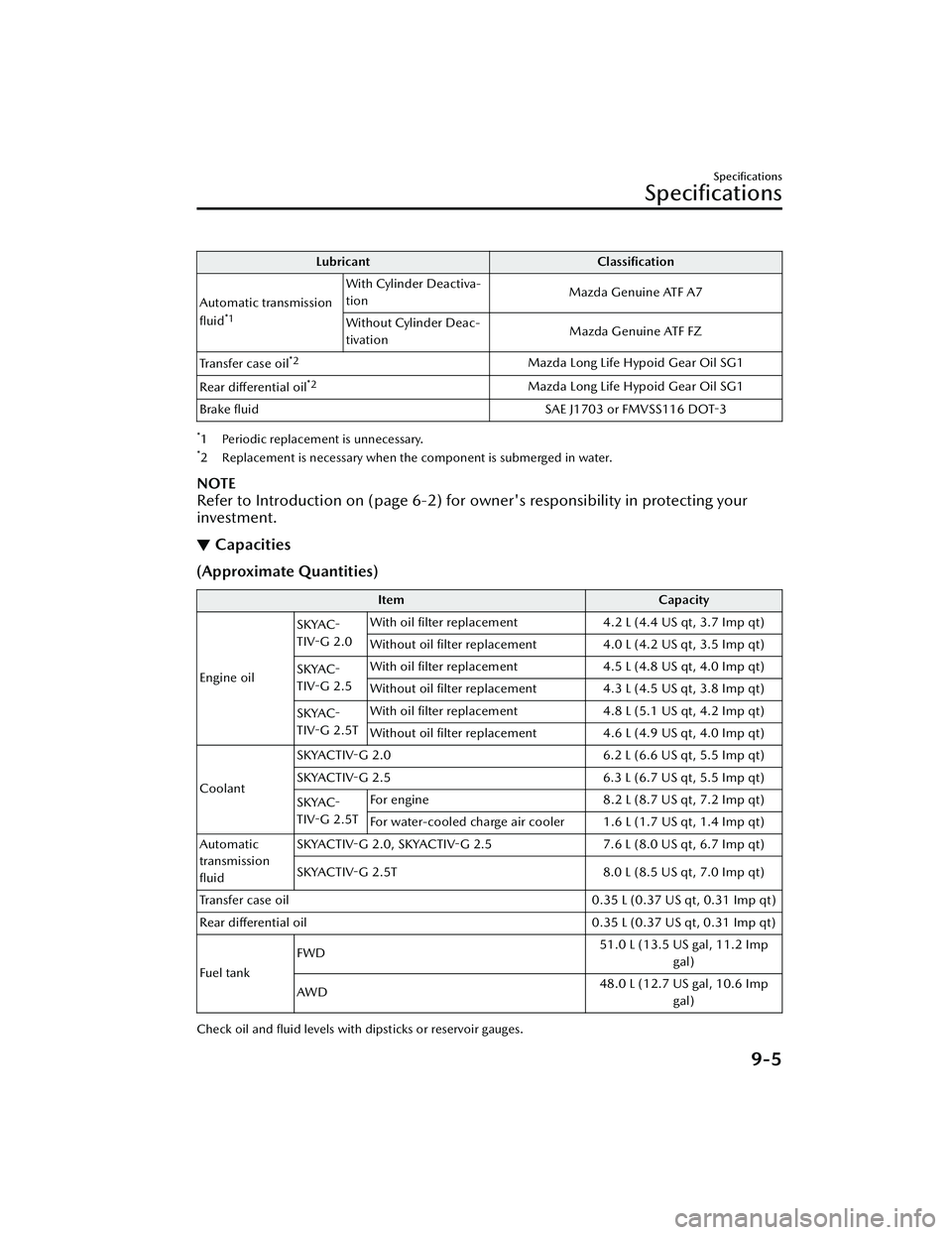
LubricantClassification
Automatic transmission
fluid
*1
With Cylinder Deactiva-
tion Mazda Genuine ATF A7
Without Cylinder Deac-
tivation Mazda Genuine ATF FZ
Tra n s f e r c a s e o i l
*2Mazda Long Life Hypoid Gear Oil SG1
Rear differential oil
*2Mazda Long Life Hypoid Gear Oil SG1
Brake fluid SAE J1703 or FMVSS116 DOT-3
*1 Periodic replacement is unnecessary.*2 Replacement is necessary when the component is submerged in water.
NOTE
Refer to Introduction on (page 6-2) for owner's responsibility in protecting your
investment.
▼ Capacities
(Approximate Quantities)
Item
Capacity
Engine oil SKYAC-
TIV-G 2.0
With oil filter replacement
4.2 L (4.4 US qt, 3.7 Imp qt)
Without oil filter replacement 4.0 L (4.2 US qt, 3.5 Imp qt)
SKYAC-
TIV-G 2.5 With oil filter replacement
4.5 L (4.8 US qt, 4.0 Imp qt)
Without oil filter replacement 4.3 L (4.5 US qt, 3.8 Imp qt)
SKYAC-
TIV-G 2.5T With oil filter replacement
4.8 L (5.1 US qt, 4.2 Imp qt)
Without oil filter replacement 4.6 L (4.9 US qt, 4.0 Imp qt)
Coolant SKYACTIV-G 2.0
6.2 L (6.6 US qt, 5.5 Imp qt)
SKYACTIV-G 2.5 6.3 L (6.7 US qt, 5.5 Imp qt)
SKYAC-
TIV-G 2.5T For engine
8.2 L (8.7 US qt, 7.2 Imp qt)
For water-cooled charge air cooler 1.6 L (1.7 US qt, 1.4 Imp qt)
Automatic
transmission
fluid SKYACTIV-G 2.0, SKYACTIV-G 2.5
7.6 L (8.0 US qt, 6.7 Imp qt)
SKYACTIV-G 2.5T 8.0 L (8.5 US qt, 7.0 Imp qt)
Transfer case oil 0.35 L (0.37 US qt, 0.31 Imp qt)
Rear differential oil 0.35 L (0.37 US qt, 0.31 Imp qt)
Fuel tank FWD
51.0 L (13.5 US gal, 11.2 Imp
gal)
AWD 48.0 L (12.7 US gal, 10.6 Imp
gal)
Check oil and fluid levels with dipsticks or reservoir gauges.
Specifications
Specifications
9-5
CX-30_8LD3-EA-22J_Edition1_new 2022-6-7 13:06:59