automatic MAZDA CX30 2023 Manual PDF
[x] Cancel search | Manufacturer: MAZDA, Model Year: 2023, Model line: CX30, Model: MAZDA CX30 2023Pages: 595, PDF Size: 21.06 MB
Page 233 of 595

Dynamic Stability Control(DSC)
▼Dynamic Stability Control (DSC)
The Dynamic Stability Control (DSC)
automatically controls braking and
engine torque in conjunction with
systems such as ABS and TCS to help
control side slip when driving on
slippery surfaces, or during sudden or
evasive maneuvering, enhancing
vehicle safety.
Refer to ABS (page 4-83) and TCS
(page 4-84).
DSC operation is possible at speeds
greater than 20 km/h (12 mph).
The warning light turns on when the
system has a malfunction.
Refer to TCS/DSC Indication/
Indicator Light (Turns on) on page
7-28.
WARNING
Do not rely on the Dynamic Stability
Control as a substitute for safe
driving:
The Dynamic Stability Control (DSC)
cannot compensate for unsafe and
reckless driving , excessive speed,
tailgating (following another vehicle
too closely), and hydroplaning
(reduced tire friction and road contact
because of water on the road surface).
You can still have an accident.
CAUTION
The DSC may not operate correctly
unless the following are observed:
Use tires of the correct size
specified for your Mazda on all 4
wheels.
Use tires of the same
manufacturer, brand and tread
pattern on all 4 wheels.
Do not mix worn tires.
The DSC may not operate correctly
when tire chains are used or a
temporary spare tire is installed
because the tire diameter changes.
NOTE
If there is a problem with the DSC, the
Hill Launch Assi st (HLA) may not
operate.
Refer to Hill Launch Assist (HLA) on
page 4-81.
▼ TCS/DSC Indicator Light
This indicator light stays on for a few
seconds when the ignition is switched
ON. If the TCS or DSC is operating,
the indicator light flashes.
If the light stays on, the TCS, DSC or
the brake assist system may have a
malfunction and they
may not operate
correctly. Take your vehicle to an
Authorized Mazda Dealer.
When Driving
ABS/TCS/DSC/Off-Road Traction Assist
4-86
CX-30_8LD3-EA-22J_Edition1_new
2022-6-7 13:06:59
Page 245 of 595

i-ACTIVSENSE OFF switch
i-ACTIVSENSE OFF symbol (Warning/
risk avoidance support system)
If the i-ACTIVSENSE OFF switch is
pressed again, the systems return to
their original operation status and the
i-ACTIVSENSE OFF symbol (Warning/
risk avoidance support system) turns
off.
If the ignition is switched OFF while
you have canceled the systems using
the i-ACTIVSENSE OFF switch, the
systems are automatically enabled the
next time the ignition is switched ON.
However, if the systems are canceled
using the personalization features, the
systems are not automatically enabled.
NOTE
You can select systems you want to
cancel using the personalization
features.
Refer to the Settings section in the
Mazda Connect Owner's Manual.
Adaptive Front LightingSystem (AFS)
*
▼Adaptive Front Lighting System
(AFS)
The adaptive front lighting system
(AFS) automatically adjusts the
headlight beams to the left or right in
conjunction with the operation of the
steering wheel after the headlights
have been turned on and the vehicle
speed is about 2 km/h (2 mph) or
higher.
A system malfunction or operation
conditions are indicated by a warning.
Refer to Exterior Light Warning
Indication/Warning Light on page
7-30.
NOTE
The Adaptive Front Lighting System
(AFS) can be switched to on/off using
the personalization function.
Refer to the Settings section in the
Mazda Connect Owner's Manual.
When Driving
i-ACTIVSENSE
4-98*Some models.
CX-30_8LD3-EA-22J_Edition1_new
2022-6-7 13:06:59
Page 246 of 595

High Beam ControlSystem (HBC)
*
▼ High Beam Control System (HBC)
The HBC determines the conditions in
front of the vehicle using the Forward
Sensing Camera (FSC) while driving in
darkness to automatically switch the
headlights between high and low
beams.
Refer to Forward Sensing Camera
(FSC) on page 4-197.
While driving the vehicle at a speed of
about 30 km/h (19 mph) or more, the
headlights are switched to high beams
when there are no vehicles ahead or
approaching in the opposite direction.
The system switches the headlights to
low beams when one of the following
occurs:
The system detects a vehicle or the
headlights/lights of a vehicle
approaching in the opposite
direction.
The vehicle is driven on roads lined
with streetlamps or on roads in
well-lit cities and towns.
The vehicle is driven at less than
about 20 km/h (12 mph).
The headlight high-beam indicator
light turns on while the high beams
are on.
1. Forward Sensing Camera (FSC)*1
*1 The recognition distance of the Forward
Sensing Camera (FSC) varies according to
the surrounding conditions.
The warning light turns on when the
system has a malfunction.
Refer to High Beam Control System
(HBC) Warning Indication/Warning
Light (Amber) on page 7-30.
CAUTION
Do not adjust the vehicle height,
modify the headlight units, or
remove the camera, otherwise the
system will not operate normally.
Do not rely excessively on the HBC
and drive the vehicle while paying
sufficient attention to safety. Switch
the headlights between the high
beams and low beams manually if
necessary.
NOTE
The timing in which the system
switches the headlights changes under
the following conditions. If the system
does not switch the headlights
appropriately, manually switch
between high and low beams
according to the visibility as well as
road and traffic conditions.
When there are sources of light in
the area such as streetlamps,
illuminated signboards, and traffic
signals.
When there are reflective objects in
the surrounding area such as
reflective plates and signs.
When visibility is reduced under rain,
snow and foggy conditions.
When driving on roads with sharp
turn or hilly terrain.
When the headlights/rear lamps of
vehicles in front of you or in the
opposite lane are dim or not
illuminated.
When Driving
i-ACTIVSENSE
*Some models.4-99
CX-30_8LD3-EA-22J_Edition1_new 2022-6-7 13:06:59
Page 247 of 595

When there is insufficient darkness
such as at dawn or dusk.
When the luggage compartment is
loaded with heavy objects or the rear
passenger seats are occupied.
When visibility is reduced due to a
vehicle in front of you spraying water
from its tires onto your windshield.
▼To Operate the System
The HBC operates to switch the
headlights automatically between high
and low beams after the ignition is
switched ON and the headlight switch
is in the AUTO and low beam position.
The HBC determines that it is dark
based on the brightness of the
surrounding area. At the same time,
the HBC indicator light (green) in the
instrument cluster illuminates.
NOTE
Operation of the HB
C function can be
disabled.
Refer to the Settings section in the
Mazda Connect Owner's Manual.
▼ Manual Switching
Switching to low beams
Switch the headlight switch to the
position, or press the high beam
control switch.
The HBC indicator light (green) turns
off.
1. High beam control switch
If the HBC is turned off using the high
beam control switch, press the high
beam control switch again to turn the
HBC back on.
Switching to high beams
Shift the lever to the high beam
position.
The HBC indicator light (green) turns
off and the headlight high-beam
indicator light is illuminated.
When Driving
i-ACTIVSENSE
4-100
CX-30_8LD3-EA-22J_Edition1_new
2022-6-7 13:06:59
Page 250 of 595
When temporarily canceling the
system
The LDWS goes on standby in the
following cases: The LDWS operation
is automatically restored when the
system's operation conditions are met.
The system cannot detect white
(yellow) lane lines.
The vehicle speed is less than about
56 km/h (35 mph).
The turn signal lever is operated.The accelerator pedal is depressed.The steering wheel is operated.The brake pedal is operated.
The function is temporarily stopped.
The LDWS stops functioning in the
following cases:
The temperature in the forward
sensing camera (FSC) is too high or
too low.
The windshield around the forward
sensing camera (FSC) is foggy.
The windshield around the forward
sensing camera (FSC) is blocked by
an obstruction, causing poor forward
visibility.
Strong light (such as sunlight, or
headlights (high-beam) of
on-coming vehicles) is directed at
the forward sensing camera (FSC).
System malfunction
If there is a problem with the system,
the i-ACTIVSENSE status symbol
(warning/risk avoidance support
system) (white) and the i-ACTIVSENSE
warning indication/warning light on
the multi-information display turns on
and a message is indicated.
Refer to i-ACTIVSENSE Status Symbol
(Warning/Risk Avoidance Support
System) on page 4-96.
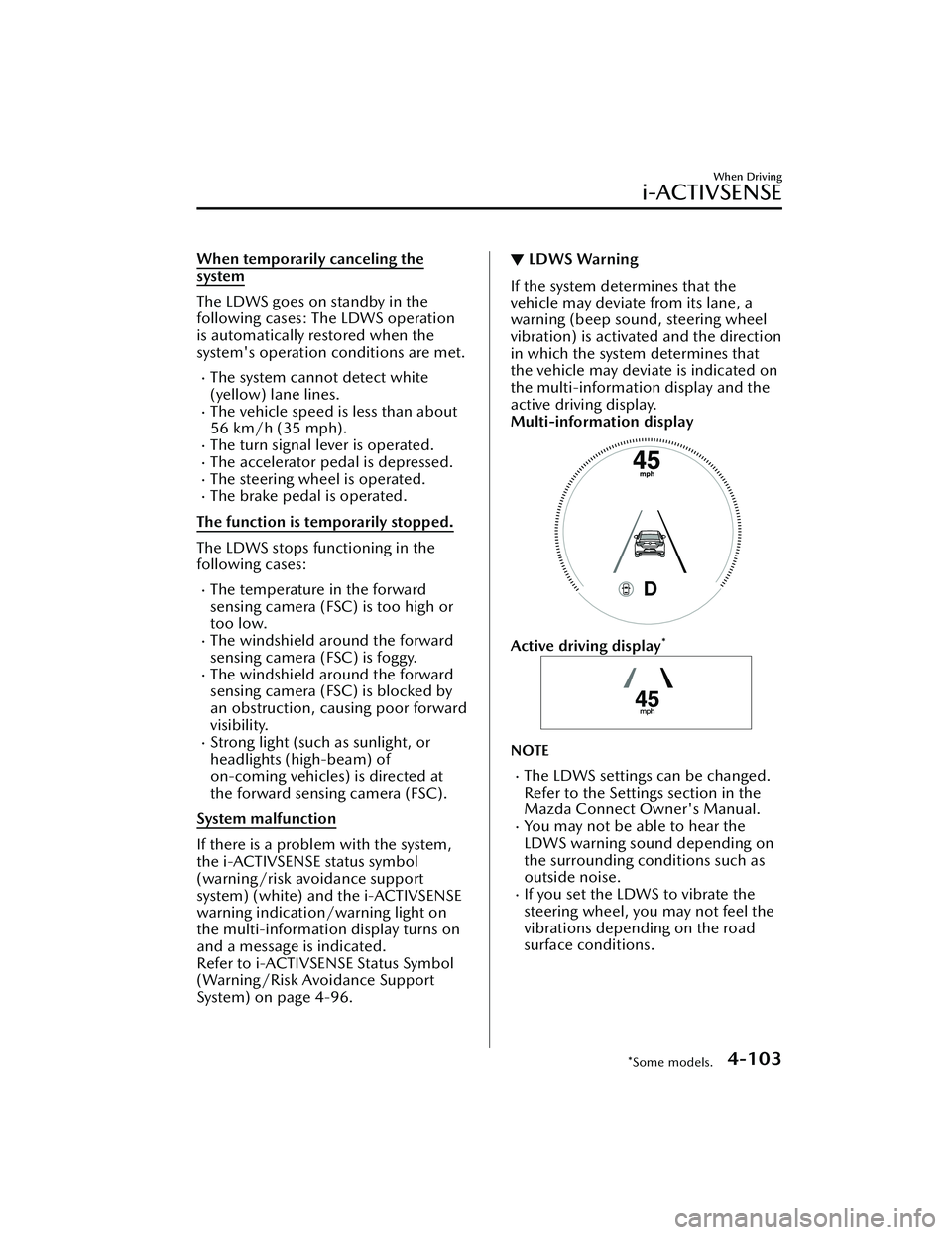
▼ LDWS Warning
If the system determines that the
vehicle may deviate from its lane, a
warning (beep sound, steering wheel
vibration) is activated and the direction
in which the system determines that
the vehicle may deviate is indicated on
the multi-information display and the
active driving display.
Multi-information display
Active driving display*
NOTE
The LDWS settings can be changed.
Refer to the Settings section in the
Mazda Connect Owner's Manual.
You may not be able to hear the
LDWS warning sound depending on
the surrounding conditions such as
outside noise.
If you set the LDWS to vibrate the
steering wheel, you may not feel the
vibrations depending on the road
surface conditions.
When Driving
i-ACTIVSENSE
*Some models.4-103
CX-30_8LD3-EA-22J_Edition1_new
2022-6-7 13:06:59
Page 251 of 595

▼Canceling the System
The LDWS can be set to inoperable.
(If only the LDWS is turned
off)
Refer to the Settings section in the
Mazda Connect Owner's Manual.
(If the LDWS is turned off by
operating the i-ACTIVSENSE OFF
switch)
Refer to i-ACTIVSENSE OFF Switch
on page 4-97.
NOTE
If the ignition is switched OFF while
you have canceled the system using the
i-ACTIVSENSE OFF switch, the system
is automatically enabled the next time
the ignition is switched ON. However,
if the system is canceled using the
personalization features, the system is
not automatically enabled.
Blind Spot Monitoring
(BSM)
*
▼Blind Spot Monitoring (BSM)
The BSM is designed to assist the driver
in checking the area to the rear of the
vehicle on both sides during lane
changes by notifying the driver of the
presence of vehicles approaching from
the rear in an adjacent lane.
BSM operation
The BSM detects vehicles approaching
from the rear while traveling in the
forward direction at a speed of 10
km/h (6.3 mph) or faster and notifies
the driver by turning on the BSM
warning indicator light and displaying
the vehicle detection screen.
If the turn signal lever is operated to
signal a turn in the direction in which
the BSM warning indicator light is
illuminated while the approaching
vehicle is detected, the BSM
notifies
the driver of possible danger flashing
on the BSM warning indicator light,
and by activating the warning sound
and the warning screen indicator
display.
The detection area on this system
covers the driving lanes on both sides
of the vehicle and from the rear part of
the front doors to about 50 m (164 ft)
behind the vehicle.
1. Your vehicle
When Driving
i-ACTIVSENSE
4-104*Some models.
CX-30_8LD3-EA-22J_Edition1_new 2022-6-7 13:06:59
Page 255 of 595

Function for canceling illumination
dimmer
If the BSM warning indicator lights turn
on when the parking lights are turned
on, the brightness of the BSM warning
indicator lights is dimmed.
If the BSM warning indicator lights are
difficult to see due to glare from
surrounding brightness when traveling
on snow-covered roads or under foggy
conditions, press the dimmer
cancellation button to cancel the
dimmer and increase the brightness of
BSM warning indicator lights when
they turn on.
Refer to Dashboard Illumination on
page 4-24.
Display indicator
The detected approaching vehicle and
warning are displayed in the
multi-information display and active
driving display.
Multi-information Display
Active Driving Display*
The detected direction is displayed
with a detection indicator (white)
when an approaching vehicle is
detected. In addition, if the turn signal
lever is operated to signal a lane
change while the vehicle is detected,
the display changes the color (amber)
of the warning indicator.
BSM warning beep
The BSM warning beep is activated
simultaneously with the flashing of a
BSM warning indicator light.
▼Canceling Operation of Blind Spot
Monitoring (BSM)
The BSM system can be set to
inoperable.
(If only the BSM is turned off)
Refer to the Settings section in the
Mazda Connect Owner's Manual.
(If the BSM is turned off by
operating the i-ACTIVSENSE OFF
switch)
Refer to i-ACTIVSENSE OFF Switch
on page 4-97.
NOTE
If the ignition is switched OFF while
you have canceled the system using the
i-ACTIVSENSE OFF switch, the system
is automatically enabled the next time
the ignition is switched ON. However,
if the system is canceled using the
personalization features, the system is
not automatically enabled.
When Driving
i-ACTIVSENSE
4-108*Some models.
CX-30_8LD3-EA-22J_Edition1_new
2022-6-7 13:06:59
Page 263 of 595

If the ignition is switched OFF while
you have canceled the system using
the i-ACTIVSENSE OFF switch, the
system is automatically enabled the
next time the ignition is switched
ON. However, if the system is
canceled using the personalization
features, the system is not
automatically enabled.
▼Vehicle Ahead Close Proximity
Warning
When the system determines that the
distance between your vehicle and a
vehicle ahead is close, the
i-ACTIVSENSE status symbol (warning/
risk avoidance support system)
changes from green to amber and the
warning indication is displayed on the
multi-information display. While
checking the safety of the surrounding
area, depress the brake pedal while
keeping a safe distance from the
vehicle ahead.
Driver Attention Alert
(DAA)
*
▼Driver Attention Alert (DAA)
The DAA is a system which detects
driver fatigue and decreased
attentiveness, and encourages the
driver to take a rest.
When the vehicle is driven inside traffic
lane lines at about 65 to 140 km/h
(41 to 86 mph), the DAA estimates the
amount of accumulated fatigue and
decreased attentiveness of the driver
based on the information from the
Forward Sensing Camera (FSC) and
other vehicle information, and
encourages the driver to take a rest
using an indication on the
multi-information display and a
warning sound.
Use the DAA on expressways or
highways.
Refer to Forward Sensing Camera
(FSC) on page 4-197.
When Driving
i-ACTIVSENSE
4-116*Some models.
CX-30_8LD3-EA-22J_Edition1_new
2022-6-7 13:06:59
Page 270 of 595

The temperature near the radar
sensors becomes extremely hot
due to driving for a long time on
slopes during the summer.
The battery voltage has decreased.The front side radar sensor of the
FCTA may be regulated under the
radio wave related laws of the
country where the vehicle is driven.
If this system is used abroad, it may
be necessary to turn off the system.
Refer to Front Side Radar Sensor
on page 4-203.
▼Canceling Operation of Front
Cross Traffic Alert (FCTA)
The FCTA can be set to inoperable.
(If only the FCTA is turned
off)
Refer to the Settings section in the
Mazda Connect Owner's Manual.
(If the FCTA is turned off by
operating the i-ACTIVSENSE OFF
switch)
Refer to i-ACTIVSENSE OFF Switch
on page 4-97.
NOTE
If the ignition is switched OFF while
you have canceled the system using the
i-ACTIVSENSE OFF switch, the system
is automatically enabled the next time
the ignition is switched ON. However,
if the system is canceled using the
personalization features, the system is
not automatically enabled.
Rear Cross Traffic Alert
(RCTA)
*
▼Rear Cross Traffic Alert (RCTA)
The RCTA system is designed to assist
the driver in checking the area to the
rear left and right sides of your vehicle
while your vehicle is reversing by
alerting the driver to the presence of
vehicles approaching the rear of your
vehicle.
The RCTA system detects vehicles
approaching from the rear left and
right sides of your vehicle and the rear
of your vehicle while your vehicle is
being reversed out of a parking space,
and notifies the driver of possible
danger using the Blind Spot Monitoring
(BSM) warning indicator lights and the
warning buzzer.
1. Your vehicle
2. Detection areas
When Driving
i-ACTIVSENSE
*Some models.4-123
CX-30_8LD3-EA-22J_Edition1_new
2022-6-7 13:06:59
Page 273 of 595

In the following cases, it may bedifficult to view the illumination/
flashing of the Blind Spot Monitoring
(BSM) warning indicator lights
equipped on the door mirrors.
Snow or ice adheres to the door
mirrors.
The front door glass is fogged or
covered in snow, frost or dirt.
Turn off the RCTA system while
pulling a trailer or while an accessory
such as a bicycle carrier is installed to
the rear of the vehicle. Otherwise,
the radio waves emitted by the radar
will be blocked causing the system to
not operate normally.
The rear side radar sensor of the
RCTA may be regulated under the
radio wave related laws of the
country where the vehicle is driven. If
this system is used abroad, it may be
necessary to turn off the system.
Refer to Rear Side Radar Sensor on
page 4-204.
▼ Canceling Operation of Rear Cross
Tra ffi c
Alert (RCTA)
The RCTA can be set to inoperable.
(If only the RCTA is turned off)
Refer to the Settings section in the
Mazda Connect Owner's Manual.
(If the RCTA is turned off by
operating the i-ACTIVSENSE OFF
switch)
Refer to i-ACTIVSENSE OFF Switch
on page 4-97.
NOTE
If the ignition is switched OFF while
you have canceled the system using the
i-ACTIVSENSE OFF switch, the system
is automatically enabled the next time
the ignition is switched ON. However,
if the system is canceled using the
personalization features, the system is
not automatically enabled.
When Driving
i-ACTIVSENSE
4-126
CX-30_8LD3-EA-22J_Edition1_new
2022-6-7 13:06:59