dead battery MAZDA CX5 2023 User Guide
[x] Cancel search | Manufacturer: MAZDA, Model Year: 2023, Model line: CX5, Model: MAZDA CX5 2023Pages: 583, PDF Size: 32.58 MB
Page 454 of 583
Key Battery Replacement
▼Key Battery Replacement
If the buttons on the transmitter are
inoperable and the operation indicator
light does not
flash, the battery may be
dead.
Replace with a new battery before the
transmitter becomes unusable.
CAUTION
Make sure the battery is installed
correctly. Battery leakage could occur
if it is not installed correctly.
When replacing the battery, be
careful not to touch any of the
internal circuitry and electrical
terminals, bend the electrical
terminals, or get dirt in the
transmitter as the transmitter could
be damaged.
There is the danger of explosion if
the battery is not correctly replaced.
Dispose of used batteries according
to the following instructions.
Insulate the plus and minus
terminals of the battery using
cellophane or equivalent tape.
Never disassemble.
Never throw the battery into fire or
water.
Never deform or crush.
Replace only with the same type
battery (CR2032 or equivalent).
The following conditions indicate that
the battery power is low:
A message, “Low Key Fob Battery.
Replace Battery” is displayed on the
multi-information display when the
ignition is switched OFF.
The system does not operate and the
operation indicator light on the
transmitter does not flash when the
buttons are pressed.
The system's operational range is
reduced.
Incorrect battery replacement
operation may damage the key.
Replacing the battery at an Authorized
Mazda Dealer is recommended. If
replacing the battery by yourself,
follow the instruction.
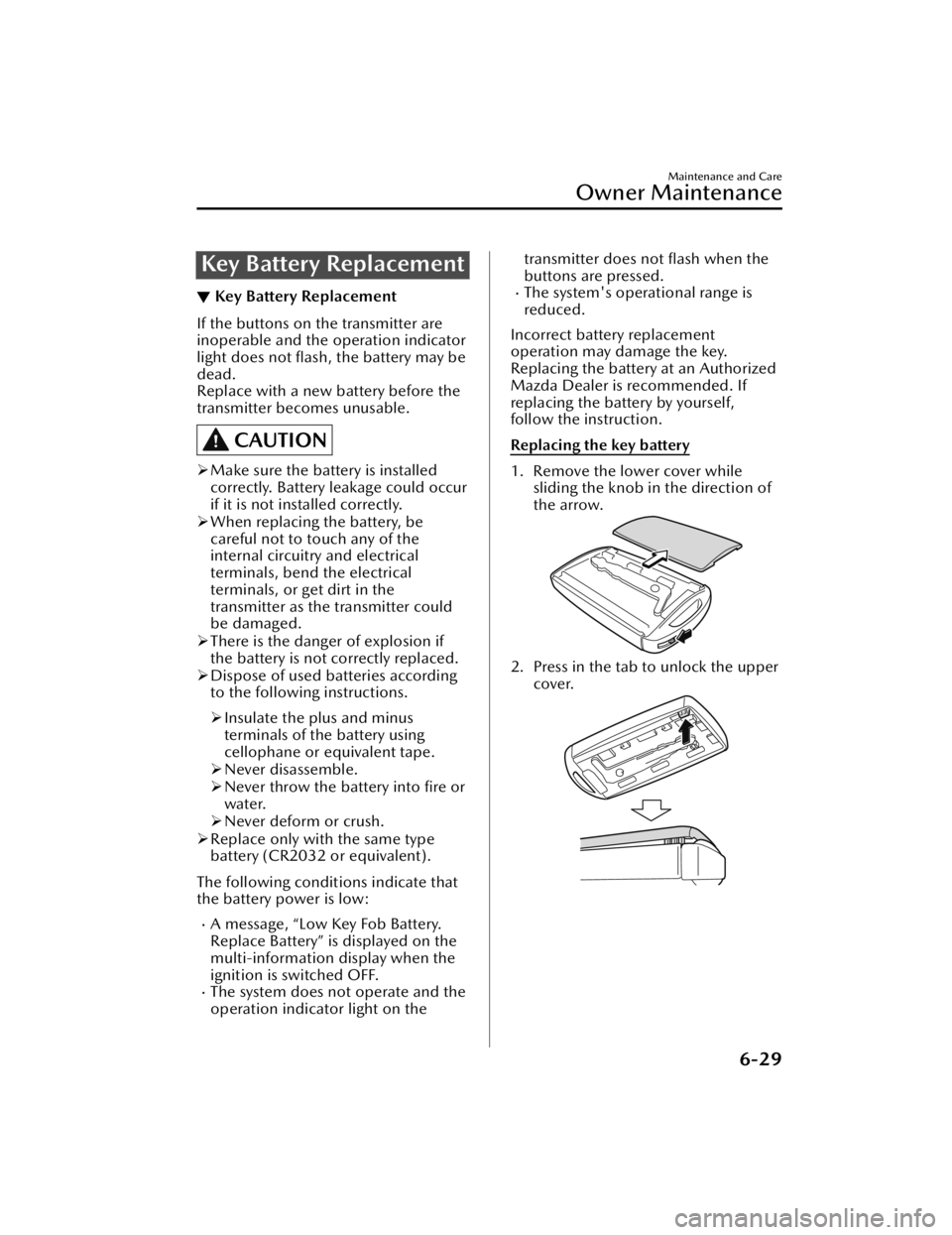
Replacing the key battery
1. Remove the lower cover while sliding the knob in the direction of
the arrow.
2. Press in the tab to unlock the upper
cover.
Maintenance and Care
Owner Maintenance
6-29
CX-50_8KB8-EA-22A_Edition2_new 2022-1-6 14:55:18
Page 503 of 583

▼Tire Pressure Monitoring System
(TPMS) Warning Indication/
Warning Light (Flashing)
If there is a problem with the TPMS or
the voltage of a tire pressure sensor
decreases, the TPMS warning light
flashes and a message is displayed on
the multi-information display. Have
your vehicle inspected by an
Authorized Mazda Dealer.
WARNING
Do not drive the vehicle at high
speeds if the TPMS warning light turns
on or flashes:
Driving the vehicle at high speeds
while the TPMS warning light is turned
on or flashing is dangerous because
the brake performance and the
steering wheel operability will be
reduced. If the vehicle is driven at high
speeds or the brakes are suddenly
applied, it could lead to an accident.
Gradually apply the brakes to lower the
vehicle's speed.
Do not ignore the TPMS warning light
when it is turned on or flashing:
Continuing to drive the vehicle while
ignoring the illumi
nation/flashing of
the TPMS warning light is dangerous
because a tire may burst which could
lead to an accident. Take appropriate
measures as soon as possible.
▼ KEY Warning Indication/Warning
Light (Red)
“Keyless Entry System Malfunction.
Have the Vehicle Inspected” is
displayed
This message is displayed if the
advanced keyless entry & push button
start system has a problem.
Contact an Authorized Mazda Dealer.
CAUTION
If the message is indicated, or the push
button start indicator light (amber)
flashes, the engine may not start. If the
engine cannot be started, try starting it
using the emergency operation for
starting the engine, and have the
vehicle inspected at an Authorized
Mazda Dealer as soon as possible.
Refer to Emergency Operation for
Starting the Engine on page 4-9.
“Key Not Detected” is displayed
If the presence of the key cannot be
detected (dead battery, battery
malfunction, no key), it is displayed
when the driver attempts to start the
engine (push button start operation,
brake pedal depression).
Displayed when it is determined that
a key that was in the vehicle has
been removed from the vehicle. (Key
taken out warning. Other than
IG-OFF).
If Trouble Arises
Warning/Indicator Lights and Warning Sounds
7-26
CX-50_8KB8-EA-22A_Edition2_new 2022-1-6 14:55:18
Page 510 of 583

Display*1*2*3ContentAction to be taken
Mazda Radar Cruise
Control Canceled. Drive
Safely This message is indicated when the
Mazda Radar Cruise Control with
Stop & Go function (MRCC with Stop
& Go function), and the Traffic Jam
Assist (TJA) have been canceled other
than by the driver.
Have your vehicle inspected by an
Authorized Mazda Dealer.
Distance & Speed Alert
Operation Canceled
Drive Safely This message is indicated when the
Distance & Speed Alert (DSA) have
been canceled other than by the driv-
er.
Have your vehicle inspected by an
Authorized Mazda Dealer.
Cruise Control Opera-
tion Canceled. Drive
Safely This message is indicated when the
Cruise Control have been canceled
other than by the driver.
Have your vehicle inspected by an
Authorized Mazda Dealer.
Emergency Braking Acti-
vated. Depress Brake
Pedal to Hold Stop This message is indicated after the
Smart Brake Support (SBS) brakes op-
erate and when the Smart Brake Sup-
port (SBS) is canceled.
Depress the brake pedal.
Touch Key Fob to Push
Button Start Switch This message is indicated when the
key battery is weak (battery dead or
damaged key). Touch the key against push button
start to start the engine.
Refer to Engine Start Function When
Key Battery is Dead on page 4-7.
Depress Brake Pedal to
Start Vehicle This message is indicated when the
push button start is pressed without
depressing the brake pedal. When starting the engine, press the
push button start with the brake ped-
al depressed.
Check Gear Selector
Lever Position This message is indicated when the
selector lever is shifted to the P or R
position while driving.
Check the selector lever position.
Close Door and Fasten
Seat Belt This message is indicated when AU-
TOHOLD is about to operate and a
door is opened or a seat belt is unfas-
tened. When the AUTOHOLD is turned on,
close the doors and fasten seat belts.
Wiper Blades Must Be
on Windshield Before
Operating This message is indicated when the
ignition is switched ON with the wip-
er arms at the service positions.
Return the wiper arms to the initial
positions.
Windshield Wiper Range
of Motion Reduced. Re-
move Obstruction(s) This message is indicated when there
is snow or dirt accumulation on the
windshield and the wiper operation
range is narrowed.
Remove foreign matter from the
windshield.
Ve h i c l e N o t S w i t c h e d
Off This message is indicated when the
driver’s door is opened without
switching the ignition OFF.
Switch the ignition OFF before leaving
the vehicle.
If Trouble Arises
Warning/Indicator Lights and Warning Sounds
7-33
CX-50_8KB8-EA-22A_Edition2_new
2022-1-6 14:55:18
Page 518 of 583

When Liftgate Cannot beOpened
▼When Liftgate Cannot be Opened
If the battery is dead, the liftgate
cannot be unlocked and opened.
In this case, the liftgate can be
unlocked by taking care of the dead
battery situation.
Refer to Jump-Starting on page 7-11.
If the liftgate cannot be unlocked even
if the dead battery situation has been
resolved, the electrical system may
have a malfunction.
In this case, the liftgate can be opened
using the following procedure as an
emergency measure.
1. Wrap the end of a
flathead
screwdriver in a cloth and remove
the cover on the interior surface of
the liftgate using it.
2. Turn the lever to the right to unlock
the liftgate.
(With power liftgate)
(Without power liftgate)
After performing this emergency
measure, have the vehicle inspected at
an Authorized Mazda Dealer as soon
as possible.
If Trouble Arises
When Liftgate Cannot be Opened
7-41
CX-50_8KB8-EA-22A_Edition2_new 2022-1-6 14:55:18