oil MAZDA CX5 2023 User Guide
[x] Cancel search | Manufacturer: MAZDA, Model Year: 2023, Model line: CX5, Model: MAZDA CX5 2023Pages: 583, PDF Size: 32.58 MB
Page 308 of 583

360°View Monitor Range
1. Cameras
2. Ultrasonic sensors
3. Front/Rear side radar sensors
WARNING
Always confirm the safety of the area
around the vehicle with the mirrors
and directly with your eyes when
driving:
The 360°View Monitor is an auxiliary
device which assists the driver in
checking the safety of the area around
the vehicle.
The shooting range of the cameras and
detection range of the sensors are
limited. For example, the areas in black
at the front and rear of the vehicle
image and the seams where each of
the camera images merge are blind
spots where an obstruction may not be
visible. In addition, the extended
vehicle width lines and projected
vehicle path lines are only to be used
as references, and the images on the
screen may differ from the actual
conditions.
CAUTION
Do not use the 360°View Monitor
under any of the following
conditions.
Icy or snow-covered roads.
Tire chains or a temporary spare
tire is installed.
The front or rear doors are not fully
closed.
The vehicle is on a road incline.
Bumpy roads.
The door mirrors are retracted.
Do not hit the front/rear camera,
front bumper, liftgate, and door
mirrors forcefully. The camera
position or installation angle may
shift.
The cameras are waterproof. Do not
disassemble, modify, or remove a
camera.
The camera cover is made of hard
plastic, therefore do not apply oil
film remover, orga nic solvents, wax,
or coating agents. If any such agent
gets on the camera cover, wipe it off
using a soft cloth immediately.
Do not rub the camera lens
forcefully, or clean it with an abrasive
or hard brush. Otherwise, it could
scratch the camera lens and
negatively affect the images.
If a camera lens is severely damaged
by flying gravel, have the camera
replaced. For camera replacement,
consult an Authorized Mazda Dealer.
Consult an Authorized Mazda Dealer
for repair, painting , or replacement
of the front/rear camera, front
bumper, liftgate and door mirrors.
Heed the following cautions to
assure that the 360°View Monitor
operates normally.
When Driving
i-ACTIVSENSE
4-157
CX-50_8KB8-EA-22A_Edition2_new 2022-1-6 14:55:18
Page 341 of 583

Always keep the windshield glass
around the camera clean by
removing dirt or fogging. Use the
windshield defroster to remove
fogging on the windshield.
Consult an Authorized Mazda
Dealer regarding cleaning the
interior side of the windshield
around the Forward Sensing
Camera (FSC).
Consult an Authorized Mazda
Dealer before performing repairs
around the Forward Sensing
Camera (FSC).
The Forward Sensing Camera (FSC)
is installed to the windshield.
Consult an Authorized Mazda
Dealer for windshield repair and
replacement.
When cleaning the windshield, do
not allow glass cleaners or similar
cleaning fluids to get on the
Forward Sensing Camera (FSC)
lens. In addition, do not touch the
Forward Sensing Camera (FSC)
lens.
When performing repairs around
the rearview mirror, consult an
Authorized Mazda Dealer.
Consult an Authorized Mazda
Dealer regarding cleaning of the
camera lens.
Do not hit or apply strong force to
the Forward Sensing Camera (FSC)
or the area around it. If the
Forward Sensing Camera (FSC) is
severely hit or if there are cracks or
damage caused by flying gravel or
debris in the area around it, stop
using the following systems and
consult an Authorized Mazda
Dealer.
High Beam Control System
(HBC)
Lane Departure Warning System
(LDWS)Traffic Sign Recognition System
(TSR)
Distance & Speed Alert (DSA)
Driver Attention Alert (DAA)
Mazda Radar Cruise Control
with Stop & Go function (MRCC
with Stop & Go function)
Lane-keep Assist System (LAS)
Traffic Jam Assist (TJA)
Emergency Lane Keeping (ELK)
Smart Brake Support (SBS)
forward drive detection
The direction in which the Forward
Sensing Camera (FSC) is pointed
has been finely adjusted. Do not
change the installation position of
the Forward Sensing Camera (FSC)
or remove it. Otherwise, it could
result in damage or malfunction.
Always use tires for all wheels that
are of the specified size, and the
same manufacturer, brand, and tread
pattern. In addition, do not use tires
with
significantly
different wear
patterns on the same vehicle as the
system may not operate normally.
The Forward Sensing Camera (FSC)
includes a function for detecting a
soiled windshield and informing the
driver, however, depending on the
conditions, it may not detect plastic
shopping bags, ice or snow on the
windshield. In such cases, the system
cannot accurately determine a
vehicle ahead and may not be able
to operate normally. Always drive
carefully and pay attention to the
road ahead.
NOTE
In the following cases, the Forward
Sensing Camera (FSC) cannot detect
target objects correctly, and each
system may be unable to operate
normally.
When Driving
i-ACTIVSENSE
4-190
CX-50_8KB8-EA-22A_Edition2_new 2022-1-6 14:55:18
Page 344 of 583
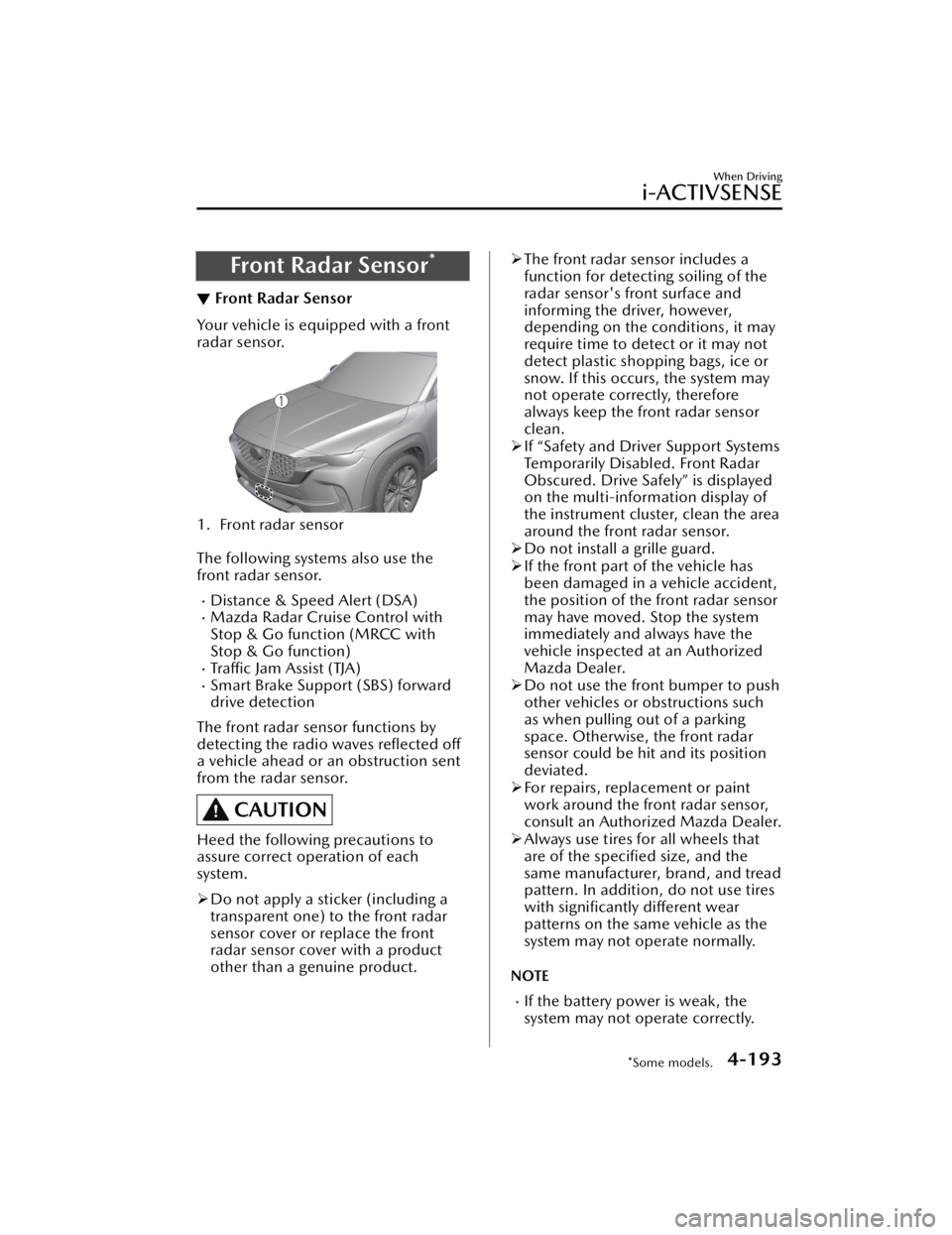
Front Radar Sensor*
▼Front Radar Sensor
Your vehicle is equipped with a front
radar sensor.
1. Front radar sensor
The following systems also use the
front radar sensor.
Distance & Speed Alert (DSA)Mazda Radar Cruise Control with
Stop & Go function (MRCC with
Stop & Go function)
Tra ffi c
Jam Assist (TJA)Smart Brake Support (SBS) forward
drive detection
The front radar sensor functions by
detecting the radio waves reflected off
a vehicle ahead or an obstruction sent
from the radar sensor.
CAUTION
Heed the following precautions to
assure correct operation of each
system.
Do not apply a sticker (including a
transparent one) to the front radar
sensor cover or replace the front
radar sensor cover with a product
other than a genuine product.
The front radar sensor includes a
function for detecting soiling of the
radar sensor's front surface and
informing the driver, however,
depending on the conditions, it may
require time to detect or it may not
detect plastic shopping bags, ice or
snow. If this occurs, the system may
not operate correctly, therefore
always keep the front radar sensor
clean.
If “Safety and Driver Support Systems
Temporarily Disabled. Front Radar
Obscured. Drive Safely” is displayed
on the multi-information display of
the instrument cluster, clean the area
around the front radar sensor.
Do not install a grille guard.
If the front part of the vehicle has
been damaged in a vehicle accident,
the position of the front radar sensor
may have moved. Stop the system
immediately and always have the
vehicle inspected at an Authorized
Mazda Dealer.
Do not use the front bumper to push
other vehicles or obstructions such
as when pulling out of a parking
space. Otherwise, the front radar
sensor could be hit and its position
deviated.
For repairs, replacement or paint
work around the front radar sensor,
consult an Authorized Mazda Dealer.
Always use tires for all wheels that
are of the specified size, and the
same manufacturer, brand, and tread
pattern. In addition, do not use tires
with significantly different wear
patterns on the same vehicle as the
system may not operate normally.
NOTE
If the battery power is weak, the
system may not operate correctly.
When Driving
i-ACTIVSENSE
*Some models.4-193
CX-50_8KB8-EA-22A_Edition2_new 2022-1-6 14:55:18
Page 418 of 583

Before using the Wireless Charger
(Qi), make sure to back up the data
stored on the mobile device. The
data on the mobile device could be
deleted.
Do not wipe the Wireless Charger
(Qi) using oil, alcohol, or thinner, or
spray hairspray or insecticide onto it.
Otherwise, it could cause damage or
cracking.
Do not leave mobile devices in the
cabin. The temperature inside the
cabin may become very hot, causing
the devices to malfunction.
How to use
1. Start the engine.
2. The power for the Wireless Charger (Qi) turns on and the LED indicator
turns on.
3. Place a device compliant with the Qi Wireless Charging standard in
the center of the charging area on
the tray.
The LED indicator turns on in
amber or green when charging
starts.
For details on the LED indicator,
refer to the following LED
indicator table.
Charging starts when all the
doors and liftgate are closed.
Charging status display
The charging status of the Wireless
Charger (Qi) can be checked with the
LED indicator or the icon displayed on
the center display.
Illumina-
tion/flash
pattern Icon indi-
cation Status
Does not turn on ―
Indicates that charg-
ing is turned off.
Tu r n s o n i n white
Indicates that charg-
ing is possible.
Tu r n s o n i n amber
Indicates normal
charging.
Tu r n s o n i n green
Indicates fast charg-
ing*1.
Flashes in white
Indicates that the
charging conditions
are not met.
Flashes in red
Indicates that charg-
ing is not possible
because a high tem-
perature is detected.
Indicates that charg-
ing is not possible
because foreign mat-
ter is detected.
Tu r n s o n i n red
Indicates that there
is a problem with
Wireless Charger
(Qi) and it needs to
be repaired. Consult
an Authorized Maz-
da Dealer.
*1 Some mobile devices can switchbetween normal charging and fast
charging.
How to switch settings
The Wireless Charger (Qi) can be
turned on/off and the connection
mode can be switched.
Refer to the Settings section in the
Mazda Connect Owner's Manual.
Interior Features
Interior Equipment
5-45
CX-50_8KB8-EA-22A_Edition2_new 2022-1-6 14:55:18
Page 426 of 583
6Maintenance and Care
How to keep your Mazda in top condition.
Essential Information................. 6-2 Introduction.......................... 6-2
Scheduled Maintenance............ 6-4 Scheduled Maintenance......... 6-4
Owner Maintenance............... 6-11 Owner Maintenance
Precautions......................... 6-11
Hood.................................. 6-12
Engine Compartment
Overview............................ 6-14
Engine Oil........................... 6-16
Engine Coolant.................... 6-19
Brake Fluid.......................... 6-20
Washer Fluid....................... 6-21
Body Lubrication.................. 6-22
Wiper Blades....................... 6-22
Battery................................ 6-27
Key Battery Replacement...... 6-29
Tires.................................... 6-31
Light Bulbs...........................6-34
Fuses.................................. 6-35
Appearance Care.................... 6-43 Exterior Care....................... 6-43
Interior Care........................ 6-49
6-1
CX-50_8KB8-EA-22A_Edition2_new 2022-1-6 14:55:18
Page 427 of 583
Introduction
▼Introduction
Be careful not to hurt yourself when
inspecting your vehicle, replacing a
tire, or doing some kind of
maintenance such as changing the oil
and
filter. In particular, wear thick work
gloves such as cotton gloves when
touching areas that are difficult to see
while inspecting or working on your
vehicle. Doing inspections or
procedures with your bare hands could
cause injury.
If you are unsure about any procedure
this manual describes, we strongly urge
you to have a reliable and qualified
service shop perform the work,
preferably an Authorized Mazda
Dealer.
Factory-trained Mazda technicians and
genuine Mazda parts are best for your
vehicle. Without this expertise and the
parts that have been designed and
made especially for your Mazda,
inadequate, incomplete, and
insufficient servicing may result in
problems. This could lead to vehicle
damage or an accident and injuries.
For expert advice and quality service,
consult an Authorized Mazda Dealer.
To continue warranty eligibility and to
protect your investment, it is your
responsibility to properly maintain your
vehicle according to factory
recommended schedules outlined in
this manual. As part of this you must
keep your maintenance records,
receipts, repair orders and any other
documents as evidence this
maintenance was performed. You must
present these documents, should any
warranty coverage disagreement occur.
Failure to do so can result in your
warranty being voided either in whole
or in part.
This evidence may consist of the
following:
The Mazda Scheduled Maintenance
Record, refer to the Warranty
Booklet, must be completely filled
out showing mileage, repair order
number, date for each service, and
signed by a qualified automotive
service technician who service
vehicles.
Original copies of repair orders or
other receipts that include the
mileage and date the vehicle was
serviced. Each receipt should be
signed by a qualified automotive
service technician.
For self maintenance, a statement
that you completed the maintenance
yourself, displaying mileage and the
date the work was performed. Also,
receipts for the replacement parts (fluid, filters, etc.) indicating the date
and mileage must accompany this
statement.
NOTE
If you elect to perform maintenance
yourself or have your vehicle serviced
at a location other than an Authorized
Mazda Dealer, Mazda requires that all
fluids, parts and materials must meet
Mazda standards for durability and
performance as described in this
manual.
Claims against the warranty resulting
from lack of maintenance, as opposed
to defective materials or authorized
Maintenance and Care
Essential Information
6-2
CX-50_8KB8-EA-22A_Edition2_new 2022-1-6 14:55:18
Page 429 of 583
Scheduled Maintenance
▼Scheduled Maintenance (U.S.A. and Puerto Rico)
Vehicles utilizing the vehicle status monitor feature:
The vehicle status monitor feature alerts you of maintenance needs by turning on the
wrench indicator light or displaying a message in the instrument panel, or both.
Every maintenance must be done when the display/wrench indication comes on.
The display/wrench indication will come
on before reaching the maximum interval
of 16,000 km (10,000 miles), or 12 mont hs (after the previous maintenance).
If you drive your vehicle under any of th e following conditions, follow the Severe
Driving Scheduled Maintenance and replace the engine oil and filter every 8,000 km
(5,000 miles) or 6 months, whichever comes first.
Otherwise, follow the Normal Driv ing Scheduled Maintenance intervals.
1. The vehicle is idled for long periods or driven at low speeds, such as with police cars, taxis, or driver's education school car.
2. Driving under dusty conditions.
3. Driving for long periods in cold temperatures or driving regularly for short distan- ces only.
4. Driving under extremely high temperature conditions.
5. Driving continuously in mountainous regions.
If you are following the Severe Driving Scheduled Maintenance (8,000 km (5,000
miles) or 6 months oil replacement interval), set the vehicle status monitor manually.
Refer to the Information section in the Mazda Connect Owner's Manual. Please
contact an Authorized Mazda Dealer if necessary.
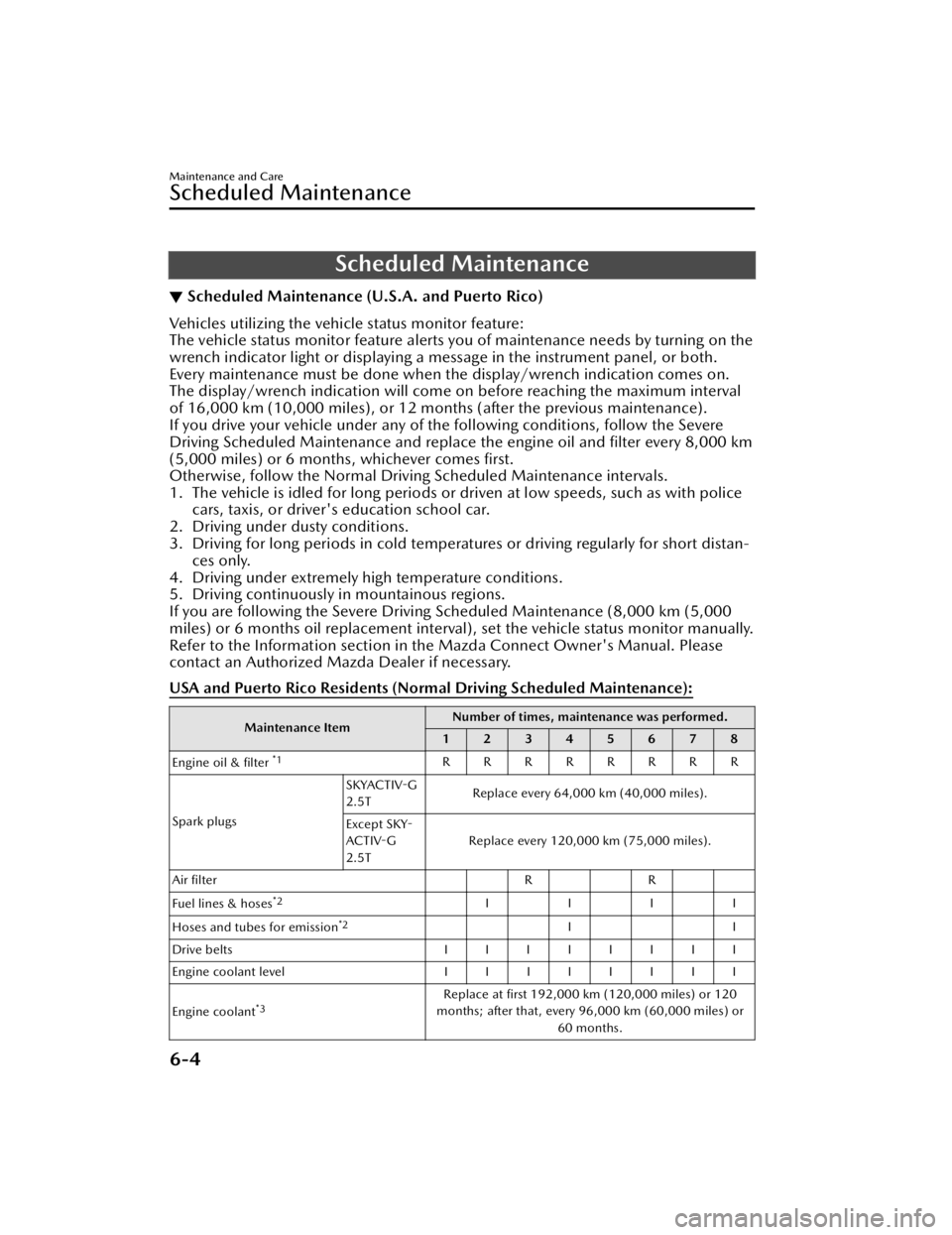
USA and Puerto Rico Residents (Nor mal Driving Scheduled Maintenance):
Maintenance ItemNumber of times, maintenance was performed.
12345678
Engine oil & filter
*1RRRRRRRR
Spark plugs SKYACTIV-G
2.5T
Replace every 64,000 km (40,000 miles).
Except SKY-
ACTIV-G
2.5T Replace every 120,000 km (75,000 miles).
Air filter RR
Fuel lines & hoses
*2IIII
Hoses and tubes for emission
*2II
Drive belts IIIIIIII
Engine coolant level IIIIIIII
Engine coolant
*3Replace at first 192,000 km (120,000 miles) or 120
months; after that, every 96,000 km (60,000 miles) or 60 months.
Maintenance and Care
Scheduled Maintenance
6-4
CX-50_8KB8-EA-22A_Edition2_new 2022-1-6 14:55:18
Page 430 of 583
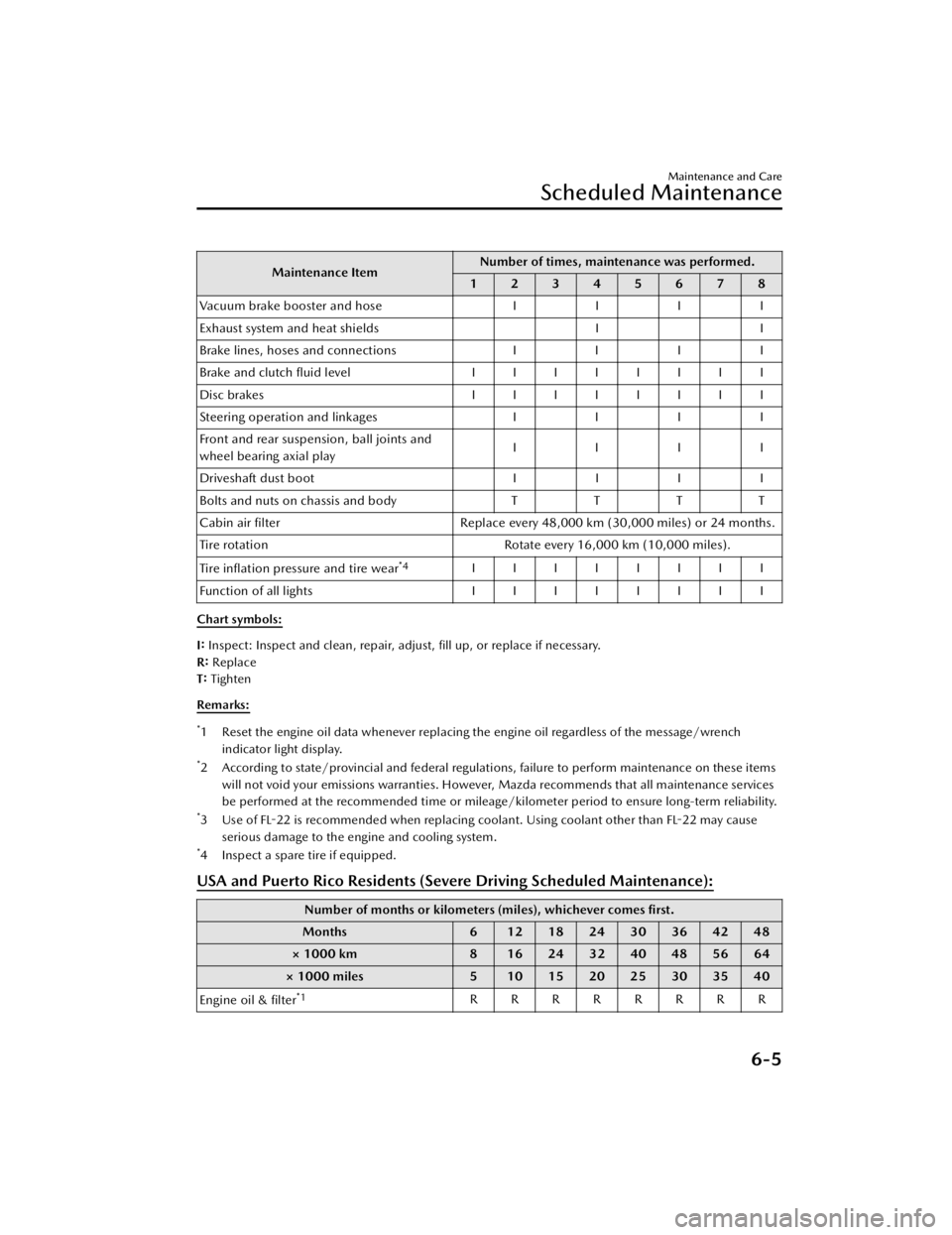
Maintenance ItemNumber of times, maintenance was performed.
12345678
Vacuum brake booster and hose II II
Exhaust system and heat shields II
Brake lines, hoses and connections II II
Brake and clutch fluid level IIIIIIII
Disc brakes IIIIIIII
Steering operation and linkages II II
Front and rear suspension, ball joints and
wheel bearing axial play IIII
Driveshaft dust boot II II
Bolts and nuts on chassis and body TTT T
Cabin air filter Replace every 48,000 km (30,000 miles) or 24 months.
Tire rotation Rotate every 16,000 km (10,000 miles).
Tire inflation pressure and tire wear
*4IIIIIIII
Function of all lights IIIIIIII
Chart symbols:
I: Inspect: Inspect and clean, repair, adjust, fill up, or replace if necessary.
R: Replace
T: Tighten
Remarks:
*1 Reset the engine oil data whenever replacing the engine oil regardless of the message/wrench indicator light display.
*2 According to state/provincial and federal regulations, failure to perform maintenance on these itemswill not void your emissions warranties. However, Mazda recommends that all maintenance services
be performed at the recommended time or mileage/kilometer period to ensure long-term reliability.
*3 Use of FL-22 is recommended when replacing coolant. Using coolant other than FL-22 may causeserious damage to the engine and cooling system.
*4 Inspect a spare tire if equipped.
USA and Puerto Rico Residents (Severe Driving Scheduled Maintenance):
Number of months or kilometers (miles), whichever comes first.
Months 6 12182430364248
× 1000 km 8 16 24 32 40 48 56 64
× 1000 miles 5 10 15 20 25 30 35 40
Engine oil & filter
*1RRRRRRRR
Maintenance and Care
Scheduled Maintenance
6-5
CX-50_8KB8-EA-22A_Edition2_new 2022-1-6 14:55:18
Page 431 of 583
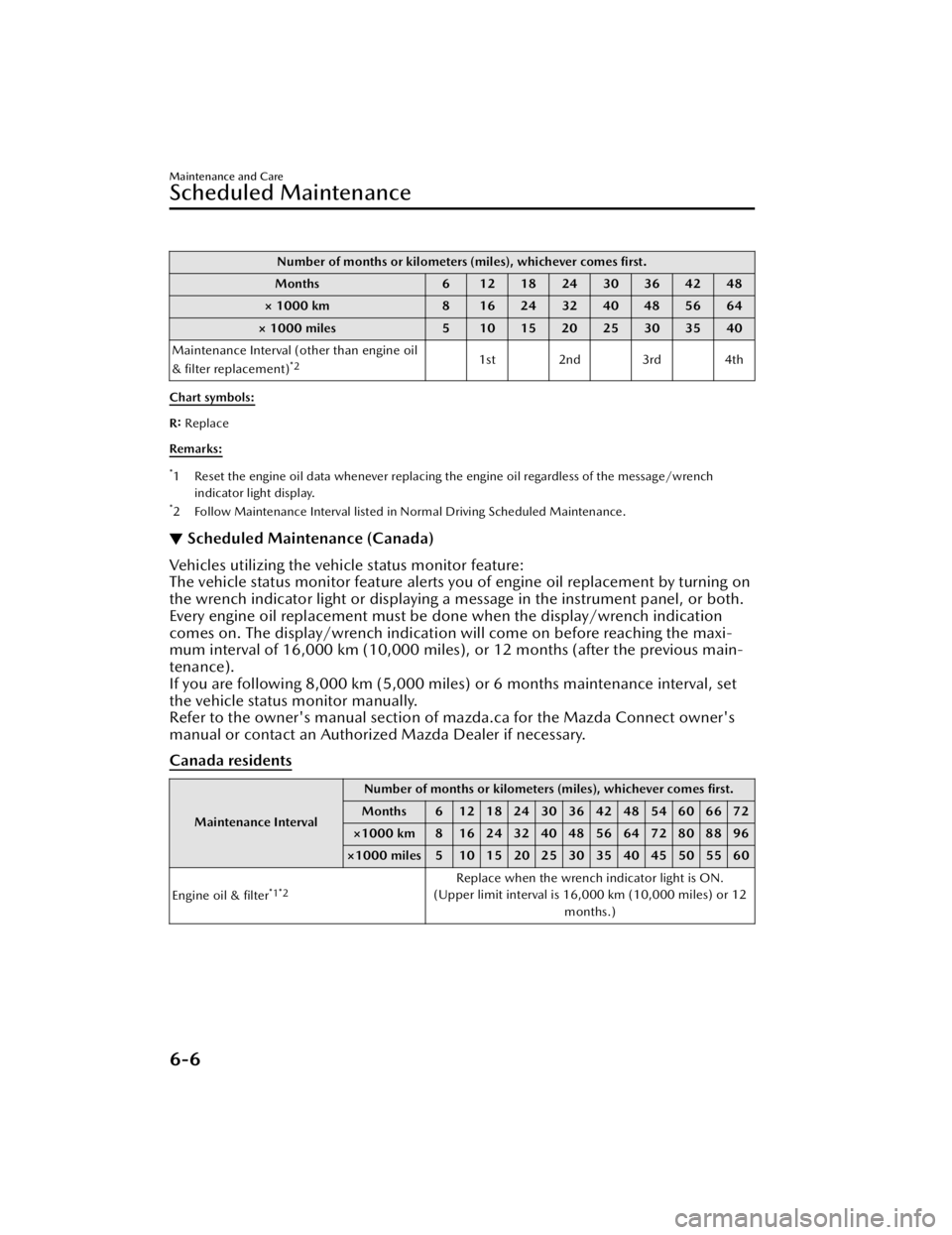
Number of months or kilometers (miles), whichever comes first.
Months 6 12182430364248
× 1000 km 8 16243240485664
× 1000 miles 5 10 15 20 25 30 35 40
Maintenance Interval (other than engine oil
& filter replacement)
*21st 2nd 3rd 4th
Chart symbols:
R: Replace
Remarks:
*1 Reset the engine oil data whenever replacing the engine oil regardless of the message/wrench indicator light display.
*2 Follow Maintenance Interval listed in Normal Driving Scheduled Maintenance.
▼Scheduled Maintenance (Canada)
Vehicles utilizing the vehicle status monitor feature:
The vehicle status monitor feature alerts you of engine oil replacement by turning on
the wrench indicator light or displaying a
message in the instrument panel, or both.
Every engine oil replacement must be done when the display/wrench indication
comes on. The display/wrench indication will come on before reaching the maxi-
mum interval of 16,000 km (10,000 miles), or 12 months (after the previous main-
tenance).
If you are following 8,000 km (5,000 miles) or 6 months maintenance interval, set
the vehicle status monitor manually.
Refer to the owner's manual section of mazda.ca for the Mazda Connect owner's
manual or contact an Authorized Mazda Dealer if necessary.
Canada residents
Maintenance Interval Number of months or kilometers (miles), whichever comes first.
Months 6 1218243036424854606672
×1000 km 8 16 24 32 40 48 56 64 72 80 88 96
×1000 miles 5 10 15 20 25 30 35 40 45 50 55 60
Engine oil & filter
*1*2Replace when the wrench indicator light is ON.
(Upper limit interval is 16,000 km (10,000 miles) or 12
months.)
Maintenance and Care
Scheduled Maintenance
6-6
CX-50_8KB8-EA-22A_Edition2_new 2022-1-6 14:55:18
Page 433 of 583

Remarks:
*1 Reset the engine oil data whenever replacing the engine oil regardless of the message/wrenchindicator light display.
*2 If you drive your vehicle under any of the following conditions, replace the engine oil & filter every8,000 km (5,000 miles) or 6 months, whichever comes first.
1. The vehicle is idled for long periods or driven at low speeds, such as with police cars, taxis, or driver's education school vehicles.
2. Driving under dusty conditions.
3. Driving for long periods in cold temperatures or driving regularly for short distances only.
4. Driving under extremely high temperature conditions.
5. Driving continuously in mountainous regions.
*3 Also inspect the air conditioner drive belts, if equipped. If the vehicle is operated primarily under any of the following conditions, inspect the drive belts more
often than the recommended intervals.
a) Driving under dusty conditions.
b) The vehicle is idled for long periods or driven at low speeds.
c) Driving for long periods in cold temperatures or driving regularly for short distances only.
d) Driving under extremely high temperature conditions.
e) Driving continuously in mountainous regions.
f) Driving for long period in extremely wet or heavy rain condition.
*4 Use of FL-22 is recommended when replacing engine coolant. Using engine coolant other than FL-22
may cause serious damage to the engine and cooling system.
*5 According to state/provincial and federal regulati ons, failure to perform maintenance on these items
will not void your emissions warranties. However, Mazda recommends that all maintenance services
be performed at the recommended time or mileage/kilometer period to ensure long-term reliability.
*6 Inspect a spare tire if equipped.
▼ Scheduled Maintenance (Mexico)
Vehicles utilizing the vehicle status monitor feature:
The vehicle status monitor feature alerts you of maintenance needs by turning on the
wrench indicator light or displaying a message in the instrument panel, or both.
Every maintenance must be done when the display/wrench indication comes on.
The display/wrench indication will come
on before reaching the maximum interval
of 10,000 km, or 6 months (after the previous maintenance).
If you drive your vehicle under any of th e following conditions, follow the Severe
Driving Scheduled Maintenance and replace the engine oil and filter every 5,000 km
or 3 months, whichever comes first.
Otherwise, follow the Normal Driv ing Scheduled Maintenance intervals.
1. The vehicle is idled for long periods or driven at low speeds, such as with police cars, taxis, or driver's education school car.
2. Driving under dusty conditions.
3. Driving for long periods in cold temperatures or driving regularly for short distan- ces only.
4. Driving under extremely high temperature conditions.
Maintenance and Care
Scheduled Maintenance
6-8
CX-50_8KB8-EA-22A_Edition2_new 2022-1-6 14:55:18