cruise control MAZDA CX90 2024 User Guide
[x] Cancel search | Manufacturer: MAZDA, Model Year: 2024, Model line: CX90, Model: MAZDA CX90 2024Pages: 687, PDF Size: 15.46 MB
Page 317 of 687

The vehicle is driven on slippery
roads such as icy roads,
snow-covered roads, and unpaved
roads.
The vehicle is driven on a long
downslope.
The vehicle is driven on a steep
slope.
A two-wheeled vehicle such as a
motorcycle or bicycle is traveling
ahead.
Switch the MRCC off when it is not
being used.
Leaving the MRCC on when it is not in
use is dangerous as it could operate
unexpectedly, resulting in an accident.
Do not leave the vehicle while the
vehicle is stopped by the MRCC
control.
Getting out of the vehicle while the
stop hold control is operating is
dangerous as the vehicle may move
unexpectedly and result in an accident.
Before leaving the vehicle, switch the
MRCC off, shift the selector lever to
the P position, and apply the parking
brake.
CAUTION
If the vehicle is towed or you are
towing something, switch the MRCC
off.
Turn off the MRCC when the vehicle
is running on a chassis roller.
Driving
Mazda Radar Cruise Control (MRCC)
5-166
CX-90_8KG7-EA-22L_Edition1_new 2022-11-17 16:05:04
Page 318 of 687
How to Use the Mazda Radar Cruise Control (MRCC)
MRCC operation conditions
The MRCC can be set when all of the following conditions are met.
The brake pedal is not depressed.The vehicle speed is about 0 km/h (0 mph) to 145 km/h (90 mph).The Hill Descent Control is not operating.
Setting the MRCC
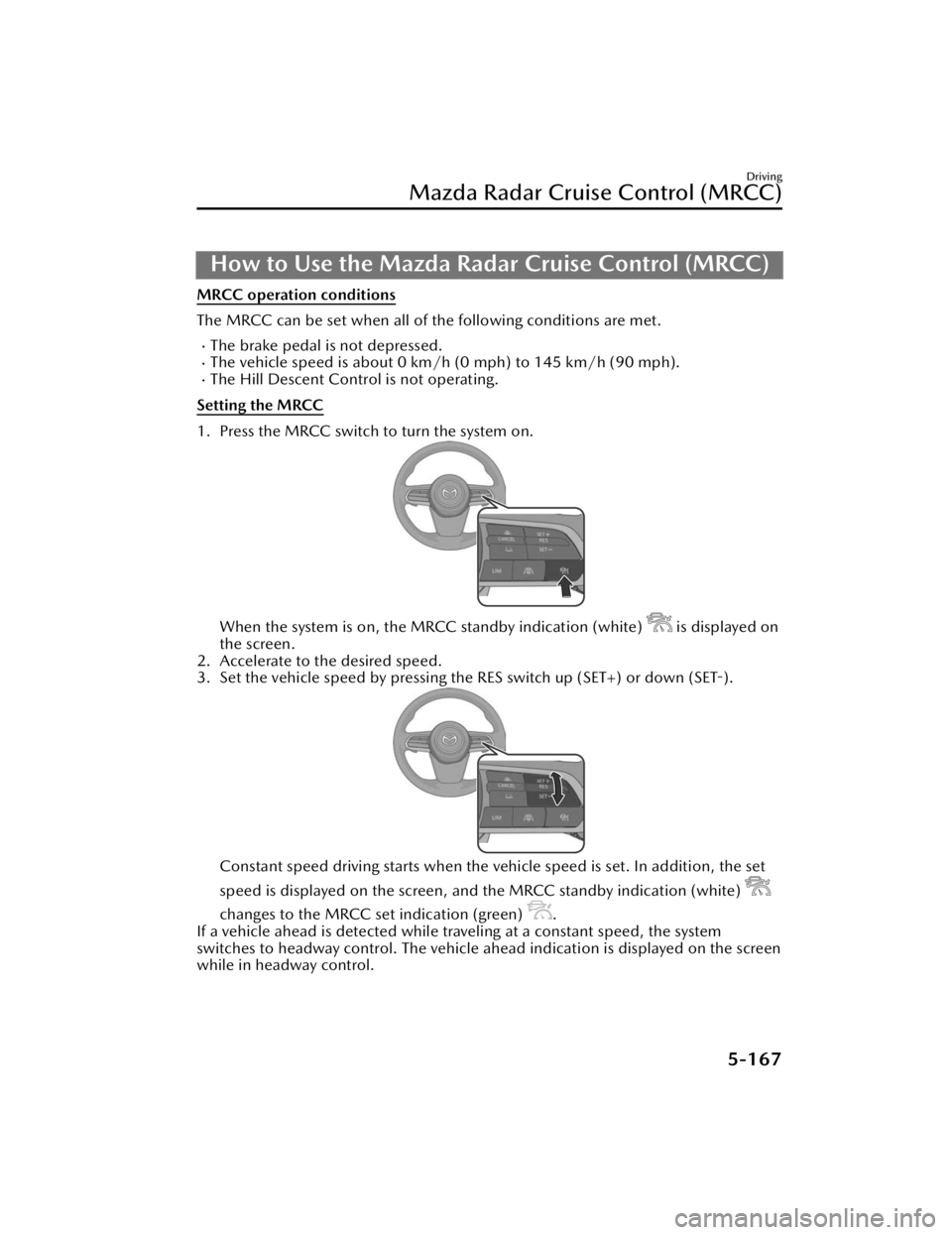
1. Press the MRCC switch to turn the system on.
When the system is on, the MRCC standby indication (white) is displayed on
the screen.
2. Accelerate to the desired speed.
3. Set the vehicle speed by pressing the RES switch up (SET+) or down (SET-).
Constant speed driving starts when the vehicle speed is set. In addition, the set
speed is displayed on the screen, and the MRCC standby indication (white)
changes to the MRCC set indication (green) .
If a vehicle ahead is detected while traveling at a constant speed, the system
switches to headway control. The vehicle ahead indication is displayed on the screen
while in headway control.
Driving
Mazda Radar Cruise Control (MRCC)
5-167
CX-90_8KG7-EA-22L_Edition1_new 2022-11-17 16:05:04
Page 319 of 687
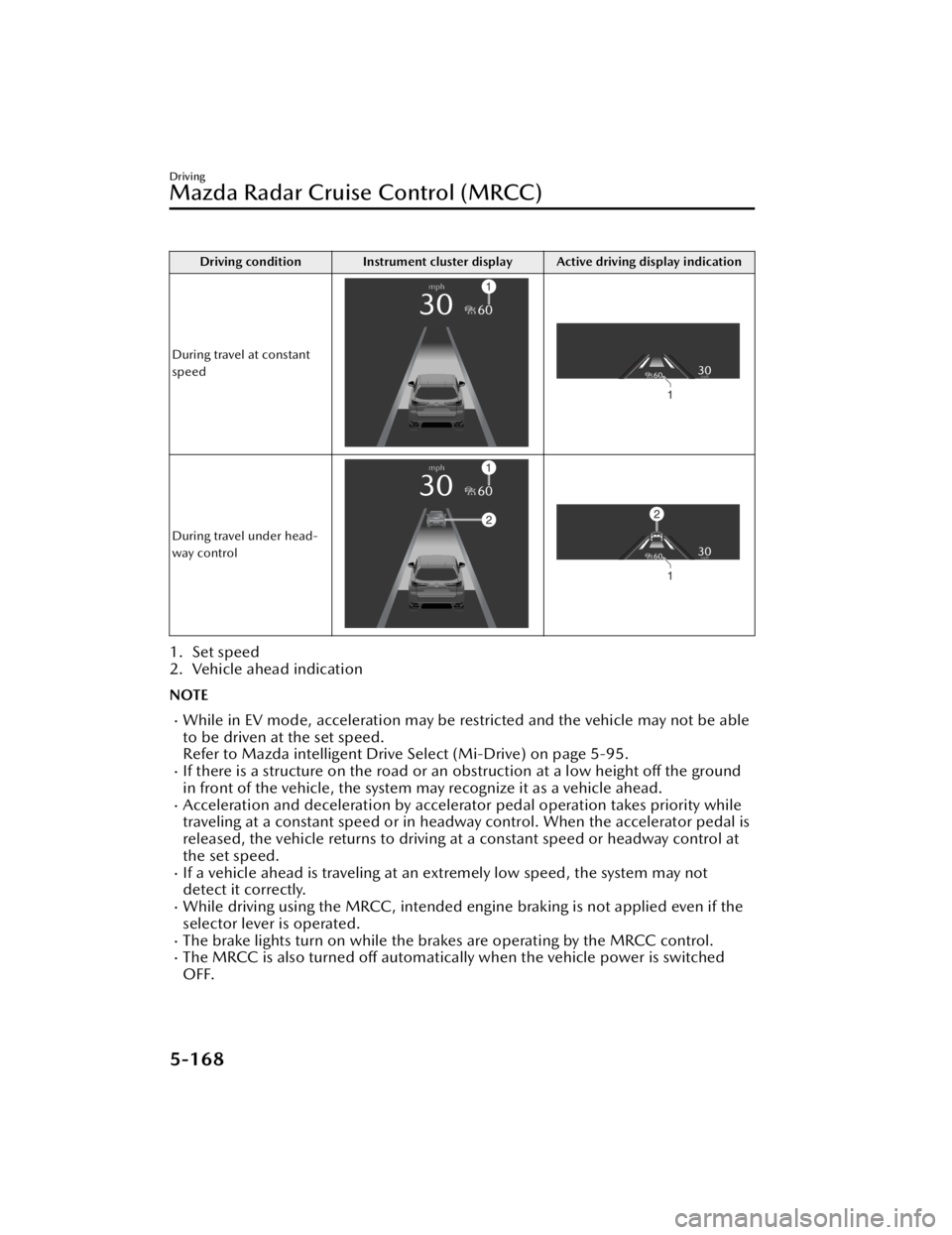
Driving condition Instrument cluster display Active driving display indication
During travel at constant
speed
During travel under head-
way control
1. Set speed
2. Vehicle ahead indication
NOTE
While in EV mode, acceleration may be restricted and the vehicle may not be able
to be driven at the set speed.
Refer to Mazda intelligent Drive Select (Mi-Drive) on page 5-95.
If there is a structure on the road or an obstruction at a low height off the ground
in front of the vehicle, the system may recognize it as a vehicle ahead.
Acceleration and deceleration by accelerator pedal operation takes priority while
traveling at a constant speed or in headway control. When the accelerator pedal is
released, the vehicle returns to driving at a constant speed or headway control at
the set speed.
If a vehicle ahead is traveling at an extremely low speed, the system may not
detect it correctly.
While driving using the MRCC, intended engine braking is not applied even if the
selector lever is operated.
The brake lights turn on while the brakes are operating by the MRCC control.The MRCC is also turned off automatically when the vehicle power is switched
OFF.
Driving
Mazda Radar Cruise Control (MRCC)
5-168
CX-90_8KG7-EA-22L_Edition1_new 2022-11-17 16:05:04
Page 320 of 687

If the distance between vehicles control is disabled using Mazda Connect, the
system switches to the cruise control. At this time, the MRCC switch functions as
the cruise control switch.
Refer to the Settings section in the Mazda Connect Owner's Manual.
If the vehicle power is switched OFF while the distance between vehicles control is
disabled, the distance between vehicles control is enabled automatically the next
time the vehicle power is switched ON.
If the vehicle ahead stops during headway control, your vehicle in headway control
also stops. When the vehicle is stopped, the MRCC indicator light
in the
instrument cluster turns on.
When the vehicle ahead accelerates from a stop and one of the following operations
is performed, your vehicle starts driving.
Press the RES switch.Depress the accelerator pedal.
If you do not start driving the vehicle af ter the vehicle ahead has resumed driving,
the system urges the driver to resume driving.
NOTE
If the vehicle ahead resumes driving within 3 seconds after the vehicle was
stopped by the system, your vehicle also resumes driving automatically.
If the vehicle is stopped by the system continuously for 10 minutes or longer, the
parking brake is applied automatically. At this time, the MRCC is canceled.
Even if the MRCC is canceled while the vehicle is stopped, the vehicle is held in its
stopped position.
Refer to AUTOHOLD on page 5-63.
If the MRCC is canceled while the vehicle is stopped and there is no vehicle
ahead, you cannot resume driving the ve hicle using the RES switch. Depress the
accelerator pedal and start driving the vehicle.
Changing the set vehicle speed
Changing the set vehicle speed using the RES switch
Press the RES switch up (SET+) or down (SET-) to the desired speed.
Press and release immediately: 1 km/h (1 mph)Press and hold: 10 km/h (5 mph)
Changing the set vehicle speed using the accelerator pedal
Depress the accelerator pedal until the vehicle speed reaches the desired speed,
then press the RES switch up (SET+) or down (SET-).
Reading the set vehicle speed from the speed limit sign using the RES switch
Press the RES switch when the speed limit sign set indication
turns on.
Driving
Mazda Radar Cruise Control (MRCC)
5-169
CX-90_8KG7-EA-22L_Edition1_new 2022-11-17 16:05:04
Page 321 of 687
CAUTION
The function which recognizes speed limit signs has limitations. Always check the
set vehicle speed that was read.
Set the speedometer display unit to the sa me unit as the speed limit sign. Differing
units will capture speeds not intended by the driver.
NOTE
The Speed Limit Assist operates only when the navigation system's SD card is
inserted.
The Speed Limit Assist uses the Tra ffi c Sign Recognition system (TSR).
Refer to Traffic Sign Recognition System (TSR) on page 5-150.
The Speed Limit Assist cannot read sp eeds of less than 30 km/h (19 mph).Set vehicle speeds read from speed limit signs can be adjusted.
Refer to the Settings section in the Mazda Connect Owner's Manual.
The Speed Limit Assist can be turned
off.
Refer to the Settings section in the Mazda Connect Owner's Manual.
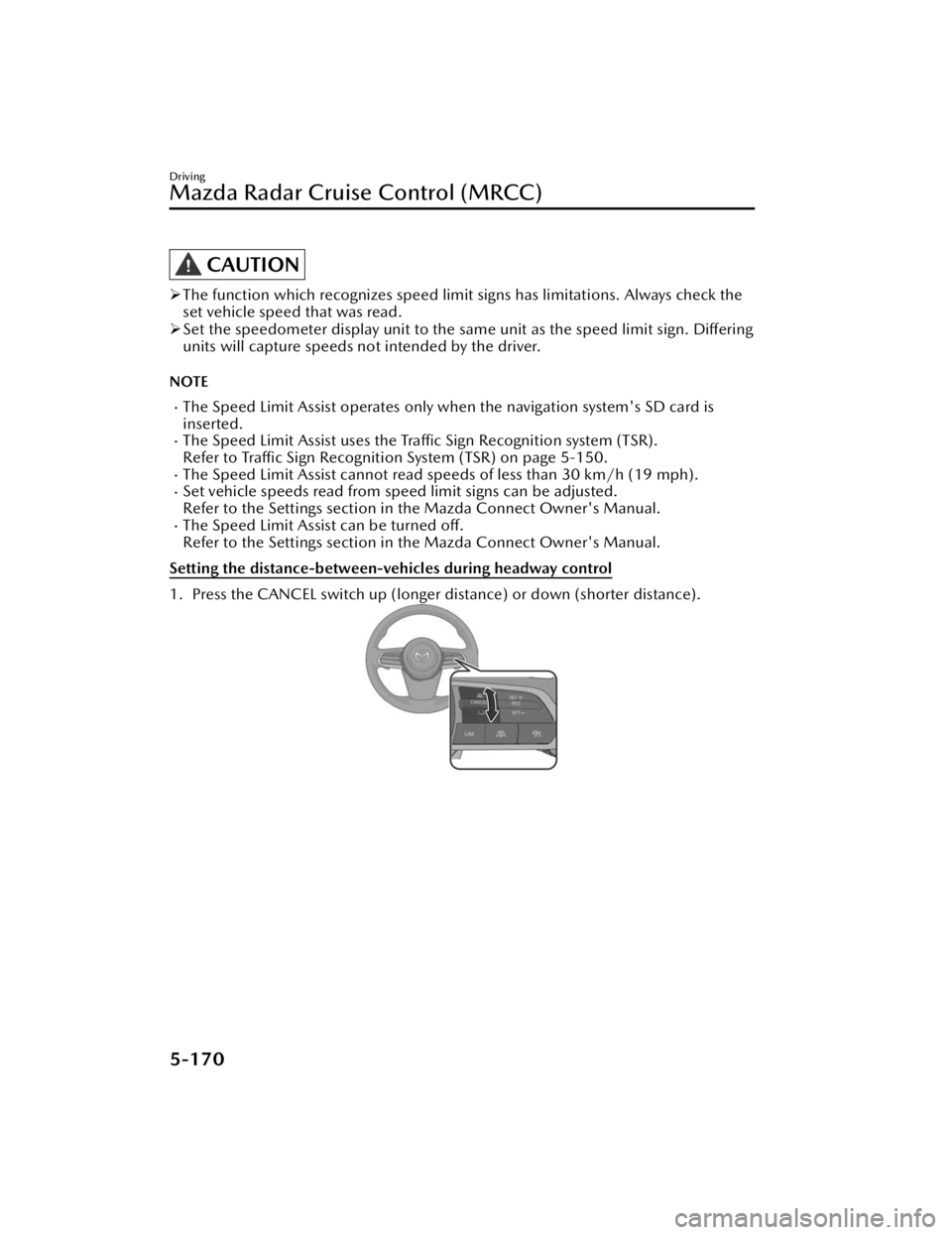
Setting the distance-between-vehicles during headway control
1. Press the CANCEL switch up (longer distance) or down (shorter distance).
Driving
Mazda Radar Cruise Control (MRCC)
5-170
CX-90_8KG7-EA-22L_Edition1_new 2022-11-17 16:05:04
Page 322 of 687

MRCC is not operating (white)
Distance-between-vehicles guide-line
(at 80 km/h (50 mph) vehicle speed) Instrument cluster display
Active driving display indica-
tion
Long (about 50 m (164 ft))
Medium (about 40 m (131 ft))
Short (about 30 m (98 ft))
Extremely short (about 25 m (82
ft))
Driving
Mazda Radar Cruise Control (MRCC)
5-171
CX-90_8KG7-EA-22L_Edition1_new 2022-11-17 16:05:04
Page 323 of 687

MRCC is operating (green)
Distance-between-vehicles guide-line
(at 80 km/h (50 mph) vehicle speed) Instrument cluster display
Active driving display indica-
tion
Long (about 50 m (164 ft))
Medium (about 40 m (131 ft))
Short (about 30 m (98 ft))
Extremely short (about 25 m (82
ft))
Driving
Mazda Radar Cruise Control (MRCC)
5-172
CX-90_8KG7-EA-22L_Edition1_new 2022-11-17 16:05:04
Page 324 of 687

NOTE
The distance-between-vehicles can be set to 4 levels: Long, medium, short, and
extremely short distance.
The distance-between-vehicles differs depending on the vehicle speed, and the
slower the vehicle speed, the shorter the distance.
Close proximity warning
If your vehicle approaches a vehicle ahead while in headway control, a warning
sound and a display cautions you.
1. “Depress Brake Pedal”
NOTE
The close proximity warning may not be activated in the following cases.
The vehicle is driven at the same speed as the vehicle ahead.Directly after the MRCC is set.Immediately after the accelerator pedal is released.Another vehicle cuts into the driving lane.Do not use the MRCC under conditions in which the close proximity warnings are
frequently activated.
The MRCC is canceled temporarily
If any of the following conditions is met, the MRCC is canceled temporarily.
The brake pedal is depressed.The CANCEL switch is pressed one time.The DSC has operated.The Smart Brake Support (SBS) has operated.The front radar sensors cannot detect target objects.The parking brake is applied.Any door is opened.The driver’s seat belt is unfastened.The frequency of the braking operation by the MRCC is high.
If the MRCC is temporarily canceled, it will resume operation at the previously set
speed by pressing the RES switch.
Driving
Mazda Radar Cruise Control (MRCC)
5-173
CX-90_8KG7-EA-22L_Edition1_new 2022-11-17 16:05:04
Page 325 of 687

Turning off the MRCC
Press the MRCC switch.
The MRCC set indication (green)
/MRCC standby indication (white) turns
off, and the MRCC turns
off.
Driving
Mazda Radar Cruise Control (MRCC)
5-174
CX-90_8KG7-EA-22L_Edition1_new 2022-11-17 16:05:04
Page 328 of 687

How to Use the Cruising & Traffic Support (CTS)
CTS operation conditions
The CTS speed can be set when all of the following conditions are met.
The brake pedal is not depressed.The vehicle speed is about 0 km/h (0 mph) to 145 km/h (90 mph).The Hill Descent Control is not operating.The Mazda Radar Cruise Control is available.
Setting the CTS
1. Press the CTS switch to turn the system on.
When the system is on, the CTS standby indication (white) is displayed on
the screen.
2. Accelerate to the desired speed.
3. Set the vehicle speed by pressing the RES switch up (SET+) or down (SET-).
Constant speed driving starts when the vehicle speed is set. In addition, the set
speed is displayed on the screen, and the CTS standby indication (white)
changes to the CTS set indication (green).
If a vehicle ahead is detected while traveling at a constant speed, the system
switches to headway control. The vehicle ahead indication is displayed on the screen
while in headway control.
Driving
Cruising & Tra ffi c Support (CTS)
5-177
CX-90_8KG7-EA-22L_Edition1_new
2022-11-17 16:05:04