lights MAZDA CX90 2024 User Guide
[x] Cancel search | Manufacturer: MAZDA, Model Year: 2024, Model line: CX90, Model: MAZDA CX90 2024Pages: 687, PDF Size: 15.46 MB
Page 130 of 687

The liftgate is not automatically
opening/closing.
The doors, liftgate, and the fuel-filler
lid/charging port lid are locked, the
hazard warning lights operate 1 time.
Then, the liftgate fully closes
automatically.
Opening/closing using the hands-free
function*
Do the kicking motion with all of the
following conditions met while the
vehicle is stopped.
You are carrying the key.The hands-free function is on.The vehicle power is switched to a
position other than ON, or the
selector lever is in P with the vehicle
power switched ON.
A : About 30―50 cm (12―19.7 in)
B : About 10 cm (3.9 in)
When the kicking motion is done
correctly, the hazard warning lights
flash 2 times, a beep sound is
activated, and the liftgate opens/
closes automatically. Be careful not to
contact the liftgate.
Move your foot away from under the
bumper within about 1 second after
moving it under the bumper.
If the kicking motion is done while the
liftgate is opening/closing
automatically, the liftgate will stop. If
the kicking motion is done again, the
liftgate moves in the direction opposite
to the direction it was moving before it
stopped.
CAUTION
Do not do the kicking motion while
wearing footwear which exposes the
feet, such as sandals. If your foot
contacts the hot exhaust pipe, it
could cause serious burns.
Do not do the kicking motion while
the area where you are standing is
unstable such as a slope or icy road.
Otherwise, you could fall down,
resulting in injury.
NOTE
The hands-free sensor detects in a
range of about 30 cm on both the
left and right sides from the center of
the rear bumper.
The hands-free sensor may not
operate normally under the following
conditions.
Opening/closing
Liftgate
*Some models.4-23
CX-90_8KG7-EA-22L_Edition1_new 2022-11-17 16:05:04
Page 147 of 687

Theft-Deterrent System
If the theft-deterrent system detects an
inappropriate entry into the vehicle,
which could result in the vehicle or its
contents being stolen, the alarm alerts
the surrounding area of an abnormality
by sounding the horn and flashing the
hazard warning lights.
The system will not function unless it's
properly armed. So when you leave the
vehicle, follow the arming procedure
correctly.
How to Use the
Theft-Deterrent System
How to Arm the System
1. Close the windows and the
panorama sunroof/moonroof*
securely.
2. Switch the vehicle power OFF.
3. Make sure the hood, the doors, and the liftgate are closed.
4. Press the lock button on the transmitter. The hazard warning
lights will flash once.
The following method will also arm
the theft-deterrent system:
Press the door-lock switch
while
any door is open and then close all
of the doors.
( With the advanced keyless
function)
Touch the sensing area of the door
lock touch sensor.
The security indicator light
in
the instrument cluster flashes twice
per second for 20 seconds.
5. After 20 seconds, the system is fully armed.
NOTE
The theft-deterrent system can also
be armed by activating the auto
relock function with all the doors,
the liftgate and the hood closed.
Refer to Transmitter on page 4-5.
The system will disarm if one of the
following operations takes place
within 20 seconds after pressing the
lock button:
Unlocking any door.Opening any door.Opening the hood.Switching the vehicle power ON.
To rearm the system, do the arming
procedure again.
Opening/closing
Security System
4-40*Some models.
CX-90_8KG7-EA-22L_Edition1_new 2022-11-17 16:05:04
Page 148 of 687

When the doors are locked by
pressing the lock button on the
transmitter while the theft-deterrent
system is armed, the hazard warning
lights will flash once to indicate that
the system is armed.
Operation
Horn triggering conditions
The horn sounds intermittently and the
hazard warning lights flash for about
30 seconds when the system is
triggered by any one of the following:
Unlocking a door with the auxiliary
key, door lock switch, or an inside
door-lock knob.
Forcing open a door, the hood or the
liftgate.
Opening the hood by operating the
hood release handle.
Switching the vehicle power ON
without using the power switch.
If the system is triggered again, the
lights and horn will activate until the
driver's door or the liftgate is unlocked
with the transmitter.
(With the advanced keyless function)
The lights and horn can also be
deactivated by touching the sensing
area of the door release touch sensor.
NOTE
The liftgate does not open while the
theft-deterrent system is operating.
If the lead-acid battery goes dead
while the theft-deterrent system is
armed, the horn will activate and the
hazard warning lights will flash when
the lead-acid battery is charged or
replaced.
To S t o p t h e A l a r m
A triggered alarm can be turned off
using any one of the following
methods:
Pressing the unlock button on the
transmitter.
Starting the hybrid system with the
power switch.
(With the advanced keyless
function)
Touching the sensing area of the
door release touch sensor.
Pressing the electric liftgate opener
while the key is being carried.
The hazard warning lights will flash
twice.
To Turn Off an Armed System
An armed system can be turned off
using any one of the following
methods:
Pressing the unlock button on the
transmitter.
Starting the hybrid system with the
power switch.
(With the advanced keyless
function)
Touching the sensing area of the
door release touch sensor.
The hazard warning lights will flash
twice.
NOTE
When the doors are unlocked by
pressing the unlock button on the
transmitter while the theft-deterrent
system is turned off, the hazard
warning lights will flash twice to
indicate that the system is turned off.
Opening/closing
Security System
4-41
CX-90_8KG7-EA-22L_Edition1_new 2022-11-17 16:05:04
Page 154 of 687

Turn Signal lever..................... 5-72How to Use the Turn Signal
Lever................................... 5-72
Windshield Wiper/Washer
Switch................................... 5-73 Windshield Wiper/Washer
Switch.................................5-73
Warning and Cautions for Using
the Windshield Wiper/Washer
Switch.................................5-73
How to Use the Windshield
Wiper/Washer Switch.......... 5-74
How to Use the Rear Wiper/
Washer Switch..................... 5-77
Rear Window Defogger
Switch................................... 5-78 Rear Window Defogger
Switch.................................5-78
Warnings and Cautions for Using
the Rear Window Defogger
Switch.................................5-78
How to Use the Rear Window
Defogger Switch.................. 5-79
Mirror Defogger
*..................5-79
How to Use the Mirror
Defogger............................. 5-80
Windshield Wiper De-icer
*..........
.......................................... 5-80
How to Use the Windshield
Wiper De-icer......................5-81
Hazard Warning Lights............. 5-82 Hazard Warning Lights......... 5-82
How to Use the Hazard Warning
Lights.................................. 5-82
Horn..................................... 5-83How to Use the Horn........... 5-83
Antilock Brake System (ABS)..... 5-84 Antilock Brake System
(ABS).................................. 5-84
Warning and Cautions for Using
the Antilock Brake System
(ABS).................................. 5-84
Traction Control System (TCS) ..........
............................................ 5-85 Tra c t i o n C o n t r o l Sy s t e m
(TCS).................................. 5-85
Warning and Cautions for Using
the Traction Control System
(TCS).................................. 5-85
How to Use the Traction Control
System (TCS)....................... 5-86
Convenient Ways to Use the
Tra c t i o n C o n t r o l Sy s t e m
(TCS).................................. 5-87
Dynamic Stability Control
(DSC).................................... 5-88 Dynamic Stability Control
(DSC)................................. 5-88
Warning and Cautions for Using
the Dynamic Stability Control
(DSC)................................. 5-88
How to Use the Dynamic Stability
Control (DSC)..................... 5-89
Trailer Stability Control (TSC) ...........
............................................ 5-90 Trailer Stability Control
(TSC).................................. 5-90
*Some models.5-3
CX-90_8KG7-EA-22L_Edition1_new 2022-11-17 16:05:04
Page 161 of 687

Convenient Ways to Usethe Outside Mirrors
Driving Position Memory*
The angle of the outside mirrors can be
programmed to the Driving Position
Memory.
Refer to Driving Position Memory on
page 3-33.
Auto fold function
*
When locking/unlocking the doors
while the vehicle power is switched
OFF, the outside mirrors automatically
fold in and out.
When the outside mirrors are folded in
and the vehicle power is switched ON,
or the hybrid system is started, the
outside mirrors fold out automatically.
Turn the auto fold function on using
the center display.
Refer to Settings section in the Mazda
Connect Owner's Manual or consult
an Authorized Mazda Dealer.
Operation function after hybrid
system is stopped
The angle of the outside mirrors can be
adjusted and they can be folded in and
out for about 40 seconds after the
vehicle power is switched from ON to
OFF.
Auto tilt-down outside mirror
function for reversing *
The outside mirrors can be set to tilt
downwards automatically when
reversing the vehicle. When the vehicle
is finished reversing , the outside
mirrors return to their original angle.
1. Press the select switch on the side of the door mirror to be tilted
down.
Turn on the indicator light of the
select switch.
2. Shift the selector lever to the Rposition.
The outside mirror on the side
where you pressed the select switch
will tilt downward.
NOTE
When any of the following condition is
met, the outer mirrors return to their
normal positions.
The vehicle power is switched to a
position other than ON.
The shift selector lever is shifted to a
position other than R.
The select switch is pressed again.
Automatic glare prevention function
*
In conjunction with the glare
prevention function of the auto-type
rearview mirror, only the driver's side
outside mirror reduces the light from
the headlights of on-coming vehicles.
Operation Function After Vehicle
power is Switched OFF
The outside mirrors can be operated
for about 40 seconds after the vehicle
power is switched from ON to off with
all doors closed. If any door is opened,
the outside mirrors will stop operating.
Driving
Mirrors
5-10*Some models.
CX-90_8KG7-EA-22L_Edition1_new 2022-11-17 16:05:04
Page 163 of 687
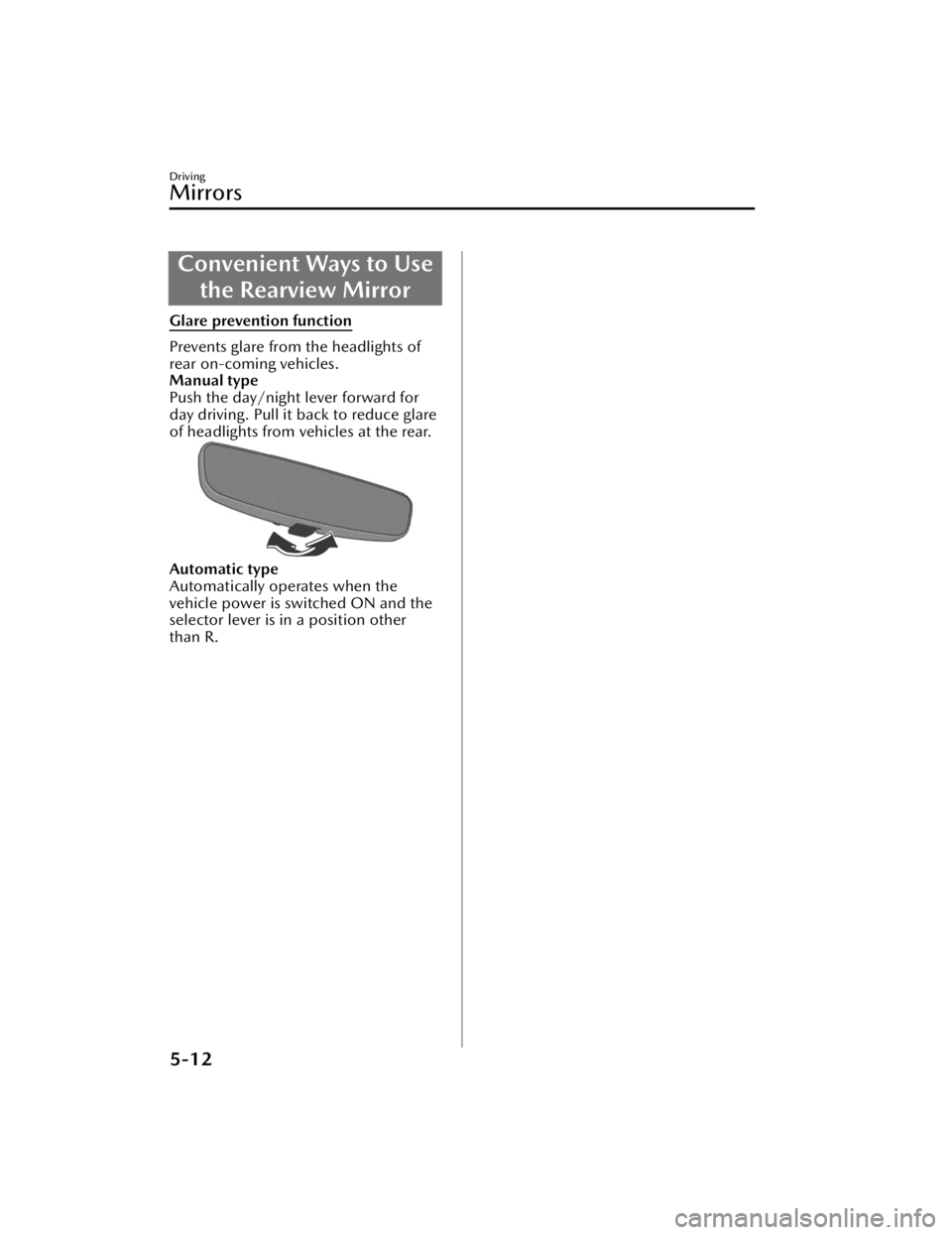
Convenient Ways to Usethe Rearview Mirror
Glare prevention function
Prevents glare from the headlights of
rear on-coming vehicles.
Manual type
Push the day/night lever forward for
day driving. Pull it back to reduce glare
of headlights from vehicles at the rear.
Automatic type
Automatically operates when the
vehicle power is switched ON and the
selector lever is in a position other
than R.
Driving
Mirrors
5-12
CX-90_8KG7-EA-22L_Edition1_new 2022-11-17 16:05:04
Page 186 of 687

Fuel Gauge
The fuel gauge shows approximately
how much fuel is remaining in the tank
when the vehicle power is switched
ON.
When the fuel tank is full, F (Full) is
indicated, and as the level lowers the
needle approaches E (Empty).
NOTE
After refueling , it may require some
time for the indicator to stabilize. In
addition, the indicator may deviate
while driving on a slope or curve
since the fuel moves in the tank.
The direction of the arrow
indicates that the fuel-filler lid is on
the left side of the vehicle.
Dashboard Illumination
When the lights are turned on with the
vehicle power switched ON, the
brightness of the dashboard
illumination is dimmed. However,
when the light sensor detects that the
surrounding area is bright such as
when the lights are turned on in the
daytime, the dashboard illumination
does not dim.
NOTE
When the vehicle power is switched
ON in the early evening or at dusk, the
dashboard illumination is dimmed for
several seconds until the light sensor
detects the brightness of the
surrounding area, however, the
dimming may cancel after the
brightness is detected.
Driving
Instrument Cluster
5-35
CX-90_8KG7-EA-22L_Edition1_new 2022-11-17 16:05:04
Page 214 of 687

AUTOHOLD
AUTOHOLD is a function to keep the
vehicle stopped by applying the brakes
even if you take your foot off the brake
pedal while the vehicle is stopped. This
function reduces the burden on the
driver while the vehicle is stopped,
such as at traffic lights.
Warning and Cautions for
Using the AUTOHOLD
WARNING
Do not rely completely on the
AUTOHOLD function.
The AUTOHOLD function is only
designed to assist the brake operation
while the vehicle is stopped.
Neglecting to operate the brakes and
relying only on the AUTOHOLD system
is dangerous and could result in an
unexpected accident if the vehicle
were to suddenly move. Operate the
brakes appropriately in accordance
with the road and surrounding
conditions. Note that the vehicle may
move suddenly depending on the
vehicle’s load or if it is towing
something.
Do not release your foot from the
brake pedal while the vehicle is
stopped on a steep grade.
Because there is a possibility of the
vehicle not being held in the stopped
position by the AUTOHOLD function,
the vehicle may move unexpectedly
and result in an accident.
Refrain from using the AUTOHOLD
function on slippery roads such as icy
or snow-covered roads, or unpaved
roads.
Even if the vehicle is held in the
stopped position by the AUTOHOLD
function, the vehicle may move
unexpectedly and result in an accident.
Operate the accelerator pedal, brakes,
or steering wheel appropriately as
necessary.
Driving
AUTOHOLD
5-63
CX-90_8KG7-EA-22L_Edition1_new 2022-11-17 16:05:04
Page 219 of 687

How to Use the LightSwitch
NOTE
Headlights which do not blind drivers
approaching in the opposite direction
have been adopted. Therefore, it is not
necessary to adjust the optical axis of
the headlights even when traveling
temporarily in a country where vehicles
are driven on the right-hand side of the
road.
Using the Lights Automatically
Using the Auto Light*
Make sure that the light switch is in the
AUTO position.
The daytime running lights turn on
automatically when it is bright, and the
headlights, parking lights, taillights,
side-marker lights, and the license
plate lights turn on automatically when
it is dark.
When the parking lights, taillights,
side-marker lights, and the license
plate lights are turned on, the parking
lights indicator light
in the
instrument cluster turns on.
NOTE
If the surroundings remain dark for
several minutes even during daytime,
the light sensor determines that it is
nighttime, and the lights may not
turn off immediately even if the
surroundings become bright.
The illumination timing for the
headlights can be changed.
Refer to the Settings section in the
Mazda Connect Owner's Manual.
Using the Daytime Running Lights
The daytime running lights turn on
while driving in bright surroundings
such as during the day.
NOTE
(Only in regions where daytime
running lights are not mandatory)
The daytime running lights can be set
so that they do not to turn on.
Refer to the Settings section in the
Mazda Connect Owner's Manual.
Using the Lights Manually
Using the Parking lights, Taillights,
Side-Marker Lights, and License Plate
Lights
(The vehicle power is switched to ON)
The parking lights, taillights,
side-marker lights, and license plate
lights turn on, and the parking lights
indicator light
in the instrument
cluster turns on.
Driving
Light Switch
5-68*Some models.
CX-90_8KG7-EA-22L_Edition1_new 2022-11-17 16:05:04
Page 220 of 687

When the vehicle power is switched
from ON to OFF, the parking lights,
taillights, side-marker lights, and the
license plate lights are turned on by the
auto headlight off function for a certain
period of time.
(The vehicle power is switched to ACC
or OFF)
The parking lights, taillights,
side-marker lights, and license plate
lights turn on, and the parking lights
indicator light
in the instrument
cluster turns on.
The parking lights, taillights,
side-marker lights, and the license
plate lights are turned on by the auto
headlight off function for a certain
period of time.
NOTE
Do not leave the lights on while the
engine is turned off. Otherwise, the
lead-acid battery power could be
depleted.
Using the Headlights
The headlights, parkin g lights, taillights,
side-marker lights, and the license
plate lights turn on, and the parking
lights indicator light
in the
instrument cluster turns on.
Switching the Headlights to High
Beams
The headlights are switched to high
beams and the headlight high-beam
indicator light
in the instrument
cluster turns on.
When the lever is returned to its
original position, the headlights are
switched to low beams.
Flash-to-pass
While the lever is being operated, the
headlight high beams turn on and the
headlight high-beam indicator light
in the instrument cluster turns on.
Driving
Light Switch
5-69
CX-90_8KG7-EA-22L_Edition1_new 2022-11-17 16:05:04