ECU MAZDA CX90 2024 Owner's Guide
[x] Cancel search | Manufacturer: MAZDA, Model Year: 2024, Model line: CX90, Model: MAZDA CX90 2024Pages: 687, PDF Size: 15.46 MB
Page 147 of 687

Theft-Deterrent System
If the theft-deterrent system detects an
inappropriate entry into the vehicle,
which could result in the vehicle or its
contents being stolen, the alarm alerts
the surrounding area of an abnormality
by sounding the horn and flashing the
hazard warning lights.
The system will not function unless it's
properly armed. So when you leave the
vehicle, follow the arming procedure
correctly.
How to Use the
Theft-Deterrent System
How to Arm the System
1. Close the windows and the
panorama sunroof/moonroof*
securely.
2. Switch the vehicle power OFF.
3. Make sure the hood, the doors, and the liftgate are closed.
4. Press the lock button on the transmitter. The hazard warning
lights will flash once.
The following method will also arm
the theft-deterrent system:
Press the door-lock switch
while
any door is open and then close all
of the doors.
( With the advanced keyless
function)
Touch the sensing area of the door
lock touch sensor.
The security indicator light
in
the instrument cluster flashes twice
per second for 20 seconds.
5. After 20 seconds, the system is fully armed.
NOTE
The theft-deterrent system can also
be armed by activating the auto
relock function with all the doors,
the liftgate and the hood closed.
Refer to Transmitter on page 4-5.
The system will disarm if one of the
following operations takes place
within 20 seconds after pressing the
lock button:
Unlocking any door.Opening any door.Opening the hood.Switching the vehicle power ON.
To rearm the system, do the arming
procedure again.
Opening/closing
Security System
4-40*Some models.
CX-90_8KG7-EA-22L_Edition1_new 2022-11-17 16:05:04
Page 148 of 687

When the doors are locked by
pressing the lock button on the
transmitter while the theft-deterrent
system is armed, the hazard warning
lights will flash once to indicate that
the system is armed.
Operation
Horn triggering conditions
The horn sounds intermittently and the
hazard warning lights flash for about
30 seconds when the system is
triggered by any one of the following:
Unlocking a door with the auxiliary
key, door lock switch, or an inside
door-lock knob.
Forcing open a door, the hood or the
liftgate.
Opening the hood by operating the
hood release handle.
Switching the vehicle power ON
without using the power switch.
If the system is triggered again, the
lights and horn will activate until the
driver's door or the liftgate is unlocked
with the transmitter.
(With the advanced keyless function)
The lights and horn can also be
deactivated by touching the sensing
area of the door release touch sensor.
NOTE
The liftgate does not open while the
theft-deterrent system is operating.
If the lead-acid battery goes dead
while the theft-deterrent system is
armed, the horn will activate and the
hazard warning lights will flash when
the lead-acid battery is charged or
replaced.
To S t o p t h e A l a r m
A triggered alarm can be turned off
using any one of the following
methods:
Pressing the unlock button on the
transmitter.
Starting the hybrid system with the
power switch.
(With the advanced keyless
function)
Touching the sensing area of the
door release touch sensor.
Pressing the electric liftgate opener
while the key is being carried.
The hazard warning lights will flash
twice.
To Turn Off an Armed System
An armed system can be turned off
using any one of the following
methods:
Pressing the unlock button on the
transmitter.
Starting the hybrid system with the
power switch.
(With the advanced keyless
function)
Touching the sensing area of the
door release touch sensor.
The hazard warning lights will flash
twice.
NOTE
When the doors are unlocked by
pressing the unlock button on the
transmitter while the theft-deterrent
system is turned off, the hazard
warning lights will flash twice to
indicate that the system is turned off.
Opening/closing
Security System
4-41
CX-90_8KG7-EA-22L_Edition1_new 2022-11-17 16:05:04
Page 159 of 687
Warnings and Cautionsfor Using the Mirrors
WARNING
Be sure to look over your shoulder
before changing lanes.
Changing lanes without taking into
account the actual distance of a vehicle
in the convex mirror is dangerous. You
could have a serious accident. What
you see in the convex mirror is closer
than it appears.
Always return the outside mirrors to
the driving position before you start
driving.
Driving with the outside mirrors folded
in is dangerous. Your rear view will be
restricted, which could lead to an
unexpected accident.
(Vehicles with electric retractable
mirrors)
Do not touch the outside mirrors
while they are folding in and out.
Touching an outside mirror while it is
folding in or out is dangerous. Your
hands could get caught which could
cause an injury or the door mirror
could be damaged.
Use the switch to set the outside
mirrors.
Setting the outside mirrors manually is
dangerous. The outside mirrors will not
lock into place, which could obstruct
visibility.
Always operate the electric retractable
mirrors with the vehicle parked in a
safe place.
Operating the electric retractable
mirrors while driving is dangerous.
Wind pressure could damage the
outside mirrors, making it impossible
to return them to the driving position
and to see behind you.
Do not adjust the outside mirrors
while driving the vehicle.
Adjusting the outside mirrors while
driving the vehicle is dangerous as
doing so could distract your attention
from the road ahead and lead to an
accident.
CAUTION
(Vehicles with electric retractable
mirrors)
Operate the folding switch to fold in or
out the outside mirrors. If you unfold
the outside mirrors manually, they will
not be in a secured position and you
will be unable to check the view to the
rear of the vehicle.
Driving
Mirrors
5-8
CX-90_8KG7-EA-22L_Edition1_new 2022-11-17 16:05:04
Page 164 of 687

Powe r Sw i tc h
Press the power switch to start/stop
the hybrid system or to switch the
vehicle power position (OFF/ACC/
ON).
Vehicle power position
OFF
All electrical accessories cannot be
used.
ACC
Some electrical accessories such as
audio can be used.
ON
All electrical accessories can be used.
Warning and Cautions forUsing the Power Switch
WARNING
Before leaving the driver's seat,
always switch the vehicle power off,
set the parking brake, and make sure
the selector lever is in the P position.
Leaving the driver's seat without
switching the vehicle power off, setting
the parking brake, and shifting the
selector lever to the P position is
dangerous. Unexpected vehicle
movement could occur which could
result in an accident. In addition, if
your intention is to leave the vehicle for
even a short period, it is important to
switch the vehicle power position to
OFF, as leaving it in another position
will disable some of the vehicle's
security systems and run the lead-acid
battery down.
Radio waves from the key may affect
medical devices such as pacemakers.
Before using the key near people who
use medical devices, ask the medical
device manufacturer or your physician
if radio waves from the key will affect
the device.
Other than for an emergency
situation, do not attempt to stop the
hybrid system while driving the
vehicle.
If the hybrid system is stopped while
driving the vehicle, loss of brake power
and power steering functions could
occur, making it difficult to control the
vehicle which could result in an
accident.
Driving
Po we r Sw i tc h
5-13
CX-90_8KG7-EA-22L_Edition1_new 2022-11-17 16:05:04
Page 255 of 687

Warnings and Cautionsfor When the Refueling
WARNING
Always heed the following when
refueling.
Turn off the hybrid system.
Keep sparks and
flames away from
the fuel-filler port.
Wipe off any spilled fuel as soon as
possible.
Otherwise, it could cause a fire or
explosion because fuel or fuel vapor
could ignite easily.
Before refueling, make sure to
discharge the static electricity in your
body by touching a metal object on
the vehicle body.
An electrical discharge could ignite the
fuel or cause serious burns.
Always heed the following while
refueling.
Always refuel the vehicle by yourself
and do not allow other people to
come close to the fuel-filler port.
Do not go back inside the cabin or
touch a person or object charged
with static electricity.
Do not use any electronic devices
such as a mobile phone or
Smartphone.
It could ignite the fuel or cause serious
burns caused by the charged static
electricity in your body again.
When opening/closing the fuel-filler
cap, always turn the fuel-filler cap by
holding the knob of the fuel-filler cap.
An electrical discharge could ignite the
fuel or cause serious burns.
Slowly open the fuel-filler cap, wait
for any hissing to stop, then open the
cap.
If the fuel-filler cap is opened quickly,
fuel may spray out and cause a fire.
Spraying fuel can also be harmful if it
gets in the eyes or on the skin.
Do not breath fuel vapors.
To x i c s u b s t a n c e s m i ght be included in
the fuel.
Insert the refueling nozzle into the
fuel-filler port securely.
If the nozzle is not inserted sufficiently,
it may delay the auto stop when the
tank is full, resulting in the fuel spilling
over and a possible fire.
Do not continue fueling after it is
stopped automatically.
If you continue fueling, fuel may spill
over causing a fire.
Do not pull out the refueling nozzle
immediately after the fuel is stopped
automatically.
The fuel remaining in the refueling
nozzle may spill out and cause a fire.
Securely close the fuel-filler cap.
If the fuel-filler cap is not closed
securely, fuel may leak while driving
the vehicle which could cause a fire.
CAUTION
Follow the fueling instructions
indicated at the gas station when
refueling.
Driving
Refueling
5-104
CX-90_8KG7-EA-22L_Edition1_new 2022-11-17 16:05:04
Page 264 of 687

Charging Related Part Overview
Charge cable
The charge cable is connected to the electrical outlet and the vehicle to send
electrical power to the vehicle. For details regarding the charge cable, refer to the
instruction manual accompanying the charge cable.
1. Charge connector
2. Control box
3. Charge plug
charge connector
The charge connector is the part used for connecting to the charging port on the
vehicle side.
When the charge connector is connected to the charging port, a vehicle system locks
the charge connector.
When the charge connector is locked by the vehicle system, it unlocks when the
driver’s door is unlocked.
If the charge connector locked by the vehicle system is not unlocked even though
the driver’s door is unlocked, consult an Authorized Mazda Dealer.
NOTE
The conditions for locking the vehicle system can be changed.
Refer to Convenient Ways to Use of Charging on page 5-118.
Control box
The control box indicates the charge status by turning on/flashing the indicator light.
For the indicator light illumination/flash pattern, refer to the instruction manual
accompanying the charge cable.
charge plug
The charge plug is the part for connecting to the electrical outlet.
In general, keep the charge cable at home. If the charge cable is kept in the vehicle,
firmly secure it using the following procedure.
1. Store the charge cable in its special storage bag.
Driving
Charging
5-113
CX-90_8KG7-EA-22L_Edition1_new 2022-11-17 16:05:04
Page 265 of 687
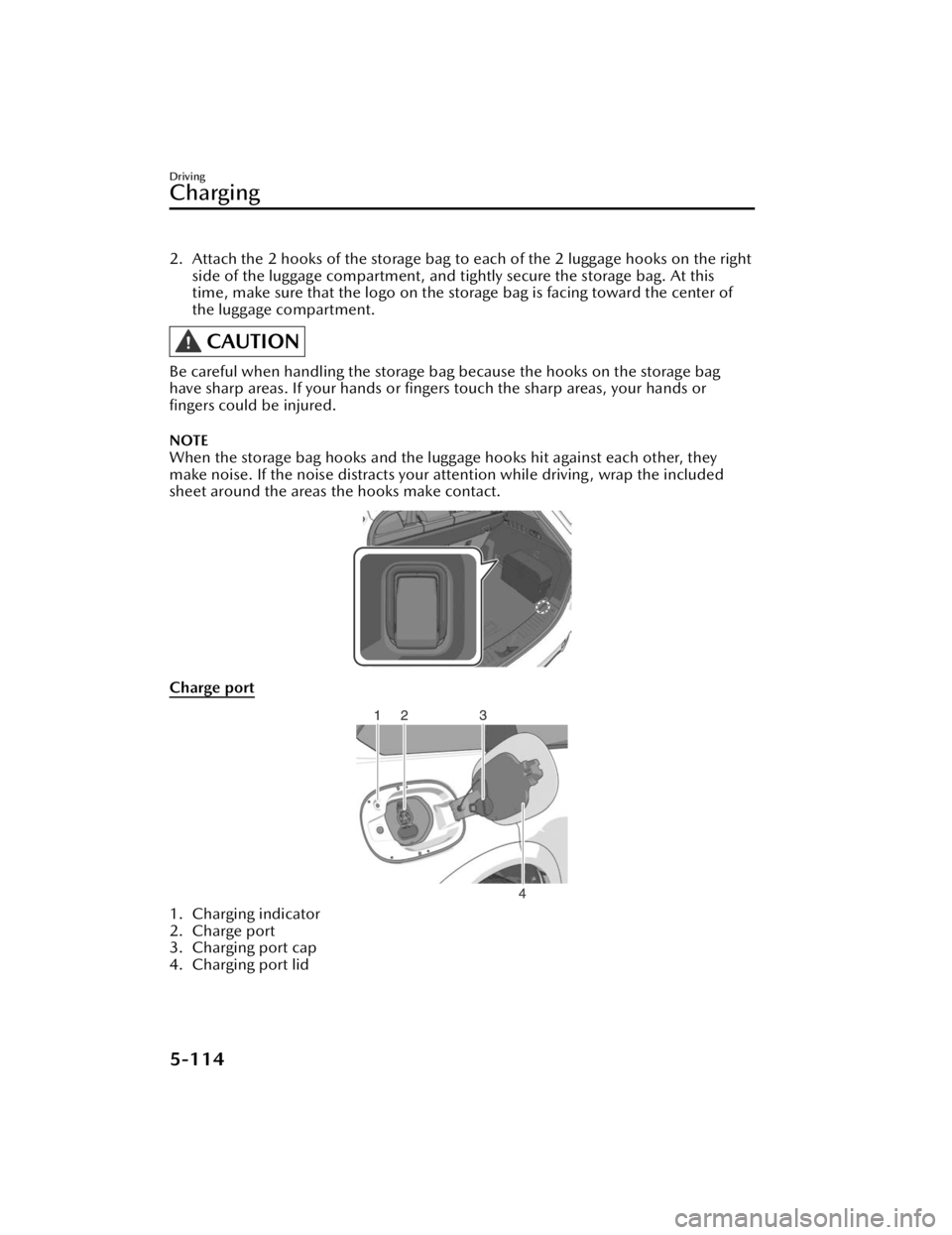
2. Attach the 2 hooks of the storage bag to each of the 2 luggage hooks on the right
side of the luggage compartment, and tightly secure the storage bag. At this
time, make sure that the logo on the storage bag is facing toward the center of
the luggage compartment.
CAUTION
Be careful when handling the storage bag because the hooks on the storage bag
have sharp areas. If your hands or fingers touch the sharp areas, your hands or
fingers could be injured.
NOTE
When the storage bag hooks and the luggage hooks hit against each other, they
make noise. If the noise distracts your attention while driving , wrap the included
sheet around the areas the hooks make contact.
Charge port
1. Charging indicator
2. Charge port
3. Charging port cap
4. Charging port lid
Driving
Charging
5-114
CX-90_8KG7-EA-22L_Edition1_new 2022-11-17 16:05:04
Page 392 of 687

Snow Tires
WARNING
Use only the same size and type tires
(snow, radial, or non-radial) on all 4
wheels:
Using tires different in size or type is
dangerous. Your vehicle's handling
could be greatly affected and result in
an accident.
CAUTION
Check local regulations before using
studded tires.
Use snow tires on all 4 wheels
Do not go faster than 120 km/h (75
mph) while driving with snow tires.
When installing winter tires, use tires of
the specified size and adjust the air
pressure of all the tires to the specified
value. (page 10-71).
The vehicle is originally equipped with
all season radials designed to be used
all year around. In some extreme
climates you may find it necessary to
replace them with snow tires during
the winter months to further improve
traction on snow and ice covered
roads.
Tire Chains
Check local regulations before using
tire chains.
CAUTION
Chains may aff ect handling.
Do not go faster than 50 km/h (30
mph) or the chain manufacturer's
recommended limit, whichever is
lower.
Drive carefully and avoid bumps,
holes, and sharp turns.
Avoid locked-wheel braking.
Do not use chains on a temporary
spare tire; it may result in damage to
the vehicle and to the tire.
Do not use chains on roads that are
free of snow or ice. The tires and
chains could be damaged.
Chains may scratch or chip
aluminum wheels.
NOTE
The tire pressure monitoring system
may not function correctly when using
tire chains.
Install the chains on the rear tires only.
Do not use chains on the front tires.
Please consult an Authorized Mazda
Dealer.
Installing the chains
1. Secure the chains on the rear tires
as tightly as possible. Always follow
the chain manufacturer's
instructions.
2. Retighten the chains after driving 1/2 ―1 km (1/4 ―1/2 mile).
Driving
Winter Driving
5-241
CX-90_8KG7-EA-22L_Edition1_new 2022-11-17 16:05:04
Page 447 of 687

(U.S.A. and Canada)
Privacy Policy
Mazda maintains a Privacy Statement which describes how we collect, use, share,
store and secure data from your vehicle equipped with connected services.
We provide you with connected services by collecting and using your personal
information and vehicle location, health and driving data.
To learn more about our Privacy Statement, please visit:
(U.S.A.)
https://www.mazdausa.com/site /privacy-connectedservices
(Canada)
https://www.mazda.ca/en/cv-privacy/
Other Equipment
Mazda Connect
7-20
CX-90_8KG7-EA-22L_Edition1_new 2022-11-17 16:05:04
Page 450 of 687

(Multicast)
On the FM radio frequency most digital stations have “multiple” or supplemental
programs on each FM station.
HD Radio Technology manufactured under license from iBiquity Digital Corporation.
U.S. and Foreign Patents.
For patents see http://dts.com/patents.
Apple CarPlay™
CAUTION
YOU EXPRESSLY ACKNOWLEDGE AND AGREE THAT USE OF APPLE CARPLAY™
(“THE APPLICATION”) IS AT YOUR SOLE RISK AND THAT THE ENTIRE RISK AS TO
SATISFACTORY QUALITY, PERFORMANCE, ACCURACY AND EFFORT IS WITH
YOU TO THE MAXIMUM EXTENT PERMITTED BY APPLICABLE LAW, AND THAT
THE APPLICATION AND INFORMATION ON THE APPLICATION IS PROVIDED “AS
IS” AND “AS AVAILABLE”, WITH ALL FAULTS AND WITHOUT WARRANTY OF ANY
KIND, AND MAZDA HEREBY DISCLAIMS ALL WARRANTIES AND CONDITIONS
WITH RESPECT TO THE APPLICATION AND INFORMATION ON THE
APPLICATION, EITHER EXPRESS, IMPLIED OR STATUTORY, INCLUDING, BUT NOT
LIMITED TO, THE IMPLIED WARRANTIES AND/OR CONDITIONS OF
MERCHANTABILITY, SATISFACTORY QUALITY, FITNESS FOR A PARTICULAR
PURPOSE, ACCURACY, QUIET ENJOYMENT, AND NONINFRINGEMENT OF
THIRD PARTY RIGHTS.
AS EXAMPLES, AND WITHOUT LIMITATION, MAZDA DISCLAIMS ANY
WARRANTY REGARDING THE ACCURACY OF DATA PROVIDED BY THE
APPLICATION, SUCH AS THE ACCURACY OF DIRECTIONS, ESTIMATED TRAVEL
TIME, SPEED LIMITS, ROAD CONDITIONS, NEWS, WEATHER, TRAFFIC, OR
OTHER CONTENT PROVIDED BY APPLE, ITS AFFILIATES, OR THIRD PARTY
PROVIDERS; MAZDA DOES NOT GUARANTEE AGAINST LOSS OF APPLICATION
DATA, WHICH MAY BE LOST AT ANY TIME; MAZDA DOES NOT GUARANTEE
THAT THE APPLICATION OR ANY SERVICES PROVIDED THROUGH THEM WILL
BE PROVIDED AT ALL TIMES OR THAT ANY OR ALL SERVICES WILL BE AVAILABLE
AT ANY PARTICULAR TIME OR LOCATION. FOR EXAMPLE, SERVICES MAY BE
SUSPENDED OR INTERRUPTED WITHOUT NOTICE FOR REPAIR, MAINTENANCE,
SECURITY FIXES, UPDATES, ETC., SERVICES MAY BE UNAVAILABLE IN YOUR AREA
OR LOCATION, ETC.
Other Equipment
Mazda Connect
7-23
CX-90_8KG7-EA-22L_Edition1_new 2022-11-17 16:05:04