steering MAZDA CX90 2024 Owner's Guide
[x] Cancel search | Manufacturer: MAZDA, Model Year: 2024, Model line: CX90, Model: MAZDA CX90 2024Pages: 687, PDF Size: 15.46 MB
Page 250 of 687

Power Steering
The power steering operates while the
hybrid system is operating.
Even when the hybrid system is
stopped or the power steering system
does not operate, steering is possible
but the operation may feel heavier
compared to normal.
Driving
Power Steering
5-99
CX-90_8KG7-EA-22L_Edition1_new2022-11-17 16:05:04
Page 251 of 687

Tire Pressure MonitoringSystem (TPMS)
The TPMS monitors the air pressure of
each tire and informs the driver of a
decrease in the tire air pressure when it
becomes lower than the specified air
pressure.
For the TPMS, the air pressure data
sent from the tire pressure sensors
installed on each wheel via radio signal
is received by the receiver unit in the
vehicle to monitor the tire pressures.
1. Tire pressure sensor
Warning and Cautions forUsing the Tire Pressure Monitoring System
(TPMS)
WARNING
Do not drive the vehicle at high
speeds if the TPMS warning light
is
turned on or flashing.
Driving the vehicle at high speeds
while the TPMS warning light is turned
on or flashing is dangerous because
the brake performance and the
steering wheel operability will be
reduced. If the vehicle is driven at high
speeds or the brakes are suddenly
applied, it could lead to an accident.
Gradually apply the brake and reduce
the vehicle speed.
Do not ignore the TPMS warning light
when it is turned on or flashing.
Continuing to driv e the vehicle while
ignoring the illumi nation/flashing of
the TPMS warning light is dangerous
because a tire may burst which could
lead to an accident. Take appropriate
measures as soon as possible.
Driving
Tire Pressure Monitoring System (TPMS)
5-100
CX-90_8KG7-EA-22L_Edition1_new 2022-11-17 16:05:04
Page 274 of 687

Active Safety Technology
Active safety technology supports
driver's safe driving and helps to
prevent accidents from occurring.
Active safety technology includes
driver awareness support systems and
driving support systems.
Driver Awareness Support Systems
Driver awareness support systems
assist in the recognition of roads, signs,
vehicle surroundings, and driver
fatigue.
Driver awareness support systems
include the following systems.
Nighttime visibility
High Beam Control System
(HBC).............................. page 5-140
Left/right side and rear detection
Lane Departure Warning System
(LDWS)............................ page 5-144
Blind Spot Monitoring (BSM)...............
........................................ page 5-146
Road sign recognition
Traffic Sign Recognition System
(TSR)................................ page 5-150
Inter-vehicle distance recognition
Distance & Speed Alert (DSA) .............
........................................ page 5-153
Forward obstruction detection when
accelerating at an intersection
Front Cross Traffic Alert (FCTA) ............
........................................ page 5-160
Rear obstruction detection when
leaving a parking space
Rear Cross Traffic Alert (RCTA) .............
........................................ page 5-163
Full-surround recognition
360° View Monitor........... page 5-206
Driver fatigue detection
Driver Attention Alert (DAA) ...............
........................................ page 5-155
Driver Monitoring (DM).... page 5-157
Driver Support Systems
Driver support systems assist in
acceleration, deceleration, and
steering operations while driving.
Driver support systems include the
following systems.
Inter-vehicle distance
Mazda Radar Cruise Control
(MRCC)........................... page 5-165
Inter-vehicle distance and lane
keeping
Cruising & Traffic Support (CTS)...........
........................................ page 5-175
Lane departure
Lane Keep Assist System (LAS) .............
........................................ page 5-188
Lane keeping
Emergency Lane Keeping (ELK) ............
........................................ page 5-191
Driving
i-ACTIVSENSE
5-123
CX-90_8KG7-EA-22L_Edition1_new 2022-11-17 16:05:04
Page 295 of 687

Lane Departure WarningSystem (LDWS)
*
The LDWS notifies the driver that the
vehicle might be deviating from its
lane. If there is a possibility of your
vehicle deviating from the vehicle lane,
a screen display and a warning sound
notify the driver of the danger.
Warnings and Cautionsfor Using the Lane
Departure Warning
System (LDWS)
WARNING
Do not rely comple tely on the LDWS.
The LDWS has limitations. Do not
rely completely on the system and
always stay on course using the
steering wheel.
The LDWS is not designed to
compensate for a driver’s lack of
caution and relying on the system
could lead to an accident.
CAUTION
Heed the following cautions so that
the LDWS can operate normally.
Do not modify the suspensions.
Always use wheels of the
specified
size for the front and rear wheels.
Consult an Authorized Mazda Dealer
for tire replacement.
Driving
Lane Departure Warning System (LDWS)
5-144*Some models.
CX-90_8KG7-EA-22L_Edition1_new 2022-11-17 16:05:04
Page 296 of 687

How to Use the LaneDeparture Warning System (LDWS)
LDWS operates
The LDWS operates when all of the
following conditions are met.
The vehicle speed is about 64 km/h
(40 mph)or faster.
The system detects white (yellow)
lane lines.
The CTS steering assist function is
not operating.
The system determines that the
vehicle may depart from the lane.
When the LDWS is operating, a screen
display and a warning sound (steering
wheel vibration and warning sound)
notify the driver of the danger.
Instrument cluster
Active driving display
NOTE
The LDWS operates only on the side
that detects white lines (yellow
lines).
The forward sensing camera (FSC)
may not be able to detect target
objects correctly, and the LDWS may
not operate normally.
Refer to Forward Sensing Camera
(FSC) on page 5-127.
The LDWS warning type can be
changed using Mazda Connect.
Refer to the Settings section in the
Mazda Connect Owner's Manual.
LDWS is temporarily canceled
If any of the following conditions is
met, the LDWS is canceled. In
addition, the LDWS is automatically
enabled when the condition changes
and the system is operable.
The turn signal lever is operated.The accelerator pedal is operated.The steering wheel is operated.The brake pedal is depressed.
Turning off the LDWS
There are 2 ways to turn off the LDWS.
Turn off the LDWS using Mazda
Connect.
Refer to the Settings section in the
Mazda Connect Owner's Manual.
Turn off the LDWS using the
i-ACTIVSENSE OFF switch.
Refer to How to Use the
i-ACTIVSENSE OFF switch on page
5-126.
Driving
Lane Departure Warning System (LDWS)
5-145
CX-90_8KG7-EA-22L_Edition1_new 2022-11-17 16:05:04
Page 306 of 687

Driver Attention Alert(DAA)
*
The DAA is a system that detects the
driver fatigue and decreased
attentiveness based on various types of
vehicle information, and encourages
the driver to take a rest using a screen
display and warning sound.
Warnings and Cautionsfor Using the Driver
Attention Alert (DAA)
WARNING
Do not rely completely on the DAA.
The DAA does not prevent driver
fatigue or decreased attentiveness and
over reliance on the system could lead
to an accident. Drive carefully and turn
the steering wheel appropriately.
In addition, the system may not be
able to correctly detect driver fatigue
or decreased attentiveness depending
on the road and driving conditions.
The driver must take sufficient rest in
consideration of safe driving.
Driving
Driver Attention Alert (DAA)
*Some models.5-155
CX-90_8KG7-EA-22L_Edition1_new 2022-11-17 16:05:04
Page 309 of 687

Warnings and Cautionsfor Using the DriverMonitoring (DM)
WARNING
Do not rely completely on the DM.
The DM does not prevent driver
drowsiness or inattentive driving and
over reliance on the system could lead
to an accident. Drive carefully and turn
the steering wheel appropriately.
In addition, the system may not be
able to correctly detect driver
drowsiness or inattentive driving
depending on the road and driving
conditions. The driver must take
sufficient rest in consideration of safe
driving.
How to Use the Driver
Monitoring (DM)
Operating the drowsiness detection
function
The drowsiness detection function
operates when all of the following
conditions are met.
The vehicle has been driven for
about 20 minutes or longer.
The vehicle speed is about 5 km/h
(3 mph) or faster.
The system detects driver
drowsiness.
When the drowsiness detection
function operates, the screen display
and warning sound encourage the
driver to take a rest.
Warning pattern (caution) (white)
1. “Time for a Break”
Warning pattern (warning) (amber)
1. “Time for a Break”
NOTE
After the drowsiness detection
function has displayed the first
message encouraging the driver to
take a rest, it does not display it
again during the following periods.
Driving
Driver Monitoring (DM)
5-158
CX-90_8KG7-EA-22L_Edition1_new 2022-11-17 16:05:04
Page 326 of 687

Cruising & Traffic Support(CTS)
*
The CTS is a system that reduces the
load on the driver while the vehicle is
driven on expressways or highways.
The CTS has the following 2 functions.
Constant speed/Headway control
function
The function performs headway
control to maintain the distance with a
vehicle ahead at a constant preset
speed without you having to depress
the accelerator or brake pedal.
Steering wheel assist function
When vehicle lane lines are detected,
the function assists your steering wheel
operation to follow the vehicle lane
lines.
When vehicle lane lines are not
detected, the function assists your
steering wheel operation to follow the
trajectory of the vehicle ahead.
Warnings and Cautionsfor Using Cruising &
Tra ffi c Support (CTS)
WARNING
Do not rely completely on the CTS.
The CTS is not an automated driving
system. Therefore, the function has
limitations. Do not rely completely
on the system and always stay on
course using the steering wheel.
Set a vehicle speed within the speed
limit according to the road
conditions and the weather
conditions.
The CTS may not be able to detect a
vehicle ahead depending on the type
of vehicle ahead and its conditions,
the weather conditions, and the road
conditions. Additionally, the system
might be unable to decelerate
sufficiently if the vehicle ahead
applies the brakes suddenly or
another vehicle cuts into your lane,
which could result in an accident.
Do not use the CTS under the
following conditions. Otherwise, it
may result in an accident.
The vehicle is driven on roads other
than expressways and highways.
The vehicle is driven on roads with
sharp curves or with heavy
traffic
where sufficient distances between
vehicles cannot be kept.
The vehicle is driven on roads where
acceleration and deceleration are
frequently repeated.
The vehicle is exiting the main lane
on an expressway to enter an
interchange, a rest area, or a parking
area.
Driving
Cruising &
Tra ffi c Support (CTS)
*Some models.5-175
CX-90_8KG7-EA-22L_Edition1_new
2022-11-17 16:05:04
Page 330 of 687

The steering assist function operates if all of the following conditions are met while
traveling at a constant speed or in headway control.
When driving near the center of the lane and the white (yellow) lane lines on both
sides are detected clearly, or a vehicle ahead is detected clearly in front of your
vehicle and at less than about 56 km/h (35 mph).
The steering wheel is not turned sharply.The turn signal lever is not operated.
When the steering assist function operates, the steering assist operation display
changes from white to green.
Driving condition Instrument cluster di splay Active driving display indication
Steering assist within vehi-
cle lane lines
Steering assist along the
trajectory of the vehicle
ahead
NOTE
The steering assist function assists the st eering wheel operation so that the vehicle
remains near the center of the driving lane, however, the function might not be
able to keep the vehicle near the center of the driving lane when any of the
following condit ions is met.
The vehicle speed is high.The vehicle is making a sharp turn.The vehicle is driven on a road with steep or up and down (wavy) slopes.The vehicle is driven on a road with a large lateral gradient.
Driving
Cruising &
Tra ffi c Support (CTS)
5-179
CX-90_8KG7-EA-22L_Edition1_new
2022-11-17 16:05:04
Page 331 of 687
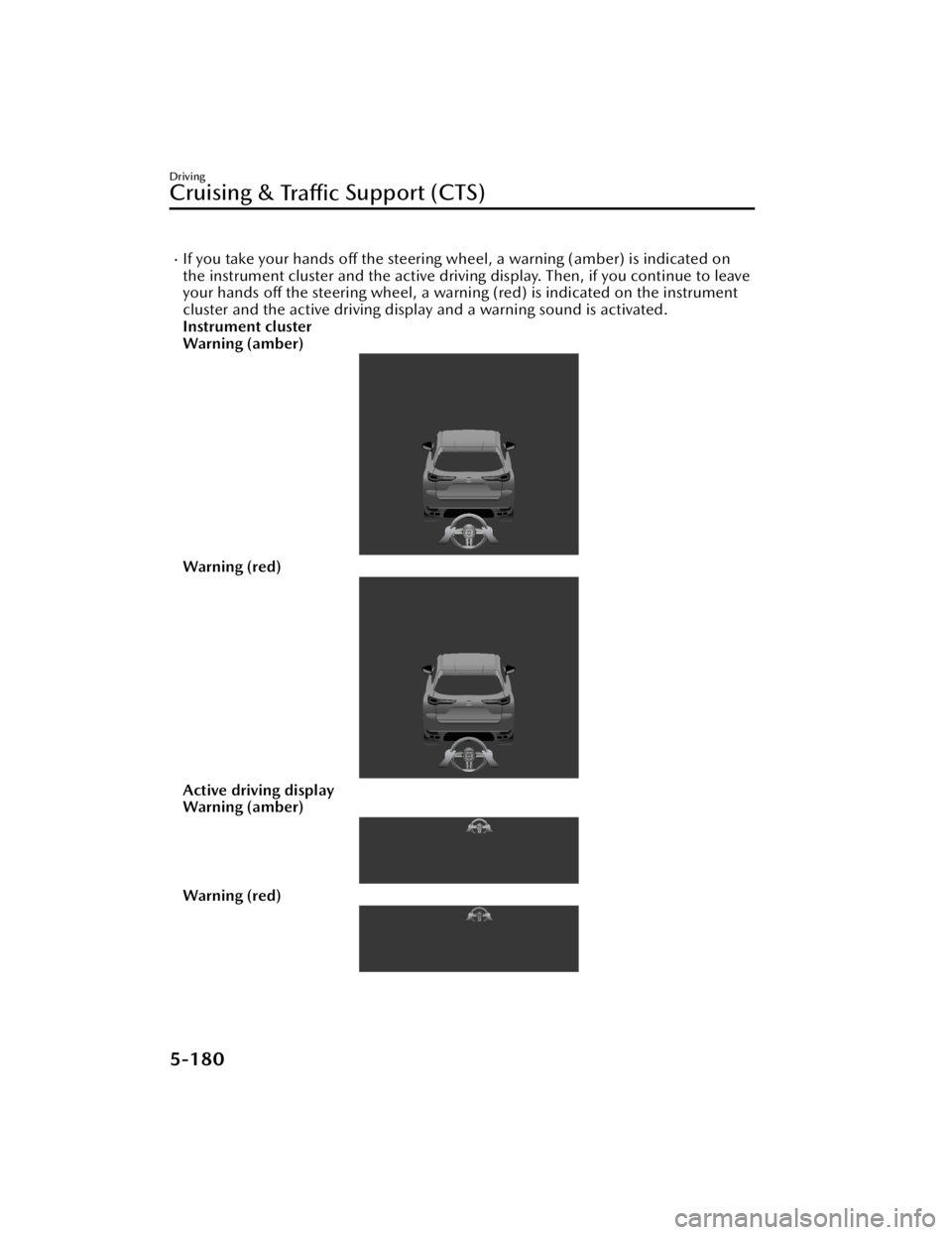
If you take your hands off the steering wheel, a warning (amber) is indicated on
the instrument cluster and the active driving display. Then, if you continue to leave
your hands off the steering wheel, a warning (red) is indicated on the instrument
cluster and the active driving display and a warning sound is activated.
Instrument cluster
Warning (amber)
Warning (red)
Active driving display
Warning (amber)
Warning (red)
Driving
Cruising & Tra ffi c Support (CTS)
5-180
CX-90_8KG7-EA-22L_Edition1_new
2022-11-17 16:05:04