change wheel MAZDA MAZDA 2021 Owner's Manual
[x] Cancel search | Manufacturer: MAZDA, Model Year: 2021, Model line: MAZDA, Model: MAZDA MAZDA 2021Pages: 612, PDF Size: 11.91 MB
Page 313 of 612

The method for parking/stopping
the vehicle using the 360°View
Monitor differs depending on the
road circumstances/conditions and
the vehicle conditions. When and
how much you turn the steering
wheel will differ depending on the
situation, , therefore always check
the vehicle surroundings directly with
your eyes while using the system.
Also, before using the system, always
make sure that the vehicle can be
parked/stopped in the parking/
stopping space.
NOTE
If there are water droplets, snow, or
mud on the camera lens, wipe it off
using a soft cloth. If the camera lens
is especially dirty, wash it off with
mild detergent.
If the camera lens is touched or there
is any dirt on it, it could affect the
screen image. Wipe the lens using a
soft cloth.
If the area where the camera is
installed, such as the front/rear
bumper or door mirrors, has been
damaged in a vehicle accident, the
camera (position, installation angle)
may have shifted. Always consult an
Authorized Mazda Dealer to have
the vehicle inspected.
If the camera is subjected to
excessive changes in temperature
such as by pouring hot water on the
camera during cold weather, the
360°View Monitor may not operate
normally.
If the vehicle is driven during cold
temperatures and the camera
temperature decreases, the top view
and the side view may become
u n c l ea r. H o we v e r, t h i s d o e s n o t
indicate a problem. If the vehicle is
stopped for a while and the camera
temperature increases, the top view
and the side view will return to the
normal condition.
If the battery voltage is low, the
screen might be temporarily difficult
to view, however, this does not
indicate a problem.
The 360°View Monitor has
limitations. Objects under the
bumper or near both ends of the
bumper cannot be displayed.
Obstructions above the upper image
range of the camera are not
displayed.
Under the following conditions, the
screen might be difficult to view,
however this does not indicate a
problem.
The temperature near the lens is
high/low.
Rainy conditions, water droplets
on the camera, or high humidity.
Mud or foreign matter near the
camera.
Extremely bright light such as
sunlight or headlights hitting the
camera lens directly.
The surroundings are illuminated
by vehicle lights, fluorescent lights,
or LED lights (display may flicker).
Extremely small dark or white dots
appear on the screen (dots may
flicker).
Because the 360°View Monitor
camera uses a special lens, the
distance displayed on the screendiffers from the actual distance.
When Driving
i-ACTIVSENSE
4-171
Mazda3_8JM2-EA-20H_Edition2_new 2020-8-19 13:13:07
Page 326 of 612
NOTE
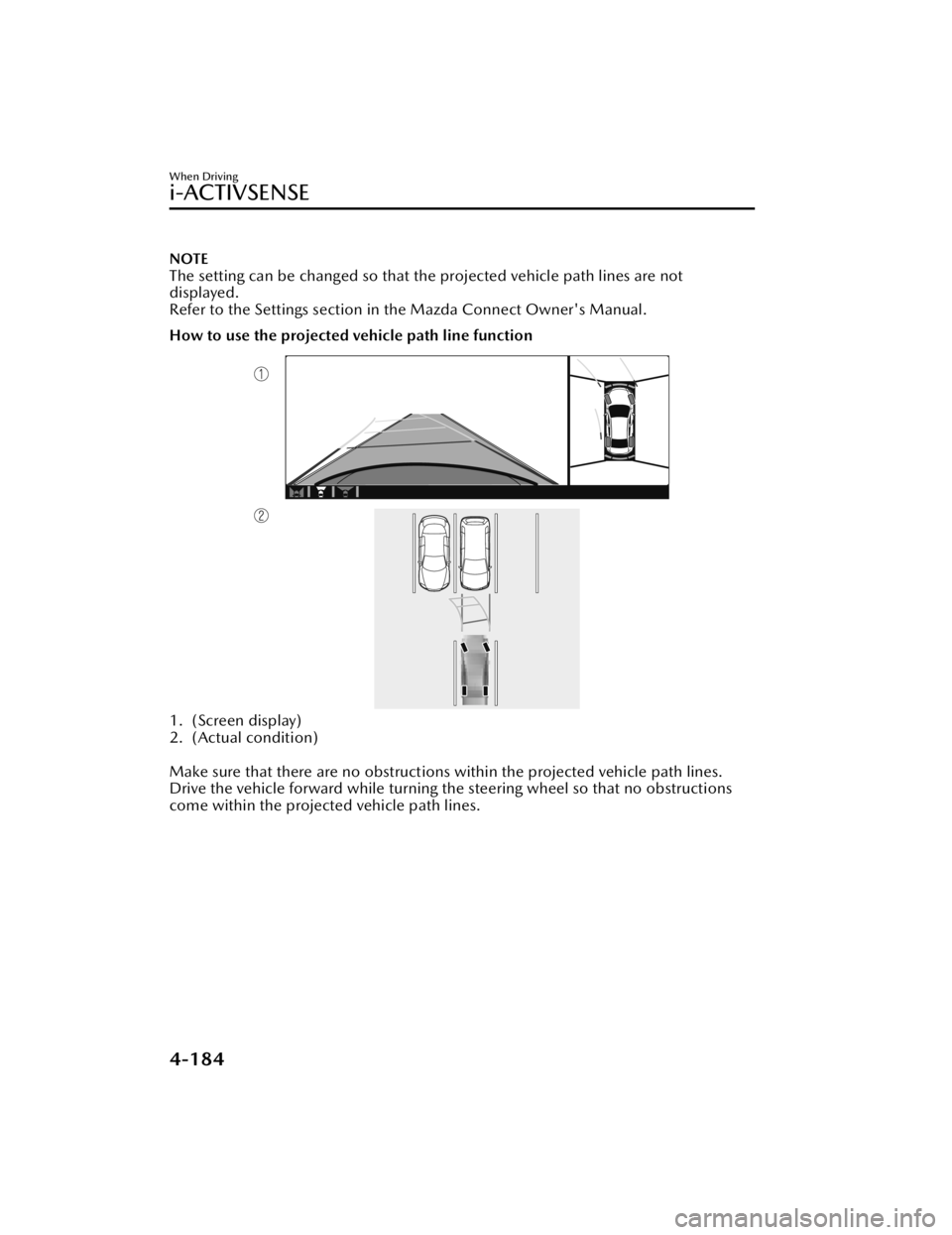
The setting can be changed so that the projected vehicle path lines are not
displayed.
Refer to the Settings section in the Mazda Connect Owner's Manual.
How to use the projected vehicle path line function
1. (Screen display)
2. (Actual condition)
Make sure that there are no obstructions within the projected vehicle path lines.
Drive the vehicle forward while turning the steering wheel so that no obstructions
come within the projected vehicle path lines.
When Driving
i-ACTIVSENSE
4-184
Mazda3_8JM2-EA-20H_Edition2_new 2020-8-19 13:13:07
Page 330 of 612
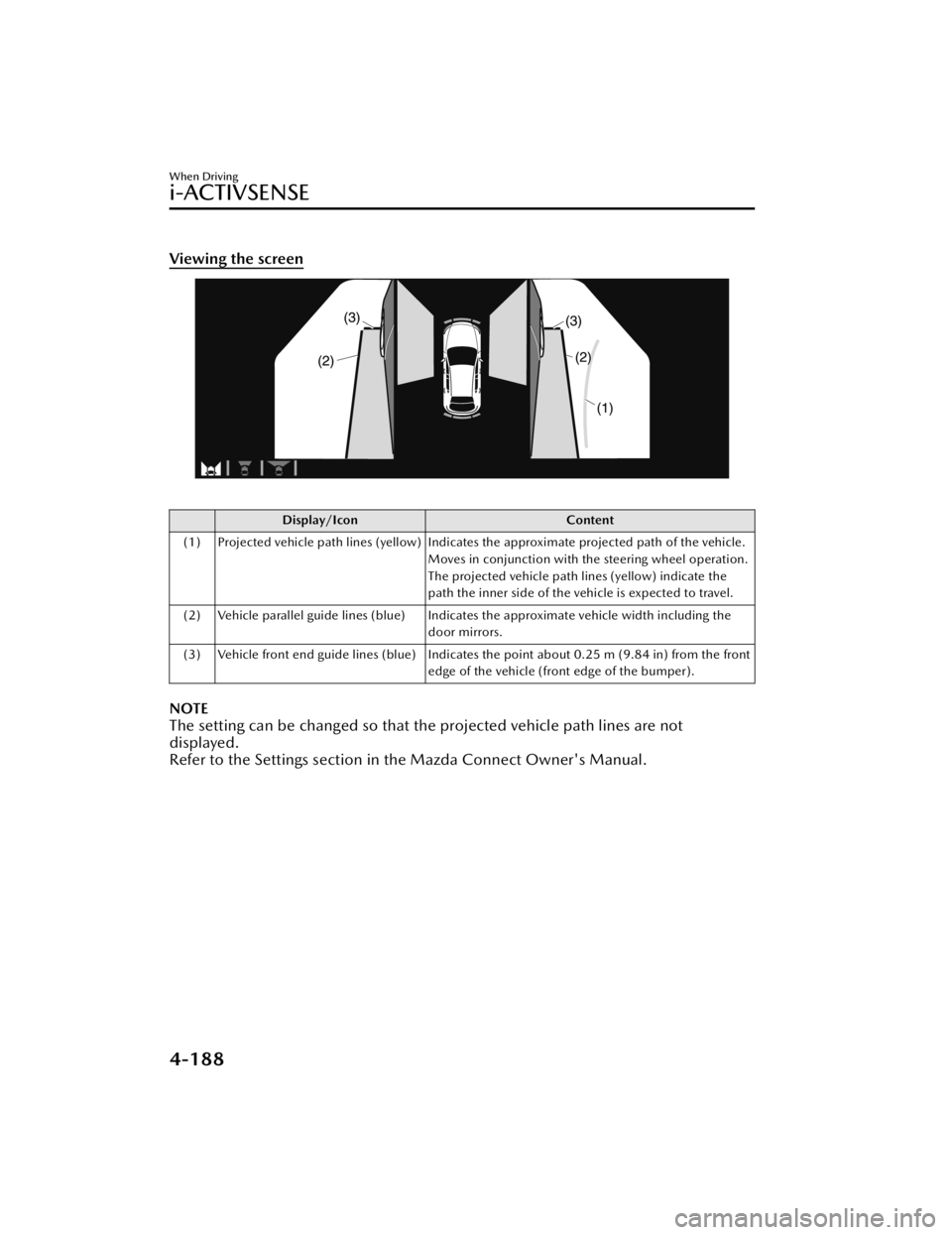
Viewing the screen
Display/IconContent
(1) Projected vehicle path lines (yellow) Indicates the approximate projected path of the vehicle. Moves in conjunction with the steering wheel operation.
The projected vehicle path lines (yellow) indicate the
path the inner side of the vehicle is expected to travel.
(2) Vehicle parallel guide lines (blue) Indicates the approximate vehicle width including the door mirrors.
(3) Vehicle front end guide lines (blue) Indicates the point about 0.25 m (9.84 in) from the front edge of the vehicle (front edge of the bumper).
NOTE
The setting can be changed so that the projected vehicle path lines are not
displayed.
Refer to the Settings section in the Mazda Connect Owner's Manual.
When Driving
i-ACTIVSENSE
4-188
Mazda3_8JM2-EA-20H_Edition2_new 2020-8-19 13:13:07
Page 333 of 612
Lines on the road may appear distorted at the seams where each of the camera
images merge.
The screen area for each camera may appear bright/dark depending on the
illumination level around any of the cameras.
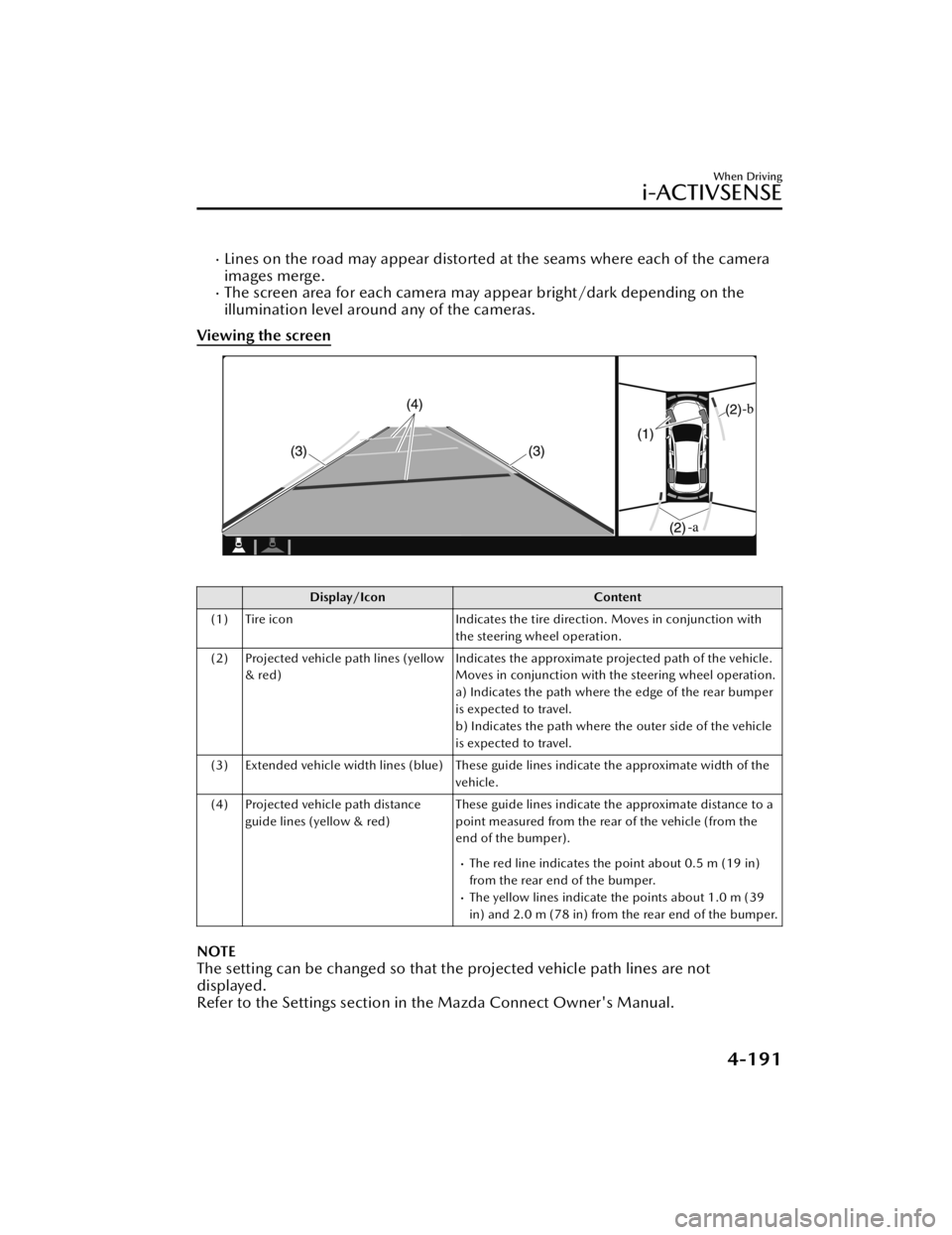
Viewing the screen
Display/Icon Content
(1) Tire icon Indicates the tire direction. Moves in conjunction with
the steering wheel operation.
(2) Projected vehicle path lines (yellow & red) Indicates the approximate projected path of the vehicle.
Moves in conjunction with the steering wheel operation.
a) Indicates the path where the edge of the rear bumper
is expected to travel.
b) Indicates the path where the outer side of the vehicle
is expected to travel.
(3) Extended vehicle width lines (blue) These guide lines indicate the approximate width of the vehicle.
(4) Projected vehicle path distance guide lines (yellow & red) These guide lines indicate the approximate distance to a
point measured from the rear of the vehicle (from the
end of the bumper).
The red line indicates the point about 0.5 m (19 in)
from the rear end of the bumper.
The yellow lines indicate the points about 1.0 m (39
in) and 2.0 m (78 in) from the rear end of the bumper.
NOTE
The setting can be changed so that the projected vehicle path lines are not
displayed.
Refer to the Settings section in the Mazda Connect Owner's Manual.
When Driving
i-ACTIVSENSE
4-191
Mazda3_8JM2-EA-20H_Edition2_new
2020-8-19 13:13:07
Page 346 of 612

Do not remove the Forward
Sensing Camera (FSC) cover.
Do not place objects on the
dashboard which reflect light.
Always keep the windshield glass
around the camera clean by
removing dirt or fogging. Use the
windshield defroster to remove
fogging on the windshield.
Consult an Authorized Mazda
Dealer regarding cleaning the
interior side of the windshield
around the Forward Sensing
Camera (FSC).
Consult an Authorized Mazda
Dealer before performing repairs
around the Forward Sensing
Camera (FSC).
The Forward Sensing Camera (FSC)
is installed to the windshield.
Consult an Authorized Mazda
Dealer for windshield repair and
replacement.
When cleaning the windshield, do
not allow glass cleaners or similar
cleaning fluids to get on the
Forward Sensing Camera (FSC)
lens. In addition, do not touch the
Forward Sensing Camera (FSC)
lens.
When performing repairs around
the rearview mirror, consult an
Authorized Mazda Dealer.
Consult an Authorized Mazda
Dealer regarding cleaning of the
camera lens.
Do not hit or apply strong force to
the Forward Sensing Camera (FSC)
or the area around it. If the
Forward Sensing Camera (FSC) is
severely hit or if there are cracks or
damage caused by flying gravel or
debris in the area around it, stop
using the following systems and
consult an Authorized Mazda
Dealer.High Beam Control System
(HBC)
Lane Departure Warning System
(LDWS)
Traffic Sign Recognition System
(TSR)
Distance & Speed Alert (DSA)
Driver Attention Alert (DAA)
Mazda Radar Cruise Control
(MRCC)
Mazda Radar Cruise Control
with Stop & Go function (MRCC
with Stop & Go function)
Lane-keep Assist System (LAS)
Traffic Jam Assist (TJA)
Smart Brake Support (SBS)
The direction in which the Forward
Sensing Camera (FSC) is pointed
has been finely adjusted. Do not
change the installation position of
the Forward Sensing Camera (FSC)
or remove it. Otherwise, it could
result in damage or malfunction.
Always use tires for all wheels that
are of the
specified size, and the
same manufacturer, brand, and tread
pattern. In addition, do not use tires
with significantly
different wear
patterns on the same vehicle as the
system may not operate normally.
The Forward Sensing Camera (FSC)
includes a function for detecting a
soiled windshield and informing the
driver, however, depending on the
conditions, it may not detect plastic
shopping bags, ice or snow on the
windshield. In such cases, the system
cannot accurately determine a
vehicle ahead and may not be able
to operate normally. Always drive
carefully and pay attention to the
road ahead.
When Driving
i-ACTIVSENSE
4-204
Mazda3_8JM2-EA-20H_Edition2_new 2020-8-19 13:13:07
Page 356 of 612
Driver MonitoringCamera
*
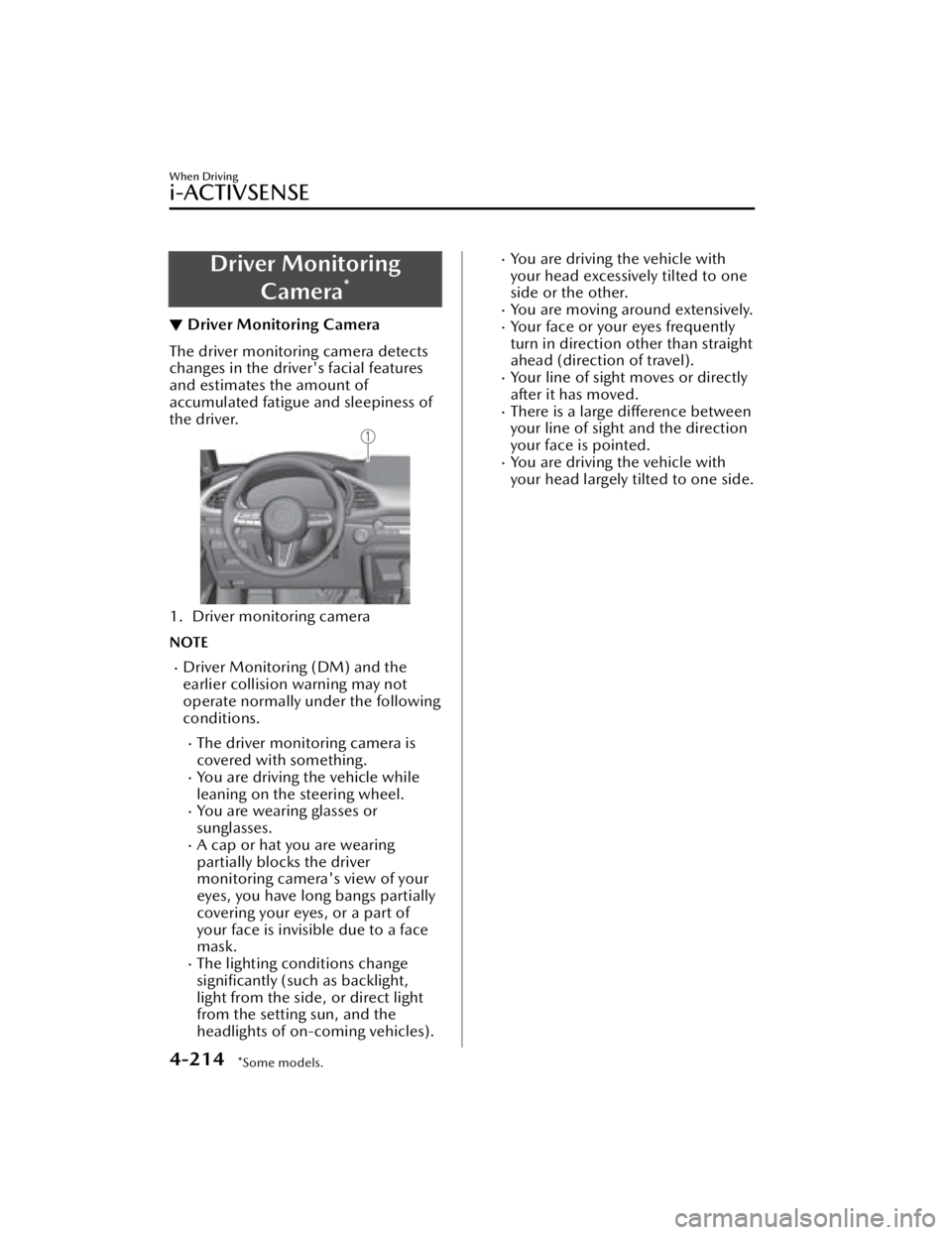
▼Driver Monitoring Camera
The driver monitoring camera detects
changes in the driver's facial features
and estimates the amount of
accumulated fatigue and sleepiness of
the driver.
1. Driver monitoring camera
NOTE
Driver Monitoring (DM) and the
earlier collision warning may not
operate normally under the following
conditions.
The driver monitoring camera is
covered with something.
You are driving the vehicle while
leaning on the steering wheel.
You are wearing glasses or
sunglasses.
A cap or hat you are wearing
partially blocks the driver
monitoring camera's view of your
eyes, you have long bangs partially
covering your eyes, or a part of
your face is invisible due to a face
mask.
The lighting conditions change
significantly (such as backlight,
light from the side, or direct light
from the setting sun, and the
headlights of on-coming vehicles).
You are driving the vehicle with
your head excessively tilted to one
side or the other.
You are moving around extensively.Your face or your eyes frequently
turn in direction other than straight
ahead (direction of travel).
Your line of sight moves or directly
after it has moved.
There is a large difference between
your line of sight and the direction
your face is pointed.
You are driving the vehicle with
your head largely tilted to one side.
When Driving
i-ACTIVSENSE
4-214*Some models.
Mazda3_8JM2-EA-20H_Edition2_new 2020-8-19 13:13:07
Page 368 of 612
The distance appearing in the displayed image is different from the actual distance
because the rear view parking camera is equipped with a specific lens.
Images displayed on the monitor from the rear view parking camera are reversed
images (mirror images).
Some optionally installed vehicle accessories may be picked up by the camera. Do
not install any optional parts that can interfere with the camera view, such as
illuminating parts or parts made of reflective material.
It may be difficult to see the display un der the following conditions, however, it
does not indicate a malfunction.
In darkened areas.When the temperature around the lens is high/low.When the camera is wet such as on a rainy day or during periods of high
humidity.
When foreign material such as mud is stuck around the camera.When the camera lens reflects sunlight or headlight beams.The surroundings are illuminated by vehicle lights, fluorescent lights, or LED
lights (display may flicker).
Extremely small dark or white dots appear on the screen (dots may flicker).Image display may be delayed if the temperature around the camera is low.
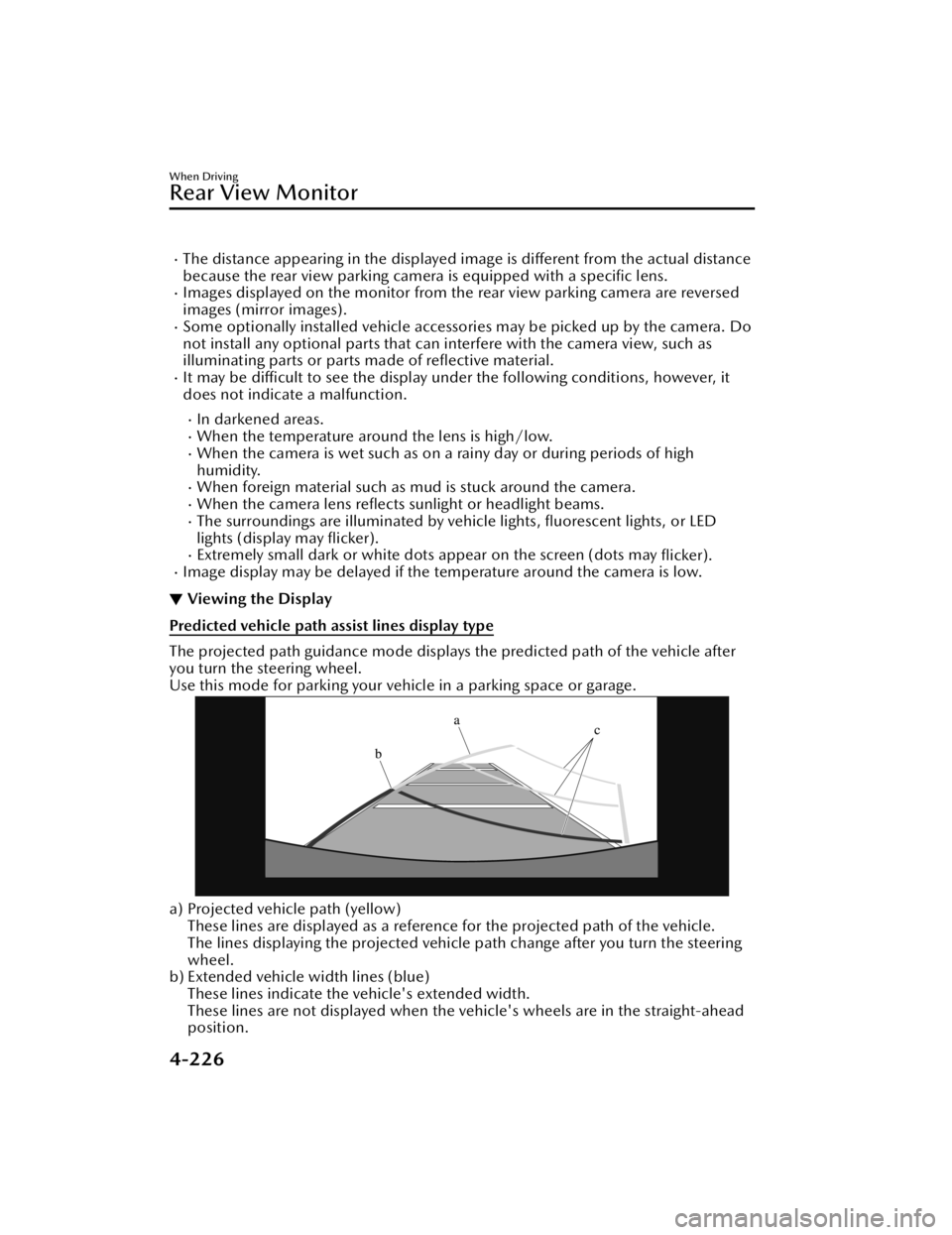
▼Viewing the Display
Predicted vehicle path assist lines display type
The projected path guidance mode displays the predicted path of the vehicle after
you turn the steering wheel.
Use this mode for parking your vehi
cle in a parking space or garage.
a) Projected vehicle path (yellow)
These lines are displayed as a reference for the projected path of the vehicle.
The lines displaying the projected vehicle path change after you turn the steering
wheel.
b) Extended vehicle width lines (blue)
These lines indicate the vehicle's extended width.
These lines are not displayed when the vehicle's wheels are in the straight-ahead
position.
When Driving
Rear View Monitor
4-226
Mazda3_8JM2-EA-20H_Edition2_new 2020-8-19 13:13:07
Page 369 of 612
c) Distance guide lines (red)These lines indicate the approximate distance to a point measured from the
vehicle's rear (from the end of the bumper).
The blue line indicates the point about 0.5 m (19 in) from the rear bumper.
The red and yellow lines, wh ich change position after you turn the steering wheel,
indicate the points about 0.5 m (19 in) for the red line and 1.0 m (39 in) and 2.0
m (78 in) for the yellow lines from the rear bumper (at the center point of each of
the lines).
A degree of error occurs when the wheels are not in the straight-ahead position.
In the above illustration, the right side of the vehicle is in a position closer to the
actual distance displayed by the distance guide lines (red: about 0.5 m (19 in)
point, yellow: about 1.0 m (39 in), and yellow: about 2.0 m (78 in) point behind
the rear bumper), whereas the left side is in a position farther away.
CAUTION
The indicated position of the guide lines on the display changes depending on the
vehicle conditions (such as the number of occupants/cargo load) and the road
conditions (such as a steep gradient to the rear of the vehicle).
Always check the area to the vehicle's re ar and the surrounding area directly with
your eyes while backing up.
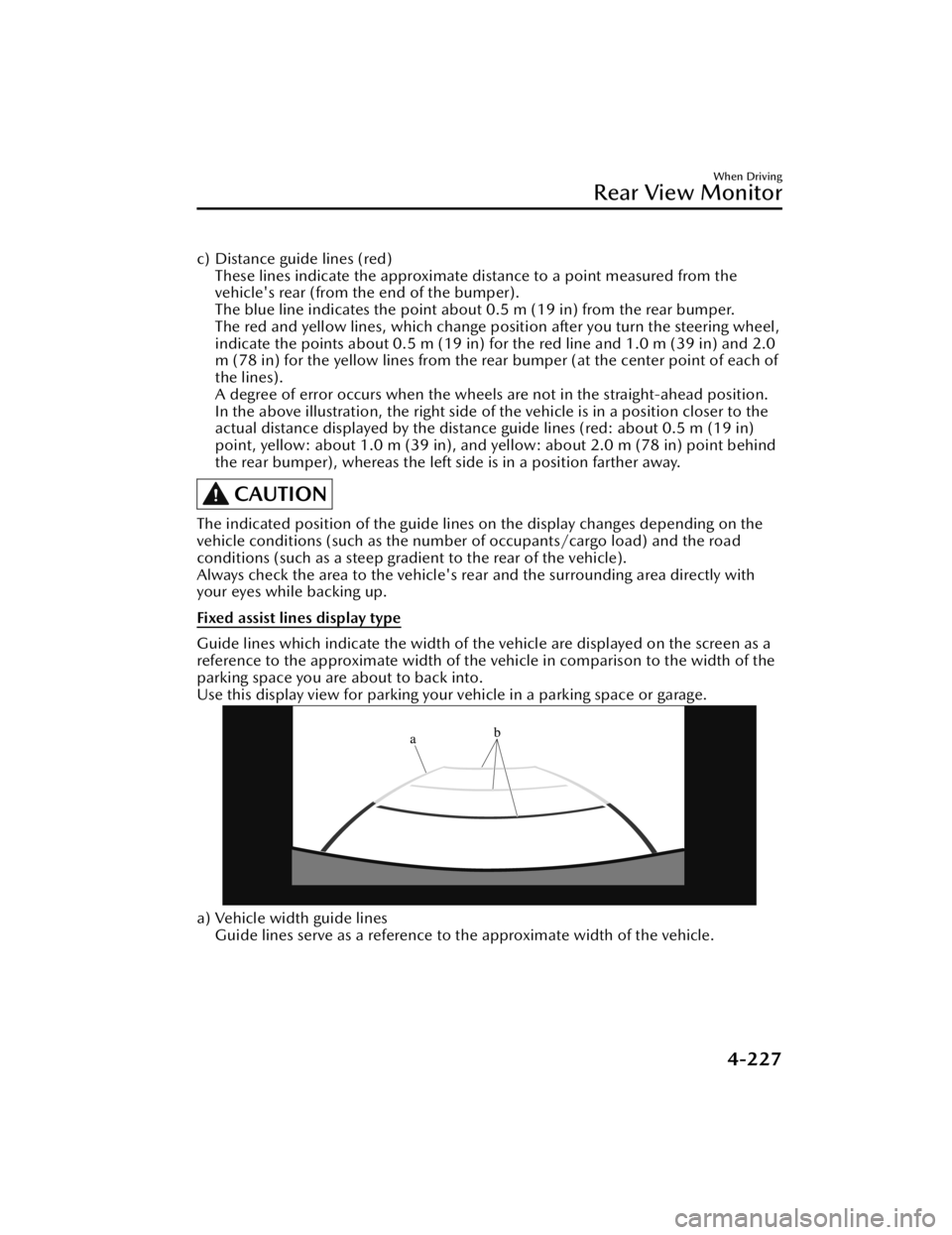
Fixed assist lines display type
Guide lines which indicate the width of the vehicle are displayed on the screen as a
reference to the approximate width of the vehicle in comparison to the width of the
parking space you are about to back into.
Use this display view for parking your vehicle in a parking space or garage.
a) Vehicle width guide lines
Guide lines serve as a reference to the approximate width of the vehicle.
When Driving
Rear View Monitor
4-227
Mazda3_8JM2-EA-20H_Edition2_new 2020-8-19 13:13:07
Page 407 of 612

No. MenuExplanation
(6) Settings You can change the settings for the Mazda Connect screen, sound set-
tings, and the vehicle functions.
In-Vehicle Displays:
Configures settings and content for all in-vehicle displays.
Sound Settings:
Configures
the in-vehicle listening experience.
Safety Settings:
Configures safety and driver assistance features.
Ve h i c l e S e t t i n g s :
Configures vehicle convenience features.
Connectivity Settings:
Configures Bluetooth and other device connectivity settings.
System Settings:
Configures language, time, and other general settings.
(7) Apple CarPlay You can use Apple CarPlay™ by connecting an iPhone
® compatible
with Apple CarPlay™ to the USB slot.
(8) Android Auto You can use Android Auto™ by connecting an Android™ Smartphone
compatible with Android Auto™ to the USB port.
WARNING
Always adjust Mazda Connect while the vehicle is stopped:
Do not adjust Mazda Connect with th
e Commander switch while driving the
vehicle. Adjusting Mazda Connect with the Commander switch while driving the
vehicle is dangerous as it could distract your attention from the vehicle operation
which could lead to a serious accident.
Even if the audio remote control switches are equipped on the steering wheel, learn
to use the switches without looking down at them so that you can keep your
maximum attention on the road while driving the vehicle.
Do not allow the connection plug cord to get tangled with the shift lever (manual
transmission)/selector leve r (automatic transmission):
Allowing the plug cord to become tangled with the shift lever (manual
transmission)/selector lever (automatic transmission) is dangerous as it could
interfere with driving, resulting in an accident.
Interior Features
Mazda Connect
5-17
Mazda3_8JM2-EA-20H_Edition2_new 2020-8-19 13:13:07
Page 413 of 612
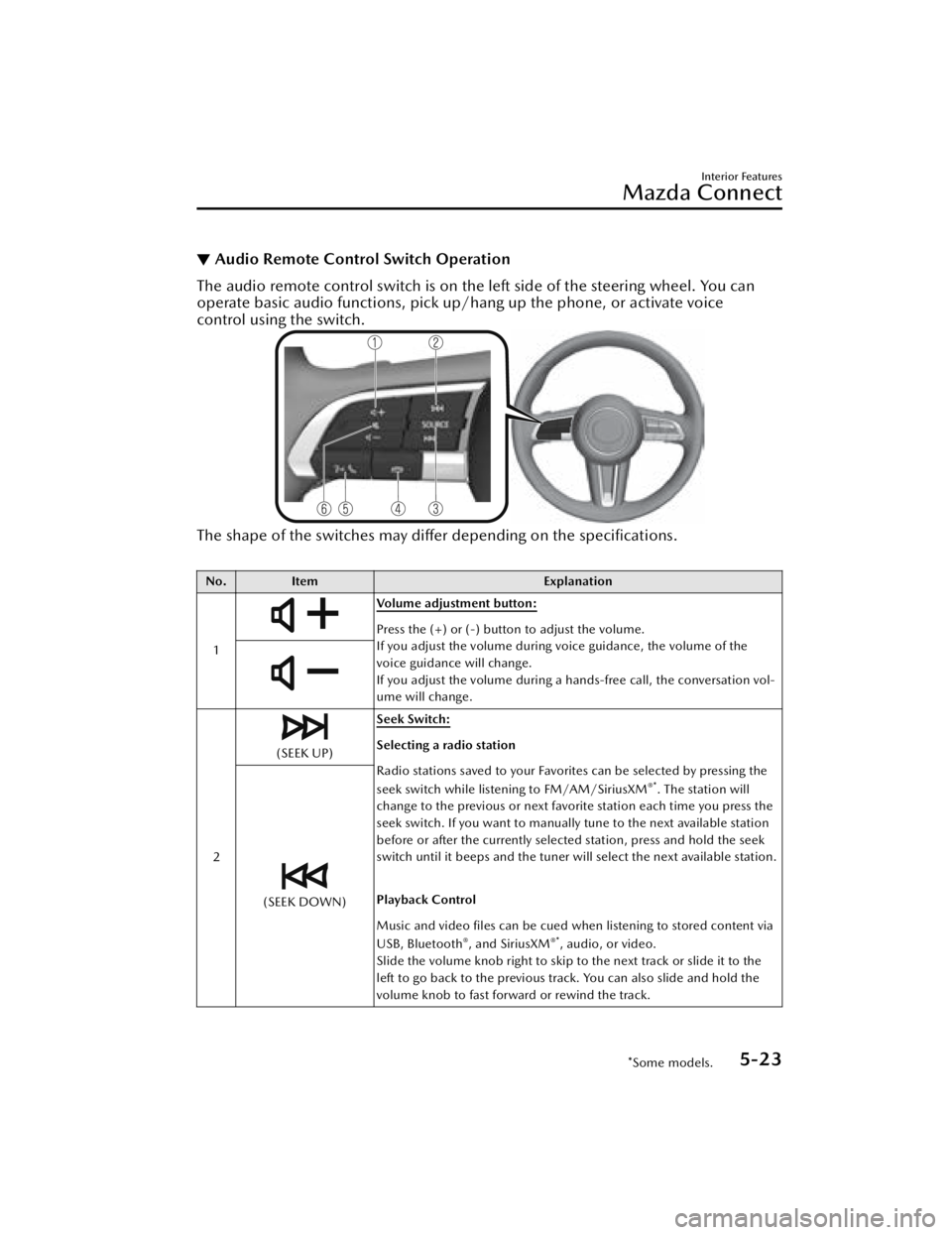
▼Audio Remote Control Switch Operation
The audio remote control switch is on the left side of the steering wheel. You can
operate basic audio functions, pick up/h
ang up the phone, or activate voice
control using the switch.
The shape of the switches may differ depending on the
specifications.
No. Item Explanation
1
Volume adjustment button:
Press the (+) or (-) button to adjust the volume.
If you adjust the volume during voice guidance, the volume of the
voice guidance will change.
If you adjust the volume during a hands-free call, the conversation vol-
ume will change.
2
(SEEK UP) Seek Switch:Selecting a radio station
Radio stations saved to your Favorites can be selected by pressing the
seek switch while listening to FM/AM/SiriusXM
®*. The station will
change to the previous or next favorite station each time you press the
seek switch. If you want to manually tune to the next available station
before or after the currently selected station, press and hold the seek
switch until it beeps and the tuner will select the next available station.
Playback Control
Music and video files can be cued when listening to stored content via
USB, Bluetooth
®, and SiriusXM®*, audio, or video.
Slide the volume knob right to skip to the next track or slide it to the
left to go back to the previous track. You can also slide and hold the
volume knob to fast forward or rewind the track.
(SEEK DOWN)
Interior Features
Mazda Connect
*Some models.5-23
Mazda3_8JM2-EA-20H_Edition2_new 2020-8-19 13:13:07