steering wheel MAZDA MIATA 1997 Factory Owner's Manual
[x] Cancel search | Manufacturer: MAZDA, Model Year: 1997, Model line: MIATA, Model: MAZDA MIATA 1997Pages: 514, PDF Size: 17.89 MB
Page 347 of 514
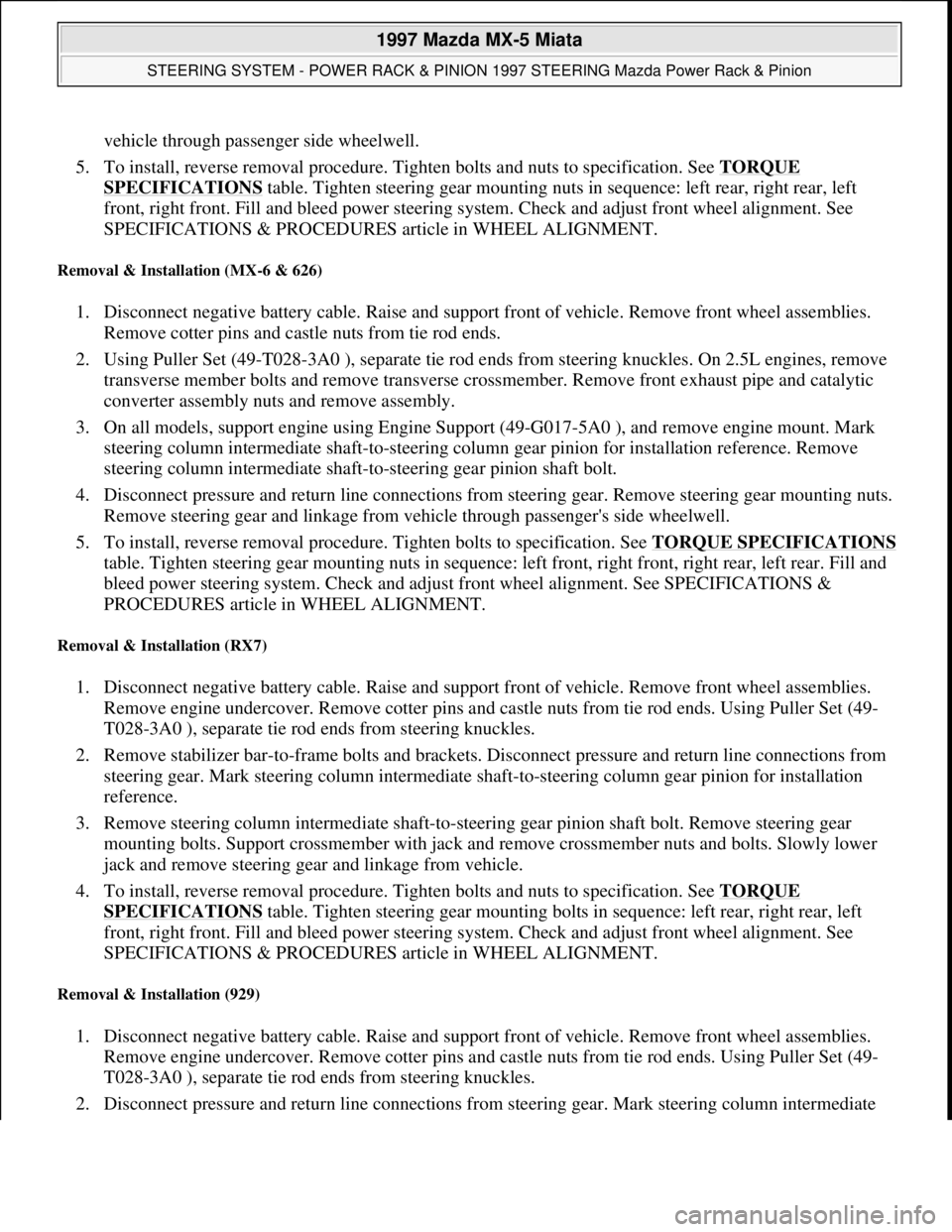
vehicle through passenger side wheelwell.
5. To install, reverse removal procedure. Tighten bolts and nuts to specification. See TORQUE
SPECIFICATIONS table. Tighten steering gear mounting nuts in sequence: left rear, right rear, left
front, right front. Fill and bleed power steering system. Check and adjust front wheel alignment. See
SPECIFICATIONS & PROCEDURES article in WHEEL ALIGNMENT.
Removal & Installation (MX-6 & 626)
1. Disconnect negative battery cable. Raise and support front of vehicle. Remove front wheel assemblies.
Remove cotter pins and castle nuts from tie rod ends.
2. Using Puller Set (49-T028-3A0 ), separate tie rod ends from steering knuckles. On 2.5L engines, remove
transverse member bolts and remove transverse crossmember. Remove front exhaust pipe and catalytic
converter assembly nuts and remove assembly.
3. On all models, support engine using Engine Support (49-G017-5A0 ), and remove engine mount. Mark
steering column intermediate shaft-to-steering column gear pinion for installation reference. Remove
steering column intermediate shaft-to-steering gear pinion shaft bolt.
4. Disconnect pressure and return line connections from steering gear. Remove steering gear mounting nuts.
Remove steering gear and linkage from vehicle through passenger's side wheelwell.
5. To install, reverse removal procedure. Tighten bolts to specification. See TORQUE SPECIFICATIONS
table. Tighten steering gear mounting nuts in sequence: left front, right front, right rear, left rear. Fill and
bleed power steering system. Check and adjust front wheel alignment. See SPECIFICATIONS &
PROCEDURES article in WHEEL ALIGNMENT.
Removal & Installation (RX7)
1. Disconnect negative battery cable. Raise and support front of vehicle. Remove front wheel assemblies.
Remove engine undercover. Remove cotter pins and castle nuts from tie rod ends. Using Puller Set (49-
T028-3A0 ), separate tie rod ends from steering knuckles.
2. Remove stabilizer bar-to-frame bolts and brackets. Disconnect pressure and return line connections from
steering gear. Mark steering column intermediate shaft-to-steering column gear pinion for installation
reference.
3. Remove steering column intermediate shaft-to-steering gear pinion shaft bolt. Remove steering gear
mounting bolts. Support crossmember with jack and remove crossmember nuts and bolts. Slowly lower
jack and remove steering gear and linkage from vehicle.
4. To install, reverse removal procedure. Tighten bolts and nuts to specification. See TORQUE
SPECIFICATIONS table. Tighten steering gear mounting bolts in sequence: left rear, right rear, left
front, right front. Fill and bleed power steering system. Check and adjust front wheel alignment. See
SPECIFICATIONS & PROCEDURES article in WHEEL ALIGNMENT.
Removal & Installation (929)
1. Disconnect negative battery cable. Raise and support front of vehicle. Remove front wheel assemblies.
Remove engine undercover. Remove cotter pins and castle nuts from tie rod ends. Using Puller Set (49-
T028-3A0 ), separate tie rod ends from steering knuckles.
2. Disconnect pressure and return line connections from steerin
g gear. Mark steering column intermediate
1997 Mazda MX-5 Miata
STEERING SYSTEM - POWER RACK & PINION 1997 STEERING Mazda Power Rack & Pinion
Microsoft
Sunday, July 05, 2009 1:39:26 PMPage 12 © 2005 Mitchell Repair Information Company, LLC.
Page 348 of 514
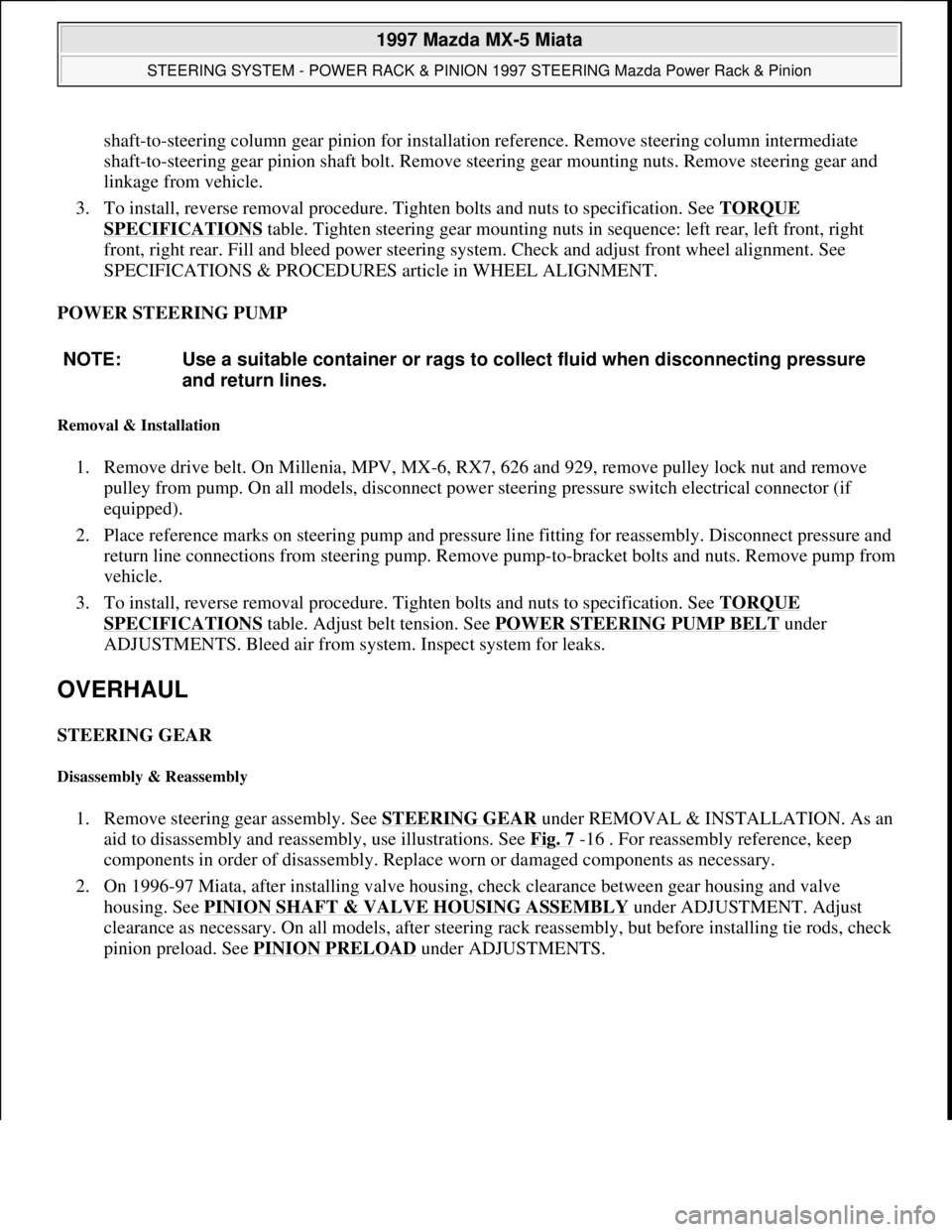
shaft-to-steering column gear pinion for installation reference. Remove steering column intermediate
shaft-to-steering gear pinion shaft bolt. Remove steering gear mounting nuts. Remove steering gear and
linkage from vehicle.
3. To install, reverse removal procedure. Tighten bolts and nuts to specification. See TORQUE
SPECIFICATIONS table. Tighten steering gear mounting nuts in sequence: left rear, left front, right
front, right rear. Fill and bleed power steering system. Check and adjust front wheel alignment. See
SPECIFICATIONS & PROCEDURES article in WHEEL ALIGNMENT.
POWER STEERING PUMP
Removal & Installation
1. Remove drive belt. On Millenia, MPV, MX-6, RX7, 626 and 929, remove pulley lock nut and remove
pulley from pump. On all models, disconnect power steering pressure switch electrical connector (if
equipped).
2. Place reference marks on steering pump and pressure line fitting for reassembly. Disconnect pressure and
return line connections from steering pump. Remove pump-to-
bracket bolts and nuts. Remove pump from
vehicle.
3. To install, reverse removal procedure. Tighten bolts and nuts to specification. See TORQUE
SPECIFICATIONS table. Adjust belt tension. See POWER STEERING PUMP BELT under
ADJUSTMENTS. Bleed air from system. Inspect system for leaks.
OVERHAUL
STEERING GEAR
Disassembly & Reassembly
1. Remove steering gear assembly. See STEERING GEARunder REMOVAL & INSTALLATION. As an
aid to disassembly and reassembly, use illustrations. See Fig. 7
-16 . For reassembly reference, keep
components in order of disassembly. Replace worn or damaged components as necessary.
2. On 1996-97 Miata, after installing valve housing, check clearance between gear housing and valve
housing. See PINION SHAFT & VALVE HOUSING ASSEMBLY
under ADJUSTMENT. Adjust
clearance as necessary. On all models, after steering rack reassembly, but before installing tie rods, check
pinion preload. See PINION PRELOAD
under ADJUSTMENTS. NOTE: Use a suitable container or rags to collect fluid when disconnecting pressure
and return lines.
1997 Mazda MX-5 Miata
STEERING SYSTEM - POWER RACK & PINION 1997 STEERING Mazda Power Rack & Pinion
Microsoft
Sunday, July 05, 2009 1:39:26 PMPage 13 © 2005 Mitchell Repair Information Company, LLC.
Page 364 of 514
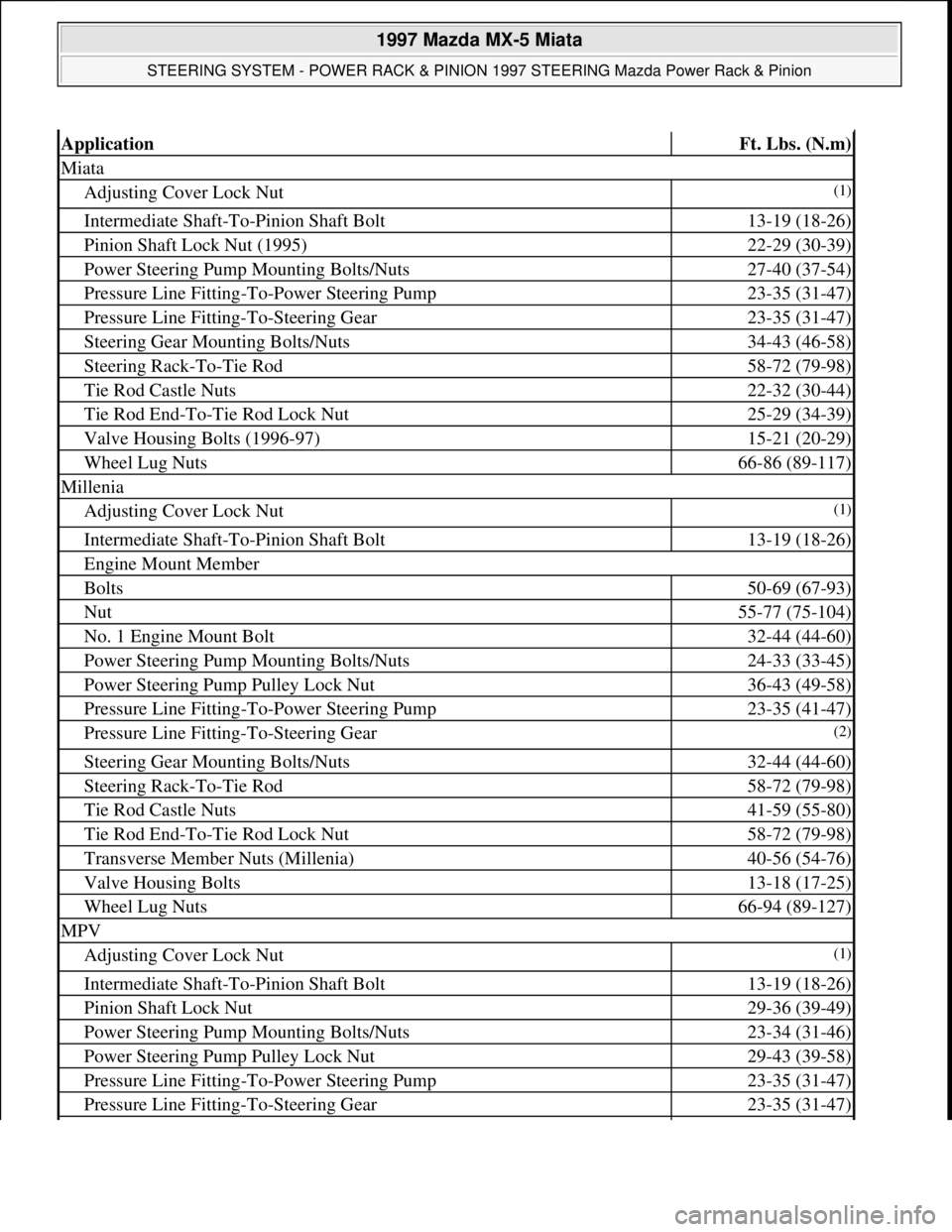
ApplicationFt. Lbs. (N.m)
Miata
Adjusting Cover Lock Nut(1)
Intermediate Shaft-To-Pinion Shaft Bolt13-19 (18-26)
Pinion Shaft Lock Nut (1995)22-29 (30-39)
Power Steering Pump Mounting Bolts/Nuts27-40 (37-54)
Pressure Line Fitting-To-Power Steering Pump23-35 (31-47)
Pressure Line Fitting-To-Steering Gear23-35 (31-47)
Steering Gear Mounting Bolts/Nuts34-43 (46-58)
Steering Rack-To-Tie Rod58-72 (79-98)
Tie Rod Castle Nuts22-32 (30-44)
Tie Rod End-To-Tie Rod Lock Nut25-29 (34-39)
Valve Housing Bolts (1996-97)15-21 (20-29)
Wheel Lug Nuts66-86 (89-117)
Millenia
Adjusting Cover Lock Nut(1)
Intermediate Shaft-To-Pinion Shaft Bolt13-19 (18-26)
Engine Mount Member
Bolts50-69 (67-93)
Nut55-77 (75-104)
No. 1 Engine Mount Bolt32-44 (44-60)
Power Steering Pump Mounting Bolts/Nuts24-33 (33-45)
Power Steering Pump Pulley Lock Nut36-43 (49-58)
Pressure Line Fitting-To-Power Steering Pump23-35 (41-47)
Pressure Line Fitting-To-Steering Gear(2)
Steering Gear Mounting Bolts/Nuts32-44 (44-60)
Steering Rack-To-Tie Rod58-72 (79-98)
Tie Rod Castle Nuts41-59 (55-80)
Tie Rod End-To-Tie Rod Lock Nut58-72 (79-98)
Transverse Member Nuts (Millenia)40-56 (54-76)
Valve Housing Bolts13-18 (17-25)
Wheel Lug Nuts66-94 (89-127)
MPV
Adjusting Cover Lock Nut(1)
Intermediate Shaft-To-Pinion Shaft Bolt13-19 (18-26)
Pinion Shaft Lock Nut29-36 (39-49)
Power Steering Pump Mounting Bolts/Nuts23-34 (31-46)
Power Steering Pump Pulley Lock Nut29-43 (39-58)
Pressure Line Fitting-To-Power Steering Pump23-35 (31-47)
Pressure Line Fitting-To-Steering Gear23-35 (31-47)
1997 Mazda MX-5 Miata
STEERING SYSTEM - POWER RACK & PINION 1997 STEERING Mazda Power Rack & Pinion
Microsoft
Sunday, July 05, 2009 1:39:27 PMPage 29 © 2005 Mitchell Repair Information Company, LLC.
Page 365 of 514
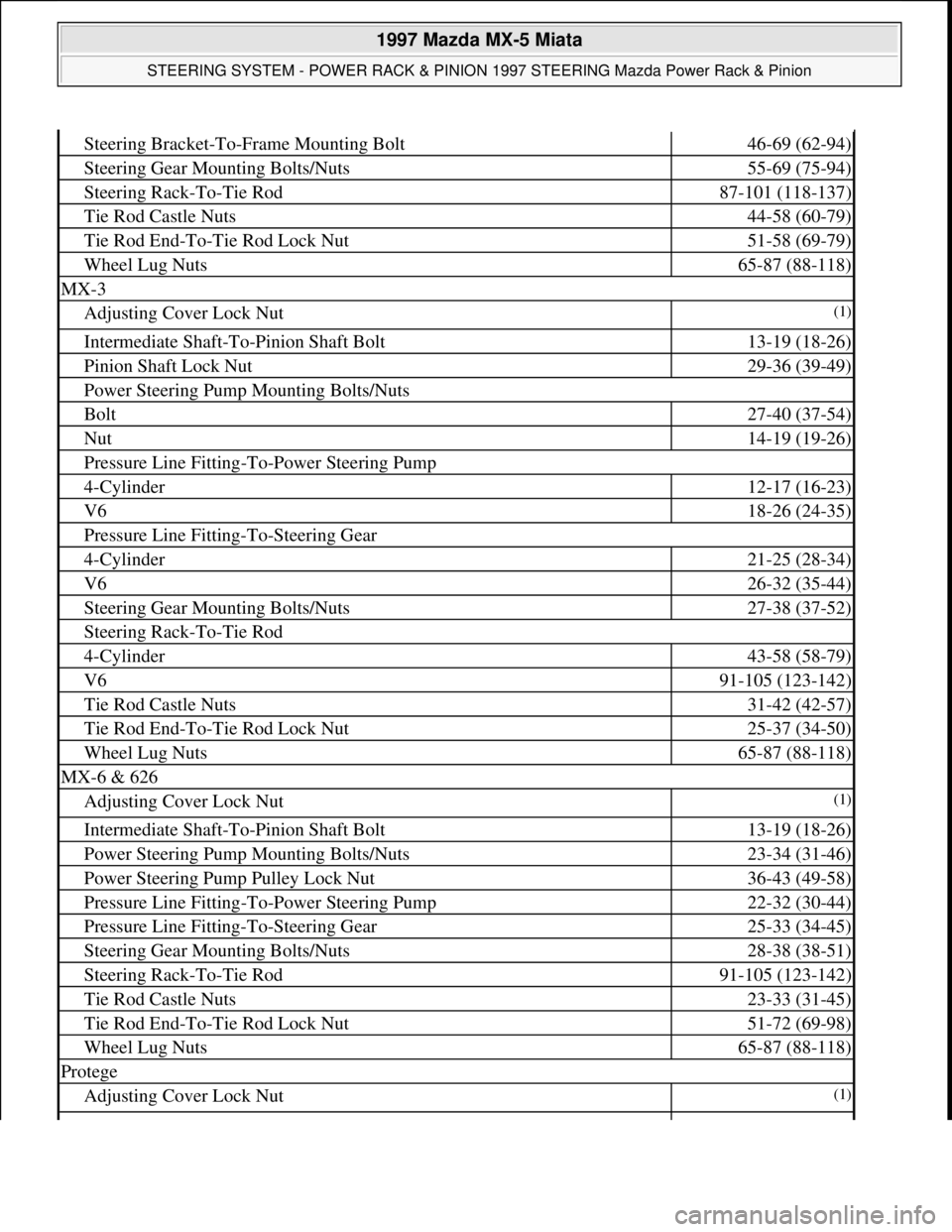
Steering Bracket-To-Frame Mounting Bolt46-69 (62-94)
Steering Gear Mounting Bolts/Nuts55-69 (75-94)
Steering Rack-To-Tie Rod87-101 (118-137)
Tie Rod Castle Nuts44-58 (60-79)
Tie Rod End-To-Tie Rod Lock Nut51-58 (69-79)
Wheel Lug Nuts65-87 (88-118)
MX-3
Adjusting Cover Lock Nut(1)
Intermediate Shaft-To-Pinion Shaft Bolt13-19 (18-26)
Pinion Shaft Lock Nut29-36 (39-49)
Power Steering Pump Mounting Bolts/Nuts
Bolt27-40 (37-54)
Nut14-19 (19-26)
Pressure Line Fitting-To-Power Steering Pump
4-Cylinder12-17 (16-23)
V618-26 (24-35)
Pressure Line Fitting-To-Steering Gear
4-Cylinder21-25 (28-34)
V626-32 (35-44)
Steering Gear Mounting Bolts/Nuts27-38 (37-52)
Steering Rack-To-Tie Rod
4-Cylinder43-58 (58-79)
V691-105 (123-142)
Tie Rod Castle Nuts31-42 (42-57)
Tie Rod End-To-Tie Rod Lock Nut25-37 (34-50)
Wheel Lug Nuts65-87 (88-118)
MX-6 & 626
Adjusting Cover Lock Nut(1)
Intermediate Shaft-To-Pinion Shaft Bolt13-19 (18-26)
Power Steering Pump Mounting Bolts/Nuts23-34 (31-46)
Power Steering Pump Pulley Lock Nut36-43 (49-58)
Pressure Line Fitting-To-Power Steering Pump22-32 (30-44)
Pressure Line Fitting-To-Steering Gear25-33 (34-45)
Steering Gear Mounting Bolts/Nuts28-38 (38-51)
Steering Rack-To-Tie Rod91-105 (123-142)
Tie Rod Castle Nuts23-33 (31-45)
Tie Rod End-To-Tie Rod Lock Nut51-72 (69-98)
Wheel Lug Nuts65-87 (88-118)
Protege
Adjusting Cover Lock Nut(1)
1997 Mazda MX-5 Miata
STEERING SYSTEM - POWER RACK & PINION 1997 STEERING Mazda Power Rack & Pinion
Microsoft
Sunday, July 05, 2009 1:39:27 PMPage 30 © 2005 Mitchell Repair Information Company, LLC.
Page 366 of 514
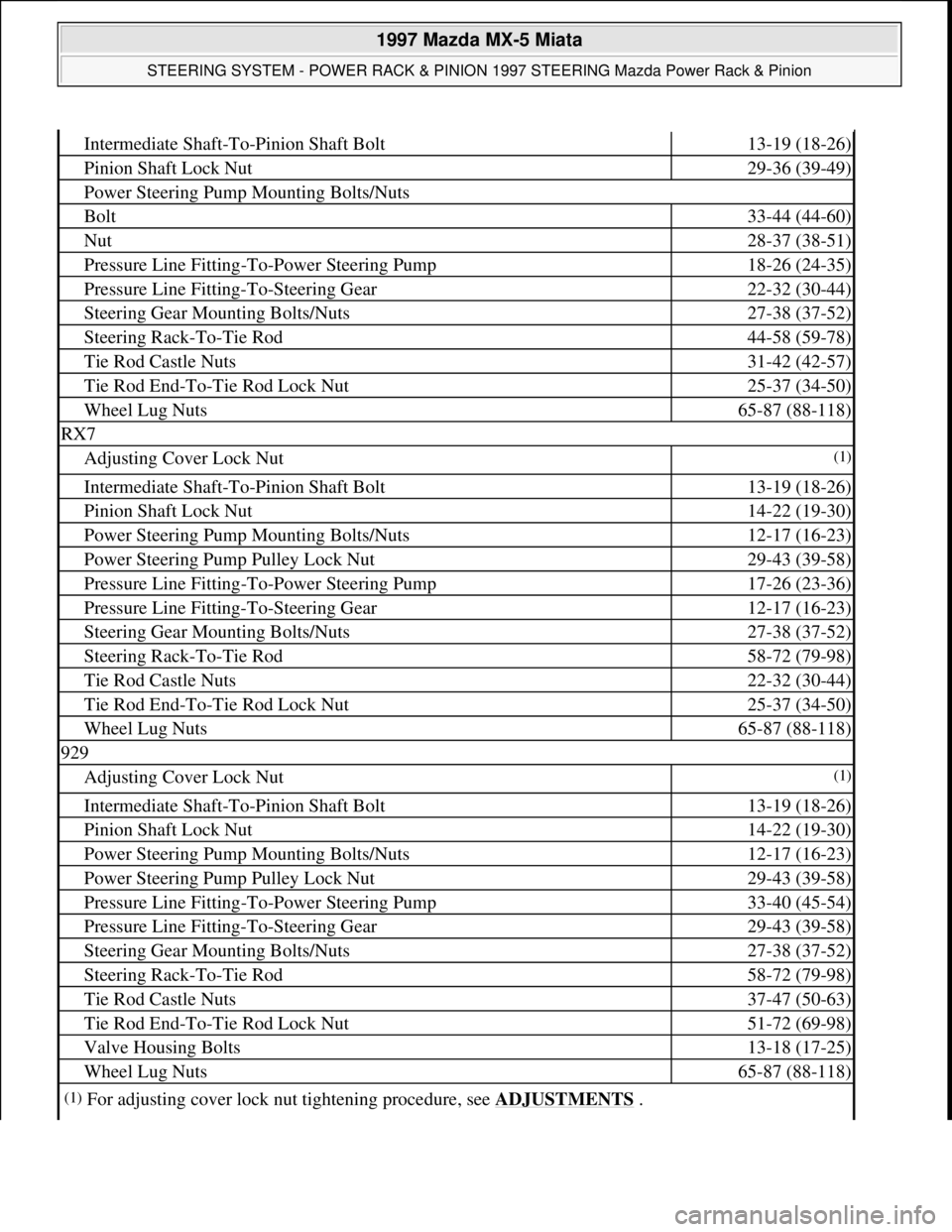
Intermediate Shaft-To-Pinion Shaft Bolt13-19 (18-26)
Pinion Shaft Lock Nut29-36 (39-49)
Power Steering Pump Mounting Bolts/Nuts
Bolt33-44 (44-60)
Nut28-37 (38-51)
Pressure Line Fitting-To-Power Steering Pump18-26 (24-35)
Pressure Line Fitting-To-Steering Gear22-32 (30-44)
Steering Gear Mounting Bolts/Nuts27-38 (37-52)
Steering Rack-To-Tie Rod44-58 (59-78)
Tie Rod Castle Nuts31-42 (42-57)
Tie Rod End-To-Tie Rod Lock Nut25-37 (34-50)
Wheel Lug Nuts65-87 (88-118)
RX7
Adjusting Cover Lock Nut(1)
Intermediate Shaft-To-Pinion Shaft Bolt13-19 (18-26)
Pinion Shaft Lock Nut14-22 (19-30)
Power Steering Pump Mounting Bolts/Nuts12-17 (16-23)
Power Steering Pump Pulley Lock Nut29-43 (39-58)
Pressure Line Fitting-To-Power Steering Pump17-26 (23-36)
Pressure Line Fitting-To-Steering Gear12-17 (16-23)
Steering Gear Mounting Bolts/Nuts27-38 (37-52)
Steering Rack-To-Tie Rod58-72 (79-98)
Tie Rod Castle Nuts22-32 (30-44)
Tie Rod End-To-Tie Rod Lock Nut25-37 (34-50)
Wheel Lug Nuts65-87 (88-118)
929
Adjusting Cover Lock Nut(1)
Intermediate Shaft-To-Pinion Shaft Bolt13-19 (18-26)
Pinion Shaft Lock Nut14-22 (19-30)
Power Steering Pump Mounting Bolts/Nuts12-17 (16-23)
Power Steering Pump Pulley Lock Nut29-43 (39-58)
Pressure Line Fitting-To-Power Steering Pump33-40 (45-54)
Pressure Line Fitting-To-Steering Gear29-43 (39-58)
Steering Gear Mounting Bolts/Nuts27-38 (37-52)
Steering Rack-To-Tie Rod58-72 (79-98)
Tie Rod Castle Nuts37-47 (50-63)
Tie Rod End-To-Tie Rod Lock Nut51-72 (69-98)
Valve Housing Bolts13-18 (17-25)
Wheel Lug Nuts65-87 (88-118)
(1)For adjusting cover lock nut tightening procedure, see ADJUSTMENTS .
1997 Mazda MX-5 Miata
STEERING SYSTEM - POWER RACK & PINION 1997 STEERING Mazda Power Rack & Pinion
Microsoft
Sunday, July 05, 2009 1:39:27 PMPage 31 © 2005 Mitchell Repair Information Company, LLC.
Page 399 of 514
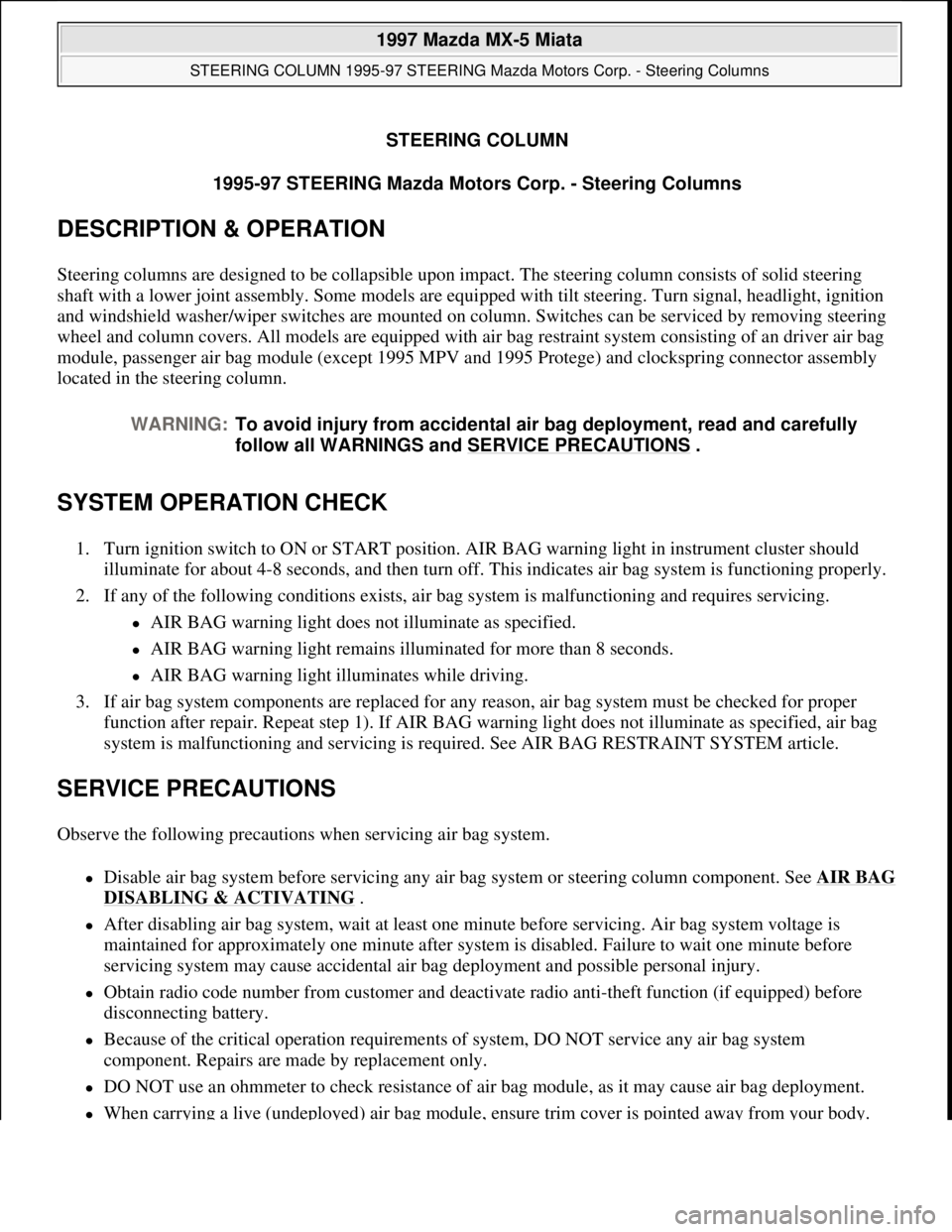
STEERING COLUMN
1995-97 STEERING Mazda Motors Corp. - Steering Columns
DESCRIPTION & OPERATION
Steering columns are designed to be collapsible upon impact. The steering column consists of solid steering
shaft with a lower joint assembly. Some models are equipped with tilt steering. Turn signal, headlight, ignition
and windshield washer/wiper switches are mounted on column. Switches can be serviced by removing steering
wheel and column covers. All models are equipped with air bag restraint system consisting of an driver air bag
module, passenger air bag module (except 1995 MPV and 1995 Protege) and clockspring connector assembly
located in the steering column.
SYSTEM OPERATION CHECK
1. Turn ignition switch to ON or START position. AIR BAG warning light in instrument cluster should
illuminate for about 4-8 seconds, and then turn off. This indicates air bag system is functioning properly.
2. If any of the following conditions exists, air bag system is malfunctioning and requires servicing.
AIR BAG warning light does not illuminate as specified.
AIR BAG warning light remains illuminated for more than 8 seconds.
AIR BAG warning light illuminates while driving.
3. If air bag system components are replaced for any reason, air bag system must be checked for proper
function after repair. Repeat step 1). If AIR BAG warning light does not illuminate as specified, air bag
system is malfunctioning and servicing is required. See AIR BAG RESTRAINT SYSTEM article.
SERVICE PRECAUTIONS
Observe the following precautions when servicing air bag system.
Disable air bag system before servicing any air bag system or steering column component. See AIR BAG
DISABLING & ACTIVATING .
After disabling air bag system, wait at least one minute before servicing. Air bag system voltage is
maintained for approximately one minute after system is disabled. Failure to wait one minute before
servicing system may cause accidental air bag deployment and possible personal injury.
Obtain radio code number from customer and deactivate radio anti-theft function (if equipped) before
disconnecting battery.
Because of the critical operation requirements of system, DO NOT service any air bag system
component. Repairs are made by replacement only.
DO NOT use an ohmmeter to check resistance of air bag module, as it may cause air bag deployment.
When carrying a live (undeployed) air bag module, ensure trim cover is pointed away from your body. WARNING:To avoid injury from accidental air bag deployment, read and carefully
follow all WARNINGS and SERVICE PRECAUTIONS
.
1997 Mazda MX-5 Miata
STEERING COLUMN 1995-97 STEERING Mazda Motors Corp. - Steering Columns
1997 Mazda MX-5 Miata
STEERING COLUMN 1995-97 STEERING Mazda Motors Corp. - Steering Columns
Microsoft
Sunday, July 05, 2009 1:40:02 PMPage 1 © 2005 Mitchell Repair Information Company, LLC.
Microsoft
Sunday, July 05, 2009 1:40:07 PMPage 1 © 2005 Mitchell Repair Information Company, LLC.
Page 400 of 514
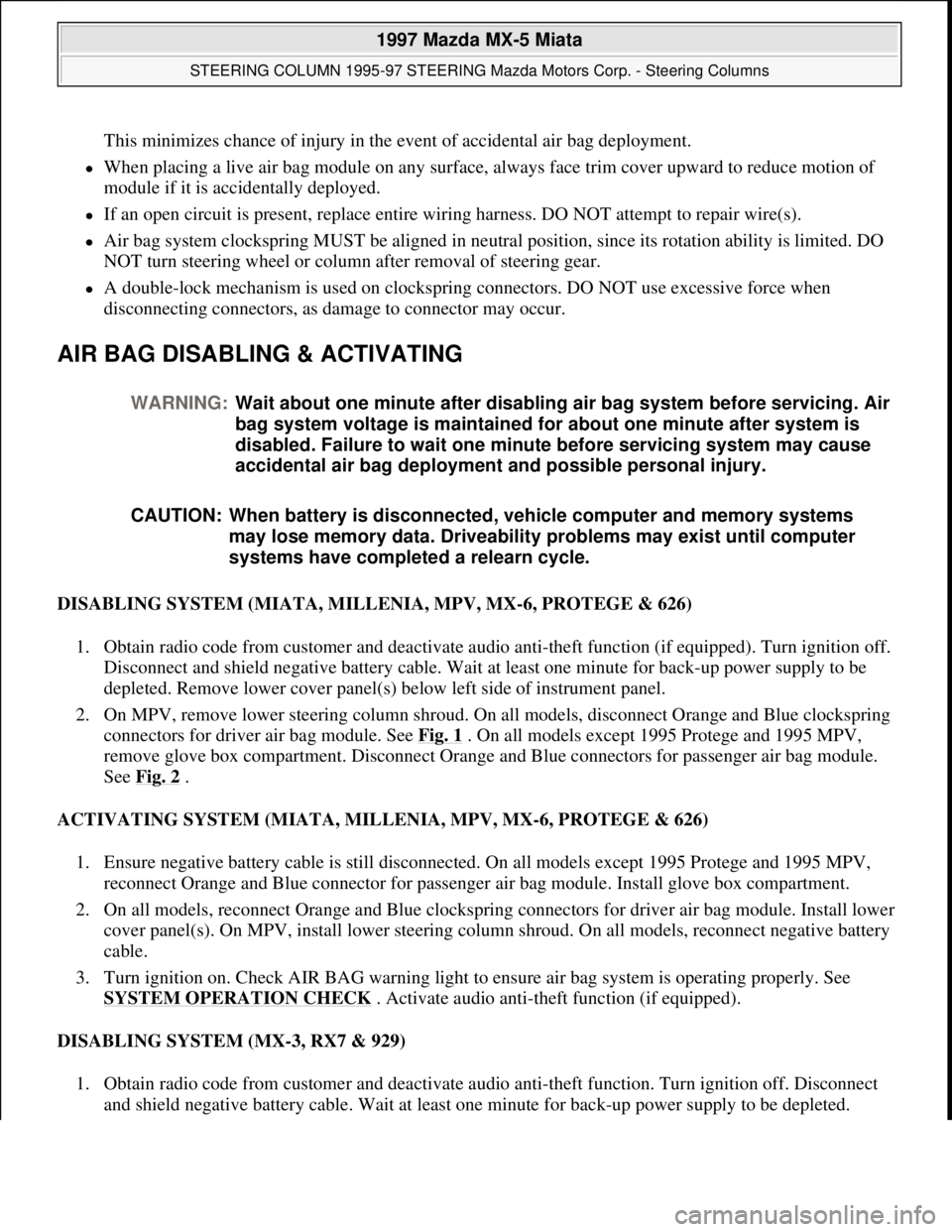
This minimizes chance of injury in the event of accidental air bag deployment.
When placing a live air bag module on any surface, always face trim cover upward to reduce motion of
module if it is accidentally deployed.
If an open circuit is present, replace entire wiring harness. DO NOT attempt to repair wire(s).
Air bag system clockspring MUST be aligned in neutral position, since its rotation ability is limited. DO
NOT turn steering wheel or column after removal of steering gear.
A double-lock mechanism is used on clockspring connectors. DO NOT use excessive force when
disconnecting connectors, as damage to connector may occur.
AIR BAG DISABLING & ACTIVATING
DISABLING SYSTEM (MIATA, MILLENIA, MPV, MX-6, PROTEGE & 626)
1. Obtain radio code from customer and deactivate audio anti-theft function (if equipped). Turn ignition off.
Disconnect and shield negative battery cable. Wait at least one minute for back-up power supply to be
depleted. Remove lower cover panel(s) below left side of instrument panel.
2. On MPV, remove lower steering column shroud. On all models, disconnect Orange and Blue clockspring
connectors for driver air bag module. See Fig. 1
. On all models except 1995 Protege and 1995 MPV,
remove glove box compartment. Disconnect Orange and Blue connectors for passenger air bag module.
See Fig. 2
.
ACTIVATING SYSTEM (MIATA, MILLENIA, MPV, MX-6, PROTEGE & 626)
1. Ensure negative battery cable is still disconnected. On all models except 1995 Protege and 1995 MPV,
reconnect Orange and Blue connector for passenger air bag module. Install glove box compartment.
2. On all models, reconnect Orange and Blue clockspring connectors for driver air bag module. Install lower
cover panel(s). On MPV, install lower steering column shroud. On all models, reconnect negative battery
cable.
3. Turn ignition on. Check AIR BAG warning light to ensure air bag system is operating properly. See
SYSTEM OPERATION CHECK
. Activate audio anti-theft function (if equipped).
DISABLING SYSTEM (MX-3, RX7 & 929)
1. Obtain radio code from customer and deactivate audio anti-theft function. Turn ignition off. Disconnect
and shield ne
gative battery cable. Wait at least one minute for back-up power supply to be depleted. WARNING:Wait about one minute after disabling air bag system before servicing. Air
bag system voltage is maintained for about one minute after system is
disabled. Failure to wait one minute before servicing system may cause
accidental air bag deployment and possible personal injury.
CAUTION: When battery is disconnected, vehicle computer and memory systems
may lose memory data. Driveability problems may exist until computer
systems have completed a relearn cycle.
1997 Mazda MX-5 Miata
STEERING COLUMN 1995-97 STEERING Mazda Motors Corp. - Steering Columns
Microsoft
Sunday, July 05, 2009 1:40:02 PMPage 2 © 2005 Mitchell Repair Information Company, LLC.
Page 403 of 514
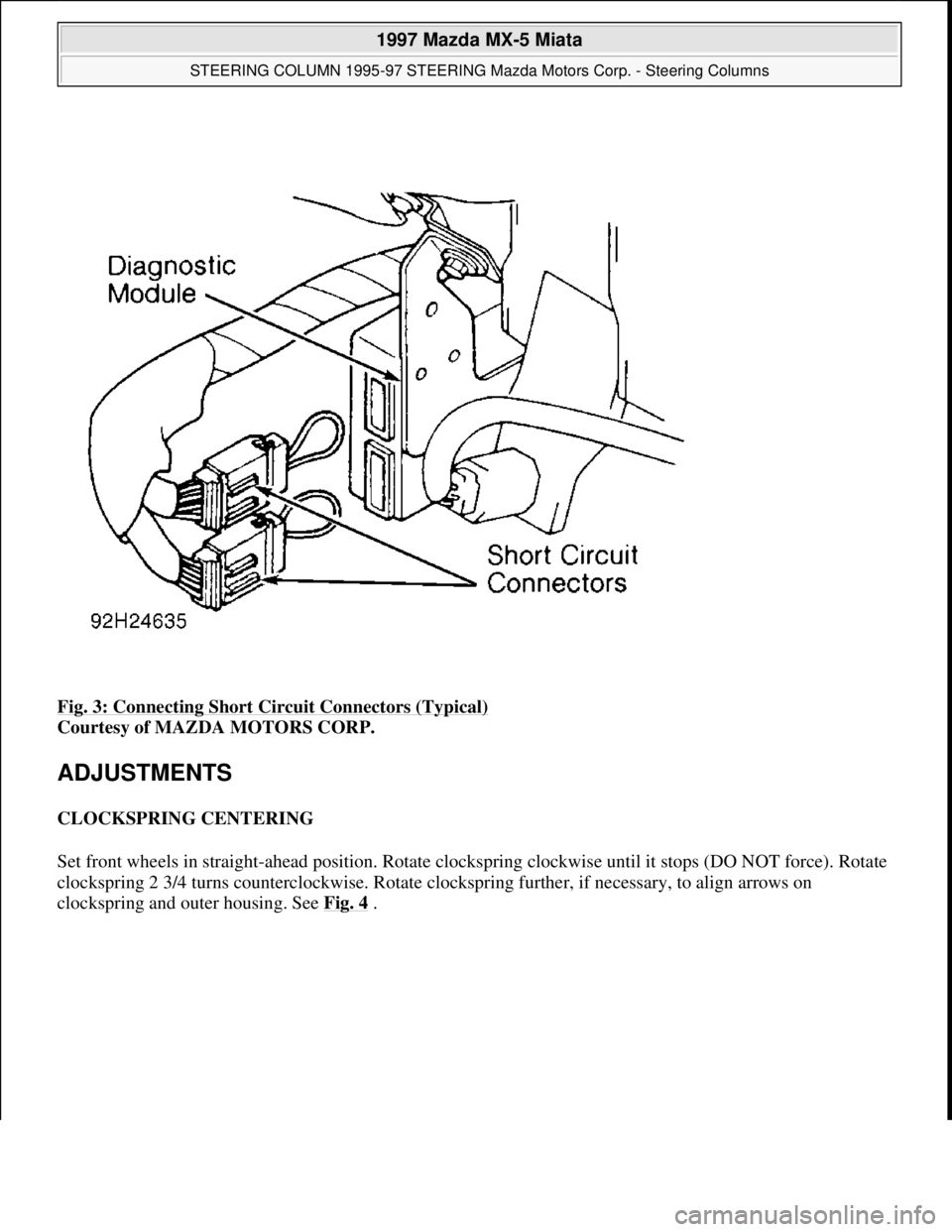
Fig. 3: Connecting Short Circuit Connectors (Typical)
Courtesy of MAZDA MOTORS CORP.
ADJUSTMENTS
CLOCKSPRING CENTERING
Set front wheels in straight-ahead position. Rotate clockspring clockwise until it stops (DO NOT force). Rotate
clockspring 2 3/4 turns counterclockwise. Rotate clockspring further, if necessary, to align arrows on
clocksprin
g and outer housing. See Fig. 4 .
1997 Mazda MX-5 Miata
STEERING COLUMN 1995-97 STEERING Mazda Motors Corp. - Steering Columns
Microsoft
Sunday, July 05, 2009 1:40:02 PMPage 5 © 2005 Mitchell Repair Information Company, LLC.
Page 404 of 514
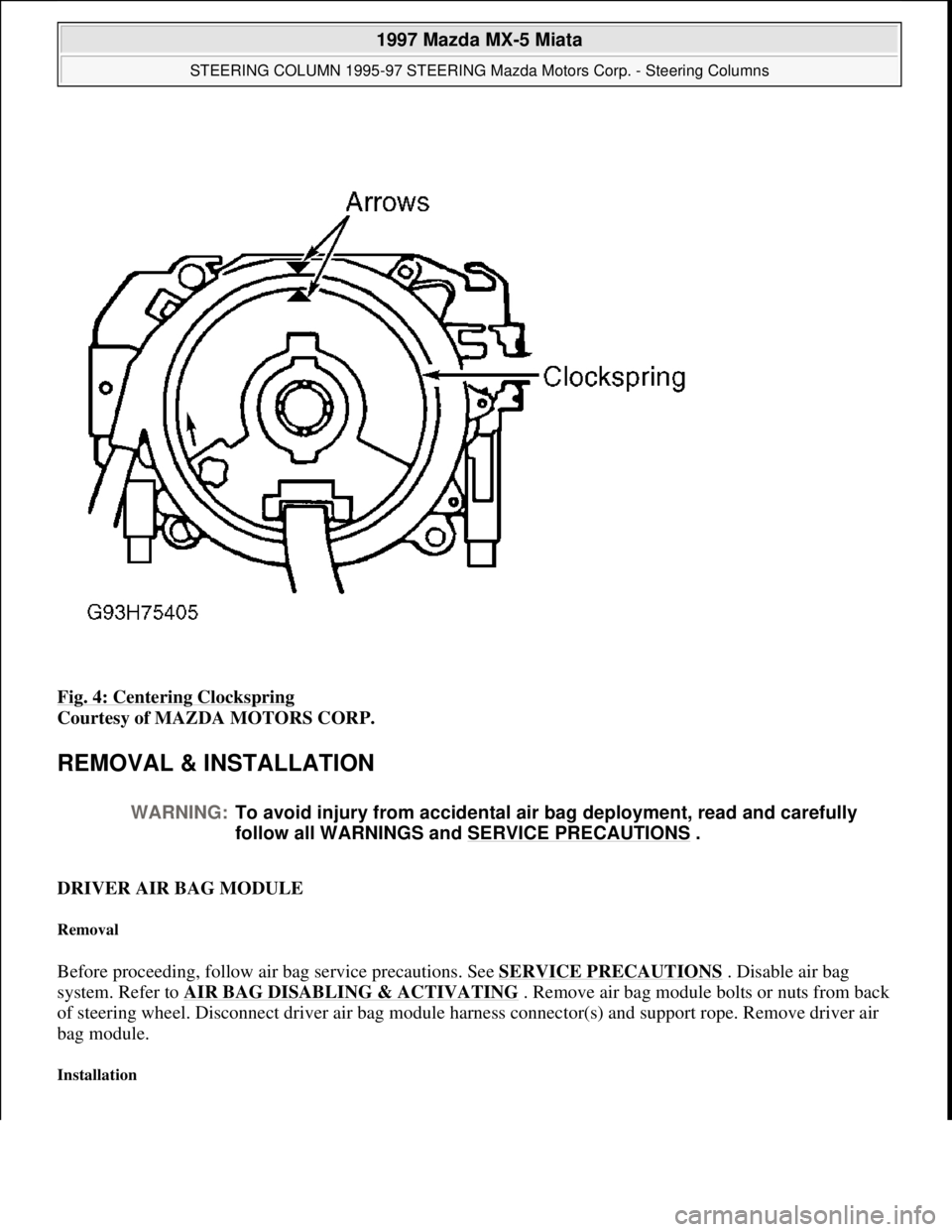
Fig. 4: Centering Clockspring
Courtesy of MAZDA MOTORS CORP.
REMOVAL & INSTALLATION
DRIVER AIR BAG MODULE
Removal
Before proceeding, follow air bag service precautions. See SERVICE PRECAUTIONS . Disable air bag
system. Refer to AIR BAG DISABLING & ACTIVATING
. Remove air bag module bolts or nuts from back
of steering wheel. Disconnect driver air bag module harness connector(s) and support rope. Remove driver air
bag module.
Installation
WARNING:To avoid injury from accidental air bag deployment, read and carefully
follow all WARNINGS and SERVICE PRECAUTIONS
.
1997 Mazda MX-5 Miata
STEERING COLUMN 1995-97 STEERING Mazda Motors Corp. - Steering Columns
Microsoft
Sunday, July 05, 2009 1:40:02 PMPage 6 © 2005 Mitchell Repair Information Company, LLC.
Page 405 of 514
To install, reverse removal procedure. Tighten driver air bag module bolts or nuts to specification. See
TORQUE SPECIFICATIONS
table. Activate air bag system. See AIR BAG DISABLING &
ACTIVATING . Check AIR BAG warning light to ensure system is functioning properly. See SYSTEM
OPERATION CHECK .
STEERING WHEEL
Removal
Set front wheels in straight-ahead position. Disconnect negative battery cable. Disable air bag system. See AIR
BAG DISABLING & ACTIVATING . Remove driver air bag module. See DRIVER AIR BAG MODULE .
Mark steering wheel and shaft for reassembly reference. Remove steering wheel nut. Using appropriate puller,
remove steering wheel.
Installation
Ensure front wheels are in straight-ahead position. Install steering wheel, ensuring reference marks are aligned.
Tighten steering wheel nut to specification. See TORQUE SPECIFICATIONS
table. To install remaining
components, reverse removal procedure.
COMBINATION SWITCH
Removal
1. Before proceeding, follow air bag service precautions. See SERVICE PRECAUTIONS. Disable air bag
system. See AIR BAG DISABLING & ACTIVATING
.
2. Remove driver air bag module. See DRIVER AIR BAG MODULE
. Remove steering wheel. See
STEERING WHEEL
. Remove upper and lower steering column covers. Disconnect combination
switch electrical connectors. Remove combination switch screws.
3. Remove clockspring and combination switch as an assembly. Separate clockspring from combination
switch.
Installation
1. To install, reverse removal procedure. Ensure front wheels are in straight-ahead position. Before
installing steering wheel, center clockspring. See CLOCKSPRING CENTERING
under
ADJUSTMENTS. Tighten steering wheel nut to specification. See TORQUE SPECIFICATIONS
table.
2. After installation, activate air bag system. See AIR BAG DISABLING & ACTIVATING
. Check AIR
BAG warning light to ensure system is functioning properly. See SYSTEM OPERATION CHECK
.
IGNITION SWITCH/STEERING LOCK ASSEMBLY
Removal & Installation
1. Remove driver air bag module, steering wheel and combination switch. See the following:
DRIVER AIR BAG MODULE.
1997 Mazda MX-5 Miata
STEERING COLUMN 1995-97 STEERING Mazda Motors Corp. - Steering Columns
Microsoft
Sunday, July 05, 2009 1:40:02 PMPage 7 © 2005 Mitchell Repair Information Company, LLC.