Change MAZDA MODEL 2 2011 User Guide
[x] Cancel search | Manufacturer: MAZDA, Model Year: 2011, Model line: MODEL 2, Model: MAZDA MODEL 2 2011Pages: 340, PDF Size: 3.88 MB
Page 101 of 340
Black plate (101,1)
Hazardous Driving
WARNING
Be extremely careful if it is necessary to
downshift on slippery surfaces:Downshifting into lower gear while
driving on slippery surfaces is
dangerous. The sudden change in tire
speed could cause the tires to skid.
This could lead to loss of vehicle
control and an accident.
Do not rely on ABS as a substitute for
safe driving: The ABS cannot compensate for
unsafe and reckless driving, excessive
speed, tailgating (following another
vehicle too closely), driving on ice and
snow, and hydroplaning (reduced tire
friction and road contact because of
water on the road surface). You can
still have an accident.
When driving on ice or in water, snow,
mud, sand, or similar hazards:
lBe cautious and allow extra distance
for braking.
lAvoid sudden braking and sudden
maneuvering.
lDo not pump the brakes. Continue to
press down on the brake pedal.
Refer to Anti-Lock Brake System
(ABS) on page 5-8.
lIf you get stuck, select a lower gear and
accelerate slowly. Do not spin the front
wheels.
lFor more traction in starting on
slippery surfaces such as ice or packed
snow, use sand, rock salt, chains,
carpeting, or other nonslip material
under the front wheels.
NOTE
Use snow chains only on the front wheels.
Floor Mat
WARNING
Make sure the floor mats are hooked
on the retention pins to prevent them
from bunching up under the foot
pedals: Using a floor mat that is not secured
is dangerous as it will interfere with
the accelerator and brake pedal
operation, which could result in an
accident.
Do not install two floor mats, one on
top of the other, on the driver's side: Installing two floor mats, one on top
of the other, on the driver's side is
dangerous as the retention pins can
only keep one floor mat from sliding
forward.
In using a heavy duty floor mat for
winter use always remove the
original floor mat.
Loose floor mat(s) will interfere with
the foot pedal and could result in an
accident.
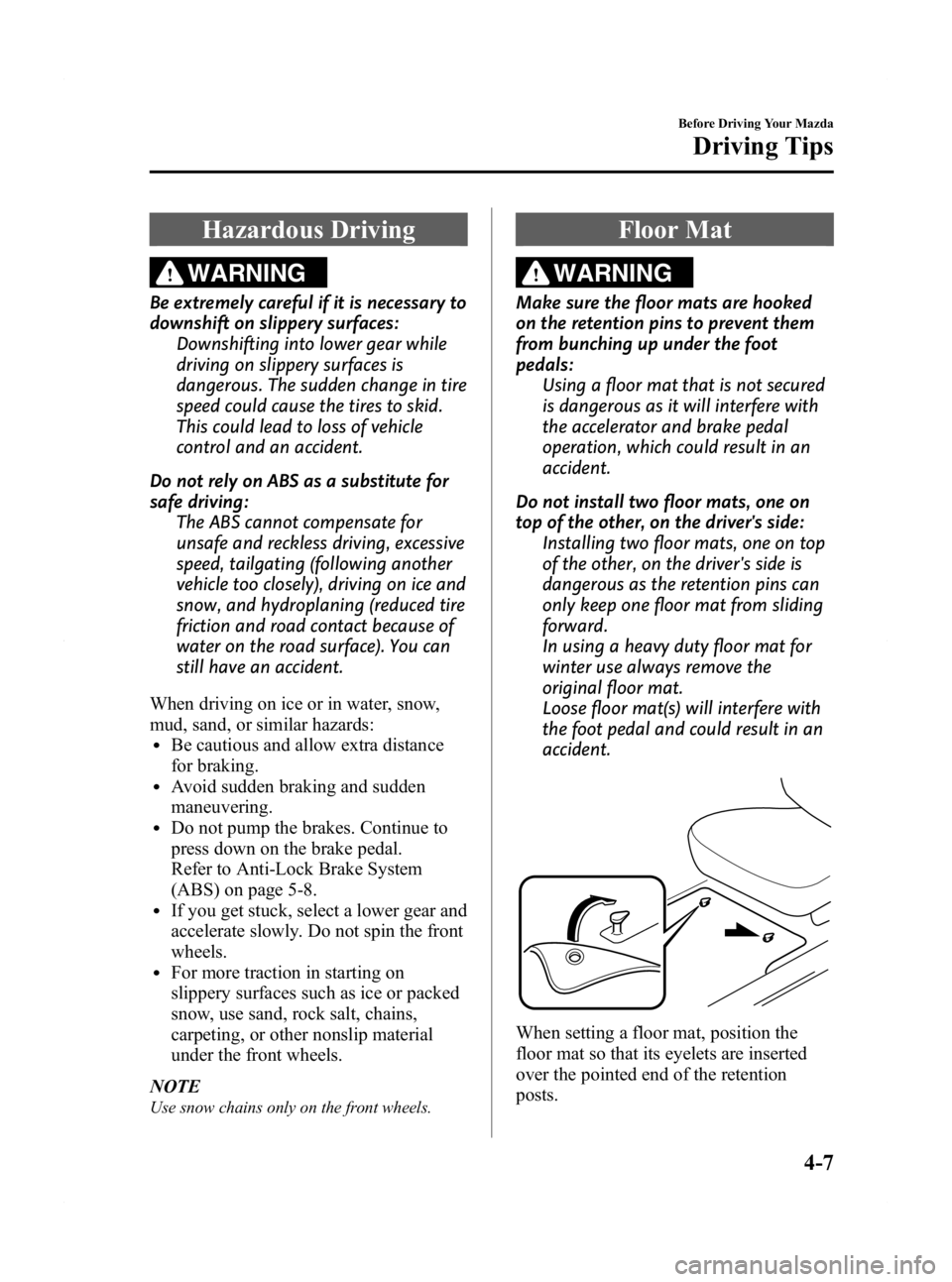
When setting a floor mat, position the
floor mat so that its eyelets are inserted
over the pointed end of the retention
posts.
Before Driving Your Mazda
Driving Tips
4-7
Mazda2_8BX2-EA-10K_Edition2 Page101
Thursday, December 23 2010 4:48 PM
Form No.8BX2-EA-10K
Page 107 of 340
Black plate (107,1)
5Driving Your Mazda
Explanation of instruments and controls.
Starting and Driving ..................................................................... 5-2Ignition Switch .......................................................................... 5-2
Starting the Engine .................................................................... 5-3
Turning the Engine Off ............................................................. 5-4
Brake System ............................................................................ 5-5
Manual Transaxle Operation ................................................... 5-10
Automatic Transaxle Controls ................................................ 5-12
Power Steering ........................................................................ 5-15
Cruise Control
í...................................................................... 5-16
Traction Control System (TCS) .............................................. 5-20
Dynamic Stability Control (DSC) ........................................... 5-21
Tire Pressure Monitoring System
í......................................... 5-23
Instrument Cluster and Indicators ............................................ 5-29 Meters and Gauges .................................................................. 5-29
Warning/Indicator Lights and Beep Sounds ............................ 5-36 Warning/Indicator Lights ........................................................ 5-36
Beep Sounds ........................................................................... 5-49
Switches and Controls ................................................................ 5-51 Lighting Control ..................................................................... 5-51
Turn and Lane-Change Signals ............................................... 5-54
Fog Lights
í............................................................................ 5-54
Windshield Wipers and Washer .............................................. 5-55
Rear Window Wiper and Washer ............................................ 5-58
Rear Window Defroster ........................................................... 5-59
Horn ........................................................................................ 5-60
Hazard Warning Flasher .......................................................... 5-60
5-1íSome models.
Mazda2_8BX2-EA-10K_Edition2 Page107
Thursday, December 23 2010 4:48 PM
Form No.8BX2-EA-10K
Page 117 of 340
Black plate (117,1)
WARNING
Do not use sudden engine braking on
slippery road surfaces or at high
speeds:Shifting down while driving on wet,
snowy, or frozen roads, or while
driving at high speeds causes sudden
engine braking, which is dangerous.
The sudden change in tire speed
could cause the tires to skid. This
could lead to loss of vehicle control
and an accident.
Be sure to leave the shift lever in 1 or R
position and set the parking brake
when leaving the vehicle unattended: Otherwise the vehicle could move
and cause an accident.
CAUTION
ØKeep your foot off the clutch pedal
except when shifting gears. Also,
do not use the clutch to hold the
vehicle on an upgrade. Riding the
clutch will cause needless clutch
wear and damage.
Ø Do not apply any excessive lateral
force to the gear lever when
changing from 5th to 4th gear.
This could lead to the accidental
selection of 2nd gear, which can
result in damage to the transaxle.
Ø Make sure the vehicle comes to a
complete stop before shifting to R.
Shifting to R while the vehicle is
still moving may damage the
transaxle.
NOTE
If shifting to R is difficult, shift back into
neutral, release the clutch pedal, and try
again.
q Recommendations for Shifting
Upshifting
For normal acceleration, we recommend
these shift points.
Gear Vehicle speed
1 to 2 21 km/h (13 mph)
2 to 3 39 km/h (24 mph)
3 to 4 55 km/h (34 mph)
4 to 5 78 km/h (49 mph)
For cruising
Gear Vehicle speed
1 to 2 18 km/h (11 mph)
2 to 3 29 km/h (18 mph)
3 to 4 47 km/h (29 mph)
4 to 5 68 km/h (42 mph)
Downshifting
When you must slow down in heavy
traffic or on a steep upgrade, downshift
before the engine starts to overwork. This
reduces the chance of stalling and gives
better acceleration when you need more
speed.
On a steep downgrade , downshifting
helps maintain safe speed and prolongs
brake life.
Driving Your Mazda
Starting and Driving
5-11
Mazda2_8BX2-EA-10K_Edition2 Page117
Thursday, December 23 2010 4:48 PM
Form No.8BX2-EA-10K
Page 119 of 340
Black plate (119,1)
N (Neutral)
In N, the wheels and transaxle are not
locked. The vehicle will roll freely even
on the slightest incline unless the parking
brake or brakes are on.
WARNING
If the engine is running faster than idle,
do not shift from N or P into a driving
gear:It's dangerous to shift from N or P
into a driving gear when the engine
is running faster than idle. If this is
done, the vehicle could move
suddenly, causing an accident or
serious injury.
Do not shift into N when driving the
vehicle: Shifting into N while driving is
dangerous. Engine braking cannot be
applied when decelerating which
could lead to an accident or serious
injury.
CAUTION
Do not shift into N when driving the
vehicle. Doing so can cause transaxle
damage.
NOTE
Apply the parking brake or depress the brake
pedal before moving the shift lever from N to
prevent the vehicle from moving unexpectedly.
D (Drive)
D is the normal driving position. From a
stop, the transaxle will automatically shift
through a 4-gear sequence.
2 (Second)
The 2 position is helpful when driving in
heavy, slow-moving traffic and climbing
hills, for engine braking assist when going
down hills, or for starting on slick
surfaces and other situations where gentle
acceleration may be necessary.
Do not exceed 98 km/h (60 mph) in the 2
position.
1 (Low)
Use the 1 position for maximum power in
hard-pulling situations, or for climbing
and descending very steep grades.
Do not exceed 43 km/h (26 mph) in the 1
position.
WARNING
Do not use sudden engine braking on
slippery road surfaces or at high
speeds: Shifting down while driving on wet,
snowy, or frozen roads, or while
driving at high speeds causes sudden
engine braking, which is dangerous.
The sudden change in tire speed
could cause the tires to skid. This
could lead to loss of vehicle control
and an accident.
qShift-Lock System
The shift-lock system prevents shifting
out of P unless the brake pedal is
depressed.
To shift from P:
1. Depress and hold the brake pedal.
2. Start the engine.
3. Press and hold the lock-release button.
4. Move the shift lever.
Driving Your Mazda
Starting and Driving
5-13
Mazda2_8BX2-EA-10K_Edition2 Page119
Thursday, December 23 2010 4:48 PM
Form No.8BX2-EA-10K
Page 124 of 340

Black plate (124,1)
qTo Increase Cruising Speed
Follow either of these procedures.
To increase speed using cruise control
switch
Press up the cruise control SET
switch
and hold it. Your vehicle will accelerate.
Release the switch at the speed you want.
Your vehicle has a tap-up feature that
allows you to increase your current speed
in increments of 1.6 km/h (1 mph) by a
momentary tap of the cruise control SET
switch. Multiple taps will increase
your vehicle speed 1.6 km/h (1 mph) for
each tap.
To increase speed using accelerator
pedal
Depress the accelerator pedal to accelerate
to the desired speed.
Press down or press up on the cruise
control SET
/SET - switch and release
it immediately.
NOTE
Accelerate if you want to speed up temporarily
when the cruise control is on. Greater speed
will not interfere with or change the set speed.
Take your foot off the accelerator to return to
the set speed.
q To Decrease Cruising Speed
Press down the cruise control SET -
switch and hold it. The vehicle will
gradually slow.
Release the switch at the speed you want.
5-18
Driving Your Mazda
Starting and Driving
Mazda2_8BX2-EA-10K_Edition2 Page124
Thursday, December 23 2010 4:48 PM
Form No.8BX2-EA-10K
Page 127 of 340
Black plate (127,1)
Dynamic Stability Control
(DSC)
The Dynamic Stability Control (DSC)
automatically controls braking and engine
torque in conjunction with systems such
as ABS and TCS to help control side slip
when driving on slippery surfaces, or
during sudden or evasive maneuvering,
enhancing vehicle safety.
Refer to ABS (page 5-8) and TCS (page
5-20).
DSC operation is possible at speeds
greater than 20 km/h (12 mph).
WARNING
Do not rely on the dynamic stability
control as a substitute for safe driving:The dynamic stability control (DSC)
cannot compensate for unsafe and
reckless driving, excessive speed,
tailgating (following another vehicle
too closely), and hydroplaning
(reduced tire friction and road
contact because of water on the road
surface). You can still have an
accident.
CAUTION
ØThe DSC may not operate correctly
unless the following are observed:
ØUse tires of the correct size
specified for your Mazda on all
four wheels.
ØUse tires of the same
manufacturer, brand and tread
pattern on all four wheels.
ØDo not mix worn tires.
Ø The DSC may not operate correctly
when tire chains are used or a
temporary spare tire is installed
because the tire diameter changes.
NOTE
After switching the ignition ON, a clicking
sound may be heard behind the dashboard.
This sound is the result of the DSC system self-
check operation and does not indicate an
abnormality.
q TCS/DSC Indicator Light
This indicator light stays on for a few
seconds when the ignition is switched
ON. If the TCS or DSC is operating, the
indicator light flashes.
If the light stays on, the TCS or DSC may
have a malfunction and they may not
operate correctly. Take your vehicle to an
Authorized Mazda Dealer.
Driving Your Mazda
Starting and Driving
5-21
Mazda2_8BX2-EA-10K_Edition2 Page127
Thursday, December 23 2010 4:48 PM
Form No.8BX2-EA-10K
Page 129 of 340
Black plate (129,1)
Tire Pressure Monitoring Systemí
The tire pressure monitoring system (TPMS) monitors the pressure for each tire.
If tire pressure is too low in one or more tires, the system will inform the driver via the
warning light in the instrument panel and by the warning beep sound.
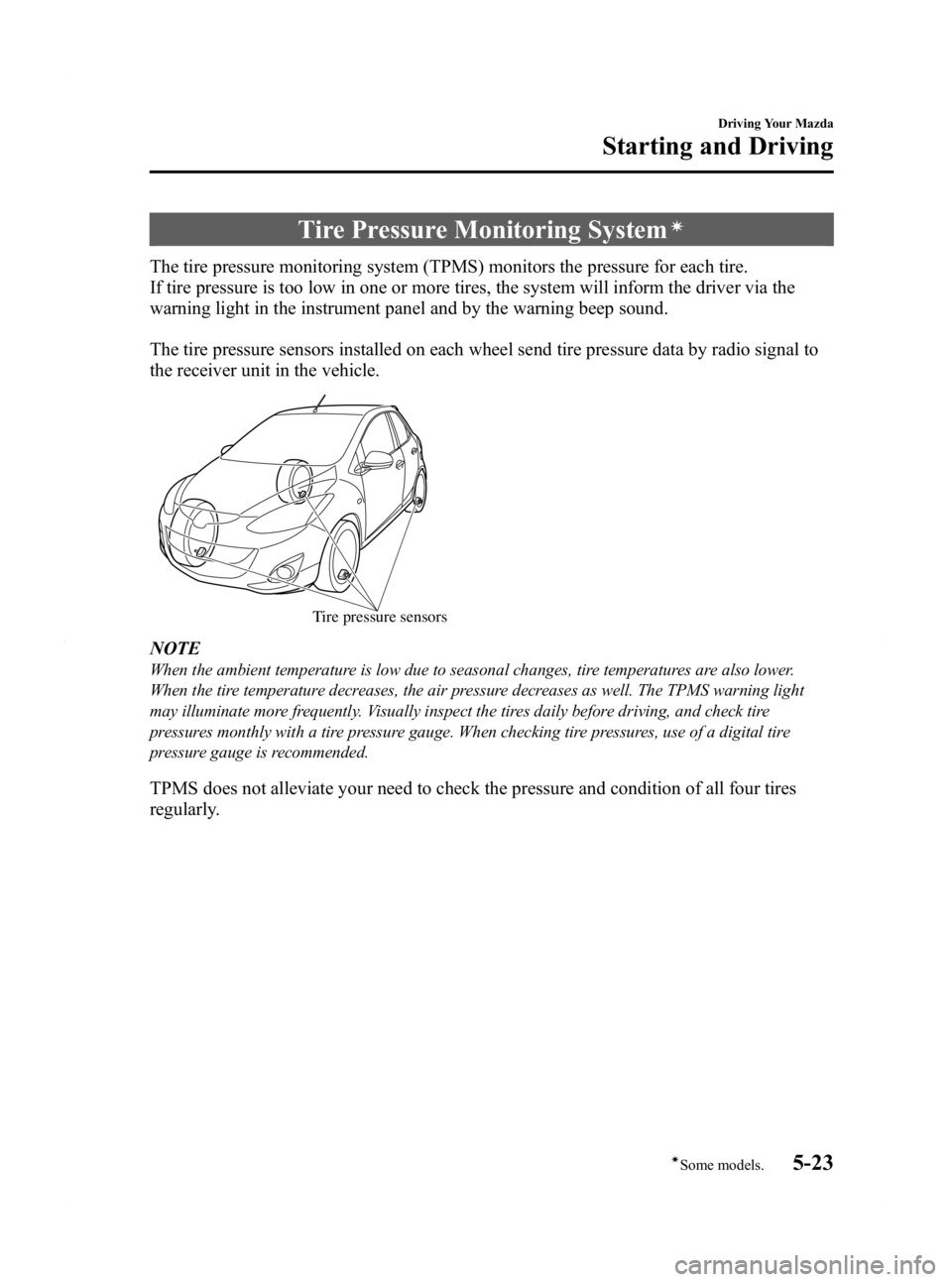
The tire pressure sensors installed on each wheel send tire pressure data by radio signal to
the receiver unit in the vehicle.
Tire pressure sensors
NOTE
When the ambient temperature is low due to seasonal changes, tire temperatures are also lower.
When the tire temperature decreases, the air pressure decreases as well. The TPMS warning light
may illuminate more frequently. Visually inspect the tires daily before driving, and check tire
pressures monthly with a tire pressure gauge. When checking tire pressures, use of a digital tire
pressure gauge is recommended.
TPMS does not alleviate your need to check the pressure and condition of all four tires
regularly.
Driving Your Mazda
Starting and Driving
5-23íSome models.
Mazda2_8BX2-EA-10K_Edition2 Page129
Thursday, December 23 2010 4:48 PM
Form No.8BX2-EA-10K
Page 133 of 340
Black plate (133,1)
If the warning light illuminates again even
after the tire pressures are adjusted, there
may be a tire puncture. Replace the
punctured tire with the temporary spare
tire (page 7-6).
NOTE
A tire pressure sensor is not installed to the
temporary spare tire. The warning light will
flash continuously while the temporary spare
tire is being used.
Warning light flashes
When the warning light flashes, there may
be a system malfunction. Consult an
Authorized Mazda Dealer.
qSystem Error Activation
When the warning light flashes, there may
be a system malfunction. Consult an
Authorized Mazda Dealer.
A system error activation may occur in
the following cases:
lWhen there is equipment or a device
near the vehicle using the same radio
frequency as that of the tire pressure
sensors.
lWhen using the following devices in
the vehicle that may cause radio
interference with the receiver unit.
lA digital device such as a personal
computer.
lA current converter device such as a
DC-AC converter.
lWhen excess snow or ice adheres to
the vehicle, especially around the
wheels.
lWhen the tire pressure sensor batteries
are exhausted.
lWhen using a wheel with no tire
pressure sensor installed.
lWhen using tires with steel wire
reinforcement in the side walls.
lWhen using tire chains.
qTires and Wheels
CAUTION
When inspecting or adjusting the tire
air pressures, do not apply excessive
force to the stem part of the wheel
unit. The stem part could be
damaged.
Changing tires and wheels
The following procedure allows the
TPMS to recognize a tire pressure sensor's
unique ID signal code whenever tires or
wheels are changed, such as changing to
and from winter tires.
NOTE
Each tire pressure sensor has a unique ID
signal code. The signal code must be
registered with the TPMS before it can work.
The easiest way to do it is to have an
Authorized Mazda Dealer change your tire and
complete ID signal code registration.
When having tires changed at an
Authorized Mazda Dealer
When an Authorized Mazda Dealer
changes your vehicle's tires, they will
complete the tire pressure sensor ID signal
code registration.
When changing tires yourself
If you or someone else changes tires, you
or someone else can also undertake the
steps for the TPMS to complete the ID
signal code registration.
1. After tires have been changed, switch
the ignition ON, then back to ACC or
OFF.
2. Wait for about 15 minutes.
Driving Your Mazda
Starting and Driving
5-27
Mazda2_8BX2-EA-10K_Edition2 Page133
Thursday, December 23 2010 4:48 PM
Form No.8BX2-EA-10K
Page 136 of 340

Black plate (136,1)
qSpeedometer
The speedometer indicates the speed of
the vehicle.
qOdometer, Trip Meter and Trip
Meter Selector
The display mode can be changed from
odometer to trip meter A to trip meter B
and then back to odometer by pressing the
selector while one of them is displayed.
The selected mode will be displayed.
Selector
Odometer
Trip meter A Press the selector
Press the selector
Press the selector
Trip meter B
NOTE
The odometer and trip meter can be displayed
and the selector can be operated as follows
even when the ignition is switched to ACC or
the ignition is switched off. The trip meter can
be switched/reset by pressing the selector.
lDisplays for approx. 10 minutes after the
ignition is switched to ACC or the ignition
is switched off from ON.
lDisplays for approx. 10 minutes after the
driver's door is opened.
Odometer
When this mode is selected, ODO will be
displayed.
The odometer records the total distance
the vehicle has been driven.
5-30
Driving Your Mazda
Instrument Cluster and Indicators
Mazda2_8BX2-EA-10K_Edition2 Page136
Thursday, December 23 2010 4:48 PM
Form No.8BX2-EA-10K
Page 137 of 340

Black plate (137,1)
Trip meter
The trip meter can record the total
distance of two trips. One is recorded in
trip meter A, and the other is recorded in
trip meter B.
For instance, trip meter A can record the
distance from the point of origin, and trip
meter B can record the distance from
where the fuel tank is filled.
When trip meter A is selected, pressing
the selector again within one second will
change to trip meter B mode.
When trip meter A is selected, TRIP A
will be displayed. When trip meter B is
selected, TRIP B will be displayed.
The trip meter records the total distance
the vehicle is driven until the meter is
again reset. Return it to“0.0 ”by holding
the selector depressed for 1 second or
more. Use this meter to measure trip
distances and to compute fuel
consumption.
NOTE
lOnly the trip meters record tenths of
kilometers (miles).
lThe trip record will be erased when:lThe power supply is interrupted (blown
fuse or the battery is disconnected).
lThe vehicle is driven over 999.9 km
(mile).
q Tachometer
The tachometer shows engine speed in
thousands of revolutions per minute
(rpm).
Red zone
CAUTION
Do not run the engine with the
tachometer needle in the RED ZONE.
This may cause severe engine
damage.
qFuel Gauge
The fuel gauge shows approximately how
much fuel is remaining in the tank when
the ignition is switched ON.
We recommend keeping the tank over 1/4
full.
Driving Your Mazda
Instrument Cluster and Indicators
5-31
Mazda2_8BX2-EA-10K_Edition2 Page137
Thursday, December 23 2010 4:48 PM
Form No.8BX2-EA-10K