audio MAZDA MODEL 2 2012 User Guide
[x] Cancel search | Manufacturer: MAZDA, Model Year: 2012, Model line: MODEL 2, Model: MAZDA MODEL 2 2012Pages: 346, PDF Size: 3.93 MB
Page 184 of 346
Black plate (184,1)
03
0102
05
04
0706
1
7 3
2
4
6
5
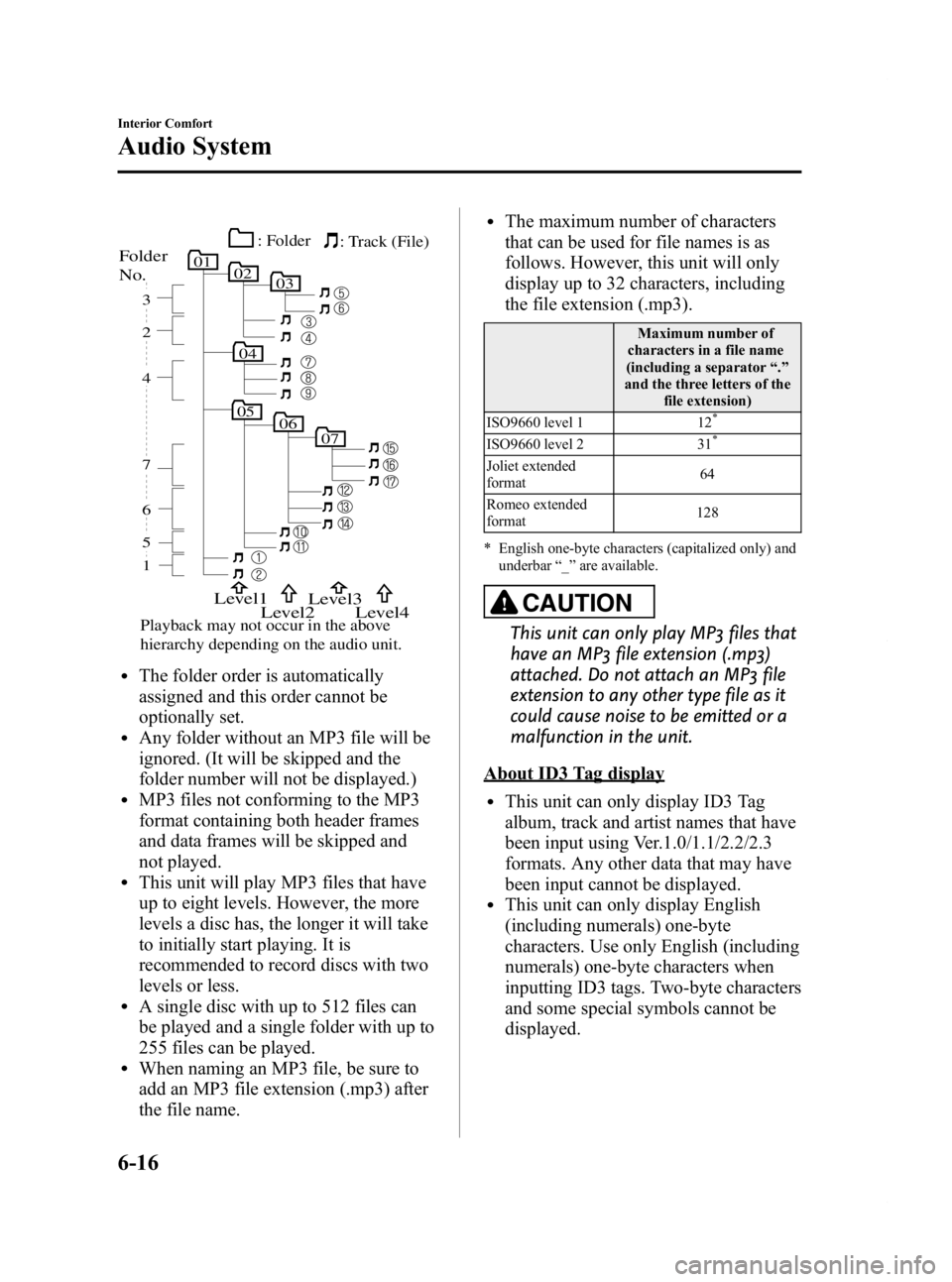
Folder
No.
Level1
Level2 Level3
Playback may not occur in the above
hierarchy depending on the audio unit.Level4
: Track (File)
: Folder
lThe folder order is automatically
assigned and this order cannot be
optionally set.
lAny folder without an MP3 file will be
ignored. (It will be skipped and the
folder number will not be displayed.)
lMP3 files not conforming to the MP3
format containing both header frames
and data frames will be skipped and
not played.
lThis unit will play MP3 files that have
up to eight levels. However, the more
levels a disc has, the longer it will take
to initially start playing. It is
recommended to record discs with two
levels or less.
lA single disc with up to 512 files can
be played and a single folder with up to
255 files can be played.
lWhen naming an MP3 file, be sure to
add an MP3 file extension (.mp3) after
the file name.
lThe maximum number of characters
that can be used for file names is as
follows. However, this unit will only
display up to 32 characters, including
the file extension (.mp3).
Maximum number of
characters in a file name
(including a separator “.”
and the three letters of the file extension)
ISO9660 level 1 12
*
ISO9660 level 2 31*
Joliet extended
format 64
Romeo extended
format 128
* English one-byte characters (capitalized only) and underbar “_ ” are available.
CAUTION
This unit can only play MP3 files that
have an MP3 file extension (.mp3)
attached. Do not attach an MP3 file
extension to any other type file as it
could cause noise to be emitted or a
malfunction in the unit.
About ID3 Tag display
lThis unit can only display ID3 Tag
album, track and artist names that have
been input using Ver.1.0/1.1/2.2/2.3
formats. Any other data that may have
been input cannot be displayed.
lThis unit can only display English
(including numerals) one-byte
characters. Use only English (including
numerals) one-byte characters when
inputting ID3 tags. Two-byte characters
and some special symbols cannot be
displayed.
6-16
Interior Comfort
Audio System
Mazda2_8CC7-EA-11H_Edition2 Page184
Monday, September 26 2011 1:55 PM
Form No.8CC7-EA-11H
Page 185 of 346

Black plate (185,1)
Specialized glossary
MP3
Abbreviation for“MPEG Audio Layer 3 ”.
A technical standard for audio
compression as decided by an ISO
(International Organization for
Standardization) MPEG working group.
Use of MP3 allows for audio data to be
compressed to approximately a tenth of
the source data size.
ISO 9660
An international standard for logical
formatting of CD-ROM files and folders.
It is divided into three separate levels
based on differences in file naming
procedures, data configuration and other
characteristics.
Multi-session
A session is the complete amount of data
recorded from the beginning to the end of
a single period of CD-ROM, CD-R/CD-
RW data recording. Multi-session refers to
the existence of data from two or more
sessions on a single disc.
Sampling
Refers to the process of encoding analog
audio data at regular intervals and
converting it to digital data. The sampling
rate refers to the number of times a
sample is taken in one second and is
expressed in Hz units. Increasing the
sampling rate improves the sound quality
but also increases the data size. Bit rate
Refers to the volume of data per second,
expressed in bps (bits per second).
Generally, the larger the number of the
transfer bit rate when compressing an
MP3 file, the more information regarding
musical reproduction it carries, and
therefore the better the sound quality.
Packet writing
A general term for the method, similar to
that used for floppy discs or hard drives,
of recording the required file in a single
increment on a CD-R and similar.
ID3 Tag
ID3 tag is a method for storing
information related to the music in an
MP3 file. Information such as track, artist
and album name can be stored. This
content can be freely edited using ID3
editing function software.
VBR
Abbreviation for Variable Bit Rate. While
CBR (Constant Bit Rate) is generally
used, VBR varies the bit rate for audio
compression according to compression
conditions and this allows for
compression with preference given to
sound quality.
q
Operating Tips for WMA
WMA is short for Windows Media Audio
and is the audio compression format used
by Microsoft.
Audio data can be created and stored at a
higher compression ratio than MP3.
* Microsoft and Windows Media are
registered trademarks of Microsoft
Corporation U.S. in the United States
and other countries.
Interior Comfort
Audio System
6-17
Mazda2_8CC7-EA-11H_Edition2 Page185
Monday, September 26 2011 1:55 PM
Form No.8CC7-EA-11H
Page 186 of 346
Black plate (186,1)
Playable WMA file specification
CD-R and CD-RW including WMA files
can be played with this unit. Discs which
conform to the following formats can be
played.
Playable WMA files are as follows:
ItemContent
Specification Windows Media
Audio Version 7.0,
8.0, 9.0
Sampling
frequency Bit rate 32kHz.
......32,40,
48 kbps
44.1kHz .....32,48,
64, 80, 96, 128, 160,
192, 256, 320 kbps
48kHz. ......64,96,
128, 160, 192 kbps
VBR (Variable Bit Rate) Supported
Channel mode Stereo/Monaural
WMA tag Title, artist name,
album name
CAUTION
This unit plays files with the (.wma)
file extension as a WMA file. Do not
use the WMA file extension for files
other than WMA files. It may cause
noise or a malfunction.
lIn a WMA file, the track name, artist
name and album name are recorded
with data called
“WMA-Tag ”, and the
information can be displayed.
lWMA files which do not comply with
the specific standard may not be played
correctly or its file and folder name
may not be displayed correctly.
lThe file extension may not be provided
depending on the computer operating
system, version, software, or settings.
In this case, add the file extension
“ .wma ”to the end of the file name, and
then write the disc.
6-18
Interior Comfort
Audio System
Mazda2_8CC7-EA-11H_Edition2 Page186
Monday, September 26 2011 1:55 PM
Form No.8CC7-EA-11H
Page 187 of 346

Black plate (187,1)
Audio Set
Power/Volume/Sound Controls .............................................................................. page 6-20
Clock ...................................................................................................................... page 6-24
Operating the Radio ............................................................................................... page 6-26
Operating the Compact Disc (CD) Player .............................................................. page 6-28
Operating the Auxiliary jack .................................................................................. page 6-31
Error Indications ..................................................................................................... page 6-32
Interior Comfort
Audio System
6-19
Mazda2_8CC7-EA-11H_Edition2 Page187
Monday, September 26 2011 1:55 PM
Form No.8CC7-EA-11H
Page 188 of 346
Black plate (188,1)
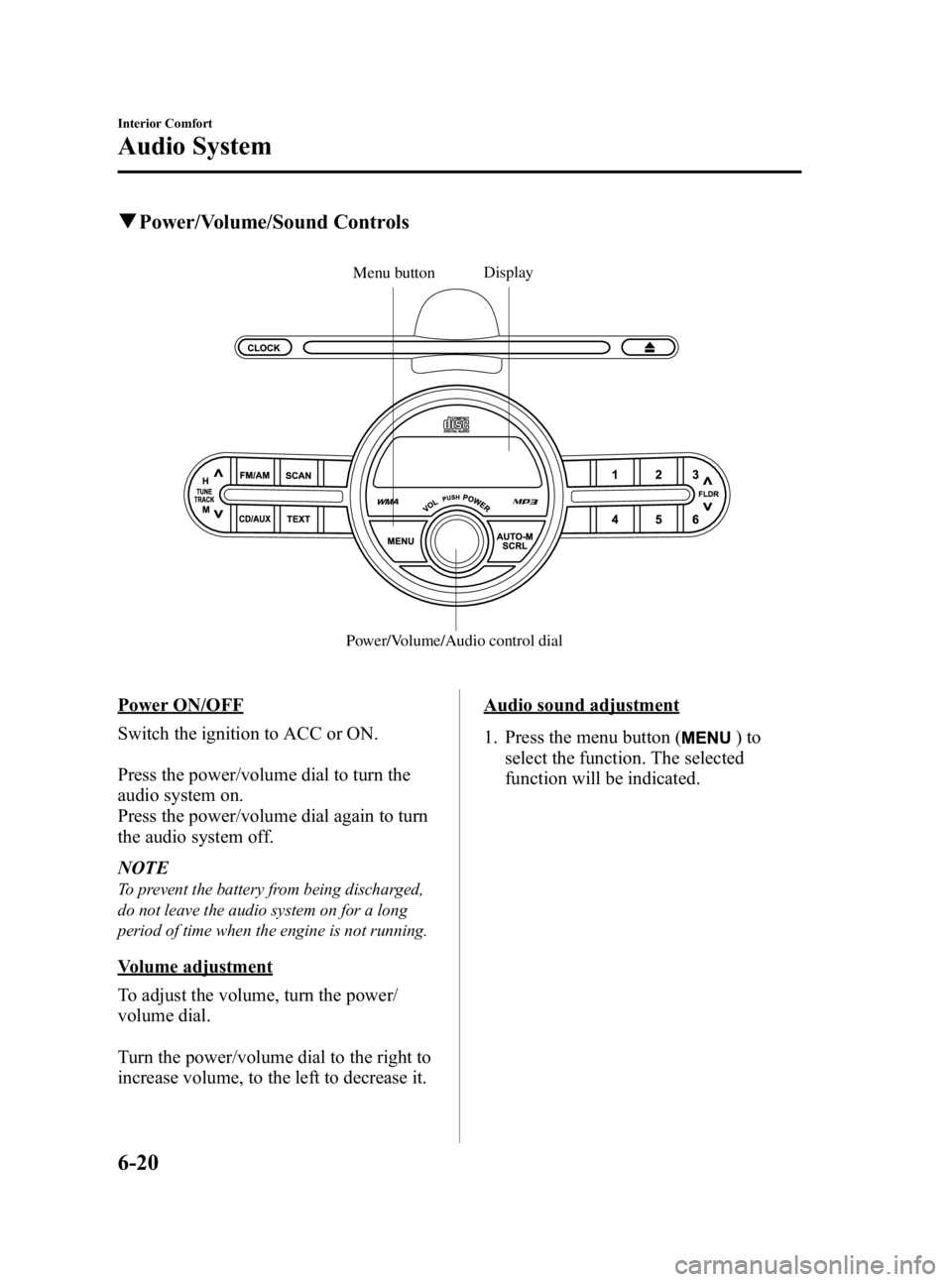
qPower/Volume/Sound Controls
Display
Power/Volume/Audio control dialMenu button
Power ON/OFF
Switch the ignition to ACC or ON.
Press the power/volume dial to turn the
audio system on.
Press the power/volume dial again to turn
the audio system off.
NOTE
To prevent the battery from being discharged,
do not leave the audio system on for a long
period of time when the engine is not running.
Volume adjustment
To adjust the volume, turn the power/
volume dial.
Turn the power/volume dial to the right to
increase volume, to the left to decrease it.
Audio sound adjustment
1. Press the menu button (
)to
select the function. The selected
function will be indicated.
6-20
Interior Comfort
Audio System
Mazda2_8CC7-EA-11H_Edition2 Page188
Monday, September 26 2011 1:55 PM
Form No.8CC7-EA-11H
Page 189 of 346

Black plate (189,1)
*1
*1
*3
*1*2
*1*2
*1 Depending on the mode selected, the
indication changes.
*2 RPT and RDM are displayed only during CD playback.
*3 If your vehicle is not equipped with
rear speakers, adjust the power/
volume dial so the level is even. 2. Turn the audio control dial to adjust the
selected functions as follows:
Indication Turn Left Turn Right
Select mode*1
Select mode
Decrease
bass Increase
bass
Decreasetreble Increase
treble
Shift the
sound to the front Shift the
sound to the rear
Shift the
sound to the left Shift the
sound to the right
OFF ON
*1 Refer to Operating the Compact Disc (CD) Player on page 6-28.
NOTE
About 5 seconds after selecting any mode, the
volume function will be automatically selected.
To reset bass, treble, fade, and balance, press
the menu button (
) for 2 seconds. The
unit will beep and “CLEAR ”will be displayed.
Automatic Level Control (ALC)
The automatic level control (ALC) is a
feature that automatically adjusts audio
volume and sound quality according to
the vehicle speed.
The volume increases in accordance with
the increase in vehicle speed, and
decreases as vehicle speed decreases.
Interior Comfort
Audio System
6-21
Mazda2_8CC7-EA-11H_Edition2 Page189
Monday, September 26 2011 1:55 PM
Form No.8CC7-EA-11H
Page 190 of 346

Black plate (190,1)
Select the desired ALC mode.
ModeVolume change
No change
Minimum
Medium
Maximum
Turn the audio control dial to select ALC
OFF or ALC LEVEL1― 7 modes. The
selected mode will be indicated.
Setting RPT (CD Repeat Play)
Repeated playback of the track currently
being played can be set on or off during
playback of the CD (page 6-28).
Setting RDM (CD Random Play)
Random playback of tracks on a CD can
be set on or off during playback of the CD
(page 6-28).
BEEP setting
The beep-sound when operating the audio
system can be set on or off.
6-22
Interior Comfort
Audio System
Mazda2_8CC7-EA-11H_Edition2 Page190
Monday, September 26 2011 1:55 PM
Form No.8CC7-EA-11H
Page 192 of 346

Black plate (192,1)
qClock
Display
Clock button
Hour/Minute set switch
Setting the time
The clock can be set at any time when the
ignition is switched to ACC or ON.
1. To adjust the time, press the clock button (
) for about 2 seconds
until a beep is heard.
2. The currently set time and hour setting display flashes.
Time adjustment
To adjust the time, press the hour/
minute set switch (
,) while the
clock's current time is flashing.
The hours advance while the upper side
of the switch is pressed. The minutes
advance while the lower side of the
switch is pressed.
3. Press the clock button (
) again
to start the clock.
Changing the display mode
The display on the unit can be changed by
pressing the clock button (
). This
alternates the display between clock mode
and normal mode. When the clock mode
has been selected, the time will be
displayed.
NOTE
The displays differ when using the audio in
clock mode and normal mode.
6-24
Interior Comfort
Audio System
Mazda2_8CC7-EA-11H_Edition2 Page192
Monday, September 26 2011 1:55 PM
Form No.8CC7-EA-11H
Page 194 of 346

Black plate (194,1)
qOperating the Radio
Display
Band selector button Scan button
Tuning button Channel preset buttonsAuto memory button
Radio ON
Press a band selector button (
)to
turn the radio on.
Band selection
Successively pressing the band selector
button (
) switches the bands as
follows: FM1 →FM2 →AM.
The selected mode will be indicated. If
FM stereo is being received, “ST ”will be
displayed.
NOTE
If the FM broadcast signal becomes weak,
reception automatically changes from
STEREO to MONO for reduced noise, and the
“ ST ”indicator will go out.
Tuning
The radio has the following tuning
methods: Manual, Seek, Scan, Preset
channel, and Auto memory tuning. The
easiest way to tune stations is to set them
on preset channels.
NOTE
If the power supply is interrupted (fuse blows
or the battery is disconnected), the preset
channels will be erased.
Manual tuning
Select the station by pressing the tuning
button (
,) lightly.
Seek tuning
Automatic search for radio stations starts
when the tuning button (
,) is pressed
until a beep sound is heard. The search
stops when a station is found.
6-26
Interior Comfort
Audio System
Mazda2_8CC7-EA-11H_Edition2 Page194
Monday, September 26 2011 1:55 PM
Form No.8CC7-EA-11H
Page 195 of 346

Black plate (195,1)
NOTE
If you continue to press and hold the button the
frequency will continue changing without
stopping.
Scan tuning
Press the scan button (
)to
automatically sample stations with a
strong frequency. Scanning stops at each
station for about 5 seconds. To hold a
station, press the scan button (
)
again during this interval.
Preset channel tuning
The 6 preset channels can be used to store
6 AM and 12 FM stations.
1. To set a channel first select AM, FM1, or FM2. Tune to the desired station.
2. Depress a channel preset button for about 2 seconds until a beep sound is
heard. The preset channel number and
station frequency will be displayed.
The station is now held in the memory.
3. Repeat this operation for the other stations and bands you want to store.
To tune one in the memory, select AM,
FM1, or FM2 and then press its
channel preset button. The station
frequency and the channel number will
be displayed.
NOTE
If the power supply is interrupted (fuse blows
or the battery is disconnected), the preset
channels will be erased.
Auto memory tuning
This is especially useful when driving in
an area where the local stations are not
known. Additional AM/FM stations can
be stored without disturbing the
previously set channels. Press and hold the auto memory button
(
) for about 2 seconds until a beep
sound is heard; the system will
automatically scan and temporarily store
up to 6 stations with the strongest
frequencies in each selected band in that
area.
After scanning is completed, the station
with the strongest frequency will be tuned
and its frequency displayed.
Press and release the auto memory button
(
) to recall stations from the auto-
stored stations. One stored station will be
selected each time; its frequency and
channel number will be displayed.
NOTE
If no stations can be tuned after scanning
operations, “A ” will be displayed.
Interior Comfort
Audio System
6-27
Mazda2_8CC7-EA-11H_Edition2 Page195
Monday, September 26 2011 1:55 PM
Form No.8CC7-EA-11H