temperature MAZDA MODEL 2 2014 User Guide
[x] Cancel search | Manufacturer: MAZDA, Model Year: 2014, Model line: MODEL 2, Model: MAZDA MODEL 2 2014Pages: 356, PDF Size: 4.02 MB
Page 147 of 356

Black plate (147,1)
If this light illuminates while driving, the
vehicle may have a problem. It is
important to note the driving conditions
when the light illuminated and consult an
Authorized Mazda Dealer.
The check engine light may illuminate in
the following cases:
lThe fuel tank level being very low or
approaching empty.
lThe engine's electrical system has a
problem.
lThe emission control system has a
problem.
If the check engine light remains on or
flashes continuously, do not drive at high
speeds and consult an Authorized Mazda
Dealer as soon as possible.
qHigh Engine Coolant Temperature
Warning Light (Red)
When the ignition is switched ON, the
light illuminates momentarily and then
turns off.
The light flashes when the engine coolant
temperature is extremely high, and
illuminates when the engine coolant
temperature increases further.
Handling Procedure
Flashing light
Drive slowly to reduce engine load. Illuminated light
This indicates the possibility of
overheating. Park the vehicle in a safe
place immediately and stop the engine.
Refer to Overheating (page 7-15).
CAUTION
Do not drive the vehicle with the high
engine coolant temperature warning
light illuminated. Otherwise, it could
result in damage to the engine.
qAir Bag/Front Seat Belt
Pretensioner System Warning Light
If the air bag/front seat belt pretensioner
system is working properly, the warning
light illuminates when the ignition is
switched ON or after the engine is
cranked. The warning light turns off after
a specified period of time.
A system malfunction is indicated if the
warning light constantly flashes,
constantly illuminates or does not
illuminate at all when the ignition is
switched ON. If any of these occur,
consult an Authorized Mazda Dealer as
soon as possible. The system may not
operate in an accident.
Driving Your Mazda
Warning/Indicator Lights and Beep Sounds
5-41
Mazda2_8DB2-EA-13G_Edition4 Page147
Thursday, May 15 2014 1:37 PM
Form No.8DB2-EA-13G
Page 150 of 356

Black plate (150,1)
Adjust the tire pressure to the correct tire
pressure. Refer to the specification charts
(page 10-6).
CAUTION
When replacing/repairing the tires or
wheels or both, have the work done
by an Authorized Mazda Dealer, or
the tire pressure sensors may be
damaged.NOTE
lPerform tire pressure adjustment when the
tires are cold. Tire pressure will vary
according to the tire temperature, therefore
let the vehicle stand for 1 hour or only drive
it 1.6 km (1 mile) or less before adjusting
the tire pressures. When pressure is
adjusted on hot tires to the cold inflation
pressure, the TPMS warning light/beep may
turn on after the tires cool and pressure
drops below specification.
Also, an illuminated TPMS warning light,
resulting from the tire air pressure dropping
due to cold ambient temperature, may turn
off if the ambient temperature rises. In this
case, it will also be necessary to adjust the
tire air pressures. If the TPMS warning
light illuminates due to a drop in tire air
pressure, make sure to check and adjust the
tire air pressures.
lAfter adjusting the tire air pressures, it may
require some time for the TPMS warning
light to turn off. If the TPMS warning light
remains illuminated, drive the vehicle at a
speed of at least 25 km/h (16 mph) for 10
minutes, and then verify that it turns off.
lTires lose air naturally over time and the
TPMS cannot tell if the tires are getting too
soft over time or you have a flat. However,
when you find one low tire in a set of four-
that is an indication of trouble; you should
have someone drive the vehicle slowly
forward so you can inspect any low tire for
cuts and any metal objects sticking through
tread or sidewall. Put a few drops of water
in the valve stem to see if it bubbles
indicating a bad valve. Leaks need to be
addressed by more than simply refilling the
trouble tire as leaks are dangerous - take it
to an Authorized Mazda Dealer which has
all the equipment to fix tires, TPMS systems
and order the best replacement tire for your
vehicle.
5-44
Driving Your Mazda
Warning/Indicator Lights and Beep Sounds
Mazda2_8DB2-EA-13G_Edition4 Page150
Thursday, May 15 2014 1:37 PM
Form No.8DB2-EA-13G
Page 152 of 356

Black plate (152,1)
qShift Position Indicator Light
(Automatic Transaxle)
This indicates the selected shift position
when the ignition is switched to ON.
Shift Position Indicator Light
qLow Engine Coolant Temperature
Indicator Light (Blue)
When the ignition is switched ON, the
light illuminates momentarily and then
turns off.
The light illuminates continuously when
the engine coolant temperature is low and
turns off after the engine is warm.
NOTE
If the low engine coolant temperature indicator
light remains illuminated after the engine has
been sufficiently warmed up, the temperature
sensor could have a malfunction. Consult an
Authorized Mazda Dealer.
qTCS/DSC Indicator Light
This indicator light stays on for a few
seconds when the ignition is switched
ON. If the TCS or DSC is operating, the
indicator light flashes.
If the light stays on, the TCS or DSC may
have a malfunction and they may not
operate correctly. Take your vehicle to an
Authorized Mazda Dealer.
NOTE
lIn addition to the indicator light flashing, a
slight lugging sound will come from the
engine. This indicates that the TCS is
operating properly.
lOn slippery surfaces, such as fresh snow, it
will be impossible to achieve high rpm
when the TCS is on.
qDSC OFF Indicator Light
This indicator light stays on for a few
seconds when the ignition is switched
ON.
It also illuminates when the DSC OFF
switch is pressed and TCS/DSC is
switched off (page 5-22).
5-46
Driving Your Mazda
Warning/Indicator Lights and Beep Sounds
Mazda2_8DB2-EA-13G_Edition4 Page152
Thursday, May 15 2014 1:37 PM
Form No.8DB2-EA-13G
Page 162 of 356

Black plate (162,1)
ØWhen the wiper lever is in the
AUTO position and the ignition is
switched ON, the wipers may
move automatically in the
following cases:
ØIf the windshield above the rain
sensor is touched or wiped with
a cloth.
ØIf the windshield is struck with
a hand or other object from
either outside or inside the
vehicle.
Keep hands and scrapers clear of
the windshield when the wiper
lever is in the AUTO position and
the ignition is switched ON as
fingers could be pinched or the
wipers and wiper blades damaged
when the wipers activate
automatically.
If you are going to clean the
windshield, be sure the wipers are
turned off completely ―this is
particularly important when
clearing ice and snow ―when it is
most likely that the engine is left
running. NOTE
lSwitching the auto-wiper lever from the
OFF to the AUTO position while driving at
a vehicle speed of 4 km/h (2 mph) or higher
(or after driving the vehicle) activates the
windshield wipers once, after which they
operate according to the rainfall amount.
lThe auto-wiper control may not operate
when the rain sensor temperature is about
_
10 °C (14 °F) or lower, or about 85 °C
(185 °F) or higher.
lIf the windshield is coated with water
repellent, the rain sensor may not be able to
sense the amount of rainfall correctly and
auto-wiper control may not operate
properly.
lIf dirt or foreign matter (Such as ice or
matter containing salt water) adheres to the
windshield above the rain sensor or if the
windshield is iced, it could cause the wipers
to move automatically. However, if the
wipers cannot remove this ice, dirt or
foreign matter, the auto-wiper control will
stop operation. In this case, set the wiper
lever to the low speed position or high
speed position for manual operation, or
remove the ice, dirt or foreign matter by
hand to restore the auto-wiper operation.
lIf the auto-wiper lever is left in the AUTO
position, the wipers could operate
automatically from the effect of strong light
sources, electromagnetic waves, or infrared
light because the rain sensor uses an
optical sensor. It is recommended that the
auto-wiper lever be switched to the OFF
position other than when driving the vehicle
under rainy conditions.
5-56
Driving Your Mazda
Switches and Controls
Mazda2_8DB2-EA-13G_Edition4 Page162
Thursday, May 15 2014 1:37 PM
Form No.8DB2-EA-13G
Page 169 of 356

Black plate (169,1)
Vent Operation
qAdjusting the Vents
Directing airflow
1. Press the upper part of the air vent to
open it.
2. Rotate the air vent left and right toadjust the direction of airflow.
NOTE
When using the air conditioner under humid
ambient temperature conditions, the system
may blow fog from the vents. This is not a sign
of trouble but a result of humid air being
suddenly cooled.
Interior Comfort
Climate Control System
6-3
Mazda2_8DB2-EA-13G_Edition4 Page169
Thursday, May 15 2014 1:37 PM
Form No.8DB2-EA-13G
Page 171 of 356

Black plate (171,1)
Control Panelí
Temperature control dialA/C switch
Fan control dial Mode selector dial
Air intake selector
Rear window defroster switch
Some models.
q Control Switches
Temperature control dial
Cold Hot
This dial controls temperature. Turn it
clockwise for hot and counterclockwise
for cold.
Fan control dial
This dial allows variable fan speeds.
0― Fan off
1 ― Low speed
2 ― Medium low speed
3 ― Medium high speed
4 ― High speed
Interior Comfort
Climate Control System
6-5íSome models.
Mazda2_8DB2-EA-13G_Edition4 Page171
Thursday, May 15 2014 1:37 PM
Form No.8DB2-EA-13G
Page 172 of 356

Black plate (172,1)
Mode selector dial
Turn the mode selector dial to select
airflow mode (page 6-4).
NOTE
lThe mode selector dial can be set at the
intermediate positions (
or)
between each mode. Set the dial to an
intermediate position if you want to slightly
adjust the airflow amount.
lFor example, when the mode selector dial is
at the
position between theand
positions, airflow from the floor vent is less
than that of the
position.lWhen the mode selector dial is in the
position, use the air intake
selector in the
position (outside air
mode).
lTheindication is designed to inform
the front occupants to switch the air intake
selector lever to the
position (outside
air mode), while the mode selector dial is
turned to the
orposition, to speed
defogging of the windshield.
A/C switchí
Press the A/C switch to turn the air
conditioner on. The indicator light on the
switch will illuminate when the fan
control dial is set at position 1, 2, 3, or 4.
Press the switch once again to turn the air
conditioner off.
NOTE
The air conditioner may not function when the
outside temperature approaches 0 °C (32 °F).
Air intake selector
This lever controls the source of air
entering the vehicle.
It is recommended that under normal
conditions the lever be kept in the outside
air position.
Outside air position (
)
Outside air is taken into the vehicle. Use
this position for normal ventilation and
heating.
Recirculated air position (
)
Outside air is shut off. Air within the
vehicle is recirculated.
This position can be used when driving on
a dusty road or in similar conditions. It
also helps to provide quicker cooling of
the interior.
6-6
Interior Comfort
íSome models.
Climate Control System
Mazda2_8DB2-EA-13G_Edition4 Page172
Thursday, May 15 2014 1:37 PM
Form No.8DB2-EA-13G
Page 173 of 356

Black plate (173,1)
WARNING
Do not use theposition in cold or
rainy weather:
Using the
position in cold or
rainy weather is dangerous as it will
cause the windows to fog up. Your
vision will be hampered, which could
lead to a serious accident.
q Heating
1. Set the mode selector dial to the
position.
2. Set the air intake selector to the
position.
3. Set the temperature control dial to the hot position.
4. Set the fan control dial to the desired speed.
5. If dehumidified heating is desired, turn on the air conditioner.
NOTE
lIf the windshield fogs up easily, set the
mode selector dial to the
position.lIf cooler air is desired at face level, set the
mode selector dial at the
position and
adjust the temperature control dial to
maintain maximum comfort.
lThe air to the floor is warmer than air to
the face (except when the temperature
control dial is set at the extreme hot or cold
position).
q Cooling (With Air Conditioner)í
1. Set the mode selector dial to the
position.
2. Set the temperature control dial to the cold position. 3. Set the fan control dial to the desired
speed.
4. Turn on the air conditioner by pressing the A/C switch.
5. Adjust the fan control dial and temperature control dial to maintain
maximum comfort.
CAUTION
If the air conditioner is used while
driving up long hills or in heavy
traffic, monitor the engine coolant
temperature warning light to see if it
is illuminated or flashing (page 5-41).
The air conditioner may cause engine
overheating. If the warning light is
illuminated or flashing, turn the air
conditioning off (page 7-15).
NOTE
lWhen maximum cooling is desired, set the
temperature control dial to the extreme cold
position and set the air intake selector to
the
position, then set the fan control
dial to position 4.
lIf warmer air is desired at floor level, set
the mode selector dial at the
position
and adjust the temperature control dial to
maintain maximum comfort.
lThe air to the floor is warmer than air to
the face (except when the temperature
control dial is set at the extreme hot or cold
position).
q Ventilation
1. Set the mode selector dial to the
position.
2. Set the air intake selector to the
position.
3. Set the temperature control dial to the desired position.
Interior Comfort
Climate Control System
6-7íSome models.
Mazda2_8DB2-EA-13G_Edition4 Page173
Thursday, May 15 2014 1:37 PM
Form No.8DB2-EA-13G
Page 174 of 356

Black plate (174,1)
4. Set the fan control dial to the desiredspeed.
qWindshield Defrosting and Defogging
1. Set the mode selector dial to the
position.
2. Set the air intake selector to the
position.
3. Set the temperature control dial to the desired position.
4. Set the fan control dial to the desired speed.
5. If dehumidified heating is desired, turn on the air conditioner.
WARNING
Do not defog the windshield using the
position with the temperature
control set to the cold position: Using the
position with the
temperature control set to the cold
position is dangerous as it will cause
the outside of the windshield to fog
up. Your vision will be hampered,
which could lead to a serious
accident. Set the temperature control
to the hot or warm position when
using the
position.
NOTE
lFor maximum defrosting, turn on the air
conditioner, set the temperature control dial
to the extreme hot position and the fan
control dial to position 4.
lIf warm air is desired at the floor, set the
mode selector dial to the
position.
q Dehumidifying (With Air
Conditioner)í
Operate the air conditioner in cool or cold
weather to help defog the windshield and
side windows.
1. Set the mode selector dial to the
desired position.
2. Set the air intake selector to the
position.
3. Set the temperature control dial to the desired position.
4. Set the fan control dial to the desired speed.
5. Turn on the air conditioner by pressing the A/C switch.
NOTE
One of the functions of the air conditioner is
dehumidifying the air and, to use this function,
the temperature does not have to be set to cold.
Therefore, set the temperature control dial to
the desired position (hot or cold) and turn on
the air conditioner when you want to
dehumidify the cabin air.
6-8
Interior Comfort
íSome models.
Climate Control System
Mazda2_8DB2-EA-13G_Edition4 Page174
Thursday, May 15 2014 1:37 PM
Form No.8DB2-EA-13G
Page 180 of 356
Black plate (180,1)
lUse discs that have been legitimately
produced. If illegally-copied discs such
as pirated discs are used, the system
may not operate properly.
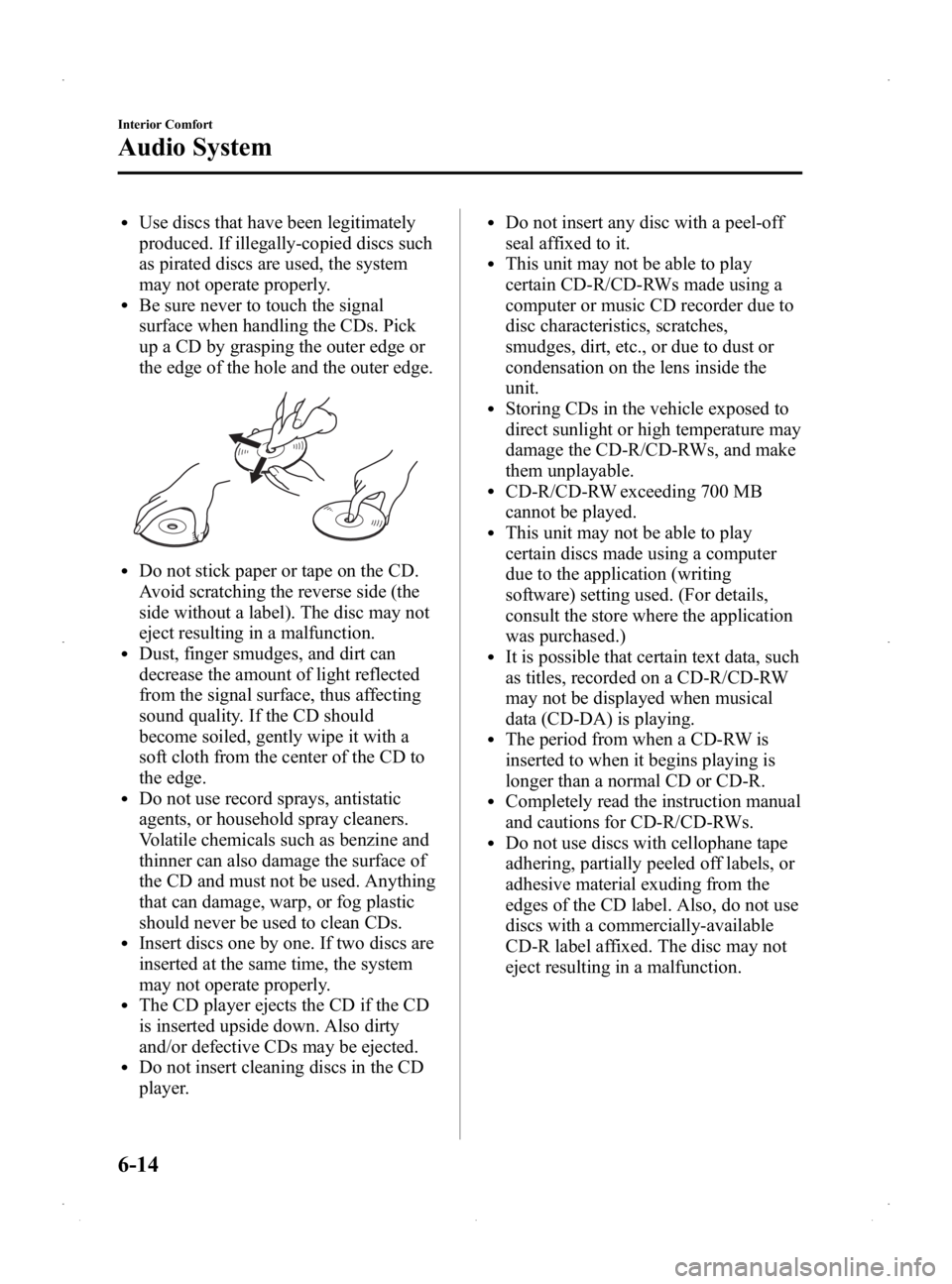
lBe sure never to touch the signal
surface when handling the CDs. Pick
up a CD by grasping the outer edge or
the edge of the hole and the outer edge.
lDo not stick paper or tape on the CD.
Avoid scratching the reverse side (the
side without a label). The disc may not
eject resulting in a malfunction.
lDust, finger smudges, and dirt can
decrease the amount of light reflected
from the signal surface, thus affecting
sound quality. If the CD should
become soiled, gently wipe it with a
soft cloth from the center of the CD to
the edge.
lDo not use record sprays, antistatic
agents, or household spray cleaners.
Volatile chemicals such as benzine and
thinner can also damage the surface of
the CD and must not be used. Anything
that can damage, warp, or fog plastic
should never be used to clean CDs.
lInsert discs one by one. If two discs are
inserted at the same time, the system
may not operate properly.
lThe CD player ejects the CD if the CD
is inserted upside down. Also dirty
and/or defective CDs may be ejected.
lDo not insert cleaning discs in the CD
player.
lDo not insert any disc with a peel-off
seal affixed to it.
lThis unit may not be able to play
certain CD-R/CD-RWs made using a
computer or music CD recorder due to
disc characteristics, scratches,
smudges, dirt, etc., or due to dust or
condensation on the lens inside the
unit.
lStoring CDs in the vehicle exposed to
direct sunlight or high temperature may
damage the CD-R/CD-RWs, and make
them unplayable.
lCD-R/CD-RW exceeding 700 MB
cannot be played.
lThis unit may not be able to play
certain discs made using a computer
due to the application (writing
software) setting used. (For details,
consult the store where the application
was purchased.)
lIt is possible that certain text data, such
as titles, recorded on a CD-R/CD-RW
may not be displayed when musical
data (CD-DA) is playing.
lThe period from when a CD-RW is
inserted to when it begins playing is
longer than a normal CD or CD-R.
lCompletely read the instruction manual
and cautions for CD-R/CD-RWs.
lDo not use discs with cellophane tape
adhering, partially peeled off labels, or
adhesive material exuding from the
edges of the CD label. Also, do not use
discs with a commercially-available
CD-R label affixed. The disc may not
eject resulting in a malfunction.
6-14
Interior Comfort
Audio System
Mazda2_8DB2-EA-13G_Edition4 Page180
Thursday, May 15 2014 1:37 PM
Form No.8DB2-EA-13G