brake light MAZDA MODEL 3 4-DOOR 2012 Owner's Manual
[x] Cancel search | Manufacturer: MAZDA, Model Year: 2012, Model line: MODEL 3 4-DOOR, Model: MAZDA MODEL 3 4-DOOR 2012Pages: 528, PDF Size: 6.47 MB
Page 214 of 528
Black plate (214,1)
WARNING
Do not drive with the brake system
warning light illuminated. Contact an
Authorized Mazda Dealer to have the
brakes inspected as soon as possible:Driving with the brake system
warning light illuminated is
dangerous. It indicates that your
brakes may not work at all or that
they could completely fail at any
time. If this light remains
illuminated, after checking that the
parking brake is fully released, have
the brakes inspected immediately.
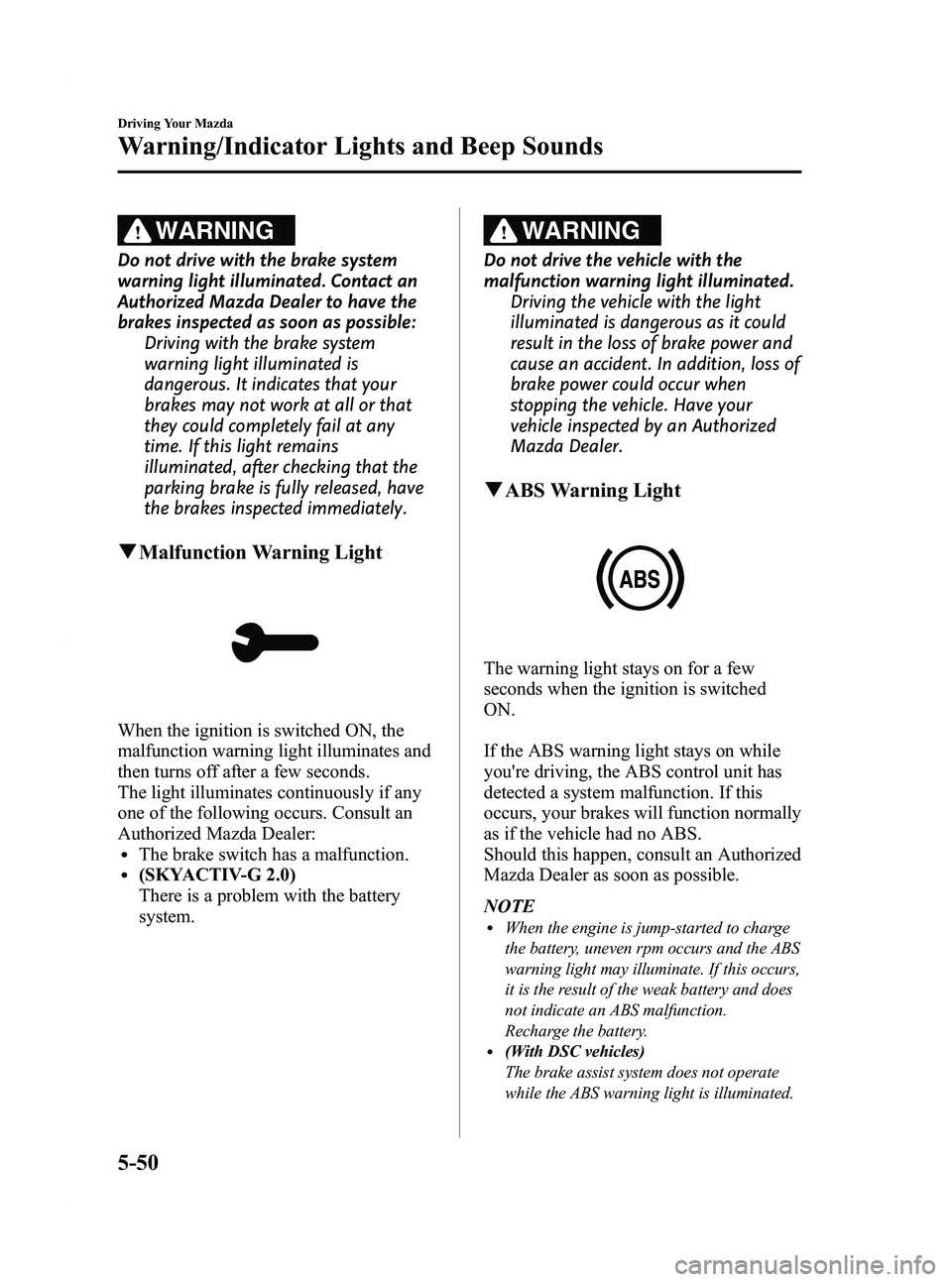
qMalfunction Warning Light
When the ignition is switched ON, the
malfunction warning light illuminates and
then turns off after a few seconds.
The light illuminates continuously if any
one of the following occurs. Consult an
Authorized Mazda Dealer:
lThe brake switch has a malfunction.l(SKYACTIV-G 2.0)
There is a problem with the battery
system.
WARNING
Do not drive the vehicle with the
malfunction warning light illuminated.
Driving the vehicle with the light
illuminated is dangerous as it could
result in the loss of brake power and
cause an accident. In addition, loss of
brake power could occur when
stopping the vehicle. Have your
vehicle inspected by an Authorized
Mazda Dealer.
qABS Warning Light
The warning light stays on for a few
seconds when the ignition is switched
ON.
If the ABS warning light stays on while
you're driving, the ABS control unit has
detected a system malfunction. If this
occurs, your brakes will function normally
as if the vehicle had no ABS.
Should this happen, consult an Authorized
Mazda Dealer as soon as possible.
NOTE
lWhen the engine is jump-started to charge
the battery, uneven rpm occurs and the ABS
warning light may illuminate. If this occurs,
it is the result of the weak battery and does
not indicate an ABS malfunction.
Recharge the battery.
l(With DSC vehicles)
The brake assist system does not operate
while the ABS warning light is illuminated.
5-50
Driving Your Mazda
Warning/Indicator Lights and Beep Sounds
Mazda3_8BY6-EA-11F_Edition3 Page214
Thursday, March 1 2012 10:17 AM
Form No.8BY6-EA-11F
Page 215 of 528
Black plate (215,1)
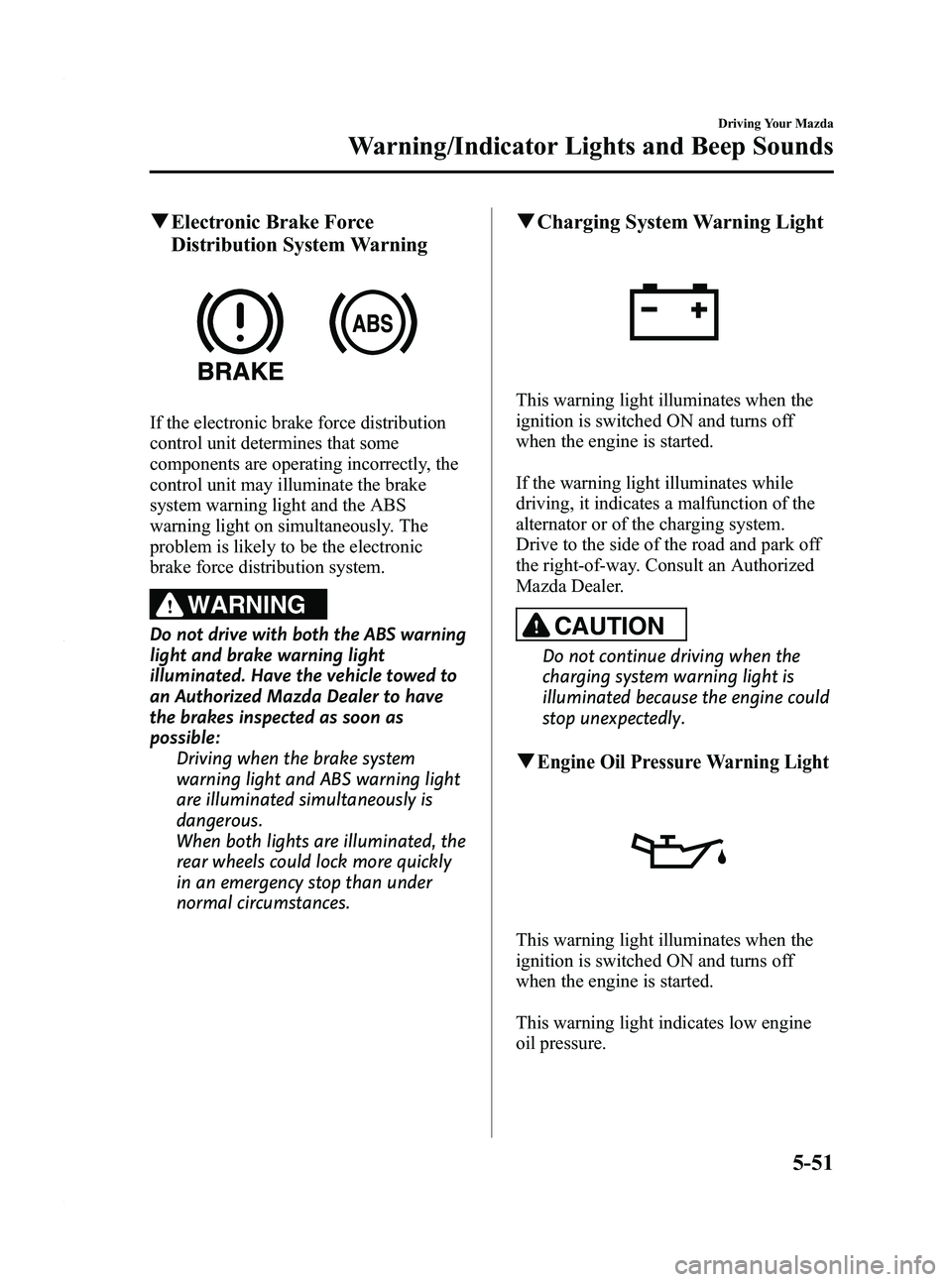
qElectronic Brake Force
Distribution System Warning
If the electronic brake force distribution
control unit determines that some
components are operating incorrectly, the
control unit may illuminate the brake
system warning light and the ABS
warning light on simultaneously. The
problem is likely to be the electronic
brake force distribution system.
WARNING
Do not drive with both the ABS warning
light and brake warning light
illuminated. Have the vehicle towed to
an Authorized Mazda Dealer to have
the brakes inspected as soon as
possible:
Driving when the brake system
warning light and ABS warning light
are illuminated simultaneously is
dangerous.
When both lights are illuminated, the
rear wheels could lock more quickly
in an emergency stop than under
normal circumstances.
qCharging System Warning Light
This warning light illuminates when the
ignition is switched ON and turns off
when the engine is started.
If the warning light illuminates while
driving, it indicates a malfunction of the
alternator or of the charging system.
Drive to the side of the road and park off
the right-of-way. Consult an Authorized
Mazda Dealer.
CAUTION
Do not continue driving when the
charging system warning light is
illuminated because the engine could
stop unexpectedly.
qEngine Oil Pressure Warning Light
This warning light illuminates when the
ignition is switched ON and turns off
when the engine is started.
This warning light indicates low engine
oil pressure.
Driving Your Mazda
Warning/Indicator Lights and Beep Sounds
5-51
Mazda3_8BY6-EA-11F_Edition3 Page215
Thursday, March 1 2012 10:17 AM
Form No.8BY6-EA-11F
Page 222 of 528
Black plate (222,1)
lUnder the following conditions, the
KEY warning light (red) will flash
continuously when the push button
start has not been pressed off to notify
the driver that the advanced key has
been removed. The KEY warning light
(red) will stop flashing when the
advanced key is back inside the
vehicle:
lThe push button start has not been
pressed off, the driver's door is
open, and the advanced key is
removed from the vehicle.
lThe push button start has not been
pressed off and all the doors are
closed after removing the advanced
key from the vehicle.
NOTE
Because the advanced key utilizes low-intensity
radio waves, the Advanced Key Removed From
Vehicle Warning may activate if the advanced
key is carried together with a metal object or it
is placed in a poor signal reception area.
KEY Indicator Light (Green)
When illuminated
When the brake pedal is depressed with
an automatic transaxle or the clutch pedal
is depressed with a manual transaxle, the
system confirms that the correct advanced
key is inside the vehicle, the KEY
indicator light (green) illuminates, and the
push button start can be pressed to ACC
(page 3-12).
When flashing
When the push button start is pressed off
from ON, the KEY indicator light (green)
flashes for approximately 30 seconds
indicating that the remaining battery
power is low. Replace with a new battery
before the advanced key becomes
unusable. Refer to Service on page 3-7.
NOTE
The advanced key can be set so that the KEY
indicator light (green) does not flash even if
the battery power is low.
Refer to Personalization Features on page
10-12.
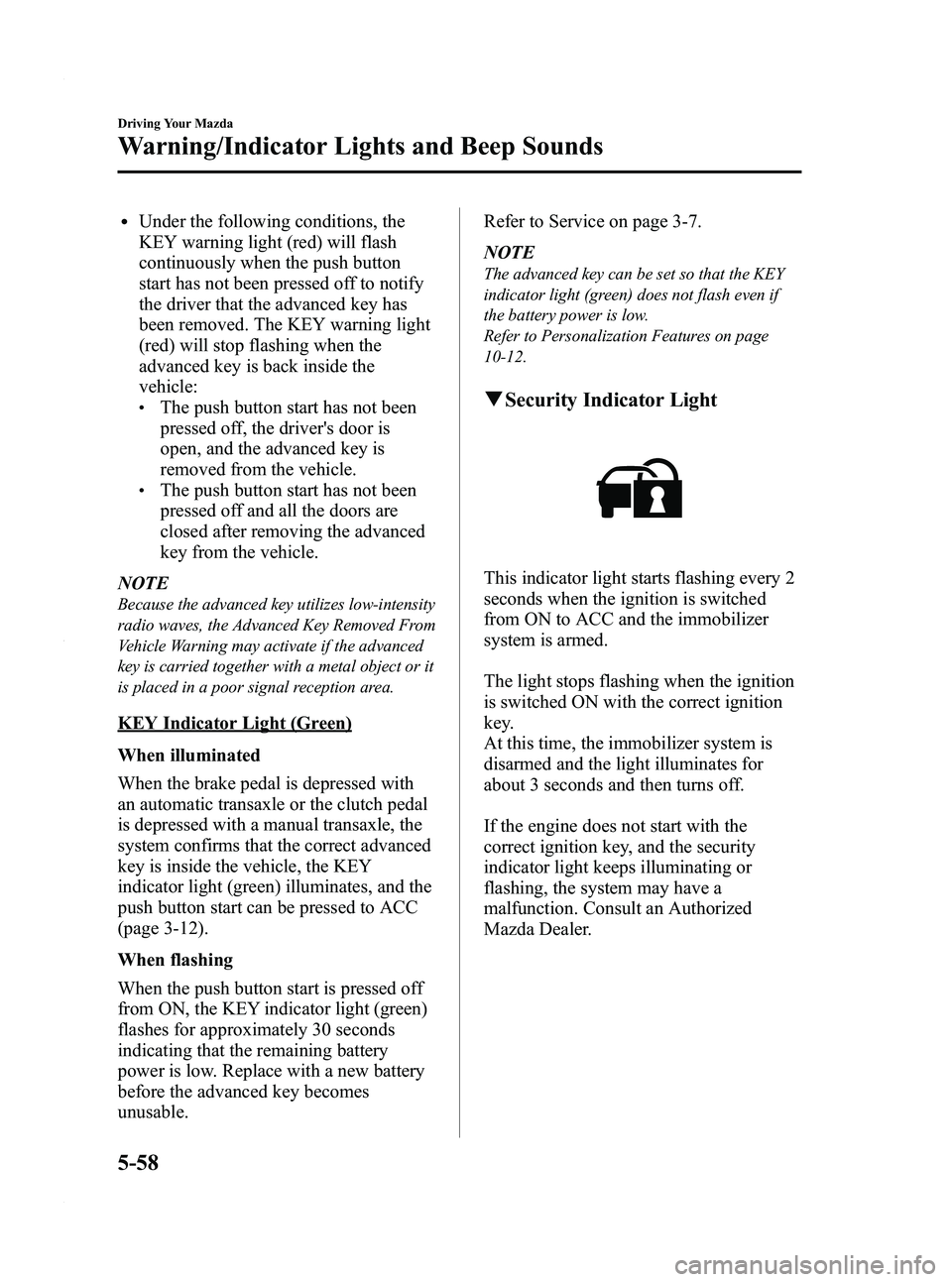
q
Security Indicator Light
This indicator light starts flashing every 2
seconds when the ignition is switched
from ON to ACC and the immobilizer
system is armed.
The light stops flashing when the ignition
is switched ON with the correct ignition
key.
At this time, the immobilizer system is
disarmed and the light illuminates for
about 3 seconds and then turns off.
If the engine does not start with the
correct ignition key, and the security
indicator light keeps illuminating or
flashing, the system may have a
malfunction. Consult an Authorized
Mazda Dealer.
5-58
Driving Your Mazda
Warning/Indicator Lights and Beep Sounds
Mazda3_8BY6-EA-11F_Edition3 Page222
Thursday, March 1 2012 10:17 AM
Form No.8BY6-EA-11F
Page 233 of 528
Black plate (233,1)
Pressing the AFS OFF switch again turns
off the AFS OFF indicator light and turns
on the AFS.
qDaytime Running Lights (Canada)
In Canada, vehicles must be driven with
the headlights on during daytime
operation.
For that reason, the daytime running lights
automatically turn on when the ignition is
switched ON.
NOTE
The Daytime Running Lights turn off when the
parking brake is applied.
Turn and Lane-Change
Signals
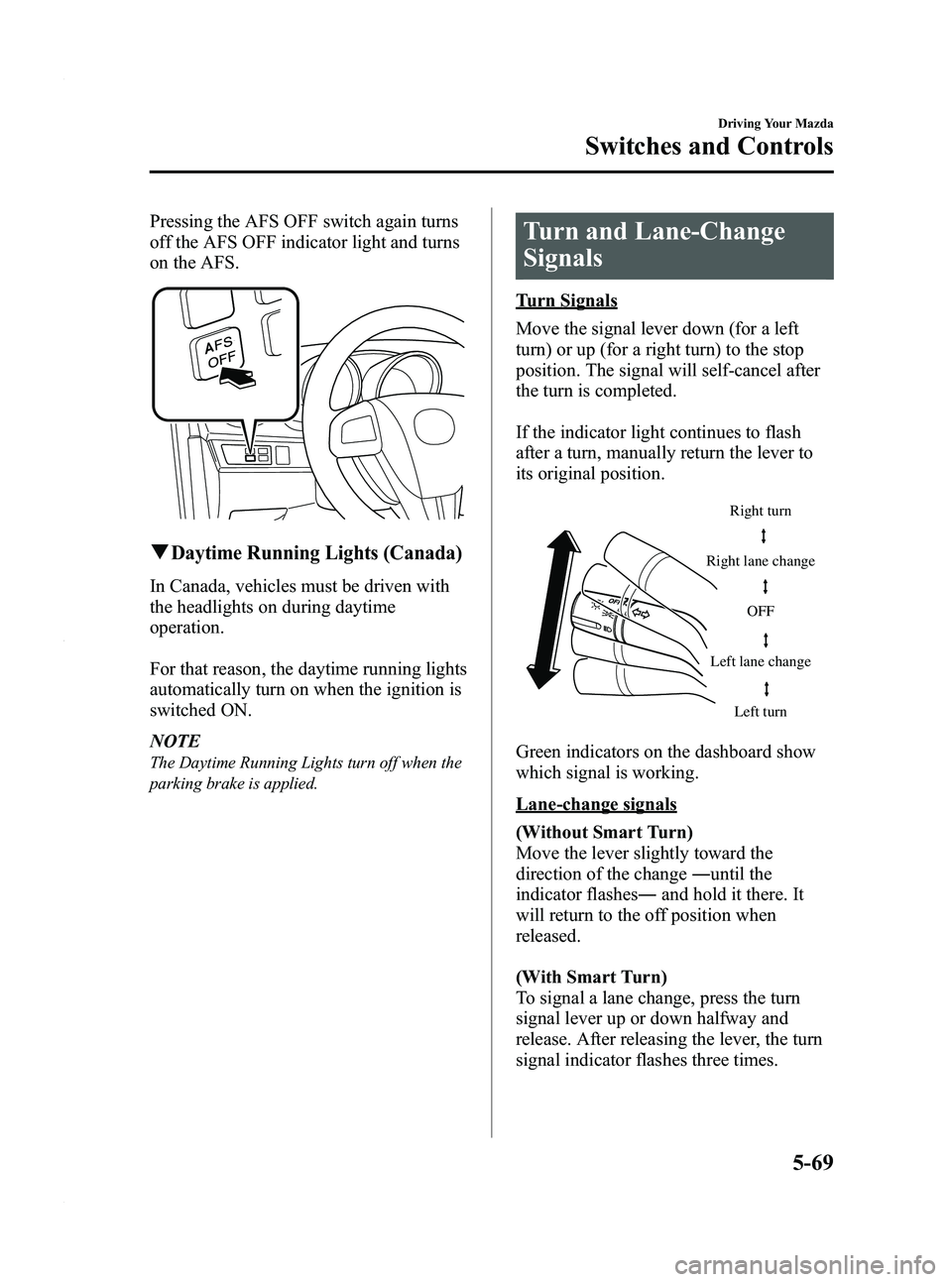
Turn Signals
Move the signal lever down (for a left
turn) or up (for a right turn) to the stop
position. The signal will self-cancel after
the turn is completed.
If the indicator light continues to flash
after a turn, manually return the lever to
its original position.
Right turnLeft turn
Right lane change
Left lane change OFF
Green indicators on the dashboard show
which signal is working.
Lane-change signals
(Without Smart Turn)
Move the lever slightly toward the
direction of the change
―until the
indicator flashes ―and hold it there. It
will return to the off position when
released.
(With Smart Turn)
To signal a lane change, press the turn
signal lever up or down halfway and
release. After releasing the lever, the turn
signal indicator flashes three times.
Driving Your Mazda
Switches and Controls
5-69
Mazda3_8BY6-EA-11F_Edition3 Page233
Thursday, March 1 2012 10:17 AM
Form No.8BY6-EA-11F
Page 350 of 528
Black plate (350,1)
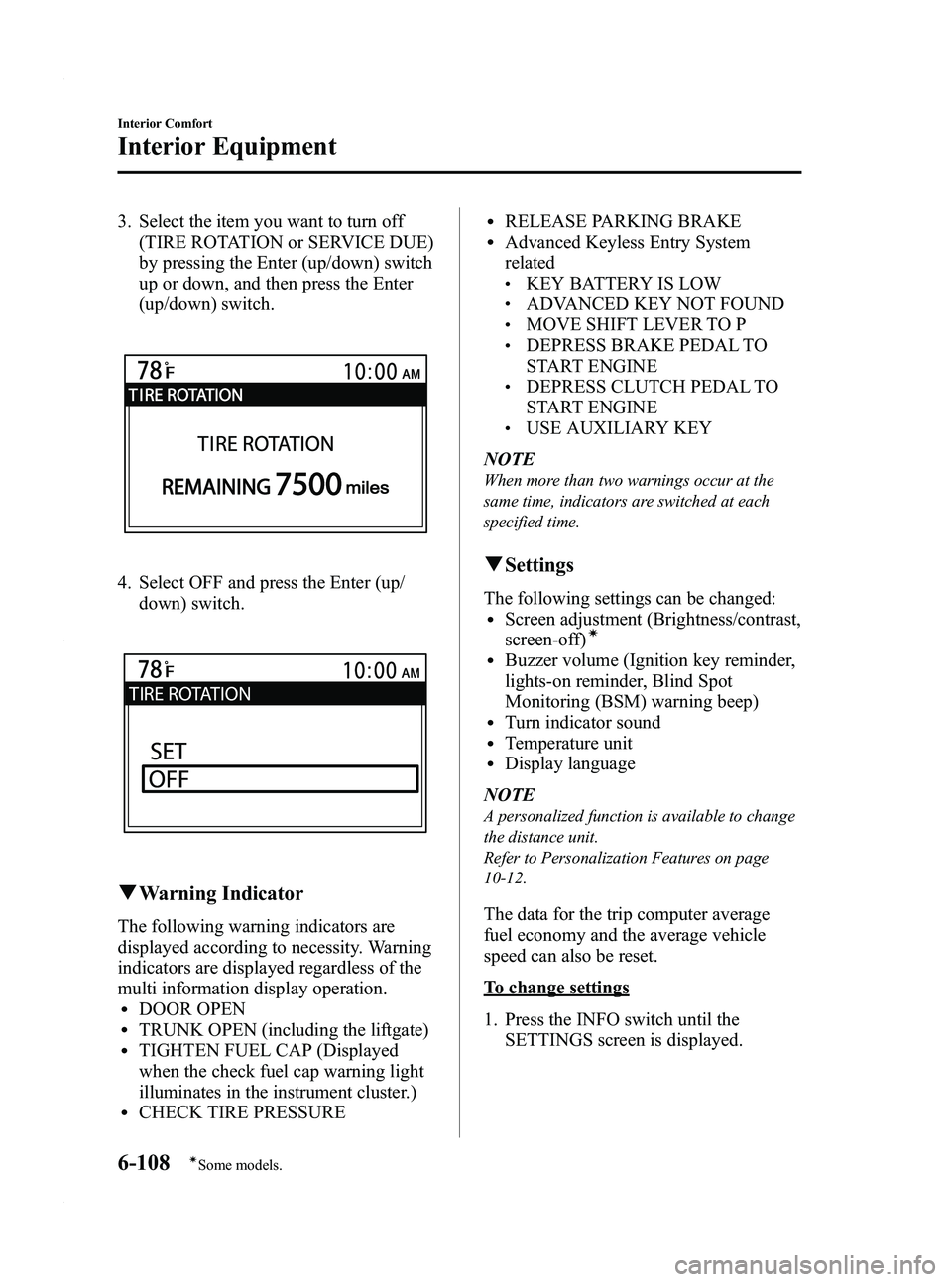
3. Select the item you want to turn off(TIRE ROTATION or SERVICE DUE)
by pressing the Enter (up/down) switch
up or down, and then press the Enter
(up/down) switch.
4. Select OFF and press the Enter (up/
down) switch.
qWarning Indicator
The following warning indicators are
displayed according to necessity. Warning
indicators are displayed regardless of the
multi information display operation.
lDOOR OPENlTRUNK OPEN (including the liftgate)lTIGHTEN FUEL CAP (Displayed
when the check fuel cap warning light
illuminates in the instrument cluster.)
lCHECK TIRE PRESSURE
lRELEASE PARKING BRAKElAdvanced Keyless Entry System
related
lKEY BATTERY IS LOWlADVANCED KEY NOT FOUNDlMOVE SHIFT LEVER TO PlDEPRESS BRAKE PEDAL TO
START ENGINE
lDEPRESS CLUTCH PEDAL TO
START ENGINE
lUSE AUXILIARY KEY
NOTE
When more than two warnings occur at the
same time, indicators are switched at each
specified time.
q Settings
The following settings can be changed:lScreen adjustment (Brightness/contrast,
screen-off)í
lBuzzer volume (Ignition key reminder,
lights-on reminder, Blind Spot
Monitoring (BSM) warning beep)
lTurn indicator soundlTemperature unitlDisplay language
NOTE
A personalized function is available to change
the distance unit.
Refer to Personalization Features on page
10-12.
The data for the trip computer average
fuel economy and the average vehicle
speed can also be reset.
To change settings
1. Press the INFO switch until the SETTINGS screen is displayed.
6-108
Interior Comfort
íSome models.
Interior Equipment
Mazda3_8BY6-EA-11F_Edition3 Page350
Thursday, March 1 2012 10:18 AM
Form No.8BY6-EA-11F
Page 374 of 528
Black plate (374,1)
Overheating
If the High engine coolant temperature
warning light illuminates, the vehicle
loses power, or you hear a loud knocking
or pinging noise, the engine is probably
too hot.
WARNING
Switch the ignition to off and
make sure the fan is not running before
attempting to work near the cooling
fan: Working near the cooling fan when it
is running is dangerous. The fan
could continue running indefinitely
even if the engine has stopped and
the engine compartment temperature
is high. You could be hit by the fan
and seriously injured.
Do not remove the cooling
system cap when the engine and
radiator are hot:
When the engine and radiator are
hot, scalding coolant and steam may
shoot out under pressure and cause
serious injury.
Open the hood ONLY after steam is no
longer escaping from the engine: Steam from an overheated engine is
dangerous. The escaping steam could
seriously burn you.
If the High engine coolant temperature
warning light illuminates:
1. Drive safely to the side of the road and park off the right-of-way. 2. Put a vehicle with an automatic
transaxle in park (P), a manual
transaxle in neutral.
3. Apply the parking brake.
4. Turn off the air conditioner.
5. Check whether coolant or steam is escaping from under the hood or from
the engine compartment.
If steam is coming from the engine
compartment:
Do not go near the front of the vehicle.
Stop the engine.
Wait until the steam dissipates, then
open the hood and start the engine.
If neither coolant nor steam is
escaping:
Open the hood and idle the engine until
it cools.
CAUTION
If the cooling fan does not operate
while the engine is running, the
engine temperature will increase.
Stop the engine and call an
Authorized Mazda Dealer.
6. Make sure the cooling fan is operating, then turn off the engine after the
temperature has decreased.
7. When cool, check the coolant reservoir level.
If it's low, look for coolant leaks from
the radiator and hoses.
7-16
In Case of an Emergency
Overheating
Mazda3_8BY6-EA-11F_Edition3 Page374
Thursday, March 1 2012 10:18 AM
Form No.8BY6-EA-11F
Page 387 of 528
Black plate (387,1)
8Maintenance and Care
How to keep your Mazda in top condition.
Introduction .................................................................................. 8-2Introduction ............................................................................... 8-2
Scheduled Maintenance ................................................................ 8-3 Scheduled Maintenance (USA, Canada, and Puerto Rico) ....... 8-3
Scheduled Maintenance (Mexico) ............................................. 8-8
Owner Maintenance ................................................................... 8-15 Owner Maintenance Schedule ................................................ 8-15
Owner Maintenance Precautions ............................................. 8-16
Engine Compartment Overview .............................................. 8-17
Engine Oil ............................................................................... 8-19
Engine Coolant ....................................................................... 8-22
Brake/Clutch Fluid .................................................................. 8-24
Power Steering Fluid ............................................................... 8-25
Automatic Transaxle Fluid (ATF)
í........................................ 8-26
Washer Fluid ........................................................................... 8-27
Body Lubrication .................................................................... 8-28
Wiper Blades ........................................................................... 8-29
Battery ..................................................................................... 8-33
Tires ........................................................................................ 8-37
Light Bulbs ............................................................................. 8-44
Fuses ....................................................................................... 8-56
Appearance Care ........................................................................ 8-63 How to Minimize Environmental Paint Damage .................... 8-63
Exterior Care ........................................................................... 8-65
Interior Care ............................................................................ 8-69
8-1íSome models.
Mazda3_8BY6-EA-11F_Edition3 Page387
Thursday, March 1 2012 10:18 AM
Form No.8BY6-EA-11F
Page 397 of 528
Black plate (397,1)
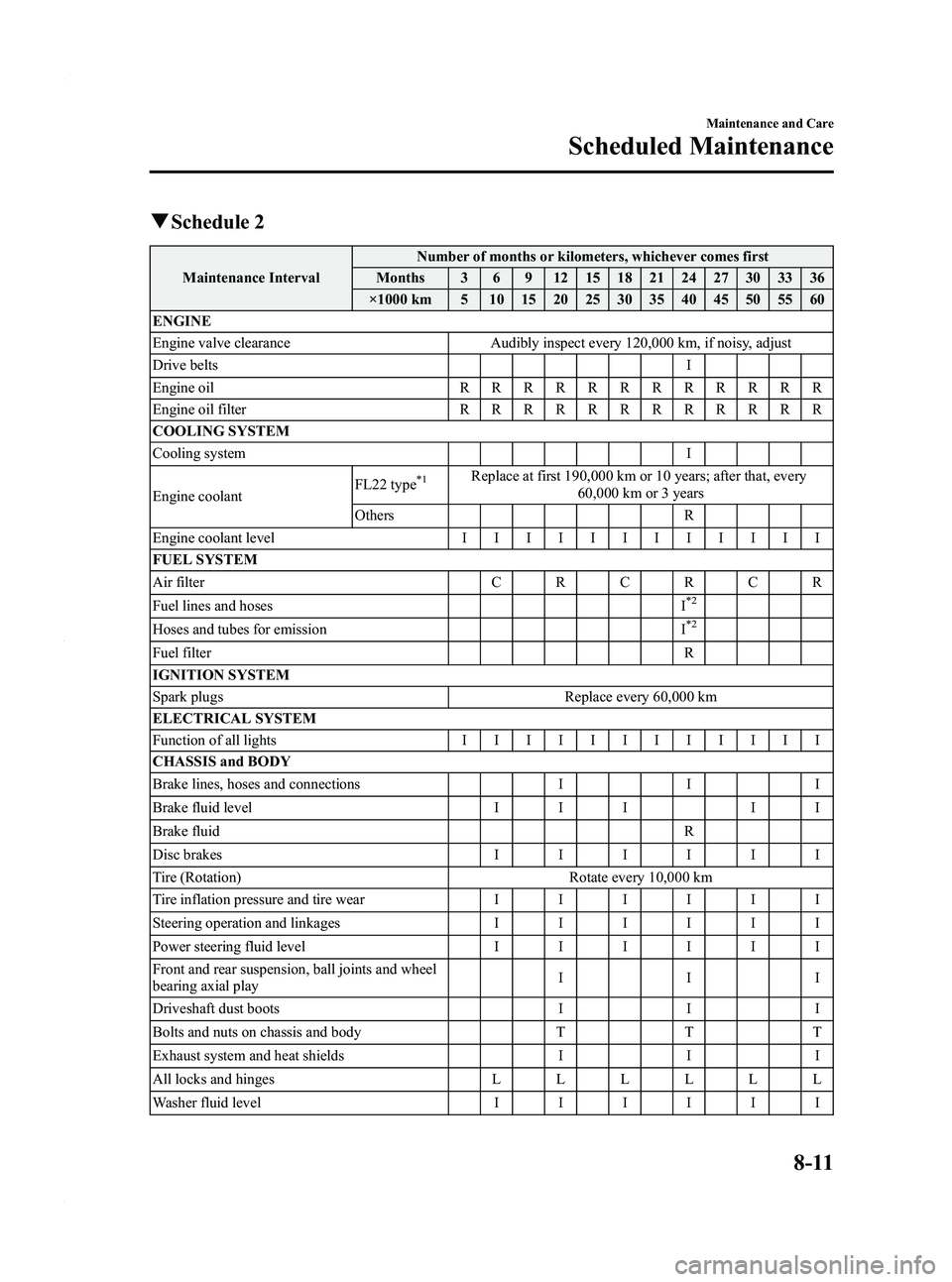
qSchedule 2
Maintenance Interval Number of months or kilometers, whichever comes first
Months 3 6 9 12 15 18 21 24 27 30 33 36
×1000 km 5 10 15 20 25 30 35 40 45 50 55 60
ENGINE
Engine valve clearance Audibly inspect every 120,000 km, if noisy, adjust
Drive belts I
Engine oil RRRRRRRRRRRR
Engine oil filter RRRRRRRRRRRR
COOLING SYSTEM
Cooling system I
Engine coolant FL22 type
*1Replace at first 190,000 km or 10 years; after that, every
60,000 km or 3 years
Others R
Engine coolant level IIIIIIIIIIII
FUEL SYSTEM
Air filter CRCRCR
Fuel lines and hoses I
*2
Hoses and tubes for emissionI*2
Fuel filter R
IGNITION SYSTEM
Spark plugs Replace every 60,000 km
ELECTRICAL SYSTEM
Function of all lights IIIIIIIIIIII
CHASSIS and BODY
Brake lines, hoses and connections III
Brake fluid level I I II I
Brake fluid R
Disc brakes IIIIII
Tire (Rotation) Rotate every 10,000 km
Tire inflation pressure and tire wear IIIIII
Steering operation and linkages IIIIII
Power steering fluid level IIIIII
Front and rear suspension, ball joints and wheel
bearing axial play III
Driveshaft dust boots III
Bolts and nuts on chassis and body TTT
Exhaust system and heat shields III
All locks and hinges LLLLLL
Washer fluid level IIIIII
Maintenance and Care
Scheduled Maintenance
8-11
Mazda3_8BY6-EA-11F_Edition3 Page397
Thursday, March 1 2012 10:18 AM
Form No.8BY6-EA-11F
Page 399 of 528
Black plate (399,1)
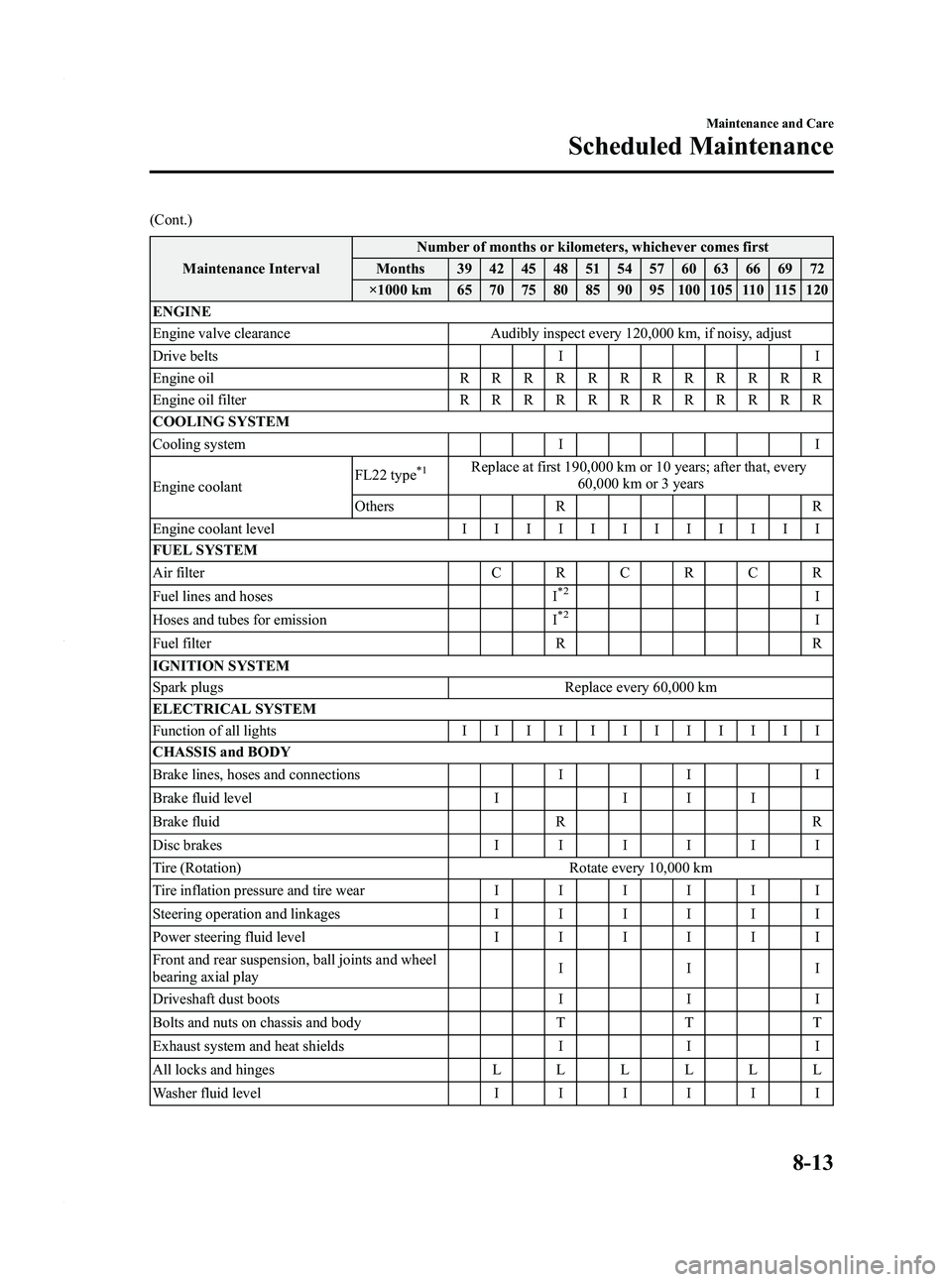
(Cont.)Maintenance Interval Number of months or kilometers, whichever comes first
Months 39 42 45 48 51 54 57 60 63 66 69 72
×1000 km 65 70 75 80 85 90 95 100 105 110 115 120
ENGINE
Engine valve clearance Audibly inspect every 120,000 km, if noisy, adjust
Drive belts II
Engine oil RRRRRRRRRRRR
Engine oil filter RRRRRRRRRRRR
COOLING SYSTEM
Cooling system II
Engine coolant FL22 type
*1Replace at first 190,000 km or 10 years; after that, every
60,000 km or 3 years
Others R R
Engine coolant level IIIIIIIIIIII
FUEL SYSTEM
Air filter CRCRCR
Fuel lines and hoses I
*2I
Hoses and tubes for emission I*2I
Fuel filter R R
IGNITION SYSTEM
Spark plugs Replace every 60,000 km
ELECTRICAL SYSTEM
Function of all lights IIIIIIIIIIII
CHASSIS and BODY
Brake lines, hoses and connections III
Brake fluid level II I I
Brake fluid RR
Disc brakes IIIIII
Tire (Rotation) Rotate every 10,000 km
Tire inflation pressure and tire wear IIIIII
Steering operation and linkages IIIIII
Power steering fluid level IIIIII
Front and rear suspension, ball joints and wheel
bearing axial play III
Driveshaft dust boots III
Bolts and nuts on chassis and body TTT
Exhaust system and heat shields III
All locks and hinges LLLLLL
Washer fluid level IIIIII
Maintenance and Care
Scheduled Maintenance
8-13
Mazda3_8BY6-EA-11F_Edition3 Page399
Thursday, March 1 2012 10:18 AM
Form No.8BY6-EA-11F
Page 430 of 528
Black plate (430,1)
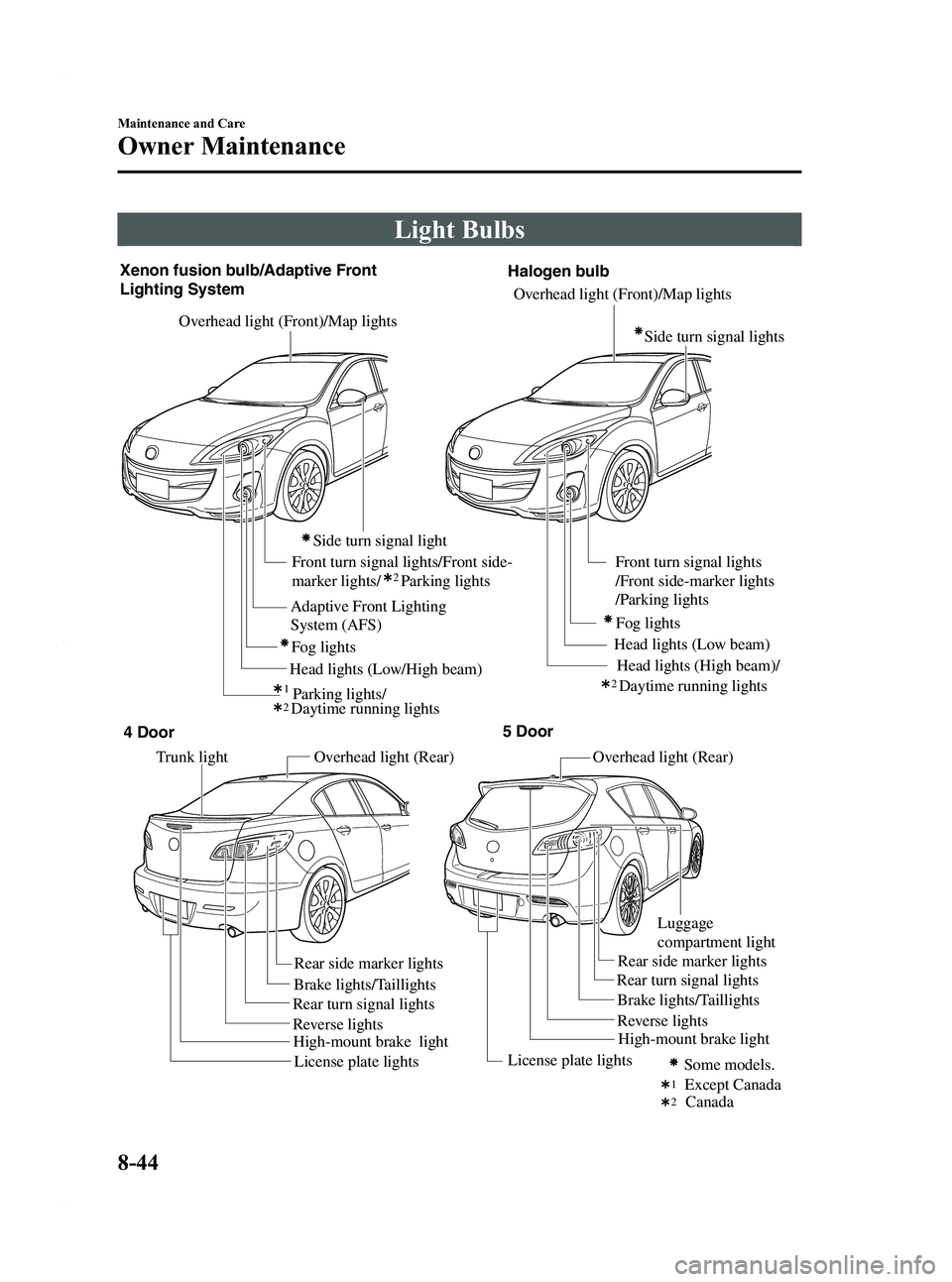
Light Bulbs
Overhead light (Front)/Map lightsOverhead light (Rear) Overhead light (Rear)
Front turn signal lights/Front side-
marker lights/ Parking lights
Xenon fusion bulb/Adaptive Front
Lighting System
Fog lights
Parking lights/
Adaptive Front Lighting
System (AFS)
Overhead light (Front)/Map lights
Front turn signal lights
/Front side-marker lights
/Parking lights
Head lights (Low beam)
Head lights (Low/High beam) Fog lights
Side turn signal light
Trunk light
Brake lights/Taillights Brake lights/Taillights
Rear turn signal lights Rear turn signal lights
Rear side marker lights
Rear side marker lights
Except Canada
Some models.
Reverse lights
Reverse lights
License plate lights License plate lights
High-mount brake light Halogen bulb
212
2
12
High-mount brake light
Luggage
compartment light
4 Door
5 Door
Canada
Daytime running lights
Head lights (High beam)/
Daytime running lights
Side turn signal lights
8-44
Maintenance and Care
Owner Maintenance
Mazda3_8BY6-EA-11F_Edition3 Page430
Thursday, March 1 2012 10:19 AM
Form No.8BY6-EA-11F