radio MAZDA MODEL 3 4-DOOR 2016 User Guide
[x] Cancel search | Manufacturer: MAZDA, Model Year: 2016, Model line: MODEL 3 4-DOOR, Model: MAZDA MODEL 3 4-DOOR 2016Pages: 598, PDF Size: 30.13 MB
Page 203 of 598

The Forward Sensing Camera (FSC) determines the conditions ahead of th\
e vehicle while
traveling at night and detect")
4–75
When Driving
i-ACTIVSENSE
Camera and Sensors
Forward sensing camera (FSC)
The Forward Sensing Camera (FSC) determines the conditions ahead of th\
e vehicle while
traveling at night and detects traffic lanes. The following systems also use the Forward
Sensing Camera (FSC).
High Beam Control system (HBC) Lane Departure Warning System (LDWS)
The Forward Sensing Camera (FSC) is installed at the top of the windsh\
ield near the
rearview mirror.
Refer to Forward Sensing Camera (FSC) on page 4-111.
Radar sensor (front)
The radar sensor (front) functions by detecting the radio waves reflected off a vehicle ahead
sent from the radar sensor. The following systems also use the radar sensor (front).
Mazda Radar Cruise Control (MRCC) Forward Obstruction Warning (FOW)
The radar sensor (front) is mounted behind the radiator grille.
Refer to Radar Sensor (Front) on page 4-113.
Laser sensor (front)
The laser sensor (front) emits a near-infrared laser beam and receives the beam reflected
off the reflective surface of a vehicle in front, and the detected beam is then used for
measurement. The following systems also use the laser sensor (front).
Smart City Brake Support (SCBS)
The laser sensor (front) is installed at the top of the windshield nea\
r the rearview mirror.
Refer to Laser Sensor (Front) on page 4-116.
Radar sensors (rear)
The radar sensors (rear) function by detecting the radio waves reflected off a vehicle
approaching from the rear or an obstruction sent from the radar sensors.\
The following
systems also use the radar sensors (rear).
Blind Spot Monitoring (BSM) System Rear Cross Traffic Alert (RCTA)
The radar sensors (rear) are installed inside the rear bumper, one each on the left and right
sides.
Refer to Radar Sensors (Rear) on page 4-118.
Mazda3_8FA4-EA-15G_Edition1.indb 752015/05/11 14:01:00
Page 216 of 598
4–88
When Driving
i-ACTIVSENSE
If the road width is extremely narrow, vehicles two lanes over may be detected.
The detection area of the radar sensors (rear) is set according to the road width of
expressways.
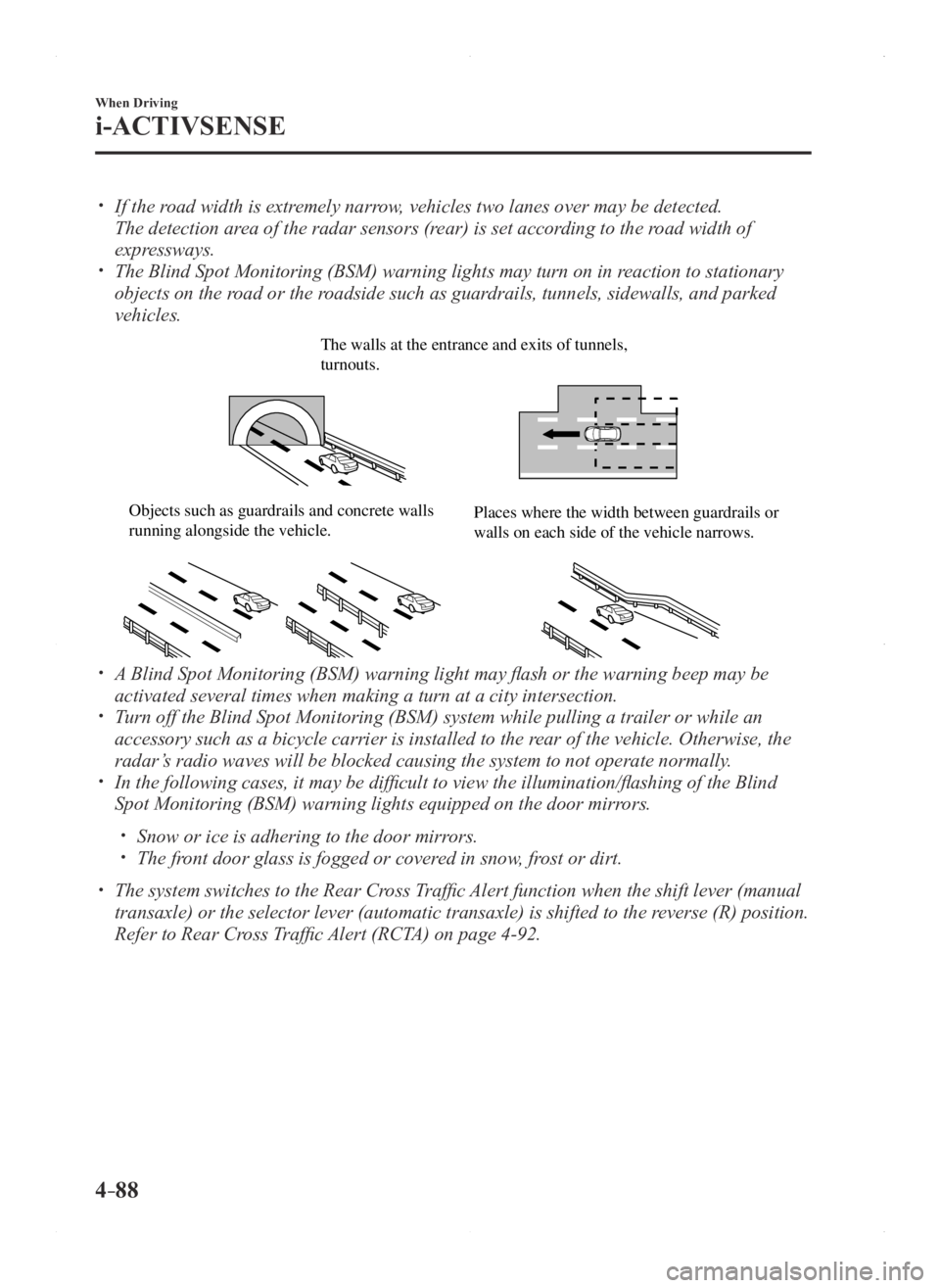
The Blind Spot Monitoring (BSM) warning lights may turn on in reaction to stationary
objects on the road or the roadside such as guardrails, tunnels, sidewalls, and parked
vehicles.
The walls at the entrance and exits of tunnels, turnouts.
Objects such as guardrails and concrete walls running alongside the vehicle.Places where the width between guardrails or walls on each side of the vehicle narrows.
A Blind Spot Monitoring (BSM) warning light may flash or the warning beep may be
activated several times when making a turn at a city intersection. Turn off the Blind Spot Monitoring (BSM) system while pulling a trailer\
or while an
accessory such as a bicycle carrier is installed to the rear of the vehicle. Otherwise, the
radar’s radio waves will be blocked causing the system to not operate normally\
.
In the following cases, it may be difficult to view the illumination/flashing of the Blind
Spot Monitoring (BSM) warning lights equipped on the door mirrors.
Snow or ice is adhering to the door mirrors. The front door glass is fogged or covered in snow, frost or dirt.
The system switches to the Rear Cross Traffic Alert function when the shift lever (manual
transaxle) or the selector lever (automatic transaxle) is shifted to \
the reverse (R) position.
Refer to Rear Cross Traffic Alert (RCTA) on page 4-92.
Mazda3_8FA4-EA-15G_Edition1.indb 882015/05/11 14:01:03
Page 222 of 598

4–94
When Driving
i-ACTIVSENSE
Under the following conditions, the radar sensors (rear) cannot detect target objects or it
may be difficult to detect them.
The vehicle speed when reversing is about 10 km/h (6.3 mph) or faster. The radar sensor (rear) detection area is obstructed by a nearby wall or parked
vehicle. (Reverse the vehicle to a position where the radar sensor detection area is no
longer obstructed.)
Your vehicle
A vehicle is approaching directly from the rear of your vehicle.
Your vehicle
The vehicle is parked on a slant.
Your vehicle
Directly after pressing the BSM OFF switch and the system becomes operable.
In the following cases, it may be difficult to view the illumina tion/flashing of the Blind
Spot Monitoring (BSM) warning lights equipped on the door mirrors.
Snow or ice adheres to the door mirrors. The front door glass is fogged or covered in snow, frost or dirt.
Turn off the Rear Cross Traffic Alert (RCTA) system while pulling a trailer or while an
accessory such as a bicycle carrier is installed to the rear of the vehicle. Otherwise,
the radio waves emitted by the radar will be blocked causing the system \
to not operate
normally.
Mazda3_8FA4-EA-15G_Edition3.indb 942015/12/04 19:23:19
Page 241 of 598

4–113
When Driving
i-ACTIVSENSE
Radar Sensor (Front)
Your vehicle is equipped with a radar sensor (front).
The following systems also use the radar sensor (front).
Mazda Radar Cruise Control (MRCC) Forward Obstruction Warning (FOW)
The radar sensor (front) functions by detecting the radio waves reflected off a vehicle ahead
or an obstruction sent from the radar sensor (front).
The radar sensor (front) is mounted behind the front emblem.
Radar sensor (front)
If the Forward Obstruction Warning (FOW) warning light (amber) is illuminated, the area
around the radar sensor (front) may be dirty. Refer to “Warning Guidance” in the center
display (Type B audio).
Refer to If a Warning Light Turns On or Flashes on page 7-24.
Mazda3_8FA4-EA-15G_Edition1.indb 1132015/05/11 14:01:09
Page 243 of 598

4–115
When Driving
i-ACTIVSENSE
NOTE
In the following cases, the radar sensor (front) may not be able to detect vehicles ahead
or obstructions.
The rear surface of a vehicle ahead does not reflect radio waves effectively, such as
an unloaded trailer or an automobile with a loading platform covered by a soft top,
vehicles with a hard plastic tailgate, and round-shaped vehicles.
Vehicles ahead with low vehicle height and thus less area for reflecting radio waves. Visibility is reduced due to a vehicle ahead casting off water, snow, or sand from its
tires and onto your windshield. The trunk/luggage compartment is loaded with heavy objects or the r ear passenger
seats are occupied. Ice, snow, or soiling is on the front surface of the front emblem. During inclement weather such as rain, snow, or sand storms. When driving near facilities or objects emitting str ong radio waves.
In the following cases, the radar sensor (front) may detect vehicles in the opposite lane or
surrounding obstructions, or it may not be able to detect vehicles ahead or \
obstructions.
The beginning and end of a curve. Roads with continuous curves. Narrow lane roads due to road construction or lane closures. The vehicle ahead enters the radar sensor's blind spot. The vehicle ahead is running abnormally due to accident or vehicle damag\
e. Roads with repeated up and down slopes Driving on poor r oads or unpaved roads. The distance between your vehicle and the vehicle ahead is extr emely short. A vehicle suddenly comes close such as by cutting into the lane.
To prevent incorrect operation of the system, use tires of the same specified size,
manufacturer, brand, and tread pattern on all four wheels. In addition, do not use tires
with significantly different wear patterns or tire pressures on the same vehicle. (Including
the temporary spare tire)
If the battery power is weak, the system may not operate correctly. When driving on roads with little traffic and few vehicles ahead or obstructions for the
radar sensor (front) to detect, Forward Obstruction Warning/Smart City Brake Support
(FOW/SCBS) warning light (amber) temporarily illuminates, however, this does not
indicate a problem.
Mazda3_8FA4-EA-15G_Edition1.indb 1152015/05/11 14:01:09
Page 278 of 598

5–16
Interior Features
Audio System
*Some models.
Antenna
Antenna (4-Door)
AM/FM Radio Antenna
The AM/FM radio antenna receives both
AM and FM signals.
The antenna is embedded into the window
glass.
CAUTION
When washing the inside of the
window which has an antenna, use
a soft cloth dampened in lukewarm
water, gently wiping the antenna lines.
Use of glass cleaning products could
damage the antenna.
Satellite Radio Antenna
*
The satellite radio antenna receives
SiriusXM signals.
Antenna
Antenna (5-Door)
AM/FM Radio Antenna*
The AM/FM radio antenna receives both
AM and FM signals.
(Type A)
To remove the antenna, turn it
counterclockwise.
To install the antenna, turn it clockwise.
Make sure the antenna is securely
installed.
Remove
Install
CAUTION
To prevent damage to the antenna,
remove it before entering a car wash
facility or passing beneath a low
overhead clearance.
Be careful around the antenna when
removing snow from the roof. Otherwise
the antenna could be damaged.
NOTE
When leaving your vehicle unattended, we
recommend that you remove the antenna
and store it inside the vehicle.
Mazda3_8FA4-EA-15G_Edition1.indb 162015/05/11 14:01:21
Page 279 of 598

5–17
Interior Features
Audio System
*Some models.
(Type B)
Antenna
Antenna for AM/FM and Satellite Radio
Antenna*
The antenna for AM/FM and satellite radio
antenna receives both AM and FM signals
and SiriusXM signals.
Antenna
Operating Tips for Audio
System
WARNING
Always adjust the audio while the
vehicle is stopped:Do not adjust the audio control
switches while driving the vehicle.
Adjusting the audio while driving
the vehicle is dangerous as it could
distract your attention from the vehicle
operation which could lead to a
serious accident.
Even if the audio control switches are
equipped on the steering wheel, learn
to use the switches without looking
down at them so that you can keep
your maximum attention on the road
while driving the vehicle.
CAUTION
For the purposes of safe driving,
adjust the audio volume to a level that
allows you to hear sounds outside of
the vehicle including car horns and
particularly emergency vehicle sirens.
NOTE
To prevent the battery from being
discharged, do not leave the audio
system on for a long period of time
when the engine is not running.
If a cellular phone or CB radio is used
in or near the vehicle, it could cause
noise to occur from the audio system,
however, this does not indicate that the
system has been damaged.
Mazda3_8FA4-EA-15G_Edition1.indb 172015/05/11 14:01:22
Page 280 of 598

5–18
Interior Features
Audio System
Do not spill any liquid on the audio
system.
Do not insert any objects, other than CDs,
into the slot.
Radio Reception
AM characteristics
AM signals bend around such things as
buildings or mountains and bounce off the
ionosphere.
Therefore, they can reach longer distances
than FM signals.
Because of this, two stations may
sometimes be picked up on the same
frequency at the same time.
Station 2
Station 1 Ionosphere
FM characteristics
An FM broadcast range is usually about
40—50 km (25—30 miles) from the
source. Because of extra coding needed to
break the sound into two channels, stereo
FM has even less range than monaural
(non-stereo) FM.
FM Station
40—50km
(25—30 miles)
Signals from an FM transmitter are similar
to beams of light because they do not
bend around corners, but they do reflect.
Unlike AM signals, FM signals cannot
travel beyond the horizon. Therefore, FM
stations cannot be received at the great
distances possible with AM reception.
AM wa
ve
FM wa
ve
FM wa ve
100—200 km (60—120 miles) Ionosphere
Atmospheric conditions can also affect
FM reception. High humidity will cause
poor reception. However, cloudy days may
provide better reception than clear days.
Mazda3_8FA4-EA-15G_Edition1.indb 182015/05/11 14:01:23
Page 281 of 598

5–19
Interior Features
Audio System
Multipath noise
Since FM signals can be reflected by
obstructions, it is possible to receive both
the direct signal and the reflected signal
at the same time. This causes a slight
delay in reception and may be heard as a
broken sound or a distortion. This problem
may also be encountered when in close
proximity to the transmitter.
Reflected waveDirect
Flutter/Skip noise
Signals from an FM transmitter move in
straight lines and become weak in valleys
between tall buildings, mountains, and
other obstacles. When a vehicle passes
through such an area, the reception
conditions may change suddenly, resulting
in annoying noise.
Weak signal noise
In suburban areas, broadcast signals
become weak because of distance from the
transmitter. Reception in such fringe areas
is characterized by sound breakup.
Strong signal noise
This occurs very close to a transmitter
tower. The broadcast signals are extremely
strong, so the result is noise and sound
breakup at the radio receiver.
Station drift noise
When a vehicle reaches the area of two
strong stations broadcasting at similar
frequencies, the original station may be
temporarily lost and the second station
picked up. At this time there will be some
noise from this disturbance.
Station 2
88.3 MHzStation 1
88.1 MHz
Mazda3_8FA4-EA-15G_Edition1.indb 192015/05/11 14:01:23
Page 286 of 598

5–24
Interior Features
Audio System
NOTE
Playback may not be possible
depending on the type and condition of
the USB flash memory even if the audio
file complies with the standard above.
A copyright protected WMA/AAC file
cannot be played in this unit. The order of the music data stored in
the device may differ from the playback
order.
To prevent loss or damage of stored
data, we recommend that you always
back up your data.
If a device exceeds the maximum
electric current value of 1,000 mA,
it may not operate or recharge when
connected.
Do not pull out the USB device while in
the USB mode (only pull it out while in
FM/AM radio or CD mode).
The device will not operate if the data is
password protected.
MP3/WMA/AAC/OGG
*1 files written
under specifications other than the
indicated specification may not play
normally or files/folder names may not
display correctly.
*1 Type B
Operating Tips for iPod
This unit supports playback of music files
recorded to an iPod.
*
iPod is a trademark of Apple Inc.,
registered in the U.S. and other
countries.
The iPod may not be compatible
depending on the model or OS version. In
this case, an error message is displayed.
CAUTION
Remove the iPod when it is not in
use. Because the iPod is not designed
to withstand excessive changes in
temperature inside the cabin, it could be
damaged or the battery may deteriorate
due to the excessive temperature or
humidity inside the cabin if it is left in the
vehicle.
If data in the iPod is lost while it is
connected to the unit, Mazda cannot
guarantee recovery of any lost data.
If the iPod battery is deteriorated, the
iPod may not recharge and playback
may not be possible when it is connected
to the unit.
Be careful not to pinch the iPod
connecting cable when opening/closing
the center console.
For details on using the iPod, refer to the
iPod instruction manual. When connecting the iPod to a USB port,
all commands are made from the audio
unit. iPod control is not possible.
NOTE
The audio unit cannot display images or
videos stored in an iPod.
Mazda3_8FA4-EA-15G_Edition1.indb 242015/05/11 14:01:25