cruise control MAZDA MODEL 3 4-DOOR 2016 Owners Manual
[x] Cancel search | Manufacturer: MAZDA, Model Year: 2016, Model line: MODEL 3 4-DOOR, Model: MAZDA MODEL 3 4-DOOR 2016Pages: 598, PDF Size: 30.13 MB
Page 9 of 598

1–3
Pictorial Index
Interior Overview
Audio control switches........................................................................\
..................page 5-57
Instrument cluster ........................................................................\
..........................page 4-11
Dashboard illumination knob ........................................................................\
........page 4-15
Cruise control switches ........................................................................\
....page 4-101, 4-119
Hazard warning flasher switch ........................................................................\
......page 4-54
Seat warmer switches ........................................................................\
......................page 2-7
Drive selection switch ........................................................................\
...................page 4-72
Push button start ........................................................................\
..............................page 4-4
Steering shift switches ........................................................................\
..................page 4-32
Lock release lever ........................................................................\
.........................page 3-31
Hood release handle ........................................................................\
......................page 6-24
Remote fuel-filler lid release ........................................................................\
.........page 3-29
Trunk release button ........................................................................\
......................page 3-21
The equipment and installation position varies by vehicle
Mazda3_8FA4-EA-15G_Edition1.indb 32015/05/11 13:59:57
Page 130 of 598

4–2*Some models.
i-ACTIVSENSE................................. 4-74
i-ACTIVSENSE
...........................4-74
Adaptive Front Lighting System
(AFS)
............................................4-76
High Beam Control System
(HBC)
...........................................4-77
Lane Departure Warning System
(LDWS)
........................................4-80
Blind Spot Monitoring (BSM)
System
..........................................4-86
Rear Cross Traffic Alert
(RCTA)
.........................................4-92
Forward Obstruction Warning
(FOW)
..........................................4-95
Mazda Radar Cruise Control
(MRCC)
.......................................4-98
Smart City Brake Support
(SCBS)
.......................................4-106
Forward Sensing Camera
(FSC)
..........................................4-111
Radar Sensor (Front)
..................4-113
Laser Sensor (Front)
..................4-116
Radar Sensors (Rear)
.................4-118
Cruise Control
.................................4-119
Cruise Control* ...........................4-119
Tire Pressure Monitoring System ...4-123
Tire Pressure Monitoring
System
* .......................................4-123
Rear View Monitor
..........................4-127
Rear View Monitor* ...................4-127
Mazda3_8FA4-EA-15G_Edition1.indb 22015/05/11 14:00:32
Page 139 of 598
4–11
When Driving
Instrument Cluster and Display
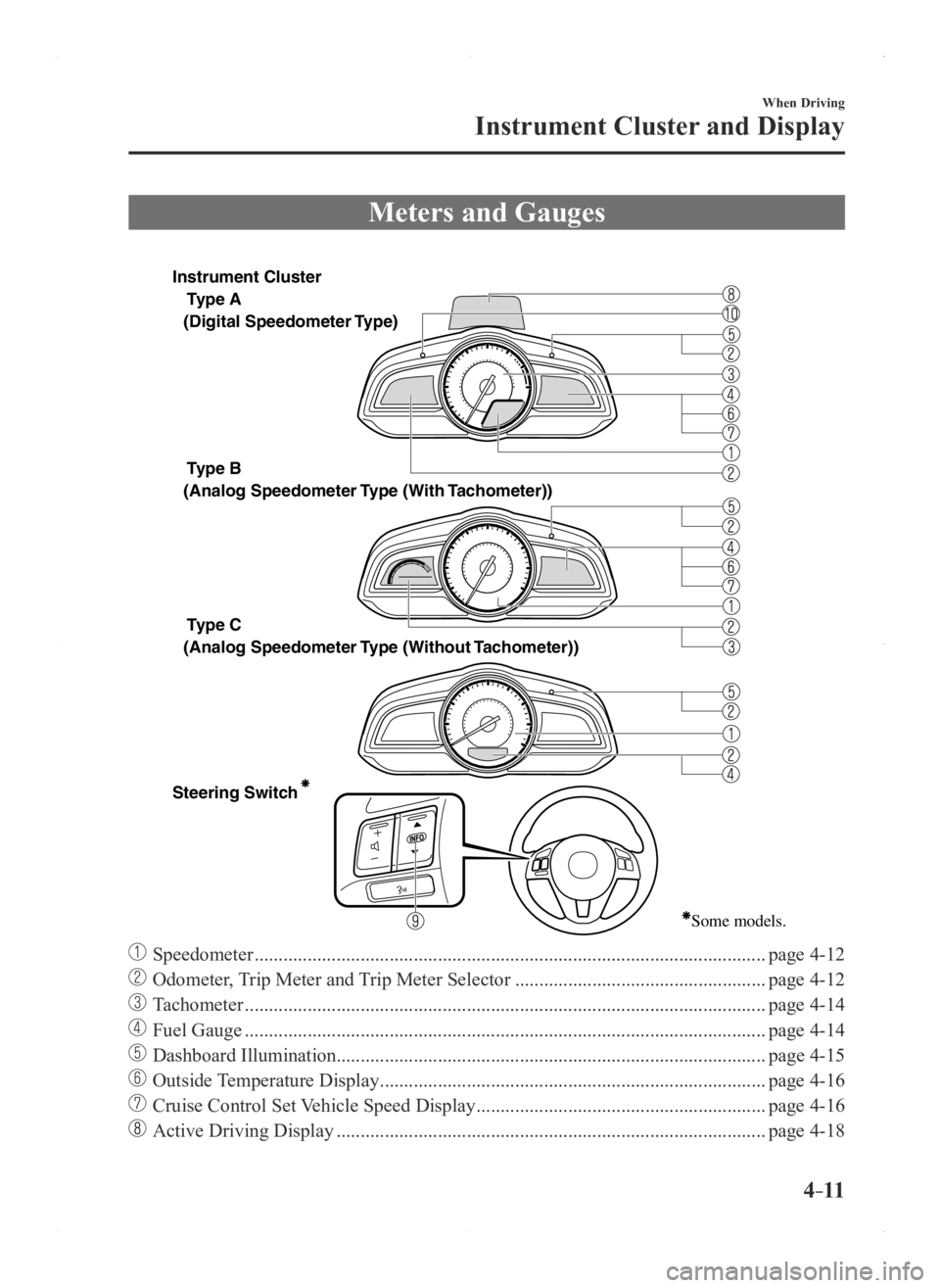
Meters and Gauges
Type A
Type B
Type C
Steering Switch
(Digital Speedometer Type)
(Analog Speedometer Type (With
Tachometer))
(Analog Speedometer Type (Without Tachometer))
Some models.
Instrument Cluster
Speedometer ........................................................................\
..................................page 4-12
Odometer, Trip Meter and Trip Meter Selector ....................................................page 4-12
Tachometer ........................................................................\
....................................page 4-14
Fuel Gauge ........................................................................\
....................................page 4-14
Dashboard Illumination........................................................................\
................. page 4-15
Outside Temperature Display ........................................................................\
........page 4-16
Cruise Control Set Vehicle Speed Display ............................................................page 4-16
Active Driving Display ........................................................................\
.................page 4-18
Mazda3_8FA4-EA-15G_Edition1.indb 112015/05/11 14:00:35
Page 144 of 598

4–16
When Driving
Instrument Cluster and Display
*Some models.
Outside Temperature Display*
When the ignition is switched ON, the
outside temperature is displayed.
NOTE
Under the following conditions, the
outside temperature display may differ
from the actual outside temperature
depending on the surroundings and vehicle
conditions:
Significantly cold or hot
temperatures. Sudden changes in outside
temperature. The vehicle is parked. The vehicle is driven at low speeds.
The outside temperature unit can be
switched between Celsius and Fahrenheit
using the following procedure.
1. Press the INFO button with the ignition
switched off and continue pressing the
INFO button for 5 seconds or longer
while switching the ignition ON. The
outside temperature display flashes.
2. Press the up or down part of the
INFO switch to change the outside
temperature unit.
3. Press and hold the INFO button for 3
seconds or longer while the outside
temperature display is flashing. The
outside temperature display illuminates.
Cruise Contr ol Set Vehicle Speed
Display*
The vehicle speed preset using the cruise
control is displayed.
Trip Computer and INFO Switch*
The following information can be selected
by pressing the up
or down part of
the steering switch with the ignition
switched ON.
Distance-to-empty Average fuel economy Current fuel economy Average vehicle speed
If you have any problems with your trip
computer, consult an Authorized Mazda
Dealer.
Distance-to-empty mode
This mode displays the approximate
distance you can travel on the remaining
fuel based on the fuel economy.
The distance-to-empty will be calculated
and displayed every second.
Mazda3_8FA4-EA-15G_Edition3.indb 162015/12/04 19:22:38
Page 147 of 598
4–19
When Driving
Instrument Cluster and Display
The active driving display indicates the following information:
Mazda Radar Cruise Control (MRCC) Operation Conditions and Warnings
Refer to Mazda Radar Cruise Control (MRCC) on page 4-98. Lane Departure Warning System (LDWS) Operation Conditions and Warnings
Refer to Lane Departure Warning System (LDWS) on page 4-80. Smart City Brake Support (SCBS) Operation Conditions and Warnings
Refer to Smart City Brake Support (SCBS) on page 4-106. Forward Obstruction Warning (FOW) Operation Conditions and Warnings
Refer to Forward Obstruction Warning (FOW) on page 4-95. Vehicle Speed Setting Using Cruise Control
Refer to Cruise Control on page 4-119. Turn-by-Turn (TBT) (Direction and Distance) and Lane Guidance Vehicle Speed
Each setting/adjustment for the active driving display can be performed on the center
display (Type B audio).
1. Select the ( ) icon on the home screen and display the Settings screen.
2. Select the AD-Disp tab.
3. Select the desired item and perform the setting/adjustment.
Height : Active driving display position Brightness Control : Method for adjusting screen brightness (Automatically/Manually) Calibration : Brightness initialization setting (when selecting automatic adjustment) Brightness : Brightness adjustment (when selecting manual adjustment) Navigation : On/Off Active Driving Display : On/Off Reset
Mazda3_8FA4-EA-15G_Edition1.indb 192015/05/11 14:00:38
Page 150 of 598

4–22
When Driving
Instrument Cluster and Display
*Some models.
SignalWarning Lights Page
*Low Washer Fluid Level Warning Light 7-24
* Tire Pressure Monitoring System Warning Light*17-24
(Red)
KEY Warning Light*17-24
(Amber)
* Forward Obstruction Warning/Smart City Brake Support (FOW/SCBS)
Warning Light*17-24
(Amber)
* Lane Departure Warning System (LDWS) Warning Light*1*37-24
* Headlight Auto-Leveling Malfunction Indicator Light*17-24
(Amber)
* High Beam Control System (HBC) Warning Light*17-24
(Amber)
* Mazda Radar Cruise Control (MRCC) Warning Light*17-24
*1 The light turns on when the ignition is switched on for an operation che\
ck, and turns of f a few seconds later or when the engine is started. If the light does not turn on or remains tur\
ned on, have the vehicle inspected at an
Authorized Mazda Dealer.
*2 The light turns on continuously when the parking brake is applied.*3 The light turns on when the system on stand-by. The light flashes when the system has a malfunction.
Mazda3_8FA4-EA-15G_Edition1.indb 222015/05/11 14:00:41
Page 152 of 598
4–24
When Driving
Instrument Cluster and Display
*Some models.
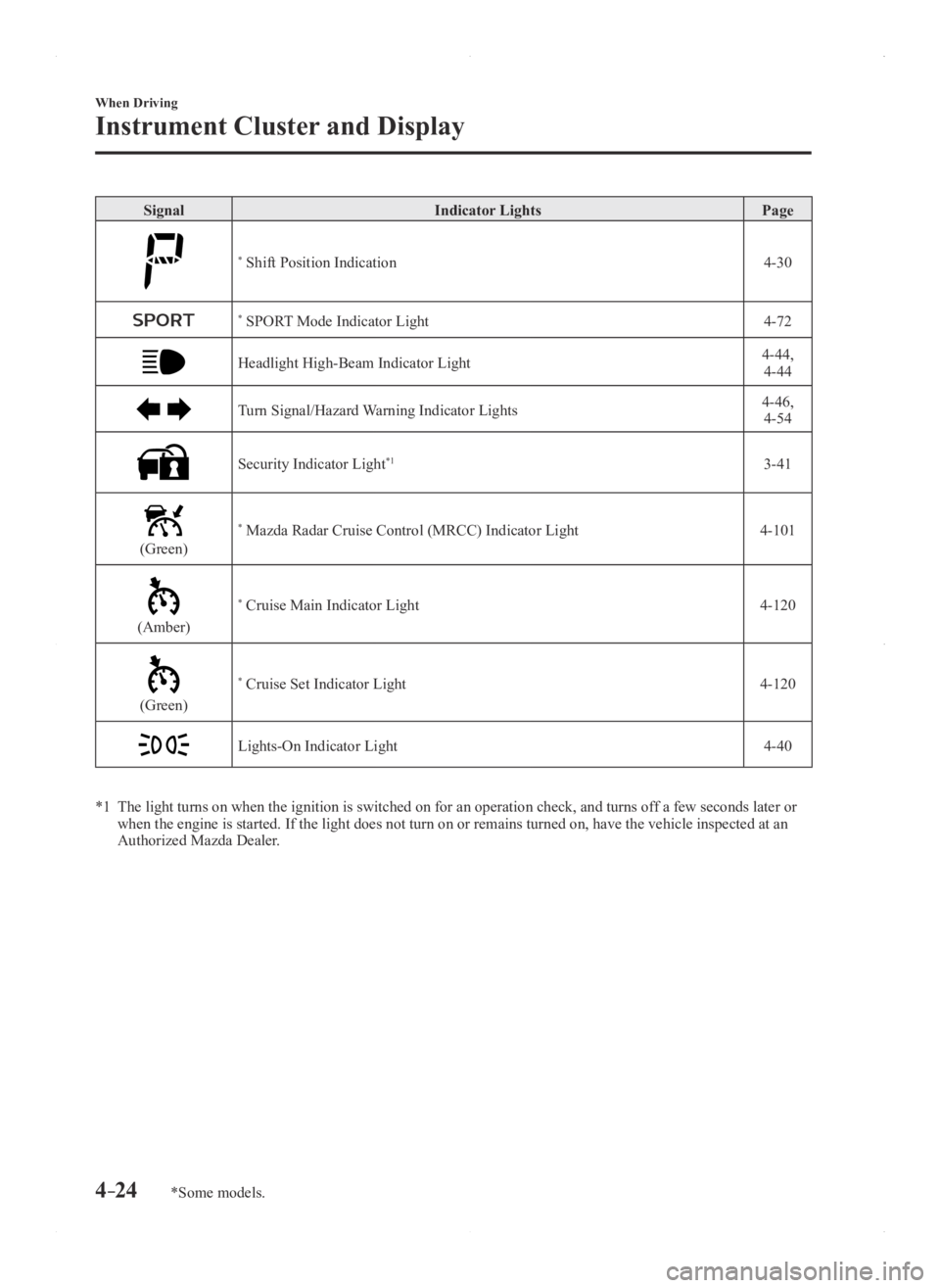
SignalIndicator Lights Page
* Shift Position Indication 4-30
* SPORT Mode Indicator Light4-72
Headlight High-Beam Indicator Light4-44,
4-44
Turn Signal/Hazard Warning Indicator Lights4-46, 4-54
Security Indicator Light*13-41
(Green)
* Mazda Radar Cruise Control (MRCC) Indicator Light 4-101
(Amber)
* Cruise Main Indicator Light4-120
(Green)
* Cruise Set Indicator Light4-120
Lights-On Indicator Light4-40
*1 The light turns on when the ignition is switched on for an operation che\
ck, and turns of f a few seconds later or when the engine is started. If the light does not turn on or remains tur\
ned on, have the vehicle inspected at an
Authorized Mazda Dealer.
Mazda3_8FA4-EA-15G_Edition1.indb 242015/05/11 14:00:43
Page 199 of 598

4–71
When Driving
Drive Selection
*Some models.
Drive Selection*
Drive selection is a system to switch the vehicle's drive mode. When the sport mode
is selected, vehicle's response against accelerator operation is enhance\
d. This provides
additional quick acceleration which may be needed to safely make maneuvers such as lane
changes, merging onto freeways, or passing other vehicles.
CAUTION
Do not use the sport mode when driving on slippery roads such as wet or snow-covered
roads. It may cause tire slipping.
NOTE
When the sport mode is selected, driving at higher engine speeds increases and it may
increase fuel consumption. Mazda recommends that you cancel the sport mode on normal
driving.
Drive mode cannot be switched in the following conditions:
ABS/TCS/DSC is operating The Mazda Radar Cruise Control (MRCC) system/cruise control is operating. Steering wheel is being operated abruptly
Mazda3_8FA4-EA-15G_Edition1.indb 712015/05/11 14:00:59
Page 200 of 598

4–72
When Driving
Drive Selection
Drive Selection Switch
The SPORT mode indicator light in the
instrument cluster is illuminated while in
SPORT mode.
NOTE
If the SET/ SET Switch of the Mazda
Radar Cruise Control (MRCC) system/
cruise control is pressed while in
SPORT mode, SPORT mode is
automatically switched off.
When the ignition is switched off,
SPORT mode is also switch off. When SPORT mode is selected, the
transaxle may automatically shift down
or the vehicle speed may accelerate
depending on the vehicle speed.
SPORT Mode Indicator Light
Type A
T
ype B
The light is illuminated while in SPORT
mode.
NOTE
The indicator light flashes a few times to
indicate that the mode cannot be switched
to SPORT mode even if the drive select
switch is pressed under the following
conditions:
ABS/TCS/DSC is operating The Mazda Radar Cruise Contr ol
(MRCC) system/cruise control is
operating.
The vehicle is making a turn or driving
on a curved road.
Mazda3_8FA4-EA-15G_Edition1.indb 722015/05/11 14:00:59
Page 202 of 598

4–74
When Driving
i-ACTIVSENSE
i-ACTIVSENSE
i-ACTIVSENSE is a collective term covering a series of advanced safety and driver support
systems which make use of a Forward Sensing Camera (FSC) and radar sen\
sors. These
systems consist of active safety and pre-crash safety systems.
These systems are designed to assist the driver in safer driving by redu\
cing the load on the
driver and helping to avert collisions or reduce their severity. However, because each system
has its limitations, always drive carefully and do not rely solely on th\
e systems.
Active Safety Technology
Active Safety Technology supports safer driving by helping the driver to recognize pote\
ntial
hazards and avert accidents.
Driver awareness support systems
Nighttime visibility
Adaptive Front Lighting System (AFS)
........................................................................\
......4-76
High Beam Control System (HBC)
........................................................................\
............4-77
Left/right side and rear side detection
Lane Departure Warning System (LDWS)
........................................................................\
.4-80
Blind Spot Monitoring (BSM) System
........................................................................\
.......4-86
Forward obstruction warning
Forward Obstruction Warning (FOW)
........................................................................\
........4-95
Rear obstruction detection when leaving a parking space
Rear Cross Traffic Alert (RCTA)
........................................................................\
................4-92
Driver support system
Inter-vehicle distance
Mazda Radar Cruise Control (MRCC)
........................................................................\
.......4-98
Pre-Crash Safety Technology
Pre-crash safety technology is designed to assist the driver in averting\
collisions or reduce
their severity in situations where they cannot be avoided.
Collision damage reduction in low vehicle speed range
Forward driving
Smart City Brake Support (SCBS)
........................................................................\
...........4-106
Mazda3_8FA4-EA-15G_Edition1.indb 742015/05/11 14:01:00