fuel type MAZDA MODEL 3 4-DOOR 2016 Owners Manual
[x] Cancel search | Manufacturer: MAZDA, Model Year: 2016, Model line: MODEL 3 4-DOOR, Model: MAZDA MODEL 3 4-DOOR 2016Pages: 598, PDF Size: 30.13 MB
Page 139 of 598
4–11
When Driving
Instrument Cluster and Display
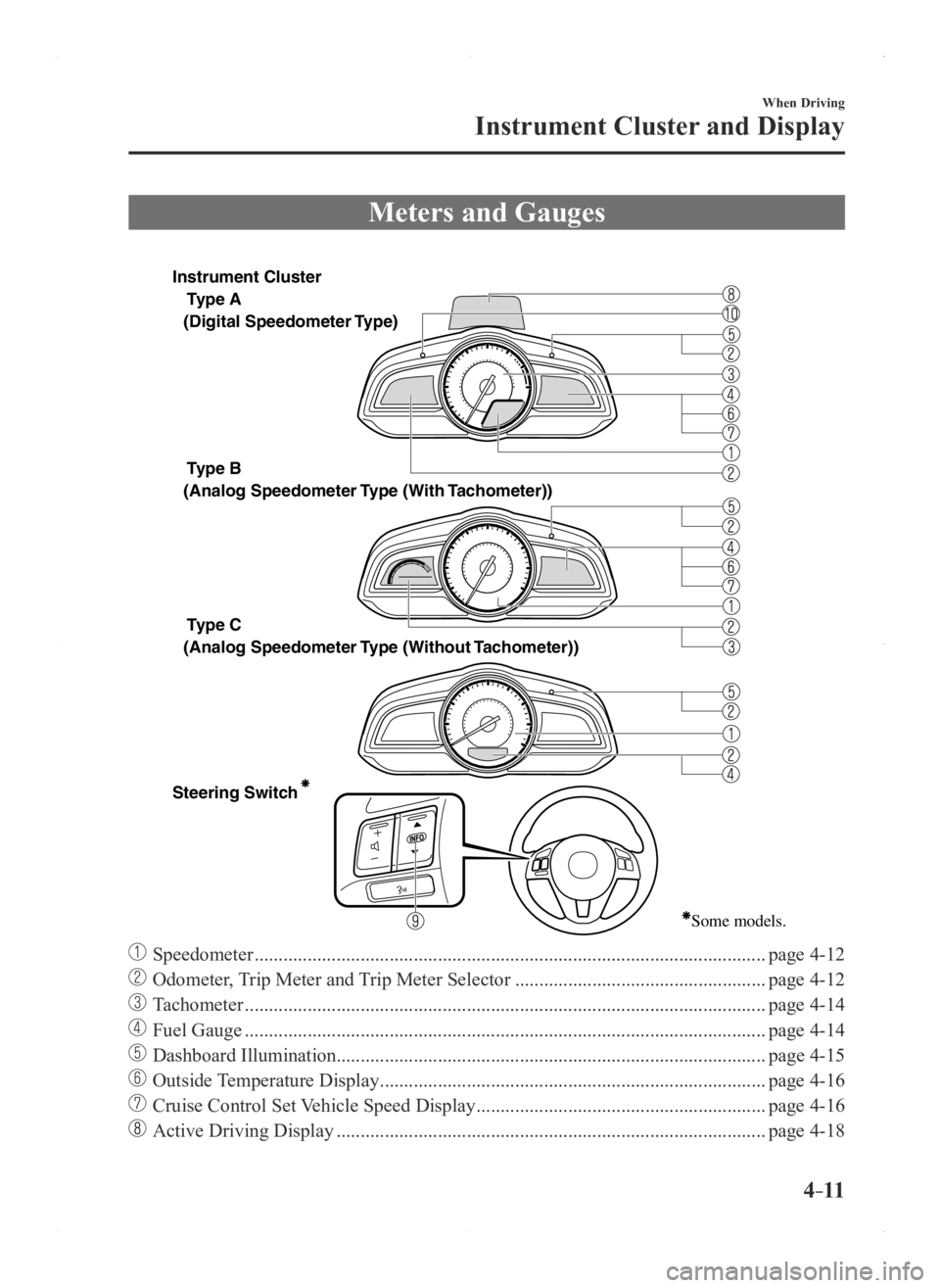
Meters and Gauges
Type A
Type B
Type C
Steering Switch
(Digital Speedometer Type)
(Analog Speedometer Type (With
Tachometer))
(Analog Speedometer Type (Without Tachometer))
Some models.
Instrument Cluster
Speedometer ........................................................................\
..................................page 4-12
Odometer, Trip Meter and Trip Meter Selector ....................................................page 4-12
Tachometer ........................................................................\
....................................page 4-14
Fuel Gauge ........................................................................\
....................................page 4-14
Dashboard Illumination........................................................................\
................. page 4-15
Outside Temperature Display ........................................................................\
........page 4-16
Cruise Control Set Vehicle Speed Display ............................................................page 4-16
Active Driving Display ........................................................................\
.................page 4-18
Mazda3_8FA4-EA-15G_Edition1.indb 112015/05/11 14:00:35
Page 141 of 598
4–13
When Driving
Instrument Cluster and Display
NOTE
When the ignition is switched to ACC or
off, the odometer or trip meters cannot be
displayed, however, pressing the selector
can inadvertently switch the trip meters or
reset them during an approximate ten-
minute period in the following cases:
After the ignition is switched to off from
ON. After the driver's door is opened.
Odometer
The odometer records the total distance
the vehicle has been driven.
Trip meter
The trip meter can record the total distance
of two trips. One is recorded in trip meter
A, and the other is recorded in trip meter
B.
For instance, trip meter A can record the
distance from the point of origin, and
trip meter B can record the distance from
where the fuel tank is filled.
When trip meter A is selected, pressing
the selector again within one second will
change to trip meter B mode.
When trip meter A is selected, TRIP A
will be displayed. When trip meter B is
selected, TRIP B will be displayed.
The trip meter records the total distance
the vehicle is driven until the meter
is again reset. Return it to “0.0” by
depressing and holding the selector for
one second or more. Use this meter to
measure trip distances and to compute fuel
consumption.
NOTE
(Vehicles with type B audio)
If the fuel economy data is reset using
the fuel economy monitor, or trip A
is reset using the trip meter when the
function which synchronizes the fuel
economy monitor and the trip meter is
on, the fuel economy data and trip A are
reset simultaneously.
Refer to Fuel Economy Monitor on page
4-69. Only the trip meters record tenths of
kilometers (miles). The trip record will be erased when:
The power supply is interrupted
(blown fuse or the battery is
disconnected).
The vehicle is driven over 9999.9 km
(mile).
Mazda3_8FA4-EA-15G_Edition1.indb 132015/05/11 14:00:35
Page 142 of 598

4–14
When Driving
Instrument Cluster and Display
*Some models.
Tachometer*
The tachometer shows engine speed in
thousands of revolutions per minute (rpm).
CAUTION
Do not run the engine with the
tachometer needle in the RED ZONE.
This may cause severe engine damage.
Type A
*1The range varies depending on the type
of gauge.*
1Striped zone
*
1Red zone
Type B
*1The range varies depending on the type of gauge. *
1Striped zone
*
1Red zone
NOTE
When the tachometer needle enters the
STRIPED ZONE, this indicates to the
driver that the gears should be shifted
before entering the RED ZONE.
Fuel Gauge
The fuel gauge shows approximately
how much fuel is remaining in the tank
when the ignition is switched ON. We
recommend keeping the tank over 1/4 full.
Type A/Type B instrument cluster
Full
1/4 Full
Type C instrument cluster
Full
1/4 Full
If the low fuel warning light illuminates or
the fuel level is very low, refuel as soon as
possible.
Refer to Warning/Indicator Lights on page
4-20.
Mazda3_8FA4-EA-15G_Edition1.indb 142015/05/11 14:00:36
Page 155 of 598

4–27
When Driving
Transaxle
*Some models.
NOTE
(For vehicles with type C instrument
cluster*1)
If the engine speed is about to exceed
the permissible engine speed, the buzzer
sounds.
Refer to Over Rev. Buzzer on page
7-39.
*1 To determine which instrument
cluster is equipped on your Mazda,
Refer to Meters and Gauges on page
4-11.
If shifting to R is difficult, shift back into
neutral, release the clutch pedal, and try
again.
Gear Shift Indicator*
The gear shift indicator supports you to
obtain optimum fuel economy and smooth
driving. It displays the selected gear
position in the instrument cluster as well
as notifies the driver to change to the most
suitable gear position corresponding to the
actual driving condition.
Selected gear positionSuitable gear position
Indication Condition
Numeral The selected gear position is
displayed.
and numeral Shift up or down to the indicated
gear position is recommended.
CAUTION
Do not rely solely on the shift-up/
shift-down recommendations by
indications. The actual driving
situation might require shift operations
different from indication. To avoid the
risk of accidents, the road and traffic
conditions have to be judged correctly
by the driver before shifting.
NOTE
The gear shift indicator turns off when the
following operations are performed.
The vehicle is stopped. The vehicle is put in neutral. The vehicle is driven in r
everse. The clutch is not fully engaged when
accelerating from a stop. The clutch pedal remains depressed for
2 seconds or longer while driving.
Mazda3_8FA4-EA-15G_Edition1.indb 272015/05/11 14:00:44
Page 197 of 598

4–69
When Driving
Fuel Economy Monitor
*Some models.
Fuel Economy Monitor*
For vehicles with type B audio, the Control Status and Fuel Consumption are switched and
displayed by operating each icon in the display.
In addition, after completing a trip, the total energy efficiency to date is displayed in the
ending display when the ending display is turned on.
1. Select the icon on the home screen to display the applications screen.
2. Select the “Fuel Economy Monitor”.
3. Operate the commander switch or touch the screen and display the menu.
NOTE
When the menu is displayed by touching the screen, the display is hidden automatically after
6 seconds.
4. Select the icon in the menu and perform the operation. Each icon operates as follows:
Indication on displayControl status
Hides the menu display.
Displays the application screen.
Switches the Fuel Economy Monitor in the order of Control Status and Fuel Consumption.
Resets the fuel economy data.
Displays the following setting screen.Ending display on/off switchingOn/off switching for function which synchronizes
reset fuel economy data to trip meter (Trip A)
Fuel Consumption Display
Information regarding the fuel economy is displayed.
Indication on display Control status
Displays the fuel economy for the past 60 minutes.Displays the fuel economy every minute for the
past 1 to 10 minutes.
Displays the fuel economy every 10 minutes for the past 10 to 60 minutes.
Displays the average fuel economy over the past 5 resets and after the current reset.
Calculates the average fuel economy every minute after vehicle travel begins, and displays it.
Mazda3_8FA4-EA-15G_Edition1.indb 692015/05/11 14:00:58
Page 319 of 598
5–57
Interior Features
Audio System
*Some models.
Applications
NOTE
Depending on the grade and specification,
the screen display may differ.
Select the
icon on the home screen to
display the Applications screen. The
following information can be verified.
Top screenItemFunction
HD
Radio™
Traffic
Map —
—
Fuel
Economy
Monitor Fuel Consumption
Control Status
(Vehicles with
i-ELOOP)
Settings Refer to Fuel
Economy Monitor
on page 4-69.
Maintenance
Scheduled
Maintenance
Tire Rotation
Oil ChangeRefer to
Maintenance
Monitor (Type B
audio) on page
6-21.
Warning
Guidance Warnings
currently active
can be verified. Refer to If a
Warning Light
Turns On or
Flashes on page
7-24.
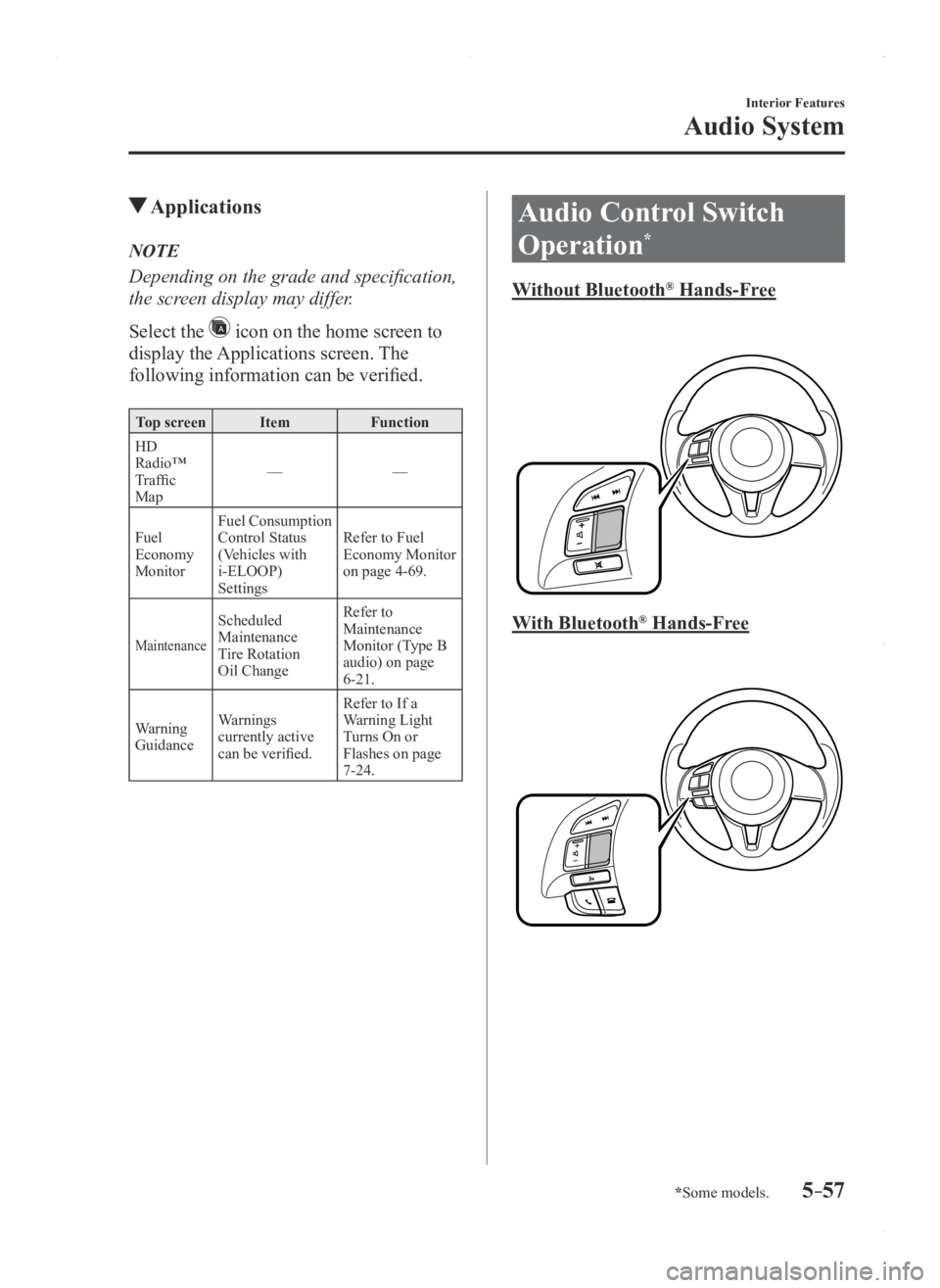
Audio Control Switch
Operation
*
Without Bluetooth® Hands-Free
With Bluetooth® Hands-Free
Mazda3_8FA4-EA-15G_Edition1.indb 572015/05/11 14:01:40
Page 432 of 598
6–28
Maintenance and Care
Owner Maintenance
Except U.S.A., Canada, and Puerto Rico
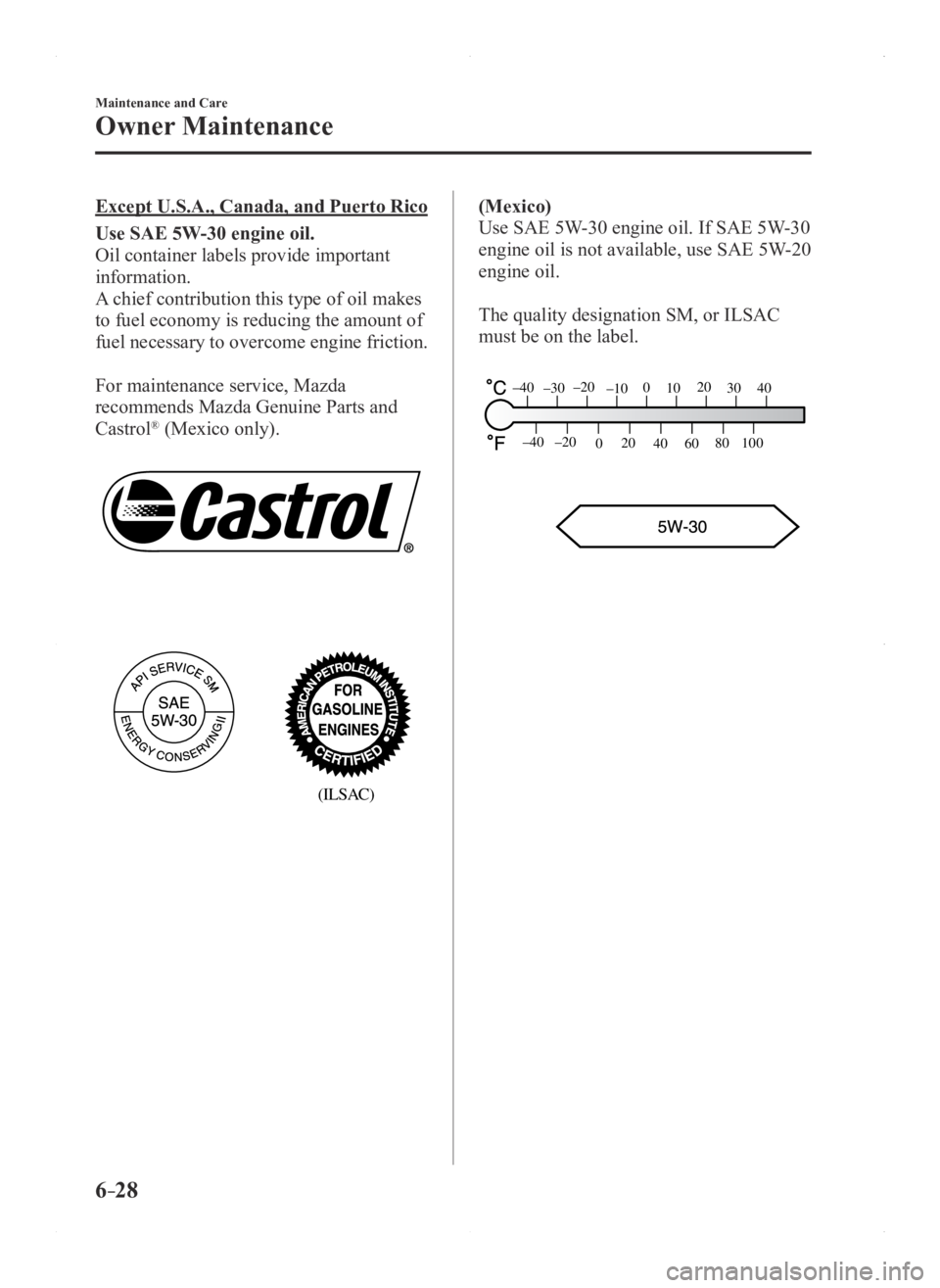
Use SAE 5W-30 engine oil.
Oil container labels provide important
information.
A chief contribution this type of oil makes
to fuel economy is reducing the amount of
fuel necessary to overcome engine friction.
For maintenance service, Mazda
recommends Mazda Genuine Parts and
Castrol
® (Mexico only).
(ILSAC)
(Mexico)
Use SAE 5W-30 engine oil. If SAE 5W-30
engine oil is not available, use SAE 5W-20
engine oil.
The quality designation SM, or ILSAC
must be on the label.
80
60
40
20
0
–40 –20
30
100
4020100–10–20–30–40
Mazda3_8FA4-EA-15G_Edition1.indb 282015/05/11 14:02:14
Page 447 of 598
6–43
Maintenance and Care
Owner Maintenance
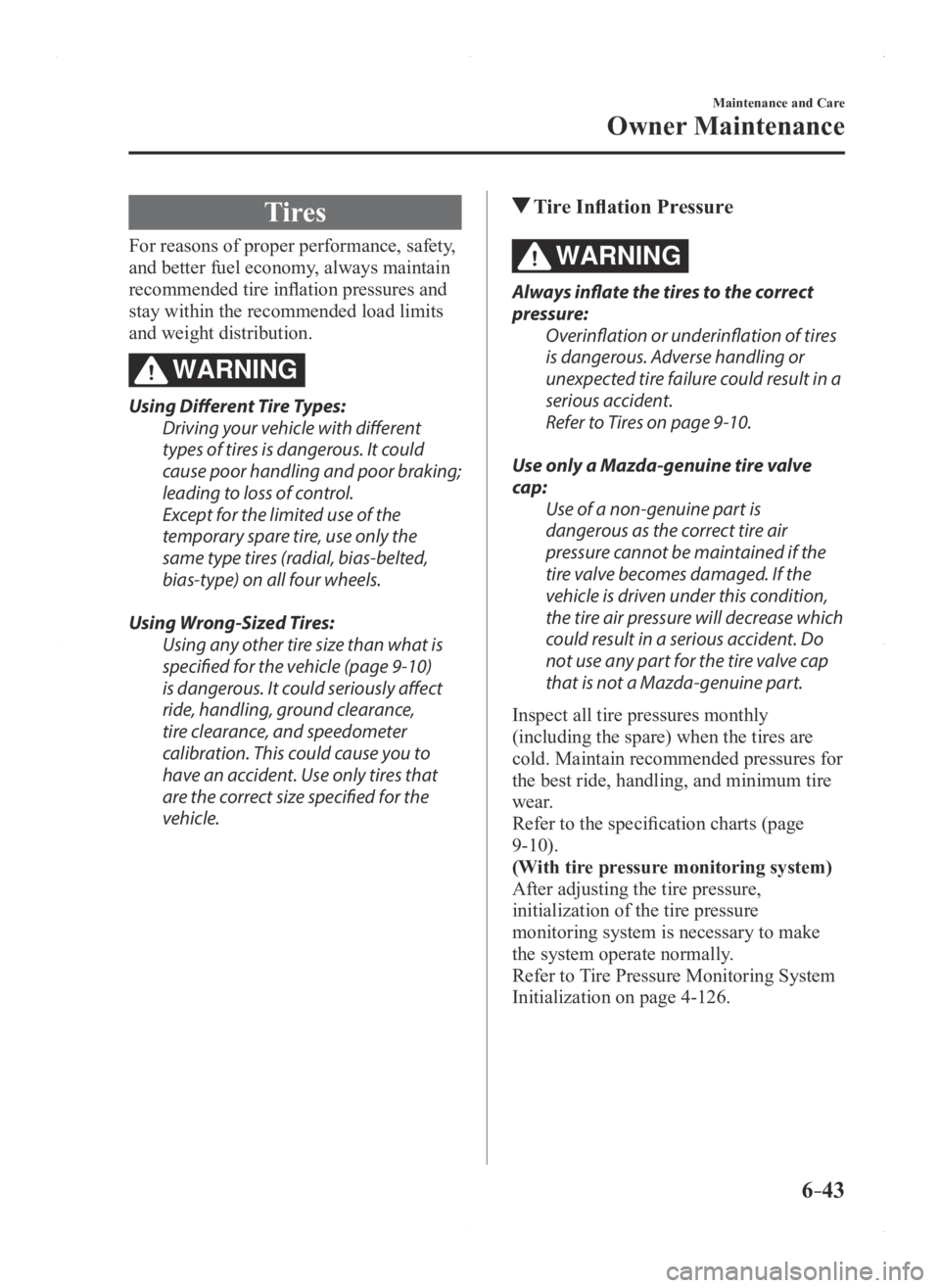
Tires
For reasons of proper performance, safety,
and better fuel economy, always maintain
recommended tire inflation pressures and
stay within the recommended load limits
and weight distribution.
WARNING
Using Different Tire Types:
Driving your vehicle with different
types of tires is dangerous. It could
cause poor handling and poor braking;
leading to loss of control.
Except for the limited use of the
temporary spare tire, use only the
same type tires (radial, bias-belted,
bias-type) on all four wheels.
Using Wrong-Sized Tires: Using any other tire size than what is
specified for the vehicle (page 9-10)
is dangerous. It could seriously affect
ride, handling, ground clearance,
tire clearance, and speedometer
calibration. This could cause you to
have an accident. Use only tires that
are the correct size specified for the
vehicle.
Tire Inflation Pressure
WARNING
Always inflate the tires to the correct
pressure:Overinflation or underinflation of tires
is dangerous. Adverse handling or
unexpected tire failure could result in a
serious accident.
Refer to Tires on page 9-10.
Use only a Mazda-genuine tire valve
cap: Use of a non-genuine part is
dangerous as the correct tire air
pressure cannot be maintained if the
tire valve becomes damaged. If the
vehicle is driven under this condition,
the tire air pressure will decrease which
could result in a serious accident. Do
not use any part for the tire valve cap
that is not a Mazda-genuine part.
Inspect all tire pressures monthly
(including the spare) when the tires are
cold. Maintain recommended pressures for
the best ride, handling, and minimum tire
wear.
Refer to the specification charts (page
9-10).
(With tire pressure monitoring system)
After adjusting the tire pressure,
initialization of the tire pressure
monitoring system is necessary to make
the system operate normally.
Refer to Tire Pressure Monitoring System
Initialization on page 4-126.
Mazda3_8FA4-EA-15G_Edition1.indb 432015/05/11 14:02:21
Page 589 of 598
9–15
Specifications
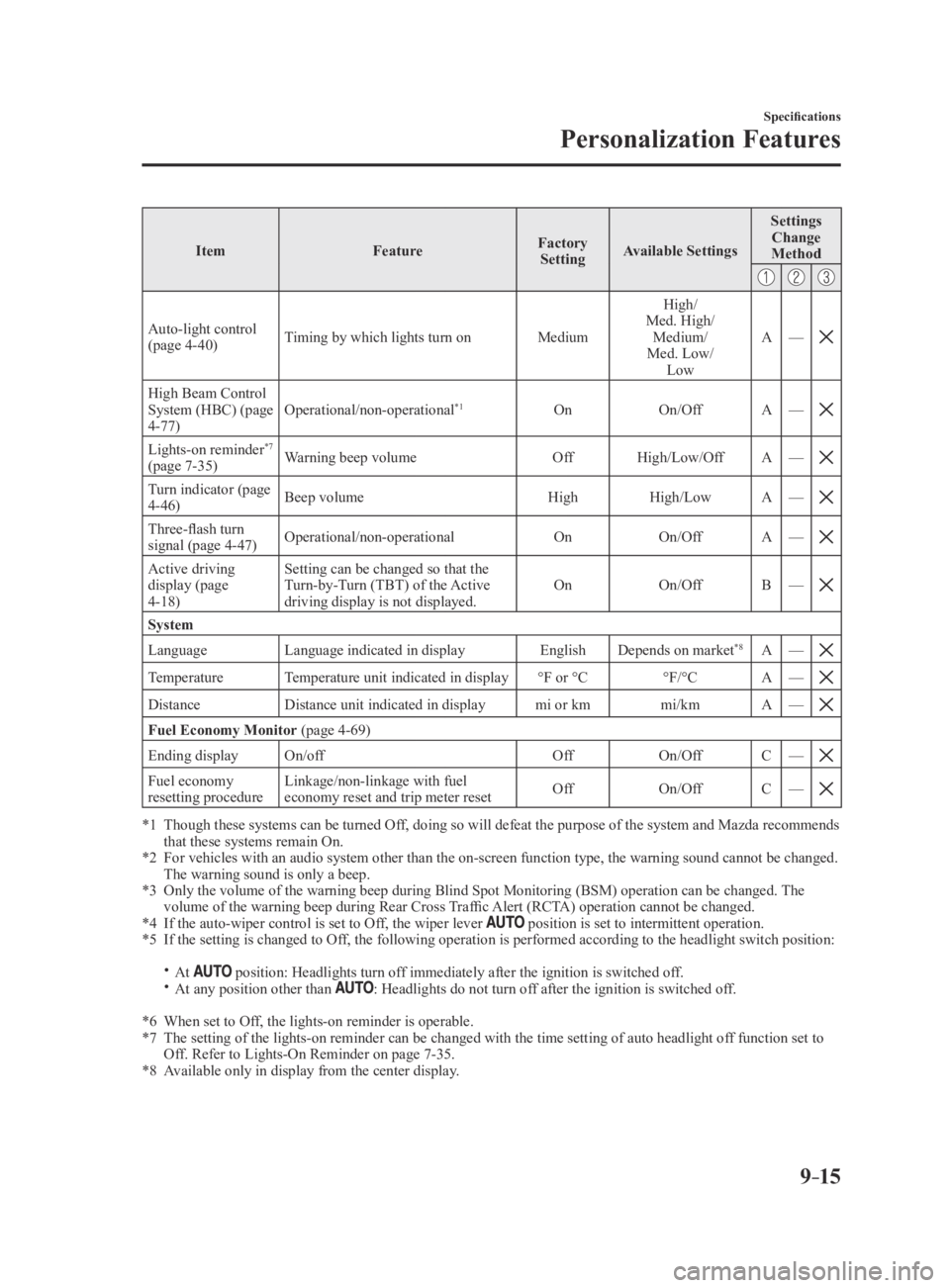
Personalization Features
ItemFeatureFactory
Setting Available Settings Settings
Change
Method
Auto-light control (page 4-40) Timing by which lights turn on
MediumHigh/
Med. High/ Medium/
Med. Low/ Low A
—
High Beam Control System (HBC) (page 4-77) Operational/non-operational
*1On
On/OffA—
Lights-on reminder*7
(page 7-35) Warning beep volume
OffHigh/Low/Off A—
Turn indicator (page 4-46) Beep volume
HighHigh/Low A—
Three-flash turn signal (page 4-47) Operational/non-operational
OnOn/OffA—
Active driving display (page 4-18) Setting can be changed so that the
Turn-by-Turn (TBT) of the Active
driving display is not displayed.
On
On/OffB—
System
Language Language indicated in display EnglishDepends on market*8A—
TemperatureTemperature unit indicated in display °F or °C°F/°CA—
DistanceDistance unit indicated in display mi or kmmi/kmA—
Fuel Economy Monitor (page 4-69)
Ending display On/off OffOn/OffC—
Fuel economy resetting procedure Linkage/non-linkage with fuel
economy reset and trip meter reset
Off
On/OffC—
*1 Though these systems can be turned Of f, doing so will defeat the purpose of the system and Mazda recommends that these systems remain On.*2 For vehicles with an audio system other than the on-screen function type\
, the warning sound cannot be changed. The warning sound is only a beep.*3 Only the volume of the warning beep during Blind Spot Monitorin g (BSM) operation can be changed. The volume of the warning beep during Rear Cross Traffic Alert (RCTA) operation cannot be changed.*4 If the auto-wiper control is set to Off, the wiper lever position is set to intermittent operation.*5 If the setting is changed to Off, the following operation is performed according to the headlight switc\
h position:
At position: Headlights turn off immediately after the ignition is switched off. At any position other than : Headlights do not turn off after the ignition is switched off.
*6 When set to Off, the lights-on reminder is operable.*7 The setting of the lights-on reminder can be changed with the time setti\
ng of auto headlight of f function set to Off. Refer to Lights-On Reminder on page 7-35.*8 Available only in display from the center display.
Mazda3_8FA4-EA-15G_Edition3.indb 152015/12/04 19:26:19
Page 597 of 598
10–7
Index
Saving Fuel and Protection of the
Environment
........................................3-44
Scheduled Maintenance
........................6-4
Seat Belt System 2-point type
...................................2-19
3-point type
...................................2-16
Automatic locking
.........................2-15
Emergency locking
........................2-15
Extender
........................................2-20
Pregnant women
............................2-15
Seat belt warning beep
........................7-36
Seats Front seat
.........................................2-5
Head restraint
................................2-11
Rear seat
..........................................2-8
Seat warmer
.....................................2-7
Security System Immobilizer system
.......................3-40
Theft-deterrent system
..................3-42
Smart City Brake Support (SCBS)
...4-106
Smart City Brake Support (SCBS)
indicator light (red)
.....................4-110
Stopping the Smart City Brake Support
(SCBS) system operation
............4-110
Spare Tire
..............................................7-5
Specifications
........................................9-4
Speed Unit Selector
.............................4-12
Speedometer
........................................4-12
Starting the Engine
................................4-5
Steering Wheel
....................................3-31
Horn ............................................... 4-53
Storage Compartments
......................5-140
Center console
.............................5-141
Glove compartment
.....................5-140
Overhead console
........................5-140
Rear coat hooks
...........................5-141
Sunshade
.............................................3-39
Sunvisors
...........................................5-134
T
Tachometer ..........................................4-14
Theft-Deterrent System
.......................3-42
Tiedown Hook
..............................................7-22
Tire Information
..................................8-24
Tire Pressure Monitoring System
.....4-123
Tire inflation pressure warning beep
...7-37
Tires
....................................................6-43
Flat Tire
...........................................7-3
Replacing a Tire
............................6-45
Replacing a Wheel
........................6-46
Snow tires
......................................3-47
Specifications
................................9-10
Temporary Spare Tire
....................6-45
Tire Inflation Pressure
...................6-43
Tire Rotation
.................................6-44
Tire chains
.....................................3-47
Uniform tire quality grading system
(UTQGS)
.......................................8-22
Towing Recreational towing
......................3-51
Trailer Towing
...............................3-51
Towing Description
.............................7-21
Traction Control System (TCS)
..........4-63
TCS/DSC Indicator Light
.............4-63
Transmitter
............................................3-4
Trip Computer
.....................................4-16
Trip Meter
...........................................4-12
Trouble Battery runs out
.............................7-15
Emergency Starting
.......................7-18
Emergency Towing ........................7-21
Flat Tire
...........................................7-3
Overheating
...................................7-19
Parking in an Emergency
................7-2
When liftgate/trunk lid cannot be
opened
...........................................7-40
Trunk Lid
............................................3-20
Inside trunk release lever
..............3-24
When liftgate/trunk lid cannot be
opened
...........................................7-40
Mazda3_8FA4-EA-15G_Edition3.indb 72015/12/04 19:26:20