sport mode MAZDA MODEL 3 4-DOOR 2016 Owners Manual
[x] Cancel search | Manufacturer: MAZDA, Model Year: 2016, Model line: MODEL 3 4-DOOR, Model: MAZDA MODEL 3 4-DOOR 2016Pages: 598, PDF Size: 30.13 MB
Page 152 of 598
4–24
When Driving
Instrument Cluster and Display
*Some models.
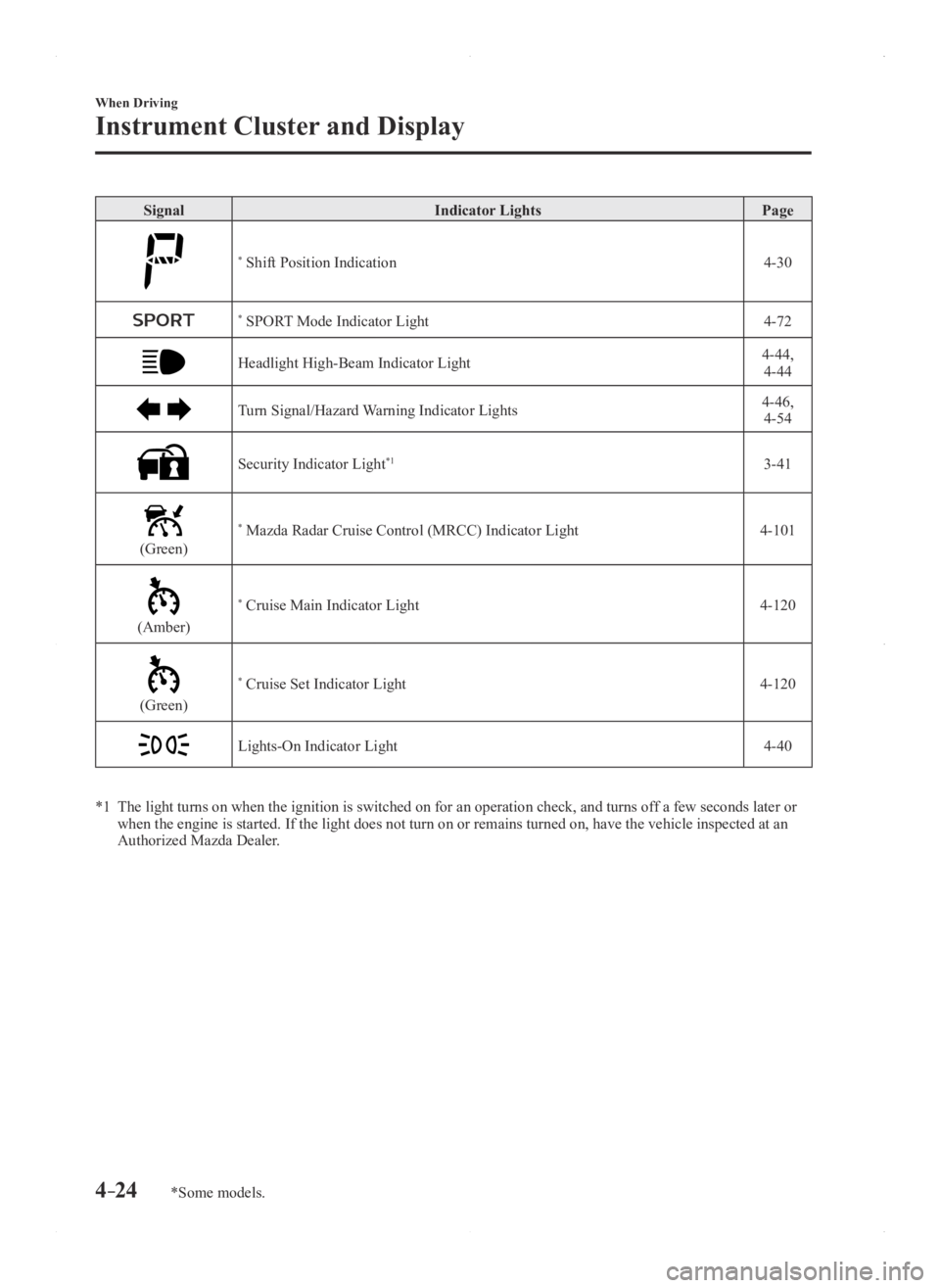
SignalIndicator Lights Page
* Shift Position Indication 4-30
* SPORT Mode Indicator Light4-72
Headlight High-Beam Indicator Light4-44,
4-44
Turn Signal/Hazard Warning Indicator Lights4-46, 4-54
Security Indicator Light*13-41
(Green)
* Mazda Radar Cruise Control (MRCC) Indicator Light 4-101
(Amber)
* Cruise Main Indicator Light4-120
(Green)
* Cruise Set Indicator Light4-120
Lights-On Indicator Light4-40
*1 The light turns on when the ignition is switched on for an operation che\
ck, and turns of f a few seconds later or when the engine is started. If the light does not turn on or remains tur\
ned on, have the vehicle inspected at an
Authorized Mazda Dealer.
Mazda3_8FA4-EA-15G_Edition1.indb 242015/05/11 14:00:43
Page 157 of 598

4–29
When Driving
Transaxle
Automatic Transaxle Controls
Lock-release button
Indicates the shift lever can be shifted freely into any position.
Indicates that you must hold in the lock-release button to shift.
Indicates that you must depress the brake pedal and hold in the lock-rel\
ease
button to shift (The ignition must be switched ON).
Various Lockouts: \
NOTE
The Sport AT has an option that is not included in the traditional automatic transax\
le that
gives the driver the option of selecting each gear instead of leaving it\
to the transaxle to
shift gears. Even if you intend to use the automatic transaxle functions\
as a traditional
automatic, you should also be aware that you can inadvertently shift into manual shift mode
and an inappropriate gear may be retained as the vehicle speed increases. If you notice the
engine speed going higher or hear the engine racing, confirm you have not accidentally
slipped into manual shift mode (page 4-32).
Mazda3_8FA4-EA-15G_Edition1.indb 292015/05/11 14:00:44
Page 199 of 598

4–71
When Driving
Drive Selection
*Some models.
Drive Selection*
Drive selection is a system to switch the vehicle's drive mode. When the sport mode
is selected, vehicle's response against accelerator operation is enhance\
d. This provides
additional quick acceleration which may be needed to safely make maneuvers such as lane
changes, merging onto freeways, or passing other vehicles.
CAUTION
Do not use the sport mode when driving on slippery roads such as wet or snow-covered
roads. It may cause tire slipping.
NOTE
When the sport mode is selected, driving at higher engine speeds increases and it may
increase fuel consumption. Mazda recommends that you cancel the sport mode on normal
driving.
Drive mode cannot be switched in the following conditions:
ABS/TCS/DSC is operating The Mazda Radar Cruise Control (MRCC) system/cruise control is operating. Steering wheel is being operated abruptly
Mazda3_8FA4-EA-15G_Edition1.indb 712015/05/11 14:00:59
Page 200 of 598

4–72
When Driving
Drive Selection
Drive Selection Switch
The SPORT mode indicator light in the
instrument cluster is illuminated while in
SPORT mode.
NOTE
If the SET/ SET Switch of the Mazda
Radar Cruise Control (MRCC) system/
cruise control is pressed while in
SPORT mode, SPORT mode is
automatically switched off.
When the ignition is switched off,
SPORT mode is also switch off. When SPORT mode is selected, the
transaxle may automatically shift down
or the vehicle speed may accelerate
depending on the vehicle speed.
SPORT Mode Indicator Light
Type A
T
ype B
The light is illuminated while in SPORT
mode.
NOTE
The indicator light flashes a few times to
indicate that the mode cannot be switched
to SPORT mode even if the drive select
switch is pressed under the following
conditions:
ABS/TCS/DSC is operating The Mazda Radar Cruise Contr ol
(MRCC) system/cruise control is
operating.
The vehicle is making a turn or driving
on a curved road.
Mazda3_8FA4-EA-15G_Edition1.indb 722015/05/11 14:00:59
Page 309 of 598

5–47
Interior Features
Audio System
*Some models.
NOTE
If an analog broadcast is received once
and is received while HD1 is
selected, the audio unit switches to the
station automatically.
When the icon is illuminated, there
could be a noticeable difference in
sound quality and volume when a
change from digital to analog signals
occurs. If the sound quality and volume
become noticeably diminished or cut
off, select the
icon to turn off
( icon is not illuminated). Once an analog br oadcast is received
when HD1 is selected from the Favorite
channels, it is switched to
automatically. If the radio reception
conditions are poor, or HD is off,
switching to
broadcasts is
not possible. When an HD specialty channel (HD2 to
HD8) is selected from the Favorite
channels, “Signal Lost” is displayed
and no audio is output until
is received. If the radio reception
conditions are poor, “Signal Lost”
continues to be displayed.
If the icon is not illuminated,
information such as song titles of the
station are received,
however, the audio output is analog.
iTunes Tagging (for Apple devices with
USB use only)
By tagging a song currently being aired,
the song can be easily purchased from the
iTunes Store. Up to 100 tags can be stored.
1. Select the icon. The tag is stored in
the audio unit.
2. Connect the device via USB. The
tag is sent to the connected device
automatically.
3. Synchronize the device with iT unes.
The tagged song can now be purchased
from the iTunes Store.
NOTE
Both AM and FM can be
used. Because iTunes Tagging only supports
purchasing from the iTunes Store, direct
downloading from the equipped vehicle
audio is not possible.
If the available memory for the
connected device is insufficient, the tag
is not sent.
If an error occurs while the tag is being
sent, reconnect the device.
Operating the Satellite Radio*
What is satellite radio?
With over 130 channels, SiriusXM
Satellite Radio brings you more of what
you love. Get channels and channels of
commercial-free music, plus sports, news,
talk, entertainment and more.
Commercial-free music from nearly
every genre —rock to pop, hip-hop to
country, jazz, classical and more. Plus
live performances and artist-dedicated
channels.
Live sports Play-by-Play & Expert Talk
—every NFL game, every NASCAR
®
race, 24/7 sports talk, college sports and
more.
Exclusive entertainment, comedy and
talk —The biggest names, compelling
talk, hilarious comedy.
World-class news plus local traffic and
weather.
Sign up for SiriusXM Satellite Radio
today!
Mazda3_8FA4-EA-15G_Edition1.indb 472015/05/11 14:01:37
Page 504 of 598
7–22
If Trouble Arises
Emergency Towing
*Some models.
Tiedown Hooks*
CAUTION
Do not use the front and rear tiedown
eyelets for towing the vehicle.
They have been designed only for
securing the vehicle to a transport
vessel during shipping.
Using the eyelets for any other purpose
could result in the vehicle being
damaged.
Tiedown Hooks
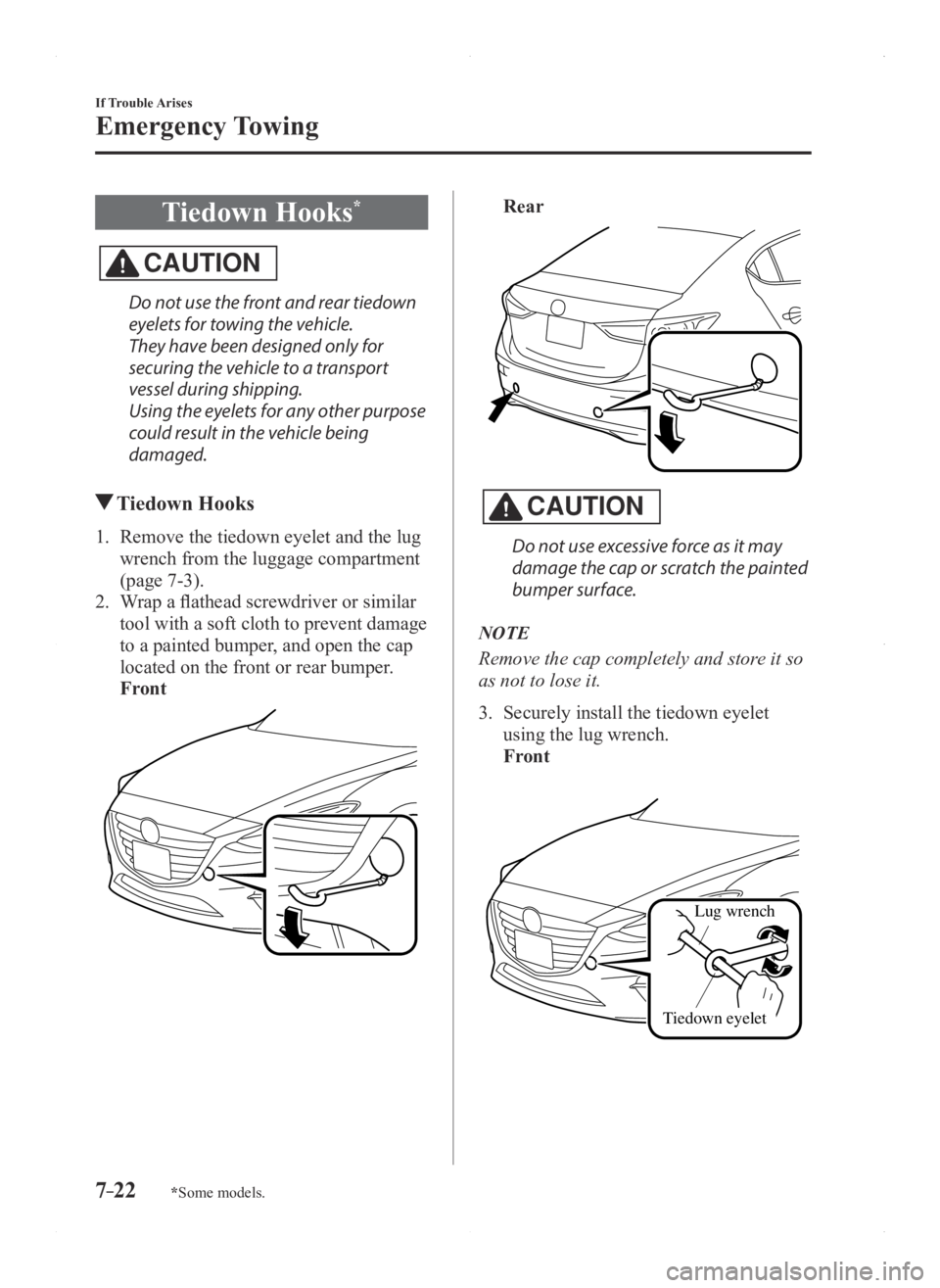
1. Remove the tiedown eyelet and the lug
wrench from the luggage compartment
(page 7-3).
2. Wrap a flathead screwdriver or similar
tool with a soft cloth to prevent damage
to a painted bumper, and open the cap
located on the front or rear bumper.
Front
Rear
CAUTION
Do not use excessive force as it may
damage the cap or scratch the painted
bumper surface.
NOTE
Remove the cap completely and store it so
as not to lose it.
3. Securely install the tiedown eyelet
using the lug wrench.
Front
Lug wrench
Tiedown eyelet
Mazda3_8FA4-EA-15G_Edition1.indb 222015/05/11 14:02:41