navigation MAZDA MODEL 3 4-DOOR 2017 User Guide
[x] Cancel search | Manufacturer: MAZDA, Model Year: 2017, Model line: MODEL 3 4-DOOR, Model: MAZDA MODEL 3 4-DOOR 2017Pages: 612
Page 394 of 612
5–102
Interior Features
Bluetooth®
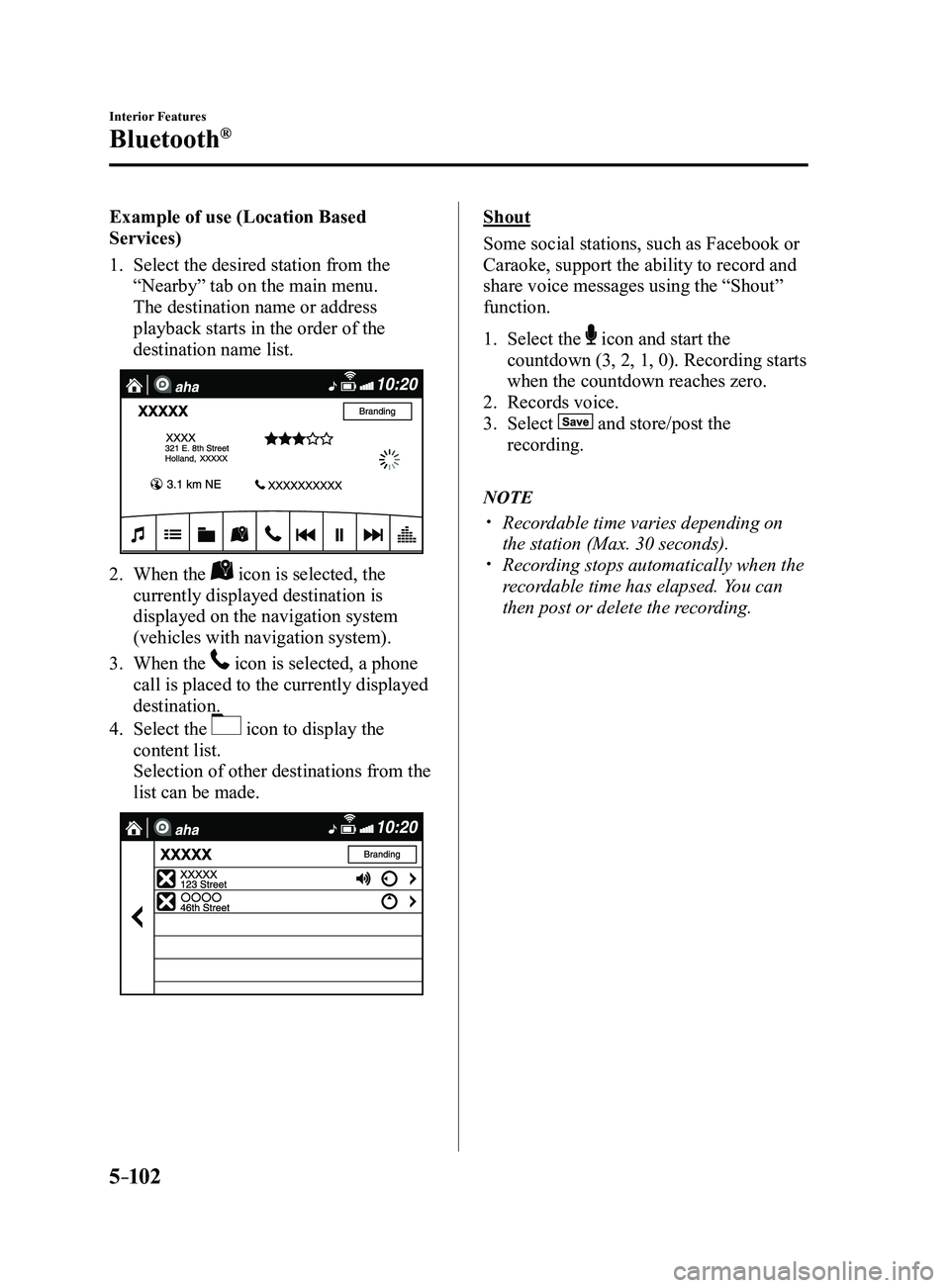
Example of use (Location Based
Services)
1. Select the desired station from the
“Nearby” tab on the main menu.
The destination name or address
playback starts in the order of the
destination name list.
2. When the icon is selected, the
currently displayed destination is
displayed on the navigation system
(vehicles with navigation system).
3. When the icon is selected, a phone
call is placed to the currently displayed
destination.
4. Select the icon to display the
content list.
Selection of other destinations from the
list can be made.
Shout
Some social stations, such as Facebook or
Caraoke, support the ability to record and
share voice messages using the “Shout”
function.
1. Select the icon and start the
countdown (3, 2, 1, 0). Recording starts
when the countdown reaches zero.
2. Records voice.
3. Select and store/post the
recording.
NOTE
Recordable time varies depending on
the station (Max. 30 seconds). Recording stops automatically when the
recordable time has elapsed. You can
then post or delete the recording.
Mazda3_8FL6-EA-16F_Edition2.indb 1022016/08/10 17:38:19
Page 554 of 612
8–20
Customer Information and Reporting Safety Defects
Cell Phones
Cell Phones Warning
WARNING
Please comply with the legal regulations concerning the use of communication
equipment in vehicles in your country:Use of any electrical devices such as cell phones, computers, portable radios, vehicle
navigation or other devices by the driver while the vehicle is moving is dangerous. Dialing
a number on a cell phone while driving also ties-up the driver's hands. Use of these
devices will cause the driver to be distracted and could lead to a serious accident. If a
passenger is unable to use the device, pull off the right-of-way to a safe area before use.
If use of a cell phone is necessary despite this warning, use a hands-free system to at least
leave the hands free to drive the vehicle. Never use a cell phone or other electrical devices
while the vehicle is moving and, instead, concentrate on the full-time job of driving.
Mazda3_8FL6-EA-16F_Edition2.indb 202016/08/10 17:39:39
Page 602 of 612
9–18
Specifications
Personalization Features
ItemFeatureFactory
Setting Available
Settings Settings
Change
Method
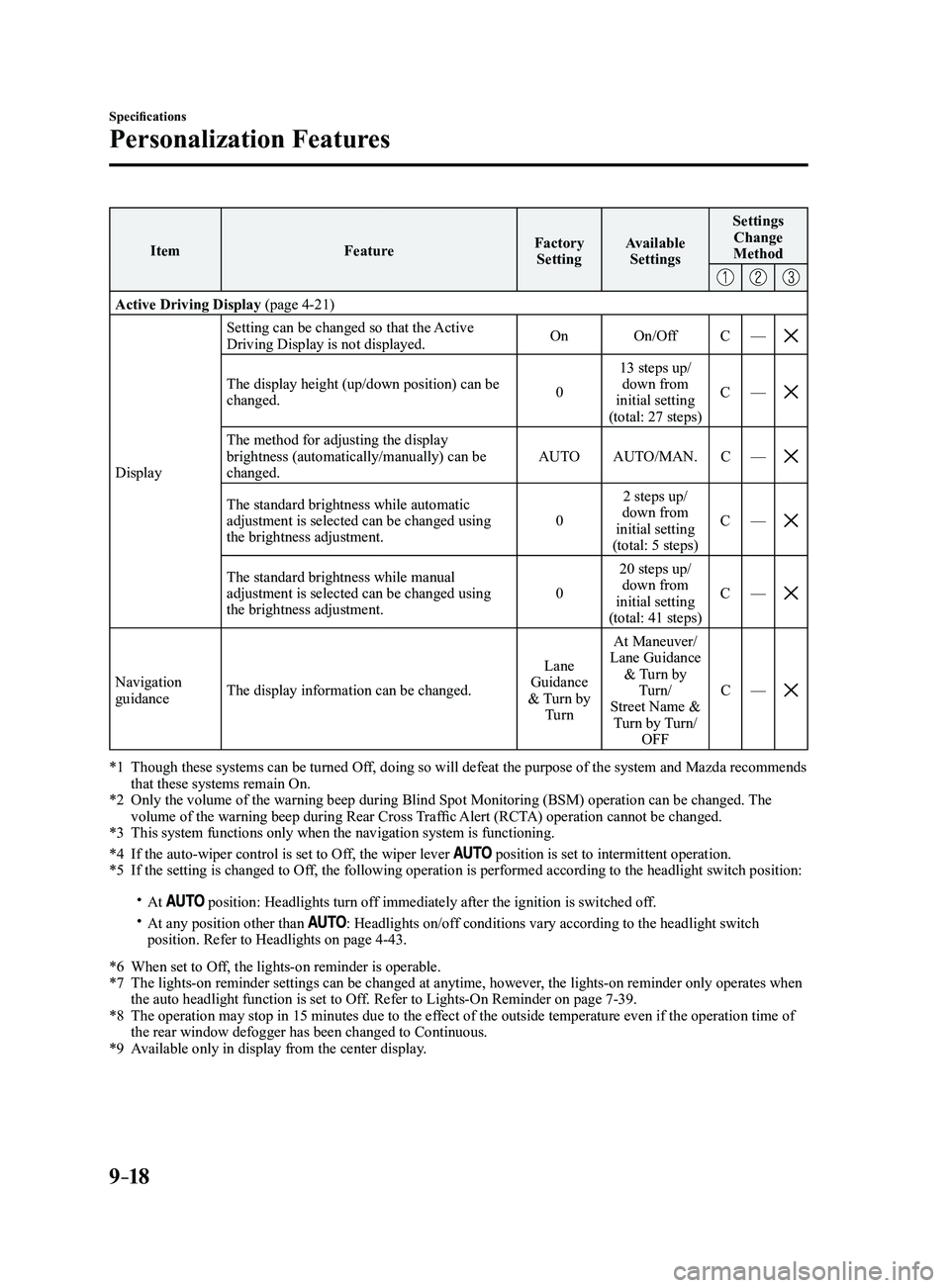
Active Driving Display (page 4-21)
Display Setting can be changed so that the Active
Driving Display is not displayed.
On
On/Off C—
The display height (up/down position) can be changed. 013 steps up/
down from
initial setting
(total: 27 steps) C
—
The method for adjusting the display brightness (automatically/manually) can be
changed. AUTO
AUTO/MAN. C—
The standard brightness while automatic adjustment is selected can be changed using
the brightness adjustment. 02 steps up/
down from
initial setting
(total: 5 steps) C
—
The standard brightness while manual adjustment is selected can be changed using
the brightness adjustment. 020 steps up/
down from
initial setting
(total: 41 steps) C
—
Navigation guidance The display information can be changed. Lane
Guidance
& Turn by Turn At Maneuver/
Lane Guidance & Turn by Turn/
Street Name & Turn by Turn/ OFF C
—
*1 Though these systems can be turned Of f, doing so will defeat the purpose of the system and Mazda recommends that these systems remain On.*2 Only the volume of the warning beep during Blind Spot Monitorin g (BSM) operation can be changed. The volume of the warning beep during Rear Cross Traffic Alert (RCTA) operation cannot be changed.*3 This system functions only when the navigation system is functioning.
*4 If the auto-wiper control is set to Off, the wiper lever position is set to intermittent operation.*5 If the setting is changed to Off, the following operation is performed according to the headlight switc\
h position:
At position: Headlights turn off immediately after the ignition is switched off. At any position other than : Headlights on/off conditions vary according to the headlight switch
position. Refer to Headlights on page 4-43.
*6 When set to Of f, the lights-on reminder is operable.*7 The lights-on reminder settings can be changed at anytime, however , the lights-on reminder only operates when the auto headlight function is set to Off. Refer to Lights-On Reminder on page 7-39.*8 The operation may stop in 15 minutes due to the effect of the outside temperature even if the operation time of the rear window defogger has been changed to Continuous.*9 Available only in display from the center display.
Mazda3_8FL6-EA-16F_Edition2.indb 182016/08/10 17:39:57