ECU MAZDA MODEL 3 4-DOOR 2017 Owner's Guide
[x] Cancel search | Manufacturer: MAZDA, Model Year: 2017, Model line: MODEL 3 4-DOOR, Model: MAZDA MODEL 3 4-DOOR 2017Pages: 612
Page 134 of 612
4–4
When Driving
Start/Stop Engine
Ignition Switch
Push Button Start Positions
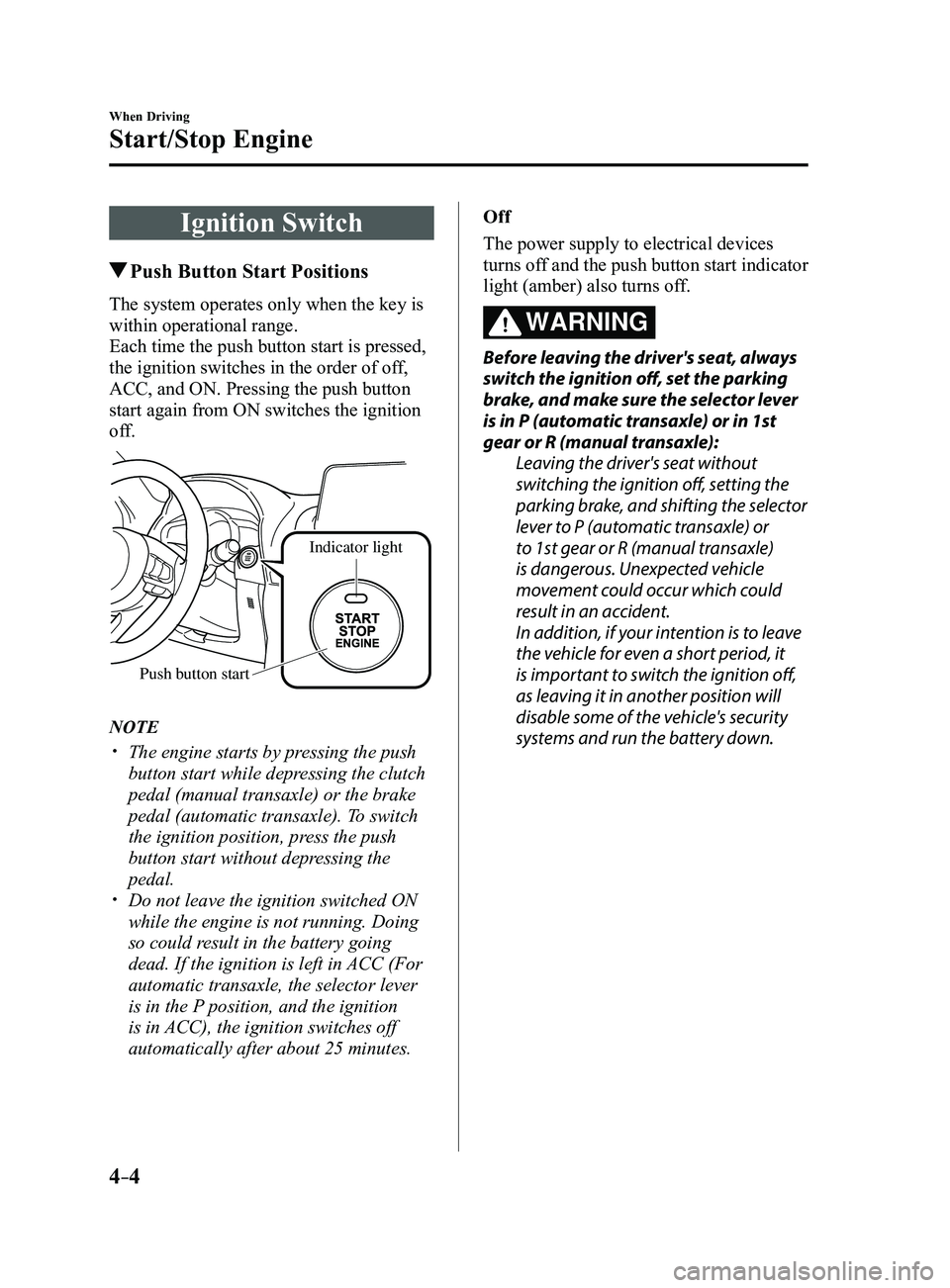
The system operates only when the key is
within operational range.
Each time the push button start is pressed,
the ignition switches in the order of off,
ACC, and ON. Pressing the push button
start again from ON switches the ignition
off.
Indicator light
Push button start
NOTE
The engine starts by pressing the push
button start while depressing the clutch
pedal (manual transaxle) or the brake
pedal (automatic transaxle). To switch
the ignition position, press the push
button start without depressing the
pedal.
Do not leave the ignition switched ON
while the engine is not running. Doing
so could result in the battery going
dead. If the ignition is left in ACC (For
automatic transaxle, the selector lever
is in the P position, and the ignition
is in ACC), the ignition switches off
automatically after about 25 minutes. Off
The power supply to electrical devices
turns off and the push button start indicator
light (amber) also turns off.
WARNING
Before leaving the driver's seat, always
switch the ignition off, set the parking
brake, and make sure the selector lever
is in P (automatic transaxle) or in 1st
gear or R (manual transaxle):
Leaving the driver's seat without
switching the ignition off, setting the
parking brake, and shifting the selector
lever to P (automatic transaxle) or
to 1st gear or R (manual transaxle)
is dangerous. Unexpected vehicle
movement could occur which could
result in an accident.
In addition, if your intention is to leave
the vehicle for even a short period, it
is important to switch the ignition off,
as leaving it in another position will
disable some of the vehicle's security
systems and run the battery down.
Mazda3_8FL6-EA-16F_Edition2.indb 42016/08/10 17:35:41
Page 138 of 612
4–8
When Driving
Start/Stop Engine
7. Press the push button start after both
the KEY indicator light (green) in the
instrument cluster and the push button
start indicator light (green) illuminate.
NOTE
After starting the engine, the push
button start indicator light (amber)
turns off and the ignition switches to the
ON position.
After pressing the push button start and
before the engine starts, the operation
sound of the fuel pump motor from near
the fuel tank can be heard, however, this
does not indicate a malfunction.
8. After starting the engine, let it idle for
about ten seconds.
NOTE
Whether the engine is cold or warm, it
should be started without the use of the
accelerator.
If the engine does not start the first
time, refer to Starting a Flooded Engine
under Emergency Starting. If the engine
still does not start, have your vehicle
inspected by an Authorized Mazda
Dealer (page
7-19).
Engine Start Function When Key
Battery is Dead
CAUTION
When starting the engine by holding
the transmitter over the push button
start due to a dead key battery or a
malfunctioning key, be careful not
to allow the following, otherwise the
signal from the key will not be received
correctly and the engine may not start.
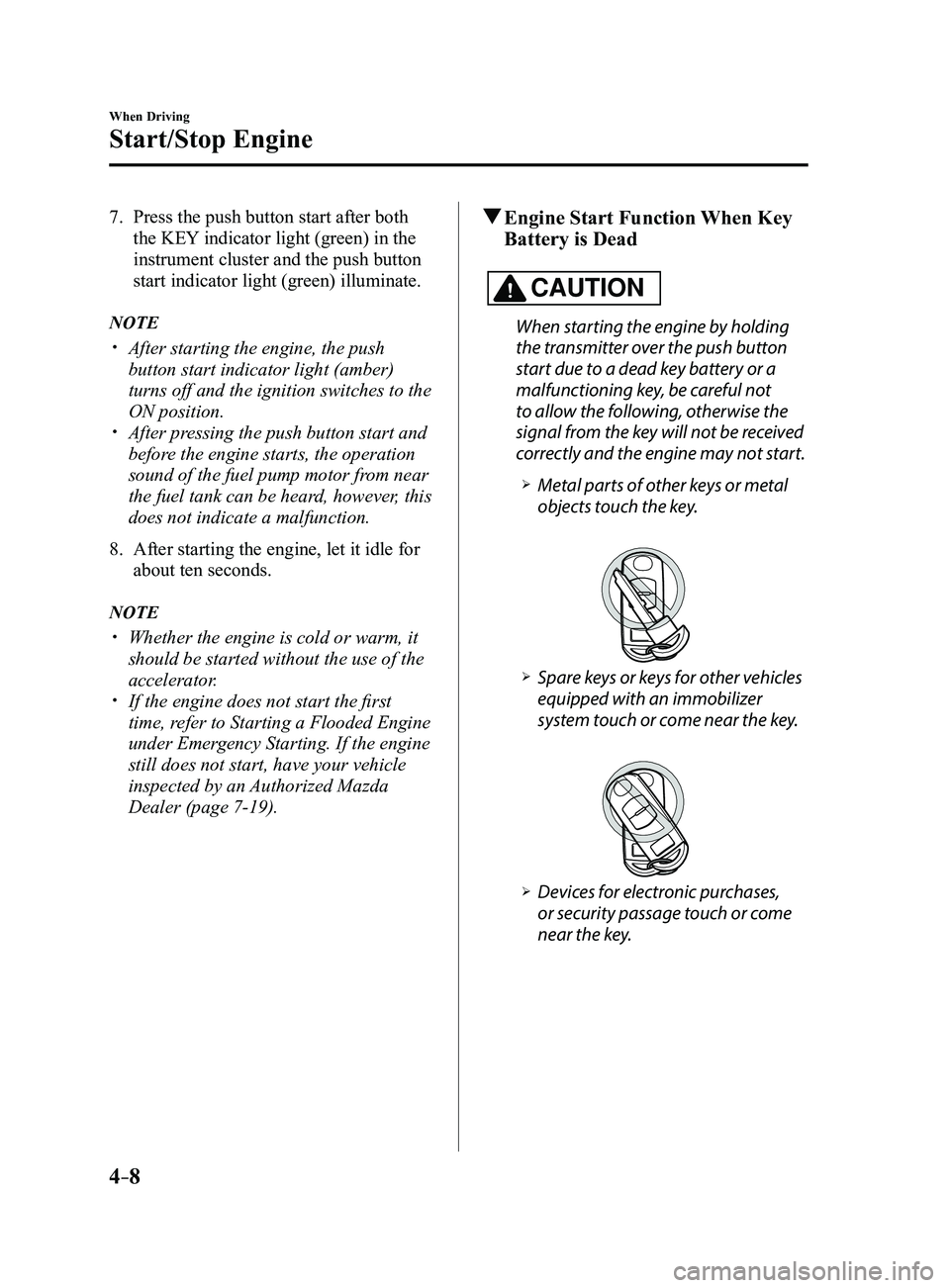
Metal parts of other keys or metal
objects touch the key.
Spare keys or keys for other vehicles
equipped with an immobilizer
system touch or come near the key.
Devices for electronic purchases,
or security passage touch or come
near the key.
Mazda3_8FL6-EA-16F_Edition2.indb 82016/08/10 17:35:43
Page 156 of 612
4–26
When Driving
Instrument Cluster and Display
*Some models.
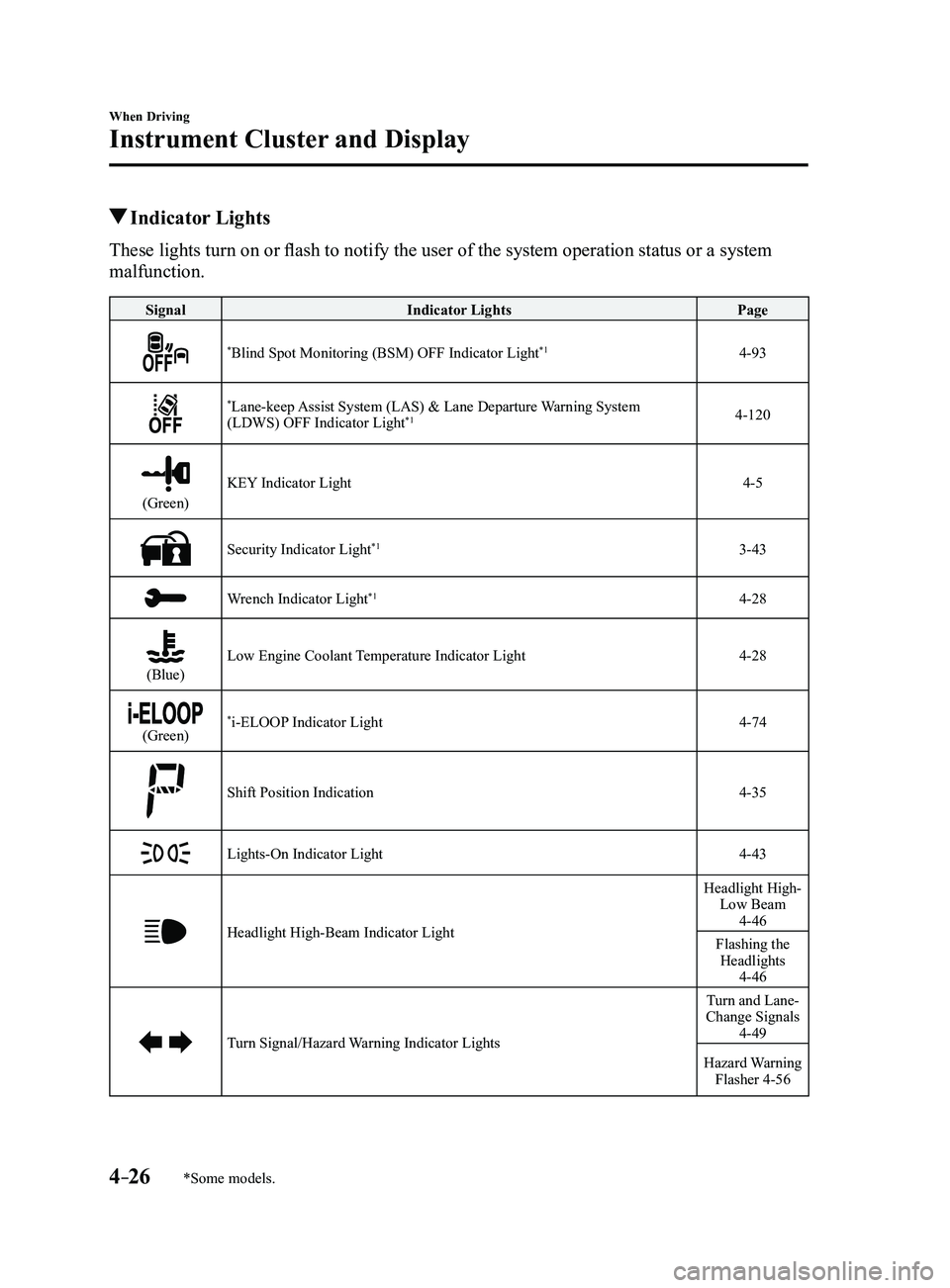
Indicator Lights
These lights turn on or flash to notify the user of the system operation status or a system
malfunction.
SignalIndicator Lights Page
*Blind Spot Monitoring (BSM) OFF Indicator Light*14-93
*Lane-keep Assist System (LAS) & Lane Departure Warning System
(LDWS) OFF Indicator Light*14-120
(Green)
KEY Indicator Light4-5
Security Indicator Light*13-43
Wrench Indicator Light*14-28
(Blue)Low Engine Coolant Temperature Indicator Light4-28
(Green)*i-ELOOP Indicator Light4-74
Shift Position Indication4-35
Lights-On Indicator Light4-43
Headlight High-Beam Indicator Light
Headlight High- Low Beam
4-46
Flashing the Headlights
4-46
Turn Signal/Hazard Warning Indicator Lights
Turn and Lane-
Change Signals
4-49
Hazard Warning Flasher 4-56
Mazda3_8FL6-EA-16F_Edition2.indb 262016/08/10 17:36:01
Page 194 of 612
4–64
When Driving
Brake
NOTE
The electric parking brake cannot be
applied or released while the vehicle
battery is dead.
An operation sound occurs when
applying or releasing the electric
parking brake, however, this does not
indicate a malfunction.
If the electric parking brake is not
used for long periods, an automatic
inspection of the system is performed
while the vehicle is parked. An
operation sound can be heard, however,
this does not indicate a problem.
When the electric parking brake is
applied and the ignition is switched
OFF, an operation sound can be heard,
however, this does not indicate a
problem.
The brake pedal may move while the
electric parking brake is being applied
or released, however, this does not
indicate a problem.
If the electric parking brake switch is
continually pulled while driving the
vehicle, the electric parking brake will
be applied and the electric parking
brake warning beep will be activated.
When the switch is released, the electric
parking brake is released and the beep
stops.
If the electric parking brake is applied
with the ignition switched off or in ACC,
the brake system warning light in the
instrument cluster and the indicator
light in the switch may turn on for 15
seconds.
When running the vehicle through an
automatic car wash, it may be necessary
to switch the ignition off with the
parking brake released depending on
the type of automatic car wash.
When applying the electric parking
brake
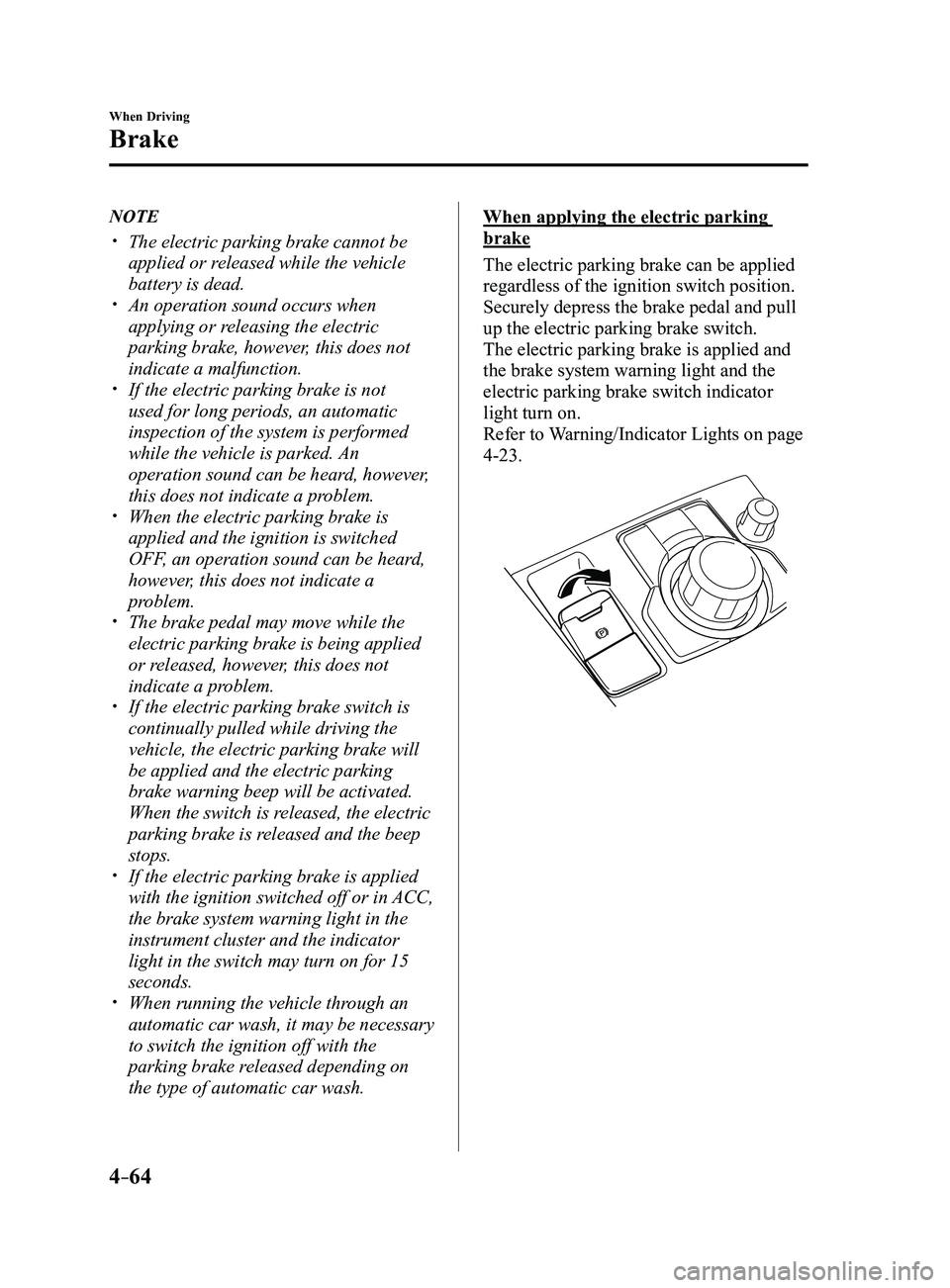
The electric parking brake can be applied
regardless of the ignition switch position.
Securely depress the brake pedal and pull
up the electric parking brake switch.
The electric parking brake is applied and
the brake system warning light and the
electric parking brake switch indicator
light turn on.
Refer to Warning/Indicator Lights on page
4-23.
Mazda3_8FL6-EA-16F_Edition2.indb 642016/08/10 17:36:27
Page 195 of 612
4–65
When Driving
Brake
When releasing the electric parking
brake
The electric parking brake can be released
while the ignition is switched ON or
the engine is running. When the electric
parking brake is released, the brake system
warning light and the electric parking
brake switch indicator light turn off.
Electric parking brake manual release
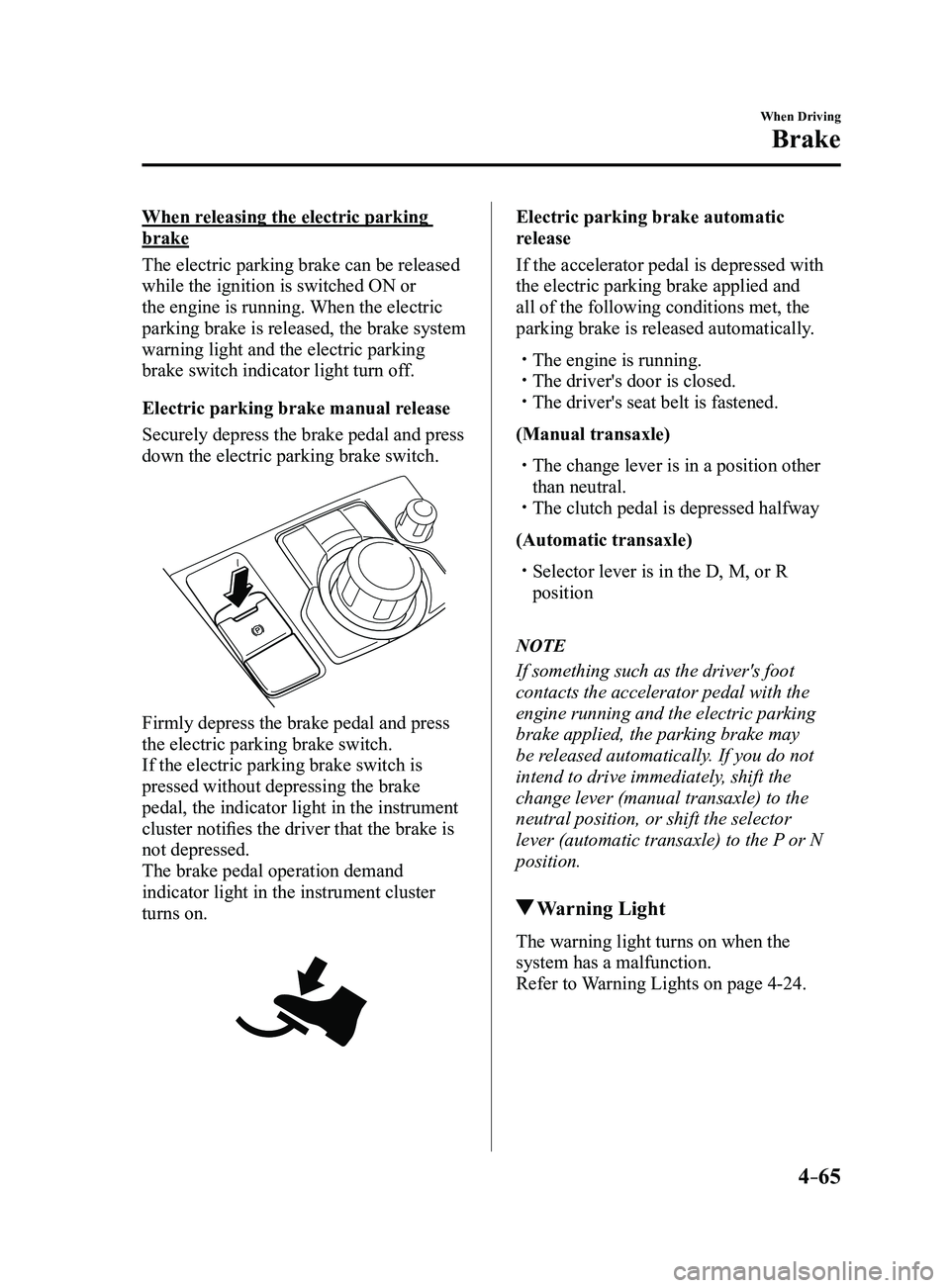
Securely depress the brake pedal and press
down the electric parking brake switch.
Firmly depress the brake pedal and press
the electric parking brake switch.
If the electric parking brake switch is
pressed without depressing the brake
pedal, the indicator light in the instrument
cluster notifies the driver that the brake is
not depressed.
The brake pedal operation demand
indicator light in the instrument cluster
turns on.
Electric parking brake automatic
release
If the accelerator pedal is depressed with
the electric parking brake applied and
all of the following conditions met, the
parking brake is released automatically.
The engine is running. The driver's door is closed. The driver's seat belt is fastened.
(Manual transaxle)
The change lever is in a position other
than neutral. The clutch pedal is depressed halfway
(Automatic transaxle)
Selector lever is in the D, M, or R
position
NOTE
If something such as the driver's foot
contacts the accelerator pedal with the
engine running and the electric parking
brake applied, the parking brake may
be released automatically. If you do not
intend to drive immediately, shift the
change lever (manual transaxle) to the
neutral position, or shift the selector
lever (automatic transaxle) to the P or N
position.
Warning Light
The warning light turns on when the
system has a malfunction.
Refer to Warning Lights on page
4-24.
Mazda3_8FL6-EA-16F_Edition2.indb 652016/08/10 17:36:27
Page 308 of 612
5–16
Interior Features
Audio System
*Some models.
Antenna
Antenna (4-Door)
AM/FM Radio Antenna
The AM/FM radio antenna receives both
AM and FM signals.
The antenna is embedded into the window
glass.
CAUTION
When washing the inside of the
window which has an antenna, use
a soft cloth dampened in lukewarm
water, gently wiping the antenna lines.
Use of glass cleaning products could
damage the antenna.
Satellite Radio Antenna
*
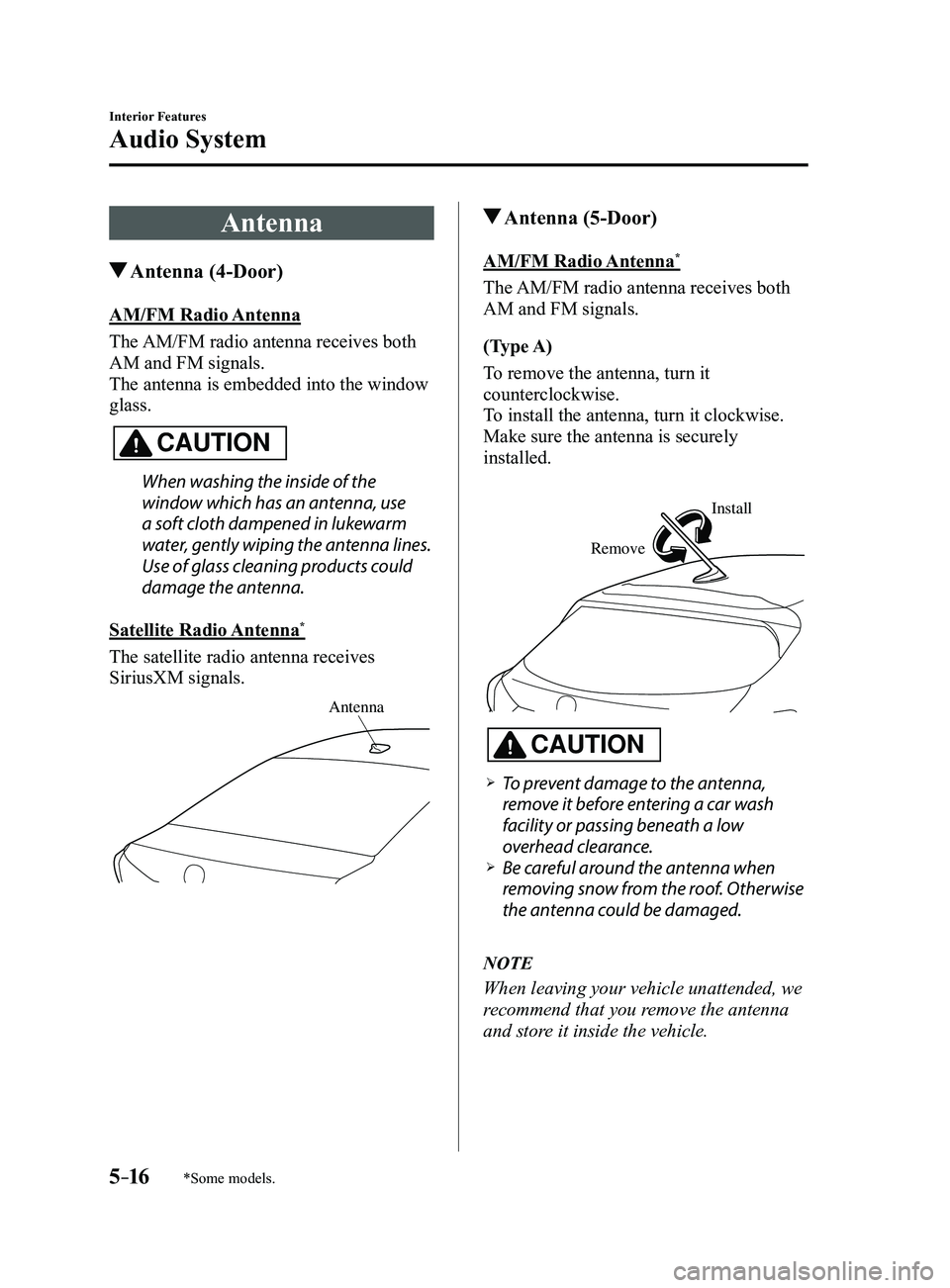
The satellite radio antenna receives
SiriusXM signals.
Antenna
Antenna (5-Door)
AM/FM Radio Antenna*
The AM/FM radio antenna receives both
AM and FM signals.
(Type A)
To remove the antenna, turn it
counterclockwise.
To install the antenna, turn it clockwise.
Make sure the antenna is securely
installed.
Remove
Install
CAUTION
To prevent damage to the antenna,
remove it before entering a car wash
facility or passing beneath a low
overhead clearance.
Be careful around the antenna when
removing snow from the roof. Otherwise
the antenna could be damaged.
NOTE
When leaving your vehicle unattended, we
recommend that you remove the antenna
and store it inside the vehicle.
Mazda3_8FL6-EA-16F_Edition2.indb 162016/08/10 17:37:19
Page 352 of 612
5–60
Interior Features
Audio System
Type B (With CD player)
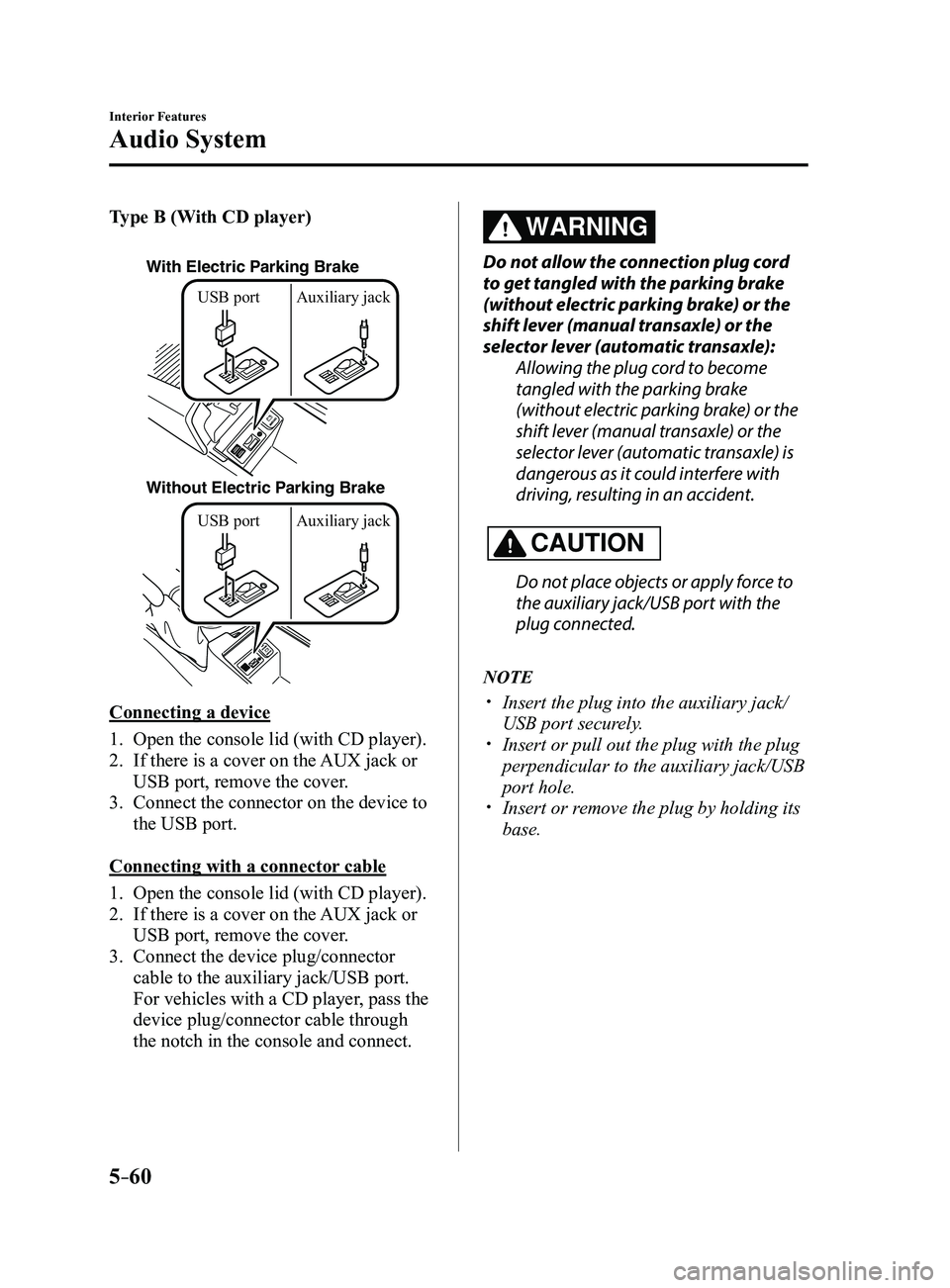
With Electric Parking Brake
Without Electric Parking BrakeUSB port Auxiliary jack USB port Auxiliary jack
Connecting a device
1. Open the console lid (with CD player).
2. If there is a cover on the AUX jack or
USB port, remove the cover.
3. Connect the connector on the device to
the USB port.
Connecting with a connector cable
1. Open the console lid (with CD player).
2. If there is a cover on the AUX jack or
USB port, remove the cover.
3. Connect the device plug/connector
cable to the auxiliary jack/USB port.
For vehicles with a CD player, pass the
device plug/connector cable through
the notch in the console and connect.
WARNING
Do not allow the connection plug cord
to get tangled with the parking brake
(without electric parking brake) or the
shift lever (manual transaxle) or the
selector lever (automatic transaxle):
Allowing the plug cord to become
tangled with the parking brake
(without electric parking brake) or the
shift lever (manual transaxle) or the
selector lever (automatic transaxle) is
dangerous as it could interfere with
driving, resulting in an accident.
CAUTION
Do not place objects or apply force to
the auxiliary jack/USB port with the
plug connected.
NOTE
Insert the plug into the auxiliary jack/
USB port securely. Insert or pull out the plug with the plug
perpendicular to the auxiliary jack/USB
port hole.
Insert or remove the plug by holding its
base.
Mazda3_8FL6-EA-16F_Edition2.indb 602016/08/10 17:37:50
Page 399 of 612

5–107
Interior Features
Bluetooth®
NOTE
When the OS of the device is updated, the pairing information may be del\
eted. If this
happens, reprogram the pairing information to the Bluetooth® unit. If you pair your phone which has already been paired to your vehicle more than once in
the past, you need to delete “Mazda” on your mobile device. Then, \
execute the Bluetooth®
search on your mobile device once again, and pair to a newly detected “Ma\
zda”.
Before you pair your device, make sure that Bluetooth® is “ON”, both on your phone and
on the vehicle.
If Bluetooth®-enabled devices are used in the following locations or conditions,
connection via Bluetooth® may not be possible.
The device is in a location hidden fr om the center display such as behind or under a
seat, or inside the glove compartment. The device contacts or is covered by a metal object or body. The device is set to power-saving mode.
Different Bluetooth®-enabled devices can be used for Bluetooth® Hands-Free and
Bluetooth® audio. For example, device A can be connected as a Bluetooth® Hands-
Free device and device B can be connected as a Bluetooth® audio device. However, the
following may occur when they are used at the same time.
The Bluetooth® connection of the device is disconnected. Noise occurs in the Hands-Fr ee audio. Hands-Free operates slowly.
Mazda3_8FL6-EA-16F_Edition2.indb 1072016/08/10 17:38:20
Page 434 of 612
6–22
Maintenance and Care
Owner Maintenance
Hood
WARNING
Always check that the hood is closed
and securely locked:A hood that is not closed and securely
locked is dangerous as it could fly open
while the vehicle is moving and block
the driver's vision which could result in
a serious accident.
Opening the Hood
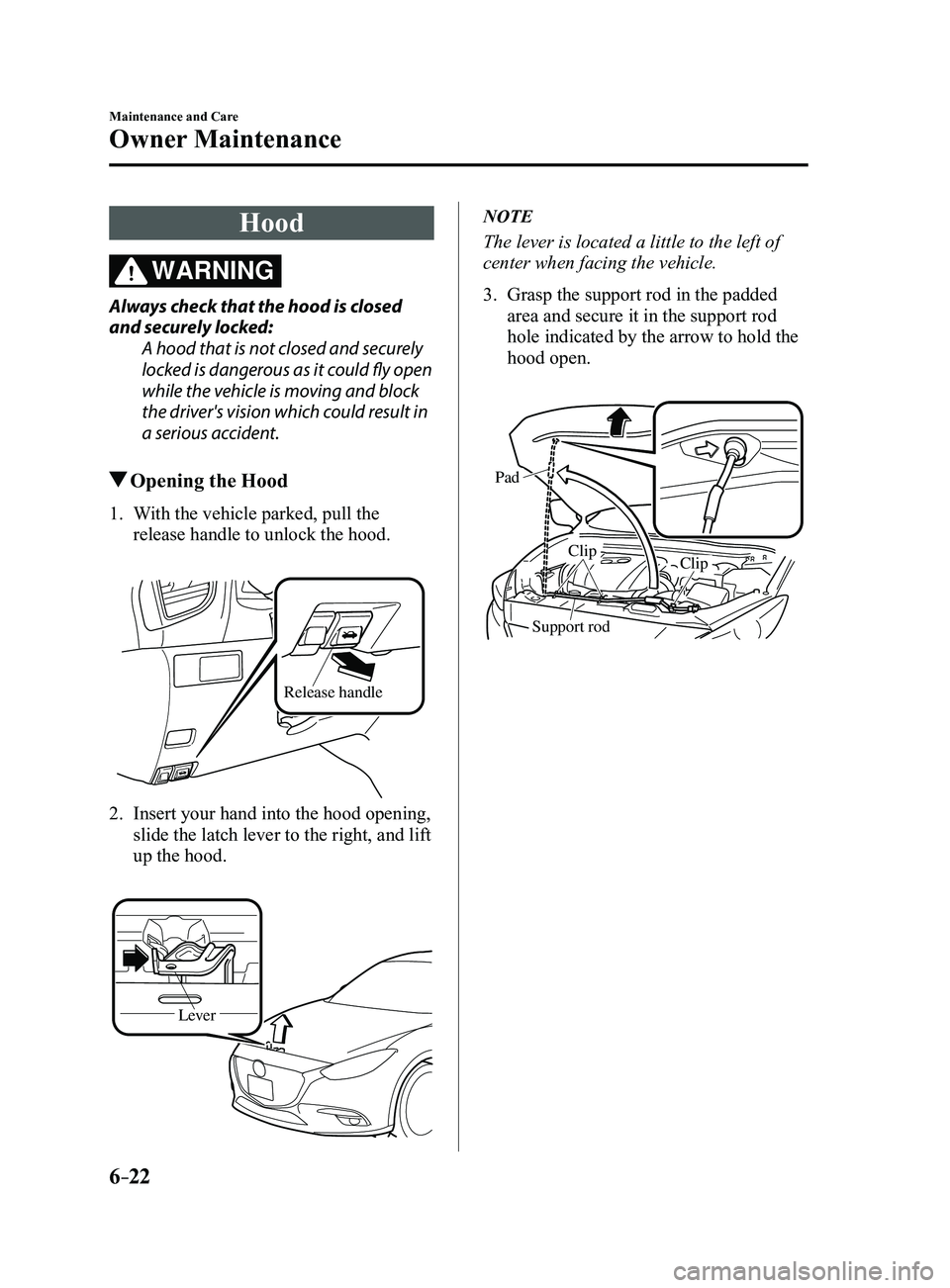
1. With the vehicle parked, pull the
release handle to unlock the hood.
Release handle
2. Insert your hand into the hood opening,
slide the latch lever to the right, and lift
up the hood.
Lever
NOTE
The lever is located a little to the left of
center when facing the vehicle.
3. Grasp the support rod in the padded
area and secure it in the support rod
hole indicated by the arrow to hold the
hood open.
Pad
Clip
Clip
Support rod
Mazda3_8FL6-EA-16F_Edition2.indb 222016/08/10 17:38:35
Page 435 of 612
6–23
Maintenance and Care
Owner Maintenance
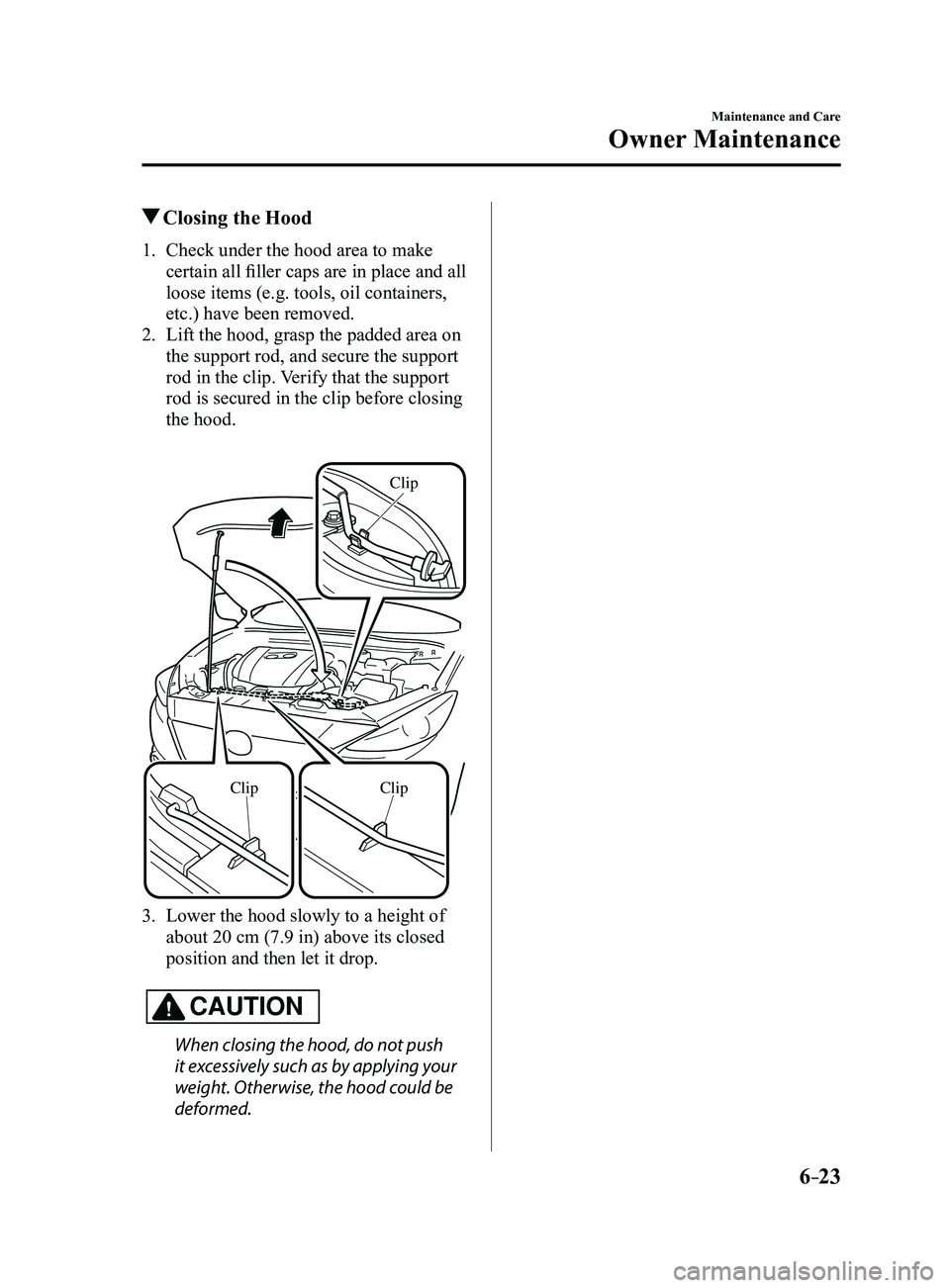
Closing the Hood
1. Check under the hood area to make
certain all filler caps are in place and all
loose items (e.g. tools, oil containers,
etc.) have been removed.
2. Lift the hood, grasp the padded area on
the support rod, and secure the support
rod in the clip. Verify that the support
rod is secured in the clip before closing
the hood.
ClipClip
Clip
3. Lower the hood slowly to a height of
about 20 cm (7.9 in) above its closed
position and then let it drop.
CAUTION
When closing the hood, do not push
it excessively such as by applying your
weight. Otherwise, the hood could be
deformed.
Mazda3_8FL6-EA-16F_Edition2.indb 232016/08/10 17:38:36