AUX MAZDA MODEL 3 4-DOOR 2017 Owners Manual
[x] Cancel search | Manufacturer: MAZDA, Model Year: 2017, Model line: MODEL 3 4-DOOR, Model: MAZDA MODEL 3 4-DOOR 2017Pages: 612
Page 79 of 612
3–3
Before Driving
Keys
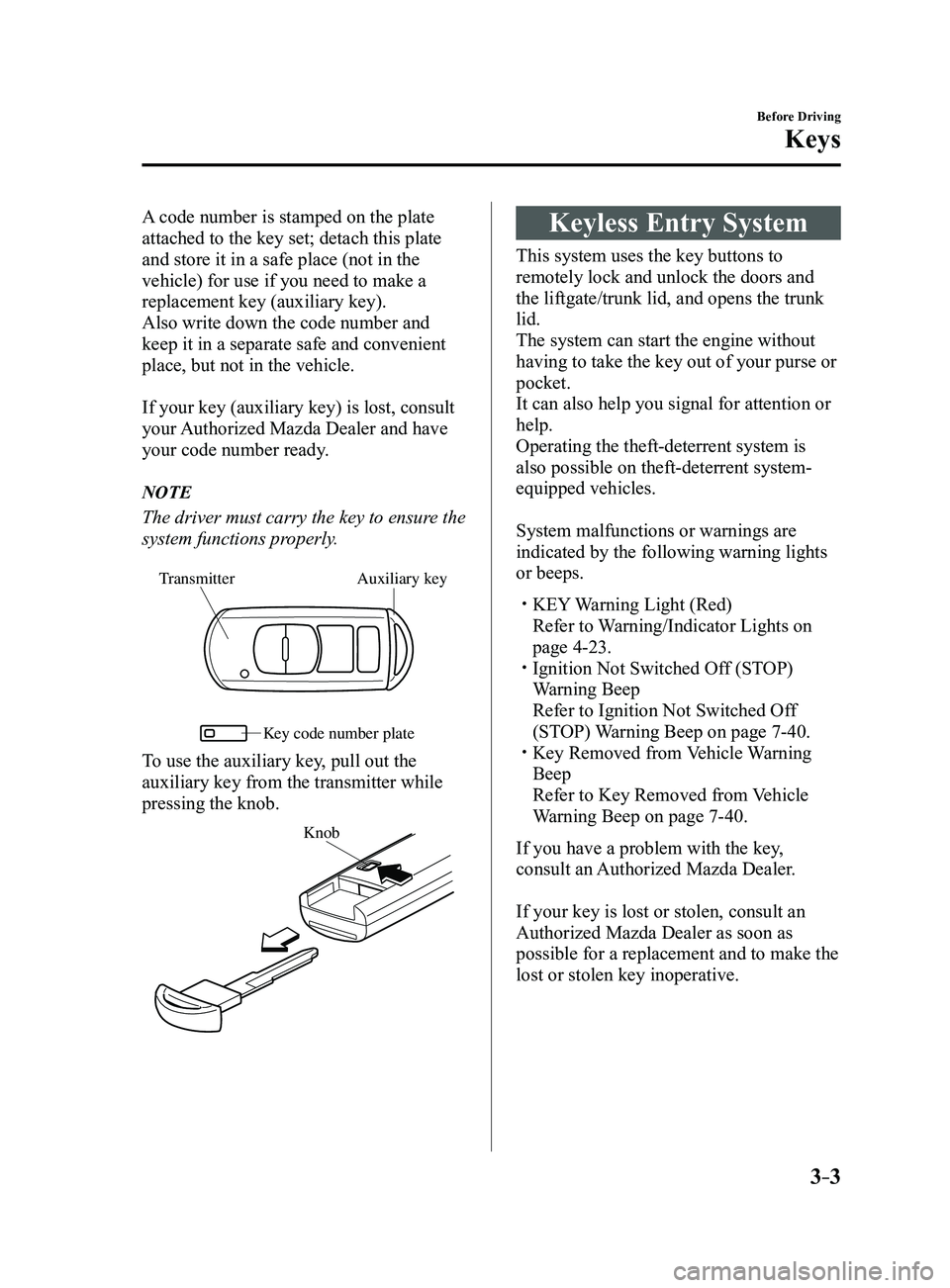
A code number is stamped on the plate
attached to the key set; detach this plate
and store it in a safe place (not in the
vehicle) for use if you need to make a
replacement key (auxiliary key).
Also write down the code number and
keep it in a separate safe and convenient
place, but not in the vehicle.
If your key (auxiliary key) is lost, consult
your Authorized Mazda Dealer and have
your code number ready.
NOTE
The driver must carry the key to ensure the
system functions properly.
Auxiliary key
Transmitter
Ke y code number plate
To use the auxiliary key, pull out the
auxiliary key from the transmitter while
pressing the knob.
Knob
Keyless Entry System
This system uses the key buttons to
remotely lock and unlock the doors and
the liftgate/trunk lid, and opens the trunk
lid.
The system can start the engine without
having to take the key out of your purse or
pocket.
It can also help you signal for attention or
help.
Operating the theft-deterrent system is
also possible on theft-deterrent system-
equipped vehicles.
System malfunctions or warnings are
indicated by the following warning lights
or beeps.
KEY Warning Light (Red)
Refer to Warning/Indicator Lights on
page 4-23. Ignition Not Switched Of f (STOP)
Warning Beep
Refer to Ignition Not Switched Of f
(STOP) Warning Beep on page 7-40. Key Removed from Vehicle Warning
Beep
Refer to Key Removed from Vehicle
Warning Beep on page 7-40.
If you have a problem with the key,
consult an Authorized Mazda Dealer.
If your key is lost or stolen, consult an
Authorized Mazda Dealer as soon as
possible for a replacement and to make the
lost or stolen key inoperative.
Mazda3_8FL6-EA-16F_Edition2.indb 32016/08/10 17:35:16
Page 90 of 612
3–14
Before Driving
Doors and Locks
Locking, Unlocking with Auxiliary
Key
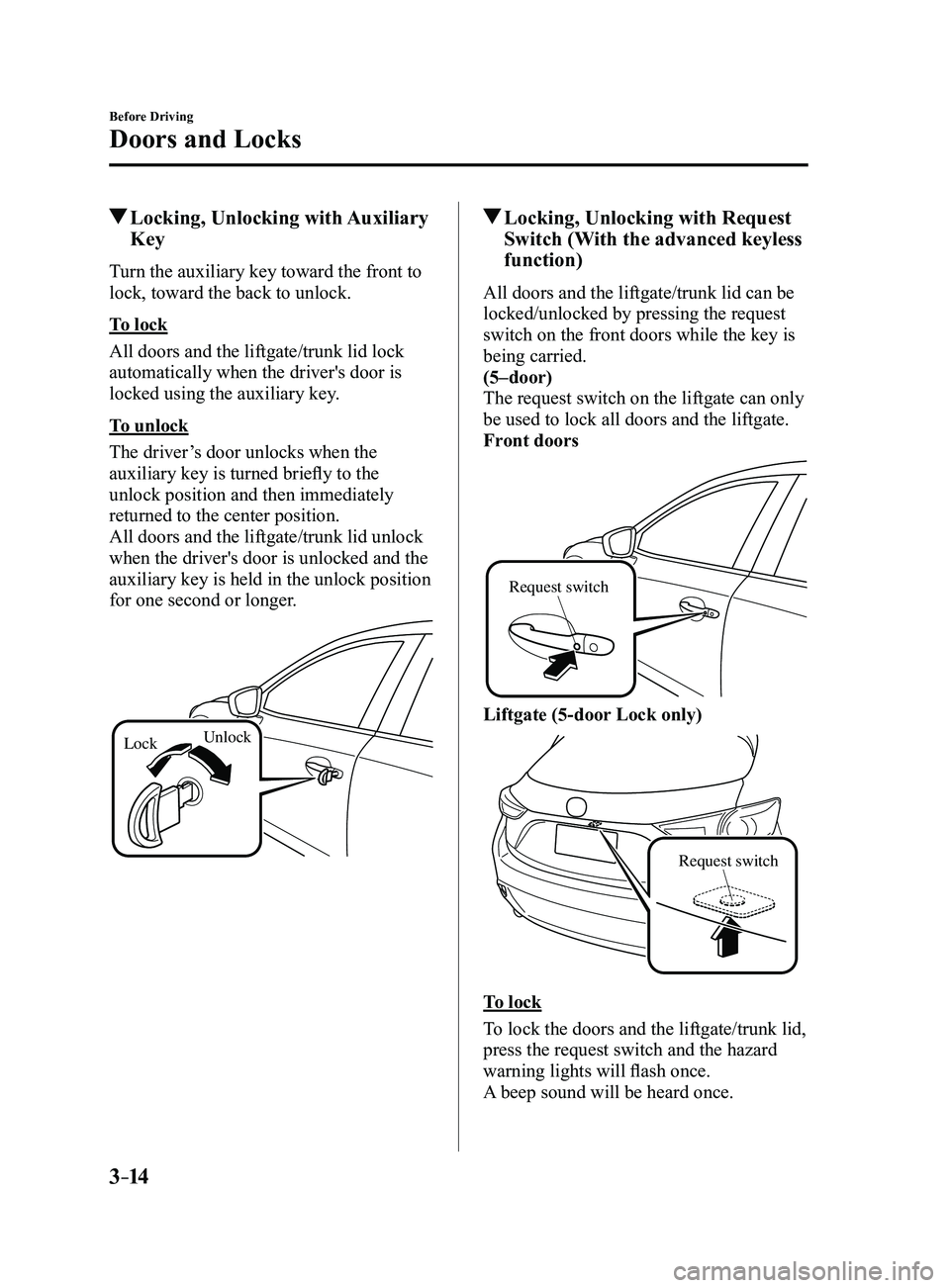
Turn the auxiliary key toward the front to
lock, toward the back to unlock.
To lock
All doors and the liftgate/trunk lid lock
automatically when the driver's door is
locked using the auxiliary key.
To unlock
The driver’s door unlocks when the
auxiliary key is turned briefly to the
unlock position and then immediately
returned to the center position.
All doors and the liftgate/trunk lid unlock
when the driver's door is unlocked and the
auxiliary key is held in the unlock position
for one second or longer.
LockUnlock
Locking, Unlocking with Request
Switch (With the advanced keyless
function)
All doors and the liftgate/trunk lid can be
locked/unlocked by pressing the request
switch on the front doors while the key is
being carried.
(5–door)
The request switch on the liftgate can only
be used to lock all doors and the liftgate.
Front doors
Request switch
Liftgate (5-door Lock only)
Request switch
To lock
To lock the doors and the liftgate/trunk lid,
press the request switch and the hazard
warning lights will flash once.
A beep sound will be heard once.
Mazda3_8FL6-EA-16F_Edition2.indb 142016/08/10 17:35:20
Page 120 of 612
3–44
Before Driving
Security System
*Some models.
Theft-Deterrent System*
If the theft-deterrent system detects an
inappropriate entry into the vehicle,
which could result in the vehicle or its
contents being stolen, the alarm alerts the
surrounding area of an abnormality by
sounding the horn and flashing the hazard
warning lights.
The system will not function unless it's
properly armed. So when you leave the
vehicle, follow the arming procedure
correctly.
Operation
System triggering conditions
The horn sounds intermittently and the
hazard warning lights flash for about 30
seconds when the system is triggered by
any one of the following:
Unlocking a door with the key, door
lock switch, or an inside door-lock knob. Forcing open a door, the hood or the
liftgate/trunk lid. Opening the hood by operating the hood
release handle. Switching the ignition ON without using
the push button start.
If the system is triggered again, the lights
and horn will activate until the driver's
door is unlocked with the transmitter.
(With the advanced keyless function)
The lights and horn can also be
deactivated by pressing the request switch
on a door.
NOTE
If the battery goes dead while the theft-
deterrent system is armed, the horn will
activate and the hazard warning lights
will flash when the battery is charged or
replaced.
How to Arm the System
1. Close the windows and the moonroof *
securely.
2. Switch the ignition OFF .
3. Make sure the hood, the doors, and the
liftgate/trunk lid are closed.
4. Press the lock button on the transmitter
or lock the driver's door from the
outside with the auxiliary key.
The hazard warning lights will flash
once.
The following method will also arm the
theft-deterrent system:
Press the door-lock switch “” while
any door is open and then close all of
the doors.
(With the advanced keyless function)
Press a request switch.
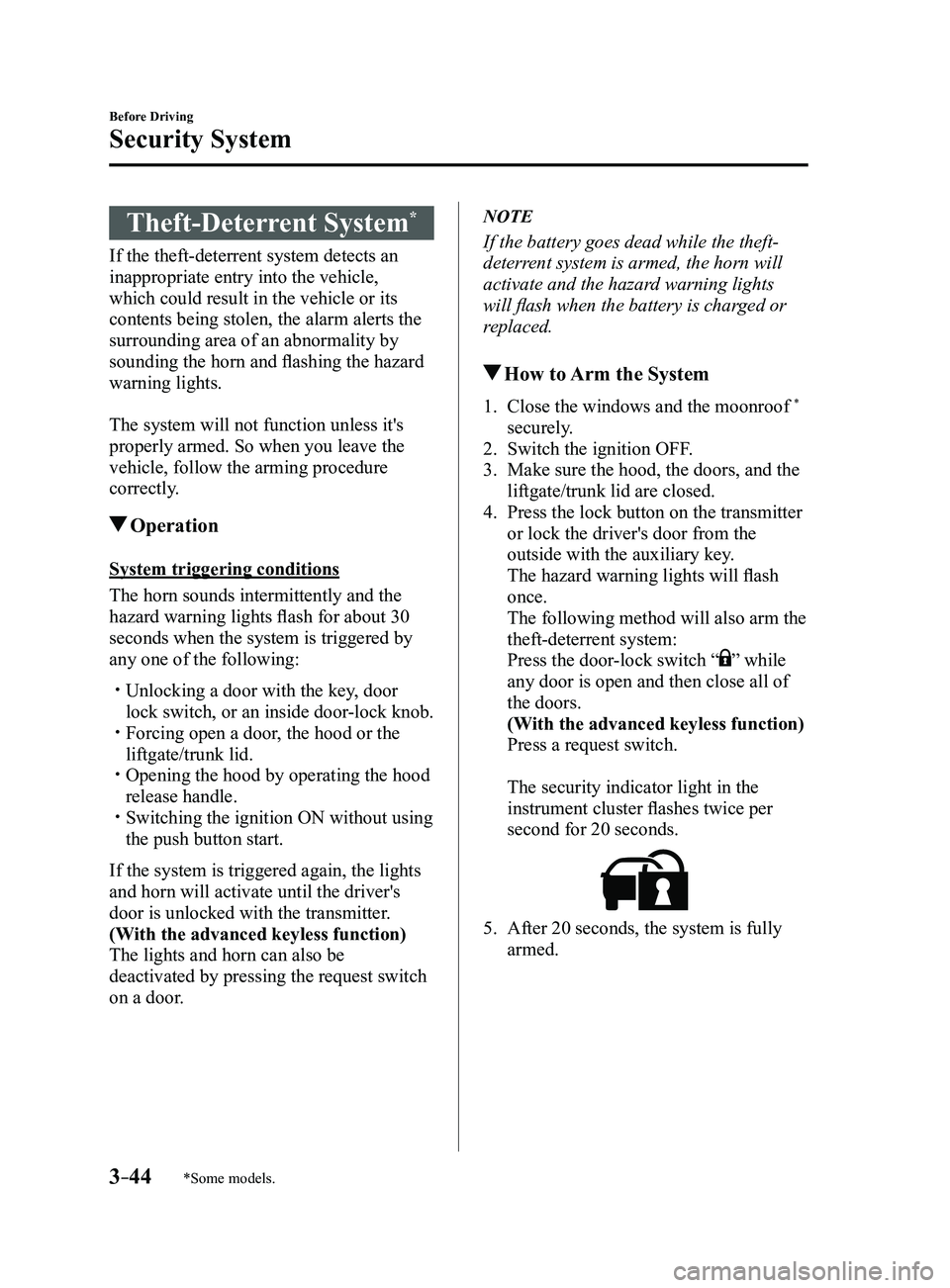
The security indicator light in the
instrument cluster flashes twice per
second for 20 seconds.
5. After 20 seconds, the system is fully
armed.
Mazda3_8FL6-EA-16F_Edition2.indb 442016/08/10 17:35:37
Page 121 of 612
3–45
Before Driving
Security System
NOTE
The theft-deterrent system can also be
armed by activating the auto relock
function with all the doors, the liftgate/
trunk lid and the hood closed.
Refer to Transmitter on page 3-5. The system will disarm if one of the
following operations takes place within
20 seconds after pressing the lock
button:
Unlocking any door . Opening any door. Opening the hood. Switching the ignition ON.
To rearm the system, do the arming
procedure again. When the doors ar e locked by pressing
the lock button on the transmitter
or using the auxiliary key while the
theft-deterrent system is armed, the
hazard warning lights will flash once to
indicate that the system is armed.
To Turn Off an Armed System
An armed system can be turned off using
any one of the following methods:
Pressing the unlock button on the
transmitter. Starting the engine with the push button
start. (With the advanced keyless function)
Pressing a request switch on the doors.
The hazard warning lights will flash twice.
NOTE
When the doors are unlocked by pressing
the unlock button on the transmitter while
the theft-deterrent system is turned off, the
hazard warning lights will flash twice to
indicate that the system is turned off.
To Stop the Alarm
A triggered alarm can be turned off using
any one of the following methods:
Pressing the unlock button on the
transmitter. Starting the engine with the push button
start. (With the advanced keyless function)
Pressing a request switch on the doors. Pressing the electric liftgate/trunk lid
opener while the key is being carried.
The hazard warning lights will flash twice.
Mazda3_8FL6-EA-16F_Edition2.indb 452016/08/10 17:35:37
Page 197 of 612
4–67
When Driving
Brake
Hill Launch Assist (HLA)
Hill Launch Assist (HLA) is a function
which assists the driver in accelerating
from a stop while on a slope. When
the driver releases the brake pedal and
depresses the accelerator pedal while
on a slope, the function prevents the
vehicle from rolling. The braking force is
maintained automatically after the brake
pedal is released on a steep grade.
For vehicles with a manual transaxle,
Hill Launch Assist (HLA) operates on a
downward slope when the shift lever is in
the reverse (R) position, and on an upward
slope when the shift lever is in a position
other than the reverse (R) position.
For vehicles with an automatic transaxle,
Hill Launch Assist (HLA) operates on a
downward slope when the selector lever
is in the reverse (R) position, and on an
upward slope when the selector lever is in
a forward gear.
WARNING
Do not rely completely on Hill Launch
Assist (HLA):Hill Launch Assist (HLA) is an auxiliary
device for accelerating from a stop
on a slope. The system only operates
for about two seconds and therefore,
relying only on the system, when
accelerating from a stop is dangerous
because the vehicle may move (roll)
unexpectedly and cause an accident.
The vehicle could roll depending on the
vehicle's load or if it is towing something.
In addition, for vehicles with a manual
transaxle, the vehicle could still roll
depending on how the clutch pedal or
the accelerator pedal is operated.
Always confirm the safety around the
vehicle before starting to drive the
vehicle.
NOTE
Hill Launch Assist (HLA) does not
operate on a gentle slope. In addition,
the gradient of the slope on which the
system will operate changes depending
on the vehicle's load.
Hill Launch Assist (HLA) does not
operate if the parking brake is applied,
the vehicle has not stopped completely,
or the clutch pedal is released.
While Hill Launch Assist (HLA) is
operating, the brake pedal may feel
stiff and vibrate, however, this does not
indicate a malfunction.
Hill Launch Assist (HLA) does not
operate while the TCS/DSC indicator
light is illuminated.
Refer to Warning/Indicator Lights on
page 4-23. Hill Launch Assist (HLA) does not
turn off even if the DSC OFF switch is
pressed to turn off the TCS/DSC.
Mazda3_8FL6-EA-16F_Edition2.indb 672016/08/10 17:36:28
Page 293 of 612
5–1
*Some models.
5Interior Features
Use of various features for ride comfort, including air-conditioning and
audio system.
Climate Control System.....................................................................
5-2
Operating Tips ........................................................................\
.......5-2
Vent Operation ........................................................................\
......5-3
Manual Climate Control ...............................................................5-5
Automatic Climate Control ...........................................................5-9
Dual-Zone Automatic Climate Control .......................................5-12
Audio System ........................................................................\
............5-16
Antenna ........................................................................\
...............5-16
Operating Tips for Audio System ...............................................5-17
Audio set [Type A (non-touchscreen)] ........................................5-26
Audio set [Type B (touchscreen)] ...............................................5-34
Audio Control Switch Operation* ...............................................5-55
AUX/USB mode ........................................................................\
.5-57
Bluetooth® ........................................................................\
.................5-74
Bluetooth®* ........................................................................\
..........5-74
Bluetooth® Hands-Free* ..............................................................5-83
Bluetooth® Audio* .......................................................................5-92
Troubleshooting* .......................................................................5-106
Interior Equipment ........................................................................\
5-110
Sunvisors ........................................................................\
...........5-110
Interior Lights ........................................................................\
...5-111
Accessory Sockets ....................................................................5-113
Cup Holder ........................................................................\
........5-115
Bottle Holder ........................................................................\
.....5-116
Storage Compartments ..............................................................5-117
Mazda3_8FL6-EA-16F_Edition2.indb 12016/08/10 17:37:09
Page 318 of 612
![MAZDA MODEL 3 4-DOOR 2017 Owners Manual 5–26
Interior Features
Audio System
Audio set [Type A (non-touchscreen)]
Power/Volume/Sound Controls ........................................................................\
.....page 5-28
Clock](/img/28/40993/w960_40993-317.png "MAZDA MODEL 3 4-DOOR 2017 Owners Manual 5–26
Interior Features
Audio System
Audio set [Type A (non-touchscreen)]
Power/Volume/Sound Controls ........................................................................\
.....page 5-28
Clock")
5–26
Interior Features
Audio System
Audio set [Type A (non-touchscreen)]
Power/Volume/Sound Controls ........................................................................\
.....page 5-28
Clock ........................................................................\
.............................................page 5-30
Operating the Radio ........................................................................\
......................page 5-32
How to use Auxiliary jack/USB port ....................................................................page 5-33
Mazda3_8FL6-EA-16F_Edition2.indb 262016/08/10 17:37:25
Page 325 of 612
5–33
Interior Features
Audio System
Preset channel tuning
The 6 preset channels can be used to store
6 AM and 12 FM stations.
1. To set a channel first select AM, FM1,
or FM2. Tune to the desired station.
2. Press a channel preset button for
about 2 seconds until a beep is heard.
The preset channel number or station
frequency will be displayed. The
station is now held in the memory.
3. Repeat this operation for the other
stations and bands you want to store.
To tune one in the memory, select AM,
FM1, or FM2 and then press its channel
preset button. The station frequency or
the channel number will be displayed.
Auto memory tuning
This is especially useful when driving in
an area where the local stations are not
known.
Press and hold the auto memory button
(
) for about 2 seconds until a beep
is heard; the system will automatically
scan and temporarily store up to 6 stations
with the strongest frequencies in each
selected band in that area.
After scanning is completed, the station
with the strongest frequency will be tuned
and its frequency displayed. Press and
release the auto memory button (
)
to recall stations from the auto-stored
stations. One stored station will be
selected each time and its frequency and
channel number will be displayed.
NOTE
If no stations can be tuned after scanning
operations, “A” will be displayed.
How to use Auxiliary jack/USB
port
Audio can be heard from the vehicle's
speakers by connecting a commercially-
available portable audio unit to the
auxiliary jack.
Use a commercially-available, non-
impedance (3.5
) stereo mini plug cable.
Contact an Authorized Mazda Dealer for
details.
In addition, audio can be played from the
vehicle audio device by connecting a USB
device to the USB port.
Refer to AUX/USB mode on page
5-57.
Mazda3_8FL6-EA-16F_Edition2.indb 332016/08/10 17:37:28
Page 344 of 612
5–52
Interior Features
Audio System
IconFunction
Plays a CD. When selected again, playback is temporarily stopped.
Advances to the beginning of the next song.
Long-press to fast forward. It stops when you remove your hand from the \
icon or the
commander knob.
Displays sound settings to adjust audio quality level.
Refer to Volume/Display/Sound Controls on page 5-40.
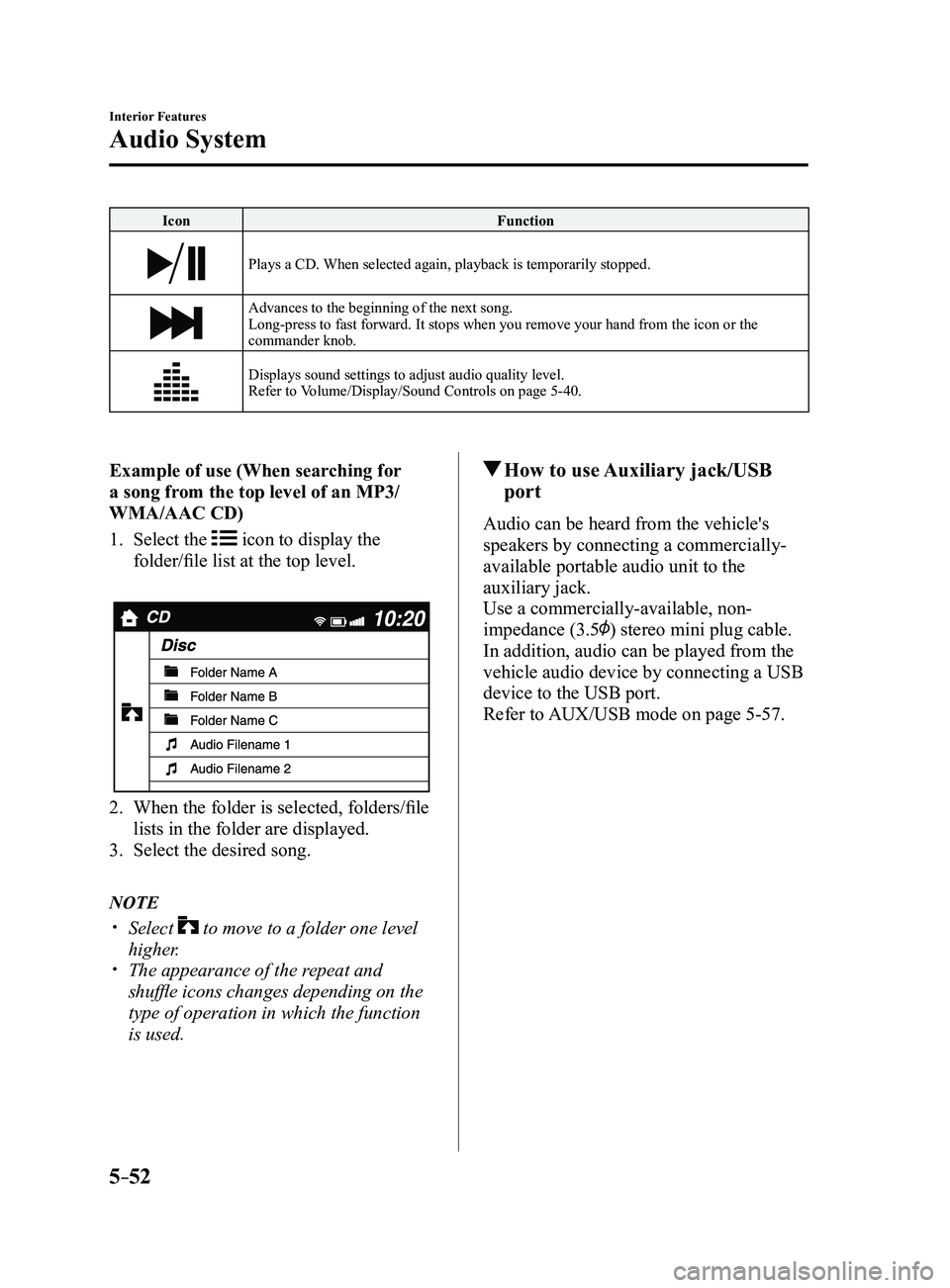
Example of use (When searching for
a song from the top level of an MP3/
WMA/AAC CD)
1. Select the icon to display the
folder/file list at the top level.
2. When the folder is selected, folders/file
lists in the folder are displayed.
3. Select the desired song.
NOTE
Select to move to a folder one level
higher. The appearance of the r epeat and
shuffle icons changes depending on the
type of operation in which the function
is used.
How to use Auxiliary jack/USB
port
Audio can be heard from the vehicle's
speakers by connecting a commercially-
available portable audio unit to the
auxiliary jack.
Use a commercially-available, non-
impedance (3.5
) stereo mini plug cable.
In addition, audio can be played from the
vehicle audio device by connecting a USB
device to the USB port.
Refer to AUX/USB mode on page
5-57.
Mazda3_8FL6-EA-16F_Edition2.indb 522016/08/10 17:37:45
Page 349 of 612
5–57
Interior Features
Audio System
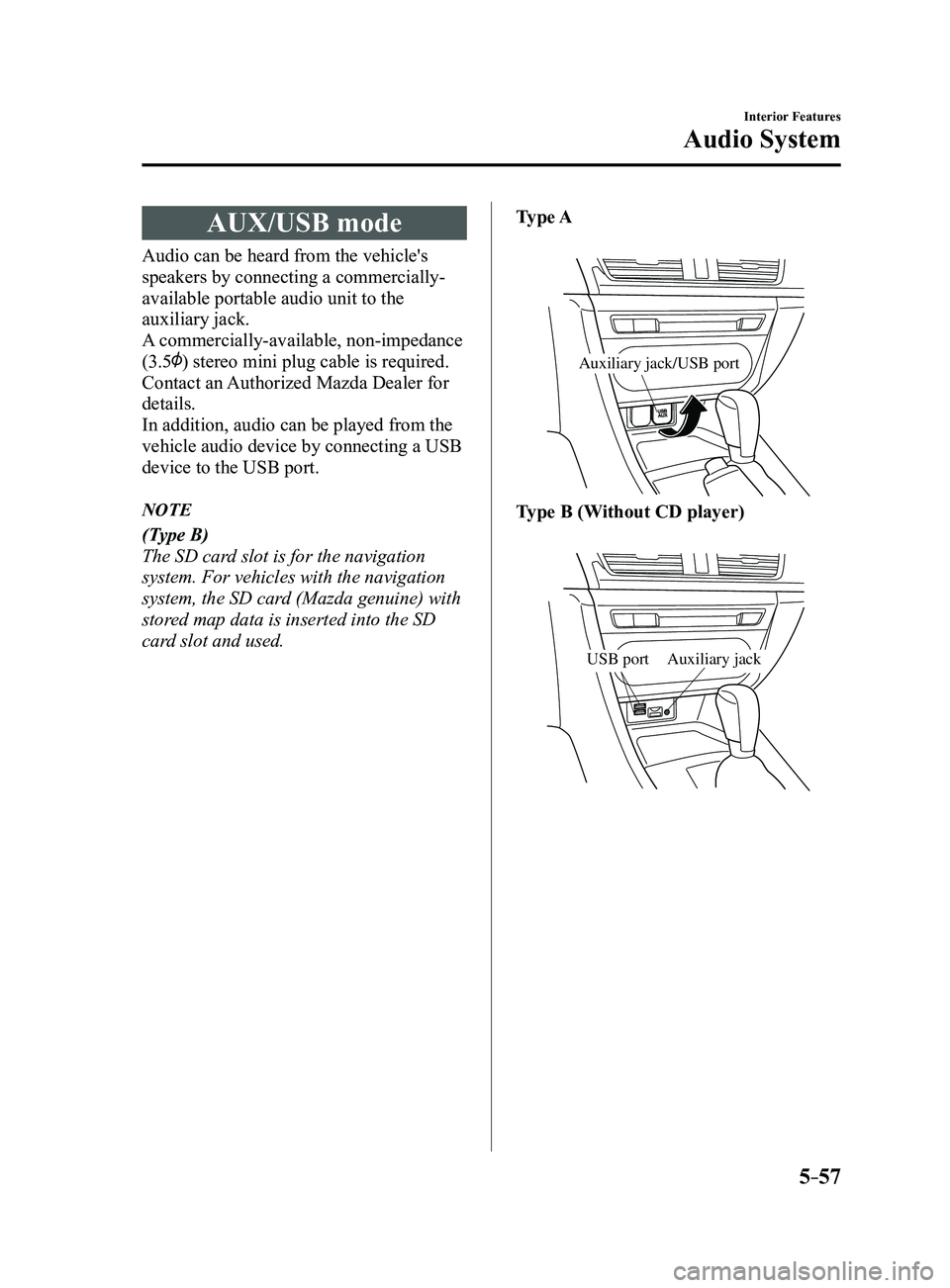
AUX/USB mode
Audio can be heard from the vehicle's
speakers by connecting a commercially-
available portable audio unit to the
auxiliary jack.
A commercially-available, non-impedance
(3.5
) stereo mini plug cable is required.
Contact an Authorized Mazda Dealer for
details.
In addition, audio can be played from the
vehicle audio device by connecting a USB
device to the USB port.
NOTE
(Type B)
The SD card slot is for the navigation
system. For vehicles with the navigation
system, the SD card (Mazda genuine) with
stored map data is inserted into the SD
card slot and used.Type A
Auxiliary jack/USB port
Type B (Without CD player)
Auxiliary jackUSB port
Mazda3_8FL6-EA-16F_Edition2.indb 572016/08/10 17:37:48