brake MAZDA MODEL 3 4-DOOR 2017 Owners Manual
[x] Cancel search | Manufacturer: MAZDA, Model Year: 2017, Model line: MODEL 3 4-DOOR, Model: MAZDA MODEL 3 4-DOOR 2017Pages: 612
Page 10 of 612
1–4
Pictorial Index
Interior Overview
The equipment and installation position varies by vehicle
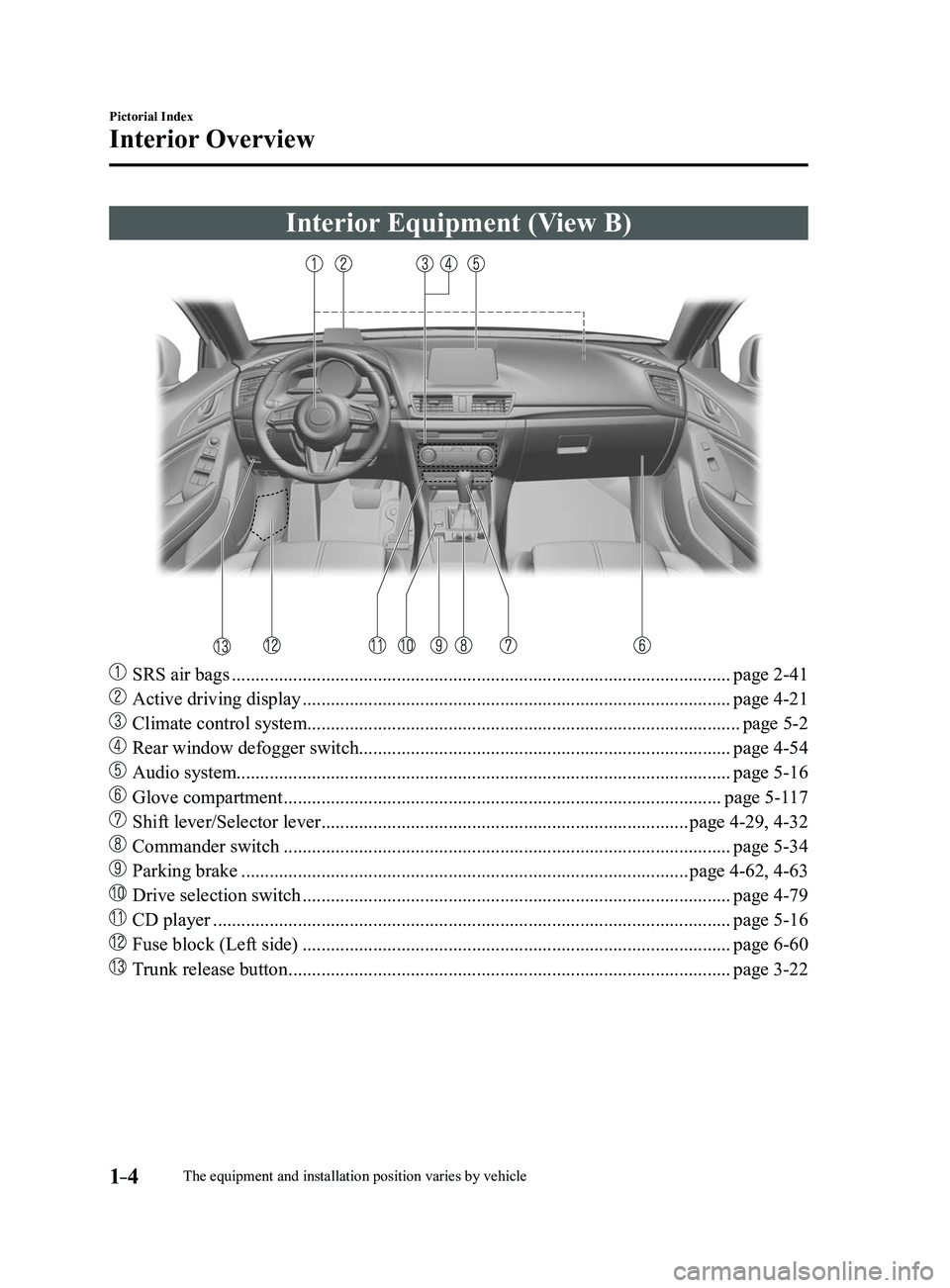
Interior Equipment (View B)
SRS air bags ........................................................................\
..................................page 2-41
Active driving display ........................................................................\
...................page 4-21
Climate control system........................................................................\
....................page 5-2
Rear window defogger switch........................................................................\
.......page 4-54
Audio system........................................................................\
................................. page 5-16
Glove compartment ........................................................................\
.....................page 5-117
Shift lever/Selector lever ........................................................................\
......page 4-29, 4-32
Commander switch ........................................................................\
.......................page 5-34
Parking brake ........................................................................\
.......................page 4-62, 4-63
Drive selection switch ........................................................................\
...................page 4-79
CD player ........................................................................\
......................................page 5-16
Fuse block (Left side) ........................................................................\
...................page 6-60
Trunk release button ........................................................................\
......................page 3-22
Mazda3_8FL6-EA-16F_Edition2.indb 42016/08/10 17:34:48
Page 122 of 612
3–46
Before Driving
Driving Tips
Break-In Period
No special break-in is necessary, but a
few precautions in the first 1,000 km
(600 miles) may add to the performance,
economy, and life of the vehicle.
Do not race the engine. Do not maintain one constant speed,
either slow or fast, for a long period of
time.
Do not drive constantly at full-throttle or
high engine rpm for extended periods of
time.
Avoid unnecessary hard stops. Avoid full-throttle starts.
Saving Fuel and
Protection of the
Environment
How you operate your Mazda determines
how far it will travel on a tank of fuel. Use
these suggestions to help save fuel and
reduce CO2.
Avoid long warm-ups. Once the engine
runs smoothly, begin driving. Avoid fast starts. Drive at lower speeds. Anticipate when to apply the brakes
(avoid sudden braking). Follow the maintenance schedule
(page 6-4) and have an Authorized
Mazda Dealer perform inspections and
servicing.
Use the air conditioner only when
necessary. Slow down on rough roads. Keep the tires properly inflated. Do not carry unnecessary weight. Do not rest your foot on the brake pedal
while driving. Keep the wheels in correct alignment. Keep windows closed at high speeds. Slow down when driving in crosswinds
and headwinds.
WARNING
Never stop the engine when going down
a hill: Stopping the engine when going
down a hill is dangerous. This causes
the loss of power steering and power
brake control, and may cause damage
to the drivetrain. Any loss of steering
or braking control could cause an
accident.
Mazda3_8FL6-EA-16F_Edition2.indb 462016/08/10 17:35:38
Page 123 of 612
3–47
Before Driving
Driving Tips
Hazardous Driving
WARNING
Be extremely careful if it is necessary to
downshift on slippery surfaces:Downshifting into lower gear
while driving on slippery surfaces is
dangerous. The sudden change in tire
speed could cause the tires to skid. This
could lead to loss of vehicle control
and an accident.
When driving on ice or in water, snow,
mud, sand, or similar hazards:
Be cautious and allow extra distance for
braking. Avoid sudden braking and sudden
maneuvering. Do not pump the brakes. Continue to
press down on the brake pedal.
Refer to Antilock Brake System (ABS)
on page 4-68. If you get stuck, select a lower gear and
accelerate slowly. Do not spin the front
wheels.
For more traction in starting on slippery
surfaces such as ice or packed snow,
use sand, rock salt, chains, carpeting, or
other nonslip material under the front
wheels.
NOTE
Use snow chains only on the front wheels.
Floor Mat
We recommend the use of Genuine
Mazda floor mats.
WARNING
Make sure the floor mats are secured
with the grommets or the retainers to
prevent them from bunching up under
the foot pedals (Driver's side): Using a floor mat that is not secured is
dangerous as it will interfere with the
accelerator and brake pedal operation
(driver's side), which could result in an
accident.
Only use a floor mat which conforms
to the shape of the floor on the driver's
side and make sure it is oriented
correctly.
Secure the floor mat using the
grommets or retainers.
There are various ways to secure floor
mats depending on the type used,
therefore secure the mat according to
the type.
After installing the floor mat, make
sure that it does not slide from side
to side or back and forth, and that
there is sufficient clearance with the
accelerator and brake pedals on the
driver's side.
After removing the floor mat for
cleaning or some other reason, always
securely reinstall it while paying
attention to the precautions just
mentioned.
Mazda3_8FL6-EA-16F_Edition2.indb 472016/08/10 17:35:38
Page 125 of 612
3–49
Before Driving
Driving Tips
Winter Driving
Carry emergency gear, including tire
chains, window scraper, flares, a small
shovel, jumper cables, and a small bag of
sand or salt.
Ask an Authorized Mazda Dealer to check
the following:
Have the proper ratio of antifreeze in the
radiator.
Refer to Engine Coolant on page
6-28. Inspect the battery and its cables. Cold
reduces battery capacity. Use an engine oil appropriate for the
lowest ambient temperatures that the
vehicle will be driven in (page
6-25). Inspect the ignition system for damage
and loose connections. Use washer fluid made with antifreeze—
but do not use engine coolant antifreeze
for washer fluid (page
6-30).
NOTE
(Without electric parking brake)
Do not use the parking brake in freezing
weather as it may freeze. Instead, shift
to P with an automatic transaxle and to
1 or R with a manual transaxle. Block
the rear wheels.
Remove snow before driving. Snow left
on the windshield is dangerous as it
could obstruct vision.
Do not apply excessive for ce to a
window scraper when removing ice or
frozen snow on the mirror glass and
windshield.
Never use warm or hot water for
removing snow or ice from windows and
mirrors as it could result in the glass
cracking.
Drive slowly. Braking performance
can be adversely affected if snow or
ice adheres to the brake components. If
this situation occurs, drive the vehicle
slowly, releasing the accelerator pedal
and lightly applying the brakes several
times until the brake performance
returns to normal.
Snow Tires
Use snow tires on all four wheels
Do not go faster than 120 km/h (75 mph)
while driving with snow tires. Inflate snow
tires 30 kPa (0.3 kgf/cm
2, 4.3 psi) more
than recommended on the tire pressure
label (driver's door frame), but never
more than the maximum cold-tire pressure
shown on the tires.
Mazda3_8FL6-EA-16F_Edition2.indb 492016/08/10 17:35:38
Page 127 of 612
3–51
Before Driving
Driving Tips
Driving In Flooded Area
WARNING
Dry off brakes that have become
wet by driving slowly, releasing the
accelerator pedal and lightly applying
the brakes several times until the brake
performance returns to normal:Driving with wet brakes is dangerous.
Increased stopping distance or the
vehicle pulling to one side when
braking could result in a serious
accident. Light braking will indicate
whether the brakes have been affected.
CAUTION
Do not drive the vehicle on flooded
roads as it could cause short circuiting
of electrical/electronic parts, or
engine damage or stalling from
water absorption. If the vehicle has
been immersed in water, consult an
Authorized Mazda Dealer.
Overloading
WARNING
Be careful not to overload your vehicle:
The gross axle weight rating (GAWR)
and the gross vehicle weight rating
(GVWR) of the vehicle are on the
Motor Vehicle Safety Standard Label
on the driver's door frame. Exceeding
these ratings can cause an accident
or vehicle damage. You can estimate
the weight of the load by weighing the
items (or people) before putting them
in the vehicle.
Mazda3_8FL6-EA-16F_Edition2.indb 512016/08/10 17:35:39
Page 131 of 612
4–1
*Some models.
4When Driving
Information concerning safe driving and stopping.
Start/Stop Engine ................................4-4
Ignition Switch ...............................4-4
Starting the Engine .........................4-5
Turning the Engine Off ................4-10
Instrument Cluster and Display ......4-12
Meters and Gauges .......................4-12
Active Driving Display* ...............4-21
Warning/Indicator Lights .............4-23
Manual Transaxle Operation ...........4-29
Manual Transaxle Shift Pattern ....4-29
Automatic Transaxle .........................4-32
Automatic Transaxle Controls .....4-32
Shift-Lock System .......................4-33
Transaxle Ranges .........................4-34
Manual Shift Mode ......................4-35
Direct Mode* ................................4-41
Driving Tips .................................4-42
Switches and Controls ......................4-43
Lighting Control ...........................4-43
Fog Lights* ...................................4-48
Turn and Lane-Change Signals ....4-49
Windshield Wipers and Washer ...4-50
Rear Window Wiper and
Washer*.........................................4-53
Rear Window Defogger ...............4-54
Horn .............................................4-56
Hazard Warning Flasher ...............4-56
HomeLink Wireless Control
System* .........................................4-57
Brake ..................................................4-61
Brake System ...............................4-61
Hill Launch Assist (HLA) ............4-67
ABS/TCS/DSC ...................................4-68
Antilock Brake System (ABS) .....4-68
Traction Control System (TCS) ...4-69
Dynamic Stability Control
(DSC)
...........................................4-70
i-ELOOP ............................................4-72
i-ELOOP* .....................................4-72
Fuel Economy Monitor .....................4-75
Fuel Economy Monitor* ...............4-75
Drive Selection ...................................4-78
Drive Selection* ...........................4-78
Power Steering ...................................4-80
Power Steering .............................4-80
Mazda3_8FL6-EA-16F_Edition2.indb 12016/08/10 17:35:40
Page 132 of 612
4–2*Some models.
i-ACTIVSENSE.................................4-81
i-ACTIVSENSE ...........................4-81
Adaptive Front Lighting
System (AFS)* ..............................4-84
High Beam Control System
(HBC)*..........................................4-85
Blind Spot Monitoring (BSM)* ....4-88
Traffic Sign Recognition System
(TSR)* ..........................................4-94
Distance Recognition Support
System (DRSS)* .........................4-101
Rear Cross Traffic Alert
(RCTA)* .....................................4-103
Mazda Radar Cruise Control
(MRCC)* ....................................4-107
Lane-keep Assist System (LAS) &
Lane Departure Warning System
(LDWS)
* ....................................4-117
Smart City Brake Support
(SCBS)* ......................................4-128
Smart Brake Support (SBS)* ......4-133
Forward Sensing Camera
(FSC)
..........................................4-136
Radar Sensor (Front) ..................4-141
Radar Sensors (Rear) .................4-144
Cruise Control .................................4-146
Cruise Control* ...........................4-146
Tire Pressure Monitoring System ...4-151
Tire Pressure Monitoring
System* .......................................4-151
Rear View Monitor ..........................4-155
Rear View Monitor* ...................4-155
Mazda3_8FL6-EA-16F_Edition2.indb 22016/08/10 17:35:40
Page 134 of 612
4–4
When Driving
Start/Stop Engine
Ignition Switch
Push Button Start Positions
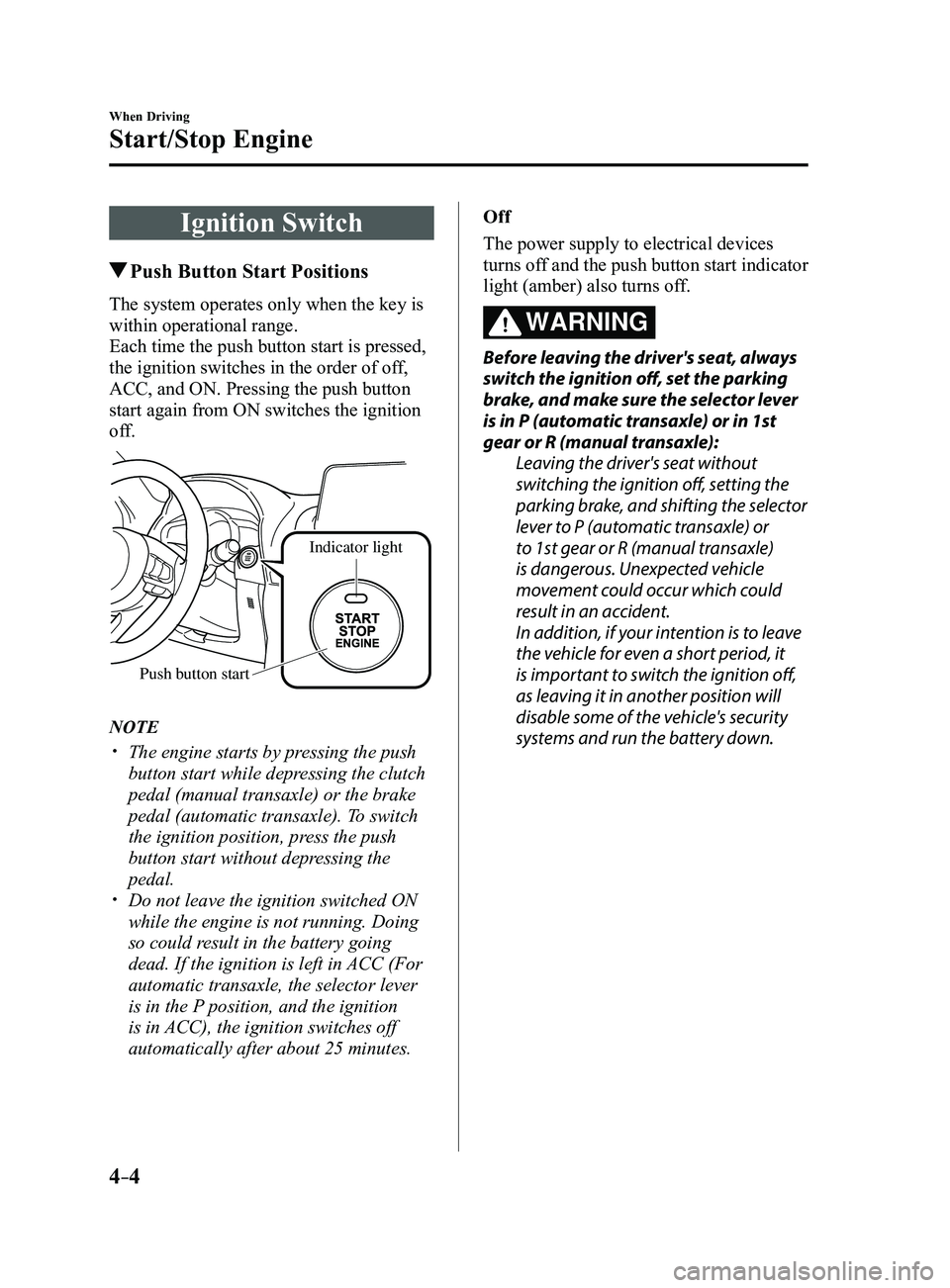
The system operates only when the key is
within operational range.
Each time the push button start is pressed,
the ignition switches in the order of off,
ACC, and ON. Pressing the push button
start again from ON switches the ignition
off.
Indicator light
Push button start
NOTE
The engine starts by pressing the push
button start while depressing the clutch
pedal (manual transaxle) or the brake
pedal (automatic transaxle). To switch
the ignition position, press the push
button start without depressing the
pedal.
Do not leave the ignition switched ON
while the engine is not running. Doing
so could result in the battery going
dead. If the ignition is left in ACC (For
automatic transaxle, the selector lever
is in the P position, and the ignition
is in ACC), the ignition switches off
automatically after about 25 minutes. Off
The power supply to electrical devices
turns off and the push button start indicator
light (amber) also turns off.
WARNING
Before leaving the driver's seat, always
switch the ignition off, set the parking
brake, and make sure the selector lever
is in P (automatic transaxle) or in 1st
gear or R (manual transaxle):
Leaving the driver's seat without
switching the ignition off, setting the
parking brake, and shifting the selector
lever to P (automatic transaxle) or
to 1st gear or R (manual transaxle)
is dangerous. Unexpected vehicle
movement could occur which could
result in an accident.
In addition, if your intention is to leave
the vehicle for even a short period, it
is important to switch the ignition off,
as leaving it in another position will
disable some of the vehicle's security
systems and run the battery down.
Mazda3_8FL6-EA-16F_Edition2.indb 42016/08/10 17:35:41
Page 136 of 612
4–6
When Driving
Start/Stop Engine
1. Make sure you are carrying the key.
2. Occupants should fasten their seat
belts.
3. Make sure the parking brake is on.
4. Continue to press the brake pedal
firmly until the engine has completely
started.
5. (Manual transaxle)
Continue to press the clutch pedal
firmly until the engine has completely
started.
(Automatic transaxle)
Put the vehicle in park (P). If you must
restart the engine while the vehicle is
moving, shift into neutral (N).
NOTE
(Manual transaxle)
The starter will not operate if the clutch
pedal is not depressed sufficiently.
(Automatic transaxle)
The starter will not operate if the selector
lever is not in P or N and the brake pedal
is not depressed sufficiently.
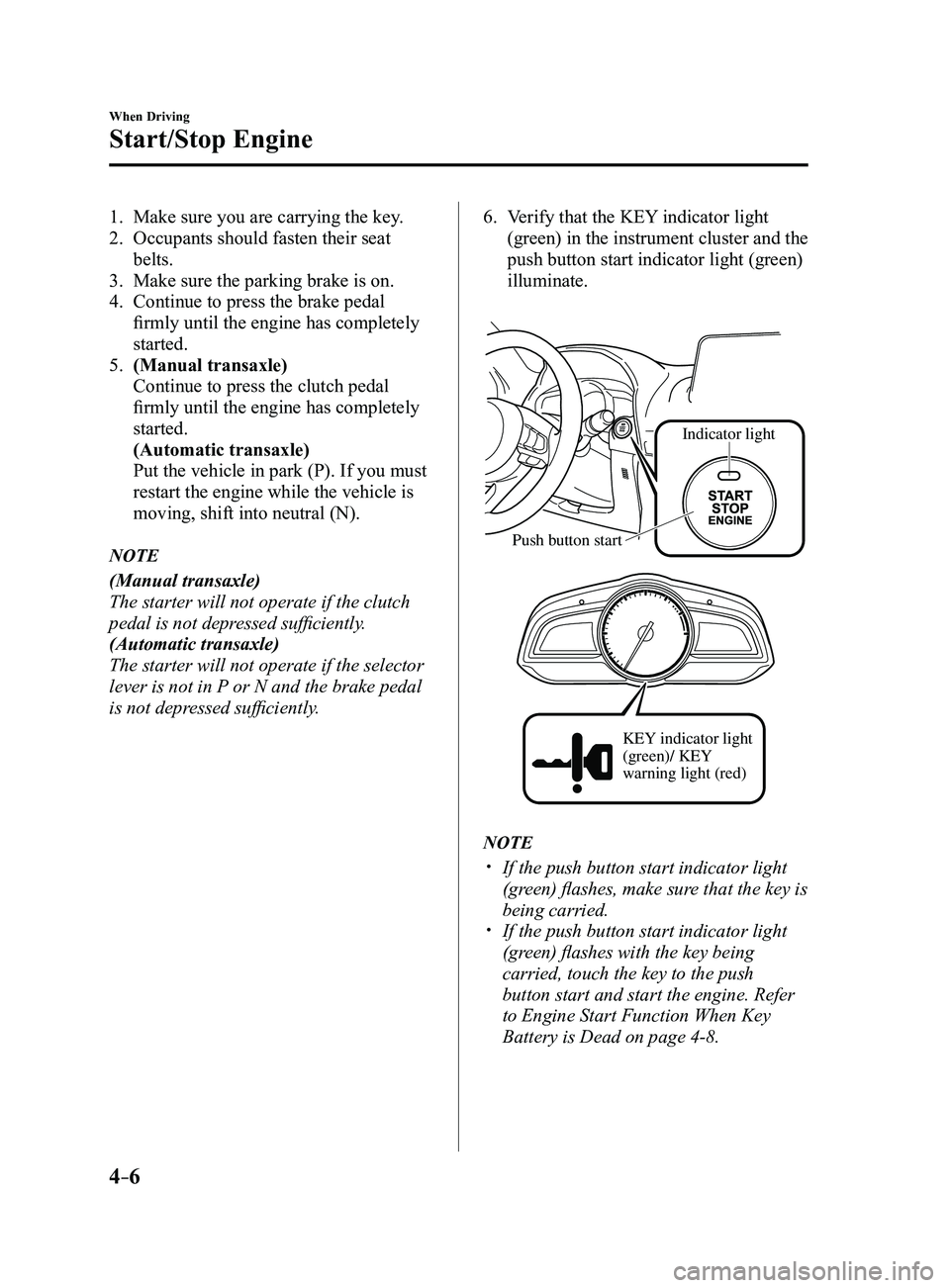
6. Verify that the KEY indicator light
(green) in the instrument cluster and the
push button start indicator light (green)
illuminate.
Indicator light
Push button start
KEY indicator light
(green)/ KEY
warning light (red)
NOTE
If the push button start indicator light
(green) flashes, make sure that the key is
being carried.
If the push button start indicator light
(green) flashes with the key being
carried, touch the key to the push
button start and start the engine. Refer
to Engine Start Function When Key
Battery is Dead on page
4-8.
Mazda3_8FL6-EA-16F_Edition2.indb 62016/08/10 17:35:42
Page 137 of 612
4–7
When Driving
Start/Stop Engine
CAUTION
If the KEY warning light (red)
illuminates, or the push button start
indicator light (amber) flashes, this
could indicate a problem with the
engine starting system. This may
prevent the engine from starting or
from switching the ignition to ACC or
ON. Have your vehicle inspected at an
Authorized Mazda Dealer as soon as
possible.
NOTE
Under the following conditions, the
KEY warning light (red) flashes after
the push button start is pressed. This
informs the driver that the push button
start will not switch to ACC, even if it is
pressed from off.
The key battery is dead. The key is out of operational range. The key is placed in areas where it is
difficult for the system to detect the
signal (page
3-8). A key from another manufacturer
similar to the key is in the
operational range.
(Forced engine starting method)
If the KEY warning light (r ed)
illuminates, or the push button start
indicator light (amber) flashes, this
could indicate that the engine may not
start using the usual starting method.
Have your vehicle inspected at an
Authorized Mazda Dealer as soon as
possible. If this occurs, the engine can
be force-started. Press and hold the
push button start until the engine starts.
Other procedures necessary for starting
the engine, such as having the key in the
cabin, and depressing the clutch pedal
(manual transaxle) or the brake pedal
(automatic transaxle) are required.
When the engine is force-started,
the KEY warning light (red) remains
illuminated and the push button
start indicator light (amber) remains
flashing.
(Automatic transaxle)
When the selector lever is in the neutral
(N) position, the KEY indicator light
(green) and the push button start
indicator light (green) do not illuminate.
Mazda3_8FL6-EA-16F_Edition2.indb 72016/08/10 17:35:42