clutch MAZDA MODEL 3 4-DOOR 2017 Owners Manual
[x] Cancel search | Manufacturer: MAZDA, Model Year: 2017, Model line: MODEL 3 4-DOOR, Model: MAZDA MODEL 3 4-DOOR 2017Pages: 612
Page 134 of 612
4–4
When Driving
Start/Stop Engine
Ignition Switch
Push Button Start Positions
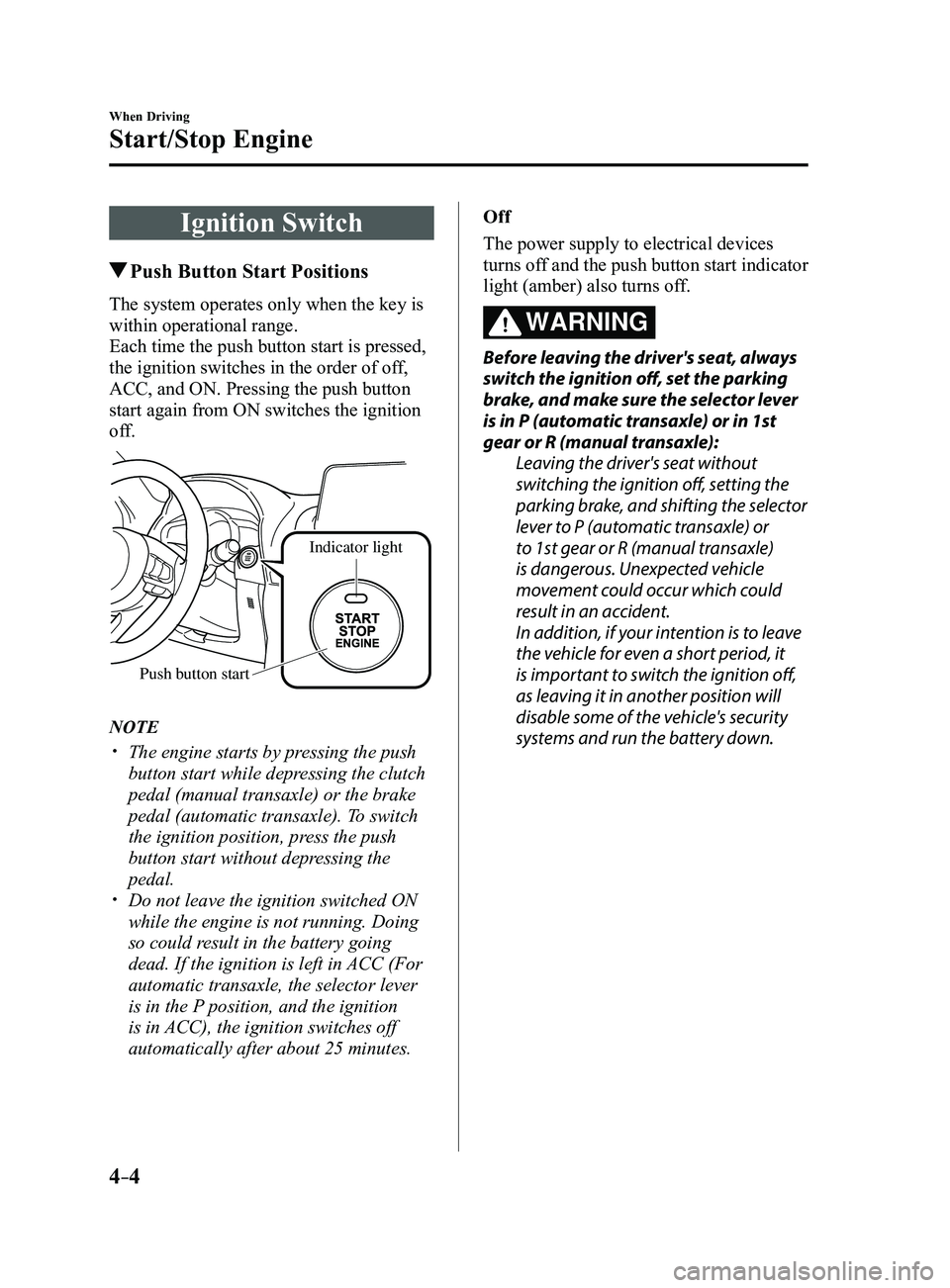
The system operates only when the key is
within operational range.
Each time the push button start is pressed,
the ignition switches in the order of off,
ACC, and ON. Pressing the push button
start again from ON switches the ignition
off.
Indicator light
Push button start
NOTE
The engine starts by pressing the push
button start while depressing the clutch
pedal (manual transaxle) or the brake
pedal (automatic transaxle). To switch
the ignition position, press the push
button start without depressing the
pedal.
Do not leave the ignition switched ON
while the engine is not running. Doing
so could result in the battery going
dead. If the ignition is left in ACC (For
automatic transaxle, the selector lever
is in the P position, and the ignition
is in ACC), the ignition switches off
automatically after about 25 minutes. Off
The power supply to electrical devices
turns off and the push button start indicator
light (amber) also turns off.
WARNING
Before leaving the driver's seat, always
switch the ignition off, set the parking
brake, and make sure the selector lever
is in P (automatic transaxle) or in 1st
gear or R (manual transaxle):
Leaving the driver's seat without
switching the ignition off, setting the
parking brake, and shifting the selector
lever to P (automatic transaxle) or
to 1st gear or R (manual transaxle)
is dangerous. Unexpected vehicle
movement could occur which could
result in an accident.
In addition, if your intention is to leave
the vehicle for even a short period, it
is important to switch the ignition off,
as leaving it in another position will
disable some of the vehicle's security
systems and run the battery down.
Mazda3_8FL6-EA-16F_Edition2.indb 42016/08/10 17:35:41
Page 136 of 612
4–6
When Driving
Start/Stop Engine
1. Make sure you are carrying the key.
2. Occupants should fasten their seat
belts.
3. Make sure the parking brake is on.
4. Continue to press the brake pedal
firmly until the engine has completely
started.
5. (Manual transaxle)
Continue to press the clutch pedal
firmly until the engine has completely
started.
(Automatic transaxle)
Put the vehicle in park (P). If you must
restart the engine while the vehicle is
moving, shift into neutral (N).
NOTE
(Manual transaxle)
The starter will not operate if the clutch
pedal is not depressed sufficiently.
(Automatic transaxle)
The starter will not operate if the selector
lever is not in P or N and the brake pedal
is not depressed sufficiently.
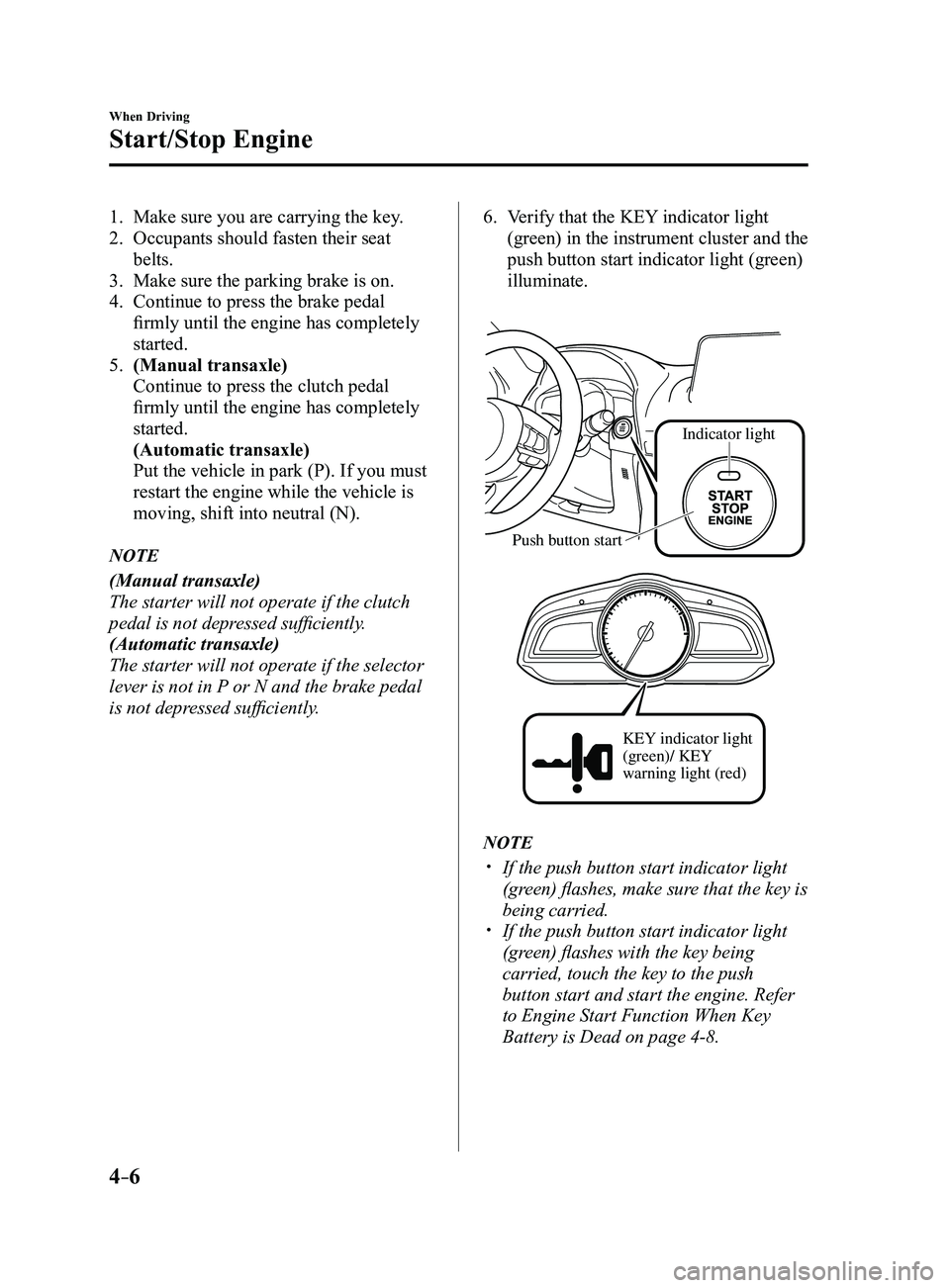
6. Verify that the KEY indicator light
(green) in the instrument cluster and the
push button start indicator light (green)
illuminate.
Indicator light
Push button start
KEY indicator light
(green)/ KEY
warning light (red)
NOTE
If the push button start indicator light
(green) flashes, make sure that the key is
being carried.
If the push button start indicator light
(green) flashes with the key being
carried, touch the key to the push
button start and start the engine. Refer
to Engine Start Function When Key
Battery is Dead on page
4-8.
Mazda3_8FL6-EA-16F_Edition2.indb 62016/08/10 17:35:42
Page 137 of 612
4–7
When Driving
Start/Stop Engine
CAUTION
If the KEY warning light (red)
illuminates, or the push button start
indicator light (amber) flashes, this
could indicate a problem with the
engine starting system. This may
prevent the engine from starting or
from switching the ignition to ACC or
ON. Have your vehicle inspected at an
Authorized Mazda Dealer as soon as
possible.
NOTE
Under the following conditions, the
KEY warning light (red) flashes after
the push button start is pressed. This
informs the driver that the push button
start will not switch to ACC, even if it is
pressed from off.
The key battery is dead. The key is out of operational range. The key is placed in areas where it is
difficult for the system to detect the
signal (page
3-8). A key from another manufacturer
similar to the key is in the
operational range.
(Forced engine starting method)
If the KEY warning light (r ed)
illuminates, or the push button start
indicator light (amber) flashes, this
could indicate that the engine may not
start using the usual starting method.
Have your vehicle inspected at an
Authorized Mazda Dealer as soon as
possible. If this occurs, the engine can
be force-started. Press and hold the
push button start until the engine starts.
Other procedures necessary for starting
the engine, such as having the key in the
cabin, and depressing the clutch pedal
(manual transaxle) or the brake pedal
(automatic transaxle) are required.
When the engine is force-started,
the KEY warning light (red) remains
illuminated and the push button
start indicator light (amber) remains
flashing.
(Automatic transaxle)
When the selector lever is in the neutral
(N) position, the KEY indicator light
(green) and the push button start
indicator light (green) do not illuminate.
Mazda3_8FL6-EA-16F_Edition2.indb 72016/08/10 17:35:42
Page 139 of 612
4–9
When Driving
Start/Stop Engine
If the engine cannot be started due to a
dead key battery, the engine can be started
using the following procedure:
1. Continue to depress the brake pedal
firmly until the engine has completely
started.
2. (Manual transaxle)
Continue to depress the clutch pedal
firmly until the engine has completely
started.
3. Verify that the push button start
indication light (green) flashes.
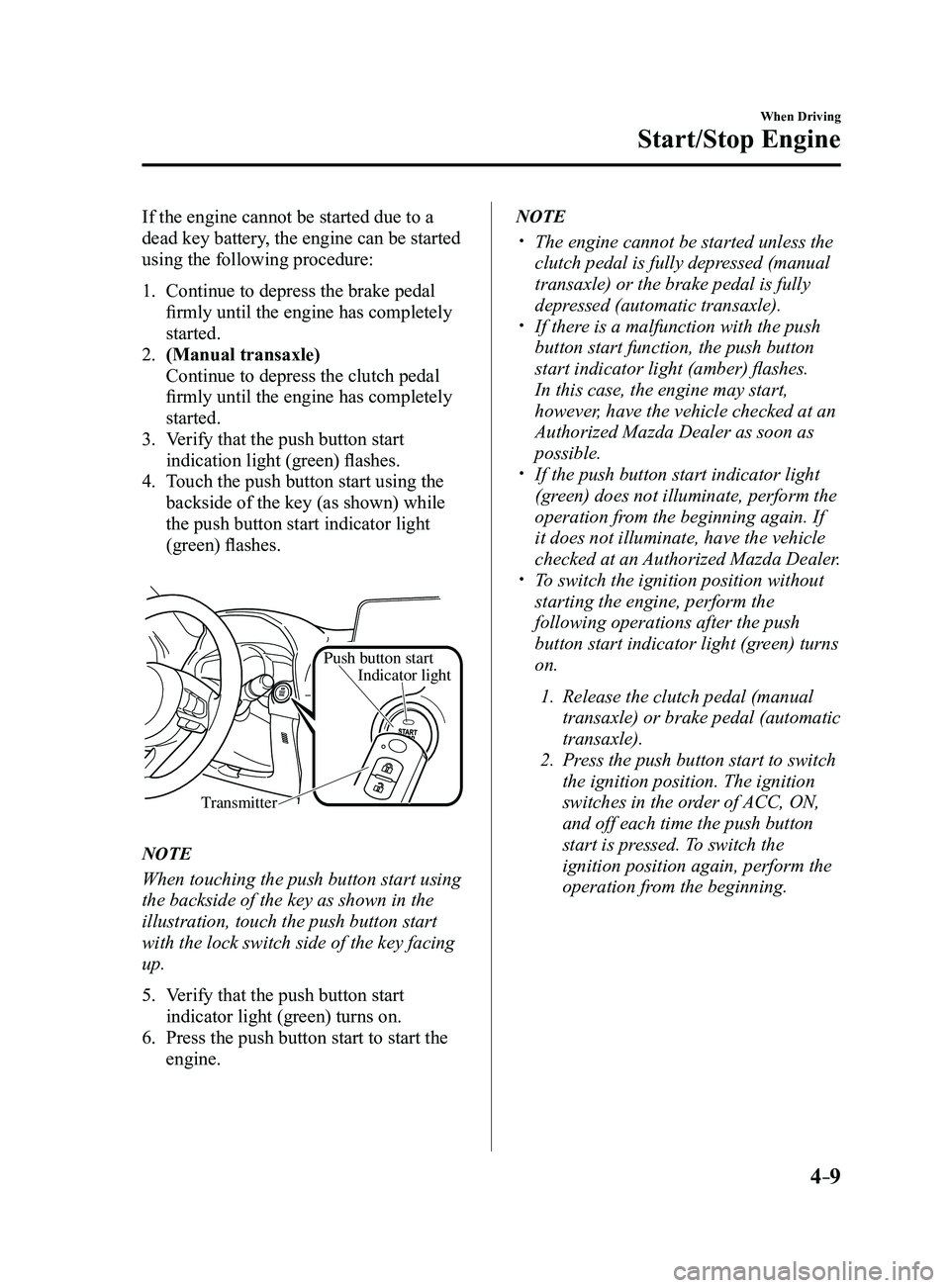
4. Touch the push button start using the
backside of the key (as shown) while
the push button start indicator light
(green) flashes.
Push button start
TransmitterIndicator light
NOTE
When touching the push button start using
the backside of the key as shown in the
illustration, touch the push button start
with the lock switch side of the key facing
up.
5. Verify that the push button start
indicator light (green) turns on.
6. Press the push button start to start the
engine.
NOTE
The engine cannot be started unless the
clutch pedal is fully depressed (manual
transaxle) or the brake pedal is fully
depressed (automatic transaxle).
If there is a malfunction with the push
button start function, the push button
start indicator light (amber) flashes.
In this case, the engine may start,
however, have the vehicle checked at an
Authorized Mazda Dealer as soon as
possible.
If the push button start indicator light
(green) does not illuminate, perform the
operation from the beginning again. If
it does not illuminate, have the vehicle
checked at an Authorized Mazda Dealer.
To switch the ignition position without
starting the engine, perform the
following operations after the push
button start indicator light (green) turns
on.
1. Release the clutch pedal (manual
transaxle) or brake pedal (automatic
transaxle).
2. Press the push button start to switch
the ignition position. The ignition
switches in the order of ACC, ON,
and off each time the push button
start is pressed. To switch the
ignition position again, perform the
operation from the beginning.
Mazda3_8FL6-EA-16F_Edition2.indb 92016/08/10 17:35:43
Page 140 of 612
4–10
When Driving
Start/Stop Engine
Emergency Operation for Starting
the Engine
If the KEY warning light (red) illuminates,
or the push button start indicator light
(amber) flashes, this could indicate that
the engine may not start using the usual
starting method. Have your vehicle
inspected at an Authorized Mazda Dealer
as soon as possible. If this occurs, the
engine can be force-started. Press and hold
the push button start until the engine starts.
Other procedures necessary for starting the
engine such as having the key in the cabin,
and depressing the clutch pedal (manual
transaxle) or the brake pedal (automatic
transaxle) are required.
Turning the Engine Off
WARNING
Do not stop the engine while the vehicle
is moving:
Stopping the engine while the vehicle
is moving for any reason other than in
an emergency is dangerous. Stopping
the engine while the vehicle is moving
will result in reduced braking ability
due to the loss of power braking, which
could cause an accident and serious
injury.
1. Stop the vehicle completely .
2. (Manual transaxle)
Shift into neutral and set the parking
brake.
(Automatic transaxle)
Shift the selector lever to the P position
and set the parking brake.
3. Press the push button start to turn of f
the engine. The ignition position is off.
CAUTION
When leaving the vehicle, make sure
the push button start is off.
Mazda3_8FL6-EA-16F_Edition2.indb 102016/08/10 17:35:43
Page 159 of 612
4–29
When Driving
Manual Transaxle Operation
Manual Transaxle Shift
Pattern
Neutral position
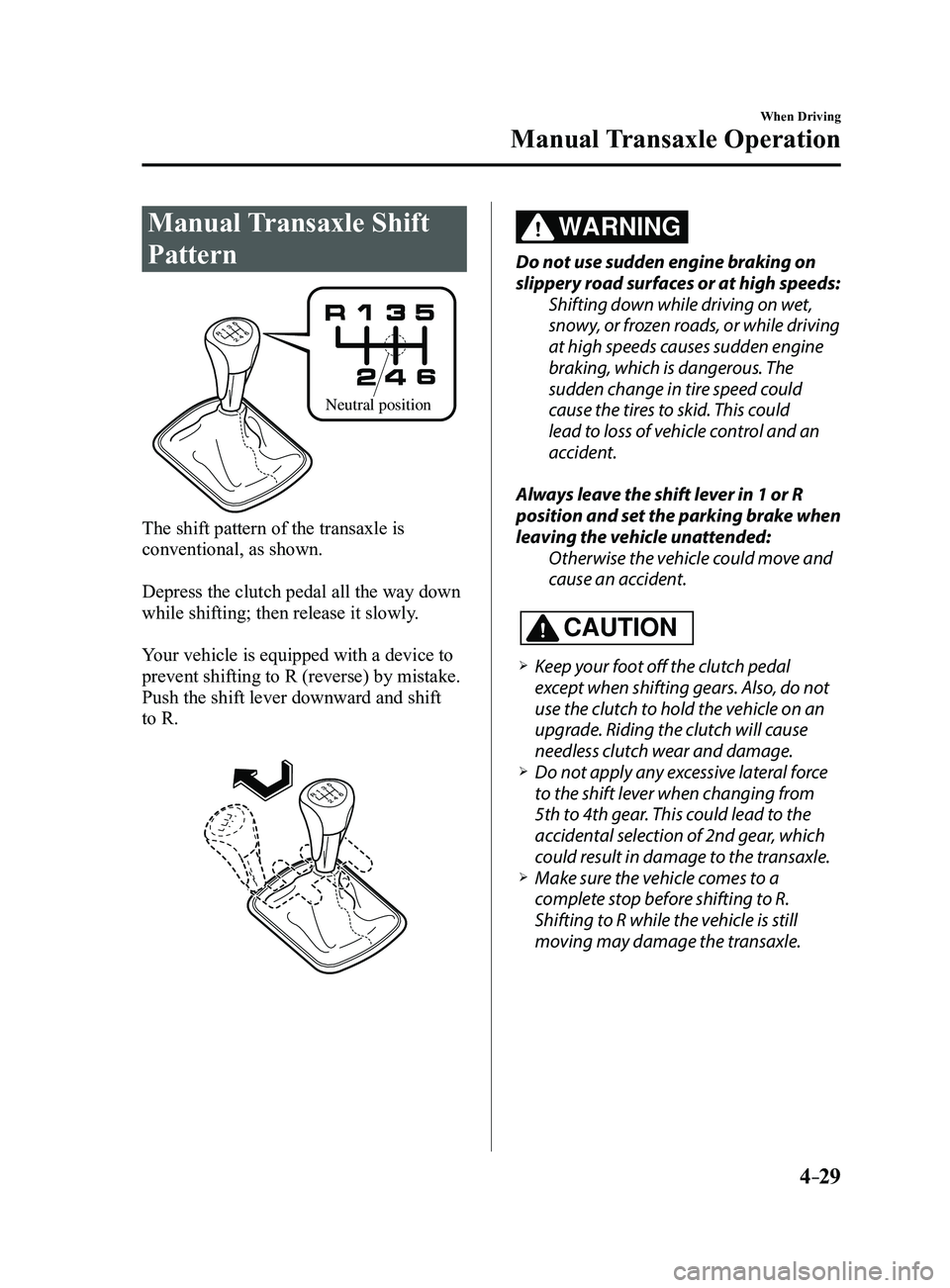
The shift pattern of the transaxle is
conventional, as shown.
Depress the clutch pedal all the way down
while shifting; then release it slowly.
Your vehicle is equipped with a device to
prevent shifting to R (reverse) by mistake.
Push the shift lever downward and shift
to R.
WARNING
Do not use sudden engine braking on
slippery road surfaces or at high speeds:Shifting down while driving on wet,
snowy, or frozen roads, or while driving
at high speeds causes sudden engine
braking, which is dangerous. The
sudden change in tire speed could
cause the tires to skid. This could
lead to loss of vehicle control and an
accident.
Always leave the shift lever in 1 or R
position and set the parking brake when
leaving the vehicle unattended: Otherwise the vehicle could move and
cause an accident.
CAUTION
Keep your foot off the clutch pedal
except when shifting gears. Also, do not
use the clutch to hold the vehicle on an
upgrade. Riding the clutch will cause
needless clutch wear and damage.
Do not apply any excessive lateral force
to the shift lever when changing from
5th to 4th gear. This could lead to the
accidental selection of 2nd gear, which
could result in damage to the transaxle.
Make sure the vehicle comes to a
complete stop before shifting to R.
Shifting to R while the vehicle is still
moving may damage the transaxle.
Mazda3_8FL6-EA-16F_Edition2.indb 292016/08/10 17:36:06
Page 160 of 612
4–30
When Driving
Manual Transaxle Operation
*Some models.
NOTE
(For vehicles with type C instrument
cluster*1)
If the engine speed is about to exceed
the permissible engine speed, the buzzer
sounds.
Refer to Over Rev. Buzzer on page
7-43.
*1 To determine which instrument
cluster is equipped on your Mazda,
Refer to Meters and Gauges on page
4-12.
If shifting to R is difficult, shift back into
neutral, release the clutch pedal, and try
again.
Gear Shift Indicator (GSI)*
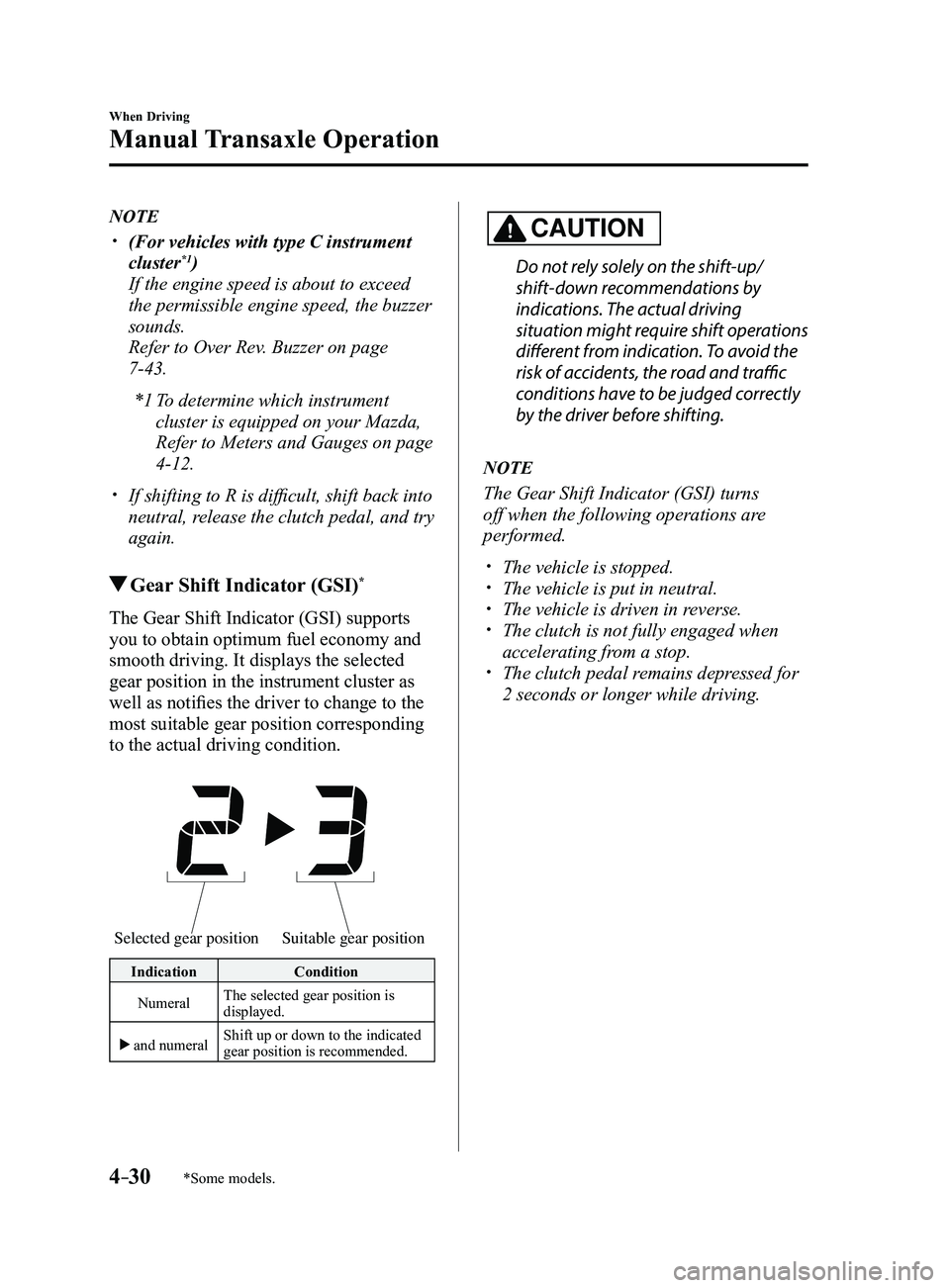
The Gear Shift Indicator (GSI) supports
you to obtain optimum fuel economy and
smooth driving. It displays the selected
gear position in the instrument cluster as
well as notifies the driver to change to the
most suitable gear position corresponding
to the actual driving condition.
Selected gear positionSuitable gear position
Indication Condition
Numeral The selected gear position is
displayed.
and numeral Shift up or down to the indicated
gear position is recommended.
CAUTION
Do not rely solely on the shift-up/
shift-down recommendations by
indications. The actual driving
situation might require shift operations
different from indication. To avoid the
risk of accidents, the road and traffic
conditions have to be judged correctly
by the driver before shifting.
NOTE
The Gear Shift Indicator (GSI) turns
off when the following operations are
performed.
The vehicle is stopped. The vehicle is put in neutral. The vehicle is driven in r
everse. The clutch is not fully engaged when
accelerating from a stop. The clutch pedal remains depressed for
2 seconds or longer while driving.
Mazda3_8FL6-EA-16F_Edition2.indb 302016/08/10 17:36:07
Page 192 of 612
4–62
When Driving
Brake
CAUTION
Do not drive with your foot held on the
clutch pedal or brake pedal, or hold
the clutch pedal depressed halfway
unnecessarily. Doing so could result in
the following:
The clutch and brake parts will wear
out more quickly. The brakes can overheat and
adversely affect brake performance.
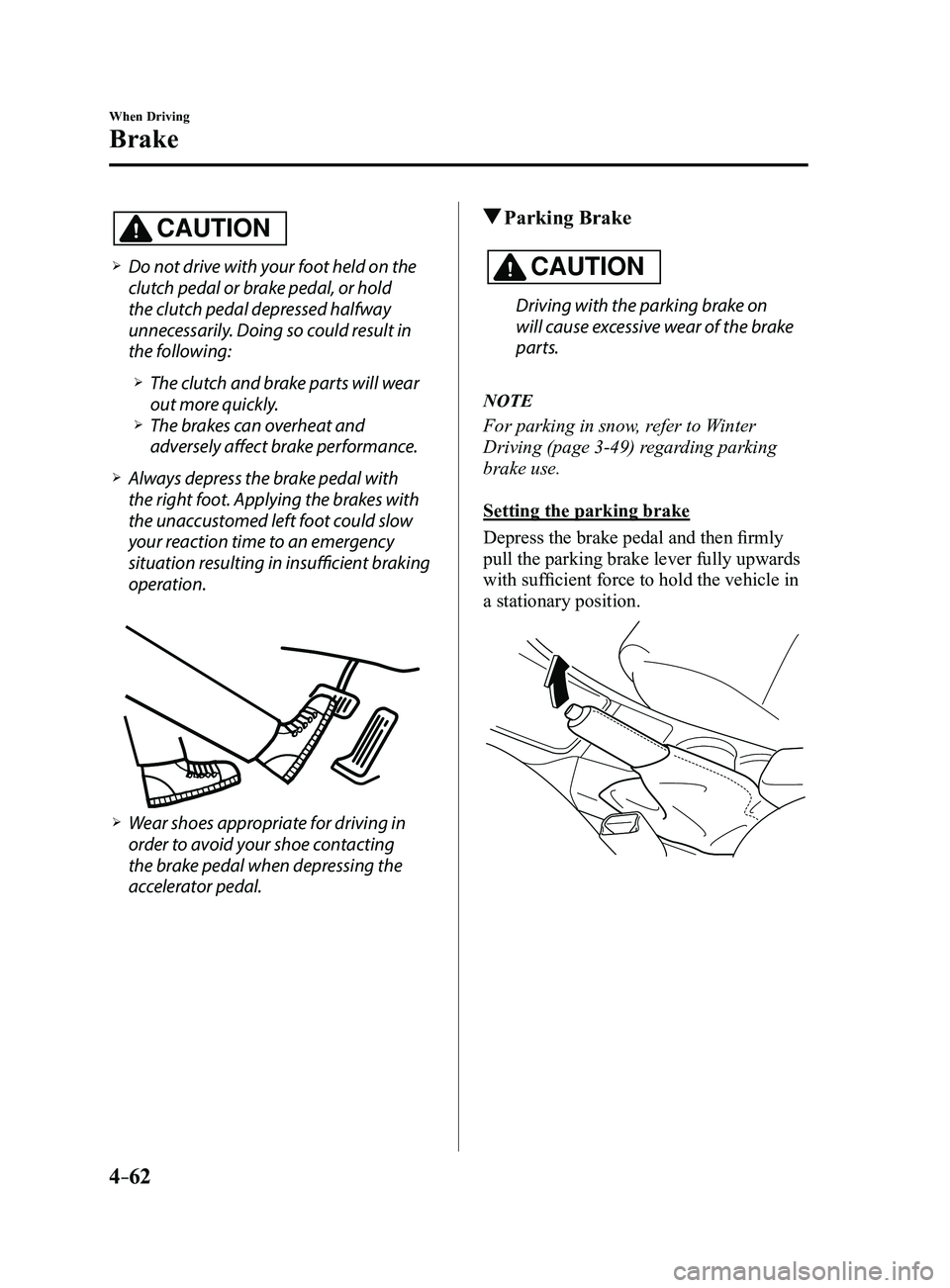
Always depress the brake pedal with
the right foot. Applying the brakes with
the unaccustomed left foot could slow
your reaction time to an emergency
situation resulting in insufficient braking
operation.
Wear shoes appropriate for driving in
order to avoid your shoe contacting
the brake pedal when depressing the
accelerator pedal.
Parking Brake
CAUTION
Driving with the parking brake on
will cause excessive wear of the brake
parts.
NOTE
For parking in snow, refer to Winter
Driving (page
3-49) regarding parking
brake use.
Setting the parking brake
Depress the brake pedal and then firmly
pull the parking brake lever fully upwards
with sufficient force to hold the vehicle in
a stationary position.
Mazda3_8FL6-EA-16F_Edition2.indb 622016/08/10 17:36:26
Page 195 of 612
4–65
When Driving
Brake
When releasing the electric parking
brake
The electric parking brake can be released
while the ignition is switched ON or
the engine is running. When the electric
parking brake is released, the brake system
warning light and the electric parking
brake switch indicator light turn off.
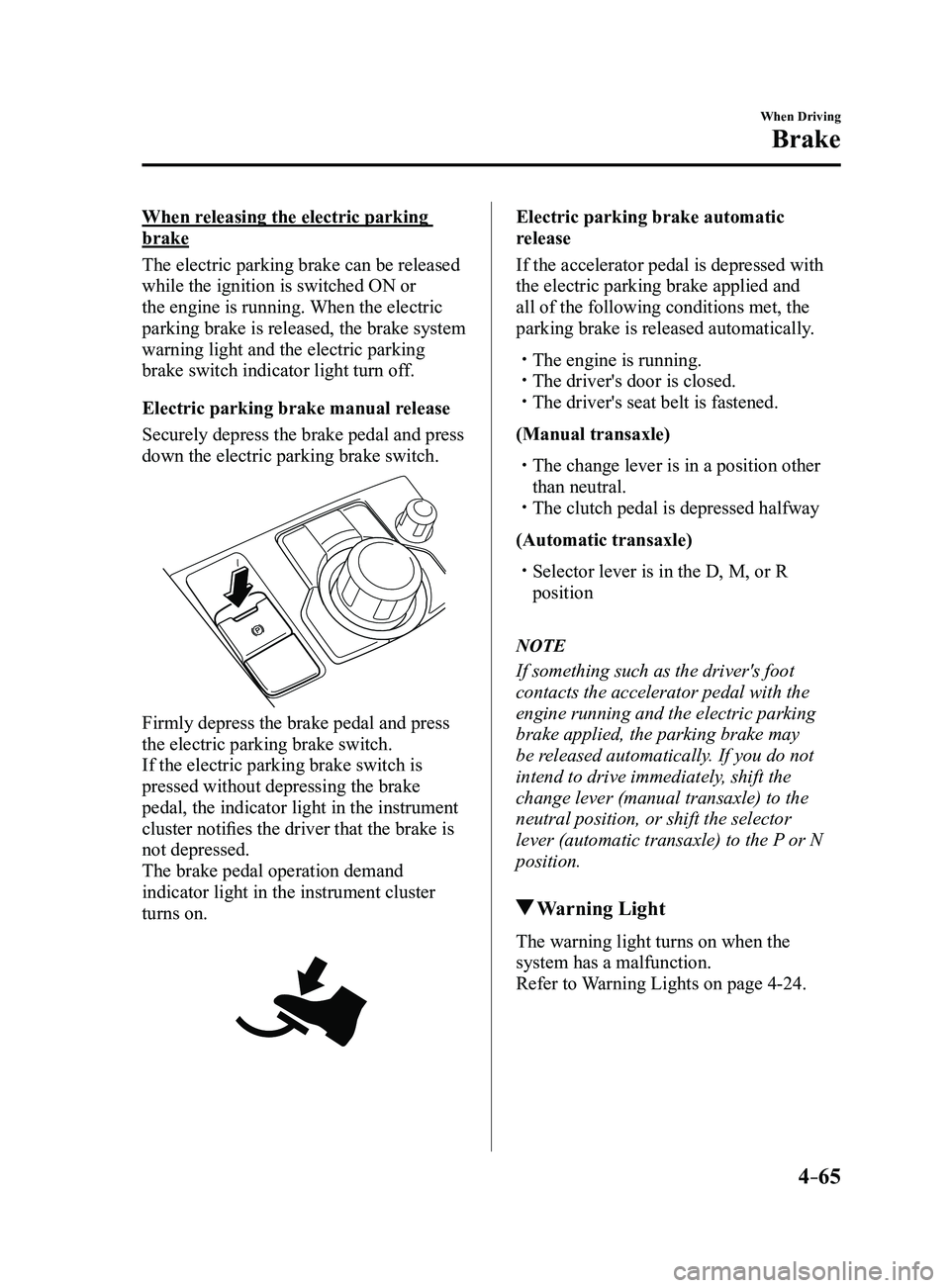
Electric parking brake manual release
Securely depress the brake pedal and press
down the electric parking brake switch.
Firmly depress the brake pedal and press
the electric parking brake switch.
If the electric parking brake switch is
pressed without depressing the brake
pedal, the indicator light in the instrument
cluster notifies the driver that the brake is
not depressed.
The brake pedal operation demand
indicator light in the instrument cluster
turns on.
Electric parking brake automatic
release
If the accelerator pedal is depressed with
the electric parking brake applied and
all of the following conditions met, the
parking brake is released automatically.
The engine is running. The driver's door is closed. The driver's seat belt is fastened.
(Manual transaxle)
The change lever is in a position other
than neutral. The clutch pedal is depressed halfway
(Automatic transaxle)
Selector lever is in the D, M, or R
position
NOTE
If something such as the driver's foot
contacts the accelerator pedal with the
engine running and the electric parking
brake applied, the parking brake may
be released automatically. If you do not
intend to drive immediately, shift the
change lever (manual transaxle) to the
neutral position, or shift the selector
lever (automatic transaxle) to the P or N
position.
Warning Light
The warning light turns on when the
system has a malfunction.
Refer to Warning Lights on page
4-24.
Mazda3_8FL6-EA-16F_Edition2.indb 652016/08/10 17:36:27
Page 197 of 612
4–67
When Driving
Brake
Hill Launch Assist (HLA)
Hill Launch Assist (HLA) is a function
which assists the driver in accelerating
from a stop while on a slope. When
the driver releases the brake pedal and
depresses the accelerator pedal while
on a slope, the function prevents the
vehicle from rolling. The braking force is
maintained automatically after the brake
pedal is released on a steep grade.
For vehicles with a manual transaxle,
Hill Launch Assist (HLA) operates on a
downward slope when the shift lever is in
the reverse (R) position, and on an upward
slope when the shift lever is in a position
other than the reverse (R) position.
For vehicles with an automatic transaxle,
Hill Launch Assist (HLA) operates on a
downward slope when the selector lever
is in the reverse (R) position, and on an
upward slope when the selector lever is in
a forward gear.
WARNING
Do not rely completely on Hill Launch
Assist (HLA):Hill Launch Assist (HLA) is an auxiliary
device for accelerating from a stop
on a slope. The system only operates
for about two seconds and therefore,
relying only on the system, when
accelerating from a stop is dangerous
because the vehicle may move (roll)
unexpectedly and cause an accident.
The vehicle could roll depending on the
vehicle's load or if it is towing something.
In addition, for vehicles with a manual
transaxle, the vehicle could still roll
depending on how the clutch pedal or
the accelerator pedal is operated.
Always confirm the safety around the
vehicle before starting to drive the
vehicle.
NOTE
Hill Launch Assist (HLA) does not
operate on a gentle slope. In addition,
the gradient of the slope on which the
system will operate changes depending
on the vehicle's load.
Hill Launch Assist (HLA) does not
operate if the parking brake is applied,
the vehicle has not stopped completely,
or the clutch pedal is released.
While Hill Launch Assist (HLA) is
operating, the brake pedal may feel
stiff and vibrate, however, this does not
indicate a malfunction.
Hill Launch Assist (HLA) does not
operate while the TCS/DSC indicator
light is illuminated.
Refer to Warning/Indicator Lights on
page 4-23. Hill Launch Assist (HLA) does not
turn off even if the DSC OFF switch is
pressed to turn off the TCS/DSC.
Mazda3_8FL6-EA-16F_Edition2.indb 672016/08/10 17:36:28