instrument panel MAZDA MODEL 3 4-DOOR 2017 Owners Manual
[x] Cancel search | Manufacturer: MAZDA, Model Year: 2017, Model line: MODEL 3 4-DOOR, Model: MAZDA MODEL 3 4-DOOR 2017Pages: 612
Page 148 of 612
4–18
When Driving
Instrument Cluster and Display
Dashboard Illumination
When the position lights are turned
on with the ignition switched ON,
the brightness of the instrument panel
illumination is dimmed.
NOTE
When the position lights are turned on,
the position lights indicator light in the
instrument cluster turns on.
Refer to Headlights on page
4-43.
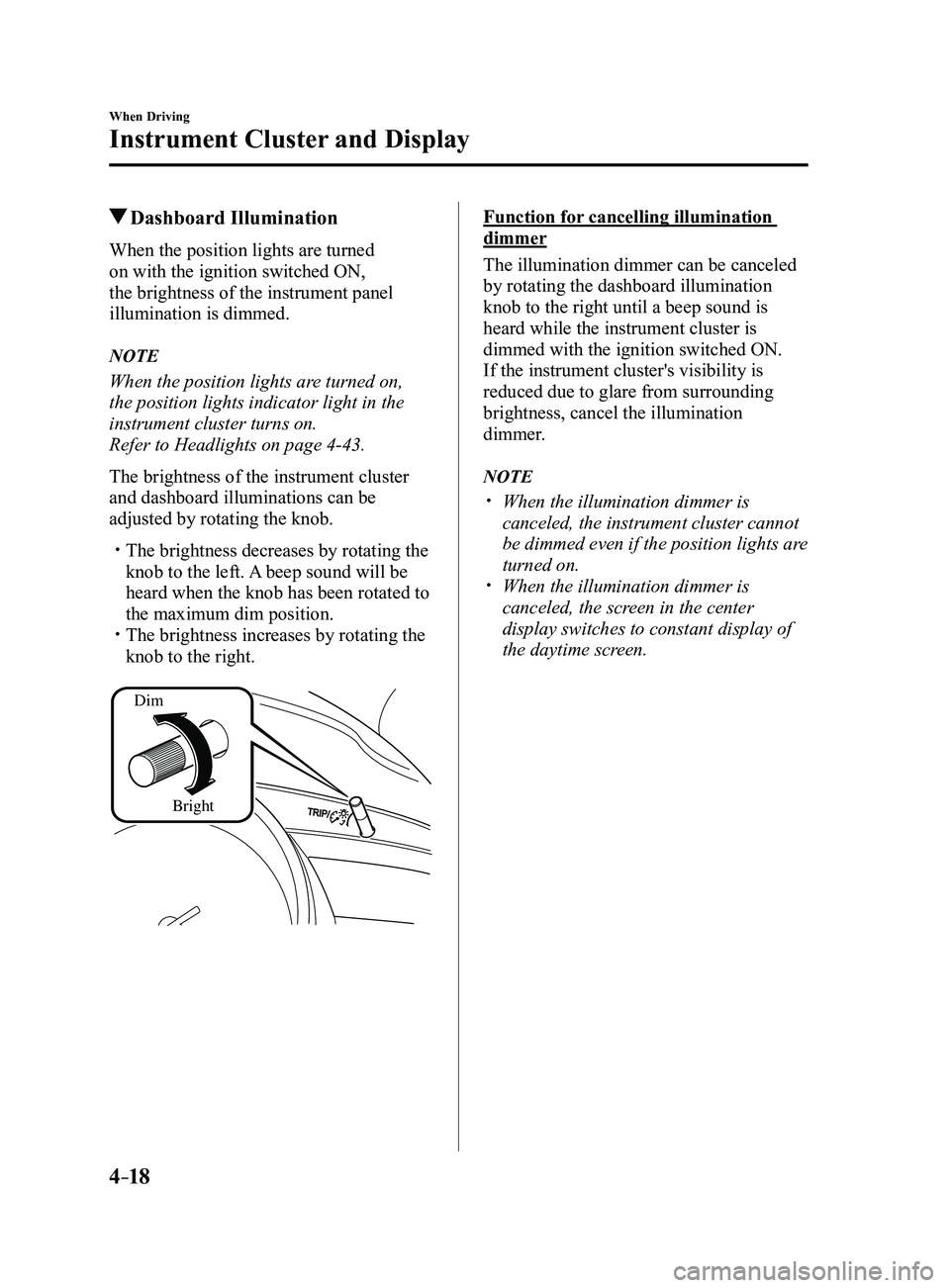
The brightness of the instrument cluster
and dashboard illuminations can be
adjusted by rotating the knob.
The brightness decreases by rotating the
knob to the left. A beep sound will be
heard when the knob has been rotated to
the maximum dim position.
The brightness increases by rotating the
knob to the right.
Dim
Bright
Function for cancelling illumination
dimmer
The illumination dimmer can be canceled
by rotating the dashboard illumination
knob to the right until a beep sound is
heard while the instrument cluster is
dimmed with the ignition switched ON.
If the instrument cluster's visibility is
reduced due to glare from surrounding
brightness, cancel the illumination
dimmer.
NOTE
When the illumination dimmer is
canceled, the instrument cluster cannot
be dimmed even if the position lights are
turned on.
When the illumination dimmer is
canceled, the screen in the center
display switches to constant display of
the daytime screen.
Mazda3_8FL6-EA-16F_Edition2.indb 182016/08/10 17:35:49
Page 166 of 612
4–36
When Driving
Automatic Transaxle
Indicators
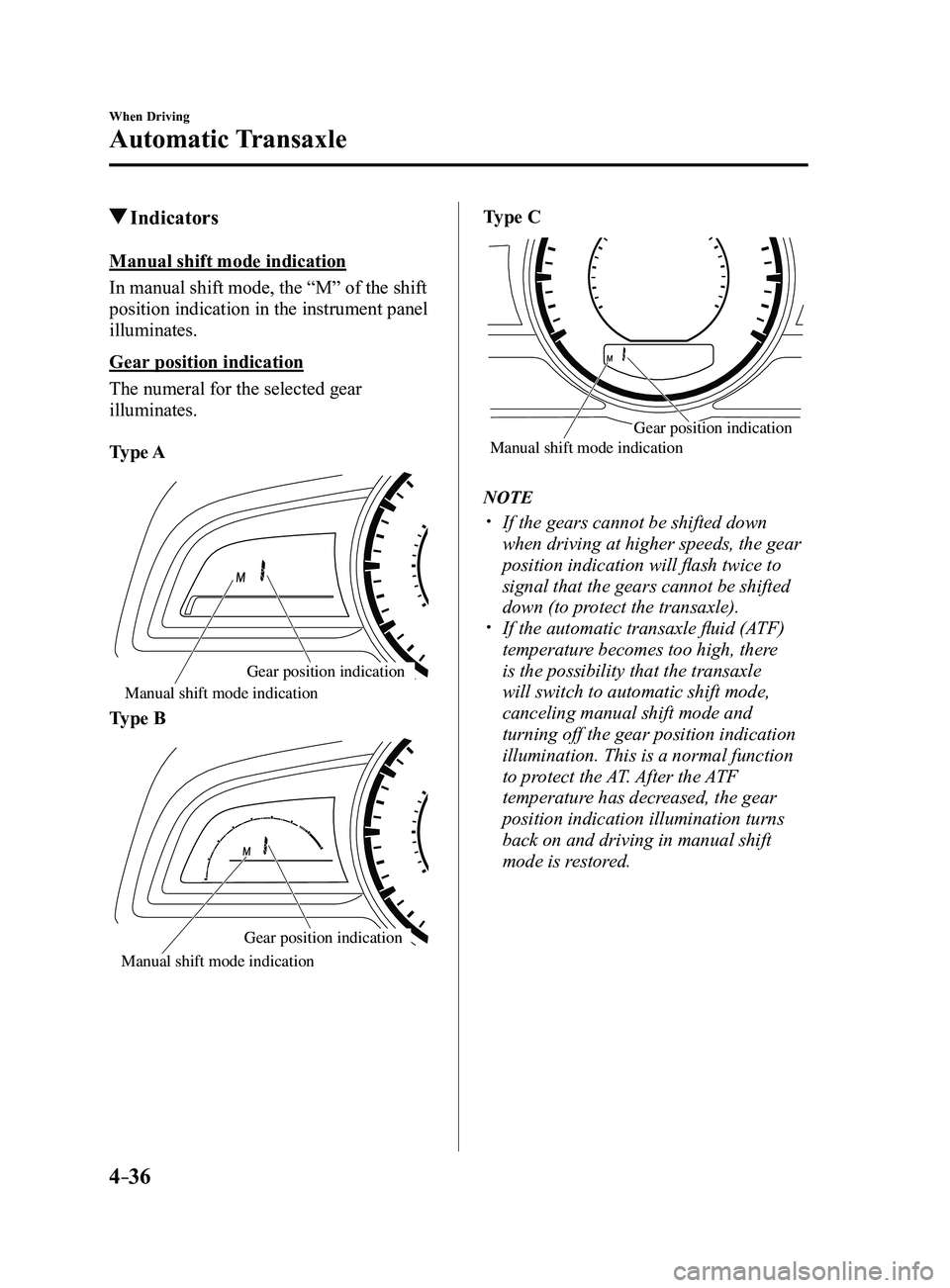
Manual shift mode indication
In manual shift mode, the “M” of the shift
position indication in the instrument panel
illuminates.
Gear position indication
The numeral for the selected gear
illuminates.
Type A
Manual shift mode indication
Gear position indication
Type B
Gear position indication
Manual shift mode indication
Type C
Manual shift mode indication Gear position indication
NOTE
If the gears cannot be shifted down
when driving at higher speeds, the gear
position indication will flash twice to
signal that the gears cannot be shifted
down (to protect the transaxle).
If the automatic transaxle fluid (A
TF)
temperature becomes too high, there
is the possibility that the transaxle
will switch to automatic shift mode,
canceling manual shift mode and
turning off the gear position indication
illumination. This is a normal function
to protect the AT. After the ATF
temperature has decreased, the gear
position indication illumination turns
back on and driving in manual shift
mode is restored.
Mazda3_8FL6-EA-16F_Edition2.indb 362016/08/10 17:36:10
Page 486 of 612
6–74
Maintenance and Care
Appearance Care
*Some models.
NOTE
Because genuine leather is a natural
material, its surface is not uniform and
it may have natural scars, scratches,
and wrinkles.
To maintain the quality for as long as
possible, periodical maintenance, about
twice a year, is recommended.
If the leather upholstery comes into
contact with any of the following, clean
it immediately.
Leaving it uncleaned could cause
premature wear, mold, or stains.
Sand or dirt Grease or oil, such as hand cream Alcohol, such as in cosmetic or hair
dressing items
If the leather upholstery gets wet,
promptly remove moisture with a dry
cloth. Remaining moisture on the
surface may cause deterioration such as
hardening and shrinkage.
Exposure to direct sunlight for long
periods may cause deterioration and
shrinkage. When parking the car under
direct sunlight for long periods, shade
the interior using sunshades.
Do not leave vinyl products on the
leather upholstery for long periods.
They may affect the leather quality
and coloring. If the cabin temperature
becomes hot, the vinyl may deteriorate
and adhere to the genuine leather.
Plastic Part Maintenance
CAUTION
Do not use polishing agents.
Depending on the product ingredients,
they could cause discoloration, stains,
cracks or peeling of the coating.
Instrument Panel Top (Soft pad)
Maintenance
Extremely soft material is used for the
soft pad surface. If the soft pad surface is
rubbed harshly with a dry cloth, it could
result in the surface being damaged and
leaving white scratch marks.
1. Wipe the soiled area with a soft cloth
soaked in a mild detergent (approx.
5%) diluted with water.
2. Wipe off the remaining detergent using
a cloth soaked in clean water and
wrung out well.
Active Driving Display
Maintenance*
The combiner and mirror surface have
a special coating. When cleaning it, do
not use a hard cloth, a cloth with a rough
surface, or cleaning detergent. Use a fine-
textured, soft cloth.
If a chemical solvent gets on the combiner
or mirror surface, wipe it off immediately.
Otherwise, they could be damaged and the
surface coating could be scratched.
Mazda3_8FL6-EA-16F_Edition2.indb 742016/08/10 17:39:06
Page 607 of 612
10–5
I
i-ACTIVSENSE ..................................4-81
Active safety technology
...............4-81
Adaptive Front Lighting System
(AFS)
.............................................4-84
Blind Spot Monitoring (BSM)
......4-88
Camera and sensors
.......................4-82
Distance Recognition Support System
(DRSS)
........................................4-101
Forward Sensing Camera (FSC) ...4-136
High Beam Control System
(HBC)
............................................4-85
Lane-keep Assist System (LAS) &
Lane Departure Warning System
(LDWS)
.......................................4-117
Mazda Radar Cruise Control
(MRCC) ....................................... 4-107
Pre-crash safety technology
..........4-82
Radar sensor (front) .....................4-141
Radar sensors (rear) .....................4-144
Rear Cross Traffic Alert
(RCTA)
........................................4-103
Smart Brake Support (SBS)
........4-133
Smart City Brake Support
(SCBS)
........................................4-128
Traffic Sign Recognition System
(TSR)
.............................................4-94
i-ELOOP
.............................................4-72
Control status display
....................4-74
Display
..........................................4-72
i-ELOOP indicator light
................4-74
i-ELOOP warning beep
.......................7-41
If a Warning Light Turns On or
Flashes................................................. 7-25
If the Active Driving Display does not
operate
.................................................7-46
Ignition Switch
..............................................4-4
Ignition not switched off (STOP) warning
beep
.....................................................7-40
Immobilizer System
............................3-42 Indicator Lights
...................................4-26
Low engine coolant temperature
...4-28
Wrench
..........................................4-28
Inside Trunk Release Lever
................3-26
Inspecting Brake/Clutch Fluid Level ...6-30
Inspecting Coolant Level
....................6-28
Inspecting Engine Oil Level
...............6-28
Inspecting Washer Fluid Level ............6-30
Interior Care
........................................6-72
Active driving display
maintenance ................................... 6-74
Cleaning the floor mats
.................6-75
Cleaning the window interiors
......6-75
Instrument panel top (Soft pad)
maintenance ................................... 6-74
Leather upholstery maintenance
...6-73
Panel maintenance
.........................6-75
Plastic part maintenance
................6-74
Seat belt maintenance
....................6-73
Upholstery and synthetic leather
maintenance ................................... 6-73
Vinyl upholstery maintenance
.......6-73
Interior Lights
...................................5-111
Luggage Compartment Light
......5-111
Map Lights
..................................5-111
Overhead Lights
..........................5-111
J
Jack .......................................................7-4
Jump-Starting
......................................7-16
Index
Mazda3_8FL6-EA-16F_Edition2.indb 52016/08/10 17:39:58