remote start MAZDA MODEL 3 4-DOOR 2017 Owners Manual
[x] Cancel search | Manufacturer: MAZDA, Model Year: 2017, Model line: MODEL 3 4-DOOR, Model: MAZDA MODEL 3 4-DOOR 2017Pages: 612
Page 9 of 612

1–3
Pictorial Index
Interior Overview
The equipment and installation position varies by vehicle
Audio control switches........................................................................\
..................page 5-55
Instrument cluster ........................................................................\
..........................page 4-12
Dashboard illumination knob ........................................................................\
........page 4-18
Cruise control switches ........................................................................\
....page 4-110, 4-146
Hazard warning flasher switch ........................................................................\
......page 4-56
Seat warmer switches ........................................................................\
......................page 2-7
Heated steering wheel switch ........................................................................\
........page 3-33
Push button start ........................................................................\
..............................page 4-4
Steering shift switches ........................................................................\
..................page 4-37
Lock release lever ........................................................................\
.........................page 3-33
Hood release handle ........................................................................\
......................page 6-22
Remote fuel-filler lid release ........................................................................\
.........page 3-31
Mazda3_8FL6-EA-16F_Edition2.indb 32016/08/10 17:34:47
Page 79 of 612
3–3
Before Driving
Keys
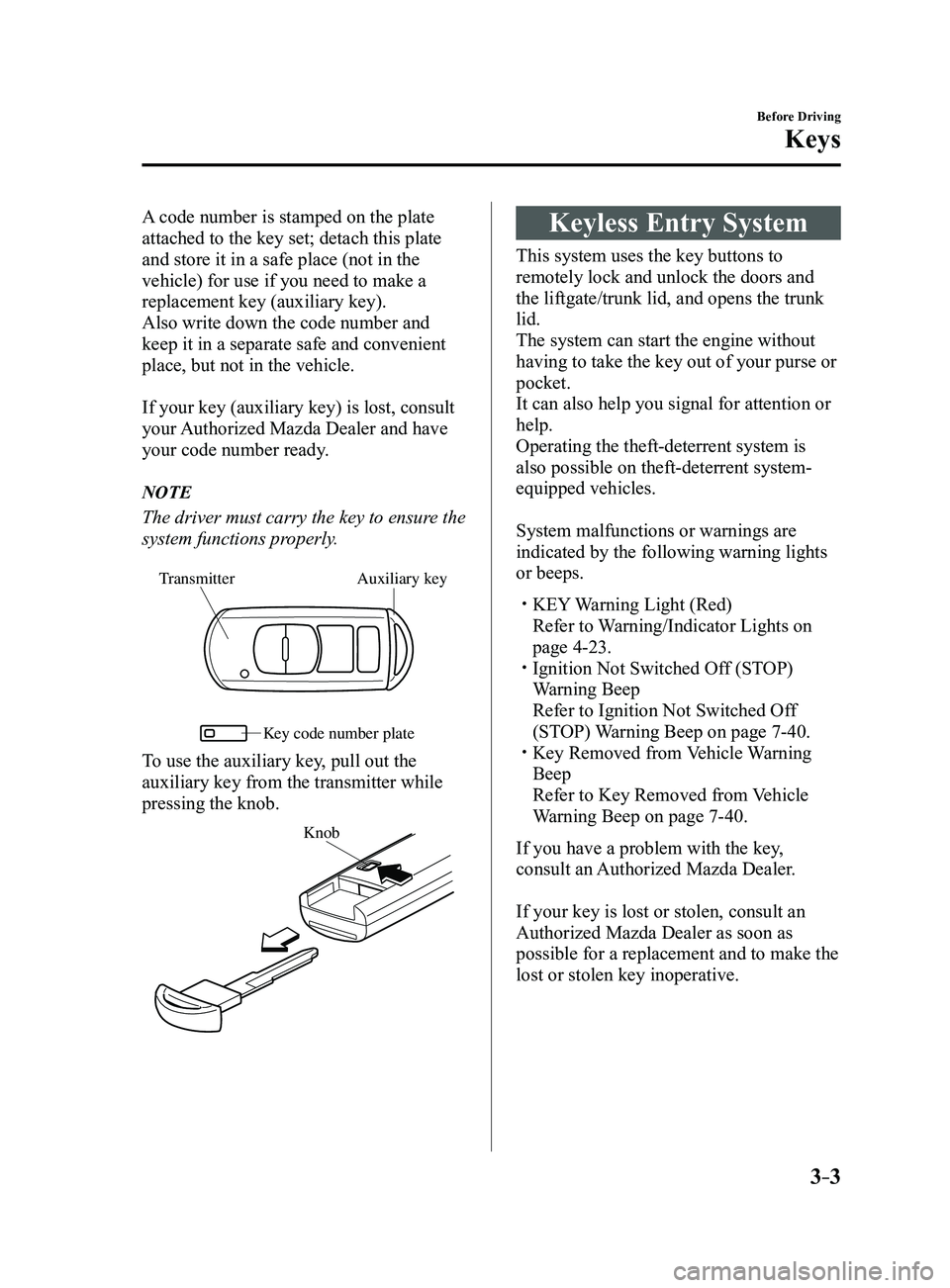
A code number is stamped on the plate
attached to the key set; detach this plate
and store it in a safe place (not in the
vehicle) for use if you need to make a
replacement key (auxiliary key).
Also write down the code number and
keep it in a separate safe and convenient
place, but not in the vehicle.
If your key (auxiliary key) is lost, consult
your Authorized Mazda Dealer and have
your code number ready.
NOTE
The driver must carry the key to ensure the
system functions properly.
Auxiliary key
Transmitter
Ke y code number plate
To use the auxiliary key, pull out the
auxiliary key from the transmitter while
pressing the knob.
Knob
Keyless Entry System
This system uses the key buttons to
remotely lock and unlock the doors and
the liftgate/trunk lid, and opens the trunk
lid.
The system can start the engine without
having to take the key out of your purse or
pocket.
It can also help you signal for attention or
help.
Operating the theft-deterrent system is
also possible on theft-deterrent system-
equipped vehicles.
System malfunctions or warnings are
indicated by the following warning lights
or beeps.
KEY Warning Light (Red)
Refer to Warning/Indicator Lights on
page 4-23. Ignition Not Switched Of f (STOP)
Warning Beep
Refer to Ignition Not Switched Of f
(STOP) Warning Beep on page 7-40. Key Removed from Vehicle Warning
Beep
Refer to Key Removed from Vehicle
Warning Beep on page 7-40.
If you have a problem with the key,
consult an Authorized Mazda Dealer.
If your key is lost or stolen, consult an
Authorized Mazda Dealer as soon as
possible for a replacement and to make the
lost or stolen key inoperative.
Mazda3_8FL6-EA-16F_Edition2.indb 32016/08/10 17:35:16
Page 366 of 612
5–74
Interior Features
Bluetooth®
*Some models.
Bluetooth®*
Bluetooth® Hands-Free outline
When a Bluetooth
® device (mobile phone) is connected to the vehicle's Bluetooth® unit via
radio wave transmission, a call can be made or received by pressing the \
talk button, pick-
up button, or hang-up button on the audio remote control switch, or by o\
perating the center
display. For example, even if a device (mobile phone) is in your coat pocket,\
a call can be
made without taking the device (mobile phone) out and operating it dir\
ectly.
Bluetooth
® audio outline
When a portable audio unit equipped with the Bluetooth
® communication function is paired
to the vehicle, you can listen to music stored on the paired portable au\
dio device from the
vehicle's speakers. It is not necessary to connect the portable audio de\
vice to the vehicle's
external input terminal. After programming, operate the vehicle audio control panel to play/
stop the audio.
NOTE
For your safety , a device can be paired only when the vehicle is parked. If the vehicle
starts to move, the pairing procedure will end. Park the vehicle in a safe place before
pairing.
The communication range of a Bluetooth® equipped device is about 10 meters (32 ft) or
less.
Basic audio operation is available using voice commands even if Bluetoot\
h® is not
connected.
For safety r easons, operation of the center display is disabled while the vehicle is\
being
driven. However, items not displayed in gray can be operated using the commander
switch while the vehicle is being driven.
Mazda3_8FL6-EA-16F_Edition2.indb 742016/08/10 17:37:57