tires MAZDA MODEL 3 4-DOOR 2018 Owner's Manual
[x] Cancel search | Manufacturer: MAZDA, Model Year: 2018, Model line: MODEL 3 4-DOOR, Model: MAZDA MODEL 3 4-DOOR 2018Pages: 624, PDF Size: 59.23 MB
Page 264 of 624

Do not disassemble or modify the Forward Sensing Camera (FSC).
Disassembly or modification of the Forward Se nsing Camera (FSC) will cause a malfunction
or mistaken operation. Consequently, each system may not operate normally which could
lead to an unexpected accident.
Heed the following cautions to assure the correct operation of the Forward Sensing Camera
(FSC).
Be careful not to scratch the Forward Sensing Camera (FSC) lens or allow it to get dirty.
Do not remove the Forward Sensing Camera (FSC) cover.
Do not place objects on the dashboard which reflect light.
Always keep the windshield glass around the camera clean by removing dirt or fogging.
Use the windshield defroster to remove fogging on the windshield.
Consult an Authorized Mazda Dealer regard ing cleaning the interior side of the
windshield around the Forw ard Sensing Camera (FSC).
Consult an Authorized Mazda Dealer before performing repairs around the Forward
Sensing Camera (FSC).
The Forward Sensing Camera (FSC) is installed to the windshield. Consult an Authorized
Mazda Dealer for windshield repair and replacement.
When cleaning the windshield, do not allow glass cleaners or similar cleaning fluids to
get on the Forward Sensing Camera (FSC) lens. In addition, do not touch the Forward
Sensing Camera (FSC) lens.
When performing repairs around the rearvi ew mirror, consult an Authorized Mazda
Dealer.
Consult an Authorized Mazda Dealer regarding cleaning of the camera lens.
Do not hit or apply strong force to the Forward Sensing Camera (FSC) or the area around
it. If the Forward Sensing Camera (FSC) is severely hit or if there are cracks or damage
caused by flying gravel or debris in the area around it, stop using the following systems
and consult an Authorized Mazda Dealer.
High Beam Control System (HBC)
Lane-keep Assist System (LAS) & Lane Departure Warning System (LDWS)
Traffic Sign Recognition System ( TSR)
Smart City Brake Support (SCBS)
Smart Brake Support (SBS)
The direction in which the Forward Sensing Camera (FSC) is pointed has been finely
adjusted. Do not change the installation position of the Forward Sensing Camera (FSC) or
remove it. Otherwise, it could result in damage or malfunction.
Always use tires for all wheels that are of the specified size, and the same manufacturer,
brand, and tread pattern. In addition, do no t use tires with significantly different wear
patterns on the same vehicle as the system may not operate normally.
When Driving
i-ACTIVSENSE
4-132
Mazda3_8GE4-EA-17F_Edition1 2017-4-7 11:59:21
Page 265 of 624

The Forward Sensing Camera (FSC) includes a function for detecting a soiled windshield
and informing the driver, however, depending on the conditions, it may not detect plastic
shopping bags, ice or snow on the windshield. In such cases, the system cannot accurately
determine a vehicle ahead and may not be able to operate normally. Always drive carefully
and pay attention to the road ahead.
NOTE
In the following cases, the Forward Sensing Camera (FSC) cannot detect target objects
correctly, and each system may be unable to operate normally.
The height of the vehicle ahead is low.
You drive your vehicle at the same speed as the vehicle ahead.
Headlights are not turned on during the night or when going through a tunnel.
In the following cases, the Forward Sensing Camera (FSC) may not be able to detect
target objects correctly.
Under bad weather condition, such as rain, fog and snow.
The window washer is being used or the windshield wipers are not used when it's
raining.
Ice, fog, snow, frost, rainfall, dirt, or foreign matter such as a plastic bag is stuck on the
windshield.
Trucks with low loading platforms and vehicl es with an extremely low or high profile.
When driving next to walls with no patterning (including fences and longitudinally
striped walls).
The taillights of the vehicle ahead are turned off.
A vehicle is outside the illumi nation range of the headlights.
The vehicle is making a sharp turn, or ascending or descending a steep slope.
Entering or exiting a tunnel.
Heavy luggage is loaded causing the vehicle to tilt.
Strong light is shone at the front of the vehicle (back light or high-beam light from
on-coming vehicles).
There are many light emitters on the vehicle ahead.
When the vehicle ahead is not equipped with taillights or the taillights are turned off at
nighttime.
Elongated luggage or cargo is loaded onto installed roof rails and covers the Forward
Sensing Camera (FSC).
Exhaust gas from the vehicle in front, sand, snow, and water vapor rising from
manholes and grating, and water splashed into the air.
When towing a malfunctioning vehicle.
The vehicle is driven with tires having significantly different wear.
The vehicle is driven on down slopes or bumpy roads.
There are water puddles on the road.
When Driving
i-ACTIVSENSE
4-133
Mazda3_8GE4-EA-17F_Edition1 2017-4-7 11:59:21
Page 269 of 624

Do not use the front bumper to push other vehicles or obstructions such as when pulling
out of a parking space. Otherwise, the radar sensor (front) could be hit and its position
deviated.
Do not remove, disassemble, or modify the radar sensor (front).
For repairs, replacement or paint work around the radar sensor (front), consult an
Authorized Mazda Dealer.
Do not modify the suspension. If the suspension are modified, the vehicle's posture could
change and the radar sensor (front) may not be able to correctly detect a vehicle ahead or
an obstruction.
NOTE
Under the following conditions, the radar sensor (front) may not be able to detect vehicles
ahead or obstructions correctly and each system may not operate normally.
The rear surface of a vehicle ahead does not reflect radio waves effectively, such as an
unloaded trailer or an automobile with a loading platform covered by a soft top,
vehicles with a hard plastic tailgate, and round-shaped vehicles.
Vehicles ahead with low vehicle height and thus less area for reflecting radio waves.
Visibility is reduced due to a vehicle ahead casting off water, snow, or sand from its tires
and onto your windshield.
The trunk/luggage compartment is loaded with heavy objects or the rear passenger
seats are occupied.
Ice, snow, or soiling is on the front surface of the front emblem.
During inclement weather such as rain, snow, or sand storms.
When driving near facilities or objects emitting strong radio waves.
Under the following conditions, the radar sensor (front) may not be able to detect vehicles
ahead or obstructions.
The beginning and end of a curve.
Roads with continuous curves.
Narrow lane roads due to road construction or lane closures.
The vehicle ahead enters the radar sensor's blind spot.
The vehicle ahead is running abnormally due to accident or vehicle damage.
Roads with repeated up and down slopes
Driving on poor roads or unpaved roads.
The distance between your vehicle and the vehicle ahead is extremely short.
A vehicle suddenly comes close such as by cutting into the lane.
To prevent incorrect operation of the system, use tires of the same specified size,
manufacturer, brand, and tread pattern on all four wheels. In addition, do not use tires
with significantly different wear patterns or tire pressures on the same vehicle (Including
the temporary spare tire).
If the battery power is weak, the system may not operate correctly.
When Driving
i-ACTIVSENSE
4-137
Mazda3_8GE4-EA-17F_Edition1 2017-4-7 11:59:21
Page 278 of 624

Tire Pressure Monitoring System*
The Tire Pressure Monitoring System (TPMS) monitors the air pressure of all four tires. If
the air pressure of one or more tires is too low, the system warns the driver b y indicating the
tire pressure monitoring system warning light in the instrument cluster and operating a beep
sound. The system monitors the tire pressures indirectly using the data sent from the ABS
wheel speed sensors.
To allow the system to operate c orrectly, the system needs to be initialized with the specified
tire pressure (value on the tire pressure label). Follow the pr ocedure and perform the
initialization.
Refer to Tire Pressure Monitorin g System Initialization on page 4-148.
The warning light flashes when the system has a malfunction.
Refer to Warning Lights on page 4-24.
ABS wheel speed sensor
When Driving
Tire Pressure Monitoring System
4-146*Some models.
Mazda3_8GE4-EA-17F_Edition1 2017-4-7 11:59:21
Page 279 of 624

CAUTION
Each tire, including the spare (if provided), should be checked monthly when cold and
inflated to the inflation pressure recommended by the vehicle manufacturer on the vehicle
placard or tire inflation pressure label. (If your vehicle has tires of a
different size than the
size indicated on the vehicle placard or tire in flation pressure label, you should determine
the proper tire inflation pressure for those tires.)
As an added safety feature, your vehicle has been equipped with a tire pressure monitoring
system ( TPMS) that illuminates a low tire pressu re telltale when one or more of your tires is
significantly
under-inflated. Accordingly, when the low tire
pressure telltale illuminates, you
should stop and check your tires as soon as possible, and inflate them to the proper
pressure. Driving on a significantly under-infla ted tire causes the tire to overheat and can
lead to tire failure. Under-inflation also reduces fuel
efficiency and tire tread life, and may
affect the vehicle's handling and stopping ability.
Please note that the TPMS is not a substitu te for proper tire maintenance, and it is the
driver's responsibility to maintain correct tire pressure, even if under-inflation has not
reached the level to trigger illumination of the TPMS low tire pressure telltale.
Your vehicle has also been equipped with a TPMS malfunction indicator to indicate when
the system is not operating properly.
The TPMS malfunction indicator is combined wi th the low tire pressure telltale. When the
system detects a malfunction, the telltale will flash for approximately one minute and then
remain continuously illuminate d. This sequence will continue upon subsequent vehicle
start-ups as long as the malfunction exists. When the malfunction indicator is illuminated,
the system may not be able to detect or signal low tire pressure as intended. TPMS
malfunctions may occur for a variety of reasons, including the installation of replacement
or alternate tires or wheels on the vehicle that prevent the TPMS from functioning properly.
Always check the TPMS malfunction telltale after replacing one or more tires or wheels on
your vehicle to ensure that the replacement or alternate tires and wheels allow the TPMS to
continue to function properly.
To avoid false readings, the system samples for a little while before indicating a problem. As
a result it will not instantane ously register a rapid tire
deflation or blow out.
NOTE
Because this system detects slight changes in tire conditions, the timing of the warning may
be faster or slower in the following cases:
The size, manufacturer, or the type of
tires is different from the specification.
The size, manufacturer, or the type of a tire is different from the others, or the level of tire
wear is excessively different between them.
A run-flat tire, studless tire, snow tire, or tire chains are used.
When Driving
Tire Pressure Monitoring System
4-147
Mazda3_8GE4-EA-17F_Edition1 2017-4-7 11:59:21
Page 280 of 624
An emergency tire is used (The tire pressure monitoring system warning light may flash
and then continue illuminating).
A tire is repaired using the emergency flat tire repair kit.
The tire pressure is excessively higher than the specified pressure, or the tire pressure is
suddenly lowered for some reason such as a tire burst during driving.
The vehicle speed is lower than about 15 km/h (9.3 mph) (including when the vehicle is
stopped), or the drive period is shorter than 5 minutes.
The vehicle is driven on an extremely rough road or a slippery, icy road.
Hard steering and rapid acceleration/decelera tion are repeated such as during aggressive
driving on a winding road.
Load on the vehicle is applied to a tire such as by loading heavy luggage to one side of
the vehicle.
System initialization has not been implem ented with the specified tire pressure.
▼Tire Pressure Monitoring System
Initialization
In the following cases, system
initialization must be
performed so that the
system operates normally.
A tire pressure is adjusted.
Tire rotation is performed.
A tire or wheel is replaced.
The battery is repl aced or completely
drained.
The tire pressure monitoring system
warning light is illuminated.
Initialization method
1. Park the car in a sa fe place and firmly
apply the parking brake.
2. Let the tires cool, then adjust the tire pressure of all four (4) tires to the
specified pressure indicated on the tire
pressure label located on the driver's
door frame (door open).
Refer to Tires on page 9-10.
3. Switch the ignition ON.
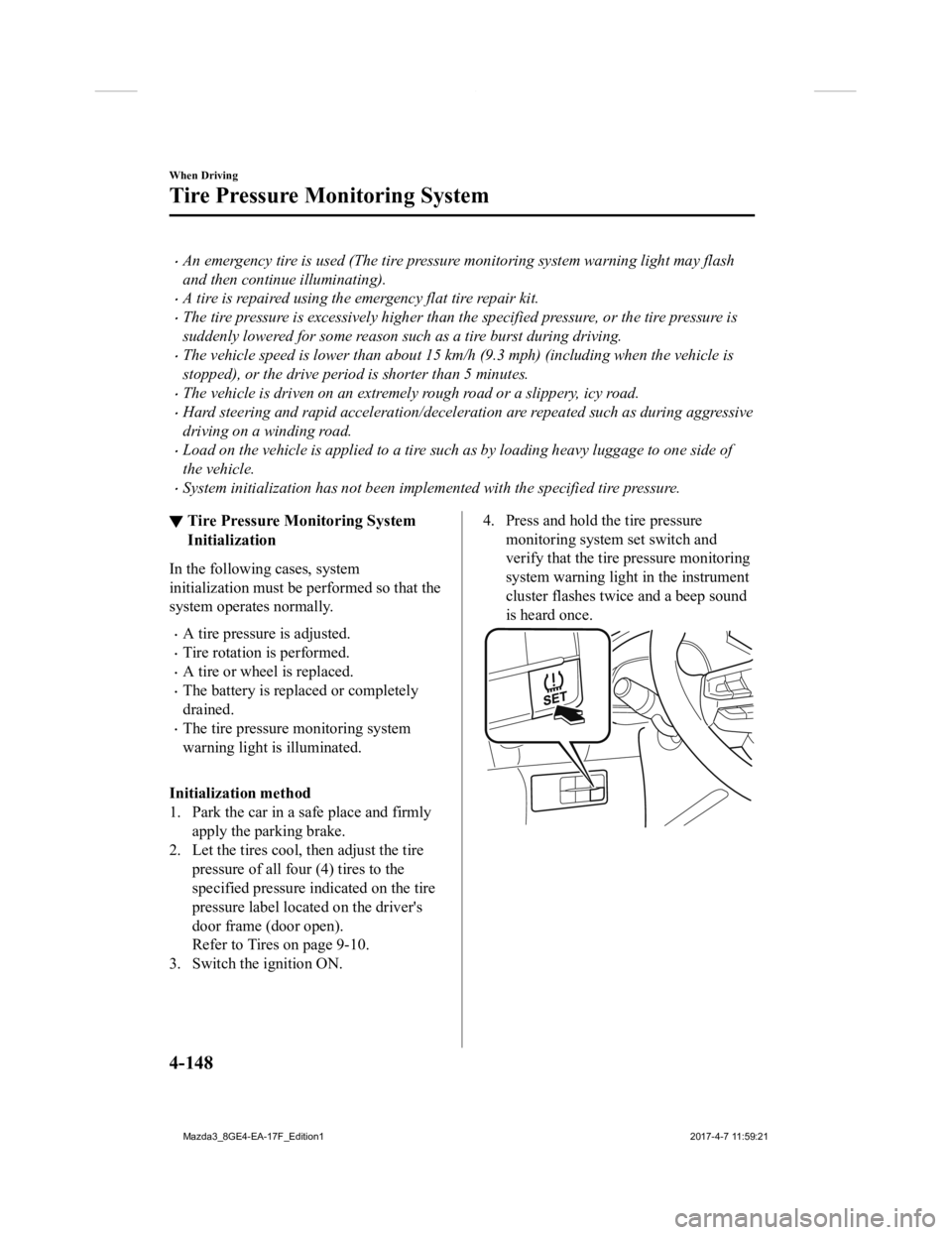
4. Press and hold the tire pressure monitoring system set switch and
verify that the tire pressure monitoring
system warning light in the instrument
cluster flashes twice and a beep sound
is heard once.
When Driving
Tire Pressure Monitoring System
4-148
Mazda3_8GE4-EA-17F_Edition1 2017-4-7 11:59:21
Page 281 of 624

CAUTION
If the system initialization is performed
without adjusting the tire pressure, the
system cannot detect the normal tire
pressure and it may not illuminate the tire
pressure monitoring system warning light
even if a tire pressure is low, or it may
illuminate the light even if the pressures are
normal.
Adjust the tire pressure on all four tires and
initialize the system when the warning
light is turned on. If the warning light turns
on for a reason other than a flat tire, the
tire pressure of all four tires may have
decreased naturally.
The system initialization will not be
performed if the switch is pressed while the
vehicle is being driven.
When Driving
Tire Pressure Monitoring System
4-149
Mazda3_8GE4-EA-17F_Edition12017-4-7 11:59:21
Page 283 of 624
NOTE
If water, snow, or mud is stuck on the camera lens, wipe it off using a soft cloth. If it
cannot be wiped off, use a mild detergent.
If the camera temperature changes rapidly (Hot to cold, cold to hot), the rear view
monitor may not operate correctly.
When replacing the tires, consult an Authorized Mazda Dealer. Replacing the tires could
result in deviation of the guide lines which appear on the display.
If the vehicle's front, side, or rear has been involved in a collision, the alignment of the
rear view parking camera (location, inst allation angle) may have deviated. Always
consult an Authorized Mazda Dealer to have the vehicle inspected.
If “No Video Signal Available” is indicated in the display, there could be a problem with
the camera. Have your vehicle inspected at an Authorized Mazda Dealer.
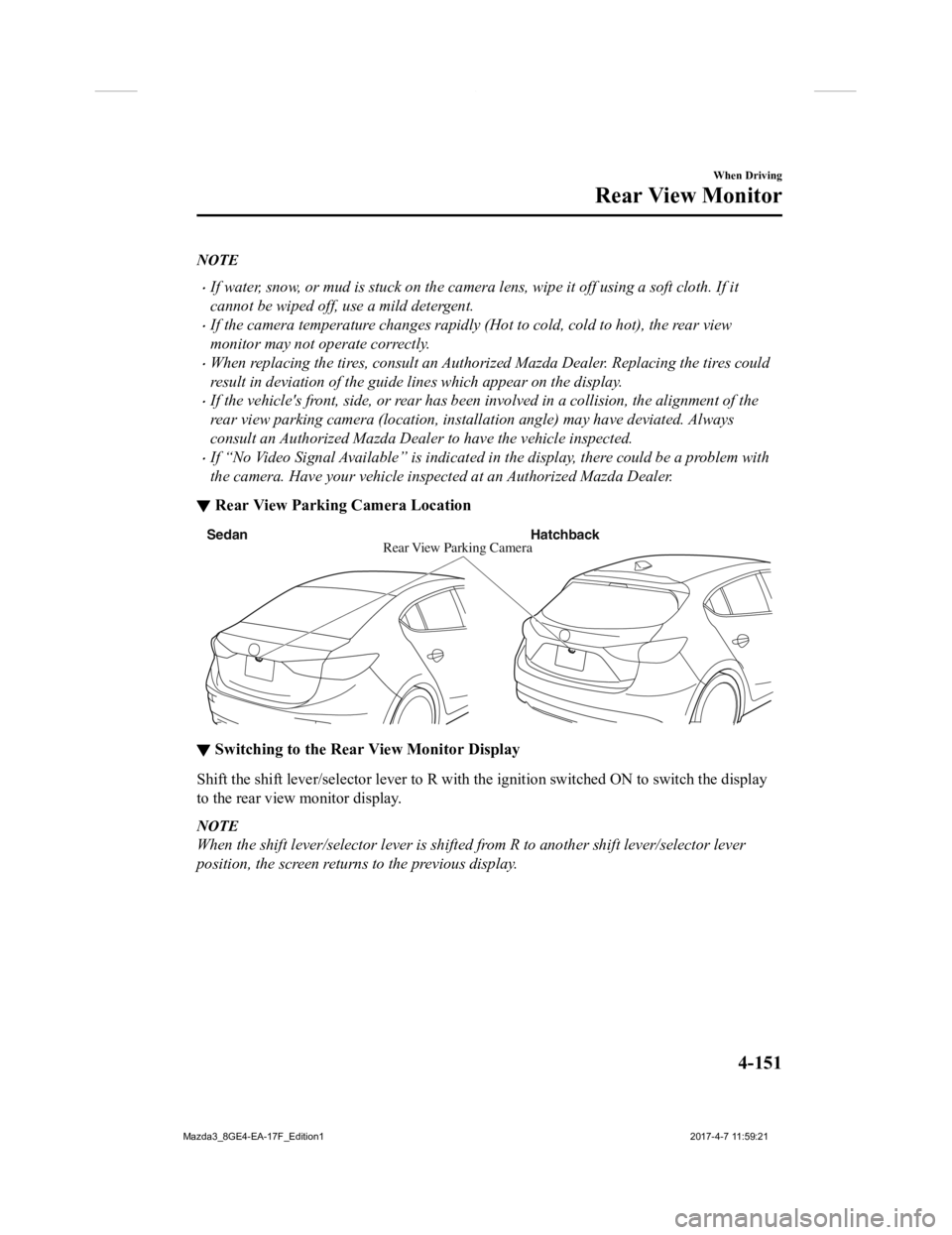
▼ Rear View Parking Camera Location
Rear View
Parking Camera
Sedan
Hatchback
▼Switching to the Rear View Monitor Display
Shift the shift lever/selector l
ever to R with the ignition swi tched ON to switch the display
to the rear view monitor display.
NOTE
When the shift lever/selector lever is shifted from R to another shift lever/selector lever
position, the screen return s to the previous display.
When Driving
Rear View Monitor
4-151
Mazda3_8GE4-EA-17F_Edition1 2017-4-7 11:59:21
Page 429 of 624

6Maintenance and Care
How to keep your Mazda in top condition.
Essential Information........................6-2 Introduction.................................. 6-2
Scheduled Maintenance.................... 6-4 Scheduled Maintenance (U.S.A.,
Canada, and Puerto Rico)............. 6-4
Scheduled Maintenance
(Mexico)..................................... 6-10
Maintenance Monitor................. 6-16
Owner Maintenance........................ 6-18 Owner Maintenance
Precautions................................. 6-18
Hood........................................... 6-20
Engine Compartment
Overview.................................... 6-22
Engine Oil...................................6-23
Engine Coolant........................... 6-25
Brake/Clutch Fluid ..................... 6-27
Washer Fluid............................... 6-27
Body Lubrication...... .................. 6-28
Wiper Blades.............................. 6-29
Battery........................................ 6-33
Key Battery Replacement........... 6-35
Tires............................................ 6-38
Light Bulbs................................. 6-42
Fuses........................................... 6-57
Appearance Care............................. 6-63
Exterior Care.............................. 6-63
Interior Care................................6-69
6-1
Mazda3_8GE4-EA-17F_Edition1 2017-4-7 11:59:21
Page 445 of 624

Ta bI t e m E x p l a n a t i o n
Tire Rotation Setting
Notification can be switched on/off.
Distance (km or mile) Displays the distance until tire rotation is due.
Select this item to set the tire rotation distance.
The wrench indication/indicator
light in the instrument cluster
will be illuminated when the remai ning distance is less than 1,000
km or 600 mile.
Reset Resets the remaining distance to the initial value.
Once the system turns on, it need
s to be reset whenever rotating
the tires.
Oil Change Setting Interval
Oil replacement period can be se
lected from the flexible setting
or fixed setting, or it can be set to non-display.
The flexible setting is available only in the United States and Pu-
erto Rico. Once engine oil flexible maintenance is selected, th e
vehicle calculates the remaini ng oil life based on the engine o per-
ating conditions. The vehicle lets you know when an oil change is
due by illuminating the wrench ind icator light in the instrument
cluster.
Distance (km or mile)
(Displays only in fixed set-
ting) Displays the distance until the oil replacement is due.
Select this item to set the oil replacement distance.
The wrench indication/indicator
light in the instrument cluster
will be illuminated when the remai ning distance is less than 1,000
km or 600 mile.
Oil life (km or mile)
(Displays only in flexible
setting) Displays the engine oil life until
the oil replacement is due.
The wrench indication/indicator light in the instrument cluster
will be illuminated when the remaining oil life distance is les s
than 1,000 km or 600 mile.
Reset In flexible setting
Resets the remaining distance
until oil replacement is due to the
initial value.
In fixed setting
Resets the remaining distance until oil replacement is due to the
initial value.
Maintenance and Care
Scheduled Maintenance
6-17
Mazda3_8GE4-EA-17F_Edition1 2017-4-7 11:59:21