clock MAZDA MODEL 3 5-DOOR 2010 User Guide
[x] Cancel search | Manufacturer: MAZDA, Model Year: 2010, Model line: MODEL 3 5-DOOR, Model: MAZDA MODEL 3 5-DOOR 2010Pages: 504, PDF Size: 5.62 MB
Page 298 of 504

Black plate (298,1)
Deleting the link to a Bluetooth audio
device
1. Using the audio control dial, select thepairing delete mode “PAIR DELETE ”
in the “BT SETUP” mode. (Refer to
“ Bluetooth audio device set-up ”for
details.)
2. Press the audio control dial to determine the mode.
3. The name of the first device among the programmed devices is displayed.
4. Rotate the audio control dial and select the name of the programmed device
you would like to delete.
Device name 1
Device name 2
Device name 3
Device name 4
Device name 5
Device name 6
Device name 7
NOTE
Only the names of programmed devices can be
displayed. If only one device is programmed,
only the name for this device is displayed.
5. If a selection other than “GO BACK ”
is made and the audio control dial is
pressed, “SURE ? NO ”is displayed.
6. Rotate the audio control dial clockwise and switch the display to “SURE ?
YES ”.
NOTE
The display changes as follows depending on
whether the audio control dial is rotated
clockwise or counterclockwise.
-Clockwise: “SURE ? YES ”displayed
-Counterclockwise: “SURE ? NO ”displayed
7. Press the audio control dial to delete
the selected device.
NOTE
Select “GO BACK ”and press the audio
control dial to return to the “PAIR DELETE ”
display.
8. “PAIR DELETED ”is displayed for
three seconds after the deletion is
completed, and then it returns to the
normal display.
NOTE
If an error occurs while trying to delete the
programmed device, “Err ”flashes in the
display for three seconds and the display
returns to “LINK DELETE ”.
Bluetooth audio device information
display
1. Using the audio control dial, select the
pair device information display mode
“DEVICE INFO ”in the “BT SETUP”
mode. (Refer to
“ Bluetooth audio device set-up ”for
details.)
2. Press the audio control dial to determine the mode.
6-68
Interior Comfort
Bluetooth Audio
Mazda3_8BG3-EA-09J_Edition2 Page298
Tuesday, December 8 2009 1:29 PM
Form No.8BG3-EA-09J
Page 300 of 504

Black plate (300,1)
Selecting a file (track)
Short-press the track down button (
)or
turn the file dial counterclockwise: Selects
the beginning of the current file (track).
Short-press the track up button (
)or
turn the file dial clockwise: Selects the
next file (track).
6-70
Interior Comfort
Bluetooth Audio
Mazda3_8BG3-EA-09J_Edition2 Page300
Tuesday, December 8 2009 1:29 PM
Form No.8BG3-EA-09J
Page 325 of 504

Black plate (325,1)
Information Display
ClockAudio display
Audio display
Ambient temperature display Climate control display
Climate control display Hands-free display
Without multi
information
display
With multi
information
display
Clock adjustment
buttons
qInformation Display Functions
The information display has the following functions:lClockí
lAmbient Temperature Display (Outside Temperature Display)í
lClimate Control DisplaylAudio DisplaylBluetooth Hands-Free DisplayíRefer to Bluetooth Hands-Free on page 6-71.
Interior Comfort
Interior Equipment
6-95íSome models.
Mazda3_8BG3-EA-09J_Edition2 Page325
Tuesday, December 8 2009 1:29 PM
Form No.8BG3-EA-09J
Page 326 of 504

Black plate (326,1)
qClockí
The time is displayed when the ignition is
switched to ACC or ON.
Time setting
1. Turn the ignition switch to the ACC or
ON position.
2. Adjust the time using the time setting buttons (
,).
The hours advance while the time
setting button (
) is pressed.
The minutes advance while the time
setting button (
) is pressed.
Time resetting
1. Turn the ignition switch to the ACC or ON position.
2. Press the :00 button.
3. When the button is pressed, the time will be reset as follows:
(Example)
12:01 ―12:29 →12:00
12:30 ―12:59 →1:00
NOTE
When the :00 button is pressed, the seconds
will start at “00 ”.
q Outside Temperature Display
(Fully Automatic Type)
When the ignition switch is in the ON
position, the ambient temperature is
displayed.
NOTE
Under the following conditions, the ambient
temperature display may differ from the actual
ambient temperature depending on the
surroundings and vehicle conditions:
lSignificantly cold or hot temperatures.lSudden changes in ambient temperature.lThe vehicle is parked.lThe vehicle is driven at low speeds.
qClimate Control Display
The climate control system status is
displayed. To operate the climate control
system, refer to “Climate Control System ”
(page 6-2).
q Audio Display
The audio system status is displayed. To
operate the audio system, refer to
“Audio System ”(page 6-16).
6-96
Interior Comfort
íSome models.
Interior Equipment
Mazda3_8BG3-EA-09J_Edition2 Page326
Tuesday, December 8 2009 1:29 PM
Form No.8BG3-EA-09J
Page 327 of 504

Black plate (327,1)
Multi Information Displayí
Steering switch
Without navigation system With navigation system
Clock adjustment
buttons
Steering Switch
Left switchRight switch
Navi switch BACK switchINFO switch
Enter (up/down) switch
Interior Comfort
Interior Equipment
6-97íSome models.
Mazda3_8BG3-EA-09J_Edition2 Page327
Tuesday, December 8 2009 1:29 PM
Form No.8BG3-EA-09J
Page 328 of 504
Black plate (328,1)
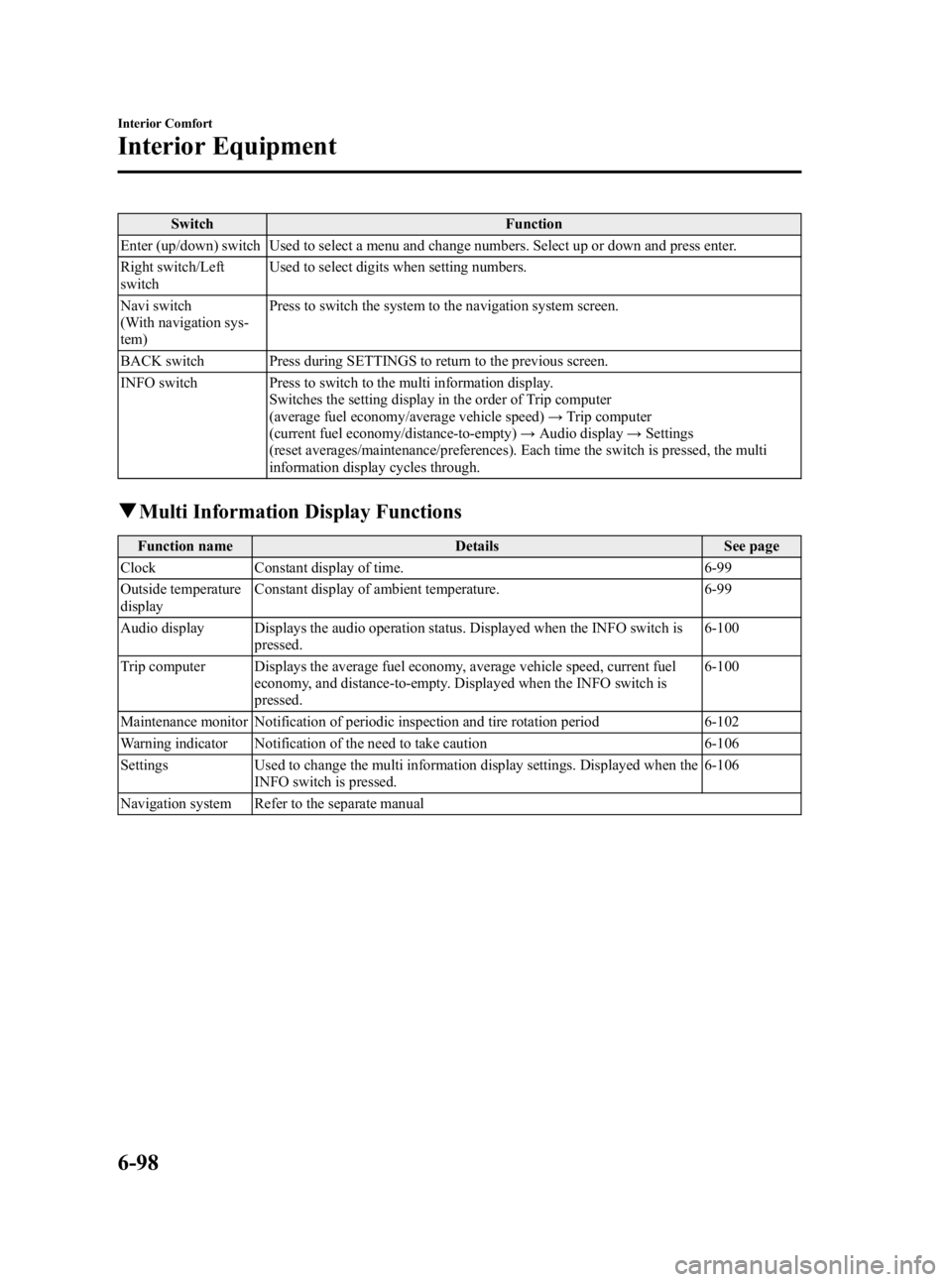
SwitchFunction
Enter (up/down) switch Used to select a menu and change numbers. Select up or down and press enter.
Right switch/Left
switch Used to select digits when setting numbers.
Navi switch
(With navigation sys-
tem) Press to switch the system to the navigation system screen.
BACK switch Press during SETTINGS to return to the previous screen.
INFO switch Press to switch to the multi information display. Switches the setting display in the order of Trip computer
(average fuel economy/average vehicle speed) →Trip computer
(current fuel economy/distance-to-empty) →Audio display →Settings
(reset averages/maintenance/preferences). Each time the switch is pressed, the multi
information display cycles through.
q Multi Information Display Functions
Function name DetailsSee page
Clock Constant display of time. 6-99
Outside temperature
display Constant display of ambient temperature.
6-99
Audio display Displays the audio operation status. Displayed when the INFO switch is pressed. 6-100
Trip computer Displays the average fuel economy, average vehicle speed, current fuel economy, and distance-to-empty. Displayed when the INFO switch is
pressed. 6-100
Maintenance monitor Notification of periodic inspection and tire rotation period 6-102
Warning indicator Notification of the need to take caution 6-106
Settings Used to change the multi information display settings. Displayed when the
INFO switch is pressed. 6-106
Navigation system Refer to the separate manual
6-98
Interior Comfort
Interior Equipment
Mazda3_8BG3-EA-09J_Edition2 Page328
Tuesday, December 8 2009 1:29 PM
Form No.8BG3-EA-09J
Page 329 of 504

Black plate (329,1)
qClock
The time is displayed when the ignition is
switched to ACC or ON.
Time setting
Refer to Clock on page 6-96.
Time resetting
Refer to Clock on page 6-96.
With navigation system
Time zone switching
1. Press the INFO switch until the
SETTINGS screen is displayed.
2. Select PREFERENCES by pressing the Enter (up/down) switch up or down,
and then press the Enter (up/down)
switch.
3. Select TIME ZONE by pressing the Enter (up/down) switch up or down,
and then press the Enter (up/down)
switch.
4. Select the desired time zone by pressing the Enter (up/down) switch up
or down, and then press the Enter (up/
down) switch. NOTE
lDaylight saving time is not reflected in the
time zone displayed.
lThe clock does not display if there is no
GPS signal reception.
lIf the battery cables are disconnected and
then reconnected, the clock does not
operate until a GPS signal is received. Do
not place objects on the dashboard,
otherwise the clock may be unable to
receive the GPS signal normally.
q
Outside Temperature Display
When the ignition switch is switched ON,
the ambient temperature is displayed.
NOTElUnder the following conditions, the ambient
temperature display may differ from the
actual ambient temperature depending on
the surroundings and vehicle conditions:
lSignificantly cold or hot temperatures.lSudden changes in ambient temperature.lThe vehicle is parked.lThe vehicle is driven at low speeds.lWhen the ignition is switched to ACC,
“--- ”is displayed.
Interior Comfort
Interior Equipment
6-99
Mazda3_8BG3-EA-09J_Edition2 Page329
Tuesday, December 8 2009 1:29 PM
Form No.8BG3-EA-09J
Page 332 of 504

Black plate (332,1)
qMaintenance Monitor
The periodic inspection and tire rotation
period notification can be displayed by
turning the Maintenance Monitor on.
NOTE
lThis function is inoperable while the
vehicle is being driven.
l(With navigation system)
If the battery cables are disconnected and
then reconnected, the SERVICE DUE item
in the MAINTENANCE setting cannot be
done until the clock resets after receiving a
GPS signal. Perform this setting after the
clock resumes operation.
Initial setting method
1. Press the INFO switch until the
SETTINGS screen is displayed.
2. Select MAINTENANCE by pressing the Enter (up/down) switch up or
down, and then press the Enter (up/
down) switch.
3. Select the item you want to turn on (TIRE ROTATION or SERVICE DUE)
by pressing the Enter (up/down) switch
up or down, and then press the Enter
(up/down) switch.
4. Press the Enter (up/down) switch. 5. Select SET and press the Enter (up/
down) switch.
NOTElFor the service due notification, either the
number of days or distance can be set.
When selecting one of the two settings, the
setting not selected is set to the initial value
automatically.
lBecause tire rotation can only be set
according to distance, the screen for setting
distance is displayed when SET is selected.
6. Select DISTANCE or DAYS and pressthe Enter (up/down) switch. The screen
for setting the distance or days to the
next maintenance period is displayed.
6-102
Interior Comfort
Interior Equipment
Mazda3_8BG3-EA-09J_Edition2 Page332
Tuesday, December 8 2009 1:29 PM
Form No.8BG3-EA-09J
Page 349 of 504
Black plate (349,1)
qJack
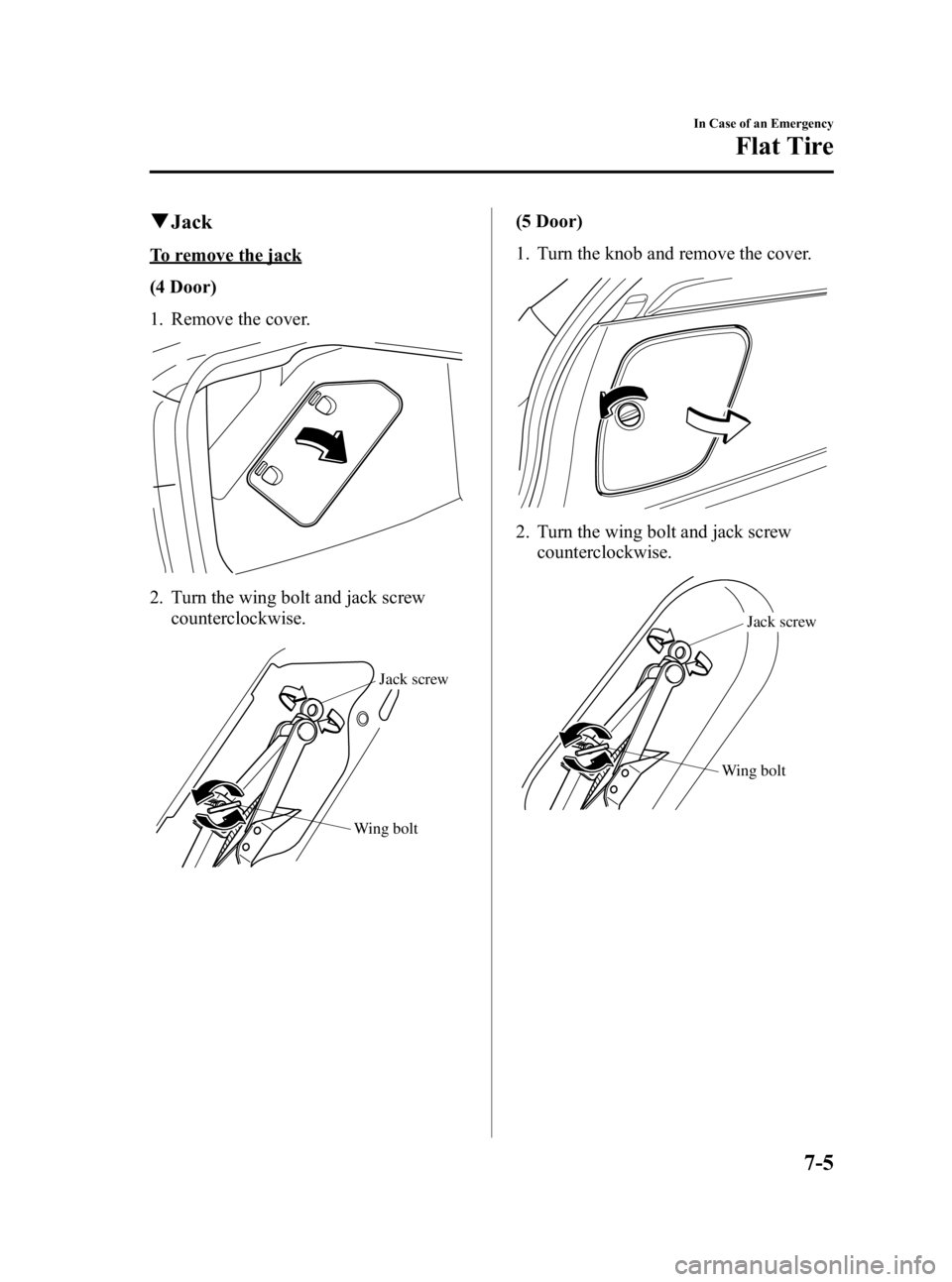
To remove the jack
(4 Door)
1. Remove the cover.
2. Turn the wing bolt and jack screw
counterclockwise.
Wing bolt Jack screw
(5 Door)
1. Turn the knob and remove the cover.
2. Turn the wing bolt and jack screw
counterclockwise.
Wing bolt Jack screw
In Case of an Emergency
Flat Tire
7-5
Mazda3_8BG3-EA-09J_Edition2 Page349
Tuesday, December 8 2009 1:29 PM
Form No.8BG3-EA-09J
Page 350 of 504
Black plate (350,1)
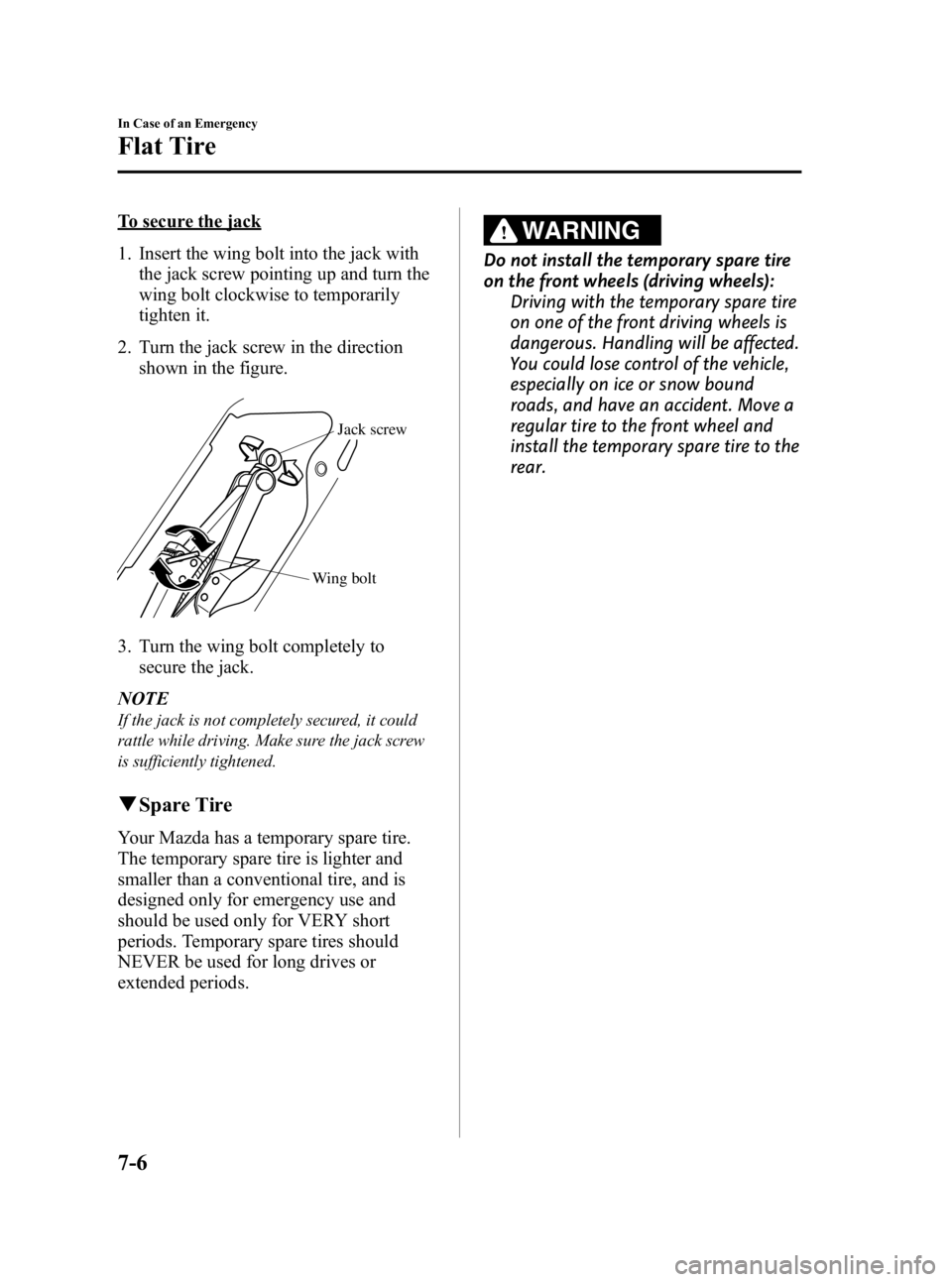
To secure the jack
1. Insert the wing bolt into the jack withthe jack screw pointing up and turn the
wing bolt clockwise to temporarily
tighten it.
2. Turn the jack screw in the direction shown in the figure.
Wing bolt Jack screw
3. Turn the wing bolt completely to
secure the jack.
NOTE
If the jack is not completely secured, it could
rattle while driving. Make sure the jack screw
is sufficiently tightened.
q Spare Tire
Your Mazda has a temporary spare tire.
The temporary spare tire is lighter and
smaller than a conventional tire, and is
designed only for emergency use and
should be used only for VERY short
periods. Temporary spare tires should
NEVER be used for long drives or
extended periods.
WARNING
Do not install the temporary spare tire
on the front wheels (driving wheels):
Driving with the temporary spare tire
on one of the front driving wheels is
dangerous. Handling will be affected.
You could lose control of the vehicle,
especially on ice or snow bound
roads, and have an accident. Move a
regular tire to the front wheel and
install the temporary spare tire to the
rear.
7-6
In Case of an Emergency
Flat Tire
Mazda3_8BG3-EA-09J_Edition2 Page350
Tuesday, December 8 2009 1:29 PM
Form No.8BG3-EA-09J