ECU MAZDA MODEL 3 5-DOOR 2010 Workshop Manual
[x] Cancel search | Manufacturer: MAZDA, Model Year: 2010, Model line: MODEL 3 5-DOOR, Model: MAZDA MODEL 3 5-DOOR 2010Pages: 504, PDF Size: 5.62 MB
Page 317 of 504
![MAZDA MODEL 3 5-DOOR 2010 Workshop Manual Black plate (317,1)
NOTE
Say“All” to delete all devices (Mobile phone).
9.Prompt: “Deleting XXXXX... (Ex.
device B...) (Registered device tag). Is
this correct? ”
10. Say: [Beep] “Ye s ”
1](/img/28/41015/w960_41015-316.png "MAZDA MODEL 3 5-DOOR 2010 Workshop Manual Black plate (317,1)
NOTE
Say“All” to delete all devices (Mobile phone).
9.Prompt: “Deleting XXXXX... (Ex.
device B...) (Registered device tag). Is
this correct? ”
10. Say: [Beep] “Ye s ”
1")
Black plate (317,1)
NOTE
Say“All” to delete all devices (Mobile phone).
9.Prompt: “Deleting XXXXX... (Ex.
device B...) (Registered device tag). Is
this correct? ”
10. Say: [Beep] “Ye s ”
11. Prompt: “Deleted ”
Registered device editing
1. Press the pick-up button or talk button
with a short press.
2. Say: [Beep] “Setup ”
3. Prompt: “Select one of the following:
Pairing options, confirmation prompts,
language, passcode, select phone or
select music player.”
4. Say: [Beep] “Pairing options ”
5. Prompt: “Select one of the following:
Pair, edit, delete, or list. ”
6. Say: [Beep] “Edit ”
7. Prompt: “Please say 1 for XXXXX...
(Ex. device A), 2 for XXXXX... (Ex.
device B...), which device please? ”
(The device tag of the registered device
is read out by the HFP.)
8. Say: [Beep] “X ”(Say the number of
the device to be edited.)
9. Prompt: “New name please? ”
10. Say: [Beep] “XXXXX... (Ex. device
C) ”(Speak a “device tag ”,an
arbitrary name for the device.)
11. Prompt: “XXXXX... (Ex. device C)
(Device tag), is this correct? ”
12. Say: [Beep] “Ye s ”
13. Prompt: “New name saved, returning
to main menu. ”
qSecurity Setting
If a passcode is set, the system cannot be
activated unless the passcode is input.
NOTE
Do this function only when parked. It is too
distracting to attempt while driving and you
may make too many errors to be effective.
Passcode setting
1. Press the pick-up button or talk button
with a short press.
2. Say: [Beep] “Setup ”
3. Prompt: “Select one of the following:
Pairing options, confirmation prompts,
language, passcode, select phone or
select music player.”
4. Say: [Beep] “Passcode ”
5. Prompt: “Passcode is disabled. Would
you like to enable it? ”
6. Say: [Beep] “Ye s ”
7. Prompt: “Please say a 4-digit passcode.
Remember this passcode. It will be
required to use this system.”
8. Say: [Beep] “XXXX ”(Say a desired 4-
digit passcode, “PCode ”.)
9. Prompt: “Passcode XXXX (Passcode,
PCode). Is this correct? ”
10. Say: [Beep] “Ye s ”
11. Prompt: “Passcode is enabled,
returning to main menu. ”
Using Bluetooth Hands-Free with a
passcode
1. Press the pick-up button or talk button
with a short press.
Interior Comfort
Bluetooth Hands-Free
6-87
Mazda3_8BG3-EA-09J_Edition2 Page317
Tuesday, December 8 2009 1:29 PM
Form No.8BG3-EA-09J
Page 318 of 504
![MAZDA MODEL 3 5-DOOR 2010 Workshop Manual Black plate (318,1)
2.Prompt: “Hands-Free system is locked.
State the passcode to continue. ”
3. Say: [Beep] “XXXX ”(Say the set
passcode “PCode ”.)
4. If the correct passcode is input, vo](/img/28/41015/w960_41015-317.png "MAZDA MODEL 3 5-DOOR 2010 Workshop Manual Black plate (318,1)
2.Prompt: “Hands-Free system is locked.
State the passcode to continue. ”
3. Say: [Beep] “XXXX ”(Say the set
passcode “PCode ”.)
4. If the correct passcode is input, vo")
Black plate (318,1)
2.Prompt: “Hands-Free system is locked.
State the passcode to continue. ”
3. Say: [Beep] “XXXX ”(Say the set
passcode “PCode ”.)
4. If the correct passcode is input, voice guidance “XXXXXX... (Ex. “Mary's
device) (Device tag) is connected ”is
announced.
If the passcode is incorrect, voice
guidance “XXXX (4-digit passcode,
Pcode) incorrect passcode, please try
again ”is announced.
Canceling the passcode
NOTE
Do this function only when parked. It is too
distracting to attempt while driving and you
may make too many errors to be effective.
1. Press the pick-up button or talk button
with a short press.
2. Say: [Beep] “Setup ”
3. Prompt: “Select one of the following:
Pairing options, confirmation prompts,
language, passcode, select phone or
select music player.”
4. Say: [Beep] “Passcode ”
5. Prompt: “Passcode is enabled. Would
you like to disable it? ”
6. Say: [Beep] “Ye s ”
7. Prompt: “Passcode is disabled,
returning to main menu. ”
Confirmation Prompts
The confirmation prompt confirms the
command content to the user before
advancing to the operation requested by
the user. When this function is turned on,
the system reads out the voice input
command previously received and
confirms whether the command is correct
before advancing to the command
execution.
When the confirmation prompt function is
turned on:
(Ex.“Calling John's device. Is this
correct? ”)
When the confirmation prompt function is
turned off:
(Ex. “Calling John's device. ”)
NOTE
If the confirmation prompt function is turned
off when making an emergency call, the system
reads out and confirms the command before
executing it.
1. Press the pick-up button or talk button with a short press.
2. Say: [Beep] “Setup ”
3. Prompt: “Select one of the following:
Pairing options, confirmation prompts,
language, passcode, select phone or
select music player.”
4. Say: [Beep] “Confirmation prompts”
5. Prompt: “Confirmation prompts are
on/off. Would you like to turn
confirmation prompts off/on? ”
6. Say: [Beep] “Ye s ”
7. Prompt: “Confirmation prompts are
off/on, returning to main menu. ”
6-88
Interior Comfort
Bluetooth Hands-Free
Mazda3_8BG3-EA-09J_Edition2 Page318
Tuesday, December 8 2009 1:29 PM
Form No.8BG3-EA-09J
Page 340 of 504
Black plate (340,1)
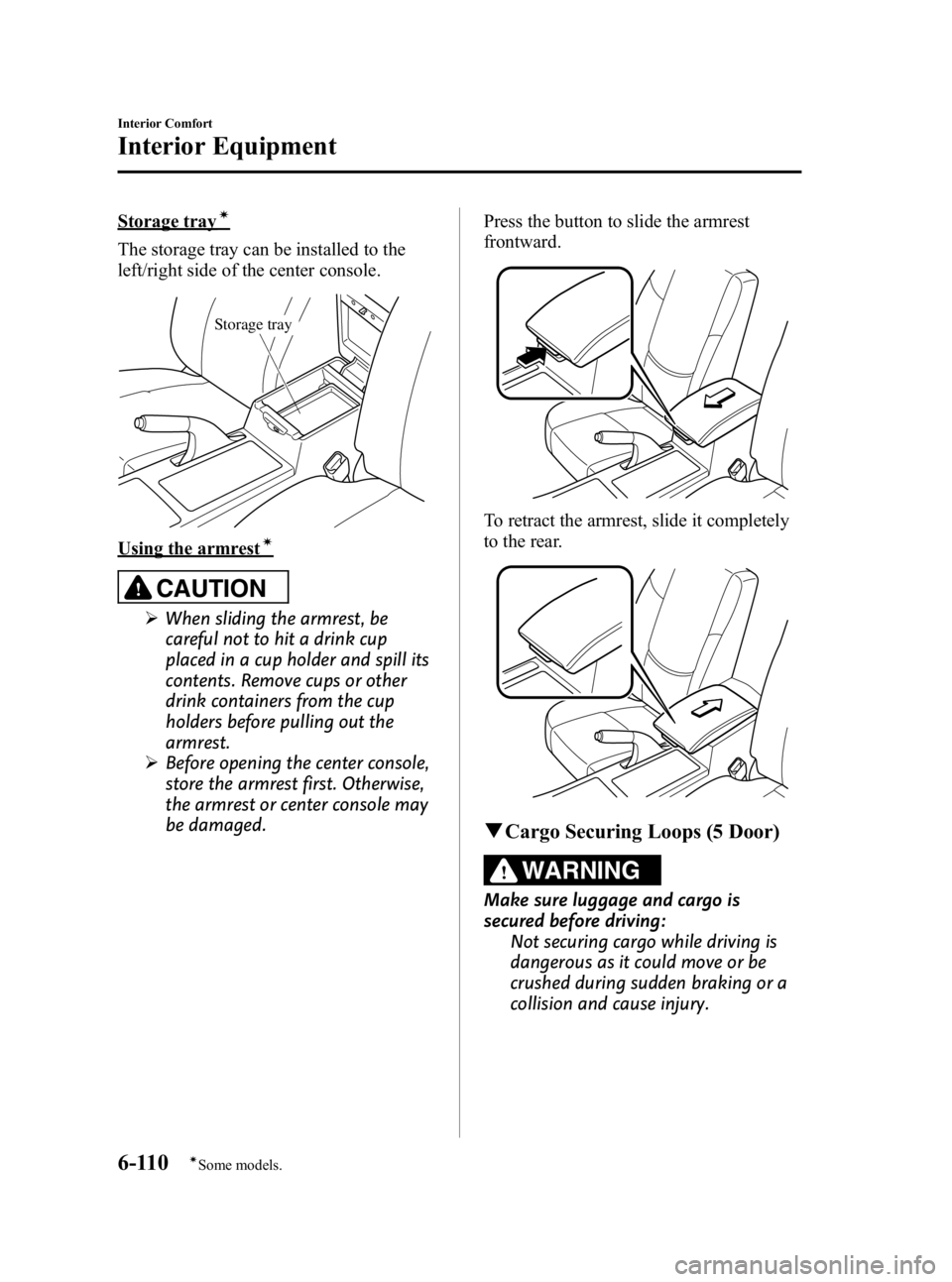
Storage trayí
The storage tray can be installed to the
left/right side of the center console.
Storage tray
Using the armrestí
CAUTION
ØWhen sliding the armrest, be
careful not to hit a drink cup
placed in a cup holder and spill its
contents. Remove cups or other
drink containers from the cup
holders before pulling out the
armrest.
Ø Before opening the center console,
store the armrest first. Otherwise,
the armrest or center console may
be damaged. Press the button to slide the armrest
frontward.
To retract the armrest, slide it completely
to the rear.
q
Cargo Securing Loops (5 Door)
WARNING
Make sure luggage and cargo is
secured before driving:
Not securing cargo while driving is
dangerous as it could move or be
crushed during sudden braking or a
collision and cause injury.
6-110
Interior Comfort
íSome models.
Interior Equipment
Mazda3_8BG3-EA-09J_Edition2 Page340
Tuesday, December 8 2009 1:29 PM
Form No.8BG3-EA-09J
Page 341 of 504
Black plate (341,1)
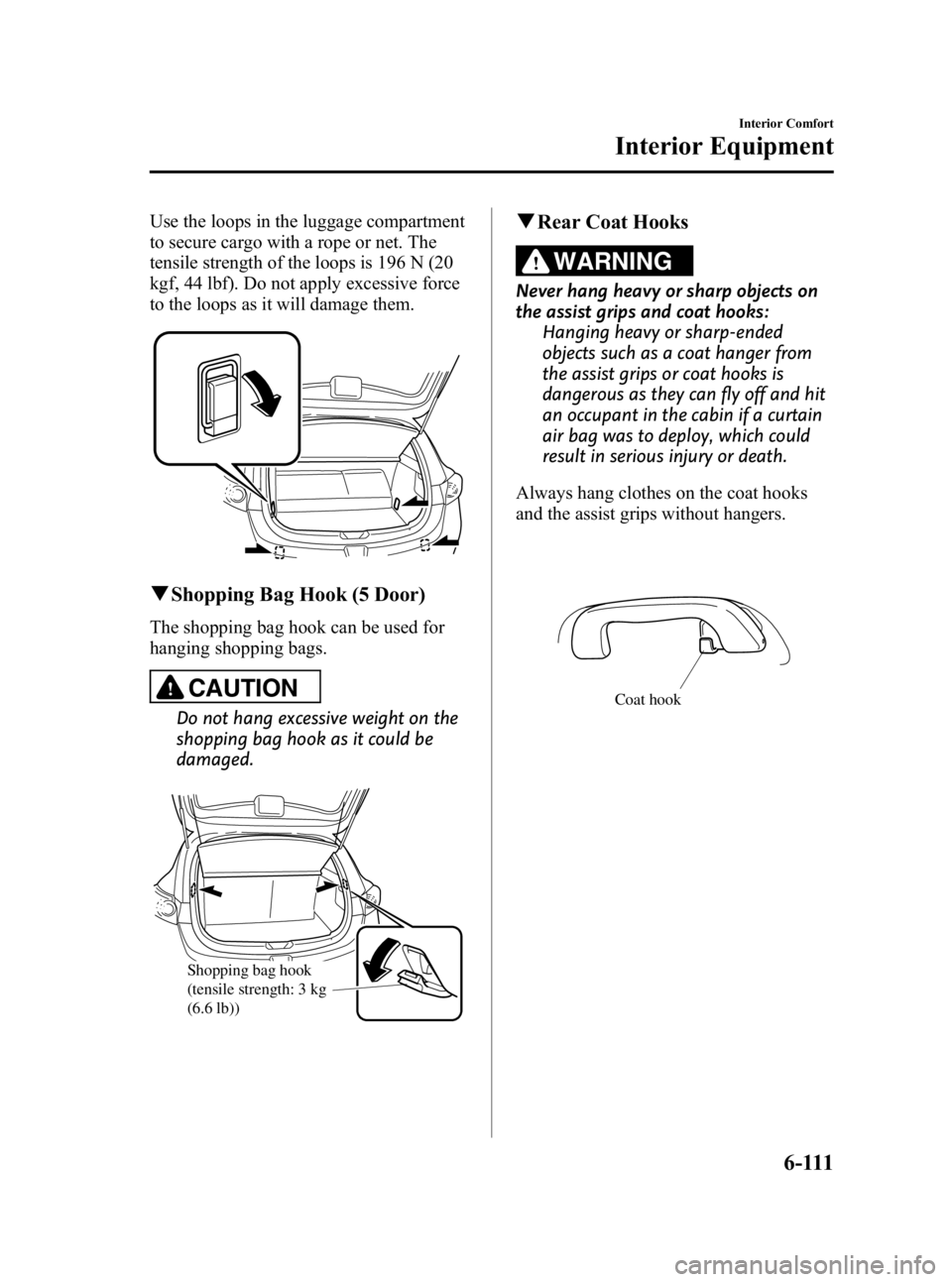
Use the loops in the luggage compartment
to secure cargo with a rope or net. The
tensile strength of the loops is 196 N (20
kgf, 44 lbf). Do not apply excessive force
to the loops as it will damage them.
qShopping Bag Hook (5 Door)
The shopping bag hook can be used for
hanging shopping bags.
CAUTION
Do not hang excessive weight on the
shopping bag hook as it could be
damaged.
Shopping bag hook
(tensile strength: 3 kg
(6.6 lb))
qRear Coat Hooks
WARNING
Never hang heavy or sharp objects on
the assist grips and coat hooks:
Hanging heavy or sharp-ended
objects such as a coat hanger from
the assist grips or coat hooks is
dangerous as they can fly off and hit
an occupant in the cabin if a curtain
air bag was to deploy, which could
result in serious injury or death.
Always hang clothes on the coat hooks
and the assist grips without hangers.
Coat hook
Interior Comfort
Interior Equipment
6-111
Mazda3_8BG3-EA-09J_Edition2 Page341
Tuesday, December 8 2009 1:29 PM
Form No.8BG3-EA-09J
Page 350 of 504
Black plate (350,1)
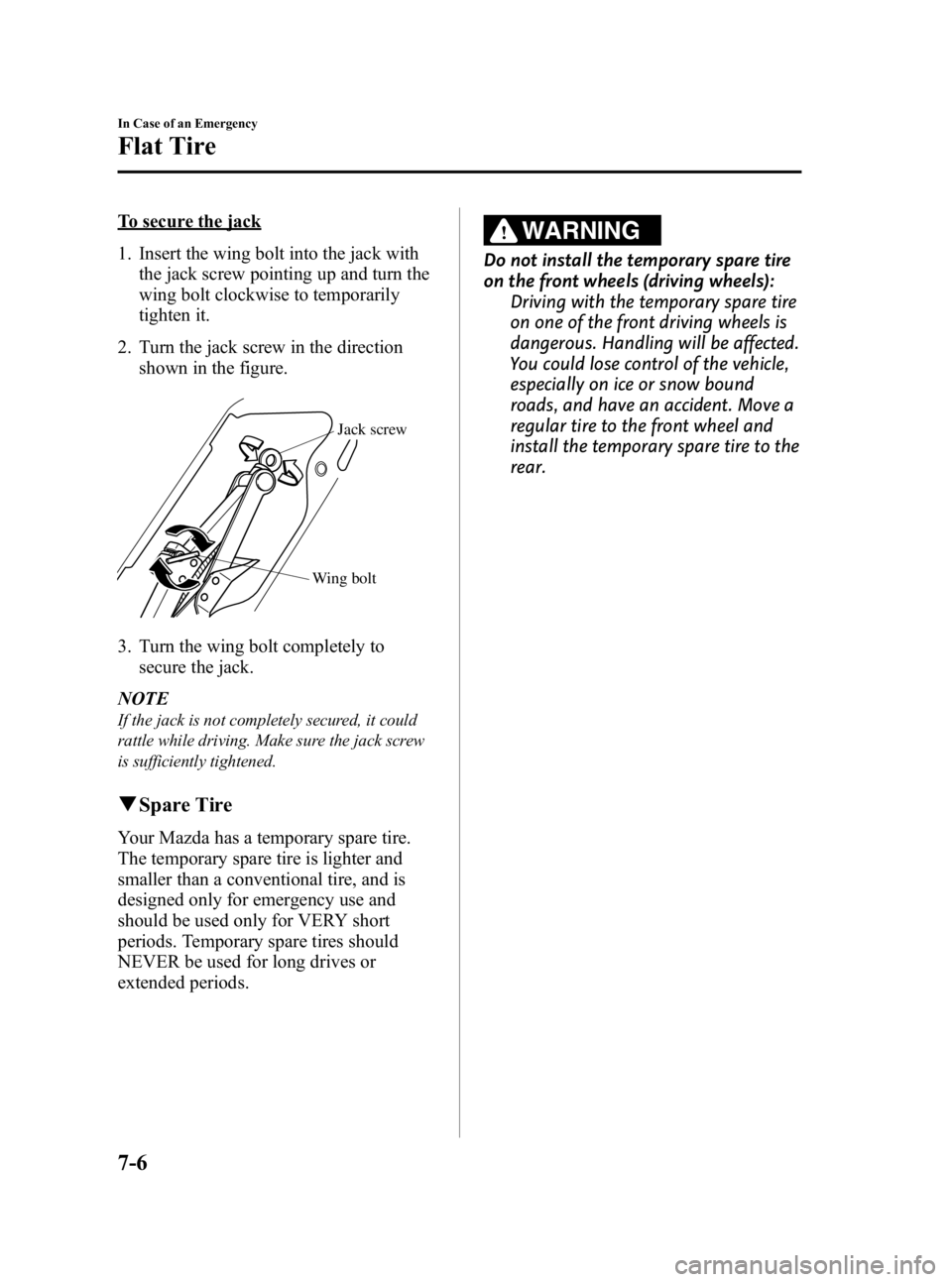
To secure the jack
1. Insert the wing bolt into the jack withthe jack screw pointing up and turn the
wing bolt clockwise to temporarily
tighten it.
2. Turn the jack screw in the direction shown in the figure.
Wing bolt Jack screw
3. Turn the wing bolt completely to
secure the jack.
NOTE
If the jack is not completely secured, it could
rattle while driving. Make sure the jack screw
is sufficiently tightened.
q Spare Tire
Your Mazda has a temporary spare tire.
The temporary spare tire is lighter and
smaller than a conventional tire, and is
designed only for emergency use and
should be used only for VERY short
periods. Temporary spare tires should
NEVER be used for long drives or
extended periods.
WARNING
Do not install the temporary spare tire
on the front wheels (driving wheels):
Driving with the temporary spare tire
on one of the front driving wheels is
dangerous. Handling will be affected.
You could lose control of the vehicle,
especially on ice or snow bound
roads, and have an accident. Move a
regular tire to the front wheel and
install the temporary spare tire to the
rear.
7-6
In Case of an Emergency
Flat Tire
Mazda3_8BG3-EA-09J_Edition2 Page350
Tuesday, December 8 2009 1:29 PM
Form No.8BG3-EA-09J
Page 352 of 504

Black plate (352,1)
2. For vehicles equipped with a sub-woofer, uncouple the connector.
Connector
NOTE
Extra strength may be required to uncouple the
connector. Be sure to squeeze the tab firmly.
3. For vehicles equipped with a sub-
woofer, loosen the hold-down bolt and
remove the woofer and spare tire.
For vehicles not equipped with a sub-
woofer, loosen the hold-down bolt and
remove the spare tire.
To secure the spare tire
Perform the removal procedure in reverse.
Secure the spare tire using the hold-down
bolt and tire clamp in the correct position
as illustrated.
NOTE
(5 Door)
When storing a conventional tire in a vehicle
equipped with a sub-woofer, you cannot
connect the connector on the trunk board.
Without sub-woofer
Tire clamp Tire hold-down bolt
7-8
In Case of an Emergency
Flat Tire
Mazda3_8BG3-EA-09J_Edition2 Page352
Tuesday, December 8 2009 1:29 PM
Form No.8BG3-EA-09J
Page 357 of 504

Black plate (357,1)
3. Install the lug nuts with the bevelededge inward; tighten them by hand.
WARNING
Do not apply oil or grease to lug nuts
and bolts and do not tighten the lug
nuts beyond the recommended
tightening torque: Applying oil or grease to lug nuts and
bolts is dangerous. The lug nuts
could loosen while driving and cause
the tire to come off, resulting in an
accident. In addition, lug nuts and
bolts could be damaged if tightened
more than necessary.
4. Turn the jack handle counterclockwise and lower the vehicle. Use the lug
wrench to tighten the nuts in the order
shown.
If you're unsure of how tight the nuts
should be, have them inspected at an
Authorized Mazda Dealer.
Nut tightening torque
N·m (kgf·m, ft·lbf) 88 ―118 (9 ―12, 65 ―87)
WARNING
Always securely and correctly tighten
the lug nuts:
Improperly or loosely tightened lug
nuts are dangerous. The wheel could
wobble or come off. This could result
in loss of vehicle control and cause a
serious accident.
Be sure to reinstall the same nuts you
removed or replace them with metric
nuts of the same configuration: Because the wheel studs and lug nuts
on your Mazda have metric threads,
using a non-metric nut is dangerous.
On a metric stud, it would not secure
the wheel and would damage the
stud, which could cause the wheel to
slip off and cause an accident.
5. Store the damaged tire, using the tire hold-down bolt to hold it in place.
(Without sub-woofer)
Tire clamp
Bolt for flat tire
In Case of an Emergency
Flat Tire
7-13
Mazda3_8BG3-EA-09J_Edition2 Page357
Tuesday, December 8 2009 1:29 PM
Form No.8BG3-EA-09J
Page 366 of 504
Black plate (366,1)
6. When finished, carefully disconnect thecables in the reverse order described in
the illustration.
NOTE
Verify that the covers are securely installed.
Push-Starting
Do not push-start your Mazda.
WARNING
Never tow a vehicle to start it: Towing a vehicle to start it is
dangerous. The vehicle being towed
could surge forward when its engine
starts, causing the two vehicles to
collide. The occupants could be
injured.
CAUTION
Do not push-start a vehicle that has
a manual transaxle. It can damage
the emission control system.
NOTE
You can't start a vehicle with an automatic
transaxle by pushing it.
7-22
In Case of an Emergency
Emergency Starting
Mazda3_8BG3-EA-09J_Edition2 Page366
Tuesday, December 8 2009 1:29 PM
Form No.8BG3-EA-09J
Page 368 of 504
Black plate (368,1)
Tiedown Hook
CAUTION
Do not use the front and rear
tiedown eyelets for towing the
vehicle.
They have been designed only for
securing the vehicle to a transport
vessel during shipping.
Using the eyelets for any other
purpose could result in the vehicle
being damaged.
qTiedown Hook-Front
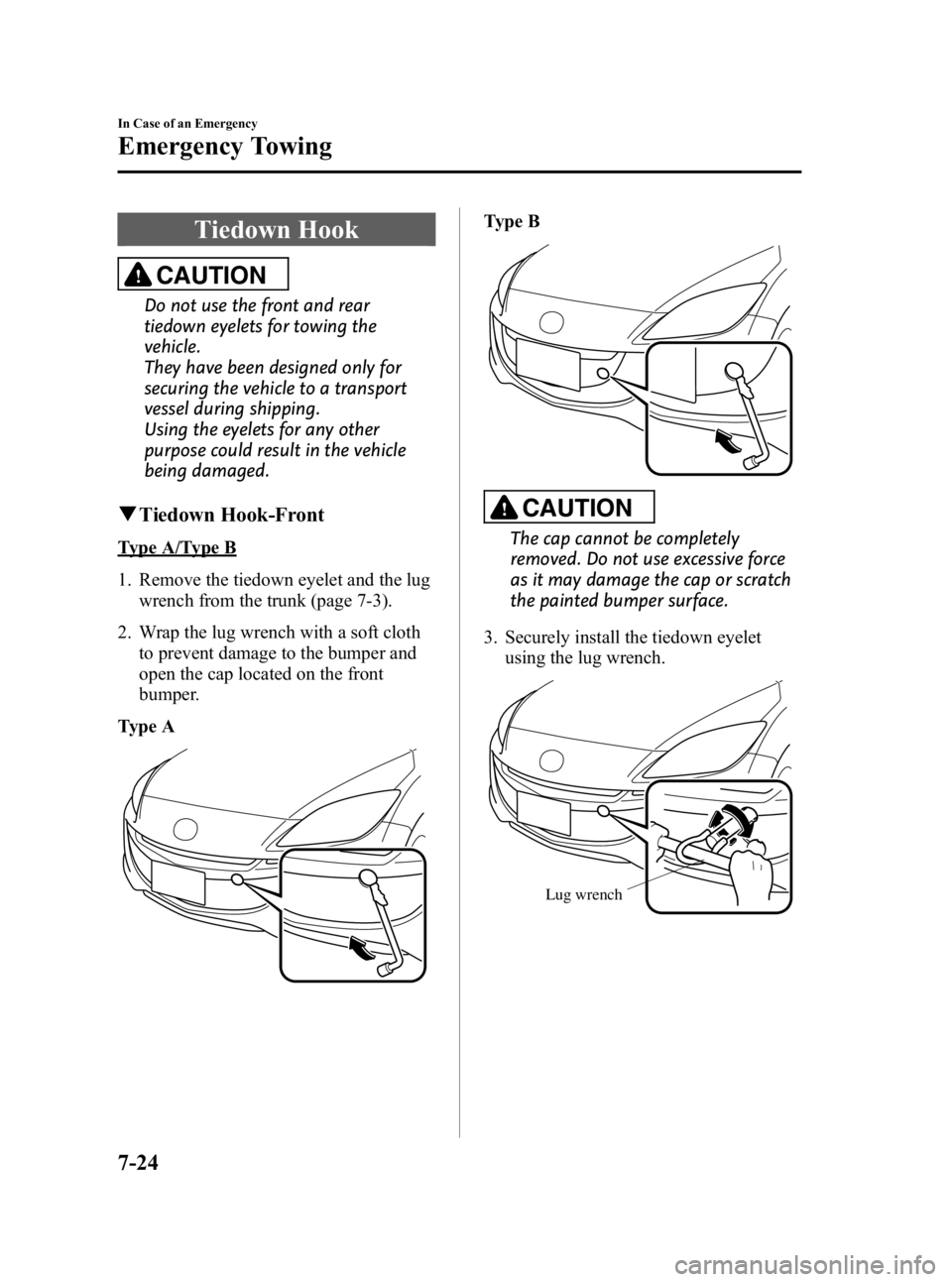
Type A/Type B
1. Remove the tiedown eyelet and the lug
wrench from the trunk (page 7-3).
2. Wrap the lug wrench with a soft cloth to prevent damage to the bumper and
open the cap located on the front
bumper.
Type A
Type B
CAUTION
The cap cannot be completely
removed. Do not use excessive force
as it may damage the cap or scratch
the painted bumper surface.
3. Securely install the tiedown eyelet using the lug wrench.
Lug wrench
7-24
In Case of an Emergency
Emergency Towing
Mazda3_8BG3-EA-09J_Edition2 Page368
Tuesday, December 8 2009 1:29 PM
Form No.8BG3-EA-09J
Page 369 of 504
Black plate (369,1)
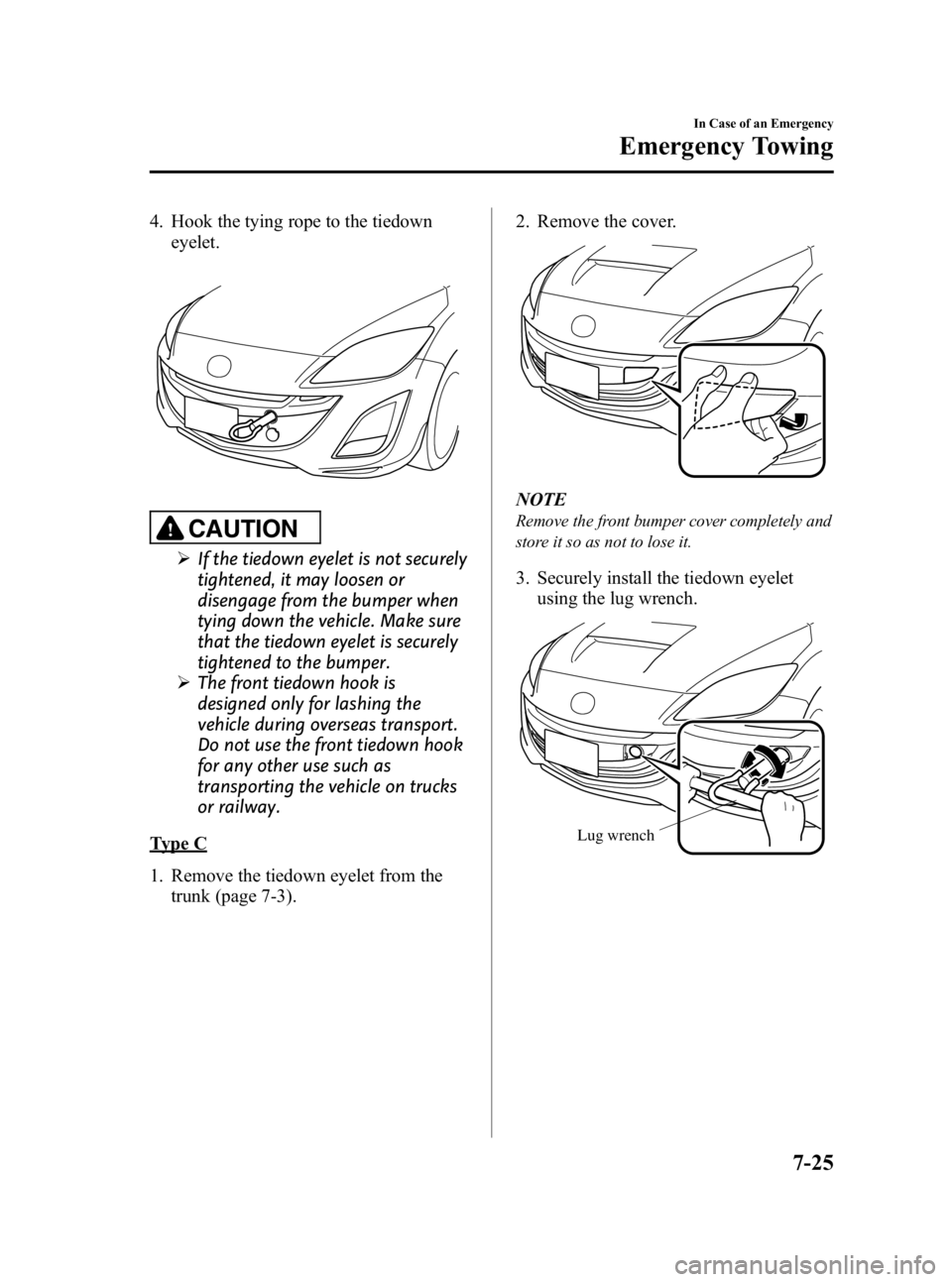
4. Hook the tying rope to the tiedowneyelet.
CAUTION
ØIf the tiedown eyelet is not securely
tightened, it may loosen or
disengage from the bumper when
tying down the vehicle. Make sure
that the tiedown eyelet is securely
tightened to the bumper.
Ø The front tiedown hook is
designed only for lashing the
vehicle during overseas transport.
Do not use the front tiedown hook
for any other use such as
transporting the vehicle on trucks
or railway.
Type C
1. Remove the tiedown eyelet from the
trunk (page 7-3). 2. Remove the cover.
NOTE
Remove the front bumper cover completely and
store it so as not to lose it.
3. Securely install the tiedown eyelet
using the lug wrench.
Lug wrench
In Case of an Emergency
Emergency Towing
7-25
Mazda3_8BG3-EA-09J_Edition2 Page369
Tuesday, December 8 2009 1:29 PM
Form No.8BG3-EA-09J