water MAZDA MODEL 3 5-DOOR 2011 Owners Manual
[x] Cancel search | Manufacturer: MAZDA, Model Year: 2011, Model line: MODEL 3 5-DOOR, Model: MAZDA MODEL 3 5-DOOR 2011Pages: 514, PDF Size: 6.58 MB
Page 81 of 514
Black plate (81,1)
qAdvanced Key Maintenance
CAUTION
Ø Make sure the battery is installed
with the correct pole facing
upward. Battery leakage could
occur if it is not installed correctly.
Ø When replacing the battery, be
careful not to touch any of the
internal circuitry and electrical
terminals, bend the electrical
terminals, or get dirt in the
transmitter as the transmitter
could be damaged.
Ø There is the danger of explosion if
the battery is not correctly
replaced.
Ø Replace only with the same type
battery (CR2025 or equivalent).
Ø Dispose of used batteries
according to the following
instructions.
ØInsulate the plus and minus
terminals of the battery using
cellophane or equivalent tape.
ØNever disassemble.
ØNever throw the battery into
fire or water.
ØNever deform or crush.
The following conditions indicate that the
battery power is low:
lThe KEY indicator light (green) flashes
in the instrument cluster for about 30
seconds after the engine is turned off.
lThe system does not operate and the
operation indicator light on the
transmitter does not flash when the
buttons are pressed.
lThe system's operational range is
reduced. Replacing the battery at an Authorized
Mazda Dealer is recommended to prevent
damage to the advanced key. If replacing
the battery by yourself, follow the
instruction below.
Replacing the advanced key battery
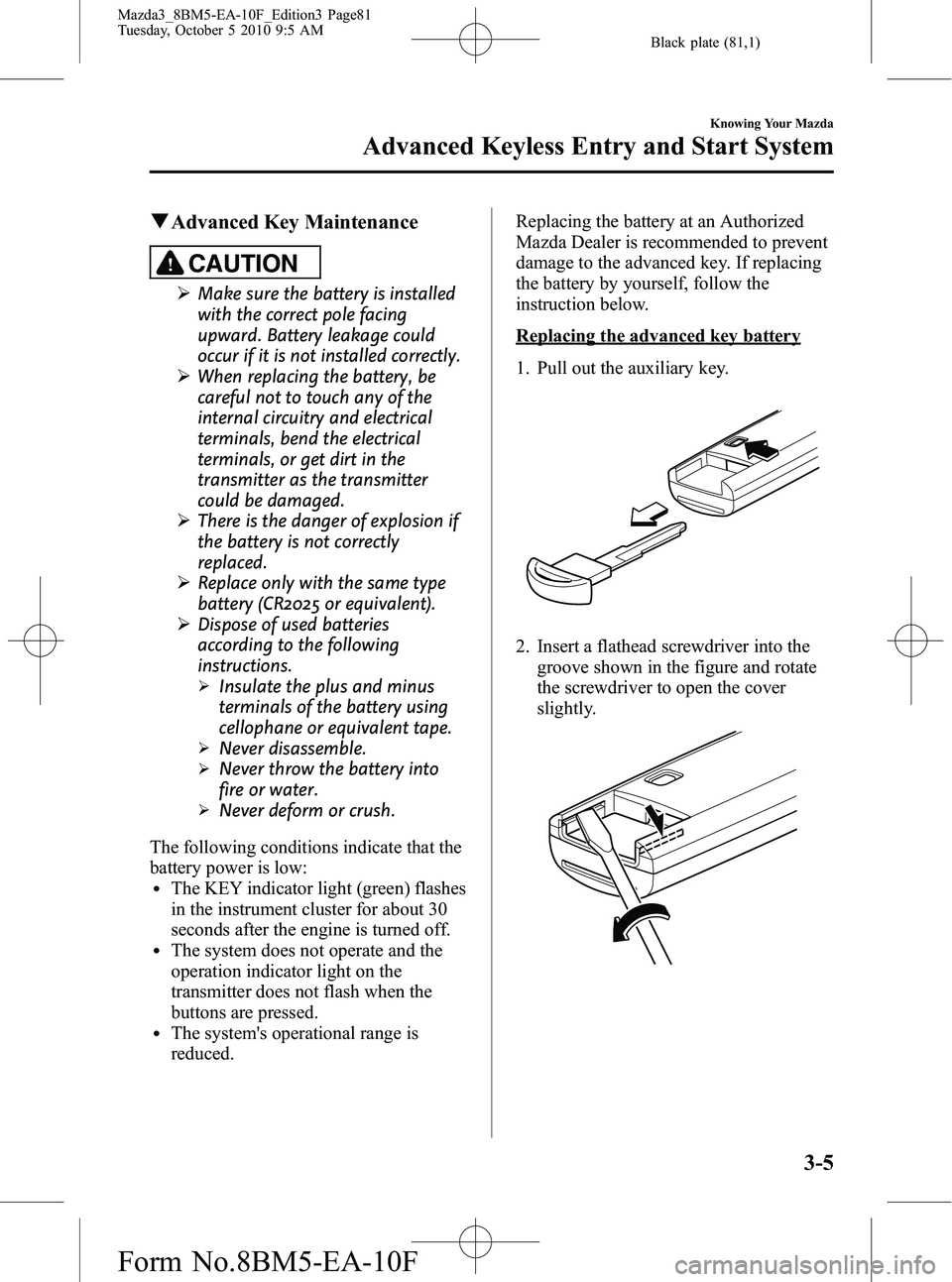
1. Pull out the auxiliary key.
2. Insert a flathead screwdriver into the
groove shown in the figure and rotate
the screwdriver to open the cover
slightly.
Knowing Your Mazda
Advanced Keyless Entry and Start System
3-5
Mazda3_8BM5-EA-10F_Edition3 Page81
Tuesday, October 5 2010 9:5 AM
Form No.8BM5-EA-10F
Page 107 of 514
Black plate (107,1)
qTransmitter Maintenance
If the buttons on the transmitter are
inoperable and the operation indicator
light does not flash, the battery may be
dead.
Replace with a new battery before the
transmitter becomes unusable.
CAUTION
Ø Install the battery with the positive
pole (
) facing down. Battery
leakage could occur if it is not
installed correctly.
Ø When replacing the battery, be
careful not to touch any of the
internal circuitry and electrical
terminals, bend the electrical
terminals, or get dirt in the
transmitter as the transmitter
could be damaged.
Ø There is the danger of explosion if
the battery is not correctly
replaced.
Ø Replace only with the same type
battery (CR1620 or equivalent).
Ø Dispose of used batteries
according to the following
instructions.
ØInsulate the plus and minus
terminals of the battery using
cellophane or equivalent tape.
ØNever disassemble.
ØNever throw the battery into
fire and/or water.
ØNever deform or crush.
Replacing the transmitter battery
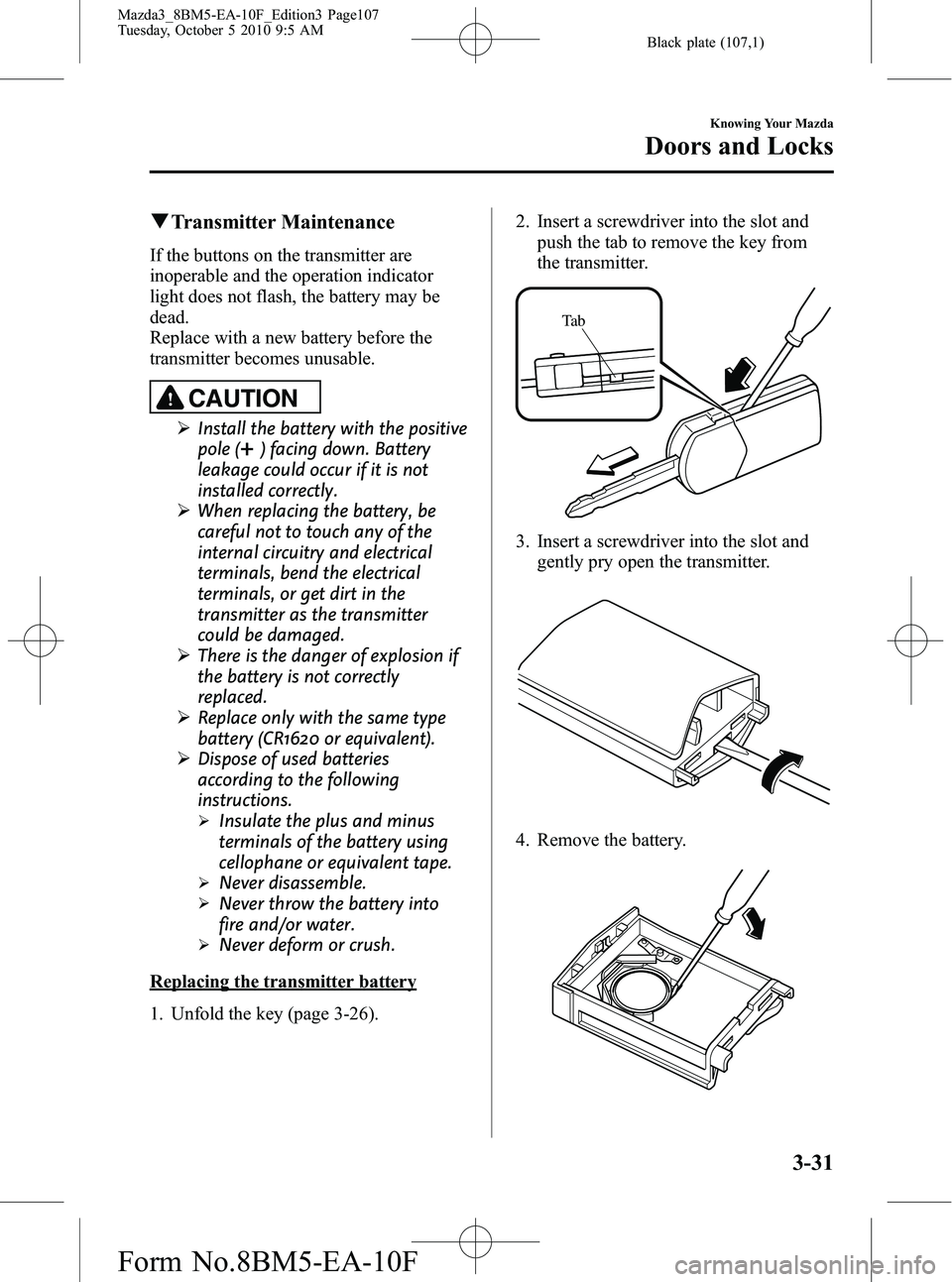
1. Unfold the key (page 3-26). 2. Insert a screwdriver into the slot and
push the tab to remove the key from
the transmitter.
Ta b
3. Insert a screwdriver into the slot andgently pry open the transmitter.
4. Remove the battery.
Knowing Your Mazda
Doors and Locks
3-31
Mazda3_8BM5-EA-10F_Edition3 Page107
Tuesday, October 5 2010 9:5 AM
Form No.8BM5-EA-10F
Page 127 of 514
Black plate (127,1)
NOTE
Before washing your Mazda, make sure the
moonroof is completely closed so that water
does not get inside the cabin area. After
washing your Mazda or after it rains, wipe the
water off the moonroof before operating it to
avoid water penetration which could cause
rust and water damage to your headliner.
qTilt Operation
The rear of the moonroof can be tilted
open to provide more ventilation.
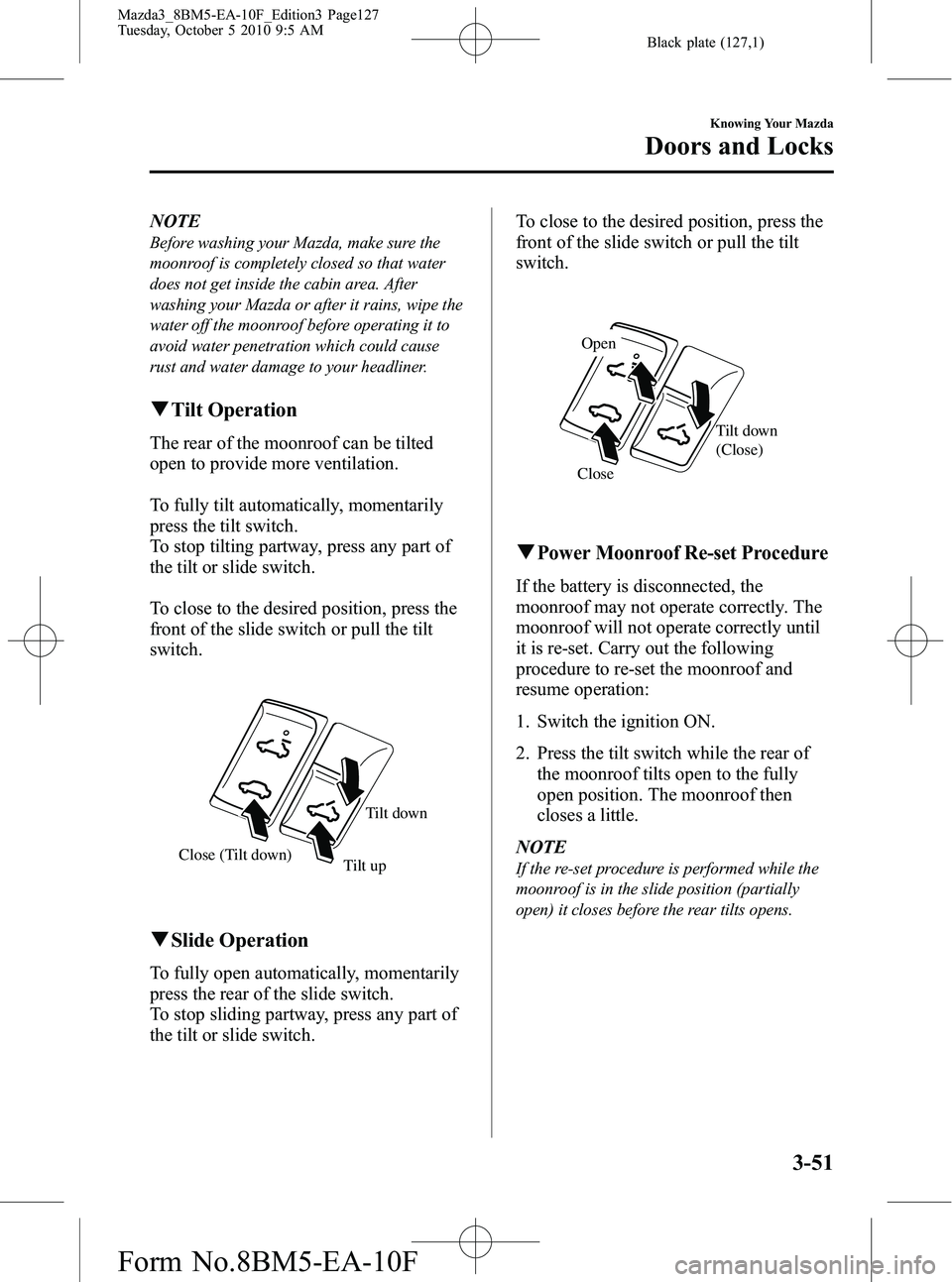
To fully tilt automatically, momentarily
press the tilt switch.
To stop tilting partway, press any part of
the tilt or slide switch.
To close to the desired position, press the
front of the slide switch or pull the tilt
switch.
Close (Tilt down) Tilt down
Tilt up
q Slide Operation
To fully open automatically, momentarily
press the rear of the slide switch.
To stop sliding partway, press any part of
the tilt or slide switch. To close to the desired position, press the
front of the slide switch or pull the tilt
switch.
Close
Tilt down
(Close)
Open
qPower Moonroof Re-set Procedure
If the battery is disconnected, the
moonroof may not operate correctly. The
moonroof will not operate correctly until
it is re-set. Carry out the following
procedure to re-set the moonroof and
resume operation:
1. Switch the ignition ON.
2. Press the tilt switch while the rear of
the moonroof tilts open to the fully
open position. The moonroof then
closes a little.
NOTE
If the re-set procedure is performed while the
moonroof is in the slide position (partially
open) it closes before the rear tilts opens.
Knowing Your Mazda
Doors and Locks
3-51
Mazda3_8BM5-EA-10F_Edition3 Page127
Tuesday, October 5 2010 9:5 AM
Form No.8BM5-EA-10F
Page 152 of 514
Black plate (152,1)
Hazardous Driving
WARNING
Be extremely careful if it is necessary to
downshift on slippery surfaces:Downshifting into lower gear while
driving on slippery surfaces is
dangerous. The sudden change in tire
speed could cause the tires to skid.
This could lead to loss of vehicle
control and an accident.
Do not rely on ABS as a substitute for
safe driving: The ABS cannot compensate for
unsafe and reckless driving, excessive
speed, tailgating (following another
vehicle too closely), driving on ice and
snow, and hydroplaning (reduced tire
friction and road contact because of
water on the road surface). You can
still have an accident.
When driving on ice or in water, snow,
mud, sand, or similar hazards:
lBe cautious and allow extra distance
for braking.
lAvoid sudden braking and sudden
maneuvering.
lDo not pump the brakes. Continue to
press down on the brake pedal.
Refer to Anti-Lock Brake System
(ABS) on page 5-8.
lIf you get stuck, select a lower gear and
accelerate slowly. Do not spin the front
wheels.
lFor more traction in starting on
slippery surfaces such as ice or packed
snow, use sand, rock salt, chains,
carpeting, or other nonslip material
under the front wheels.
NOTE
Use snow chains only on the front wheels.
Floor Mat
WARNING
Make sure the floor mats are hooked
on the retention pins to prevent them
from bunching up under the foot
pedals: Using a floor mat that is not secured
is dangerous as it will interfere with
the accelerator and brake pedal
operation, which could result in an
accident.
Do not install two floor mats, one on
top of the other, on the driver's side: Installing two floor mats, one on top
of the other, on the driver's side is
dangerous as the retention pins can
only keep one floor mat from sliding
forward.
In using a heavy duty floor mat for
winter use always remove the
original floor mat.
Loose floor mat(s) will interfere with
the foot pedal and could result in an
accident.
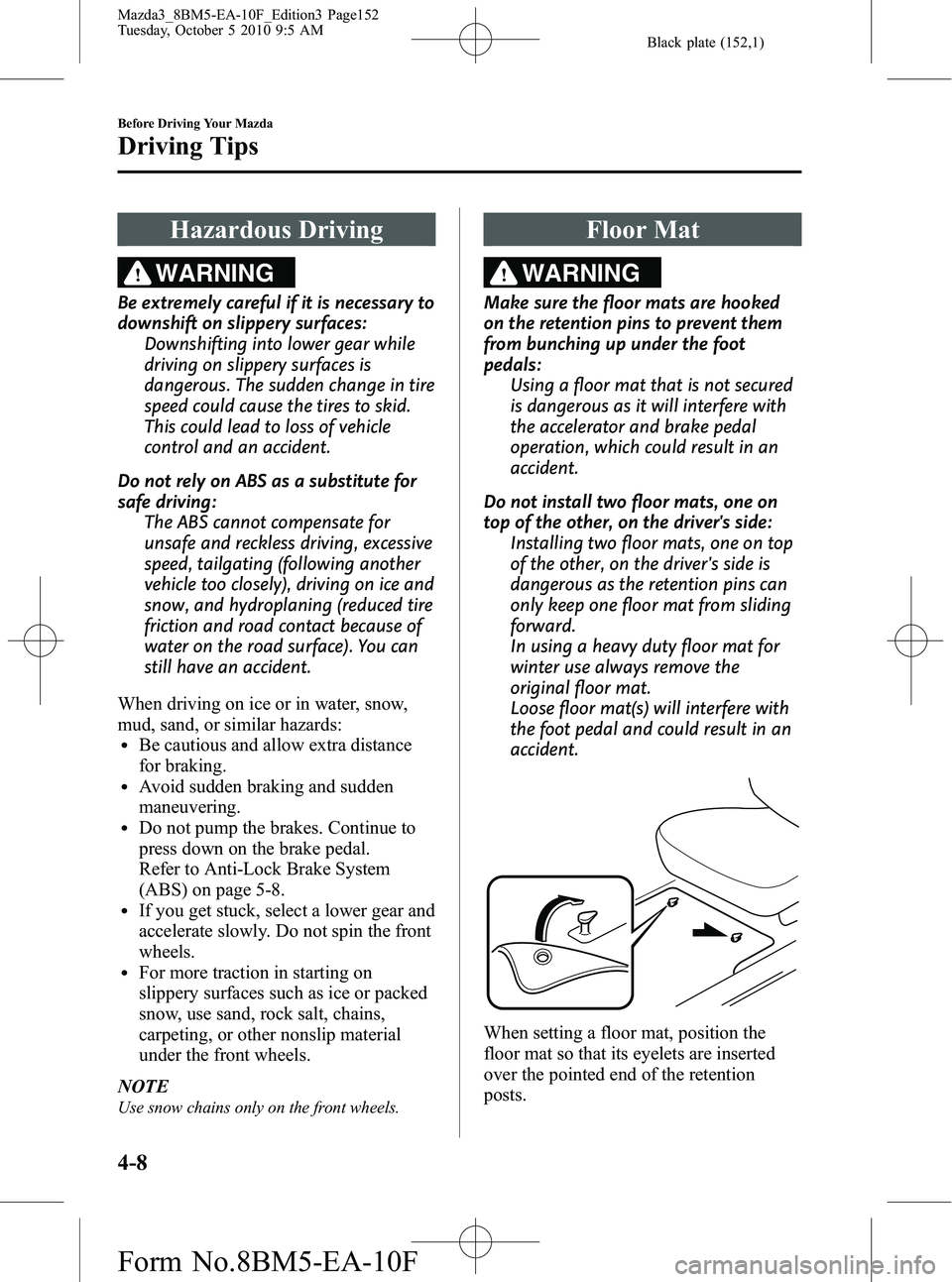
When setting a floor mat, position the
floor mat so that its eyelets are inserted
over the pointed end of the retention
posts.
4-8
Before Driving Your Mazda
Driving Tips
Mazda3_8BM5-EA-10F_Edition3 Page152
Tuesday, October 5 2010 9:5 AM
Form No.8BM5-EA-10F
Page 153 of 514
Black plate (153,1)
Rocking the Vehicle
WARNING
Do not spin the wheels at more than 56
km/h (35 mph), and do not allow
anyone to stand behind a wheel when
pushing the vehicle:When the vehicle is stuck, spinning
the wheels at high speed is
dangerous. The spinning tire could
overheat and explode. This could
cause serious injuries.
CAUTION
Too much rocking may cause engine
overheating, transaxle failure, and
tire damage.
If you must rock the vehicle to free it from
snow, sand or mud, depress the
accelerator slightly and slowly move the
shift lever from 1 (D) to R.
Winter Driving
lCarry emergency gear, including tire
chains, window scraper, flares, a small
shovel, jumper cables, and a small bag
of sand or salt.
Ask an Authorized Mazda Dealer to
perform the following precautions:
lHave the proper ratio of antifreeze in
the radiator.
Refer to Engine Coolant on page 8-21.
lInspect the battery and its cables. Cold
reduces battery capacity.
lUse only cold-weather engine oil (page
8-18).
lInspect the ignition system for damage
and loose connections.
lUse washer fluid made with
antifreeze ―but do not use engine
coolant antifreeze for washer fluid
(page 8-26).
lDo not use the parking brake in
freezing weather as it may freeze.
Instead, shift to P with an automatic
transaxle and to 1 or R with a manual
transaxle. Block the rear wheels.
lDo not apply excessive force to a
window scraper when removing ice or
frozen snow on the mirror glass and
windshield.
lNever use warm or hot water for
removing snow or ice from windows
and mirrors as it could result in the
glass cracking.
lBraking performance can be adversely
affected if snow or ice adheres to the
brake equipment. If this situation
occurs, drive the vehicle slowly,
releasing the accelerator pedal and
lightly applying the brakes several
times until the brake performance
returns to normal.
Before Driving Your Mazda
Driving Tips
4-9
Mazda3_8BM5-EA-10F_Edition3 Page153
Tuesday, October 5 2010 9:5 AM
Form No.8BM5-EA-10F
Page 155 of 514
Black plate (155,1)
2. Secure the chains on the front tires astightly as possible. Always follow the
chain manufacturer's instructions.
3. Retighten the chains after driving 1/2 ―1 km (1/4 ―1/2 mile).Driving In Flooded Area
WARNING
Dry wet brakes by driving very slowly
and applying the brakes lightly until
brake performance returns to normal:
Driving with wet brakes is
dangerous. Increased stopping
distance or the vehicle pulling to one
side when braking could result in a
serious accident. Light braking will
indicate whether the brakes have
been affected.
CAUTION
Do not drive the vehicle on flooded
roads as it could cause short
circuiting of electrical/electronic
parts, or engine damage or stalling
from water absorption. If the vehicle
has been immersed in water, consult
an Authorized Mazda Dealer.
Before Driving Your Mazda
Driving Tips
4-11
Mazda3_8BM5-EA-10F_Edition3 Page155
Tuesday, October 5 2010 9:5 AM
Form No.8BM5-EA-10F
Page 169 of 514

Black plate (169,1)
WARNING
Do not rely on ABS as a substitute for
safe driving:The ABS cannot compensate for
unsafe and reckless driving, excessive
speed, tailgating (following another
vehicle too closely), driving on ice and
snow, and hydroplaning (reduced tire
friction and road contact because of
water on the road surface). You can
still have an accident.
NOTE
lBraking distances may be longer on loose
surfaces (snow or gravel, for example)
which usually have a hard foundation. A
vehicle with a normal braking system may
require less distance to stop under these
conditions because the tires will build up a
wedge of surface layer when the wheels
skid.
lThe sound of the ABS operating may be
heard when starting the engine or
immediately after starting the vehicle.
However, it does not indicate a malfunction.
q ABS Warning Light
The warning light stays on for a few
seconds when the ignition is switched
ON. If the ABS warning light stays on while
you're driving, the ABS control unit has
detected a system malfunction. If this
occurs, your brakes will function normally
as if the vehicle had no ABS.
Should this happen, consult an Authorized
Mazda Dealer as soon as possible.
NOTE
lWhen the engine is jump-started to charge
the battery, uneven rpm occurs and the ABS
warning light may illuminate. If this occurs,
it is the result of the weak battery and does
not indicate an ABS malfunction.
Recharge the battery.
l(With DSC vehicles)
The brake assist system does not operate
while the ABS warning light is illuminated.
q
Electronic Brake Force
Distribution System Warning
If the electronic brake force distribution
control unit determines that some
components are operating incorrectly, the
control unit may illuminate the brake
system warning light and the ABS
warning light on simultaneously. The
problem is likely to be the electronic
brake force distribution system.
Driving Your Mazda
Starting and Driving
5-9
Mazda3_8BM5-EA-10F_Edition3 Page169
Tuesday, October 5 2010 9:5 AM
Form No.8BM5-EA-10F
Page 186 of 514
Black plate (186,1)
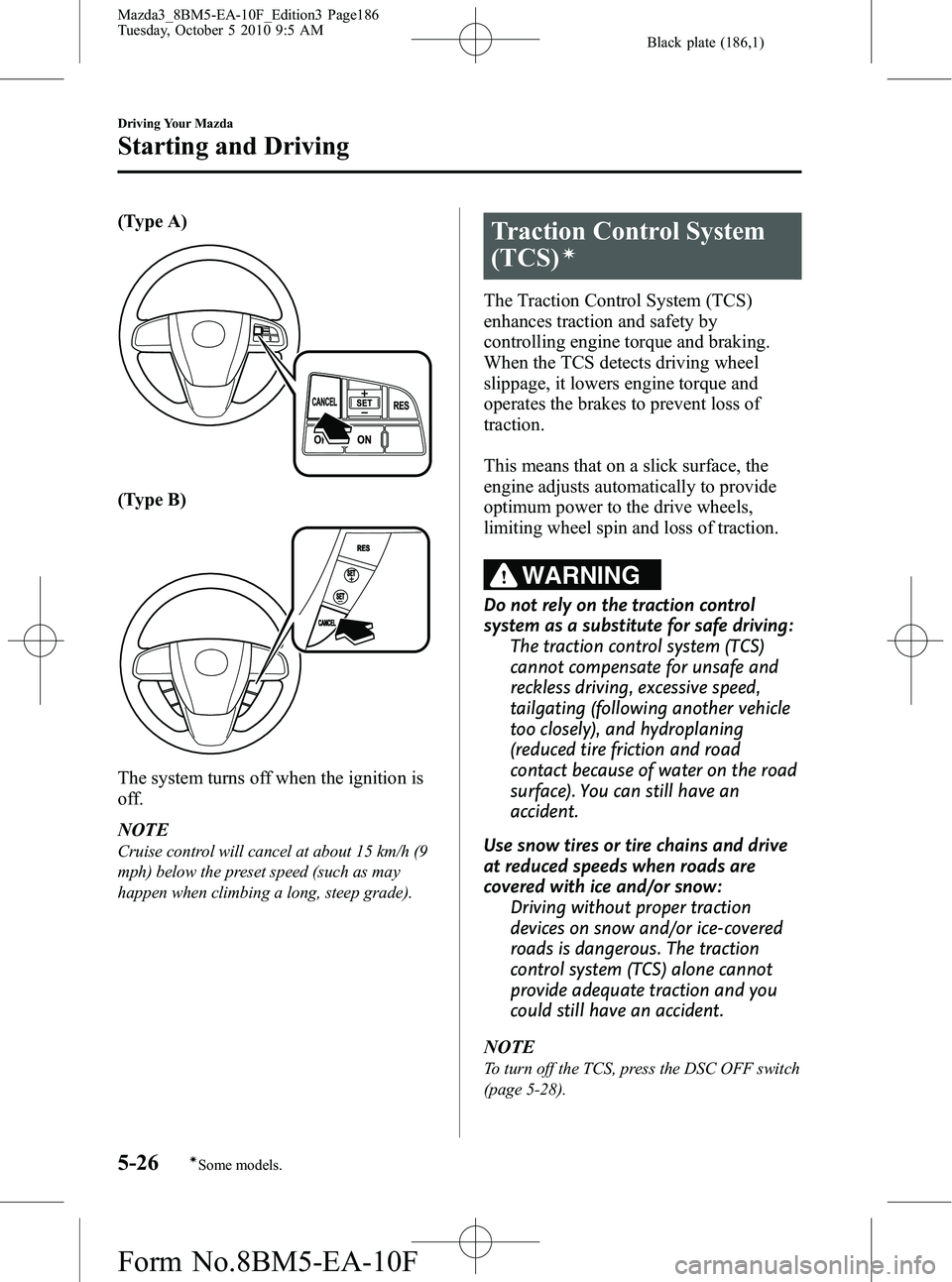
(Type A)
(Type B)
The system turns off when the ignition is
off.
NOTE
Cruise control will cancel at about 15 km/h (9
mph) below the preset speed (such as may
happen when climbing a long, steep grade).
Traction Control System
(TCS)
í
The Traction Control System (TCS)
enhances traction and safety by
controlling engine torque and braking.
When the TCS detects driving wheel
slippage, it lowers engine torque and
operates the brakes to prevent loss of
traction.
This means that on a slick surface, the
engine adjusts automatically to provide
optimum power to the drive wheels,
limiting wheel spin and loss of traction.
WARNING
Do not rely on the traction control
system as a substitute for safe driving:The traction control system (TCS)
cannot compensate for unsafe and
reckless driving, excessive speed,
tailgating (following another vehicle
too closely), and hydroplaning
(reduced tire friction and road
contact because of water on the road
surface). You can still have an
accident.
Use snow tires or tire chains and drive
at reduced speeds when roads are
covered with ice and/or snow: Driving without proper traction
devices on snow and/or ice-covered
roads is dangerous. The traction
control system (TCS) alone cannot
provide adequate traction and you
could still have an accident.
NOTE
To turn off the TCS, press the DSC OFF switch
(page 5-28).
5-26
Driving Your Mazda
íSome models.
Starting and Driving
Mazda3_8BM5-EA-10F_Edition3 Page186
Tuesday, October 5 2010 9:5 AM
Form No.8BM5-EA-10F
Page 187 of 514
Black plate (187,1)
qTCS/DSC Indicator Light
This indicator light stays on for a few
seconds when the ignition is switched
ON. If the TCS or DSC is operating, the
indicator light flashes.
If the light stays on, the TCS or DSC may
have a malfunction and they may not
operate correctly. Take your vehicle to an
Authorized Mazda Dealer.
NOTE
lIn addition to the indicator light flashing, a
slight lugging sound will come from the
engine. This indicates that the TCS is
operating properly.
lOn slippery surfaces, such as fresh snow, it
will be impossible to achieve high rpm
when the TCS is on.
Dynamic Stability Control
(DSC)
í
The Dynamic Stability Control (DSC)
automatically controls braking and engine
torque in conjunction with systems such
as ABS and TCS to help control side slip
when driving on slippery surfaces, or
during sudden or evasive maneuvering,
enhancing vehicle safety.
Refer to ABS (page 5-8) and TCS (page
5-26).
DSC operation is possible at speeds
greater than 20 km/h (12 mph).
WARNING
Do not rely on the dynamic stability
control as a substitute for safe driving:
The dynamic stability control (DSC)
cannot compensate for unsafe and
reckless driving, excessive speed,
tailgating (following another vehicle
too closely), and hydroplaning
(reduced tire friction and road
contact because of water on the road
surface). You can still have an
accident.
Driving Your Mazda
Starting and Driving
5-27íSome models.
Mazda3_8BM5-EA-10F_Edition3 Page187
Tuesday, October 5 2010 9:5 AM
Form No.8BM5-EA-10F
Page 193 of 514

Black plate (193,1)
Adjust the tire pressure to the correct tire
pressure. Refer to the specification charts
(page 10-11).
CAUTION
When replacing/repairing the tires or
wheels or both, have the work done
by an Authorized Mazda Dealer, or
the tire pressure sensors may be
damaged.NOTE
lPerform tire pressure adjustment when the
tires are cold. Tire pressure will vary
according to the tire temperature, therefore
let the vehicle stand for 1 hour or only drive
it 1.6 km (1 mile) or less before adjusting
the tire pressures. When pressure is
adjusted on hot tires to the cold inflation
pressure, the TPMS warning light/beep may
turn on after the tires cool and pressure
drops below specification.
Also, an illuminated TPMS warning light,
resulting from the tire air pressure dropping
due to cold ambient temperature, may turn
off if the ambient temperature rises. In this
case, it will also be necessary to adjust the
tire air pressures. If the TPMS warning
light illuminates due to a drop in tire air
pressure, make sure to check and adjust the
tire air pressures.
lAfter adjusting the tire air pressures, it may
require some time for the TPMS warning
light to turn off. If the TPMS warning light
remains illuminated, drive the vehicle at a
speed of at least 25 km/h (16 mph) for 10
minutes, and then verify that it turns off.
lTires lose air naturally over time and the
TPMS cannot tell if the tires are getting too
soft over time or you have a flat. However,
when you find one low tire in a set of four-
that is an indication of trouble; you should
have someone drive the vehicle slowly
forward so you can inspect any low tire for
cuts and any metal objects sticking through
tread or sidewall. Put a few drops of water
in the valve stem to see if it bubbles
indicating a bad valve. Leaks need to be
addressed by more than simply refilling the
trouble tire as leaks are dangerous - take it
to an Authorized Mazda Dealer which has
all the equipment to fix tires, TPMS systems
and order the best replacement tire for your
vehicle.
Driving Your Mazda
Starting and Driving
5-33
Mazda3_8BM5-EA-10F_Edition3 Page193
Tuesday, October 5 2010 9:6 AM
Form No.8BM5-EA-10F