maintenance MAZDA MODEL 3 5-DOOR 2012 User Guide
[x] Cancel search | Manufacturer: MAZDA, Model Year: 2012, Model line: MODEL 3 5-DOOR, Model: MAZDA MODEL 3 5-DOOR 2012Pages: 528, PDF Size: 6.47 MB
Page 125 of 528
Black plate (125,1)
Power window system initialization
procedure
If the battery was disconnected during
vehicle maintenance, or for other reasons
(such as a switch continues to be operated
after the window is fully open/closed), the
window will not fully open and close
automatically. Carry out the following
procedure to resume operation:
1. Switch the ignition ON.
2. Press the switch and fully open thewindow.
3. Pull up the switch to fully close the window and continue holding the
switch for about 2 seconds after the
window fully closes.
Jam-safe window
If a person's hands, head or an object
blocks the window during the auto-
closing operation, the window will stop
and open halfway.
WARNING
Make sure nothing blocks the window
just before it reaches the fully closed
position or while holding up the power
window switch: Blocking the power window just
before it reaches the fully closed
position or while holding up the
power window switch is dangerous.
In this case, the jam-safe function
cannot prevent the window from
closing all the way. If fingers are
caught, serious injuries could occur. NOTE
Depending on driving conditions, a closing
power window could stop and start opening
when the window feels a shock that is similar
to something blocking it.
In the event the jam-safe function activates and
the power window cannot be closed
automatically, pull and hold the switch and the
window will close.
Engine-off power window operation
The power window can be operated for
about 45 seconds after the ignition is
switched from ON to ACC or OFF with
all doors closed. If any door is opened, the
power window will be inoperable.
NOTE
For engine-off operation of the power window,
the switch must be held up firmly throughout
window closure because the auto-closing
function will be inoperable.
Knowing Your Mazda
Doors and Locks
3-47
Mazda3_8BY6-EA-11F_Edition3 Page125
Thursday, March 1 2012 10:17 AM
Form No.8BY6-EA-11F
Page 154 of 528
Black plate (154,1)
Before Getting In
lBe sure the windows, outside mirrors,
and outside lights are clean.
lInspect inflation pressures and
condition of tires.
lLook under the vehicle for any sign of
fluid leaks.
lIf you plan to back up, make sure
nothing is in your way.
NOTE
Engine oil, engine coolant, brake/clutch fluid,
washer fluid, and other fluid levels should be
inspected. See Maintenance, Section 8.
After Getting In
lAre all doors closed and locked?lIs the seat adjusted properly?lAre the inside and outside mirrors
adjusted?
lIs the steering wheel adjusted properly?lIs everyone's seat belt fastened?lCheck all gauges.lCheck all warning lights when the
ignition is switched ON.
lRelease the parking brake and make
sure the brake warning light goes off.
Always be thoroughly familiar with your
Mazda.
4-6
Before Driving Your Mazda
Before Starting the Engine
Mazda3_8BY6-EA-11F_Edition3 Page154
Thursday, March 1 2012 10:17 AM
Form No.8BY6-EA-11F
Page 155 of 528
Black plate (155,1)
Break-In Period
No special break-in is necessary, but a few
precautions in the first 1,000 km (600
miles) may add to the performance,
economy, and life of your Mazda.
lDo not race the engine.lDo not maintain one constant speed,
either slow or fast, for a long period of
time.
lDo not drive constantly at full-throttle
or high engine rpm for extended
periods of time.
lAvoid unnecessary hard stops.lAvoid full-throttle starts.
Money-Saving Suggestions
How you operate your Mazda determines
how far it will travel on a tank of fuel. Use
these suggestions to help save money on
fuel and repairs.
lAvoid long warm-ups. Once the engine
runs smoothly, begin driving.
lAvoid fast starts.lKeep the engine tuned. Follow the
maintenance schedule (page 8-3) and
have an Authorized Mazda Dealer
perform inspections and servicing.
lUse the air conditioner only when
necessary.
lSlow down on rough roads.lKeep the tires properly inflated.lDo not carry unnecessary weight.lDo not rest your foot on the brake
pedal while driving.
lKeep the wheels in correct alignment.lKeep windows closed at high speeds.lSlow down when driving in crosswinds
and headwinds.
WARNING
Never stop the engine when going
down a hill:Stopping the engine when going
down a hill is dangerous. This causes
the loss of power steering and power
brake control, and may cause
damage to the drivetrain. Any loss of
steering or braking control could
cause an accident.
Before Driving Your Mazda
Driving Tips
4-7
Mazda3_8BY6-EA-11F_Edition3 Page155
Thursday, March 1 2012 10:17 AM
Form No.8BY6-EA-11F
Page 162 of 528
Black plate (162,1)
Turbocharger Informationí
The turbocharger greatly enhances engine power. Its advanced design provides improved
operation and requires minimum additional maintenance. To get maximum performance
from your turbocharged engine, take note of the following tips:
lThe turbocharged engine is designed for optimal operation with premium unleaded
gasoline (page 4-2). Do not use fuel with a lower octane rating. Extra fuel additives are
NOT recommended.
lChange the engine oil and filter using the turbo engine interval outlined in the
maintenance schedule (for your driving condition).
lUse only the recommended engine oil (page 8-19). Extra oil additives are NOT
recommended.
lAfter driving at freeway speeds or up a long hill, idle the engine at least 30 seconds to
cool the turbo before turning off the engine. Avoid simply shutting the engine off
abruptly after a hard or long drive. Damage to the turbocharger may result.
lDo not race or over-rev the engine when starting. This should not be done with ANY
engine, especially not with one that's turbocharged.
lDo not add any aftermarket devices to alter the engine's ignition timing, fuel delivery, or
turbo boost pressure. This may lead to serious engine damage and may void your
warranty.
4-14
Before Driving Your Mazda
íSome models.
Driving Tips
Mazda3_8BY6-EA-11F_Edition3 Page162
Thursday, March 1 2012 10:17 AM
Form No.8BY6-EA-11F
Page 196 of 528
Black plate (196,1)
CAUTION
ØEach tire, including the spare (if provided), should be checked monthly when cold
and inflated to the inflation pressure recommended by the vehicle manufacturer
on the vehicle placard or tire inflation pressure label. (If your vehicle has tires of a
different size than the size indicated on the vehicle placard or tire inflation
pressure label, you should determine the proper tire inflation pressure for those
tires.)
As an added safety feature, your vehicle has been equipped with a tire pressure
monitoring system (TPMS) that illuminates a low tire pressure telltale when one
or more of your tires is significantly under-inflated. Accordingly, when the low tire
pressure telltale illuminates, you should stop and check your tires as soon as
possible, and inflate them to the proper pressure. Driving on a significantly under-
inflated tire causes the tire to overheat and can lead to tire failure. Under-inflation
also reduces fuel efficiency and tire tread life, and may affect the vehicle's
handling and stopping ability.
Please note that the TPMS is not a substitute for proper tire maintenance, and it
is the driver's responsibility to maintain correct tire pressure, even if under-
inflation has not reached the level to trigger illumination of the TPMS low tire
pressure telltale.
Ø Your vehicle has also been equipped with a TPMS malfunction indicator to
indicate when the system is not operating properly.
The TPMS malfunction indicator is combined with the low tire pressure telltale.
When the system detects a malfunction, the telltale will flash for approximately
one minute and then remain continuously illuminated. This sequence will
continue upon subsequent vehicle start-ups as long as the malfunction exists.
When the malfunction indicator is illuminated, the system may not be able to
detect or signal low tire pressure as intended. TPMS malfunctions may occur for a
variety of reasons, including the installation of replacement or alternate tires or
wheels on the vehicle that prevent the TPMS from functioning properly. Always
check the TPMS malfunction telltale after replacing one or more tires or wheels on
your vehicle to ensure that the replacement or alternate tires and wheels allow
the TPMS to continue to function properly.
Ø To avoid false readings, the system samples for a little while before indicating a
problem. As a result it will not instantaneously register a rapid tire deflation or
blow out.
NOTE
This device complies with part 15 of the FCC Rules. Operation is subject to the following two
conditions: (1) This device may not cause harmful interference, and (2) this device must accept any
interference received, including interference that may cause undesired operation.
5-32
Driving Your Mazda
Starting and Driving
Mazda3_8BY6-EA-11F_Edition3 Page196
Thursday, March 1 2012 10:17 AM
Form No.8BY6-EA-11F
Page 244 of 528
Black plate (244,1)
Operating Tips
qOperating the Climate Control
System
Operate the climate control system with
the engine running.
NOTE
To prevent the battery from being discharged,
do not leave the fan control dial on for a long
period of time with the ignition switched ON
when the engine is not running.
qClearing the Air Inlet
Clear all obstructions such as leaves,
snow and ice from the hood and the air
inlet in the cowl grille to improve the
system efficiency.
qFoggy Windows
The windows may fog up easily in humid
weather. Use the climate control system to
defog the windows.
To help defog the windows, operate the
air conditioner to dehumidify the air.
NOTE
The air conditioner may be used along with the
heater to dehumidify the air.
qParking in Direct Sunlight
If the vehicle has been parked in direct
sunlight during hot weather, open the
windows to let warm air escape, then run
the climate control system.
qNot Using for a Long Period
Run the air conditioner about 10 minutes
at least once a month to keep internal
parts lubricated.
qCheck the Refrigerant before the
Weather Gets Hot
Have the air conditioner checked before
the weather gets hot. Lack of refrigerant
may make the air conditioner less
efficient. Consult an Authorized Mazda
Dealer for refrigerant inspection.
The air conditioner is filled with
HFC134a (R134a), a refrigerant that will
not damage the ozone layer.
If the air conditioner is low on refrigerant
or has a malfunction, consult an
Authorized Mazda Dealer.
qReplacement of the Cabin Air
Filterí
Your vehicle is equipped with an air filter
for the air conditioner. It is necessary to
change the filter periodically as indicated
in scheduled maintenance (page 8-3).
Consult an Authorized Mazda Dealer for
replacement of the cabin air filter.
6-2
Interior Comfort
íSome models.
Climate Control System
Mazda3_8BY6-EA-11F_Edition3 Page244
Thursday, March 1 2012 10:17 AM
Form No.8BY6-EA-11F
Page 342 of 528
Black plate (342,1)
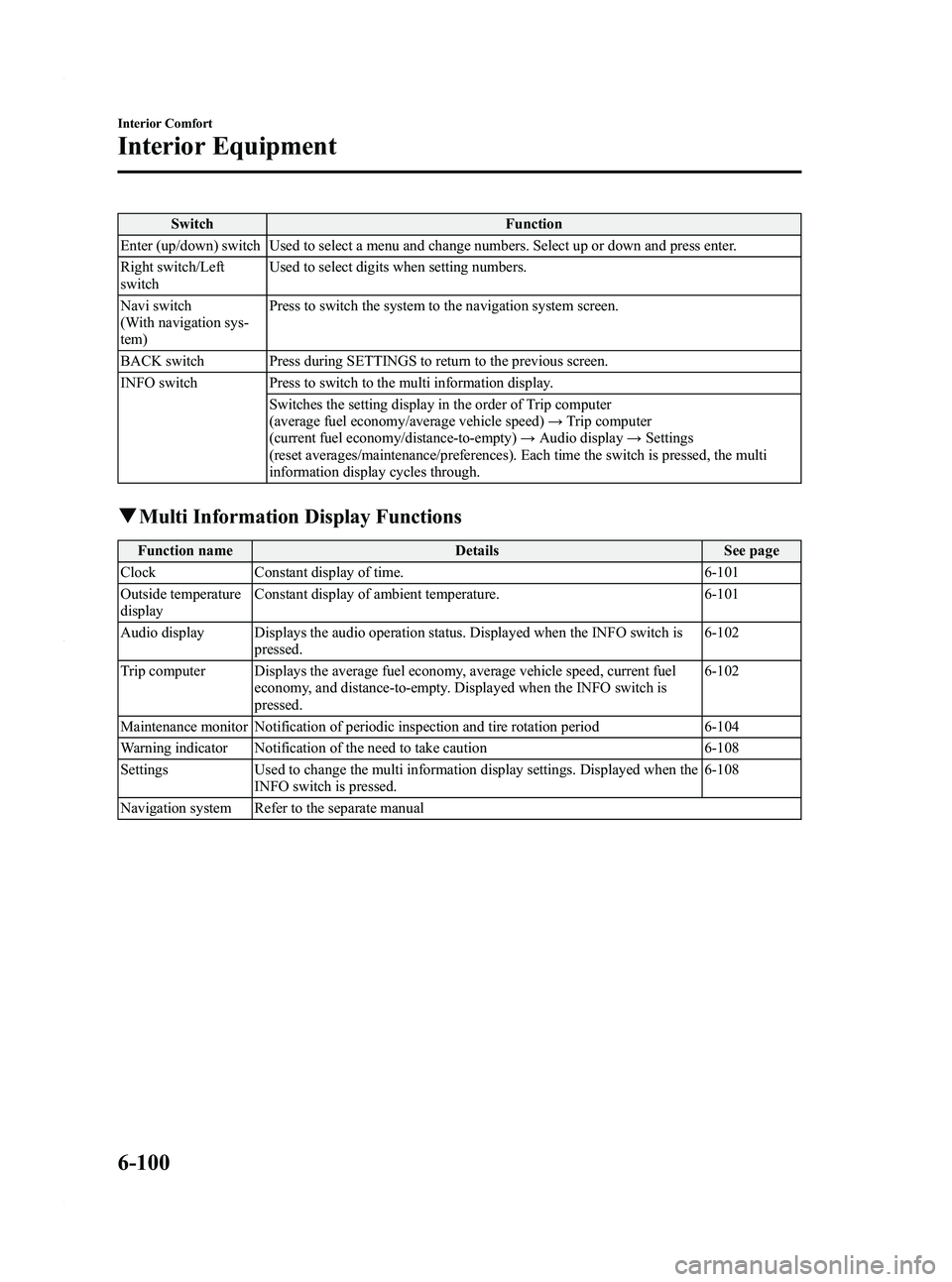
SwitchFunction
Enter (up/down) switch Used to select a menu and change numbers. Select up or down and press enter.
Right switch/Left
switch Used to select digits when setting numbers.
Navi switch
(With navigation sys-
tem) Press to switch the system to the navigation system screen.
BACK switch Press during SETTINGS to return to the previous screen.
INFO switch Press to switch to the multi information display. Switches the setting display in the order of Trip computer
(average fuel economy/average vehicle speed) →Trip computer
(current fuel economy/distance-to-empty) →Audio display →Settings
(reset averages/maintenance/preferences). Each time the switch is pressed, the multi
information display cycles through.
q Multi Information Display Functions
Function name DetailsSee page
Clock Constant display of time. 6-101
Outside temperature
display Constant display of ambient temperature.
6-101
Audio display Displays the audio operation status. Displayed when the INFO switch is pressed. 6-102
Trip computer Displays the average fuel economy, average vehicle speed, current fuel economy, and distance-to-empty. Displayed when the INFO switch is
pressed. 6-102
Maintenance monitor Notification of periodic inspection and tire rotation period 6-104
Warning indicator Notification of the need to take caution 6-108
Settings Used to change the multi information display settings. Displayed when the
INFO switch is pressed. 6-108
Navigation system Refer to the separate manual
6-100
Interior Comfort
Interior Equipment
Mazda3_8BY6-EA-11F_Edition3 Page342
Thursday, March 1 2012 10:18 AM
Form No.8BY6-EA-11F
Page 346 of 528
Black plate (346,1)
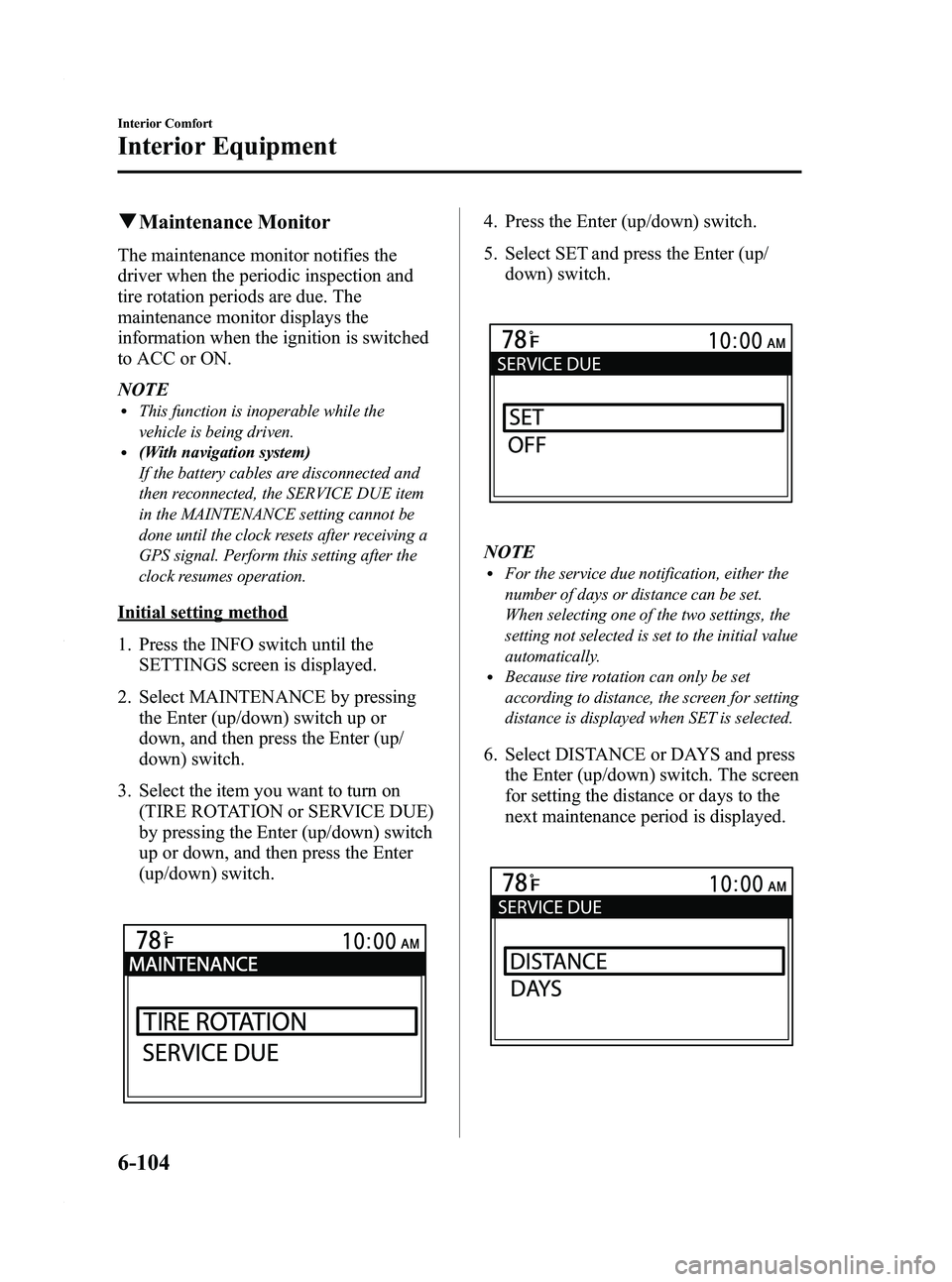
qMaintenance Monitor
The maintenance monitor notifies the
driver when the periodic inspection and
tire rotation periods are due. The
maintenance monitor displays the
information when the ignition is switched
to ACC or ON.
NOTE
lThis function is inoperable while the
vehicle is being driven.
l(With navigation system)
If the battery cables are disconnected and
then reconnected, the SERVICE DUE item
in the MAINTENANCE setting cannot be
done until the clock resets after receiving a
GPS signal. Perform this setting after the
clock resumes operation.
Initial setting method
1. Press the INFO switch until the
SETTINGS screen is displayed.
2. Select MAINTENANCE by pressing the Enter (up/down) switch up or
down, and then press the Enter (up/
down) switch.
3. Select the item you want to turn on (TIRE ROTATION or SERVICE DUE)
by pressing the Enter (up/down) switch
up or down, and then press the Enter
(up/down) switch.
4. Press the Enter (up/down) switch.
5. Select SET and press the Enter (up/down) switch.
NOTElFor the service due notification, either the
number of days or distance can be set.
When selecting one of the two settings, the
setting not selected is set to the initial value
automatically.
lBecause tire rotation can only be set
according to distance, the screen for setting
distance is displayed when SET is selected.
6. Select DISTANCE or DAYS and pressthe Enter (up/down) switch. The screen
for setting the distance or days to the
next maintenance period is displayed.
6-104
Interior Comfort
Interior Equipment
Mazda3_8BY6-EA-11F_Edition3 Page346
Thursday, March 1 2012 10:18 AM
Form No.8BY6-EA-11F
Page 347 of 528
Black plate (347,1)
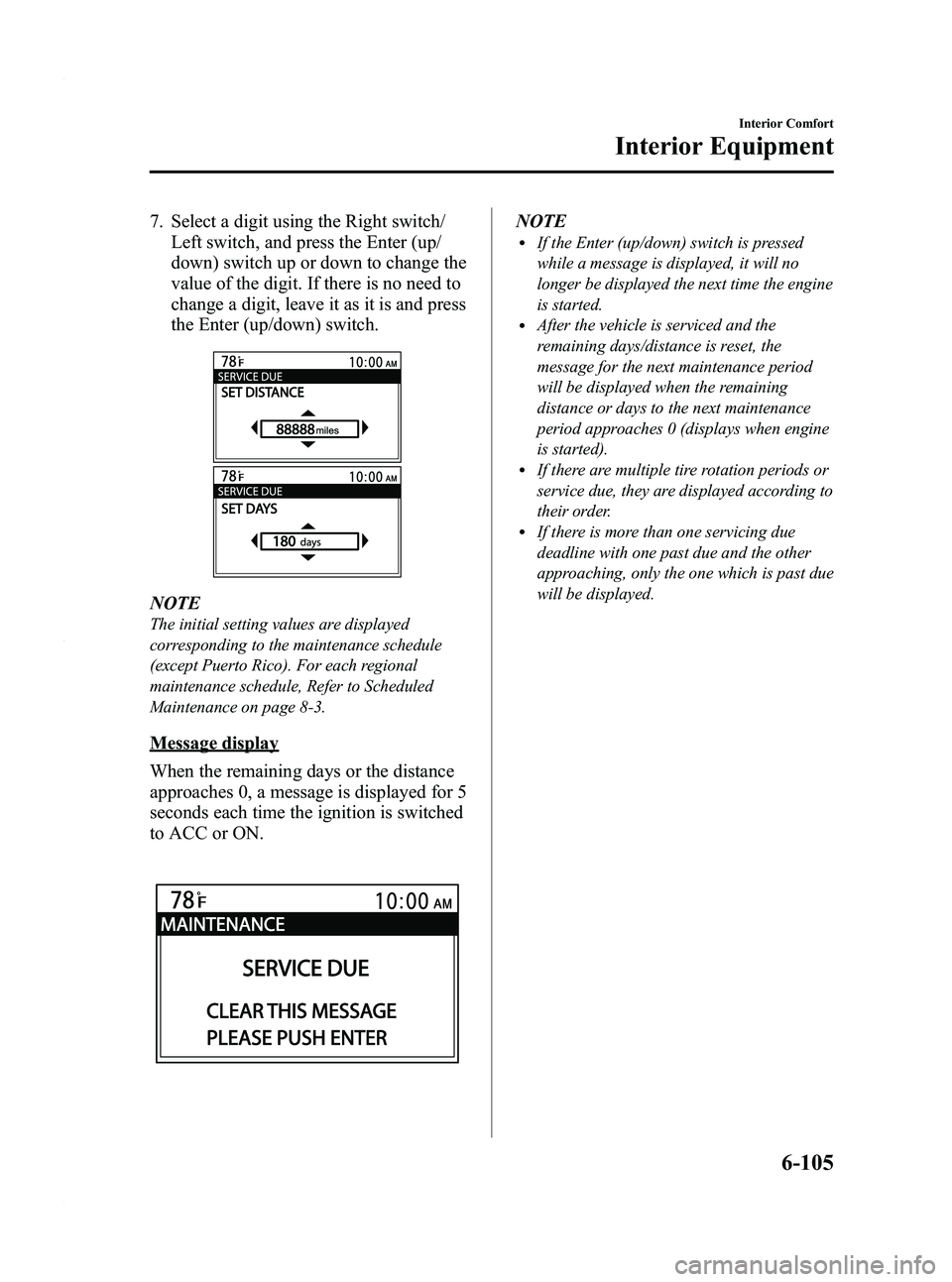
7. Select a digit using the Right switch/Left switch, and press the Enter (up/
down) switch up or down to change the
value of the digit. If there is no need to
change a digit, leave it as it is and press
the Enter (up/down) switch.
NOTE
The initial setting values are displayed
corresponding to the maintenance schedule
(except Puerto Rico). For each regional
maintenance schedule, Refer to Scheduled
Maintenance on page 8-3.
Message display
When the remaining days or the distance
approaches 0, a message is displayed for 5
seconds each time the ignition is switched
to ACC or ON.
NOTElIf the Enter (up/down) switch is pressed
while a message is displayed, it will no
longer be displayed the next time the engine
is started.
lAfter the vehicle is serviced and the
remaining days/distance is reset, the
message for the next maintenance period
will be displayed when the remaining
distance or days to the next maintenance
period approaches 0 (displays when engine
is started).
lIf there are multiple tire rotation periods or
service due, they are displayed according to
their order.
lIf there is more than one servicing due
deadline with one past due and the other
approaching, only the one which is past due
will be displayed.
Interior Comfort
Interior Equipment
6-105
Mazda3_8BY6-EA-11F_Edition3 Page347
Thursday, March 1 2012 10:18 AM
Form No.8BY6-EA-11F
Page 348 of 528
Black plate (348,1)
Display periodItem Start of message display End of message display
TIRE ROTATION When remaining distance is less than 500 km (300 mile) Distance exceeds 500 km (300 mile) from
remaining distance of 0 km
SERVICE DUE When remaining distance is less than 500 km (300 mile), or
remaining days are less than 15
(which ever comes first) Distance exceeds 500 km (300 mile) from
remaining distance of 0 km, or 15 days have
elapsed since remaining days reached
“0 ” days
(which ever comes first)
Message display Item Timing Displayed message
TIRE ROTATION Remaining distance: 500 km (300 mile) to -500 km (-300 mile) TIRE ROTATION DUE
SERVICE DUE Remaining distance: 500 km (300 mile) to 0 km (0 mile) SERVICE DUE
Remaining days: 15 to 0 days
Remaining distance:
0 km (0 mile) to -500 km (-300 mile) SERVICE OVERDUE
Remaining days:0 to 15 days
Reset method
If resetting is performed after a tire
rotation or periodic inspection has been
done, a notification of the next
maintenance period will be displayed
when the period approaches.
1. Press the INFO switch until the SETTINGS screen is displayed.
2. Select MAINTENANCE by pressing the Enter (up/down) switch up or
down, and then press the Enter (up/
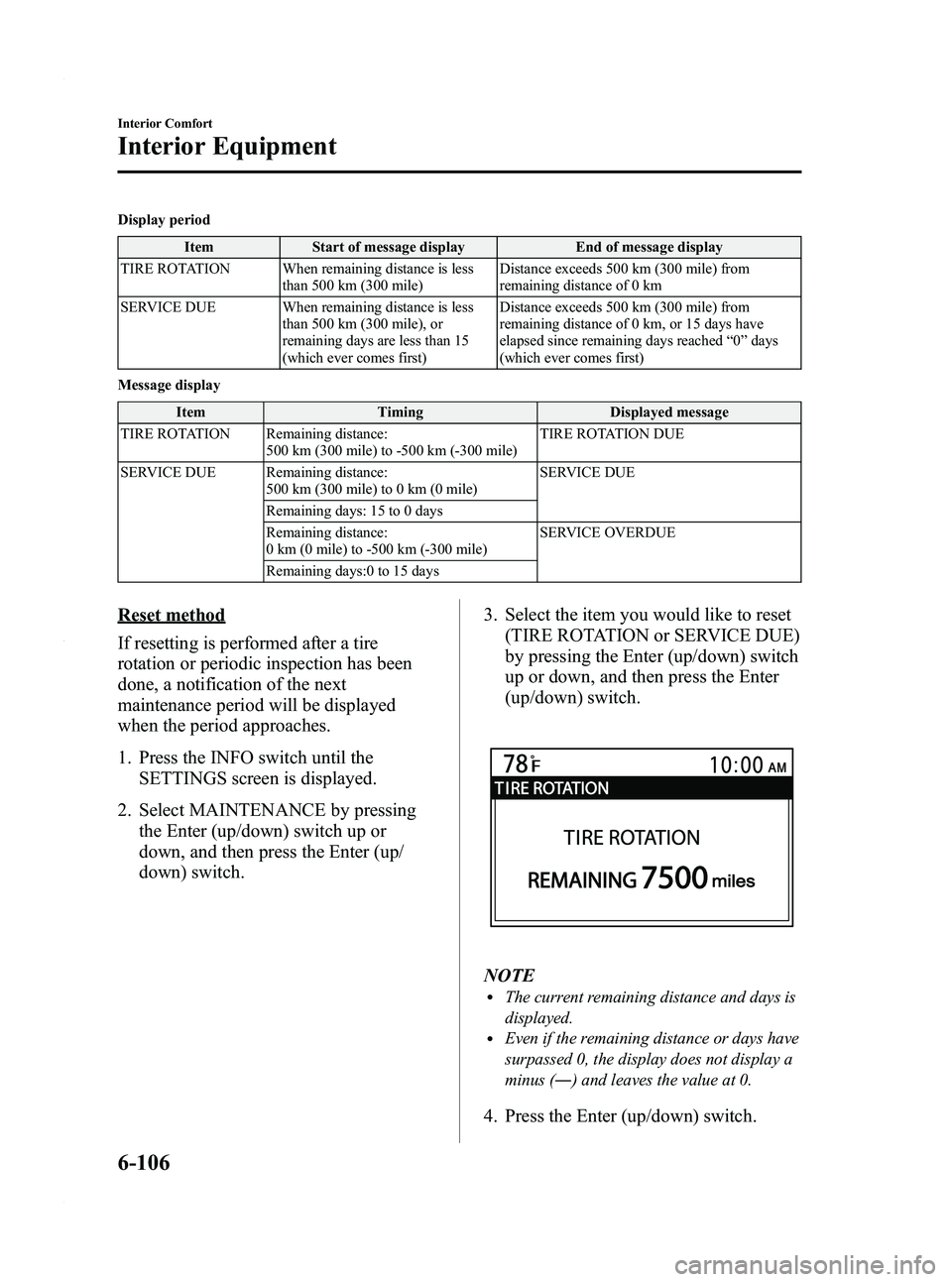
down) switch. 3. Select the item you would like to reset
(TIRE ROTATION or SERVICE DUE)
by pressing the Enter (up/down) switch
up or down, and then press the Enter
(up/down) switch.
NOTElThe current remaining distance and days is
displayed.
lEven if the remaining distance or days have
surpassed 0, the display does not display a
minus (― ) and leaves the value at 0.
4. Press the Enter (up/down) switch.
6-106
Interior Comfort
Interior Equipment
Mazda3_8BY6-EA-11F_Edition3 Page348
Thursday, March 1 2012 10:18 AM
Form No.8BY6-EA-11F