fuel MAZDA MODEL 3 5-DOOR 2012 Owner's Manual
[x] Cancel search | Manufacturer: MAZDA, Model Year: 2012, Model line: MODEL 3 5-DOOR, Model: MAZDA MODEL 3 5-DOOR 2012Pages: 528, PDF Size: 6.47 MB
Page 212 of 528
Black plate (212,1)
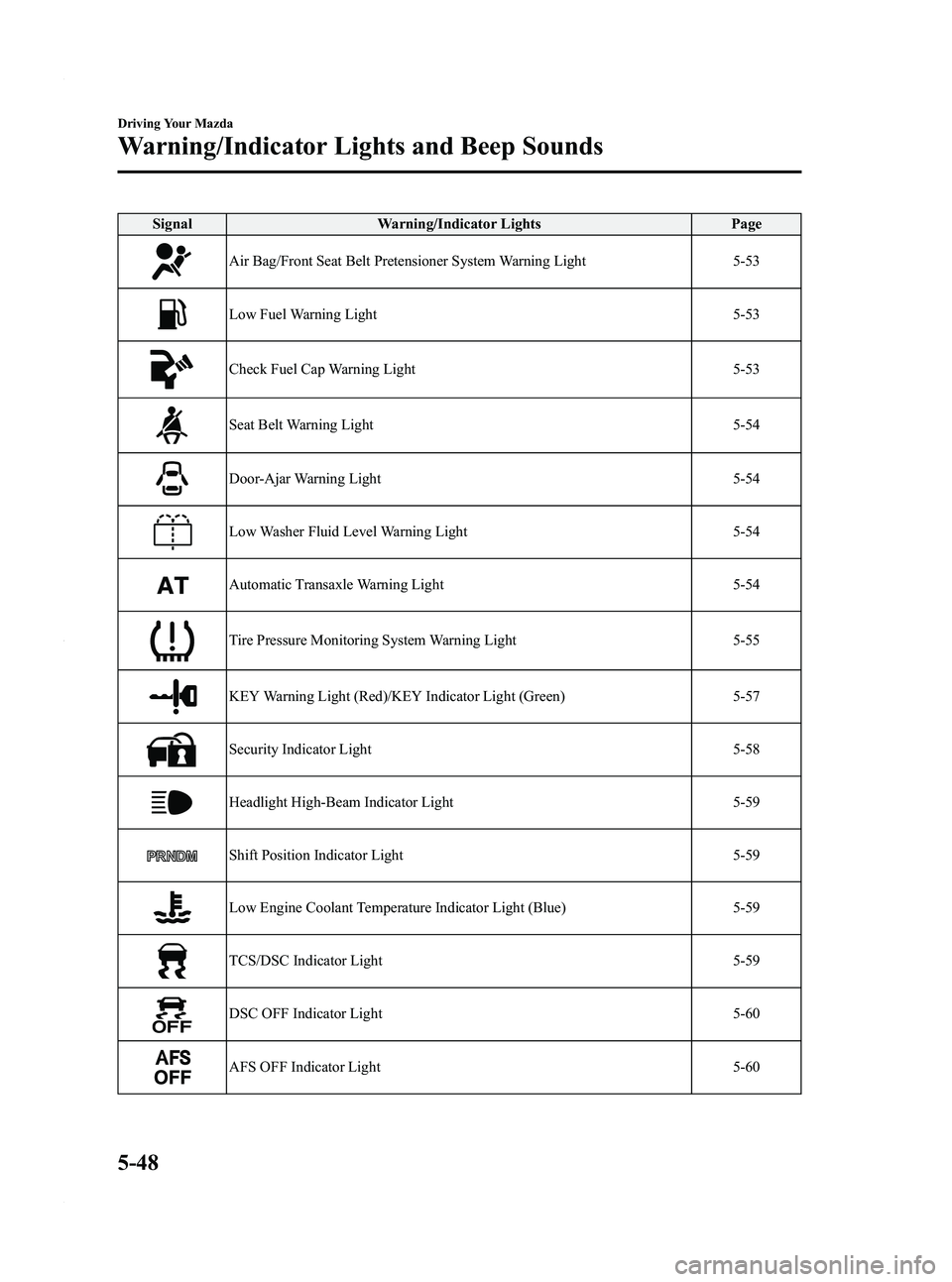
SignalWarning/Indicator Lights Page
Air Bag/Front Seat Belt Pretensioner System Warning Light 5-53
Low Fuel Warning Light5-53
Check Fuel Cap Warning Light5-53
Seat Belt Warning Light5-54
Door-Ajar Warning Light5-54
Low Washer Fluid Level Warning Light5-54
Automatic Transaxle Warning Light5-54
Tire Pressure Monitoring System Warning Light5-55
KEY Warning Light (Red)/KEY Indicator Light (Green)5-57
Security Indicator Light5-58
Headlight High-Beam Indicator Light5-59
Shift Position Indicator Light5-59
Low Engine Coolant Temperature Indicator Light (Blue) 5-59
TCS/DSC Indicator Light5-59
DSC OFF Indicator Light5-60
AFS OFF Indicator Light5-60
5-48
Driving Your Mazda
Warning/Indicator Lights and Beep Sounds
Mazda3_8BY6-EA-11F_Edition3 Page212
Thursday, March 1 2012 10:17 AM
Form No.8BY6-EA-11F
Page 216 of 528
Black plate (216,1)
If the light illuminates while driving:
1. Drive to the side of the road and parkoff the right-of-way on level ground.
2. Turn off the engine and wait 5 minutes for the oil to drain back into the oil
pan.
3. Inspect the engine oil level (page 8-21). If it's low, add the appropriate amount
of engine oil while being careful not to
overfill.
4. Start the engine and check the warning light.
If the light remains illuminated even after
you add oil, stop the engine immediately
and have your vehicle towed to an
Authorized Mazda Dealer.
CAUTION
Do not run the engine if the oil
pressure is low. It could result in
extensive engine damage.
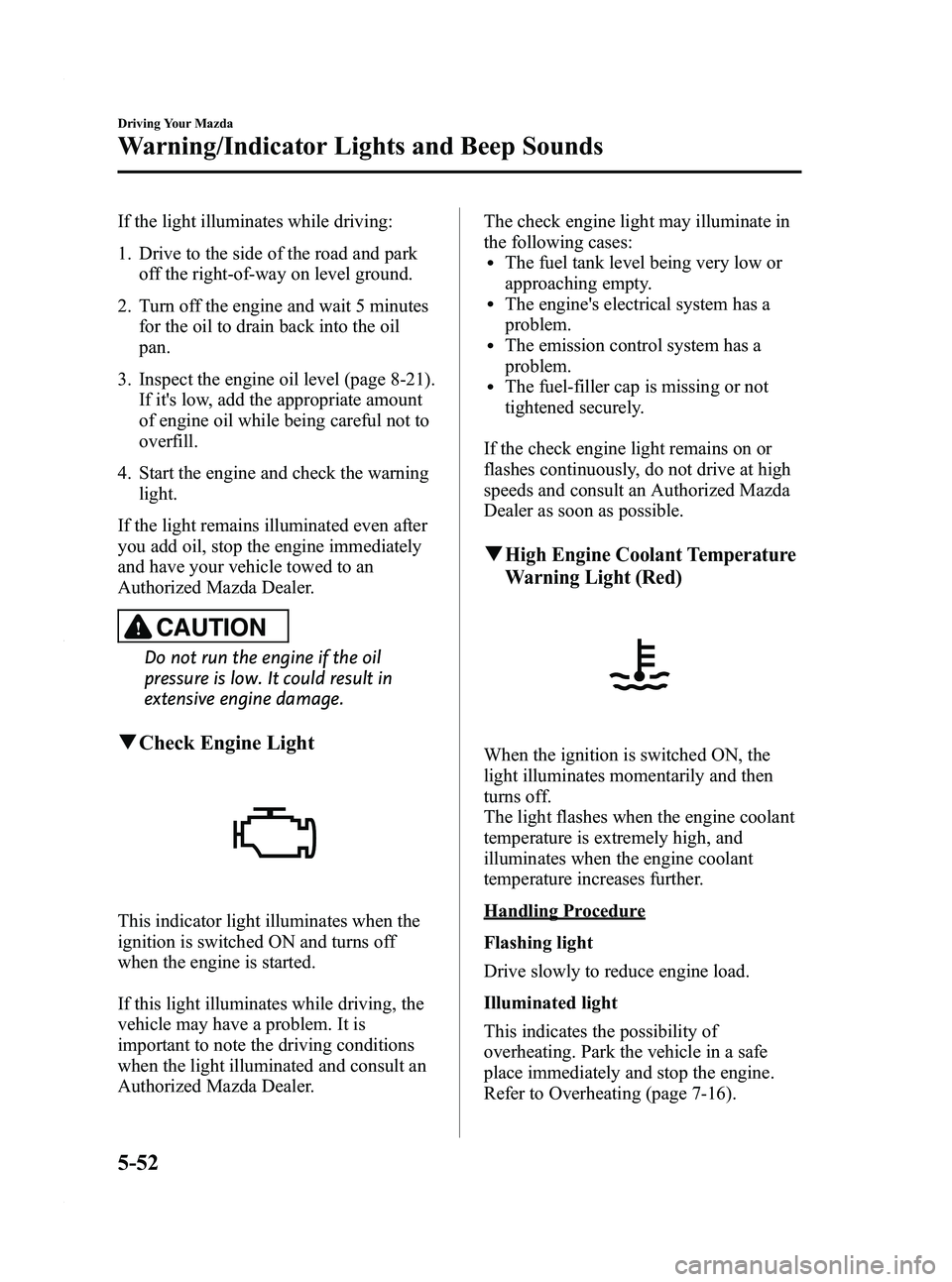
q Check Engine Light
This indicator light illuminates when the
ignition is switched ON and turns off
when the engine is started.
If this light illuminates while driving, the
vehicle may have a problem. It is
important to note the driving conditions
when the light illuminated and consult an
Authorized Mazda Dealer. The check engine light may illuminate in
the following cases:
lThe fuel tank level being very low or
approaching empty.
lThe engine's electrical system has a
problem.
lThe emission control system has a
problem.
lThe fuel-filler cap is missing or not
tightened securely.
If the check engine light remains on or
flashes continuously, do not drive at high
speeds and consult an Authorized Mazda
Dealer as soon as possible.
qHigh Engine Coolant Temperature
Warning Light (Red)
When the ignition is switched ON, the
light illuminates momentarily and then
turns off.
The light flashes when the engine coolant
temperature is extremely high, and
illuminates when the engine coolant
temperature increases further.
Handling Procedure
Flashing light
Drive slowly to reduce engine load.
Illuminated light
This indicates the possibility of
overheating. Park the vehicle in a safe
place immediately and stop the engine.
Refer to Overheating (page 7-16).
5-52
Driving Your Mazda
Warning/Indicator Lights and Beep Sounds
Mazda3_8BY6-EA-11F_Edition3 Page216
Thursday, March 1 2012 10:17 AM
Form No.8BY6-EA-11F
Page 217 of 528
Black plate (217,1)
CAUTION
Do not drive the vehicle with the high
engine coolant temperature warning
light illuminated. Otherwise, it could
result in damage to the engine.
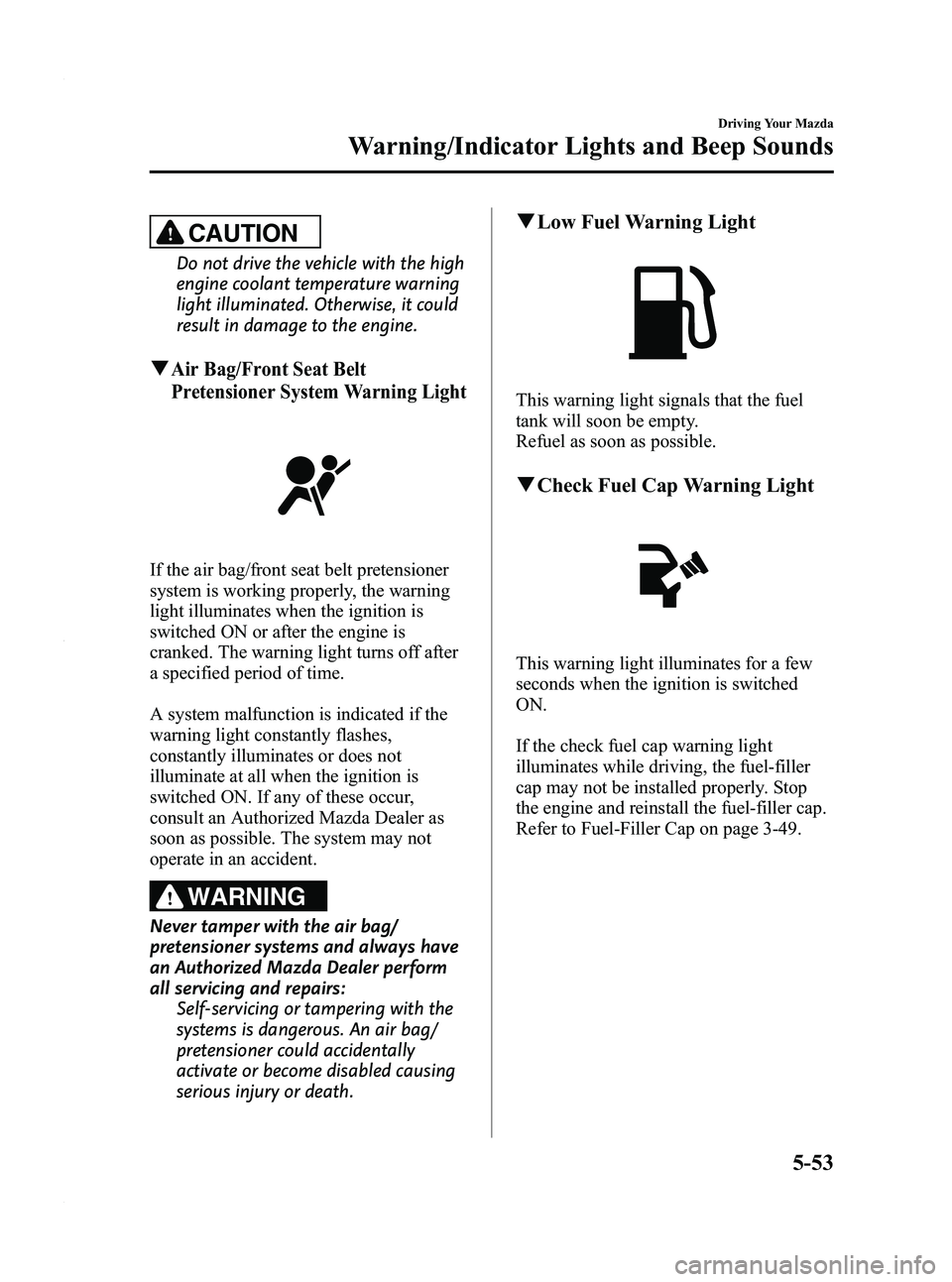
qAir Bag/Front Seat Belt
Pretensioner System Warning Light
If the air bag/front seat belt pretensioner
system is working properly, the warning
light illuminates when the ignition is
switched ON or after the engine is
cranked. The warning light turns off after
a specified period of time.
A system malfunction is indicated if the
warning light constantly flashes,
constantly illuminates or does not
illuminate at all when the ignition is
switched ON. If any of these occur,
consult an Authorized Mazda Dealer as
soon as possible. The system may not
operate in an accident.
WARNING
Never tamper with the air bag/
pretensioner systems and always have
an Authorized Mazda Dealer perform
all servicing and repairs:Self-servicing or tampering with the
systems is dangerous. An air bag/
pretensioner could accidentally
activate or become disabled causing
serious injury or death.
qLow Fuel Warning Light
This warning light signals that the fuel
tank will soon be empty.
Refuel as soon as possible.
qCheck Fuel Cap Warning Light
This warning light illuminates for a few
seconds when the ignition is switched
ON.
If the check fuel cap warning light
illuminates while driving, the fuel-filler
cap may not be installed properly. Stop
the engine and reinstall the fuel-filler cap.
Refer to Fuel-Filler Cap on page 3-49.
Driving Your Mazda
Warning/Indicator Lights and Beep Sounds
5-53
Mazda3_8BY6-EA-11F_Edition3 Page217
Thursday, March 1 2012 10:17 AM
Form No.8BY6-EA-11F
Page 342 of 528
Black plate (342,1)
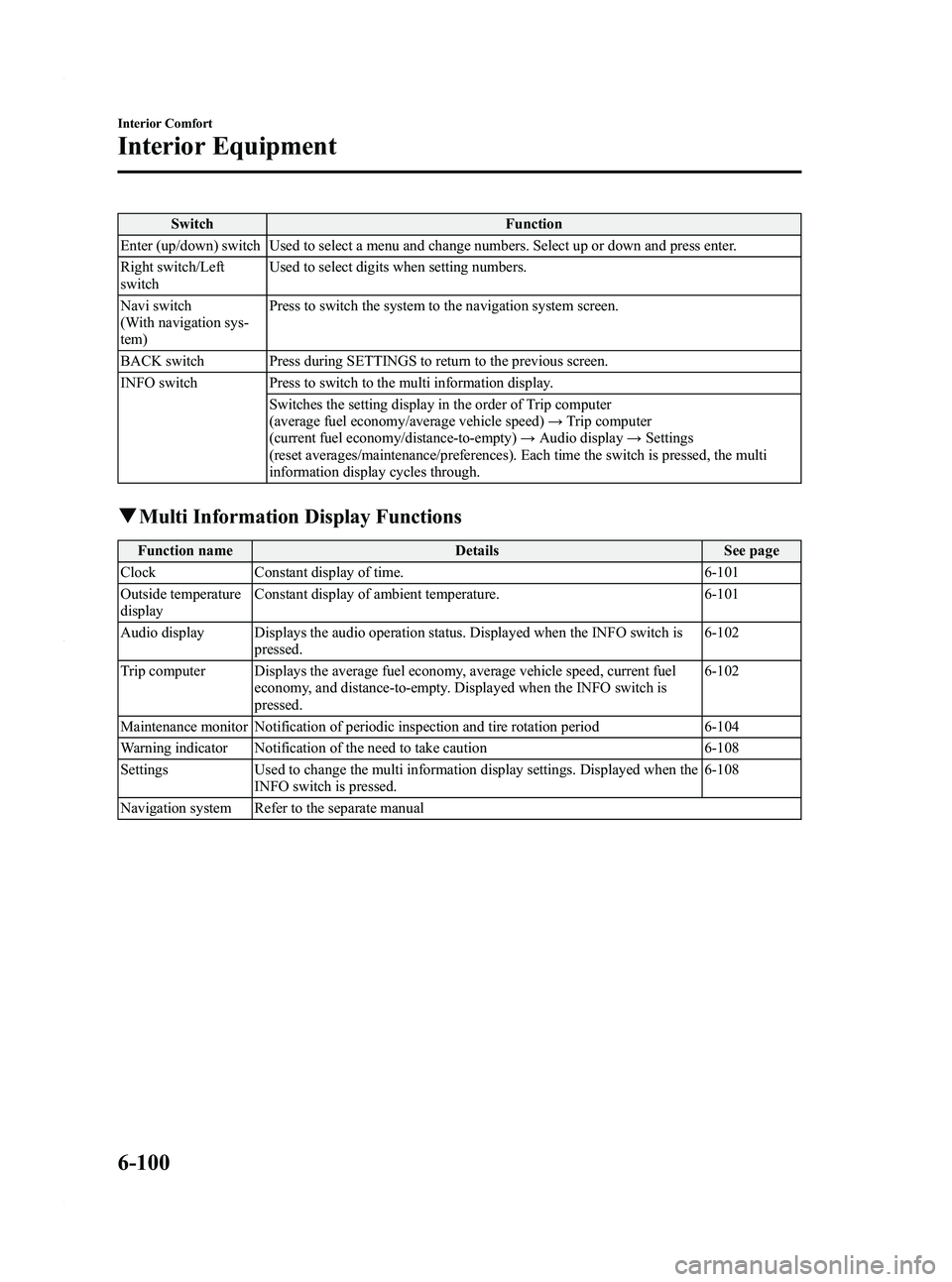
SwitchFunction
Enter (up/down) switch Used to select a menu and change numbers. Select up or down and press enter.
Right switch/Left
switch Used to select digits when setting numbers.
Navi switch
(With navigation sys-
tem) Press to switch the system to the navigation system screen.
BACK switch Press during SETTINGS to return to the previous screen.
INFO switch Press to switch to the multi information display. Switches the setting display in the order of Trip computer
(average fuel economy/average vehicle speed) →Trip computer
(current fuel economy/distance-to-empty) →Audio display →Settings
(reset averages/maintenance/preferences). Each time the switch is pressed, the multi
information display cycles through.
q Multi Information Display Functions
Function name DetailsSee page
Clock Constant display of time. 6-101
Outside temperature
display Constant display of ambient temperature.
6-101
Audio display Displays the audio operation status. Displayed when the INFO switch is pressed. 6-102
Trip computer Displays the average fuel economy, average vehicle speed, current fuel economy, and distance-to-empty. Displayed when the INFO switch is
pressed. 6-102
Maintenance monitor Notification of periodic inspection and tire rotation period 6-104
Warning indicator Notification of the need to take caution 6-108
Settings Used to change the multi information display settings. Displayed when the
INFO switch is pressed. 6-108
Navigation system Refer to the separate manual
6-100
Interior Comfort
Interior Equipment
Mazda3_8BY6-EA-11F_Edition3 Page342
Thursday, March 1 2012 10:18 AM
Form No.8BY6-EA-11F
Page 344 of 528
Black plate (344,1)
qAudio Display
Press the INFO switch until the AUDIO
screen is displayed. The audio operation
status is displayed.
To operate the audio system, refer to
“Audio System ”(page 6-16).
q Trip Computer
The trip computer can display the
following:
lThe average fuel economy.lThe average vehicle speed.lThe current fuel economy.lThe approximate distance you can
travel on the available fuel.
1. Switch the ignition ON.
2. Press the INFO switch until the trip computer screen is displayed.
If you have any problems with your trip
computer, consult an Authorized Mazda
Dealer.
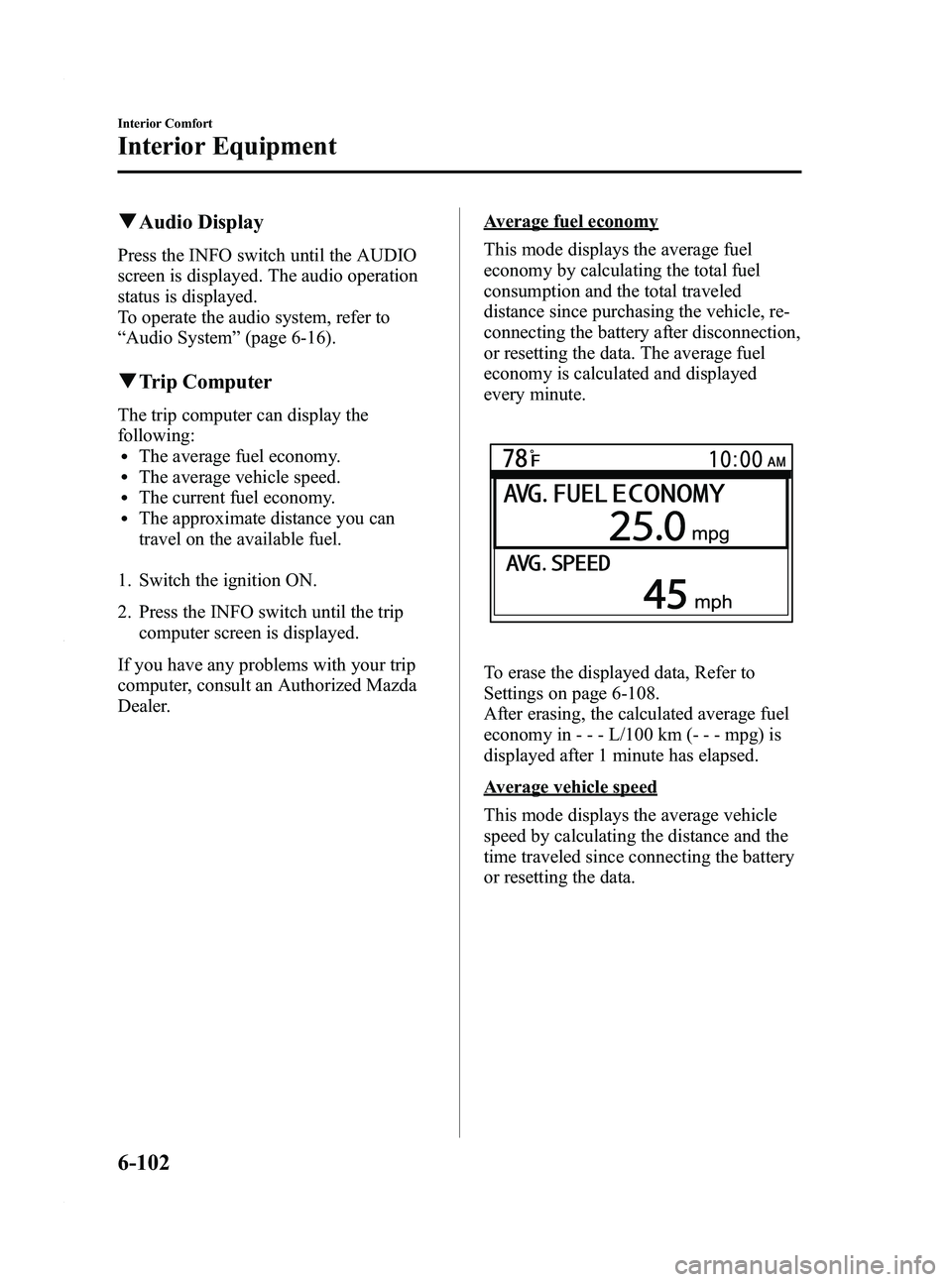
Average fuel economy
This mode displays the average fuel
economy by calculating the total fuel
consumption and the total traveled
distance since purchasing the vehicle, re-
connecting the battery after disconnection,
or resetting the data. The average fuel
economy is calculated and displayed
every minute.
To erase the displayed data, Refer to
Settings on page 6-108.
After erasing, the calculated average fuel
economy in - - - L/100 km (- - - mpg) is
displayed after 1 minute has elapsed.
Average vehicle speed
This mode displays the average vehicle
speed by calculating the distance and the
time traveled since connecting the battery
or resetting the data.
6-102
Interior Comfort
Interior Equipment
Mazda3_8BY6-EA-11F_Edition3 Page344
Thursday, March 1 2012 10:18 AM
Form No.8BY6-EA-11F
Page 345 of 528
Black plate (345,1)
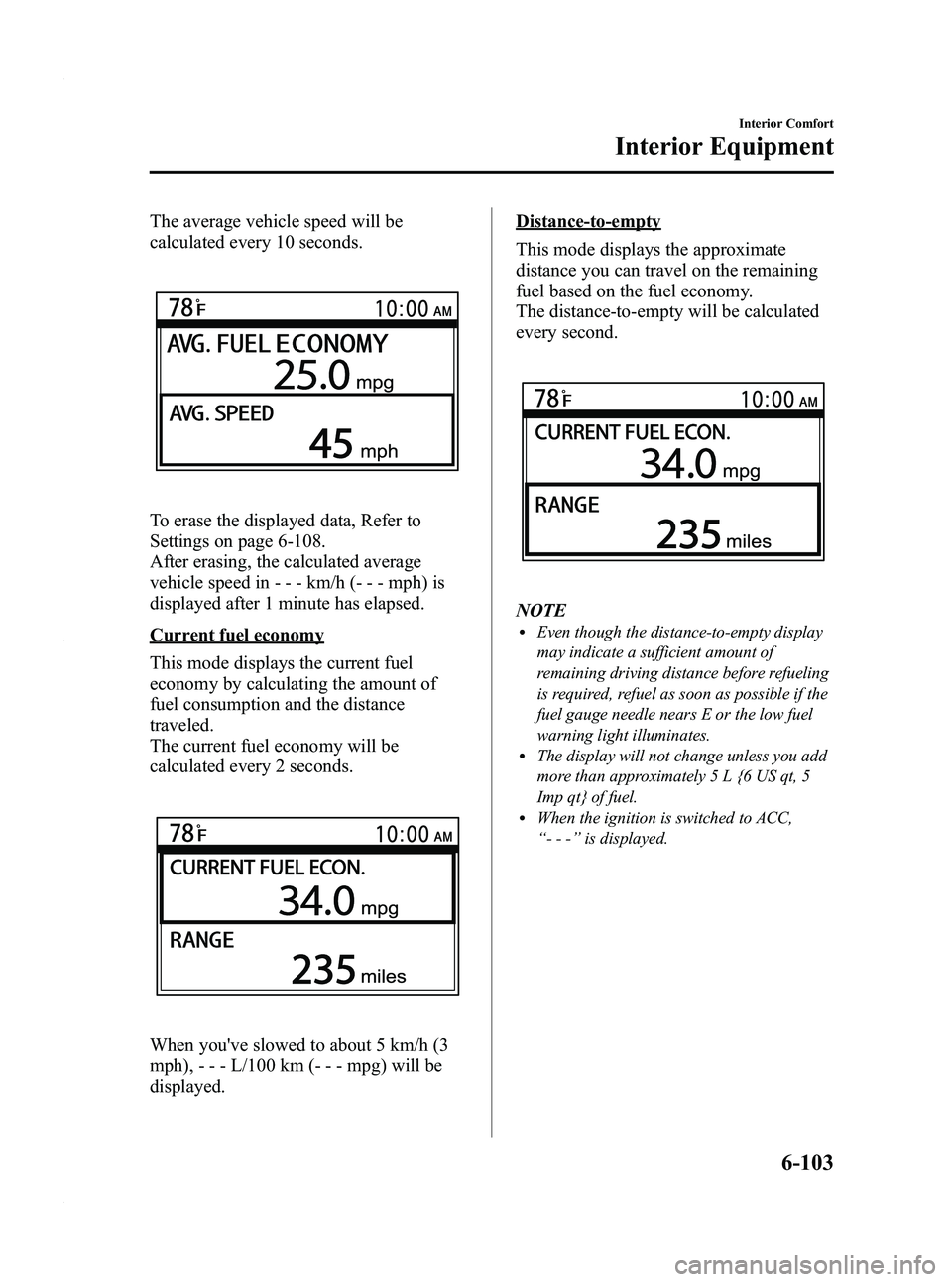
The average vehicle speed will be
calculated every 10 seconds.
To erase the displayed data, Refer to
Settings on page 6-108.
After erasing, the calculated average
vehicle speed in - - - km/h (- - - mph) is
displayed after 1 minute has elapsed.
Current fuel economy
This mode displays the current fuel
economy by calculating the amount of
fuel consumption and the distance
traveled.
The current fuel economy will be
calculated every 2 seconds.
When you've slowed to about 5 km/h (3
mph), - - - L/100 km (- - - mpg) will be
displayed.
Distance-to-empty
This mode displays the approximate
distance you can travel on the remaining
fuel based on the fuel economy.
The distance-to-empty will be calculated
every second.
NOTElEven though the distance-to-empty display
may indicate a sufficient amount of
remaining driving distance before refueling
is required, refuel as soon as possible if the
fuel gauge needle nears E or the low fuel
warning light illuminates.
lThe display will not change unless you add
more than approximately 5 L {6 US qt, 5
Imp qt} of fuel.
lWhen the ignition is switched to ACC,
“--- ”is displayed.
Interior Comfort
Interior Equipment
6-103
Mazda3_8BY6-EA-11F_Edition3 Page345
Thursday, March 1 2012 10:18 AM
Form No.8BY6-EA-11F
Page 350 of 528
Black plate (350,1)
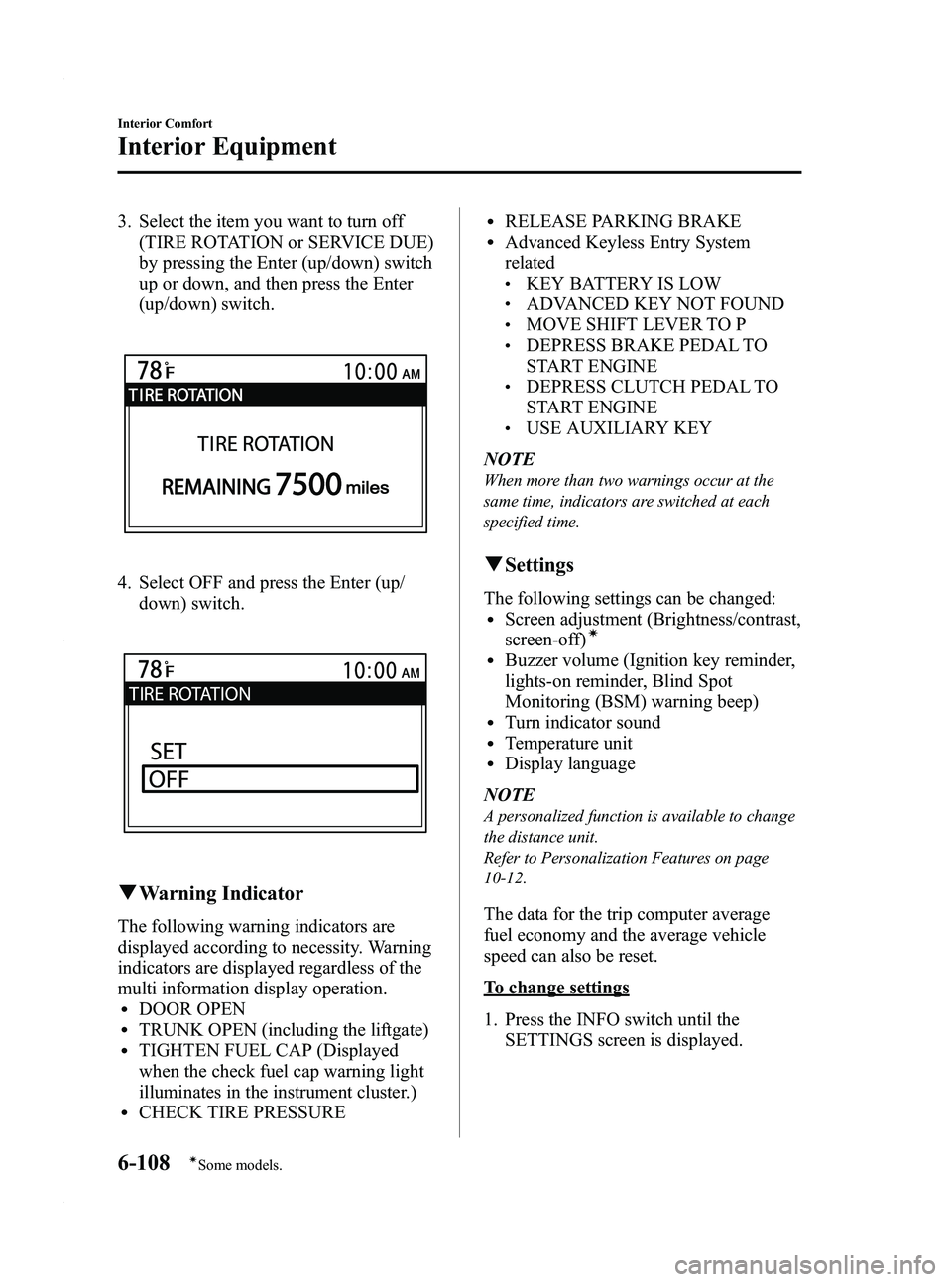
3. Select the item you want to turn off(TIRE ROTATION or SERVICE DUE)
by pressing the Enter (up/down) switch
up or down, and then press the Enter
(up/down) switch.
4. Select OFF and press the Enter (up/
down) switch.
qWarning Indicator
The following warning indicators are
displayed according to necessity. Warning
indicators are displayed regardless of the
multi information display operation.
lDOOR OPENlTRUNK OPEN (including the liftgate)lTIGHTEN FUEL CAP (Displayed
when the check fuel cap warning light
illuminates in the instrument cluster.)
lCHECK TIRE PRESSURE
lRELEASE PARKING BRAKElAdvanced Keyless Entry System
related
lKEY BATTERY IS LOWlADVANCED KEY NOT FOUNDlMOVE SHIFT LEVER TO PlDEPRESS BRAKE PEDAL TO
START ENGINE
lDEPRESS CLUTCH PEDAL TO
START ENGINE
lUSE AUXILIARY KEY
NOTE
When more than two warnings occur at the
same time, indicators are switched at each
specified time.
q Settings
The following settings can be changed:lScreen adjustment (Brightness/contrast,
screen-off)í
lBuzzer volume (Ignition key reminder,
lights-on reminder, Blind Spot
Monitoring (BSM) warning beep)
lTurn indicator soundlTemperature unitlDisplay language
NOTE
A personalized function is available to change
the distance unit.
Refer to Personalization Features on page
10-12.
The data for the trip computer average
fuel economy and the average vehicle
speed can also be reset.
To change settings
1. Press the INFO switch until the SETTINGS screen is displayed.
6-108
Interior Comfort
íSome models.
Interior Equipment
Mazda3_8BY6-EA-11F_Edition3 Page350
Thursday, March 1 2012 10:18 AM
Form No.8BY6-EA-11F
Page 351 of 528
Black plate (351,1)
2. Select PREFERENCES by pressing theEnter (up/down) switch up or down,
and then press the Enter (up/down)
switch.
3. Select the setting item you want to change by pressing the Enter (up/
down) switch up or down, and then
press the Enter (up/down) switch.
4. Select the desired setting by pressing the Enter (up/down) switch up or
down, and then press the Enter (up/
down) switch.
NOTE
The buzzer volume for both the ignition key
reminder and the lights-on reminder is
changed simultaneously. If you prefer separate
buzzer volume settings, consult an Authorized
Mazda Dealer. If separate buzzer volume
settings have been done at an Authorized
Mazda Dealer, you will be unable to change
the settings.
Resetting the data for the trip computer
average fuel economy and the average
vehicle speed
1. Press the INFO switch until the SETTINGS screen is displayed.
2. Select RESET AVERAGES and press the Enter (up/down) switch.
3. Select FUEL ECONOMY or SPEED, and press the Enter (up/down) switch.
Cup Holder
WARNING
Never use a cup holder to hold hot
liquids while the vehicle is moving:
Using a cup holder to hold hot liquids
while the vehicle is moving is
dangerous. If the contents spill, you
could be scalded.
CAUTION
To reduce the possibility of injury in
an accident or a sudden stop, keep
the cup holders closed when they are
not in use, or when using them for
storage.
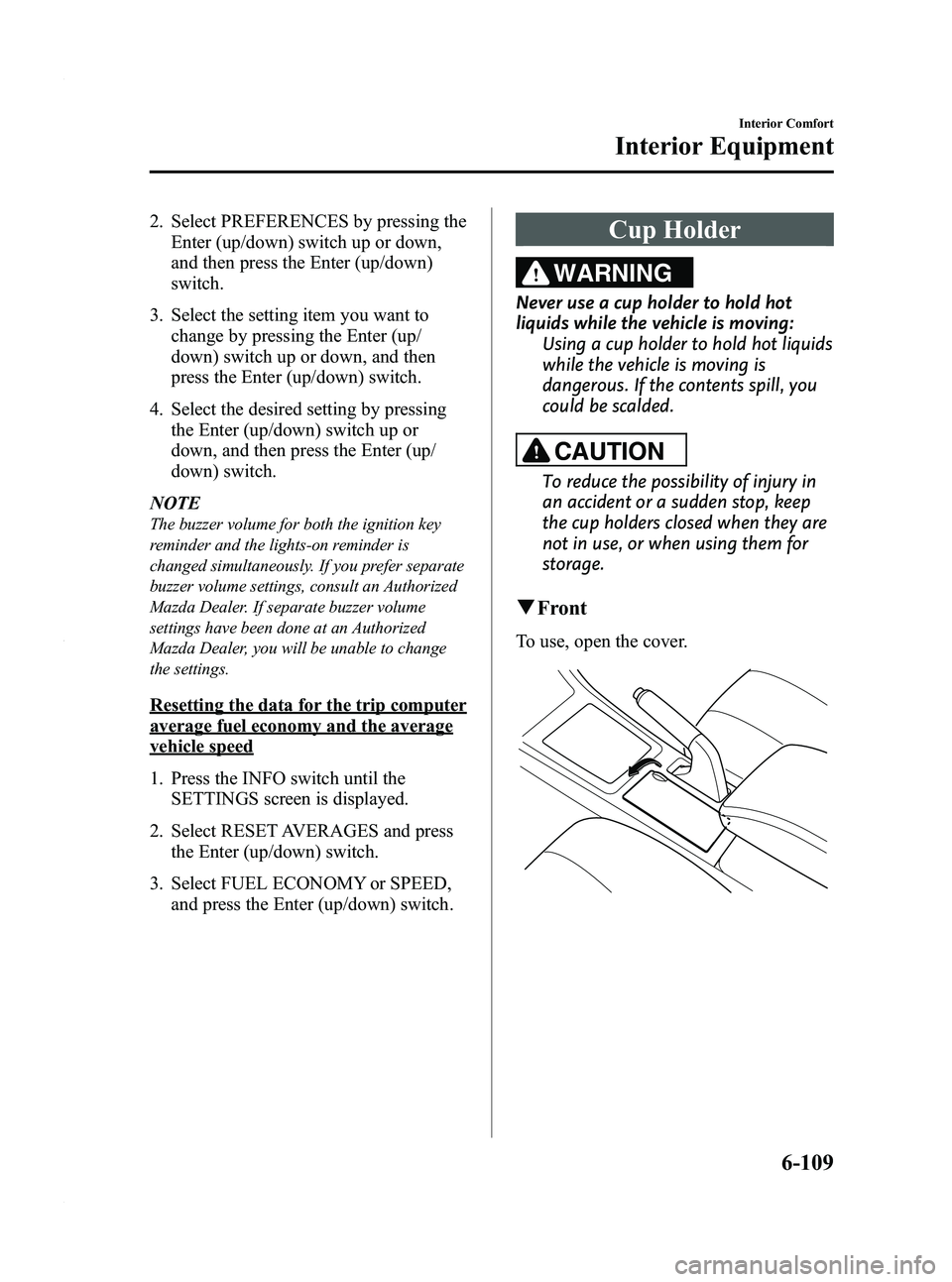
qFront
To use, open the cover.
Interior Comfort
Interior Equipment
6-109
Mazda3_8BY6-EA-11F_Edition3 Page351
Thursday, March 1 2012 10:18 AM
Form No.8BY6-EA-11F
Page 376 of 528
Black plate (376,1)
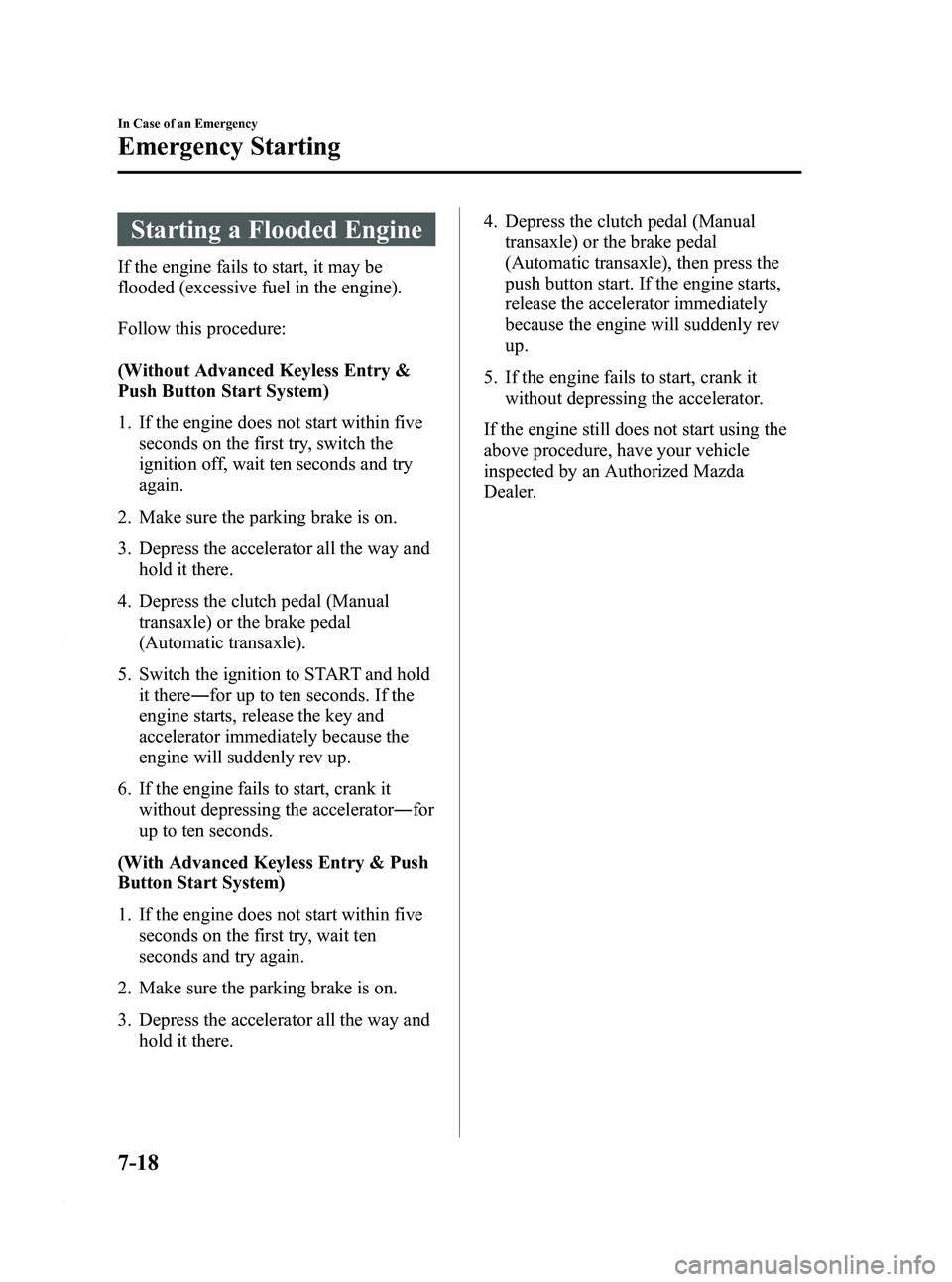
Starting a Flooded Engine
If the engine fails to start, it may be
flooded (excessive fuel in the engine).
Follow this procedure:
(Without Advanced Keyless Entry &
Push Button Start System)
1. If the engine does not start within fiveseconds on the first try, switch the
ignition off, wait ten seconds and try
again.
2. Make sure the parking brake is on.
3. Depress the accelerator all the way and hold it there.
4. Depress the clutch pedal (Manual transaxle) or the brake pedal
(Automatic transaxle).
5. Switch the ignition to START and hold it there ―for up to ten seconds. If the
engine starts, release the key and
accelerator immediately because the
engine will suddenly rev up.
6. If the engine fails to start, crank it without depressing the accelerator ―for
up to ten seconds.
(With Advanced Keyless Entry & Push
Button Start System)
1. If the engine does not start within five seconds on the first try, wait ten
seconds and try again.
2. Make sure the parking brake is on.
3. Depress the accelerator all the way and hold it there. 4. Depress the clutch pedal (Manual
transaxle) or the brake pedal
(Automatic transaxle), then press the
push button start. If the engine starts,
release the accelerator immediately
because the engine will suddenly rev
up.
5. If the engine fails to start, crank it without depressing the accelerator.
If the engine still does not start using the
above procedure, have your vehicle
inspected by an Authorized Mazda
Dealer.
7-18
In Case of an Emergency
Emergency Starting
Mazda3_8BY6-EA-11F_Edition3 Page376
Thursday, March 1 2012 10:18 AM
Form No.8BY6-EA-11F
Page 390 of 528
Black plate (390,1)
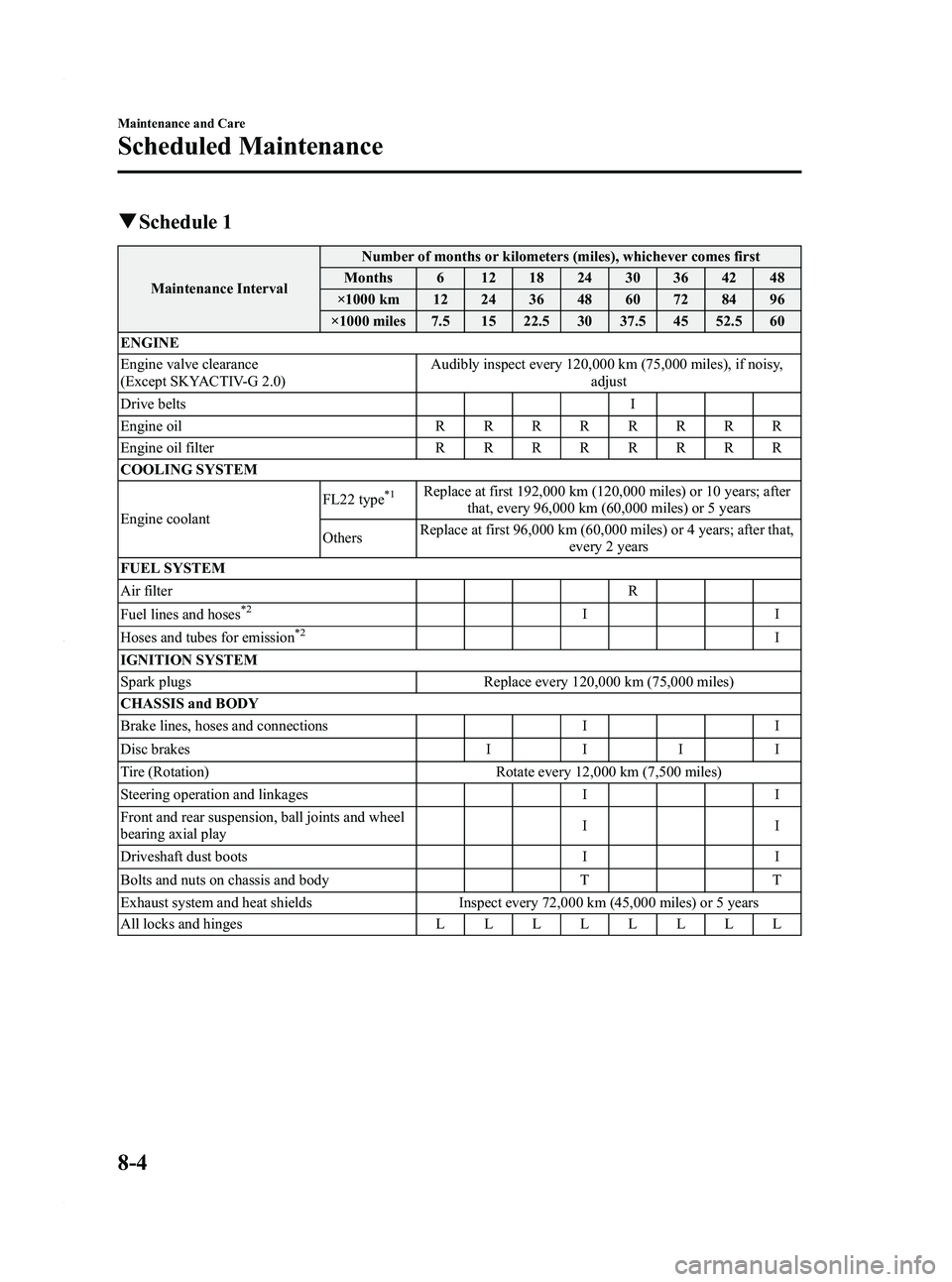
qSchedule 1
Maintenance Interval Number of months or kilometers (miles), whichever comes first
Months 6 12 18 24 30 36 42 48
×1000 km 12 24 36 48 60 72 84 96
×1000 miles 7.5 15 22.5 30 37.5 45 52.5 60
ENGINE
Engine valve clearance
(Except SKYACTIV-G 2.0) Audibly inspect every 120,000 km (75,000 miles), if noisy,
adjust
Drive belts I
Engine oil RRRRRRRR
Engine oil filter RRRRRRRR
COOLING SYSTEM
Engine coolant FL22 type
*1Replace at first 192,000 km (120,000 miles) or 10 years; after
that, every 96,000 km (60,000 miles) or 5 years
Others Replace at first 96,000 km (60,000 miles) or 4 years; after that,
every 2 years
FUEL SYSTEM
Air filter R
Fuel lines and hoses
*2II
Hoses and tubes for emission*2I
IGNITION SYSTEM
Spark plugs Replace every 120,000 km (75,000 miles)
CHASSIS and BODY
Brake lines, hoses and connections I I
Disc brakes IIII
Tire (Rotation) Rotate every 12,000 km (7,500 miles)
Steering operation and linkages I I
Front and rear suspension, ball joints and wheel
bearing axial play II
Driveshaft dust boots I I
Bolts and nuts on chassis and body T T
Exhaust system and heat shields Inspect every 72,000 km (45,000 miles) or 5 years
All locks and hinges LLLLLLLL
8-4
Maintenance and Care
Scheduled Maintenance
Mazda3_8BY6-EA-11F_Edition3 Page390
Thursday, March 1 2012 10:18 AM
Form No.8BY6-EA-11F