CD player MAZDA MODEL 3 5-DOOR 2013 User Guide
[x] Cancel search | Manufacturer: MAZDA, Model Year: 2013, Model line: MODEL 3 5-DOOR, Model: MAZDA MODEL 3 5-DOOR 2013Pages: 610, PDF Size: 7.05 MB
Page 303 of 610
Black plate (303,1)
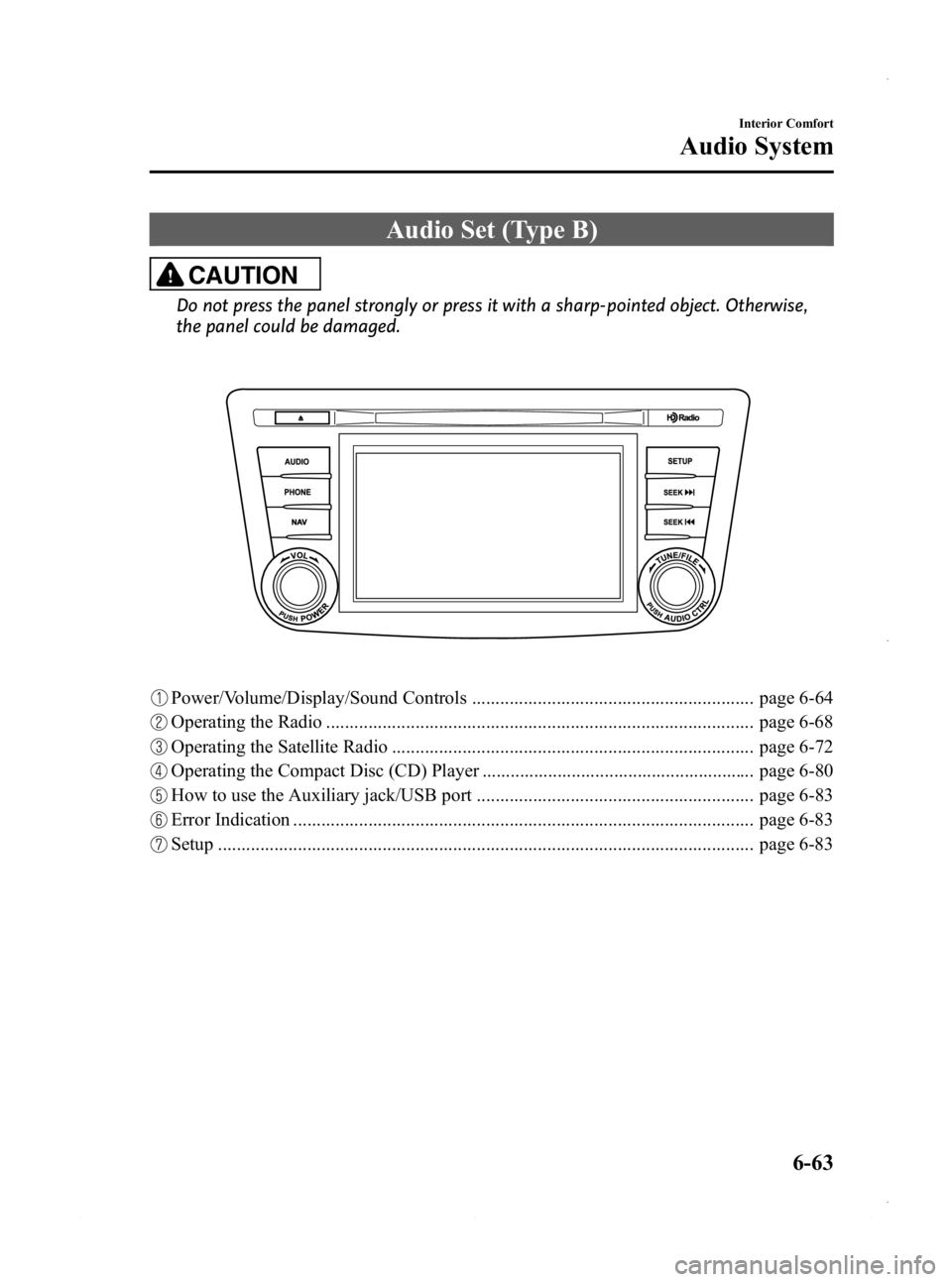
Audio Set (Type B)
CAUTION
Do not press the panel strongly or press it with a sharp-pointed object. Otherwise,
the panel could be damaged.
Power/Volume/Display/Sound Controls ............................................................ page 6-64
Operating the Radio ........................................................................................... page 6-68
Operating the Satellite Radio ............................................................................. page 6-72
Operating the Compact Disc (CD) Player .......................................................... page 6-80
How to use the Auxiliary jack/USB port ........................................................... page 6-83
Error Indication .................................................................................................. page 6-83
Setup .................................................................................................................. page 6-83
Interior Comfort
Audio System
6-63
Mazda3_8CV6-EA-12H_Edition3 Page303
Thursday, February 28 2013 11:29 AM
Form No.8CV6-EA-12H
Page 320 of 610
Black plate (320,1)
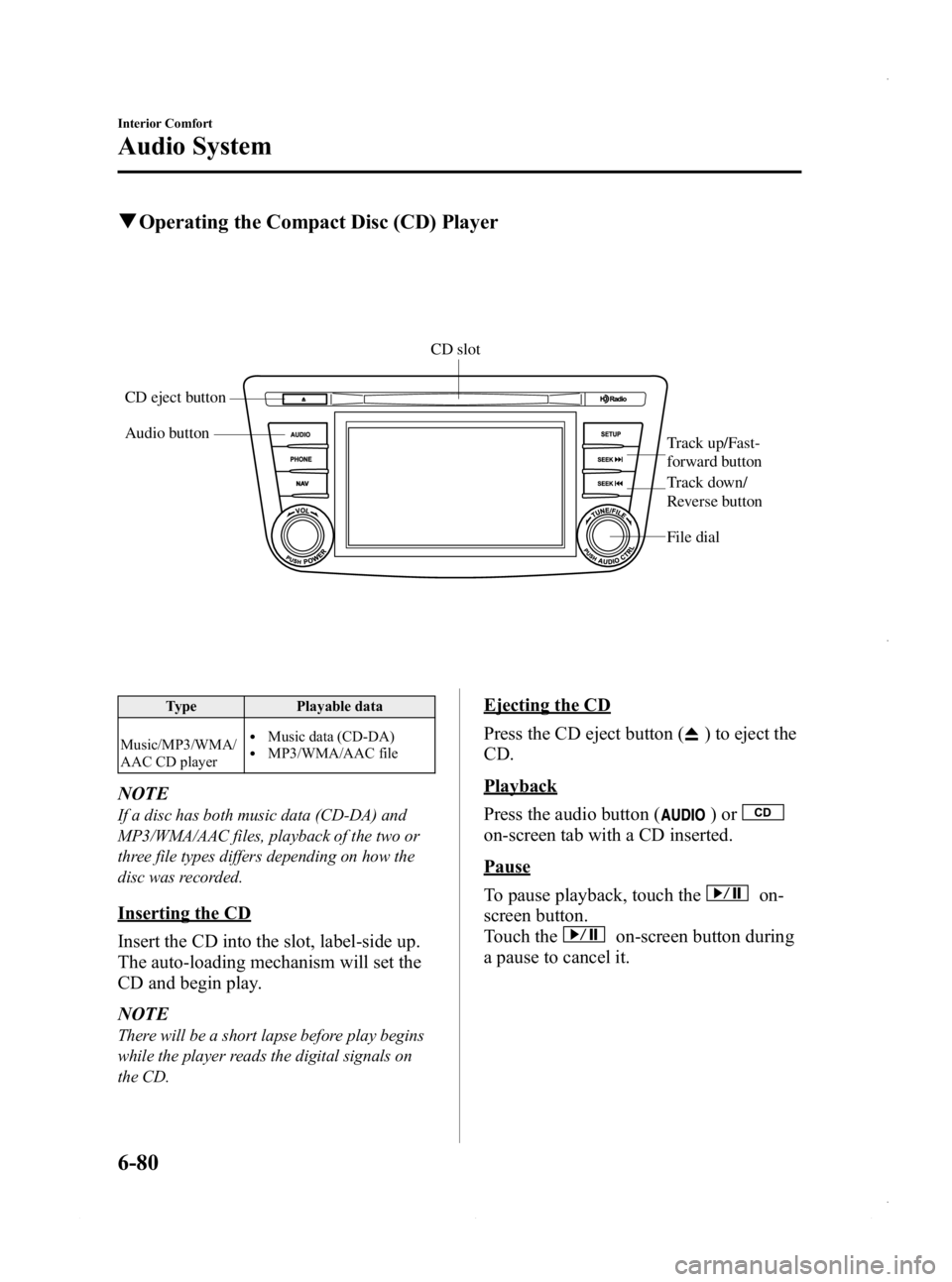
qOperating the Compact Disc (CD) Player
Audio button
Track up/Fast-
forward button
File dial
CD eject buttonCD slot
Track down/
Reverse button
Type
Playable data
Music/MP3/WMA/
AAC CD player
lMusic data (CD-DA)lMP3/WMA/AAC file
NOTE
If a disc has both music data (CD-DA) and
MP3/WMA/AAC files, playback of the two or
three file types differs depending on how the
disc was recorded.
Inserting the CD
Insert the CD into the slot, label-side up.
The auto-loading mechanism will set the
CD and begin play.
NOTE
There will be a short lapse before play begins
while the player reads the digital signals on
the CD.
Ejecting the CD
Press the CD eject button (
) to eject the
CD.
Playback
Press the audio button (
)or
on-screen tab with a CD inserted.
Pause
To pause playback, touch the
on-
screen button.
Touch the
on-screen button during
a pause to cancel it.
6-80
Interior Comfort
Audio System
Mazda3_8CV6-EA-12H_Edition3 Page320
Thursday, February 28 2013 11:29 AM
Form No.8CV6-EA-12H
Page 325 of 610

Black plate (325,1)
With Bluetooth® Hands-Free and
navigation system
Talk buttonPick-up buttonTalk button
Hang-up button
Pick-up button
NOTElThe talk button, pick-up button, and hang-
up button are operable with the audio unit
turned off.
lMazda has installed this system to prevent
distraction while driving the vehicle and
using audio controls on the dashboard.
Always make safe driving your first priority.
q
Adjusting the Volume
To increase the volume, press up the
volume switch.
To decrease the volume, press down the
volume switch.
Without Bluetooth® Hands-Free
With Bluetooth® Hands-Free
qChanging the Sourceí
Press the mode switch () to change
the audio source (FM1 radio →FM2
radio →AM radio →CD player or CD
changer →SIRIUS1 →SIRIUS2 →
SIRIUS3 →AUX →BT audio →USB/
iPod →cyclical).
Without Bluetooth® Hands-Free
Interior Comfort
Audio System
6-85íSome models.
Mazda3_8CV6-EA-12H_Edition3 Page325
Thursday, February 28 2013 11:29 AM
Form No.8CV6-EA-12H
Page 326 of 610
Black plate (326,1)
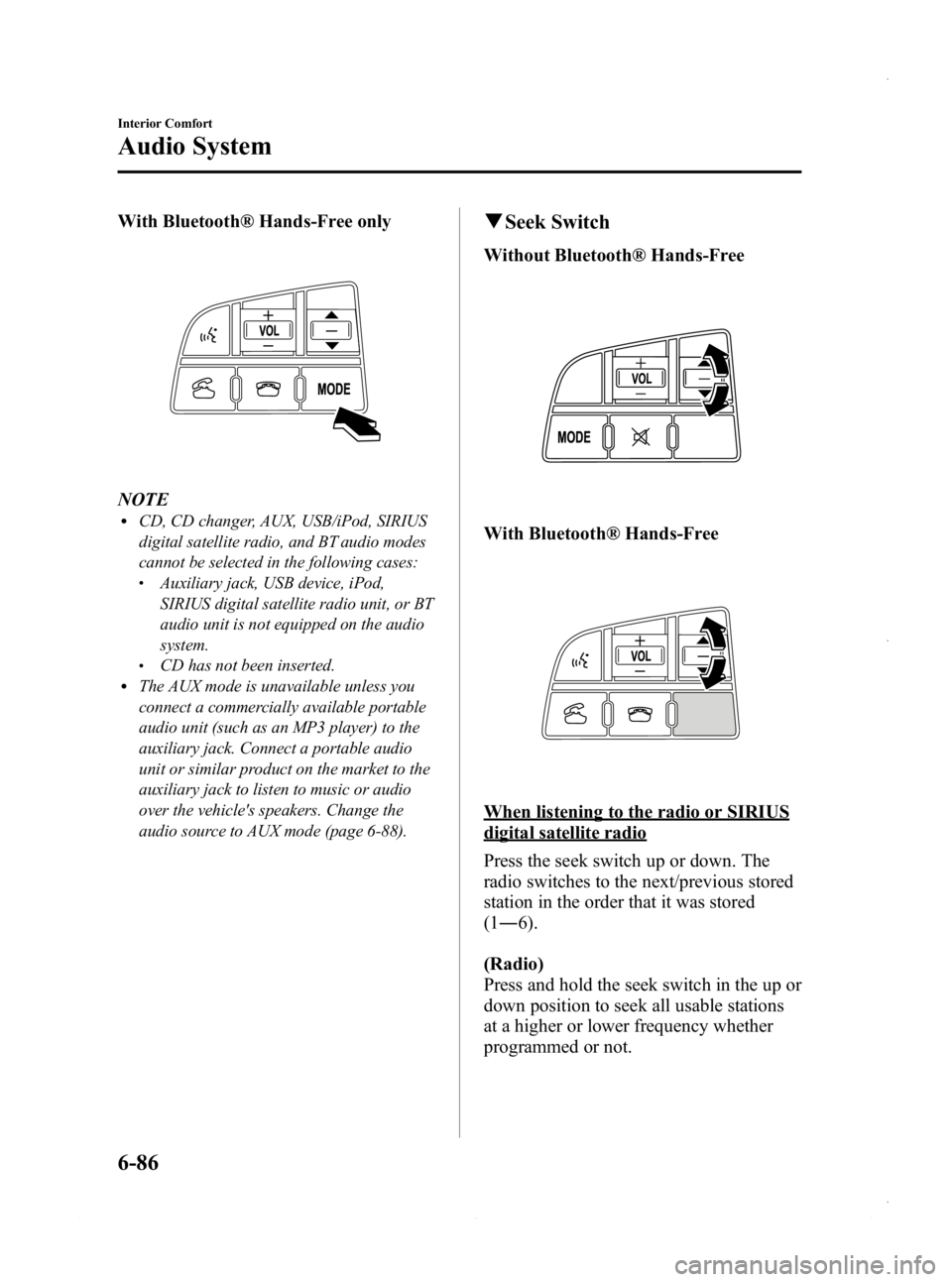
With Bluetooth® Hands-Free only
NOTElCD, CD changer, AUX, USB/iPod, SIRIUS
digital satellite radio, and BT audio modes
cannot be selected in the following cases:
lAuxiliary jack, USB device, iPod,
SIRIUS digital satellite radio unit, or BT
audio unit is not equipped on the audio
system.
lCD has not been inserted.lThe AUX mode is unavailable unless you
connect a commercially available portable
audio unit (such as an MP3 player) to the
auxiliary jack. Connect a portable audio
unit or similar product on the market to the
auxiliary jack to listen to music or audio
over the vehicle's speakers. Change the
audio source to AUX mode (page 6-88).
qSeek Switch
Without Bluetooth® Hands-Free
With Bluetooth® Hands-Free
When listening to the radio or SIRIUS
digital satellite radio
Press the seek switch up or down. The
radio switches to the next/previous stored
station in the order that it was stored
(1― 6).
(Radio)
Press and hold the seek switch in the up or
down position to seek all usable stations
at a higher or lower frequency whether
programmed or not.
6-86
Interior Comfort
Audio System
Mazda3_8CV6-EA-12H_Edition3 Page326
Thursday, February 28 2013 11:29 AM
Form No.8CV6-EA-12H
Page 347 of 610
Black plate (347,1)
Safety Certification
This CD player is made and tested to meet exacting safety standards. It meets FCC
requirements and complies with safety performance standards of the U.S. Department of
Health and Human Services.
CAUTION
ØThis CD player should not be adjusted or repaired by anyone except qualified
service personnel.
If servicing is required, contact an Authorized Mazda Dealer.
Ø Use of controls or adjustments or performance of procedures other than those
specified herein may result in hazardous laser exposure. Never operate the CD
player with the top case of the unit removed.
Ø Changes or modifications not expressly approved by the party responsible for
compliance could void the user's authority to operate this equipment.
NOTE
For CD player section:
This device complies with part 15 of the FCC Rules. Operation is subject to the following two
conditions: (1) This device may not cause harmful interference, and (2) this device must accept any
interference received, including interference that may cause undesired operation.
NOTE
This equipment has been tested and found to comply with the limits for a Class B digital device,
pursuant to part 15 of the FCC Rules. These limits are designed to provide reasonable protection
against harmful interference in a residential installation. This equipment generates, uses, and can
radiate radio frequency energy and, if not installed and used in accordance with the instructions,
may cause harmful interference to radio communications. However, there is no guarantee that
interference will not occur in a particular installation.
Interior Comfort
Audio System
6-107
Mazda3_8CV6-EA-12H_Edition3 Page347
Thursday, February 28 2013 11:29 AM
Form No.8CV6-EA-12H
Page 362 of 610
Black plate (362,1)
Voice guidance interrupt operation
Voice guidance can be skipped by
pressing the talk button with a short press
while it is being heard. A new voice input
command can then be spoken by the user.
Voice recognition mode cancel
If you want to cancel the voice
recognition mode during a call, the voice
recognition mode can be canceled without
having to end the call.
Press the talk button with a long press.
Basic Bluetooth® Hands-
Free Operation
qBluetooth® Hands-Free Preparation
Language setting
The available languages are English,
Spanish, and Canadian French. If the
language setting is changed, all of the
voice guidance and voice input
commands are done in the selected
language.
NOTE
lIf the language setting is changed, device
registration is maintained.
Phonebook records are not cleared, but
each language has a separate phonebook.
Therefore, entries created in one language
will need to be re-entered in the phonebook
of the new language.
lDo these steps before you start driving.
These less used functions are too
distracting to undertake while driving until
you are fully familiar with the system.
Method 1
1. Press the pick-up button or talk buttonwith a short press.
2. Say: [Beep] “Setup ”
3. Prompt: “Select one of the following:
Pairing options, confirmation prompts,
language, passcode, select phone or
select music player.”
4. Say: [Beep] “Language ”
5. Prompt: “Select a language: English,
French, or Spanish. ”
6. Say: [Beep] “French ”(Speak the
desired language: “English ”, “French ”
or “Spanish ”)
6-122
Interior Comfort
Bluetooth® Hands-Free (Type A)
Mazda3_8CV6-EA-12H_Edition3 Page362
Thursday, February 28 2013 11:29 AM
Form No.8CV6-EA-12H
Page 363 of 610
Black plate (363,1)
NOTE
Other language settings can also be made
while in the current setting by saying the name
of the language in the native pronunciation.
7.Prompt: “French (Desired language)
selected. Is this correct? ”
8. Say: [Beep] “Ye s ”
9. Prompt: “French (Desired language)
selected, returning to main menu ”
(Spoken in the newly selected
language).
Method 2
1. Press the pick-up button or talk button with a short press.
2. Say: [Beep] “French ”(Say the desired
language: “English ”, “French ”,or
“ Spanish ”.) (Change the desired
language by saying the language
name.)
NOTE
Other language settings can also be made
while in the current setting by saying the name
of the language in the native pronunciation.
3. Prompt: “Would you like to change
the language to French (Desired
language)? ”
4. Say: [Beep] “Ye s ”
5. Prompt: “Please wait. Switching to
French phonebook. French selected,
returning to main menu ”(Spoken in
the newly selected language).
Pairing code setting
The 4-digit pairing code setting for
registration of your cell phone (pairing)
can be set beforehand.
NOTE
The initial setting value is “0000 ”.
1. Press the pick-up button or talk button
with a short press.
2. Say: [Beep] “Setup ”
3. Prompt: “Select one of the following:
Pairing options, confirmation prompts,
language, passcode, select phone or
select music player.”
4. Say: [Beep] “Pairing options ”
5. Prompt: “Available options are: Pair,
Edit, Delete, List, or Set Pairing Code. ”
6. Say: [Beep] “Set pairing code ”
7. Prompt: “Your current pairing code is
XXXX. Do you want to change it to a
different pairing code? ”
8. Say: [Beep] “Ye s ”
9. Prompt: “Please say a 4-digit pairing
code. ”
10. Say: [Beep] “YYYY ”
11. Prompt: “YYYY is this correct? ”
12. Say: [Beep] “Ye s ”or “No ”
13. If “Ye s ”, go to Step 14. If “No” , the
procedure returns to Step 9.
14. Prompt: “Your new pairing code is
YYYY. Use this pairing code when
pairing devices to the Hands free
system. Do you want to pair a device
now? ”
15. Say: [Beep] “Ye s ”or “No ”
16. If “Ye s ”, the system switches to the
device registration mode. If “No” , the
system returns to standby status.
Interior Comfort
Bluetooth® Hands-Free (Type A)
6-123
Mazda3_8CV6-EA-12H_Edition3 Page363
Thursday, February 28 2013 11:29 AM
Form No.8CV6-EA-12H
Page 364 of 610
Black plate (364,1)
Device programming (Pairing)
To use Bluetooth
®Hands-Free, the device
equipped with Bluetooth®has to be
programmed to the hands-free unit using
the following procedure.
A maximum of seven devices including
hands-free mobile phones and Bluetooth
®
audio devices can be programmed to one
vehicle.
NOTE
lA device can be programmed only when the
vehicle is parked. If the vehicle starts to
move, the pairing procedure will end.
Programming is dangerous while driving -
pair up your device before you start
driving. Park the car in a safe place before
programming.
lIf a Bluetooth®device has already been
programmed to the vehicle as a Bluetooth®
audio device, it does not need to be
programmed again when using the device
as a hands-free mobile phone. Conversely,
it does not need to be programmed again as
a Bluetooth
®audio device if it has already
been programmed as a hands-free mobile
phone.
lSince the communication range of a
Bluetooth®equipped device is about 10
meters (32 ft), if a device is placed within a
10-meter (32 ft) radius of the vehicle, it may
be detected/programmed unintentionally
while another device is being programmed.
1. Activate the Bluetooth®application of
the device.
NOTE
For the operation of the device, refer to its
instruction manual.
2. Press the pick-up button or talk button with a short press.
3. Say: [Beep] “Setup ” 4.
Prompt: “Select one of the following:
Pairing options, confirmation prompts,
language, passcode, select phone or
select music player.”
5. Say: [Beep] “Pairing options ”
6. Prompt: “Available options are: Pair,
Edit, Delete, List, or Set Pairing Code. ”
7. Say: [Beep] “Pair ”
8. Prompt: “Start the pairing process on
your Bluetooth
®device. Your pairing
code is 0000 (XXXX). Input this on
your Bluetooth
®device when
prompted on the device. See device
manual for instructions. ”
9. Using the device, perform a search for the Bluetooth
®device (Peripheral
device).
NOTE
For the operation of the device, refer to its
instruction manual.
10. Select “Mazda ”from the device list
searched by the device.
11. Input the 4-digit pairing code to the device.
12. Prompt: “Please say the name of the
device after the beep. ”
13. Say: [Beep] “XXXX - - - ”(Speak a
“ device tag ”, an arbitrary name for
the device.)
Example: “Stan's device. ”
NOTE
Speak a programmed “device tag ”within 10
seconds.
If more than two devices are to be
programmed, they cannot be programmed with
the same or similar “device tag ”.
6-124
Interior Comfort
Bluetooth® Hands-Free (Type A)
Mazda3_8CV6-EA-12H_Edition3 Page364
Thursday, February 28 2013 11:29 AM
Form No.8CV6-EA-12H
Page 373 of 610
Black plate (373,1)
l“Call ”: Calls the registered phonebook
data when the talk button is short-
pressed.
l“ Edit ”: Edits the registered phonebook
data when the talk button is short-
pressed.
l“ Delete ”: Deletes the registered
phonebook data when the talk button is
short-pressed.
l“ Previous ”: Returns to the previous
phonebook data in read-out when the
talk button is short-pressed.
6. Prompt: “End of list, would you like
to start from the beginning?”
7. Say: [Beep] “No ”
8. Prompt: “Returning to main menu. ”
qDTMF (Dual Tone Multi-
Frequency Signal) Transmission
This function is used when transmitting
DTMF via the user's voice. The receiver
of a DTMF transmission is generally a
home telephone answering machine or a
company's automated guidance call center
(When you send tone signals back
according to the voice guidance
recording).
1. Press the talk button with a short press.
2. Say: [Beep] “XXXX... send ”(Say
DTMF code)
3. Prompt: “Sending XXXX... (DTMF
code) ”
Hands-Free Setting
qDevice
Device registration
For the registration of a Bluetooth
®
equipped device to Bluetooth®Hands-
Free.
Refer to Bluetooth® Hands-Free
Preparation on page 6-122.
Registered device read-out
Bluetooth
®Hands-Free can read-out the
devices registered to its system.
NOTE
Do this function only when parked. It is too
distracting to attempt while driving and you
may make too many errors to be effective.
1. Press the pick-up button or talk button with a short press.
2. Say: [Beep] “Setup ”
3. Prompt: “Select one of the following:
Pairing options, confirmation prompts,
language, passcode, select phone or
select music player.”
4. Say: [Beep] “Pairing options ”
5. Prompt: “Available options are: Pair,
Edit, Delete, List, or Set Pairing Code ”
6. Say: [Beep] “List ”
7. Prompt: “XXXXX..., XXXXX...,
XXXXX... (Ex. Device A, device B,
device C) ”(The voice guidance reads
out the device tags registered to the
hands-free system.)
Interior Comfort
Bluetooth® Hands-Free (Type A)
6-133
Mazda3_8CV6-EA-12H_Edition3 Page373
Thursday, February 28 2013 11:29 AM
Form No.8CV6-EA-12H
Page 374 of 610
Black plate (374,1)
Press the talk button with a short press
during the read-out at the desired device,
and then say one of the following voice
commands to execute it.
l“Select phone ”: Selects device (Mobile
phone) when the talk button is short-
pressed.
l“ Select music player ”: Selects device
(Music player) when the talk button is
short-pressed.
l“ Edit ”: Edits device when the talk
button is short-pressed.
l“ Continue ”: Continues the list read-
out.
l“ Delete ”: Deletes the registered device
when the talk button is short-pressed.
l“ Previous ”: Returns to the previous
device in read-out when the talk button
is short-pressed.
8. Prompt: “End of list, would you like
to start from the beginning?”
9. Say: [Beep] “No ”
10. Prompt: “Returning to main menu. ”
Device selection
If several devices have been programmed,
the Bluetooth
®unit links the device last
connected. If you would like to link a
different programmed device, it is
necessary to change the link. The order of
device priority after the link has been
changed is maintained even when the
ignition is switched off.
Hands-free phone
1. Press the pick-up button or talk button with a short press.
2. Say: [Beep] “Setup ” 3.
Prompt: “Select one of the following:
Pairing options, confirmation prompts,
language, passcode, select phone or
select music player.”
4. Say: [Beep] “Select phone ”
5. Prompt: “Please say the name of the
device you would like to select.
Available devices are XXXXX... (Ex.
device A), XXXXX... (Ex. device B),
XXXXX... (Ex. device C). Which
device please? ”
6. Say: [Beep] “XXXXX... (Ex. Device
B) ”
7. Prompt: “XXXXX... (Ex. Device B).
Is this correct? ”
8. Say: [Beep] “Ye s ”or “No ”
9. If “Ye s ”, go to Step 10. If “No” , the
procedure returns to Step 5.
10. Prompt: “XXXXX... (Ex. Device B)
selected.”
Music player
1. Press the pick-up button or talk button with a short press.
2. Say: [Beep] “Setup ”
3. Prompt: “Select one of the following:
Pairing options, confirmation prompts,
language, passcode, select phone or
select music player.”
4. Say: [Beep] “Select music player ”
5. Prompt: “Please say the name of the
device you would like to select.
Available devices are XXXXX... (Ex.
device A), XXXXX... (Ex. device B),
XXXXX... (Ex. device C). Which
device please? ”
6-134
Interior Comfort
Bluetooth® Hands-Free (Type A)
Mazda3_8CV6-EA-12H_Edition3 Page374
Thursday, February 28 2013 11:29 AM
Form No.8CV6-EA-12H