service MAZDA MODEL 3 5-DOOR 2013 User Guide
[x] Cancel search | Manufacturer: MAZDA, Model Year: 2013, Model line: MODEL 3 5-DOOR, Model: MAZDA MODEL 3 5-DOOR 2013Pages: 610, PDF Size: 7.05 MB
Page 323 of 610
Black plate (323,1)
(CD shuffle)
Touch the
on-screen button two
times during playback to play the songs in
the CD shuffle. “
”is displayed during
playback.
Touch the
on-screen button while
“
” is displayed to cancel.
Display scroll
If a whole title cannot be displayed at one
time, touch the
on-screen button on
the right side of the title. When the last
character is displayed, touch the
on-
screen button to display the first character
of the title.
NOTE
lTheon-screen button is displayed only
if a whole title cannot be displayed at one
time.
lThe information viewable in the display is
only CD information (such as artist name,
song title) which has been recorded to the
CD.
lThis unit cannot display some characters.
Characters which cannot be displayed are
indicated by an asterisk (
).lThe number of characters which can be
displayed is restricted.
Message Display
If “CD Error ”is displayed, it means that
there is some CD malfunction. Check the
CD for damage, dirt, or smudges, and
then properly reinsert. If the message
appears again, take the unit to an
Authorized Mazda Dealer for service.
qHow to use Auxiliary jack/USB port
Audio can be heard from the vehicle's
speakers by connecting a commercially-
available portable audio unit to the
auxiliary jack.
Use a commercially-available, non-
impedance (3.5
) stereo mini plug cable.
Contact an Authorized Mazda Dealer for
details.
In addition, audio can be played from the
vehicle audio device by connecting a USB
device or an iPod to the USB port.
Refer to AUX/USB/iPod Mode on page
6-88.
q Error Indications
If you see an error indication on the
display, find the cause in the chart. If you
cannot clear the error indication, take the
vehicle to an Authorized Mazda Dealer.
IndicationCause Solution
CD
Error CD is inserted
upside down
Insert the CD
properly. If the error
indication continues
to display, consult an
Authorized Mazda
Dealer.
CD is defective Insert another CD
properly. If the error
indication continues
to display, consult an
Authorized Mazda
Dealer.
q
Setup
You can customize settings in the setup
display as follows:
Display
Refer to Power/Volume/Display/Sound
Controls on page 6-64.
Interior Comfort
Audio System
6-83
Mazda3_8CV6-EA-12H_Edition3 Page323
Thursday, February 28 2013 11:29 AM
Form No.8CV6-EA-12H
Page 347 of 610
Black plate (347,1)
Safety Certification
This CD player is made and tested to meet exacting safety standards. It meets FCC
requirements and complies with safety performance standards of the U.S. Department of
Health and Human Services.
CAUTION
ØThis CD player should not be adjusted or repaired by anyone except qualified
service personnel.
If servicing is required, contact an Authorized Mazda Dealer.
Ø Use of controls or adjustments or performance of procedures other than those
specified herein may result in hazardous laser exposure. Never operate the CD
player with the top case of the unit removed.
Ø Changes or modifications not expressly approved by the party responsible for
compliance could void the user's authority to operate this equipment.
NOTE
For CD player section:
This device complies with part 15 of the FCC Rules. Operation is subject to the following two
conditions: (1) This device may not cause harmful interference, and (2) this device must accept any
interference received, including interference that may cause undesired operation.
NOTE
This equipment has been tested and found to comply with the limits for a Class B digital device,
pursuant to part 15 of the FCC Rules. These limits are designed to provide reasonable protection
against harmful interference in a residential installation. This equipment generates, uses, and can
radiate radio frequency energy and, if not installed and used in accordance with the instructions,
may cause harmful interference to radio communications. However, there is no guarantee that
interference will not occur in a particular installation.
Interior Comfort
Audio System
6-107
Mazda3_8CV6-EA-12H_Edition3 Page347
Thursday, February 28 2013 11:29 AM
Form No.8CV6-EA-12H
Page 358 of 610
Black plate (358,1)
Bluetooth® Hands-Freeí
qWhat is Bluetooth® Hands-Free?
Bluetooth®Hands-Free Outline
By connecting a Bluetooth
®equipped
device (Mobile phone) to the hands-free
unit equipped on the vehicle, making and
receiving calls is possible using the talk
button, pick-up button and hang-up button
located on the steering wheel, and saying
the voice commands.
WARNING
Perform phonebook registration related
operations while the vehicle is parked: Performing phonebook registration
while driving the vehicle could be a
distraction to your driving and result
in an accident. In addition, a mistake
in performing the phonebook
operation could result in the loss of
important data.
Bluetooth®equipped device (Mobile
phone)
A Bluetooth
®equipped device (Mobile
phone) communicates with the hands-free
unit equipped on the vehicle using radio
transmission (Bluetooth
®).
For example, if the device (Mobile phone)
is placed in a coat pocket, the phone calls
can be made through your mobile service
without taking out and handling the
device (Mobile phone).
CAUTION
The types of devices (Mobile phone)
which can be connected to the
hands-free unit are limited.
Therefore, before purchasing or
changing your device (Mobile phone)
model, consult Mazda Bluetooth
®
Hands-Free Customer Service or visit
www.MazdaUSA.com/bluetooth for a
complete list of compatible phones.
Devices (Mobile phone) which can be
connected to the hands-free system
need to be compliant with
Bluetooth
®specifications and the
appropriate profile. However, even
among these Bluetooth
®devices
(Mobile phone) are some which will
not connect with your Mazda or will
have limited function. Therefore,
consult Mazda Bluetooth
®Hands-
Free Customer Service for
information regarding device (Mobile
phone) compatibility:
Ø U.S.A.
Phone: 800-430-0153
Web: www.MazdaUSA.com/
bluetooth
Ø Canada
Phone: 800-430-0153
Web: www.mazdahandsfree.ca
Ø Mexico
Center of Attention to Client (CAC)
Phone: 01-800-01-MAZDA
Web: www.mazdamexico.com.mx
Applicable Bluetooth
®specification
Ver. 2.0 or higher
Response profile
lHFP (Hands Free Profile) Ver. 1.5lDUN (Dial-up Networking Profile)
Ver. 1.1
lPBAP (Phone Book Access Profile)
Ver. 1.0
6-118
Interior Comfort
íSome models.
Bluetooth® Hands-Free (Type A)
Mazda3_8CV6-EA-12H_Edition3 Page358
Thursday, February 28 2013 11:29 AM
Form No.8CV6-EA-12H
Page 380 of 610

Black plate (380,1)
Safety Certification
FCC ID: CB2MBLUEC09 IC:279B-
MBLUEC09
This device complies with Part 15 of the
FCC Rules and with RSS-210 of Industry
Canada. Operation is subject to the
following two conditions:
(1) This device may not cause harmfulinterference, and
(2) This device must accept any interference received, including
interference that may cause undesired
operation.
WARNING
Changes or modifications not
expressively approved by the party
responsible for compliance could void
the user's authority to operate the
equipment.
The term “IC: ”before the radio
certification number only signifies that
Industry Canada technical specifications
were met.
The antenna used for this transmitter must
not be co-located or operating in
conjunction with any other antenna or
transmitter. End-users and installers must
be provided with installation instructions
and transmitter operating conditions for
satisfying RF exposure compliance.
Mazda Bluetooth® Hands-
Free Customer Service
lU.S.A.
Phone: 800-430-0153 (Toll-free)
www.MazdaUSA.com/bluetooth
lCanada
Phone: 800-430-0153 (Toll-free)
www.mazdahandsfree.ca
lMexico
Center of Attention to Client (CAC)
Phone: 01-800-01-MAZDA (Toll-free)
Web: www.mazdamexico.com.mx
6-140
Interior Comfort
Bluetooth® Hands-Free (Type A)
Mazda3_8CV6-EA-12H_Edition3 Page380
Thursday, February 28 2013 11:29 AM
Form No.8CV6-EA-12H
Page 392 of 610
Black plate (392,1)
qTransferring a call from a device
(mobile phone) to Hands-Free
Communication between devices (mobile
phone) can be switched to Bluetooth®
Hands-Free.
Touch the
on-screen button.
qCall interrupt
A call can be interrupted to receive an
incoming call from a third party.
To switch to a new incoming call.
Touch the
on-screen button or press
the pick-up button on the steering wheel.
NOTE
lAfter receiving a new incoming call, the
previous call is placed on hold.
lTouch theon-screen button or press
the hang-up button on the steering wheel to
refuse a call.
Switching between calls
Touch the
on-screen button or
press the pick-up button on the steering
wheel.
Three-way call function
Touch the
on-screen button.
q DTMF (Dual Tone Multi-
Frequency Signal) Transmission
This function is used when transmitting
DTMF via the Numerical Keypad. The
receiver of a DTMF transmission is
generally a home telephone answering
machine or a company's automated
guidance call center.
1. Touch the
on-screen button
after connecting to a home device or
service to display the tone transmission
screen. 2. Input the number using a numerical
keypad.
NOTE
If the DTMF code has two or more digits or
symbols, each one must be transmitted
individually.
q Receiving and Replying to
Messages (only MAP 1.0)
SMS (Short Message Service) messages,
MMS (Multimedia Messaging Service)
messages, and E-mail received by
connected devices can be downloaded,
displayed, and played (read by the
system).
Additionally, replies can also be made to
calls and messages in the received
messages.
Downloading messages
Up to 15 new messages can be
downloaded and displayed from a
connected device.
1. Touch the
on-screen tab.
2. Touch the
on-screen button.
NOTE
lMessages that have not been read are
downloaded first.
lAttached data is not downloaded.lMessages up to 160-bytes can be
downloaded.
lA message list is created for each device.lIf there are unread messages, the receive
icon is displayed.
lIf the connected device does not correspond
to MAP 1.0, the AT command is used to
download. The downloaded message
indicates that it is already read.
lDownloading using the AT command may
not function depending on the connected
device.
6-152
Interior Comfort
Bluetooth® (Type B)
Mazda3_8CV6-EA-12H_Edition3 Page392
Thursday, February 28 2013 11:30 AM
Form No.8CV6-EA-12H
Page 403 of 610
Black plate (403,1)
qGracenote Database
The Gracenote media database is used to improve voice recognition of artist and album
names with the Mazda Hands Free system. To make best use of the voice recognition,
install the most recent database.
CAUTION
For information related to the most recent Gracenote database which can be used
and how to install it, go to the Mazda Hands Free Website:
http://www.mazdahandsfree.com
Introduction
Music recognition technology and related data are provided by Gracenote
®. Gracenote is
the industry standard in music recognition technology and related content delivery. For
more information visit www.gracenote.com.
CD and music-related data from Gracenote, Inc., copyright © 2000 to present Gracenote.
Gracenote Software, copyright © 2000 to present Gracenote. One or more patents owned
by Gracenote apply to this product and service. See the Gracenote website for a non-
exhaustive list of applicable Gracenote patents. Gracenote, CDDB, MusicID, MediaVOCS,
the Gracenote logo and logotype, and the “Powered by Gracenote ”logo are either
registered trademarks or trademarks of Gracenote in the United States and/or other
countries.
Interior Comfort
Bluetooth® (Type B)
6-163
Mazda3_8CV6-EA-12H_Edition3 Page403
Thursday, February 28 2013 11:30 AM
Form No.8CV6-EA-12H
Page 404 of 610
Black plate (404,1)
Gracenote®End User License Agreement
This application or device contains software from Gracenote, Inc. of Emeryville, California
( “ Gracenote ”). The software from Gracenote (the “Gracenote Software ”) enables this
application to perform disc and/or file identification and obtain music-related information,
including name, artist, track, and title information ( “Gracenote Data ”) from online servers
or embedded databases (collectively, “Gracenote Servers ”) and to perform other functions.
You may use Gracenote Data only by means of the intended End-User functions of this
application or device.
You agree that you will use Gracenote Data, the Gracenote Software, and Gracenote
Servers for your own personal non-commercial use only. You agree not to assign, copy,
transfer or transmit the Gracenote Software or any Gracenote Data to any third party. YOU
AGREE NOT TO USE OR EXPLOIT GRACENOTE DATA, THE GRACENOTE
SOFTWARE, OR GRACENOTE SERVERS, EXCEPT AS EXPRESSLY PERMITTED
HEREIN.
You agree that your non-exclusive license to use the Gracenote Data, the Gracenote
Software, and Gracenote Servers will terminate if you violate these restrictions. If your
license terminates, you agree to cease any and all use of the Gracenote Data, the Gracenote
Software, and Gracenote Servers. Gracenote reserves all rights in Gracenote Data, the
Gracenote Software, and the Gracenote Servers, including all ownership rights. Under no
circumstances will Gracenote become liable for any payment to you for any information
that you provide. You agree that Gracenote, Inc. may enforce its rights under this
Agreement against you directly in its own name.
The Gracenote service uses a unique identifier to track queries for statistical purposes. The
purpose of a randomly assigned numeric identifier is to allow the Gracenote service to
count queries without knowing anything about who you are. For more information, see the
web page for the Gracenote Privacy Policy for the Gracenote service.
The Gracenote Software and each item of Gracenote Data are licensed to you “AS IS. ”
Gracenote makes no representations or warranties, express or implied, regarding the
accuracy of any Gracenote Data from in the Gracenote Servers. Gracenote reserves the
right to delete data from the Gracenote Servers or to change data categories for any cause
that Gracenote deems sufficient. No warranty is made that the Gracenote Software or
Gracenote Servers are error-free or that functioning of Gracenote Software or Gracenote
Servers will be uninterrupted. Gracenote is not obligated to provide you with new
enhanced or additional data types or categories that Gracenote may provide in the future
and is free to discontinue its services at any time.
GRACENOTE DISCLAIMS ALL WARRANTIES EXPRESS OR IMPLIED,
INCLUDING, BUT NOT LIMITED TO, IMPLIED WARRANTIES OF
MERCHANTABILITY, FITNESS FOR A PARTICULAR PURPOSE, TITLE, AND
NON-INFRINGEMENT. GRACENOTE DOES NOT WARRANT THE RESULTS THAT
WILL BE OBTAINED BY YOUR USE OF THE GRACENOTE SOFTWARE OR ANY
GRACENOTE SERVER. IN NO CASE WILL GRACENOTE BE LIABLE FOR ANY
CONSEQUENTIAL OR INCIDENTAL DAMAGES OR FOR ANY LOST PROFITS OR
LOST REVENUES.
© 2000 to present. Gracenote, Inc.
6-164
Interior Comfort
Bluetooth® (Type B)
Mazda3_8CV6-EA-12H_Edition3 Page404
Thursday, February 28 2013 11:30 AM
Form No.8CV6-EA-12H
Page 410 of 610
Black plate (410,1)
Troubleshooting
Bluetooth®does not operate under the following conditions. Check whether the following
conditions apply to your Bluetooth®device:lThe device is not being operated correctly.lThe device is not connected to the Bluetooth®unit equipped on the vehicle.lThe device's battery is weak.lA device which interferes with radio wave reception has been placed in the vehicle.lThe ignition switch has been turned off.
If none of the above conditions apply, refer to the following to see if any of the problem
symptoms correspond to your device.
If the problem cannot be resolved, consult an Authorized Mazda Dealer or Mazda
Bluetooth
®Hands-Free Customer Service.
Mazda Bluetooth®Hands-Free Customer Service
If you have any problems with Bluetooth
®, contact with our toll-free customer service
center.
lU.S.A.
Phone: 800-430-0153 (Toll-free)
Web: www.MazdaUSA.com/bluetooth
lCanada
Phone: 800-430-0153 (Toll-free)
Web: www.mazdahandsfree.ca
6-170
Interior Comfort
Bluetooth® (Type B)
Mazda3_8CV6-EA-12H_Edition3 Page410
Thursday, February 28 2013 11:30 AM
Form No.8CV6-EA-12H
Page 411 of 610
Black plate (411,1)
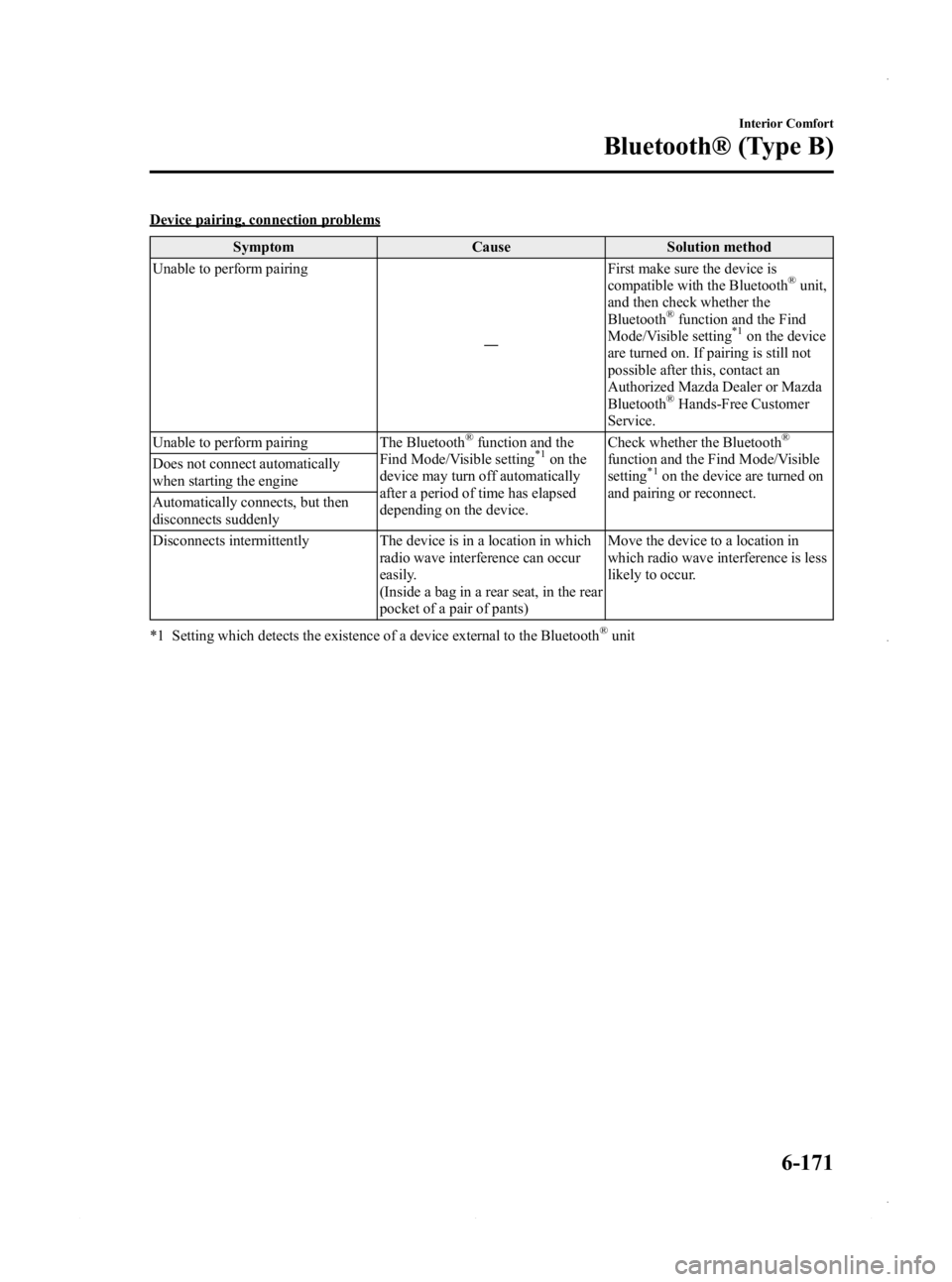
Device pairing, connection problemsSymptom Cause Solution method
Unable to perform pairing
―First make sure the device is
compatible with the Bluetooth
®unit,
and then check whether the
Bluetooth
®function and the Find
Mode/Visible setting*1on the device
are turned on. If pairing is still not
possible after this, contact an
Authorized Mazda Dealer or Mazda
Bluetooth
®Hands-Free Customer
Service.
Unable to perform pairing The Bluetooth
®function and the
Find Mode/Visible setting*1on the
device may turn off automatically
after a period of time has elapsed
depending on the device. Check whether the Bluetooth
®
function and the Find Mode/Visible
setting*1on the device are turned on
and pairing or reconnect.
Does not connect automatically
when starting the engine
Automatically connects, but then
disconnects suddenly
Disconnects intermittently The device is in a location in which
radio wave interference can occur
easily.
(Inside a bag in a rear seat, in the rear
pocket of a pair of pants) Move the device to a location in
which radio wave interference is less
likely to occur.
*1 Setting which detects the existence of a device external to the Bluetooth
®unit
Interior Comfort
Bluetooth® (Type B)
6-171
Mazda3_8CV6-EA-12H_Edition3 Page411
Thursday, February 28 2013 11:30 AM
Form No.8CV6-EA-12H
Page 424 of 610
Black plate (424,1)
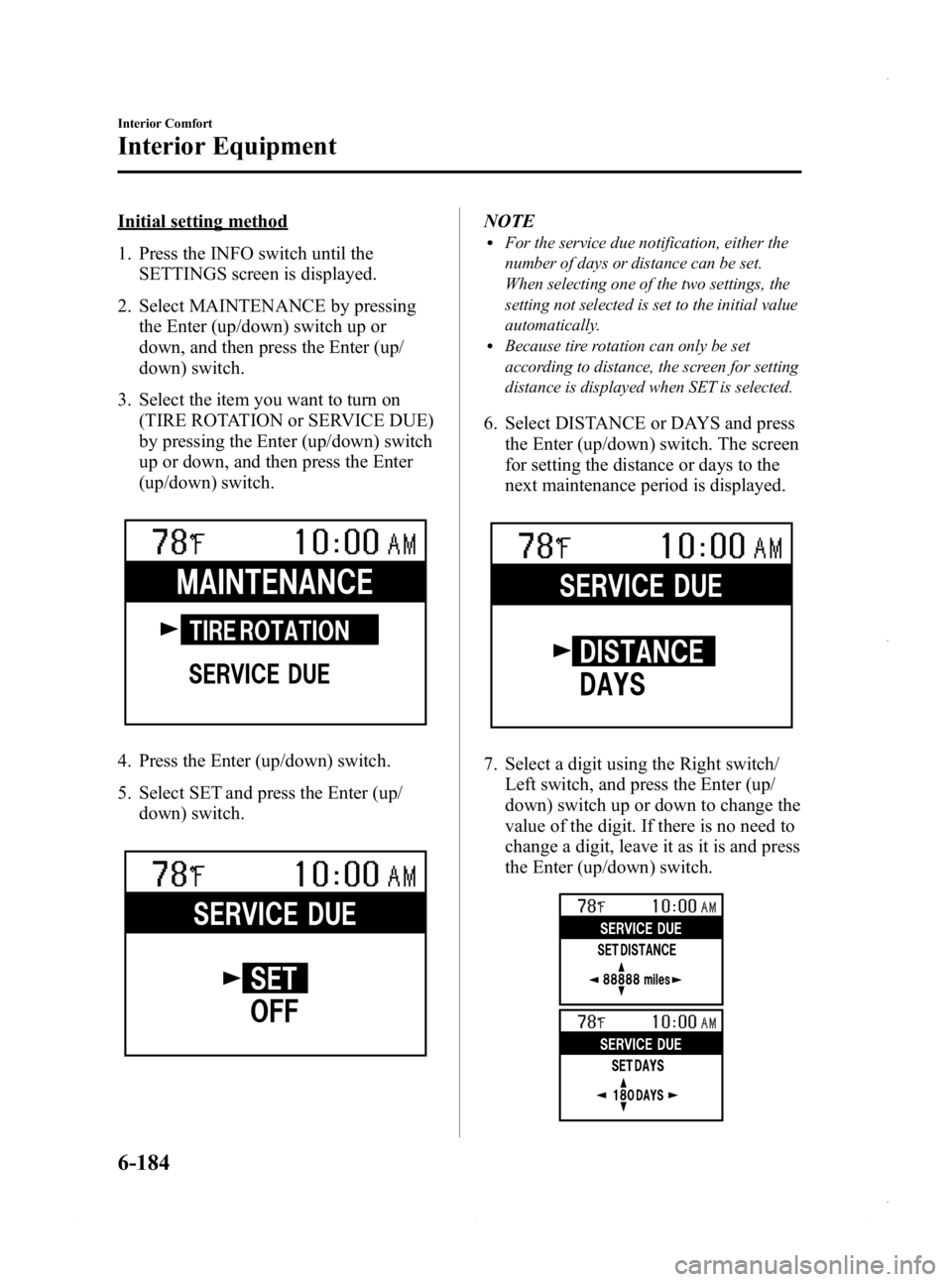
Initial setting method
1. Press the INFO switch until theSETTINGS screen is displayed.
2. Select MAINTENANCE by pressing the Enter (up/down) switch up or
down, and then press the Enter (up/
down) switch.
3. Select the item you want to turn on (TIRE ROTATION or SERVICE DUE)
by pressing the Enter (up/down) switch
up or down, and then press the Enter
(up/down) switch.
4. Press the Enter (up/down) switch.
5. Select SET and press the Enter (up/down) switch.
NOTElFor the service due notification, either the
number of days or distance can be set.
When selecting one of the two settings, the
setting not selected is set to the initial value
automatically.
lBecause tire rotation can only be set
according to distance, the screen for setting
distance is displayed when SET is selected.
6. Select DISTANCE or DAYS and pressthe Enter (up/down) switch. The screen
for setting the distance or days to the
next maintenance period is displayed.
7. Select a digit using the Right switch/Left switch, and press the Enter (up/
down) switch up or down to change the
value of the digit. If there is no need to
change a digit, leave it as it is and press
the Enter (up/down) switch.
6-184
Interior Comfort
Interior Equipment
Mazda3_8CV6-EA-12H_Edition3 Page424
Thursday, February 28 2013 11:30 AM
Form No.8CV6-EA-12H