key battery MAZDA MODEL 3 5-DOOR 2013 Owner's Manual
[x] Cancel search | Manufacturer: MAZDA, Model Year: 2013, Model line: MODEL 3 5-DOOR, Model: MAZDA MODEL 3 5-DOOR 2013Pages: 610, PDF Size: 7.05 MB
Page 164 of 610
Black plate (164,1)
Ignition Switch
With advanced key
Refer to“Starting the engine (page 3-12) ”
for information on how to use the ignition
switch.
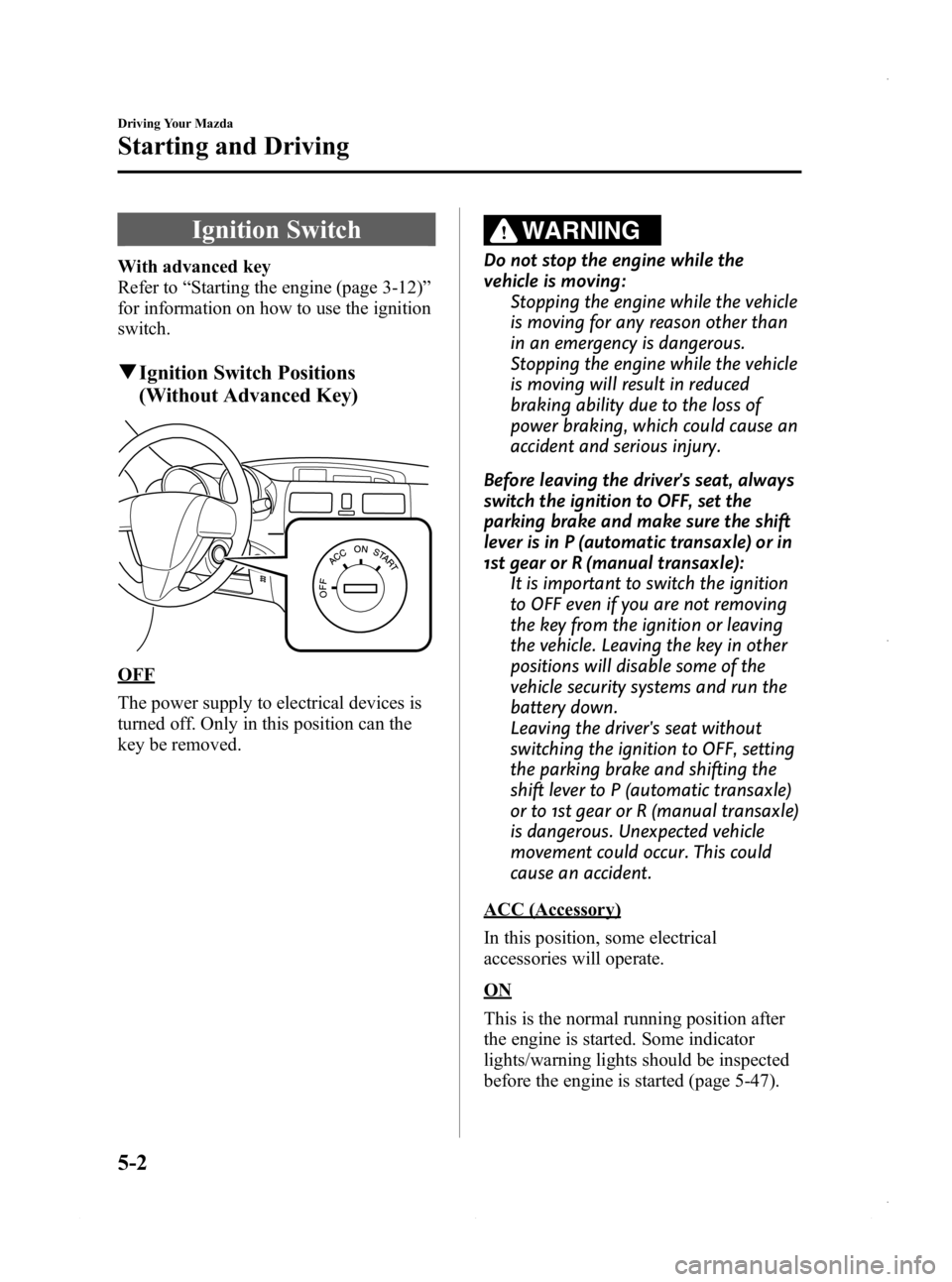
q Ignition Switch Positions
(Without Advanced Key)
OFF
The power supply to electrical devices is
turned off. Only in this position can the
key be removed.
WARNING
Do not stop the engine while the
vehicle is moving:
Stopping the engine while the vehicle
is moving for any reason other than
in an emergency is dangerous.
Stopping the engine while the vehicle
is moving will result in reduced
braking ability due to the loss of
power braking, which could cause an
accident and serious injury.
Before leaving the driver's seat, always
switch the ignition to OFF, set the
parking brake and make sure the shift
lever is in P (automatic transaxle) or in
1st gear or R (manual transaxle): It is important to switch the ignition
to OFF even if you are not removing
the key from the ignition or leaving
the vehicle. Leaving the key in other
positions will disable some of the
vehicle security systems and run the
battery down.
Leaving the driver's seat without
switching the ignition to OFF, setting
the parking brake and shifting the
shift lever to P (automatic transaxle)
or to 1st gear or R (manual transaxle)
is dangerous. Unexpected vehicle
movement could occur. This could
cause an accident.
ACC (Accessory)
In this position, some electrical
accessories will operate.
ON
This is the normal running position after
the engine is started. Some indicator
lights/warning lights should be inspected
before the engine is started (page 5-47).
5-2
Driving Your Mazda
Starting and Driving
Mazda3_8CV6-EA-12H_Edition3 Page164
Thursday, February 28 2013 11:27 AM
Form No.8CV6-EA-12H
Page 166 of 610
Black plate (166,1)
CAUTION
Do not try the starter for more than
10 seconds at a time. If the engine
stalls or fails to start, wait 10 seconds
before trying again. Otherwise, you
may damage the starter and drain
the battery.
6. After starting the engine, let it idle for about 10 seconds.
NOTE
lIn extremely cold weather or after the
vehicle has not been driven in several days,
let the engine warm up without operating
the accelerator.
lWhether the engine is cold or warm, it
should be started without use of the
accelerator.
lIf the engine does not start the first time,
refer to Starting a Flooded Engine under
Emergency Starting. If the engine still does
not start, have your vehicle inspected by an
Authorized Mazda Dealer (page 7-18).
l(SKYACTIV-G 2.0)
After starting a cold engine, the engine
speed increases and a whining sound from
the engine compartment can be heard.
This is for improved exhaust gas
purification and does not indicate defect of
the parts.
Turning the Engine Off
WARNING
Do not stop the engine while the
vehicle is moving: Stopping the engine while the vehicle
is moving for any reason other than
in an emergency is dangerous.
Stopping the engine while the vehicle
is moving will result in reduced
braking ability due to the loss of
power braking, which could cause an
accident and serious injury.
1. Stop the vehicle completely.
2. (Manual transaxle)
Shift into neutral.
(Automatic transaxle)
Shift the shift lever to the P position.
3. (Without Advanced Keyless Entry &
Push Button Start System)
Switch the ignition from ON to OFF.
(With Advanced Keyless Entry &
Push Button Start System)
Press the push button start to turn off
the engine.
CAUTION
When leaving the vehicle, make sure
the ignition is switched off.
NOTE
The electrical fan in the engine compartment
could turn on for a few minutes after the
ignition is switched from ON to OFF, whether
or not the A/C is on or off, to cool the engine
compartment quickly.
5-4
Driving Your Mazda
Starting and Driving
Mazda3_8CV6-EA-12H_Edition3 Page166
Thursday, February 28 2013 11:27 AM
Form No.8CV6-EA-12H
Page 219 of 610

Black plate (219,1)
If the warning light illuminates again even
after the tire pressures are adjusted, there
may be a tire puncture. Replace the
punctured tire with the temporary spare
tire (page 7-9).
NOTE
A tire pressure sensor is not installed to the
temporary spare tire. The warning light will
flash continuously while the temporary spare
tire is being used.
Warning light flashes
When the warning light flashes, there may
be a system malfunction. Consult an
Authorized Mazda Dealer.
qKEY Warning Light (Red)/KEY
Indicator Light (Green) (with
Advanced Key)
This indicator has two colors.
KEY Warning Light (Red)
When illuminated
lWhen the push button start is pressed
ON, it illuminates momentarily and
then turns off.
lIf any malfunction occurs in the
advanced keyless system, it illuminates
continuously.
WARNING
Do not drive the vehicle with the KEY
warning light illuminated:
If the KEY warning light remains
illuminated, do not continue to drive
using the advanced key system. Park
the vehicle in a safe place and use
the auxiliary key to continue driving
the vehicle. Have the vehicle
inspected at an Authorized Mazda
Dealer as soon as possible.
When flashing
lUnder the following conditions, the
KEY warning light (red) flashes to
inform the driver that the push button
start will not switch to ACC even if it
is pressed from off.
lThe advanced key battery is dead.lThe advanced key is not within
operational range.
lThe advanced key is placed in areas
where it is difficult for the system to
detect the signal (page 3-7).
lA key from another manufacturer
similar to the advanced key is in the
operational range.
Driving Your Mazda
Warning/Indicator Lights and Beep Sounds
5-57
Mazda3_8CV6-EA-12H_Edition3 Page219
Thursday, February 28 2013 11:28 AM
Form No.8CV6-EA-12H
Page 220 of 610
Black plate (220,1)
lUnder the following conditions, the
KEY warning light (red) will flash
continuously when the push button
start has not been pressed off to notify
the driver that the advanced key has
been removed. The KEY warning light
(red) will stop flashing when the
advanced key is back inside the
vehicle:
lThe push button start has not been
pressed off, the driver's door is
open, and the advanced key is
removed from the vehicle.
lThe push button start has not been
pressed off and all the doors are
closed after removing the advanced
key from the vehicle.
NOTE
Because the advanced key utilizes low-intensity
radio waves, the Advanced Key Removed From
Vehicle Warning may activate if the advanced
key is carried together with a metal object or it
is placed in a poor signal reception area.
KEY Indicator Light (Green)
When illuminated
When the brake pedal is depressed with
an automatic transaxle or the clutch pedal
is depressed with a manual transaxle, the
system confirms that the correct advanced
key is inside the vehicle, the KEY
indicator light (green) illuminates, and the
push button start can be pressed to ACC
(page 3-12).
When flashing
When the push button start is pressed off
from ON, the KEY indicator light (green)
flashes for approximately 30 seconds
indicating that the remaining battery
power is low. Replace with a new battery
before the advanced key becomes
unusable. Refer to Service on page 3-7.
NOTE
The advanced key can be set so that the KEY
indicator light (green) does not flash even if
the battery power is low.
Refer to Personalization Features on page
10-13.
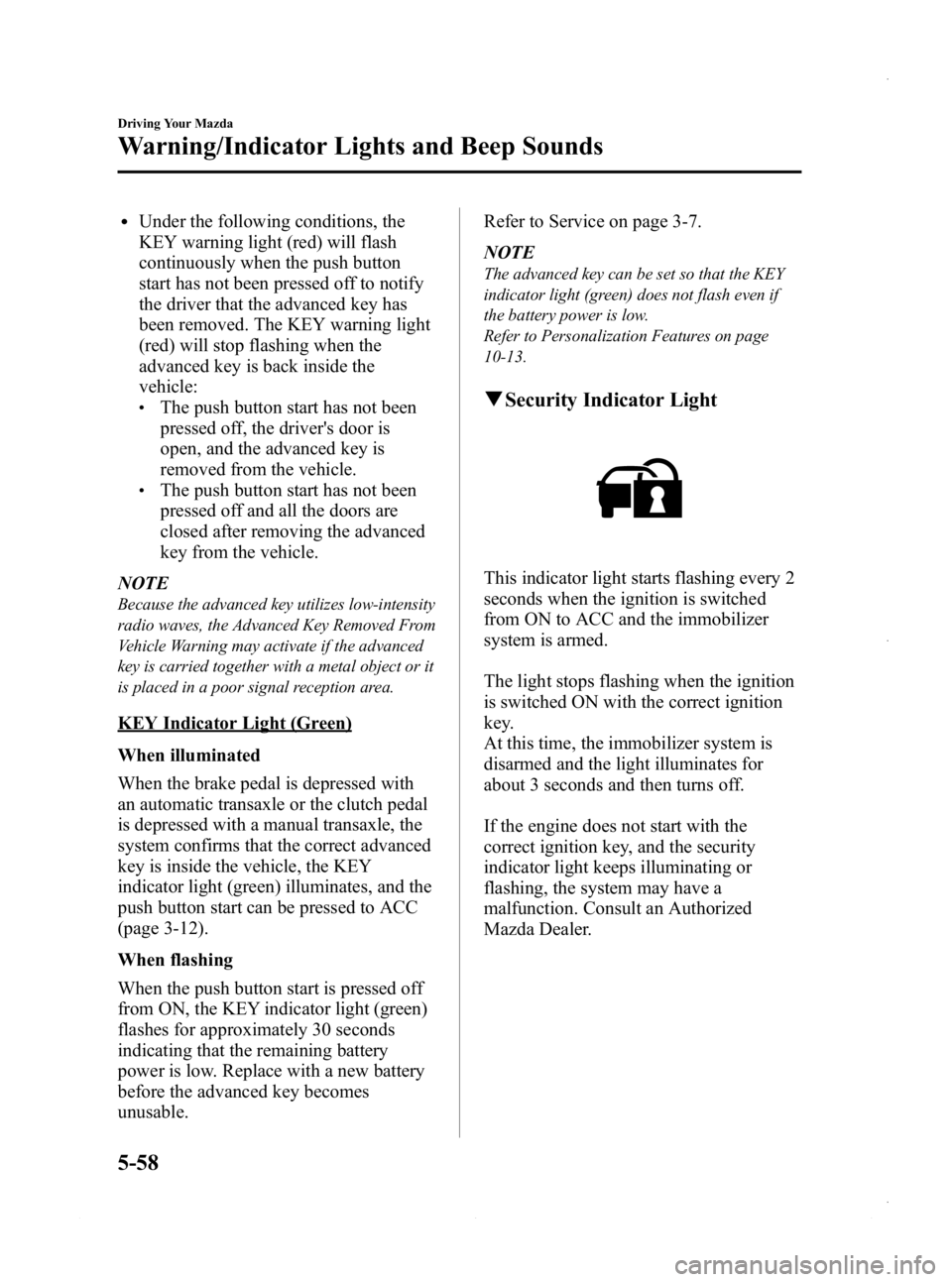
q
Security Indicator Light
This indicator light starts flashing every 2
seconds when the ignition is switched
from ON to ACC and the immobilizer
system is armed.
The light stops flashing when the ignition
is switched ON with the correct ignition
key.
At this time, the immobilizer system is
disarmed and the light illuminates for
about 3 seconds and then turns off.
If the engine does not start with the
correct ignition key, and the security
indicator light keeps illuminating or
flashing, the system may have a
malfunction. Consult an Authorized
Mazda Dealer.
5-58
Driving Your Mazda
Warning/Indicator Lights and Beep Sounds
Mazda3_8CV6-EA-12H_Edition3 Page220
Thursday, February 28 2013 11:28 AM
Form No.8CV6-EA-12H
Page 416 of 610
Black plate (416,1)
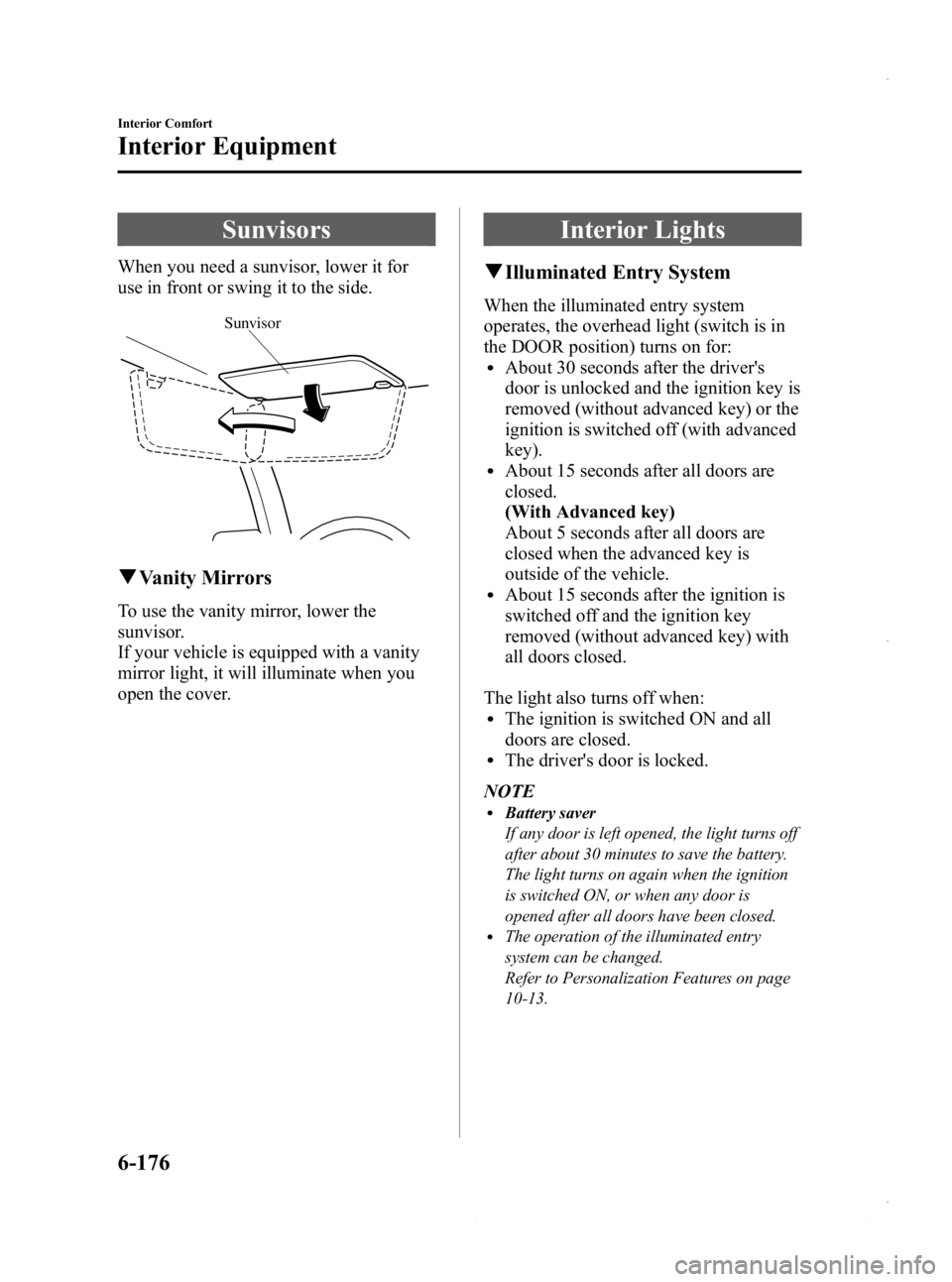
Sunvisors
When you need a sunvisor, lower it for
use in front or swing it to the side.
Sunvisor
qVanity Mirrors
To use the vanity mirror, lower the
sunvisor.
If your vehicle is equipped with a vanity
mirror light, it will illuminate when you
open the cover.
Interior Lights
qIlluminated Entry System
When the illuminated entry system
operates, the overhead light (switch is in
the DOOR position) turns on for:
lAbout 30 seconds after the driver's
door is unlocked and the ignition key is
removed (without advanced key) or the
ignition is switched off (with advanced
key).
lAbout 15 seconds after all doors are
closed.
(With Advanced key)
About 5 seconds after all doors are
closed when the advanced key is
outside of the vehicle.
lAbout 15 seconds after the ignition is
switched off and the ignition key
removed (without advanced key) with
all doors closed.
The light also turns off when:
lThe ignition is switched ON and all
doors are closed.
lThe driver's door is locked.
NOTE
lBattery saver
If any door is left opened, the light turns off
after about 30 minutes to save the battery.
The light turns on again when the ignition
is switched ON, or when any door is
opened after all doors have been closed.
lThe operation of the illuminated entry
system can be changed.
Refer to Personalization Features on page
10-13.
6-176
Interior Comfort
Interior Equipment
Mazda3_8CV6-EA-12H_Edition3 Page416
Thursday, February 28 2013 11:30 AM
Form No.8CV6-EA-12H
Page 428 of 610
Black plate (428,1)
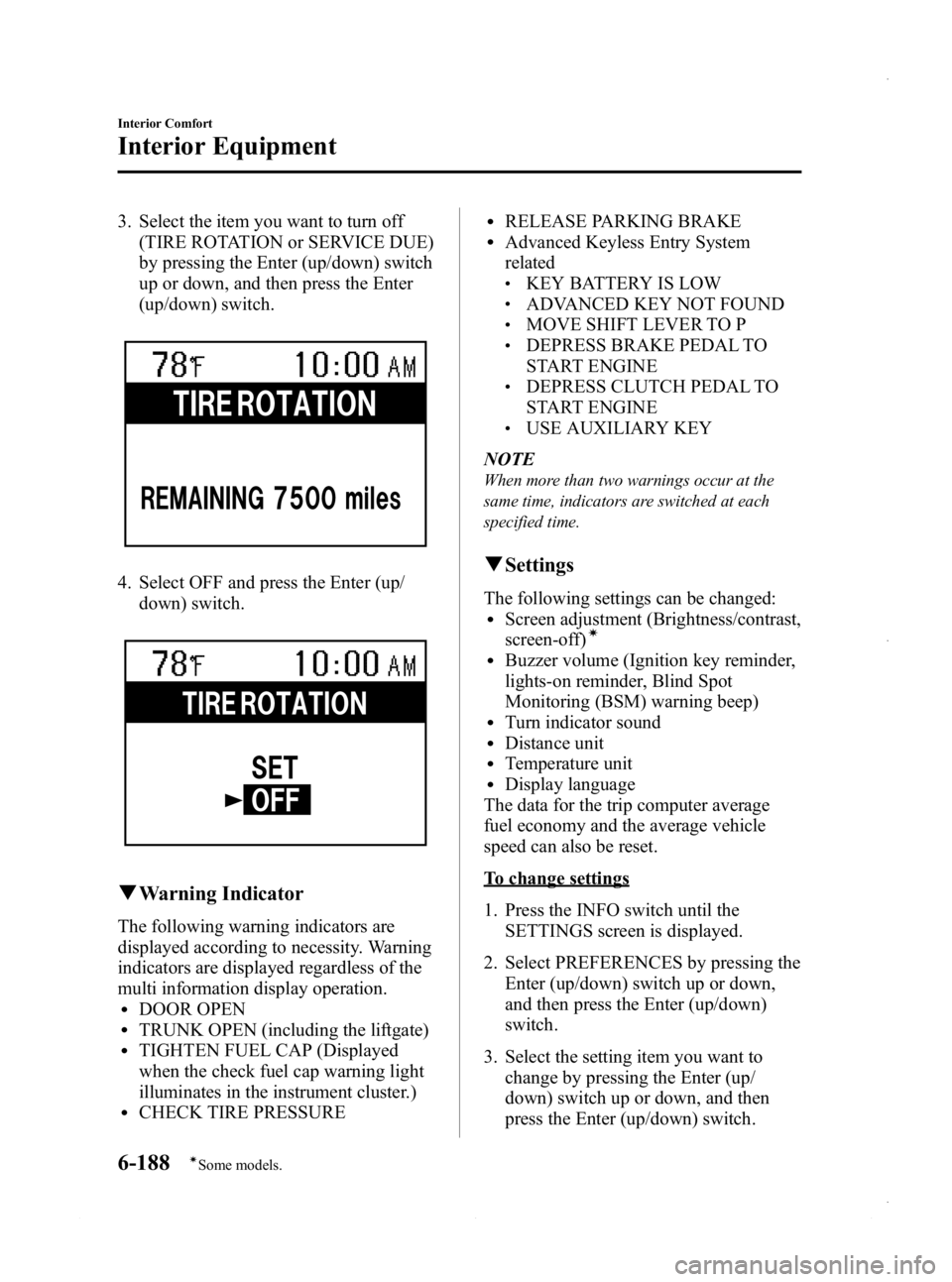
3. Select the item you want to turn off(TIRE ROTATION or SERVICE DUE)
by pressing the Enter (up/down) switch
up or down, and then press the Enter
(up/down) switch.
4. Select OFF and press the Enter (up/
down) switch.
qWarning Indicator
The following warning indicators are
displayed according to necessity. Warning
indicators are displayed regardless of the
multi information display operation.
lDOOR OPENlTRUNK OPEN (including the liftgate)lTIGHTEN FUEL CAP (Displayed
when the check fuel cap warning light
illuminates in the instrument cluster.)
lCHECK TIRE PRESSURE
lRELEASE PARKING BRAKElAdvanced Keyless Entry System
related
lKEY BATTERY IS LOWlADVANCED KEY NOT FOUNDlMOVE SHIFT LEVER TO PlDEPRESS BRAKE PEDAL TO
START ENGINE
lDEPRESS CLUTCH PEDAL TO
START ENGINE
lUSE AUXILIARY KEY
NOTE
When more than two warnings occur at the
same time, indicators are switched at each
specified time.
q Settings
The following settings can be changed:lScreen adjustment (Brightness/contrast,
screen-off)í
lBuzzer volume (Ignition key reminder,
lights-on reminder, Blind Spot
Monitoring (BSM) warning beep)
lTurn indicator soundlDistance unitlTemperature unitlDisplay language
The data for the trip computer average
fuel economy and the average vehicle
speed can also be reset.
To change settings
1. Press the INFO switch until the SETTINGS screen is displayed.
2. Select PREFERENCES by pressing the Enter (up/down) switch up or down,
and then press the Enter (up/down)
switch.
3. Select the setting item you want to change by pressing the Enter (up/
down) switch up or down, and then
press the Enter (up/down) switch.
6-188
Interior Comfort
íSome models.
Interior Equipment
Mazda3_8CV6-EA-12H_Edition3 Page428
Thursday, February 28 2013 11:30 AM
Form No.8CV6-EA-12H
Page 597 of 610
Black plate (597,1)
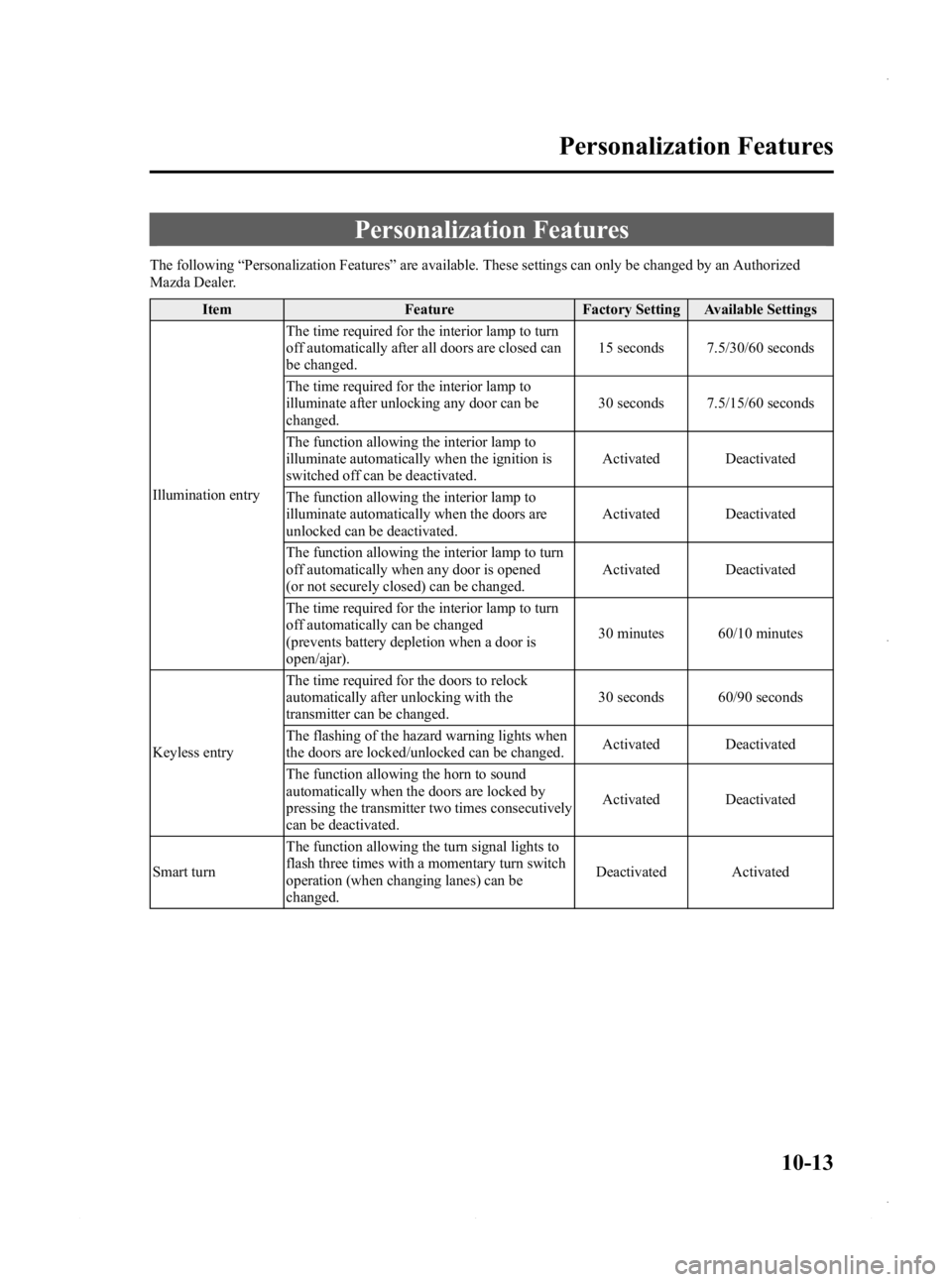
Personalization Features
The following“Personalization Features ”are available. These settings can only be changed by an Authorized
Mazda Dealer.
Item Feature Factory Setting Available Settings
Illumination entry The time required for the interior lamp to turn
off automatically after all doors are closed can
be changed.
15 seconds 7.5/30/60 seconds
The time required for the interior lamp to
illuminate after unlocking any door can be
changed. 30 seconds 7.5/15/60 seconds
The function allowing the interior lamp to
illuminate automatically when the ignition is
switched off can be deactivated. Activated Deactivated
The function allowing the interior lamp to
illuminate automatically when the doors are
unlocked can be deactivated. Activated Deactivated
The function allowing the interior lamp to turn
off automatically when any door is opened
(or not securely closed) can be changed. Activated Deactivated
The time required for the interior lamp to turn
off automatically can be changed
(prevents battery depletion when a door is
open/ajar). 30 minutes 60/10 minutes
Keyless entry The time required for the doors to relock
automatically after unlocking with the
transmitter can be changed.
30 seconds 60/90 seconds
The flashing of the hazard warning lights when
the doors are locked/unlocked can be changed. Activated Deactivated
The function allowing the horn to sound
automatically when the doors are locked by
pressing the transmitter two times consecutively
can be deactivated. Activated Deactivated
Smart turn The function allowing the turn signal lights to
flash three times with a momentary turn switch
operation (when changing lanes) can be
changed. Deactivated Activated
Personalization Features
10-13
Mazda3_8CV6-EA-12H_Edition3 Page597
Thursday, February 28 2013 11:31 AM
Form No.8CV6-EA-12H
Page 598 of 610
Black plate (598,1)
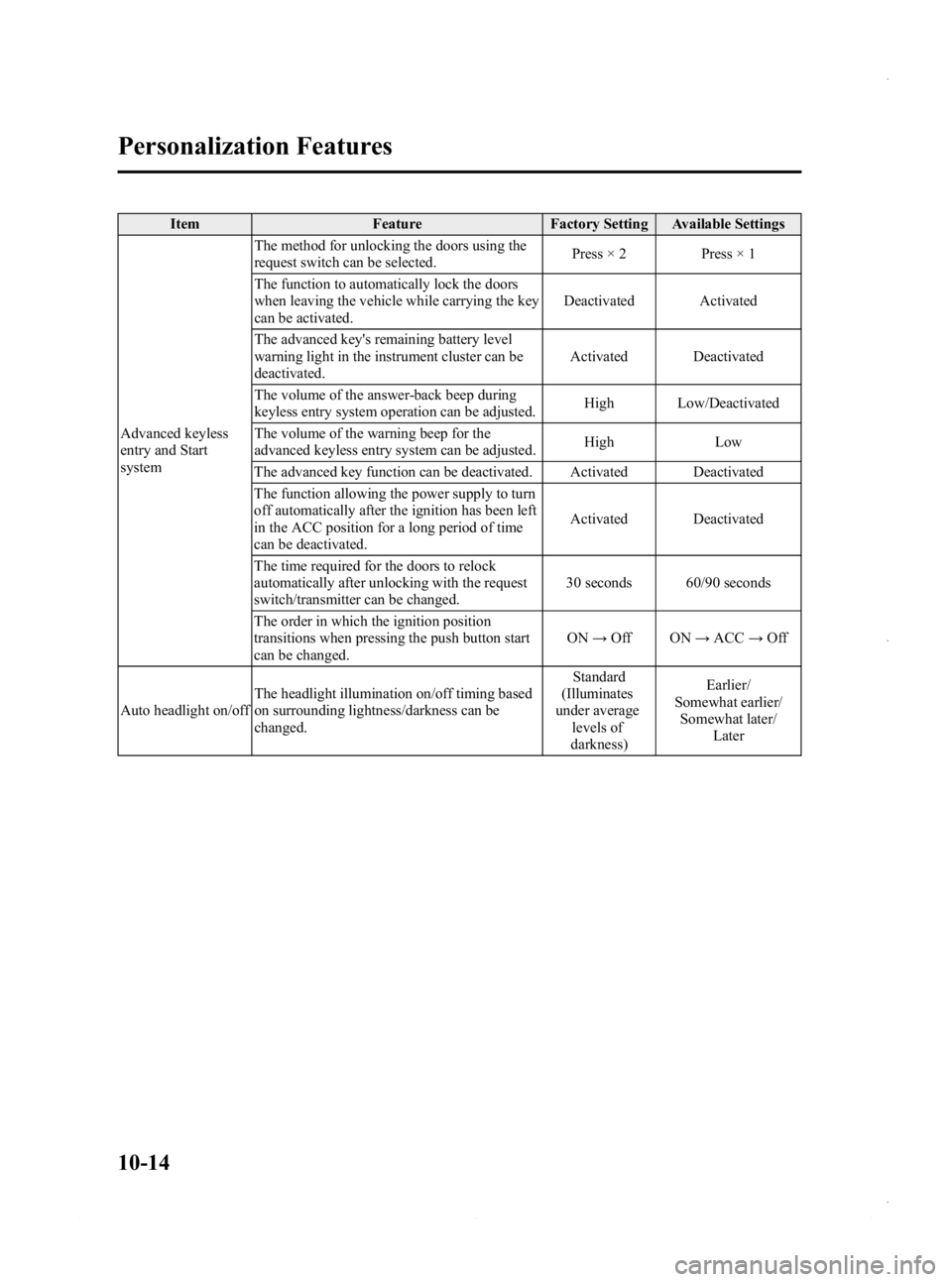
ItemFeatureFactory Setting Available Settings
Advanced keyless
entry and Start
system The method for unlocking the doors using the
request switch can be selected.
Press × 2 Press × 1
The function to automatically lock the doors
when leaving the vehicle while carrying the key
can be activated. Deactivated Activated
The advanced key's remaining battery level
warning light in the instrument cluster can be
deactivated. Activated Deactivated
The volume of the answer-back beep during
keyless entry system operation can be adjusted. High Low/Deactivated
The volume of the warning beep for the
advanced keyless entry system can be adjusted. High
Low
The advanced key function can be deactivated. Activated Deactivated
The function allowing the power supply to turn
off automatically after the ignition has been left
in the ACC position for a long period of time
can be deactivated. Activated Deactivated
The time required for the doors to relock
automatically after unlocking with the request
switch/transmitter can be changed. 30 seconds 60/90 seconds
The order in which the ignition position
transitions when pressing the push button start
can be changed. ON
→Off ON →ACC →Off
Auto headlight on/off The headlight illumination on/off timing based
on surrounding lightness/darkness can be
changed. Standard
(Illuminates
under average
levels of
darkness) Earlier/
Somewhat earlier/ Somewhat later/
Later
10-14
Personalization Features
Mazda3_8CV6-EA-12H_Edition3 Page598
Thursday, February 28 2013 11:31 AM
Form No.8CV6-EA-12H
Page 604 of 610
Black plate (604,1)
A
Accessory Socket ............................ 6-194
Adaptive Front Lighting System
(AFS) ................................................ 5-68
Add-On Non-Genuine Parts and
Accessories ....................................... 9-18
Advanced Key ..................................... 3-2Advanced key maintenance ......... 3-5
Advanced key suspend
function ...................................... 3-20
Auxiliary key .............................. 3-20
Locking, unlocking with request
switch ........................................... 3-9
Opening the liftgate/trunk lid ..... 3-11
Operational range ......................... 3-7
Remote control function ............. 3-16
Service ......................................... 3-7
Warning and beep sounds .......... 3-21
When warning indicator/beep is
activated ..................................... 3-24
Air Bag Systems ............................... 2-44
Antenna ............................................. 6-16
Anti-Lock Brake System (ABS) ......... 5-8 Warning light ............................... 5-8
Appearance Care ............................... 8-65
Audio System ................................... 6-16 Audio control switch .................. 6-84
Audio set (Type A) ..................... 6-33
Audio set (Type B) ..................... 6-63
AUX/USB/iPod mode ................ 6-88
Operating tips for audio
system ........................................ 6-17
Safety certification ................... 6-107
A
Automatic TransaxleDriving tips ................................ 5-20
Fluid ........................................... 8-28
Manual shift mode ..................... 5-16
Shift-lock override ..................... 5-15
Shift-lock system ....................... 5-15
Transaxle ranges ........................ 5-14
B
BatteryEmergency starting .................... 7-18
Maintenance ............................... 8-35
Specifications ............................. 10-4
Beep Sounds Blind spot monitoring system
warning ...................................... 5-63
Ignition key reminder ................. 5-63
Lights-on reminder ..................... 5-63
Seat belt warning ........................ 5-63
Tire inflation pressure warning ... 5-63
Before Starting the Engine .................. 4-6 After getting in ............................. 4-6
Before getting in .......................... 4-6
Blind Spot Monitoring
(BSM) System .................................. 5-37
BSM OFF indicator light ........... 5-39
BSM OFF switch ....................... 5-40
Care of radar sensors .................. 5-40
Warning light/beep ..................... 5-39
Bluetooth® (Type B) ...................... 6-141 Bluetooth® Audio .................... 6-166
Bluetooth® Hands-Free ........... 6-147
Safety Certification .................. 6-174
Troubleshooting ....................... 6-170
Bluetooth® Audio (Type A) ........... 6-108
11-2
Index
Mazda3_8CV6-EA-12H_Edition3 Page604
Thursday, February 28 2013 11:31 AM
Form No.8CV6-EA-12H