change time MAZDA MODEL 3 5-DOOR 2013 Owner's Guide
[x] Cancel search | Manufacturer: MAZDA, Model Year: 2013, Model line: MODEL 3 5-DOOR, Model: MAZDA MODEL 3 5-DOOR 2013Pages: 610, PDF Size: 7.05 MB
Page 304 of 610

Black plate (304,1)
qPower/Volume/Display/Sound Controls
Audio button
Setup button
Audio control dial
Phone button
Navigation button
Power/Volume dial
Power ON/OFF
Switch the ignition to ACC or ON.
Press the power/volume dial to turn the
audio system on. Press the power/volume
dial again to turn the audio system off.
Volume adjustment
To adjust the volume, turn the power/
volume dial.
Turn the power/volume dial to the right to
increase volume, to the left to decrease it.
Display setting
Press the setup button (
) to display
the display setting screen.
Touch the
on-screen tab to select
the item you would like to change.
Brightness adjustment
: Increase brightness
: Decrease brightness Contrast adjustment
: Higher contrast
: Lower contrast
Daytime/nighttime screen setting
The daytime or nighttime screen can be
selected even if the headlights are
illuminated or turned off (when bright
screen is required at night or dark screen
is required at noon).
: Daytime screen setting
: Nighttime screen setting
: Switches screen automatically
according to headlight illumination
condition
6-64
Interior Comfort
Audio System
Mazda3_8CV6-EA-12H_Edition3 Page304
Thursday, February 28 2013 11:29 AM
Form No.8CV6-EA-12H
Page 309 of 610
Black plate (309,1)
Manual tuning
Turning the manual tuning dial will
change the frequency higher or lower.
NOTE
When anbroadcast is being
received, a receivable multicast channel is also
received.
Seek tuning
Pressing the seek tuning button (
,)
will cause the tuner to seek a higher or
lower frequency automatically.
NOTE
lIf you continue to press and hold the seek
tuning button (
,) the frequency will
continue changing without stopping.
lWhen anbroadcast is being
received, a receivable multicast channel is
also received.
Scan tuning
You can search for receivable radio
stations by touching the
on-screen
button.
Scanning stops at each station for about
five seconds.
Touch the
on-screen button one time
during reception to continue receiving a
broadcasting station.
Preset channel tuning
The six preset channels can be used to
store six AM and twelve FM stations.
1. To set a channel, first select AM, FM1, or FM2. Tune to the desired station.
2. Press and hold any of the preset on- screen buttons. The reception
frequency is programmed and
displayed on the preset button. 3. Repeat this operation for the other
stations and bands you want to store.
When receiving a programmed
frequency, select AM, FM1, or FM2
and touch the preset on-screen button.
NOTE
The programmed frequency is displayed on the
preset button.
Auto memory tuning
This is especially useful when driving in
an area where the local stations are
unknown. Additional AM/FM stations
can be stored without disturbing the
previously set channels.
1. Touch the
on-screen button. The
auto memory preset list is displayed
and the previously tuned frequency is
received.
2. Touch the
on-screen button to
display the frequencies of up to ten
radio stations on the auto memory
preset list.
3. Touch the desired frequency.
NOTE
Touch theon-screen button during
auto memory tuning to return to the AM/FM
main screen.
Radio Broadcast Data System (RBDS)
Radio text information display
A maximum of 64 characters of radio text
information sent from a broadcasting
station is displayed in the audio display.
Interior Comfort
Audio System
6-69
Mazda3_8CV6-EA-12H_Edition3 Page309
Thursday, February 28 2013 11:29 AM
Form No.8CV6-EA-12H
Page 310 of 610
Black plate (310,1)
NOTE
Radio text information is a function of FM
radio. Text information is not displayed in the
following:
lDuringreceptionlNot an RBDS broadcastlDuring HD receptionlRBDS broadcast, but radio text is not
transmitted from the radio station
Genre Seek
Some FM stations transmit Genre codes
(Program type like a Rock, News, and so
on). This code enables alternative stations
transmitting the same Genre code to be
found quickly. To select from the genre
list, touch the
on-screen button
while in the FM mode and the desired
Genre Seek.
(To scan for Genre Seek:)
1. Touch the genre type which you want to select.
2. Touch the
,on-screen
button.
Ex.)
89.3 is currently being received. With
Rock selected as the Genre, the radio
stations broadcasting Rock are at the
following frequencies.
98.3
*1, 98.7, 104.3*1, 107.1
*1 Radio stations with good reception
The frequency changes as follows each
time the Genre Seek on-screen button is
pressed.
89.3 →98.3 →104.3 →98.3 NOTE
lOnly one Genre can be selected.lTouch theon-screen button to
return to the FM1 or FM2 main screen.
lIt may not be possible to receive any station
even if the Genre Seek function is used.
lIf a program in the selected genre is not
broadcast to a region, reception is not
possible even if the Genre Seek function is
used.
lThe Genre Seek function searches for genre
code (program type) which FM analog
broadcasts transmit.
specialty
programs (HD2-HD8) cannot be searched
because they are not FM analog
broadcasts.
lIf radio stations which are selected by
scanning using the Genre Seek function are
broadcasting stations, they are
changed from analog broadcasts to
broadcasts after a few seconds
if the reception conditions are good. The
genre is displayed after the switch,
however, the genre for FM analog
broadcasts may differ.
HD Radio
What is HD Radio ™Technology and
how does it work?
HD Radio ™Technology is the digital
evolution of analog AM/FM radio. Your
radio product has a special receiver which
allows it to receive digital broadcasts
(where available) in addition to the analog
broadcasts it already receives. Digital
broadcasts have better sound quality than
analog broadcasts as digital broadcasts
provide free, crystal clear audio. For more
information, and a guide to available radio
stations and programming, please visit
www.hdradio.com.
6-70
Interior Comfort
Audio System
Mazda3_8CV6-EA-12H_Edition3 Page310
Thursday, February 28 2013 11:29 AM
Form No.8CV6-EA-12H
Page 313 of 610
Black plate (313,1)
NOTE
Exclusive to Sirius. If your vehicle is equipped
with Sirius, your new Mazda includes a free
introductory subscription with a limited term
trial offer. Call 888-539-7474 to activate. For
more information, visit www.siriusxm.com.
Satellite radio is only available in regions
providing satellite radio service (some areas of
the United States and Canada). Contact
Authorized Mazda Dealer for details.
How to Activate Satellite Radio
You must call SIRIUS to activate your
service. Activation is free and takes only a
few minutes.
SIRIUS service uses an ID code to
identify your radio. This code is needed to
activate SIRIUS service, and report any
problems.
Please have the following information
ready:
lSIRIUS ID (12-digit electronic serial
no, or ESN*1)lValid credit card information (may not
be required at initial sign-up)
*1 ESN: Electronic Serial Number
Be sure you are parked outside with a
clear view of open sky, you will be
instructed to turn on your radio (in
SIRIUS mode and tuned to channel 184).
Activation typically takes only 2 ―5
minutes.
Displaying the SIRIUS ID (ESN)
Turn the manual tuning dial and select
channel 0 to display the twelve-digit
Electronic Serial Number (ESN) for the
SIRIUS tuner.
SIRIUS operation
All operations of the satellite radio are
conducted by means of the audio unit. SIRIUS radio mode selection
Touch the
on-screen tab on the
audio screen to receive the previously
received SIRIUS channel.
Every time the
on-screen tab is
touched, the bank changes in the order
shown below.
SIRIUS1 SIRIUS2 SIRIUS3
NOTElSIRIUS1, SIRIUS2 and SIRIUS3: six
stations can be stored in each bank for
convenient access to your favorite stations.
lis displayed when SIRIUS1 is
selected,
is displayed when
SIRIUS2 is selected, and
is
displayed when SIRIUS3 is selected.
Operation in the initial state
It may take some time to start up the
equipment when it is in the initial state,
when there is a change in the user's
subscription condition, when the firmware
is updated or when the SIRIUS channel
map is changed.
“ Updating Channels XXX % ”is
displayed when the SIRIUS channel map
is changed.
If the user contract content is changed,
“ Subscription Updated ”is displayed.
When the firmware is updated, the
“ Updating Receiver ”is displayed.
Updating could take as long as a few
minutes depending on the geographical
area. When the unit is in an initialized
state, channel 184 is displayed after the
display indicates “Updating Receiver ”.
Interior Comfort
Audio System
6-73
Mazda3_8CV6-EA-12H_Edition3 Page313
Thursday, February 28 2013 11:29 AM
Form No.8CV6-EA-12H
Page 315 of 610
Black plate (315,1)
Scan tuning
Touch the
on-screen button to
automatically sample stations. Scanning
stops at each station for about five
seconds.
To hold a station, touch the
on-
screen button again during this interval.
NOTE
Unsubscribed channels, invalid channels,
parental lock channels and channel 0 are not
subject to the scan, therefore these channels
will skip automatically.
Channel number, channel name,
category name, artist name, song titles
and information display
The information regarding the channel
which is currently being received is
displayed.
NOTE
If channels have not been subscribed to or
parental locked, the channel name, category
name, artist name, song title and information
is not displayed.
Display scroll
If a whole title cannot be displayed at one
time, touch the
on-screen button on
the right side of the title. When the last
character is displayed, touch the
on-
screen button to display the first character
of the title.
NOTE
Theon-screen button is displayed only if a
whole title cannot be displayed at one time.
Instant replay
This function allows you to rewind and
replay the program that you were
previously or are currently listening to. When the
on-screen button is
touched, playback starts from the
beginning of the current program.
When the
on-screen button is
touched twice, playback starts from the
beginning of the previous program.
Touch and hold the
on-screen
button to reverse the program while the
button is being pressed.
When the
on-screen button is
touched, playback starts from the
beginning of the next program.
When the
on-screen button is
touched while the last program is being
played, the instant replay mode is
canceled.
Touch and hold the
on-screen
button to fast-forward the program while
the button is being pressed.
When touching and holding the button
until the end of the program, the instant
replay mode is canceled.
Instant replay (PAUSE)
If the
on-screen button is touched,
instant replay mode is turned on in a
paused condition (PAUSE).
Touch the
on-screen button again
to resume playback from the point at
which it was paused.
Parental lock
Parental lock, parental unlock, parental
lock code change, and parental lock code
reset can be set.
Interior Comfort
Audio System
6-75
Mazda3_8CV6-EA-12H_Edition3 Page315
Thursday, February 28 2013 11:29 AM
Form No.8CV6-EA-12H
Page 333 of 610
Black plate (333,1)
Fast-forward/Reverse
Press and hold the fast-forward button
(
) to advance through a track at high
speed.
Press and hold the reverse button (
)to
reverse through a track at high speed.
Track search
Press the track up button (
) or turn the
file dial clockwise once to skip forward to
the beginning of the next track.
Press the track down button (
) or turn
the file dial counterclockwise within a few
seconds after playback begins to track
down to the beginning of the previous
track.
Press the track down button (
) or turn
the file dial counterclockwise after a few
seconds have elapsed to start playback
from the beginning of the current track.
Folder search
To change to the previous folder, press the
folder down button (
), or press the
folder up button (
) to advance to the
next folder.
Music Scan
This function scans the titles in a folder
currently being played and plays ten
seconds of each song to aid you in finding
a song you want to listen to.
Press the scan button (
) during
playback to start the scan play operation
(the track number will flash). Press the
scan button (
) again to cancel scan
playback.
NOTE
If the unit is left in scan, normal playback will
resume where scan was selected.
Repeat playback
Press the repeat button (
) during
playback to play the current track
repeatedly. “RPT ”is displayed during
playback.
Press the repeat button (
) two times
while “RPT ”is displayed to cancel.
Random playback
Press the random button (
) during
playback to play the tracks in the folder
randomly. “RDM ”is displayed during
playback.
Press the random button (
) two times
while “RDM ”is displayed to cancel.
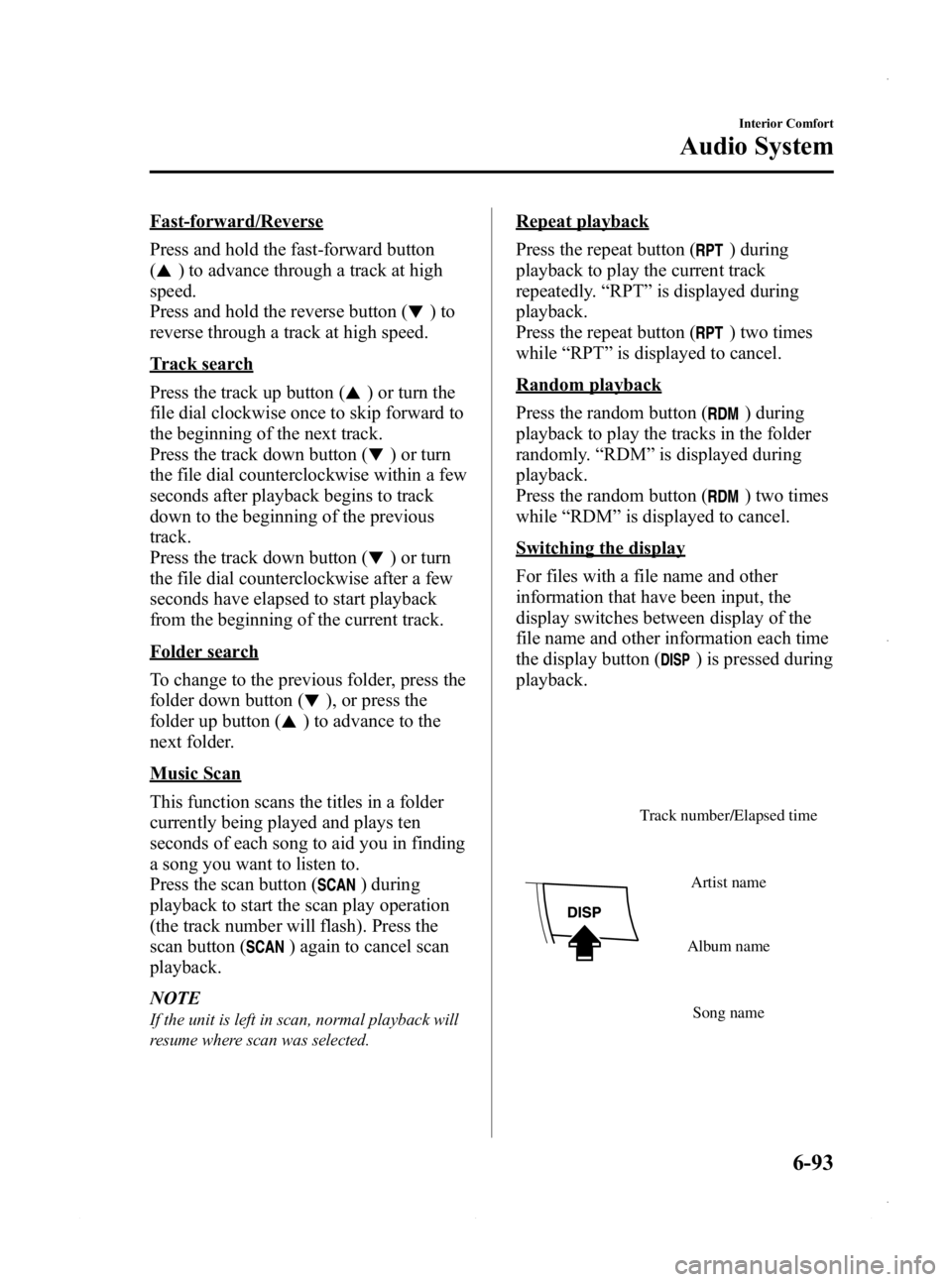
Switching the display
For files with a file name and other
information that have been input, the
display switches between display of the
file name and other information each time
the display button (
) is pressed during
playback.
Track number/Elapsed time
Song name
Album name
Artist name
Interior Comfort
Audio System
6-93
Mazda3_8CV6-EA-12H_Edition3 Page333
Thursday, February 28 2013 11:29 AM
Form No.8CV6-EA-12H
Page 350 of 610
Black plate (350,1)
qBluetooth® Audio Preparation
Bluetooth®audio device set-up
Bluetooth
®audio programming, changes,
deletions, and display of programmed
device information can be performed.
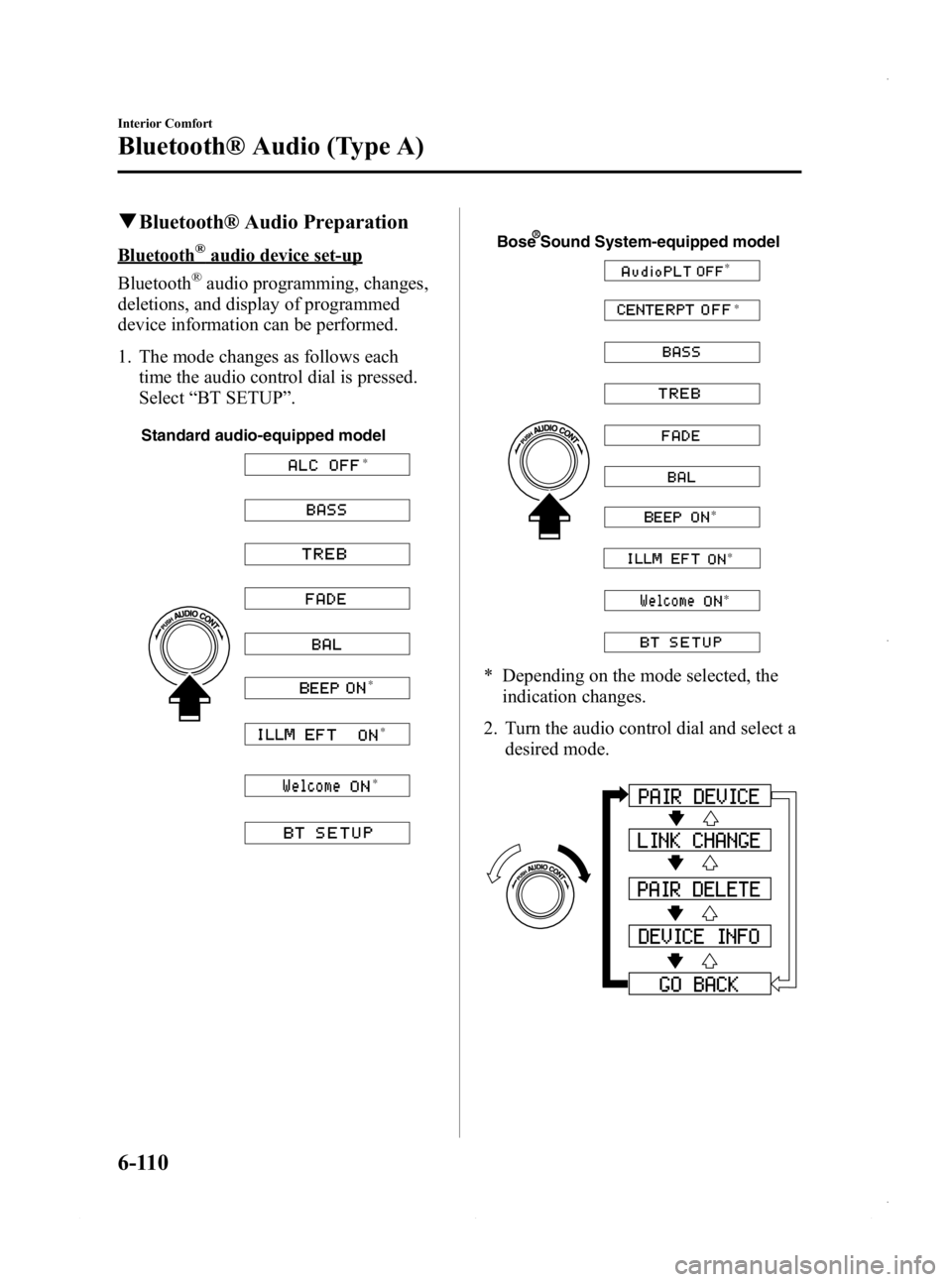
1. The mode changes as follows each time the audio control dial is pressed.
Select “BT SETUP” .
Standard audio-equipped model
*
* *
*
Bose Sound System-equipped model
* *
*
*
*
* Depending on the mode selected, theindication changes.
2. Turn the audio control dial and select a desired mode.
6-110
Interior Comfort
Bluetooth® Audio (Type A)
Mazda3_8CV6-EA-12H_Edition3 Page350
Thursday, February 28 2013 11:29 AM
Form No.8CV6-EA-12H
Page 353 of 610
Black plate (353,1)
6. When the programming is completed,“
”and “PAIR SUCCESS” are
displayed after about 10-30 seconds,
after which “PAIR SUCCESS”
continues to be displayed for three
seconds, and then the unit returns to the
normal display.
NOTE
lIf pairing cannot be completed, try “1234 ”
instead. Refer to the owner's manual of
your mobile device for the right PIN code.
lSome Bluetooth®audio devices need a
certain amount of time before the “
”
symbol is displayed.
lIf the programming failed, “Err ”flashes
for three seconds.
lProgramming cannot be performed while
the vehicle is moving. If you attempt to
perform programming while the vehicle is
moving, “PAIR DISABLE ”is displayed.
lIf seven Bluetooth®audio devices have
already been programmed to the vehicle,
programming cannot be performed and
“ MEMORY FULL ”is displayed. Delete
one programmed device to program
another one.
Changing the link to a Bluetooth®
audio device
If several devices have been programmed,
the Bluetooth
®unit links the device last
programmed. If you would like to link a
different programmed device, it is
necessary to change the link. The order of
device priority after the link has been
changed is maintained even when the
ignition is switched off.
1. Using the audio control dial, select the link change mode “LINK CHANGE ”
in the “BT SETUP” mode. (Refer to
“ Bluetooth
®audio device set-up ”for
details.) 2. Press the audio control dial to
determine the mode.
3. The name of the currently linked Bluetooth
®audio device is displayed.
If no Bluetooth®audio device is
currently linked, the name of the first
device among the programmed devices
is displayed.
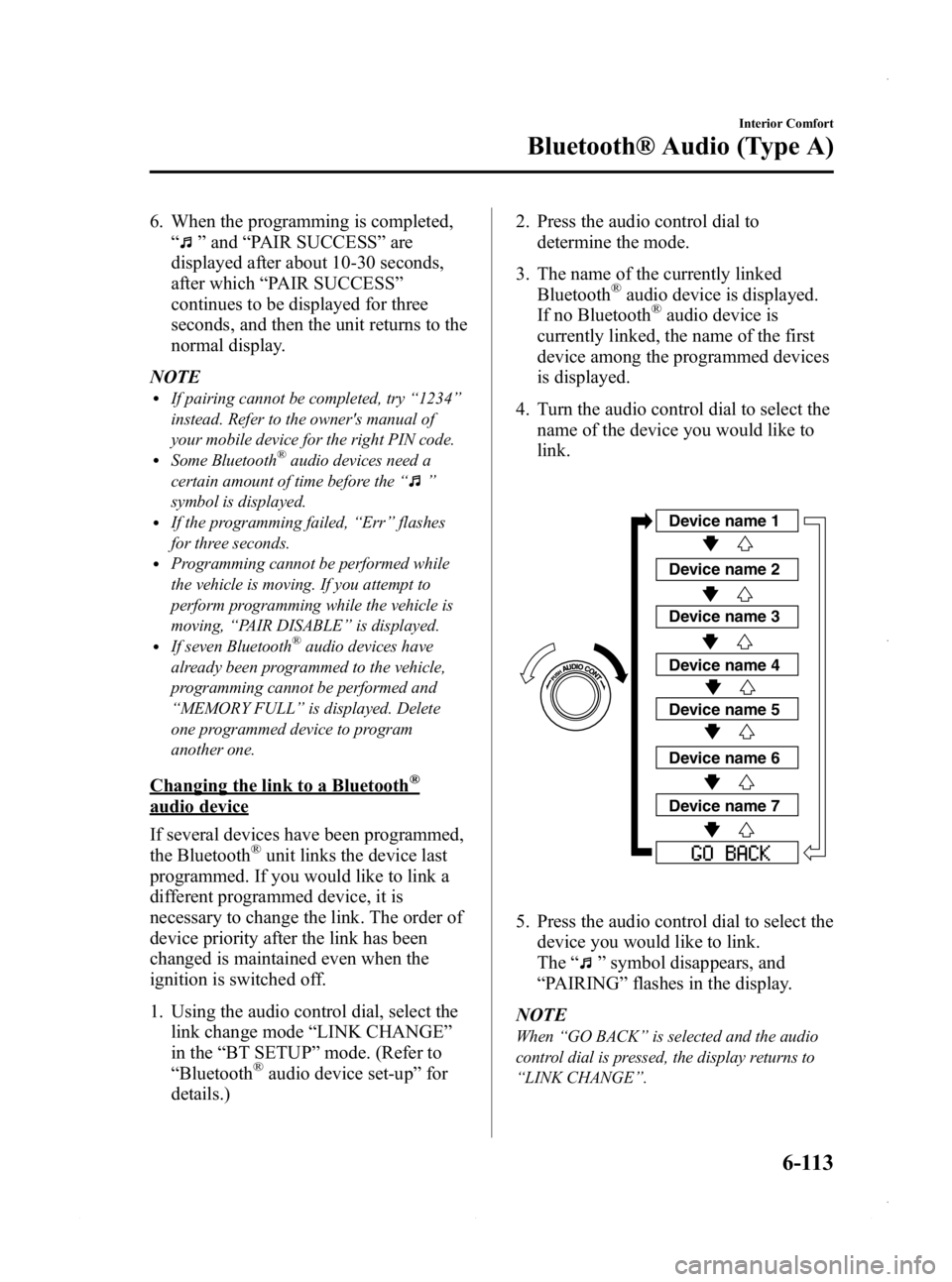
4. Turn the audio control dial to select the name of the device you would like to
link.
Device name 1
Device name 2
Device name 3
Device name 4
Device name 5
Device name 6
Device name 7
5. Press the audio control dial to select thedevice you would like to link.
The “
”symbol disappears, and
“ PAIRING ”flashes in the display.
NOTE
When “GO BACK ”is selected and the audio
control dial is pressed, the display returns to
“ LINK CHANGE ”.
Interior Comfort
Bluetooth® Audio (Type A)
6-113
Mazda3_8CV6-EA-12H_Edition3 Page353
Thursday, February 28 2013 11:29 AM
Form No.8CV6-EA-12H
Page 354 of 610
Black plate (354,1)
6. If the link to the desired device issuccessful, the “
”symbol is
displayed again, together with
“ LINK CHANGED ”.
“ LINK CHANGED ”is displayed for
three seconds, then it returns to the
normal display.
NOTE
lSome Bluetooth®audio devices need a
certain amount of time before the “
”
symbol is displayed.
lIf a hands-free type mobile phone has been
the most recently programmed device, the
Bluetooth
®unit links this device. If you
would like to use a Bluetooth®audio type
device which has been previously
programmed to the Bluetooth
®unit, the link
must be changed to this device.
lIf an error occurs while trying to link a
device, “Err ”flashes in the display for
three seconds, and the display returns to
“ LINK CHANGE ”. If this occurs, check the
programming status of the Bluetooth
®
audio device and the location of the device
in the vehicle (not in the trunk or a metal-
type box), and then try the link operation
again.
lDevice selection can also be done using
voice recognition (page 6-133).
How to confirm the device currently
linked
Switch to the link-change mode. (Refer to
“ Changing the link to a Bluetooth
®audio
device ”)
The device name displayed first is the
device which is currently linked.
Deleting the link to a Bluetooth®audio
device
1. Using the audio control dial, select the pairing delete mode “PAIR DELETE ”
in the “BT SETUP” mode. (Refer to
“ Bluetooth
®audio device set-up ”for
details.)
2. Press the audio control dial to determine the mode.
3. The name of the first device among the programmed devices is displayed.
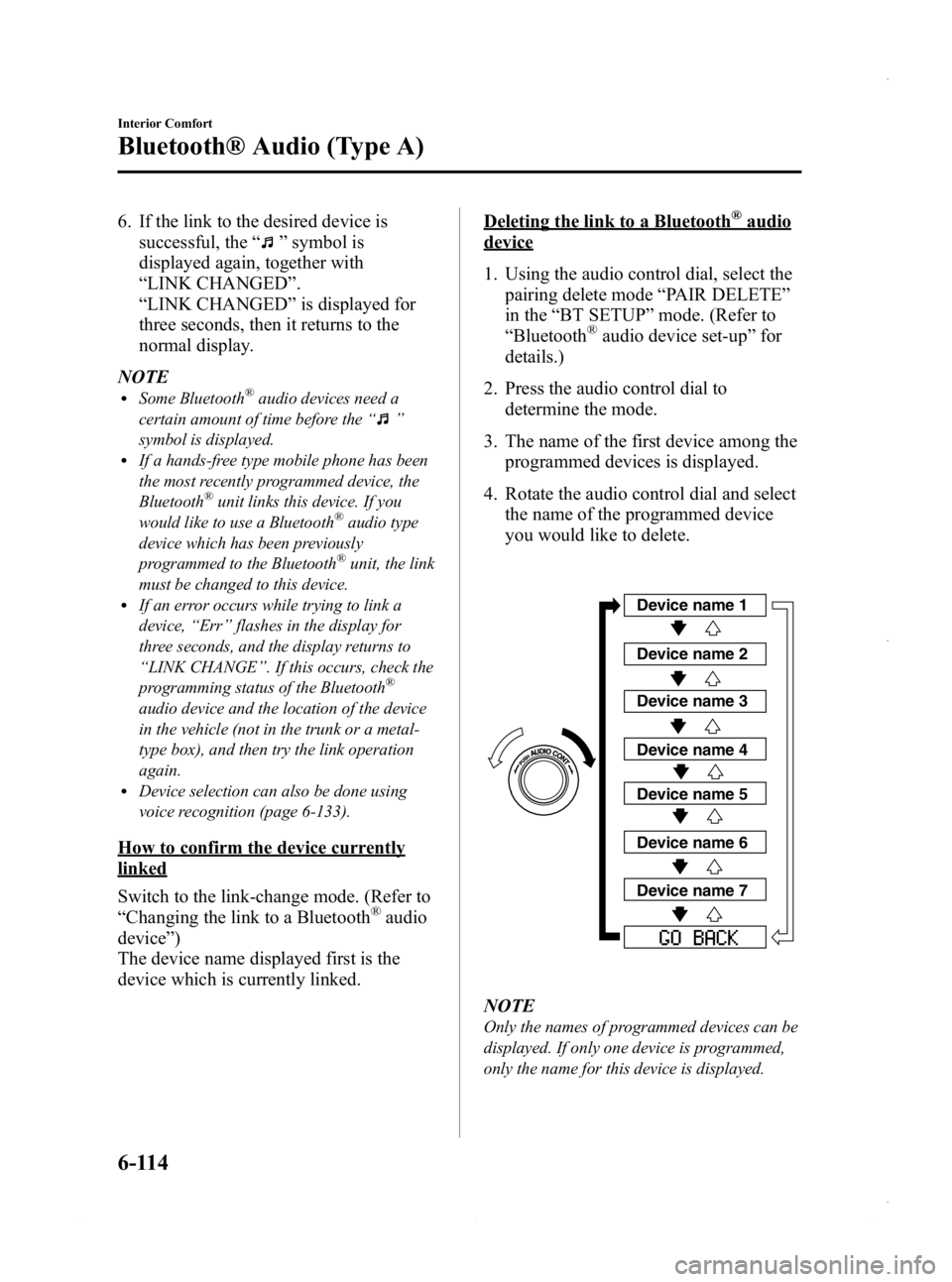
4. Rotate the audio control dial and select the name of the programmed device
you would like to delete.
Device name 1
Device name 2
Device name 3
Device name 4
Device name 5
Device name 6
Device name 7
NOTE
Only the names of programmed devices can be
displayed. If only one device is programmed,
only the name for this device is displayed.
6-114
Interior Comfort
Bluetooth® Audio (Type A)
Mazda3_8CV6-EA-12H_Edition3 Page354
Thursday, February 28 2013 11:29 AM
Form No.8CV6-EA-12H
Page 404 of 610
Black plate (404,1)
Gracenote®End User License Agreement
This application or device contains software from Gracenote, Inc. of Emeryville, California
( “ Gracenote ”). The software from Gracenote (the “Gracenote Software ”) enables this
application to perform disc and/or file identification and obtain music-related information,
including name, artist, track, and title information ( “Gracenote Data ”) from online servers
or embedded databases (collectively, “Gracenote Servers ”) and to perform other functions.
You may use Gracenote Data only by means of the intended End-User functions of this
application or device.
You agree that you will use Gracenote Data, the Gracenote Software, and Gracenote
Servers for your own personal non-commercial use only. You agree not to assign, copy,
transfer or transmit the Gracenote Software or any Gracenote Data to any third party. YOU
AGREE NOT TO USE OR EXPLOIT GRACENOTE DATA, THE GRACENOTE
SOFTWARE, OR GRACENOTE SERVERS, EXCEPT AS EXPRESSLY PERMITTED
HEREIN.
You agree that your non-exclusive license to use the Gracenote Data, the Gracenote
Software, and Gracenote Servers will terminate if you violate these restrictions. If your
license terminates, you agree to cease any and all use of the Gracenote Data, the Gracenote
Software, and Gracenote Servers. Gracenote reserves all rights in Gracenote Data, the
Gracenote Software, and the Gracenote Servers, including all ownership rights. Under no
circumstances will Gracenote become liable for any payment to you for any information
that you provide. You agree that Gracenote, Inc. may enforce its rights under this
Agreement against you directly in its own name.
The Gracenote service uses a unique identifier to track queries for statistical purposes. The
purpose of a randomly assigned numeric identifier is to allow the Gracenote service to
count queries without knowing anything about who you are. For more information, see the
web page for the Gracenote Privacy Policy for the Gracenote service.
The Gracenote Software and each item of Gracenote Data are licensed to you “AS IS. ”
Gracenote makes no representations or warranties, express or implied, regarding the
accuracy of any Gracenote Data from in the Gracenote Servers. Gracenote reserves the
right to delete data from the Gracenote Servers or to change data categories for any cause
that Gracenote deems sufficient. No warranty is made that the Gracenote Software or
Gracenote Servers are error-free or that functioning of Gracenote Software or Gracenote
Servers will be uninterrupted. Gracenote is not obligated to provide you with new
enhanced or additional data types or categories that Gracenote may provide in the future
and is free to discontinue its services at any time.
GRACENOTE DISCLAIMS ALL WARRANTIES EXPRESS OR IMPLIED,
INCLUDING, BUT NOT LIMITED TO, IMPLIED WARRANTIES OF
MERCHANTABILITY, FITNESS FOR A PARTICULAR PURPOSE, TITLE, AND
NON-INFRINGEMENT. GRACENOTE DOES NOT WARRANT THE RESULTS THAT
WILL BE OBTAINED BY YOUR USE OF THE GRACENOTE SOFTWARE OR ANY
GRACENOTE SERVER. IN NO CASE WILL GRACENOTE BE LIABLE FOR ANY
CONSEQUENTIAL OR INCIDENTAL DAMAGES OR FOR ANY LOST PROFITS OR
LOST REVENUES.
© 2000 to present. Gracenote, Inc.
6-164
Interior Comfort
Bluetooth® (Type B)
Mazda3_8CV6-EA-12H_Edition3 Page404
Thursday, February 28 2013 11:30 AM
Form No.8CV6-EA-12H