light MAZDA MODEL 3 5-DOOR 2016 Owners Manual
[x] Cancel search | Manufacturer: MAZDA, Model Year: 2016, Model line: MODEL 3 5-DOOR, Model: MAZDA MODEL 3 5-DOOR 2016Pages: 598, PDF Size: 30.13 MB
Page 251 of 598
 monitors the air pressure of all\
four tires. If
the ai")
4–123
When Driving
Tire Pressure Monitoring System
*Some models.
Tire Pressure Monitoring System*
The Tire Pressure Monitoring System (TPMS) monitors the air pressure of all\
four tires. If
the air pressure of one or more tires is too low, the system warns the driver by indicating the
tire pressure monitoring system warning light in the instrument cluster \
and operating a beep
sound. The system monitors the tire pressures indirectly using the data sent from the ABS
wheel speed sensors.
To allow the system to operate correctly, the system needs to be initialized with the specified
tire pressure (value on the tire pressure label). Follow the procedure\
and perform the
initialization.
Refer to Tire Pressure Monitoring System Initialization on page 4-126.
The warning light flashes when the system has a malfunction.
Refer to Warning Lights on page 4-21.
ABS wheel speed sensor
Mazda3_8FA4-EA-15G_Edition1.indb 1232015/05/11 14:01:11
Page 253 of 598
4–125
When Driving
Tire Pressure Monitoring System
NOTE
Because this system detects slight changes in tire conditions, the timing of the warning may
be faster or slower in the following cases:
The size, manufacturer, or the type of tires is different from the specification. The size, manufacturer, or the type of a tire is different from the others, or the level of tire
wear is excessively different between them. A run-flat tire, studless tire, snow tire, or tire chains are used. An emergency tire is used (The tire pressure monitoring system warning light may flash
and then continue illuminating). A tire is repaired using the emergency flat tire repair kit. The tire pressure is excessively higher than the specified pressure, or the tire pressure is
suddenly lowered for some reason such as a tire burst during driving. The vehicle speed is lower than about 15 km/h (9.3 mph) (including wh\
en the vehicle is
stopped), or the drive period is shorter than 5 minutes. The vehicle is driven on an extr emely rough road or a slippery, icy road. Hard steering and rapid acceleration/deceleration are repeated such as during aggressive
driving on a winding road. Load on the vehicle is applied to a tir e such as by loading heavy luggage to one side of
the vehicle. System initialization has not been implemented with the specifie d tire pressure.
Mazda3_8FA4-EA-15G_Edition1.indb 1252015/05/11 14:01:11
Page 254 of 598
4–126
When Driving
Tire Pressure Monitoring System
Tire Pressure Monitoring System
Initialization
In the following cases, system
initialization must be performed so that the
system operates normally.
A tire pressure is adjusted. Tire rotation is performed. A tire or wheel is replaced. The battery is replaced or completely
drained. The tire pressure monitoring system
warning light is illuminated.
Initialization method
1. Park the car in a safe place and firmly
apply the parking brake.
2. Let the tires cool, then adjust the tire
pressure of all four (4) tires to the
specified pressure indicated on the tire
pressure label located on the driver's
door frame (door open).
Refer to Tires on page 9-10.
3. Switch the ignition ON.
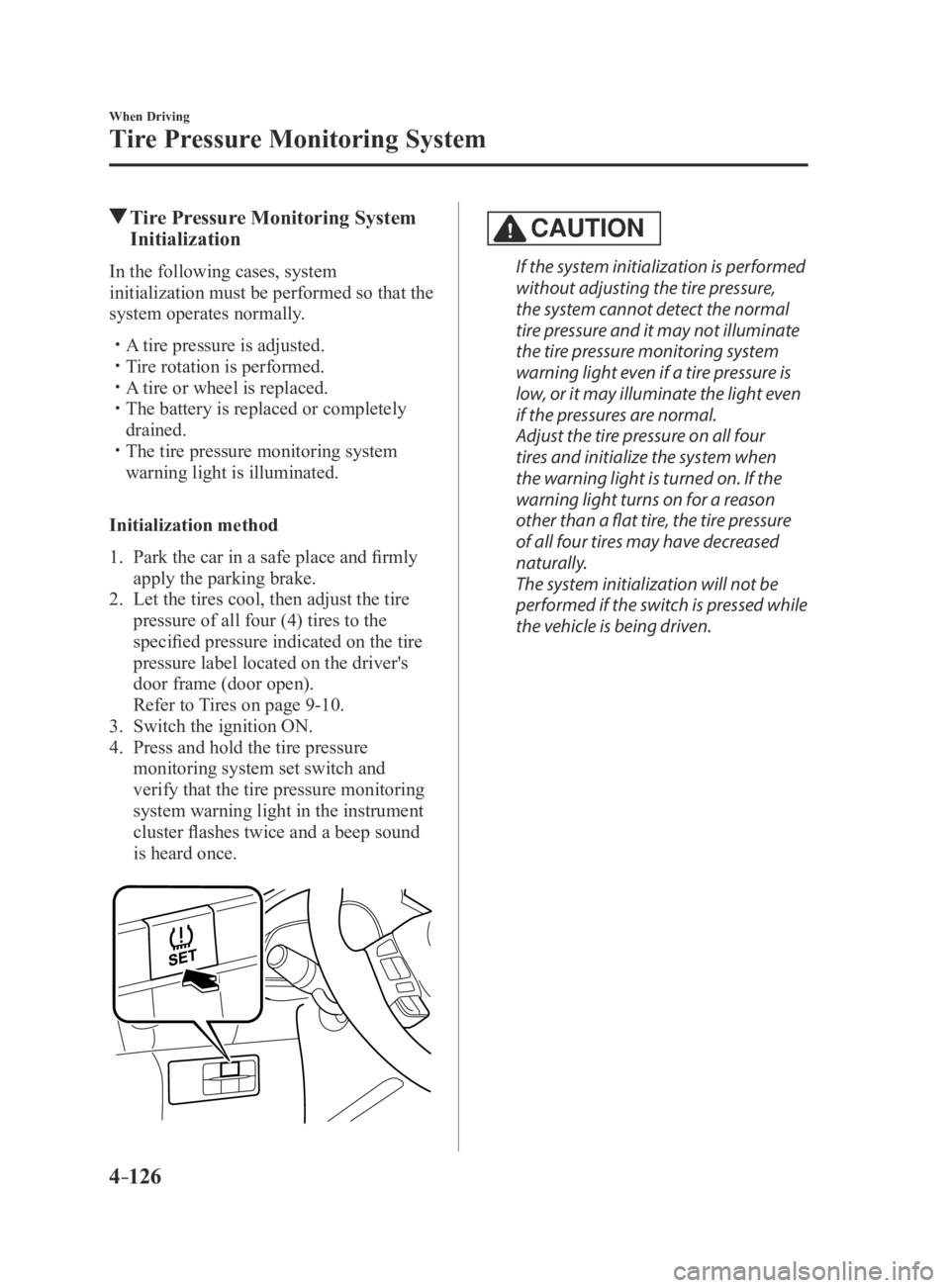
4. Press and hold the tire pressure
monitoring system set switch and
verify that the tire pressure monitoring
system warning light in the instrument
cluster flashes twice and a beep sound
is heard once.
CAUTION
If the system initialization is performed
without adjusting the tire pressure,
the system cannot detect the normal
tire pressure and it may not illuminate
the tire pressure monitoring system
warning light even if a tire pressure is
low, or it may illuminate the light even
if the pressures are normal.
Adjust the tire pressure on all four
tires and initialize the system when
the warning light is turned on. If the
warning light turns on for a reason
other than a flat tire, the tire pressure
of all four tires may have decreased
naturally.
The system initialization will not be
performed if the switch is pressed while
the vehicle is being driven.
Mazda3_8FA4-EA-15G_Edition3.indb 1262015/12/04 19:23:30
Page 257 of 598
4–129
When Driving
Rear View Monitor
Displayable Range on the Screen
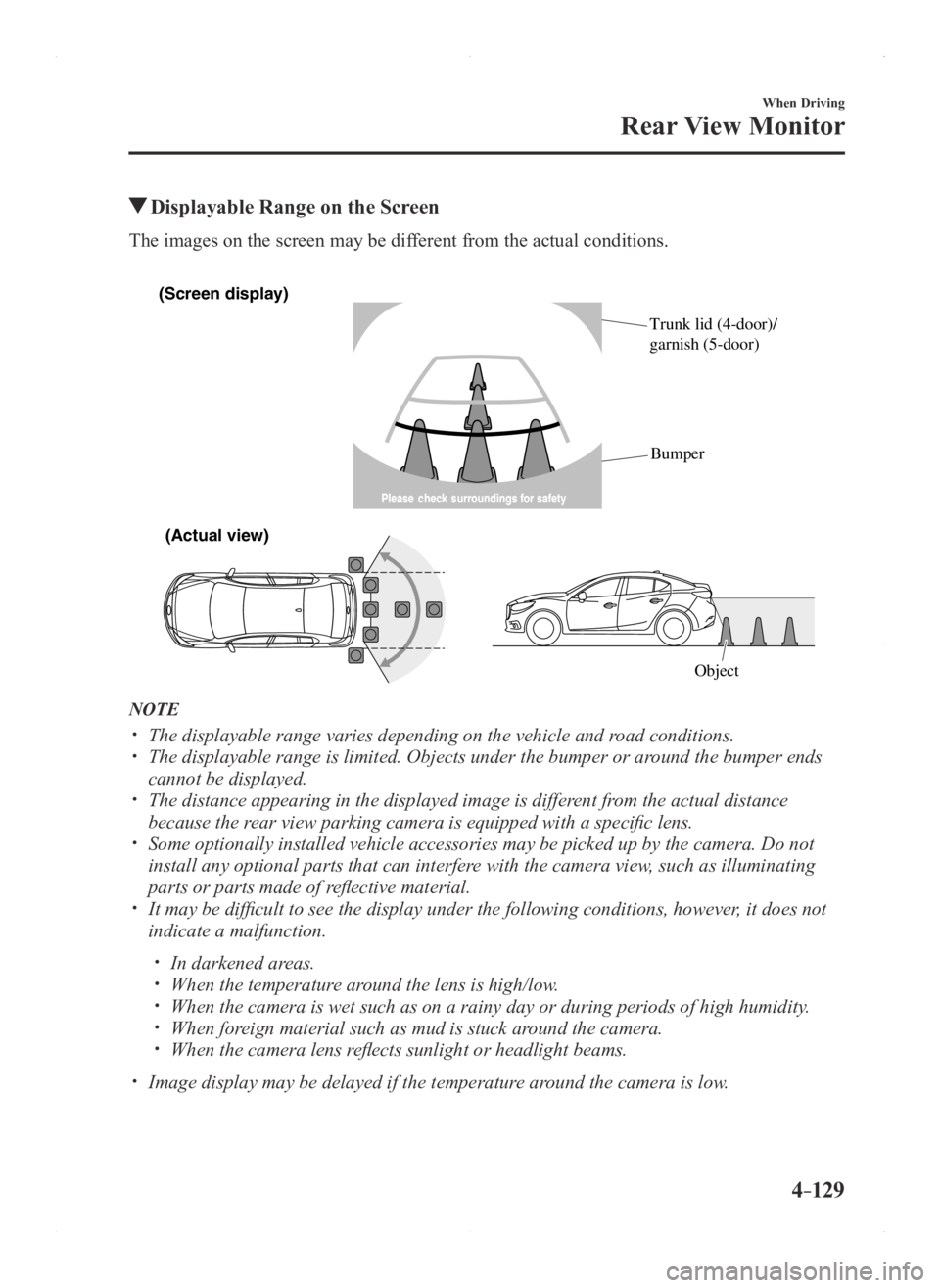
The images on the screen may be different from the actual conditions.
(Screen display)
(Actual vie\f)
Object
Trunk lid (4-door)/
garnish (5-door)
Bumper
NOTE
The displayable range varies depending on the vehicle and r
oad conditions. The displayable range is limited. Objects under the bumper or ar ound the bumper ends
cannot be displayed. The distance appearing in the displayed image is different from the actual distance
because the rear view parking camera is equipped with a specific lens. Some optionally installed vehicle accessories may be picked up by the ca\
mera. Do not
install any optional parts that can interfere with the camera view, such as illuminating
parts or parts made of reflective material.
It may be difficult to see the display under the following condi tions, however, it does not
indicate a malfunction.
In darkened areas. When the temperatur e around the lens is high/low. When the camera is wet such as on a rainy day or during periods of high \
humidity . When foreign material such as mud is stuck around the camera. When the camera lens reflects sunlight or headlight beams.
Image display may be delayed if the temperatur e around the camera is low.
Mazda3_8FA4-EA-15G_Edition1.indb 1292015/05/11 14:01:12
Page 263 of 598
5–1*Some models.
5Interior Features
Use of various features for ride comfort, including air-conditioning and
audio system.
Climate Control System..................................................................... 5-2
Operating Tips
........................................................................\
.......5-2
Vent Operation
........................................................................\
......5-3
Manual Climate Control
...............................................................5-5
Automatic Climate Control
...........................................................5-9
Dual-Zone Automatic Climate Control
.......................................5-12
Audio System
........................................................................\
............5-16
Antenna
........................................................................\
...............5-16
Operating Tips for Audio System
...............................................5-17
Audio set [Type A (non-touchscreen)]
........................................5-25
Audio set [Type B (touchscreen)]
...............................................5-36
Audio Control Switch Operation* ...............................................5-57
AUX/USB mode
........................................................................\
.5-59
Bluetooth
® ........................................................................\
.................5-77
Bluetooth®* ........................................................................\
..........5-77
Bluetooth® Hands-Free (Type A)* ...............................................5-99
Bluetooth® Hands-Free (Type B)* .............................................5-105
Bluetooth® Audio (Type A)* ......................................................5-115
Bluetooth® Audio (Type B)* ......................................................5-117
Troubleshooting* .......................................................................5-131
Interior Equipment
........................................................................\
5-134
Sunvisors
........................................................................\
...........5-134
Interior Lights
........................................................................\
...5-135
Accessory Sockets
....................................................................5-137
Cup Holder
........................................................................\
........5-138
Bottle Holder
........................................................................\
.....5-139
Storage Compartments
..............................................................5-140
Mazda3_8FA4-EA-15G_Edition3.indb 12015/12/04 19:23:34
Page 264 of 598
5–2
Interior Features
Climate Control System
Operating Tips
Operate the climate control system with
the engine running. To prevent the battery from being
discharged, do not leave the fan control
dial on for a long period of time with the
ignition switched ON when the engine is
not running.
Clear all obstructions such as leaves,
snow and ice from the hood and the air
inlet in the cowl grille to improve the
system efficiency.
Use the climate control system to defog
the windows and dehumidify the air. The recirculate mode should be used
when driving through tunnels or while in
a traffic jam, or when you would like to
shut off outside air for quick cooling of
the interior.
Use the outside air position for
ventilation or windshield defrosting. If the vehicle has been parked in direct
sunlight during hot weather, open the
windows to let warm air escape, then
run the climate control system.
(With A/C switch)
Run the air conditioner about 10 minutes
at least once a month to keep internal
parts lubricated.
Have the air conditioner checked before
the weather gets hot. Lack of refrigerant
may make the air conditioner less
efficient.
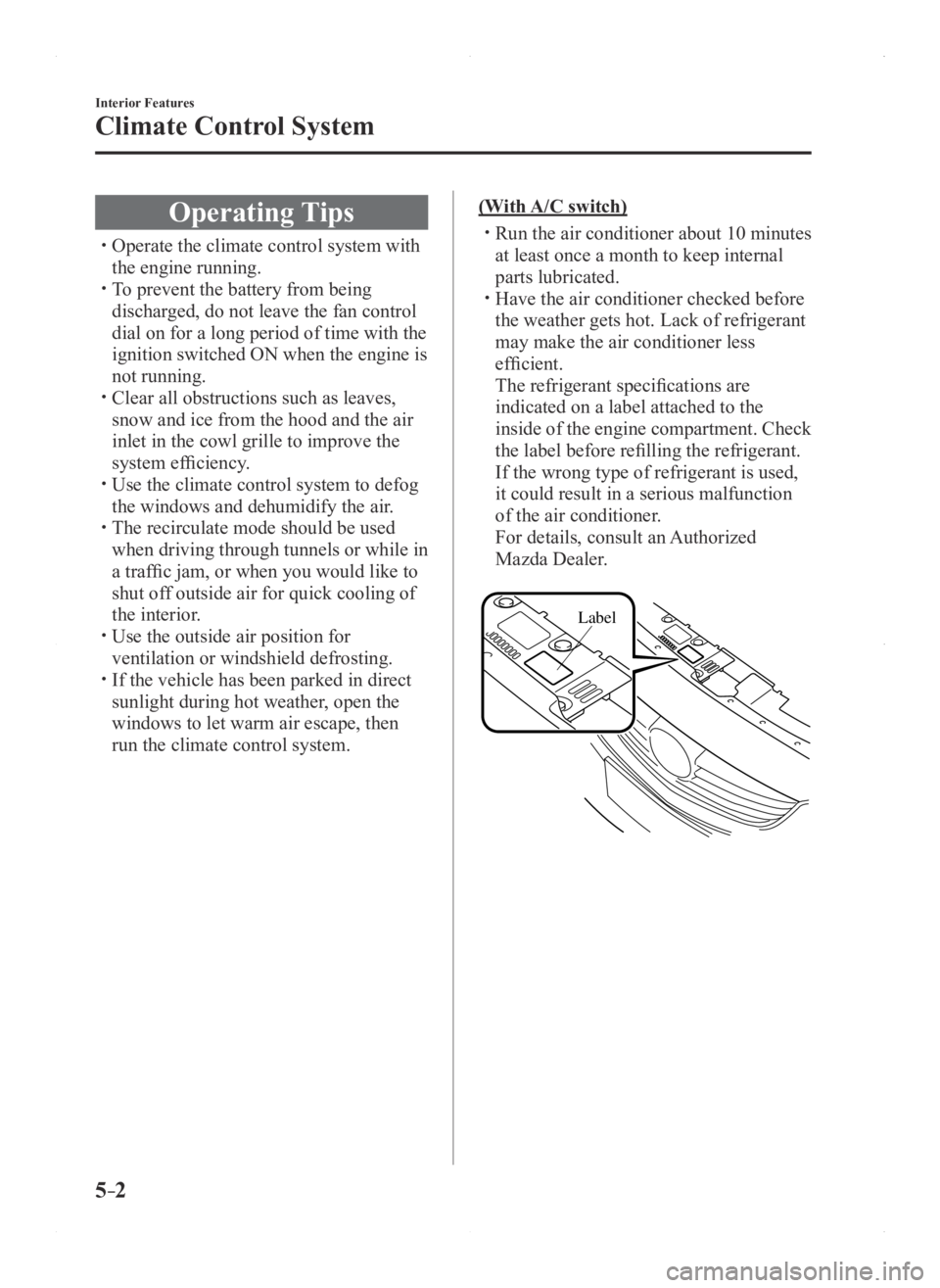
The refrigerant specifications are
indicated on a label attached to the
inside of the engine compartment. Check
the label before refilling the refrigerant.
If the wrong type of refrigerant is used,
it could result in a serious malfunction
of the air conditioner.
For details, consult an Authorized
Mazda Dealer.
Label
Mazda3_8FA4-EA-15G_Edition1.indb 22015/05/11 14:01:17
Page 267 of 598

5–5
Interior Features
Climate Control System
*Some models.
Manual Climate Control
Rear window defogger switch
Temperature control dial
Fan control dialMode selector dial
A/C switch
Air intake selector
(recirculated air
position)Air intake selector
(outside air position)
With A/C switch
Control Switches
Temperature control dial
This dial controls temperature. Turn it
clockwise for hot and counterclockwise
for cold.
NOTE
When the mode is set to or with the
fan control dial in a position other than 0
and the temperature control dial in the
maximum cold position, the air intake
selector switches to the recirculated air
position and the A/C turns on
automatically.
If A/C is not desired, press the A/C switch
to turn it off.
Fan control dial
This dial allows variable fan speeds.
The fan has seven speeds.
Mode selector dial
Turn the mode selector dial to select
airflow mode (page 5-4).
NOTE
The mode selector dial can be set at the
intermediate positions () between
each mode. Set the dial to an
intermediate position if you want to split
the airflow between the two modes.
For example, when the mode selector
dial is at the position between the
and positions, airflow from the floor
vent is less than that of the position.
A/C switch*
Press the A/C switch to turn the air
conditioner on. The indicator light on the
switch will illuminate when the fan control
dial is in any position except OFF.
Press the switch once again to turn the air
conditioner off.
NOTE
The air conditioner may not function when
the outside temperature approaches 0 °C
(32 °F).
Mazda3_8FA4-EA-15G_Edition3.indb 52015/12/04 19:23:37
Page 268 of 598
5–6
Interior Features
Climate Control System
Air intake selector
This switch controls the source of air
entering the vehicle.
Press the air intake selector switch to
alternate between the outside air and
recirculated air positions.
Recirculated air position (
)
Outside air is shut off. Air within the
vehicle is recirculated.
Outside air position (
)
Outside air is allowed to enter the
cabin. Use this mode for ventilation or
windshield defrosting.
WARNING
Do not use the recirculated air position
in cold or rainy weather:Using the recirculated air position in
cold or rainy weather is dangerous as it
will cause the windows to fog up. Your
vision will be hampered, which could
lead to a serious accident.
Rear window defogger switch
Press the rear window defogger switch to
defrost the rear window.
Refer to Rear Window Defogger on page
4-52.
Heating
1. Set the mode selector dial to the
position.
2. Set the air intake selector to the outside
air position.
3. Set the temperature control dial to the
hot position.
4. Set the fan control dial to the desired
speed.
5. If dehumidified heating is desired, turn
on the air conditioner.
NOTE
If the windshield fogs up easily , set the
mode selector dial to the position. If cooler air is desired at face level, set
the mode selector dial at the position
and adjust the temperature control dial
to maintain maximum comfort.
The air to the floor is warmer than air
to the face (except when the temperature
control dial is set at the extreme hot or
cold position).
Cooling (With air conditioner)
1. Set the mode selector dial to the
position.
2. Set the temperature control dial to the
cold position.
3. Set the fan control dial to the desired
speed.
4. Turn on the air conditioner by pressing
the A/C switch.
5. After cooling begins, adjust the fan
control dial and temperature control
dial as needed to maintain maximum
comfort.
CAUTION
If the air conditioner is used while
driving up long hills or in heavy
traffic, monitor the engine coolant
temperature warning light to see if it is
illuminated or flashing (page 4-20).
The air conditioner may cause engine
overheating. If the warning light is
illuminated or flashing, turn the air-
conditioning off (page 7-19).
Mazda3_8FA4-EA-15G_Edition3.indb 62015/12/04 19:23:38
Page 272 of 598
5–10
Interior Features
Climate Control System
A/C switch
The air-conditioning (cooling/
dehumidifying functions) can be turned on
or off by pressing the switch while the fan
control dial is at a position other than 0.
The indicator light turns on while the air-
conditioning is operating.
NOTE
The air conditioner may not function when
the outside temperature approaches 0 °C
(32 °F).
Air intake selector
Outside or recirculated air positions can be
selected. Press the switch to select outside/
recirculated air positions.
Recirculated air position (indicator light
illuminated)
Outside air is shut off. Use this position
when going through tunnels, driving in
congested traffic (high engine exhaust
areas) or when quick cooling is desired.
Outside air position (indicator light
turned off)
Outside air is allowed to enter the
cabin. Use this mode for ventilation or
windshield defrosting.
WARNING
Do not use the position in cold or
rainy weather:Using the
position in cold or rainy
weather is dangerous as it will cause
the windows to fog up. Your vision will
be hampered, which could lead to a
serious accident.
Operation of Automatic Air-
conditioning
1. Set the mode selector dial to the AUTO
position.
2. Set the air intake selector to the outside
air position (indicator light turned off).
NOTE
If the recirculated air position is used
for long periods in cold weather or high
humidity, the windshield may fog up more
easily.
3. Set the fan control dial to the AUTO
position.
4. Press the A/C switch to operate the air-
conditioning (turn indicator light on).
5. Set the temperature control dial to the
desired position.
6. To turn off the system, set the fan
control dial to the 0 position.
NOTE
Setting the temperatur e to maximum
hot or cold will not provide the desired
temperature at a faster rate.
When selecting heat, the system will
restrict airflow until it has warmed to
prevent cold air from blowing out of the
vents.
Mazda3_8FA4-EA-15G_Edition3.indb 102015/12/04 19:23:39
Page 273 of 598

5–11
Interior Features
Climate Control System
Windshield Defrosting and
Defogging
Set the mode selector dial to the
position and turn the fan control dial to the
desired speed.
In this position, the outside air position
is automatically selected, and when the
fan control dial is ON, the air conditioner
automatically turns on. The air conditioner
will directly dehumidify the air to the
front windshield and side windows (page
5-4). Airflow amount will be increased.
WARNING
Set the temperature control to the hot
or warm position when defogging (
position):Using the
position with the
temperature control set to the cold
position is dangerous as it will cause
the outside of the windshield to fog up.
Your vision will be hampered, which
could lead to a serious accident.
NOTE
Use the temperature control dial to
increase the air flow temperature and
defog the windshield more quickly.
Sunlight/Temperature Sensor
The climate control system measures
inside and outside temperatures, and
sunlight. It then sets temperatures inside
the passenger compartment accordingly.
CAUTION
Do not obstruct either sensor,
otherwise the climate control system
will not operate properly.
Sunlight sensor
Interior temperature sensor
Mazda3_8FA4-EA-15G_Edition1.indb 112015/05/11 14:01:20