clock MAZDA MODEL 3 5-DOOR 2016 User Guide
[x] Cancel search | Manufacturer: MAZDA, Model Year: 2016, Model line: MODEL 3 5-DOOR, Model: MAZDA MODEL 3 5-DOOR 2016Pages: 598, PDF Size: 30.13 MB
Page 298 of 598
![MAZDA MODEL 3 5-DOOR 2016 User Guide 5–36
Interior Features
Audio System
Audio set [Type B (touchscreen)]
NOTE
The explanation of functions described in this manual may differ from the actual
operation, and the shapes of screens and b](/img/28/40994/w960_40994-297.png "MAZDA MODEL 3 5-DOOR 2016 User Guide 5–36
Interior Features
Audio System
Audio set [Type B (touchscreen)]
NOTE
The explanation of functions described in this manual may differ from the actual
operation, and the shapes of screens and b")
5–36
Interior Features
Audio System
Audio set [Type B (touchscreen)]
NOTE
The explanation of functions described in this manual may differ from the actual
operation, and the shapes of screens and buttons and the letters and cha\
racters displayed
may also differ from the actual appearance.
Additionally, depending on future software updates, the content may successively cha\
nge
without notice.
Audio Set (Type B) has three different human interfaces.
Commander switch Touch panel Voice recognition with steering switch and microphone
Commander switch operation
NOTE
For safety reasons, some operations are disabled while the vehicle is being driven.
Volume dial operation
Volume dial
Press the volume dial to switch the audio MUTE on and off.
Turn the volume dial to adjust the volume. The volume increases by turning the dial
clockwise, and decreases by turning it counterclockwise.
Mazda3_8FA4-EA-15G_Edition3.indb 362015/12/04 19:23:54
Page 304 of 598

5–42
Interior Features
Audio System
Volume/Display/Sound Controls
Volume dialCommander switchA udio control switch
Volume switch
Volume adjustment
Turn the commander switch volume dial.
The volume switch on the steering switch
can also be pressed.
Display setting
Select the
icon on the home screen to
display the Settings screen.
Select the
tab to select the item you
would like to change.
Display OFF/Clock
The center display can be turned off.
Select
to turn the display off.
When is
selected the center display turns off and
the clock is displayed.
The center display can be turned back on
as follows:
Touch the center display. Operate the commander switch.
Daytime/nighttime (System) screen
setting
The daytime or nighttime screen can be
selected.
: Switches screen automatically
according to headlight illumination
condition*1
: Daytime screen setting
: Nighttime screen setting
*1 The display is constantly on daytime
screen when the illumination dimmer is
cancelled.
Brightness adjustment
Adjust the center display brightness using
the slider.
Contrast adjustment
Adjust the center display contrast using
the slider.
Display setting reset
All of the screen setting values can be
reset to their initial settings.
1. Select .
2. Select .
Mazda3_8FA4-EA-15G_Edition1.indb 422015/05/11 14:01:33
Page 317 of 598
5–55
Interior Features
Audio System
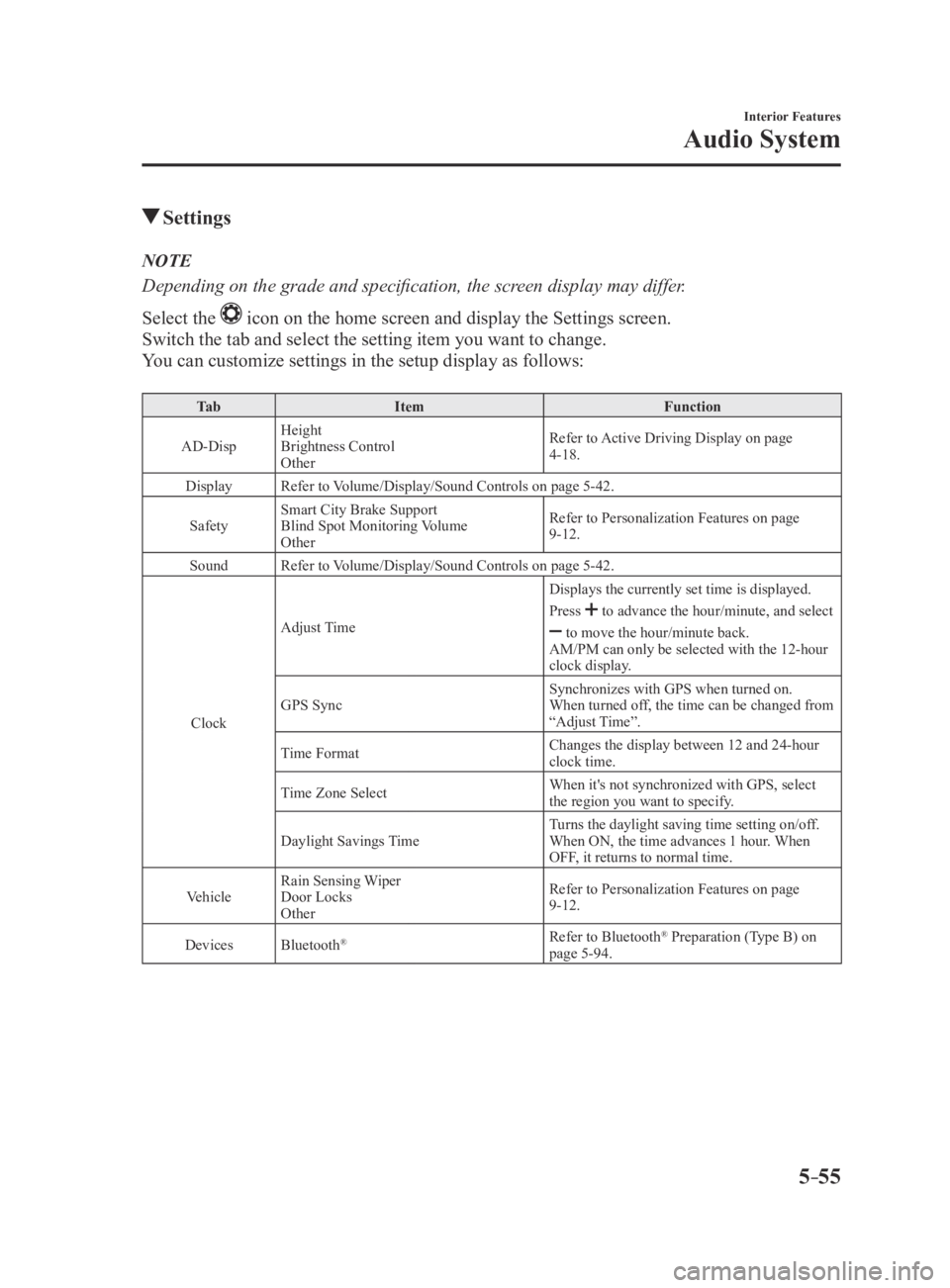
Settings
NOTE
Depending on the grade and specification, the screen display may differ.
Select the
icon on the home screen and display the Settings screen.
Switch the tab and select the setting item you want to change.
You can customize settings in the setup display as follows:
Ta bItem Function
AD-Disp Height
Brightness Control
Other Refer to Active Driving Display on page
4-18.
Display Refer to Volume/Display/Sound Controls on page 5-42.
Safety Smart City Brake Support
Blind Spot Monitoring Volume
Other Refer to Personalization Features on page
9-12.
Sound Refer to Volume/Display/Sound Controls on page 5-42.
Clock Adjust Time
Displays the currently set time is displayed.
Press
to advance the hour/minute, and select
to move the hour/minute back.
AM/PM can only be selected with the 12-hour
clock display.
GPS Sync Synchronizes with GPS when turned on.
When turned off, the time can be changed from
“Adjust Time”.
Time Format Changes the display between 12 and 24-hour
clock time.
Time Zone Select When it's not synchronized with GPS, select
the region you want to specify.
Daylight Savings Time Turns the daylight saving time setting on/off.
When ON, the time advances 1 hour. When
OFF, it returns to normal time.
Vehicle Rain Sensing Wiper
Door Locks
Other Refer to Personalization Features on page
9-12.
Devices Bluetooth
®Refer to Bluetooth® Preparation (Type B) on
page 5-94.
Mazda3_8FA4-EA-15G_Edition3.indb 552015/12/04 19:24:09
Page 350 of 598

5–88
Interior Features
Bluetooth®
4. Rotate the audio control dial and select
the name of the paired device you
would like to delete.
Device name 1
Device name 2
Device name 3
Device name 4
Device name 5
Device name 6
Device name 7
NOTE
Only the names of paired devices can be
displayed. If only one device is paired,
only the name for this device is displayed.
5. If a selection other than “GO BACK”
is made and the audio control dial is
pressed, “SURE ? NO” is displayed.
6. Rotate the audio control dial clockwise
and switch the display to “SURE ?
YES”.
NOTE
The display changes as follows depending
on whether the audio control dial is
rotated clockwise or counterclockwise.
-Clockwise: “SURE ? YES” displayed
-Counterclockwise: “SURE ? NO”
displayed
7. Press the audio control dial to delete
the selected device.
NOTE
Select “GO BACK” and press the audio
control dial to return to the “PAIR
DELETE” display.
8. “PAIR DELETED” is displayed for
three seconds after the deletion is
completed, and then it returns to the
normal display.
NOTE
If an error occurs while trying to delete
the paired device, “Err” flashes in the
display for three seconds and the display
returns to “LINK DELETE”.
Bluetooth
® audio device information
display
1. Using the audio control dial, select the
pair device information display mode
“DEVICE INFO” in the “BT SETUP”
mode. (Refer to “Bluetooth
® audio
device set-up” for details.)
2. Press the audio control dial to
determine the mode.
3. The name of the Bluetooth® unit device
is displayed.
4. Rotate the audio control dial to select
the information for the Bluetooth® unit
which you would like to view.
Device name
BT address
NOTE
When “GO BACK” is selected and the
audio control dial is pressed, the display
returns to “DEVICE INFO”.
Mazda3_8FA4-EA-15G_Edition1.indb 882015/05/11 14:01:48
Page 453 of 598
6–49
Maintenance and Care
Owner Maintenance
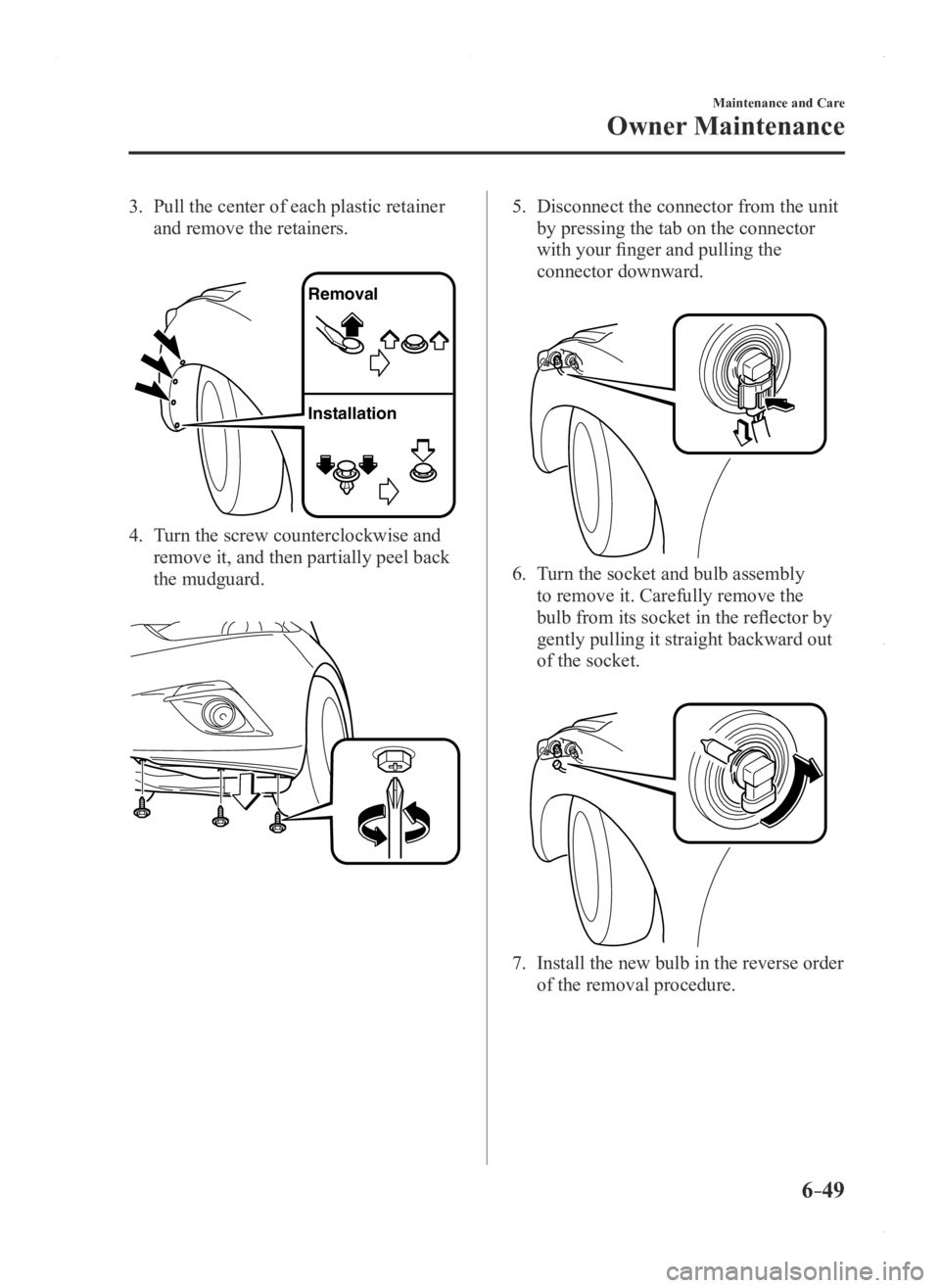
3. Pull the center of each plastic retainer
and remove the retainers.
Removal
Installation
4. Turn the screw counterclockwise and
remove it, and then partially peel back
the mudguard.
5. Disconnect the connector from the unit
by pressing the tab on the connector
with your finger and pulling the
connector downward.
6. Turn the socket and bulb assembly
to remove it. Carefully remove the
bulb from its socket in the reflector by
gently pulling it straight backward out
of the socket.
7. Install the new bulb in the reverse order
of the removal procedure.
Mazda3_8FA4-EA-15G_Edition1.indb 492015/05/11 14:02:23
Page 455 of 598
6–51
Maintenance and Care
Owner Maintenance
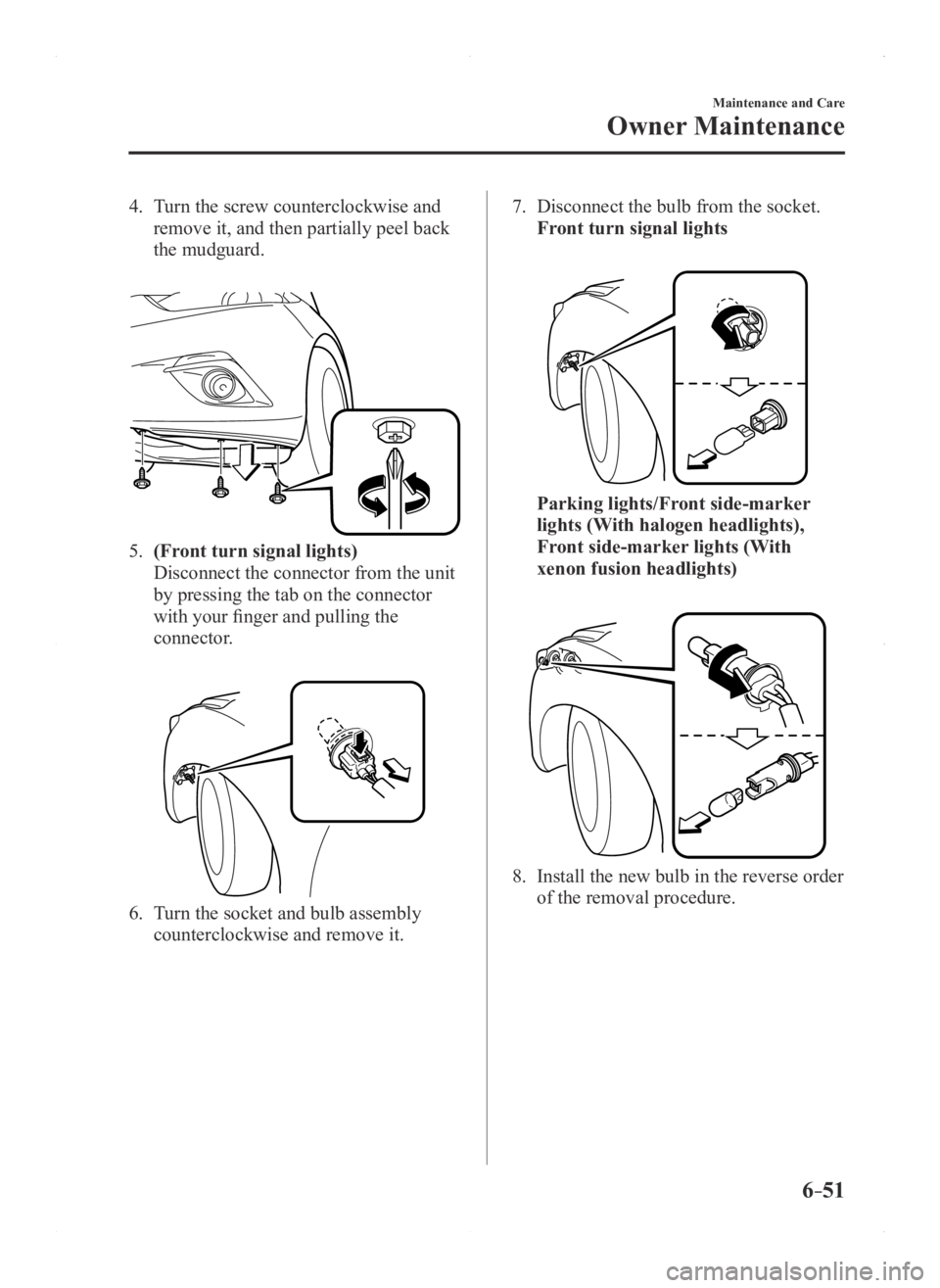
4. Turn the screw counterclockwise and
remove it, and then partially peel back
the mudguard.
5. (Front turn signal lights)
Disconnect the connector from the unit
by pressing the tab on the connector
with your finger and pulling the
connector.
6. Turn the socket and bulb assembly
counterclockwise and remove it.
7. Disconnect the bulb from the socket.
Front turn signal lights
Parking lights/Front side-marker
lights (With halogen headlights),
Front side-marker lights (With
xenon fusion headlights)
8. Install the new bulb in the reverse order
of the removal procedure.
Mazda3_8FA4-EA-15G_Edition1.indb 512015/05/11 14:02:23
Page 456 of 598
6–52
Maintenance and Care
Owner Maintenance
*Some models.
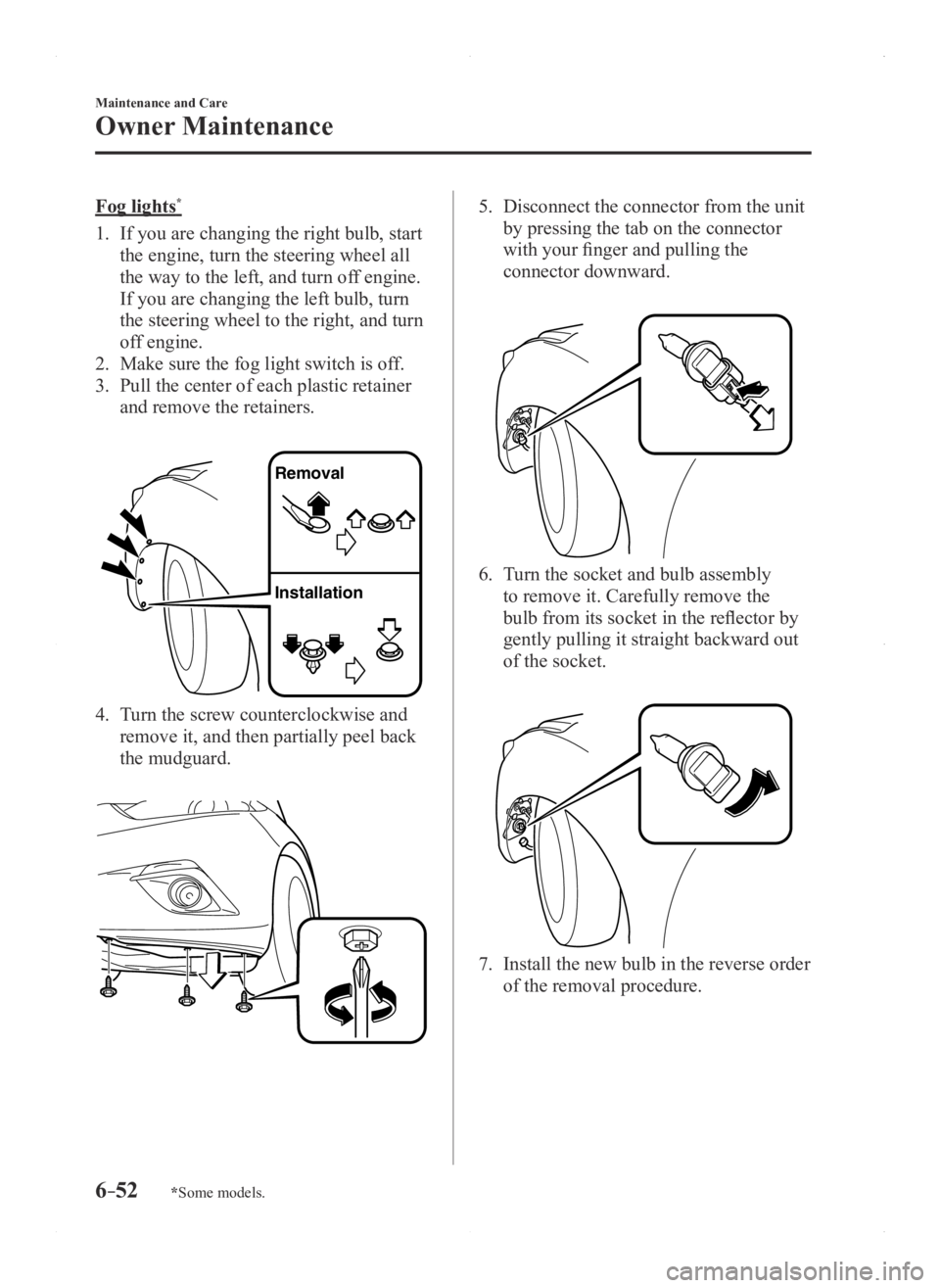
Fog lights*
1. If you are changing the right bulb, start
the engine, turn the steering wheel all
the way to the left, and turn off engine.
If you are changing the left bulb, turn
the steering wheel to the right, and turn
off engine.
2. Make sure the fog light switch is off.
3. Pull the center of each plastic retainer
and remove the retainers.
Removal
Installation
4. Turn the screw counterclockwise and
remove it, and then partially peel back
the mudguard.
5. Disconnect the connector from the unit
by pressing the tab on the connector
with your finger and pulling the
connector downward.
6. Turn the socket and bulb assembly
to remove it. Carefully remove the
bulb from its socket in the reflector by
gently pulling it straight backward out
of the socket.
7. Install the new bulb in the reverse order
of the removal procedure.
Mazda3_8FA4-EA-15G_Edition1.indb 522015/05/11 14:02:24
Page 457 of 598
6–53
Maintenance and Care
Owner Maintenance
*Some models.
Side turn signal lights*, Brake lights
(LED type), Taillights/Rear side-marker
lights (LED type), Taillights (Trunk lid
side/Liftgate side), High-mount brake
light
The LED bulb cannot be replaced as a
single unit because it is an integrated unit.
The LED bulb has to be replaced with the
unit. We recommend an Authorized Mazda
Dealer when the replacement is necessary.
Rear turn signal lights, Brake lights/
Taillights/Rear side-marker lights (Bulb
type)
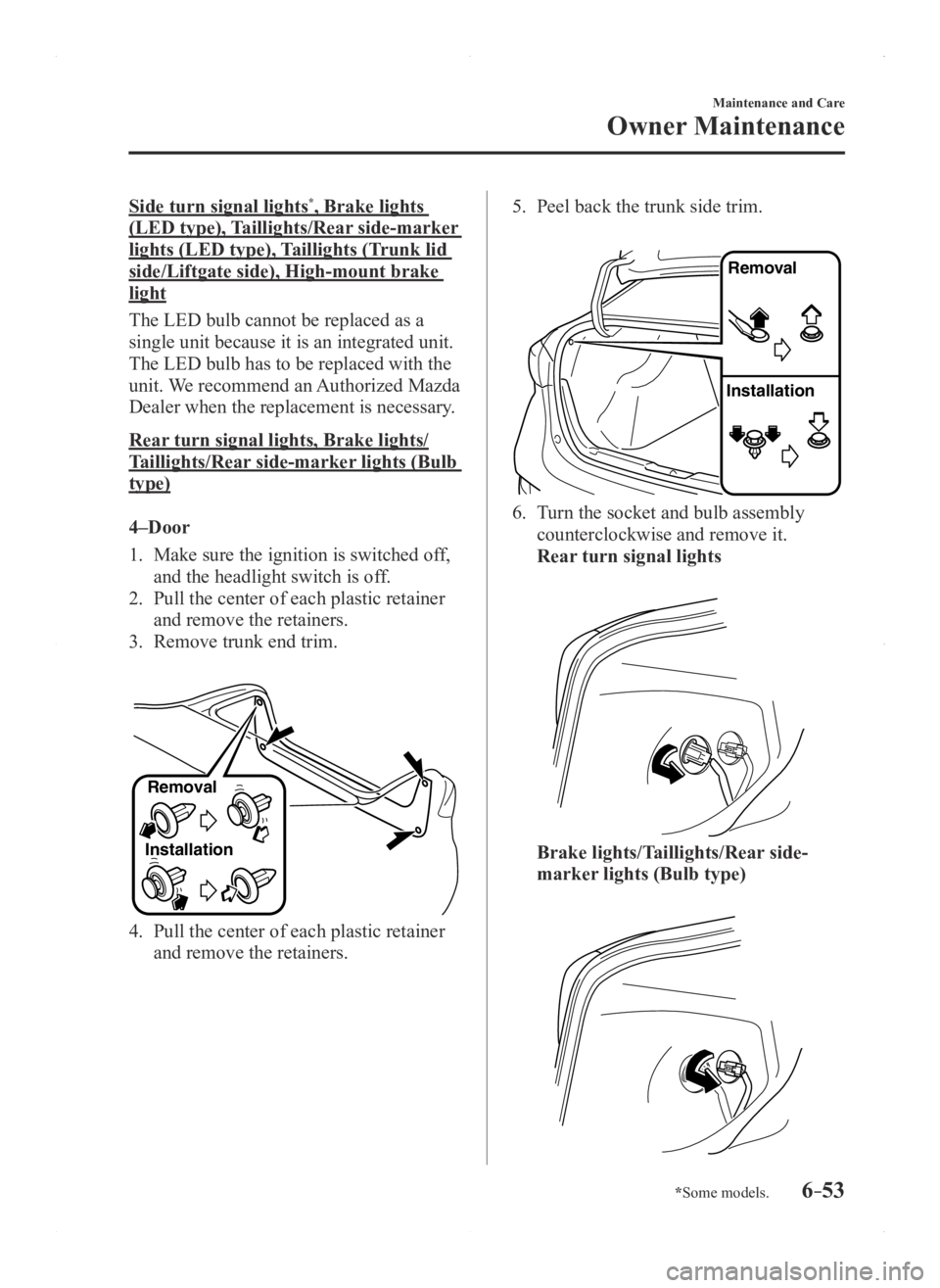
4–Door
1. Make sure the ignition is switched of f,
and the headlight switch is off.
2. Pull the center of each plastic retainer
and remove the retainers.
3. Remove trunk end trim.
InstallationRemoval
4. Pull the center of each plastic retainer
and remove the retainers.
5. Peel back the trunk side trim.
Remova
l
Installation
6. Turn the socket and bulb assembly
counterclockwise and remove it.
Rear turn signal lights
Brake lights/Taillights/Rear side-
marker lights (Bulb type)
Mazda3_8FA4-EA-15G_Edition1.indb 532015/05/11 14:02:24
Page 459 of 598
6–55
Maintenance and Care
Owner Maintenance
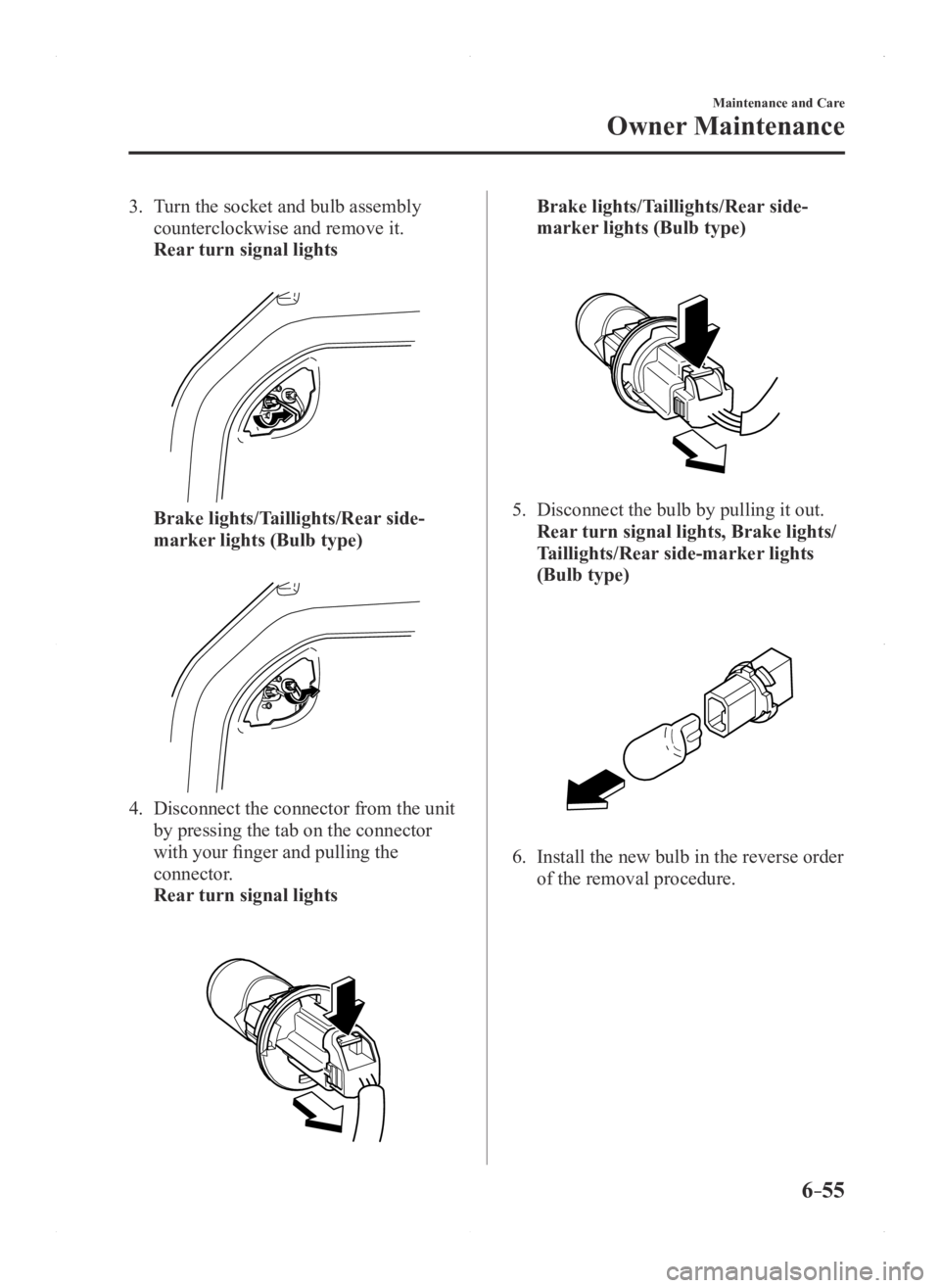
3. Turn the socket and bulb assembly
counterclockwise and remove it.
Rear turn signal lights
Brake lights/Taillights/Rear side-
marker lights (Bulb type)
4. Disconnect the connector from the unit
by pressing the tab on the connector
with your finger and pulling the
connector.
Rear turn signal lights
Brake lights/Taillights/Rear side-
marker lights (Bulb type)
5. Disconnect the bulb by pulling it out.
Rear turn signal lights, Brake lights/
Taillights/Rear side-marker lights
(Bulb type)
6. Install the new bulb in the reverse order
of the removal procedure.
Mazda3_8FA4-EA-15G_Edition1.indb 552015/05/11 14:02:25
Page 460 of 598
6–56
Maintenance and Care
Owner Maintenance
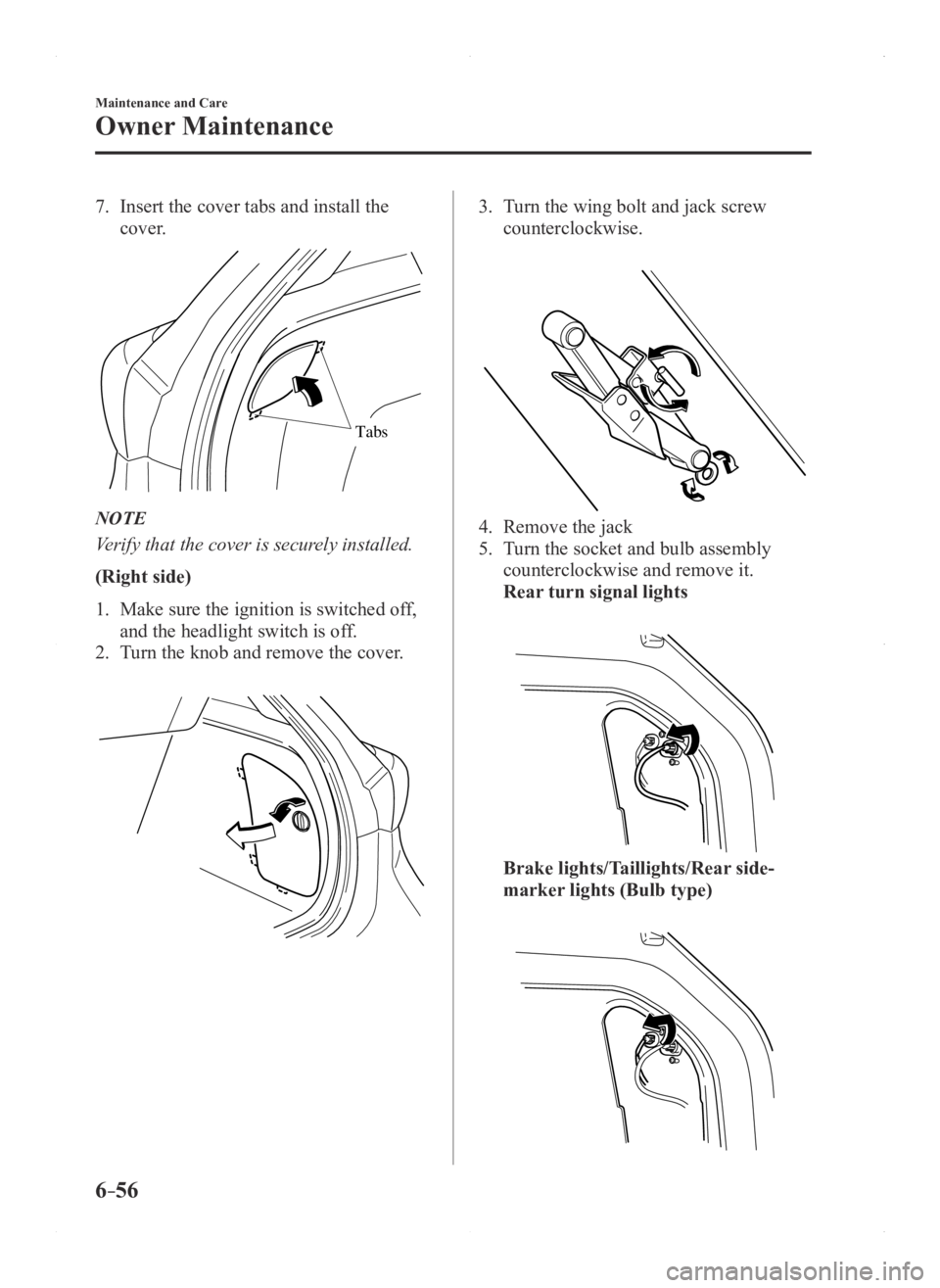
7. Insert the cover tabs and install the
cover.
Tabs
NOTE
Verify that the cover is securely installed.
(Right side)
1. Make sure the ignition is switched off,
and the headlight switch is off.
2. Turn the knob and remove the cover.
3. Turn the wing bolt and jack screw
counterclockwise.
4. Remove the jack
5. Turn the socket and bulb assembly
counterclockwise and remove it.
Rear turn signal lights
Brake lights/Taillights/Rear side-
marker lights (Bulb type)
Mazda3_8FA4-EA-15G_Edition1.indb 562015/05/11 14:02:26