lights MAZDA MODEL 3 5-DOOR 2016 Owner's Manual
[x] Cancel search | Manufacturer: MAZDA, Model Year: 2016, Model line: MODEL 3 5-DOOR, Model: MAZDA MODEL 3 5-DOOR 2016Pages: 598, PDF Size: 30.13 MB
Page 143 of 598

4–15
When Driving
Instrument Cluster and Display
NOTE
After refueling, it may require some
time for the indicator to stabilize. In
addition, the indicator may deviate
while driving on a slope or curve since
the fuel moves in the tank.
The display indicating a quarter or less
remaining fuel has more segments to
show the remaining fuel level in greater
detail.
The direction of the arrow () indicates
that the fuel-filler lid is on the left side
of the vehicle.
Dashboard Illumination
When the position lights are turned
on with the ignition switched ON,
the brightness of the instrument panel
illumination is dimmed.
NOTE
When the position lights are turned on,
the position lights indicator light in the
instrument cluster turns on.
Refer to Headlights on page 4-40.
The brightness of the instrument panel and
dashboard illuminations can be adjusted
by rotating the knob.
The brightness decreases by rotating the
knob to the left. A beep sound will be
heard when the knob has been rotated to
the maximum dim position.
The brightness increases by rotating the
knob to the right.
Dim
Bright
Function for cancelling illumination
dimmer
The illumination dimmer can be canceled
by rotating the dashboard illumination
knob to the right until a beep sound is
heard while the instrument cluster is
dimmed with the ignition switched ON.
If the instrument cluster's visibility is
reduced due to glare from surrounding
brightness, cancel the illumination
dimmer.
NOTE
When the illumination dimmer is
canceled, the instrument cluster cannot
be dimmed even if the position lights are
turned on.
When the illumination dimmer is
canceled, the screen in the center
display switches to constant display of
the daytime screen.
Mazda3_8FA4-EA-15G_Edition1.indb 152015/05/11 14:00:37
Page 148 of 598

4–20
When Driving
Instrument Cluster and Display
Warning/Indicator Lights
Instrument Cluster varies depending on model and specifications.
Warning/Indicator lights will appear in any of the highlighted areas
Type A
Type B
Type C
Center of Dashboard
(Digital Speedometer Type)
(Analog Speedometer Type (With
Tachometer))
(Analog Speedometer Type (Without Tachometer))
Instrument Cluster
Mazda3_8FA4-EA-15G_Edition1.indb 202015/05/11 14:00:38
Page 149 of 598
4–21
When Driving
Instrument Cluster and Display
*Some models.
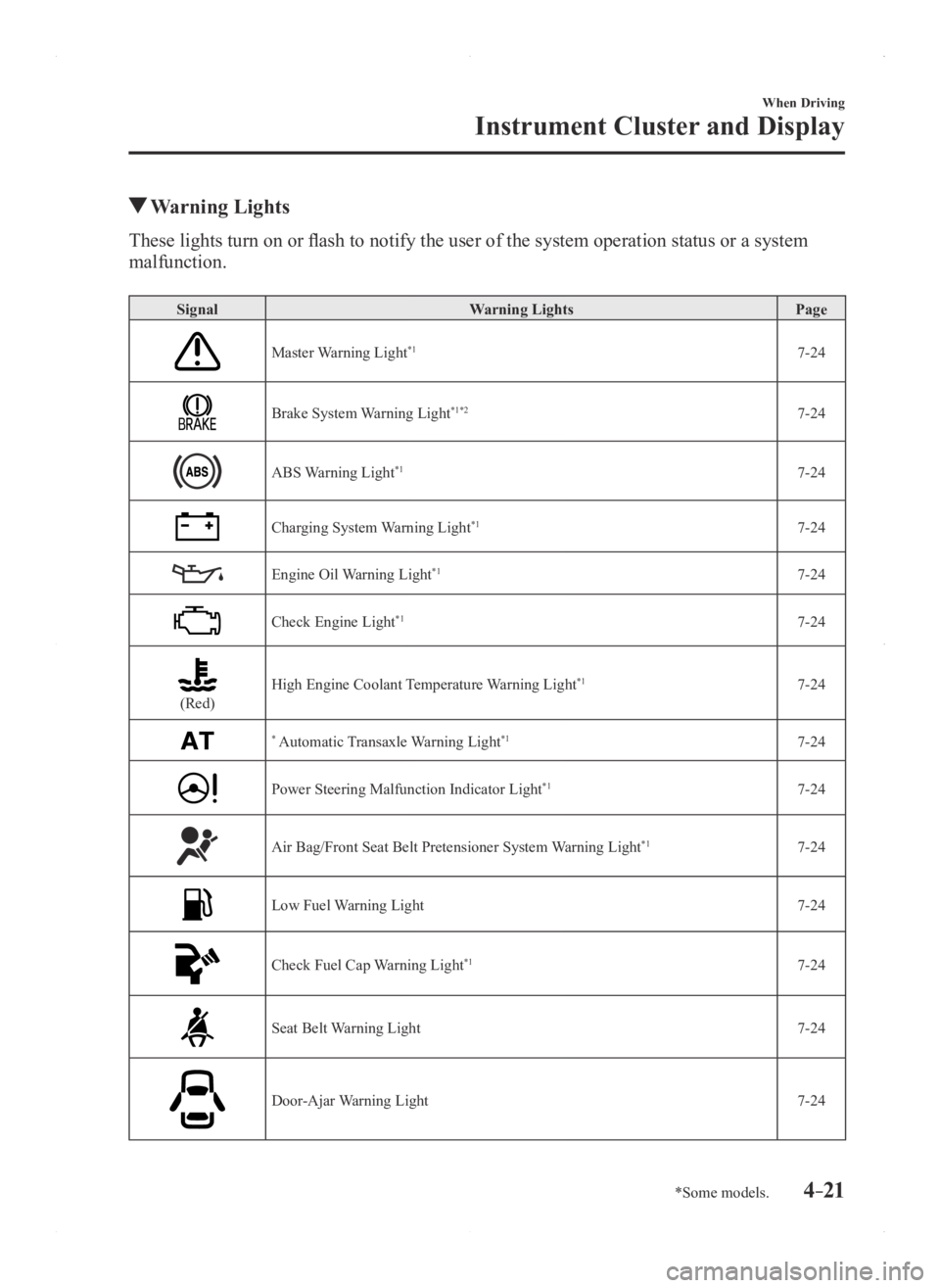
Warning Lights
These lights turn on or flash to notify the user of the system operation status or a system
malfunction.
SignalWarning Lights Page
Master Warning Light*17-24
Brake System Warning Light*1*27-24
ABS Warning Light*17-24
Charging System Warning Light*17-24
Engine Oil Warning Light*17-24
Check Engine Light*17-24
(Red)High Engine Coolant Temperature Warning Light*17-24
* Automatic Transaxle Warning Light*17-24
Power Steering Malfunction Indicator Light*17-24
Air Bag/Front Seat Belt Pretensioner System Warning Light*17-24
Low Fuel Warning Light7-24
Check Fuel Cap Warning Light*17-24
Seat Belt Warning Light7-24
Door-Ajar Warning Light7-24
Mazda3_8FA4-EA-15G_Edition1.indb 212015/05/11 14:00:40
Page 150 of 598

4–22
When Driving
Instrument Cluster and Display
*Some models.
SignalWarning Lights Page
*Low Washer Fluid Level Warning Light 7-24
* Tire Pressure Monitoring System Warning Light*17-24
(Red)
KEY Warning Light*17-24
(Amber)
* Forward Obstruction Warning/Smart City Brake Support (FOW/SCBS)
Warning Light*17-24
(Amber)
* Lane Departure Warning System (LDWS) Warning Light*1*37-24
* Headlight Auto-Leveling Malfunction Indicator Light*17-24
(Amber)
* High Beam Control System (HBC) Warning Light*17-24
(Amber)
* Mazda Radar Cruise Control (MRCC) Warning Light*17-24
*1 The light turns on when the ignition is switched on for an operation che\
ck, and turns of f a few seconds later or when the engine is started. If the light does not turn on or remains tur\
ned on, have the vehicle inspected at an
Authorized Mazda Dealer.
*2 The light turns on continuously when the parking brake is applied.*3 The light turns on when the system on stand-by. The light flashes when the system has a malfunction.
Mazda3_8FA4-EA-15G_Edition1.indb 222015/05/11 14:00:41
Page 151 of 598

4–23
When Driving
Instrument Cluster and Display
*Some models.
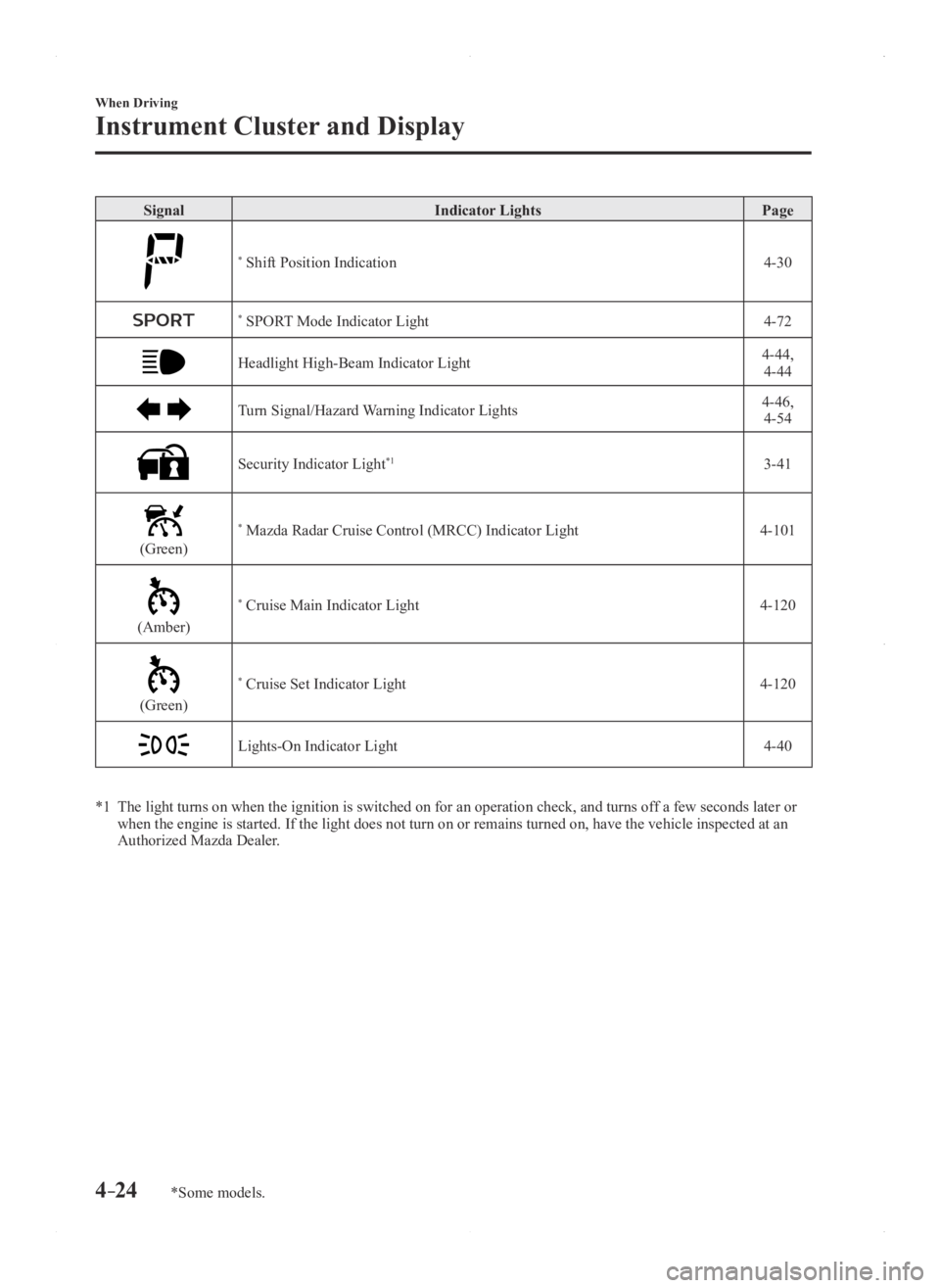
Indicator Lights
These lights turn on or flash to notify the user of the system operation status or a system
malfunction.
SignalIndicator Lights Page
* BSM OFF Indicator Light 4-91
(Green)
* Lane Departure Warning System (LDWS) Indicator Light4-84
(Green)
KEY Indicator Light 3-9
(Green)
* High Beam Control System (HBC) Indicator Light4-79
Wrench Indicator Light*14-25
TCS/DSC Indicator Light*14-63,
4-64
DSC OFF Indicator Light*14-65
* AFS OFF Indicator Light*14-76
(Red)
* Forward Obstruction Warning/Smart City Brake Support (FOW/SCBS)
Indicator Light*14-97,
4-110
* Forward Obstruction Warning/Smart City Brake Support (FOW/SCBS) OFF
Indicator Light*14-110
* i-ELOOP Indicator Light 4-68
(Blue)Low Engine Coolant Temperature Indicator Light 4-25
Mazda3_8FA4-EA-15G_Edition1.indb 232015/05/11 14:00:42
Page 152 of 598
4–24
When Driving
Instrument Cluster and Display
*Some models.
SignalIndicator Lights Page
* Shift Position Indication 4-30
* SPORT Mode Indicator Light4-72
Headlight High-Beam Indicator Light4-44,
4-44
Turn Signal/Hazard Warning Indicator Lights4-46, 4-54
Security Indicator Light*13-41
(Green)
* Mazda Radar Cruise Control (MRCC) Indicator Light 4-101
(Amber)
* Cruise Main Indicator Light4-120
(Green)
* Cruise Set Indicator Light4-120
Lights-On Indicator Light4-40
*1 The light turns on when the ignition is switched on for an operation che\
ck, and turns of f a few seconds later or when the engine is started. If the light does not turn on or remains tur\
ned on, have the vehicle inspected at an
Authorized Mazda Dealer.
Mazda3_8FA4-EA-15G_Edition1.indb 242015/05/11 14:00:43
Page 158 of 598

4–30
When Driving
Transaxle
Shift Position Indication
The selector position is indicated when the
ignition is switched ON.
Gear position indication
In manual shift mode, the “M” of the shift
position indication illuminates and the
numeral for the selected gear is displayed.
Warning Light
The warning light turns on when the
system has a malfunction.
Refer to Warning Lights on page 4-21.
Transaxle Ranges
The shift position indicator light in the
instrument cluster illuminates. Refer to
Warning/Indicator Lights on page
4-20.
The selector lever must be in P or N to
operate the starter.
P (Park)
P locks the transaxle and prevents the front
wheels from rotating.
WARNING
Always set the selector lever to P and set
the parking brake: Only setting the selector lever to the
P position without using the parking
brake to hold the vehicle is dangerous.
If P fails to hold, the vehicle could move
and cause an accident.
CAUTION
Shifting into P, N or R while the vehicle is
moving can damage your transaxle. Shifting into a driving gear or reverse
when the engine is running faster than
idle can damage the transaxle.
R (Reverse)
In position R, the vehicle moves only
backward. You must be at a complete
stop before shifting to or from R, except
under rare circumstances as explained in
Rocking the Vehicle (page 3-46).
N (Neutral)
In N, the wheels and transaxle are not
locked. The vehicle will roll freely even
on the slightest incline unless the parking
brake or brakes are on.
WARNING
If the engine is running faster than idle,
do not shift from N or P into a driving
gear: It's dangerous to shift from N or P
into a driving gear when the engine
is running faster than idle. If this is
done, the vehicle could move suddenly,
causing an accident or serious injury.
Do not shift into N when driving the
vehicle: Shifting into N while driving is
dangerous. Engine braking cannot
be applied when decelerating which
could lead to an accident or serious
injury.
Mazda3_8FA4-EA-15G_Edition1.indb 302015/05/11 14:00:45
Page 168 of 598

4–40
When Driving
Switches and Controls
Lighting Control
Headlights
Turn the headlight switch to turn the headlights, other exterior lights a\
nd dashboard
illumination on or off.
When the lights are turned on, the lights-on indicator light in the inst\
rument cluster turns on.
NOTE
If the light switch is left on, the lights will automatically switch off\
approximately 30
seconds after switching the ignition off.
The time setting can be changed.
Refer to Personalization Features on page 9-12. To prevent discharging the battery, do not leave the lights on while the engine is off unless
safety requires them.
Without auto-light control
Switch Position
Ignition PositionON OFF ONOFF ONOFF
Headlights OffOffOffOff OnOn
Daytime running lights OnOff OnOff OffOff
Taillights
Parking lights
License lights
Side-marker lights
Dashboard illumination Off
Off OnOnOnOn
Mazda3_8FA4-EA-15G_Edition1.indb 402015/05/11 14:00:48
Page 169 of 598

4–41
When Driving
Switches and Controls
With auto-light control
Switch Position
Ignition PositionONOFF ONOFF ONOFF ONOFF
Headlights OffOffAuto*1Off OffOff OnOn
Daytime running lights OnOffAuto*1Off OnOff OffOff
Taillights
Parking lights
License lights
Side-marker lights
Dashboard illumination Off
OffAuto
*1Off OnOnOnOn
*1 The headlight and other light settings switch automatically depending on\
the surrounding brightness detected by the sensor.
Mazda3_8FA4-EA-15G_Edition1.indb 412015/05/11 14:00:49
Page 170 of 598
4–42
When Driving
Switches and Controls
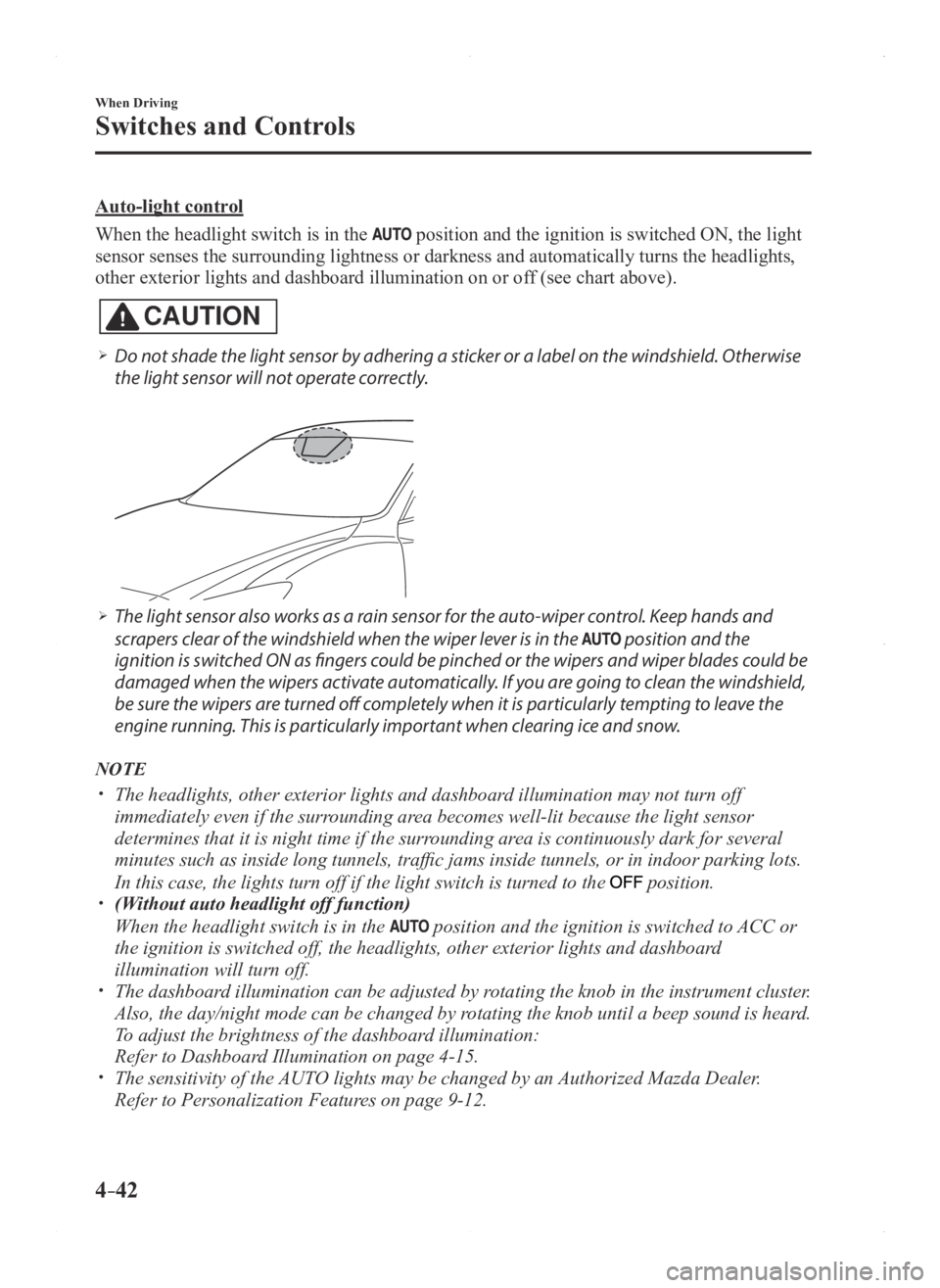
Auto-light control
When the headlight switch is in the
position and the ignition is switched ON, the light
sensor senses the surrounding lightness or darkness and automatically tu\
rns the headlights,
other exterior lights and dashboard illumination on or off (see chart above).
CAUTION
Do not shade the light sensor by adhering a sticker or a label on the windshield. Otherwise
the light sensor will not operate correctly.
The light sensor also works as a rain sensor for the auto-wiper control. Keep hands and
scrapers clear of the windshield when the wiper lever is in the position and the
ignition is switched ON as fingers could be pinched or the wipers and wiper blades could be
damaged when the wipers activate automatically. If you are going to clean the windshield,
be sure the wipers are turned off completely when it is particularly tempting to leave the
engine running. This is particularly important when clearing ice and snow.
NOTE
The headlights, other exterior lights and dashboard illumination may not turn off
immediately even if the surrounding area becomes well-lit because the light sensor
determines that it is night time if the surrounding area is continuously dark for several
minutes such as inside long tunnels, traffic jams inside tunnels, or in indoor parking lots.
In this case, the lights turn off if the light switch is turned to the position. (Without auto headlight off function)
When the headlight switch is in the position and the ignition is switched to ACC or
the ignition is switched off, the headlights, other exterior lights and \
dashboard
illumination will turn off.
The dashboard illumination can be adjusted by rotating the knob in the instrument cluster.
Also, the day/night mode can be changed by rotating the knob until a beep sound is heard.
To adjust the brightness of the dashboard illumination:
Refer to Dashboar d Illumination on page 4-15. The sensitivity of the AUTO lights may be changed by an Authorized Mazda Dealer.
Refer to Personalization Featur es on page 9-12.
Mazda3_8FA4-EA-15G_Edition1.indb 422015/05/11 14:00:49