reset MAZDA MODEL 3 5-DOOR 2016 Owner's Guide
[x] Cancel search | Manufacturer: MAZDA, Model Year: 2016, Model line: MODEL 3 5-DOOR, Model: MAZDA MODEL 3 5-DOOR 2016Pages: 598, PDF Size: 30.13 MB
Page 425 of 598
6–21
Maintenance and Care
Scheduled Maintenance
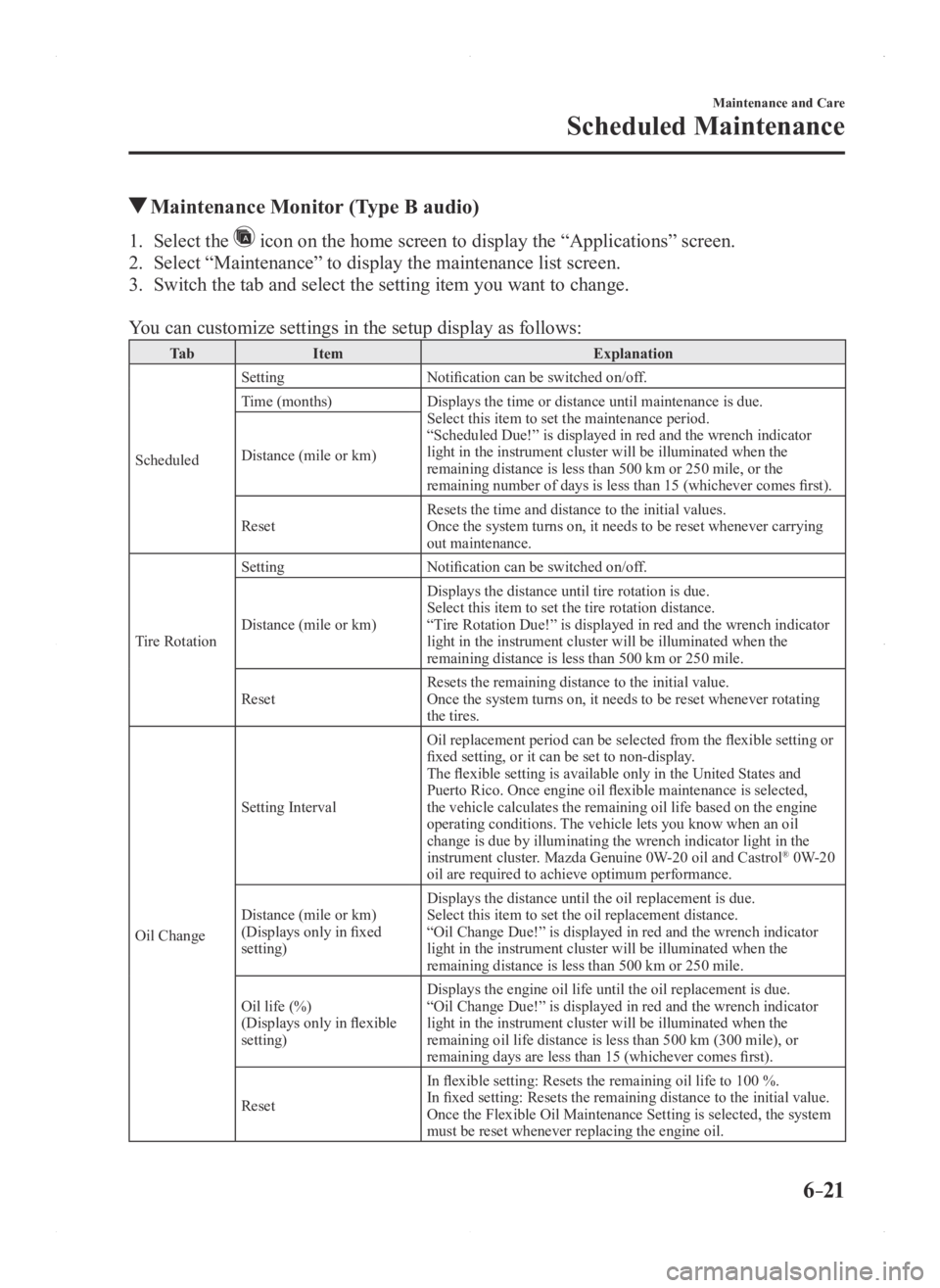
Maintenance Monitor (Type B audio)
1. Select the icon on the home screen to display the “Applications” screen.
2. Select “Maintenance” to display the maintenance list screen.
3. Switch the tab and select the setting item you want to change.
You can customize settings in the setup display as follows:
Ta bItem Explanation
Scheduled Setting
Notification can be switched on/off.
Time (months) Displays the time or distance until maintenance is due.
Select this item to set the maintenance period.
“Scheduled Due!” is displayed in red and the wrench indicator
light in the instrument cluster will be illuminated when the
remaining distance is less than 500 km or 250 mile, or the
remaining number of days is less than 15 (whichever comes first).
Distance (mile or km)
Reset
Resets the time and distance to the initial values.
Once the system turns on, it needs to be reset whenever carrying
out maintenance.
Tire Rotation Setting
Notification can be switched on/off.
Distance (mile or km) Displays the distance until tire rotation is due.
Select this item to set the tire rotation distance.
“Tire Rotation Due!” is displayed in red and the wrench indicator
light in the instrument cluster will be illuminated when the
remaining distance is less than 500 km or 250 mile.
Reset Resets the remaining distance to the initial value.
Once the system turns on, it needs to be reset whenever rotating
the tires.
Oil Change Setting Interval
Oil replacement period can be selected from the flexible setting or
fixed setting, or it can be set to non-display.
The flexible setting is available only in the United States and
Puerto Rico. Once engine oil flexible maintenance is selected,
the vehicle calculates the remaining oil life based on the engine
operating conditions. The vehicle lets you know when an oil
change is due by illuminating the wrench indicator light in the
instrument cluster. Mazda Genuine 0W-20 oil and Castrol
® 0W-20
oil are required to achieve optimum performance.
Distance (mile or km)
(Displays only in fixed
setting) Displays the distance until the oil replacement is due.
Select this item to set the oil replacement distance.
“Oil Change Due!” is displayed in red and the wrench indicator
light in the instrument cluster will be illuminated when the
remaining distance is less than 500 km or 250 mile.
Oil life (%)
(Displays only in flexible
setting) Displays the engine oil life until the oil replacement is due.
“Oil Change Due!” is displayed in red and the wrench indicator
light in the instrument cluster will be illuminated when the
remaining oil life distance is less than 500 km (300 mile), or
remaining days are less than 15 (whichever comes first).
Reset In flexible setting: Resets the remaining oil life to 100 %.
In fixed setting: Resets the remaining distance to the initial value.
Once the Flexible Oil Maintenance Setting is selected, the system
must be reset whenever replacing the engine oil.
Mazda3_8FA4-EA-15G_Edition1.indb 212015/05/11 14:02:12
Page 433 of 598
6–29
Maintenance and Care
Owner Maintenance
Vehicle Engine Control Unit Reset Procedure
NOTE
This procedure is intended for vehicles with the engine oil flexible maintenance setting
selected.
After replacing the engine oil, have a repair shop such as an Authorized Mazda Dealer
perform the initialization (engine oil data resetting) of the recorded\
value. If the value
recorded by the computer is not initialized, the wrench indicator light \
may not turn off or it
may turn on earlier than normal.
NOTE
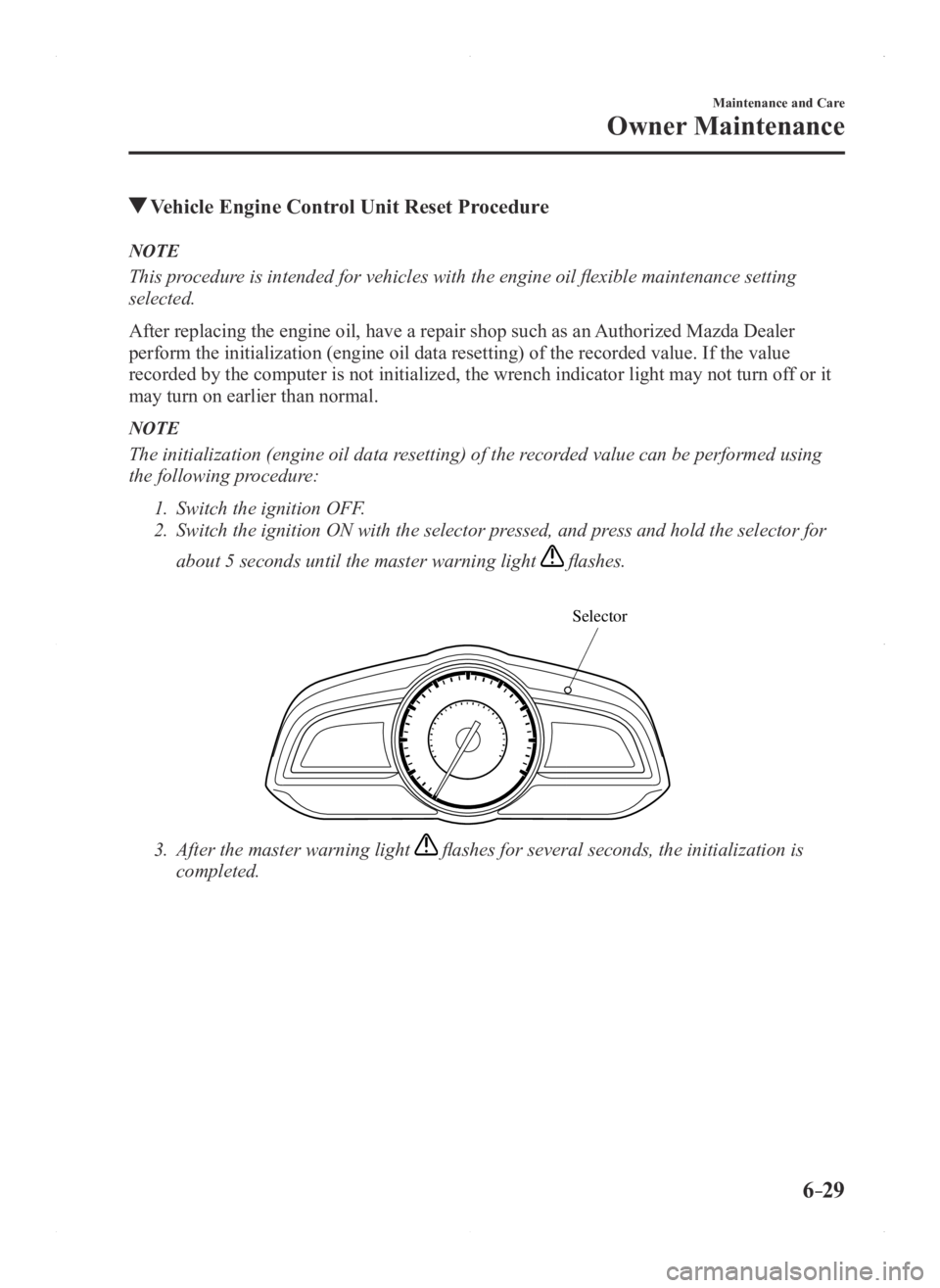
The initialization (engine oil data resetting) of the recorded value can be performed using
the following procedure:
1. Switch the ignition OFF.
2. Switch the ignition ON with the selector pr essed, and press and hold the selector for
about 5 seconds until the master warning light flashes.
Selector
3. After the master warning light flashes for several seconds, the initialization is
completed.
Mazda3_8FA4-EA-15G_Edition1.indb 292015/05/11 14:02:15
Page 589 of 598
9–15
Specifications
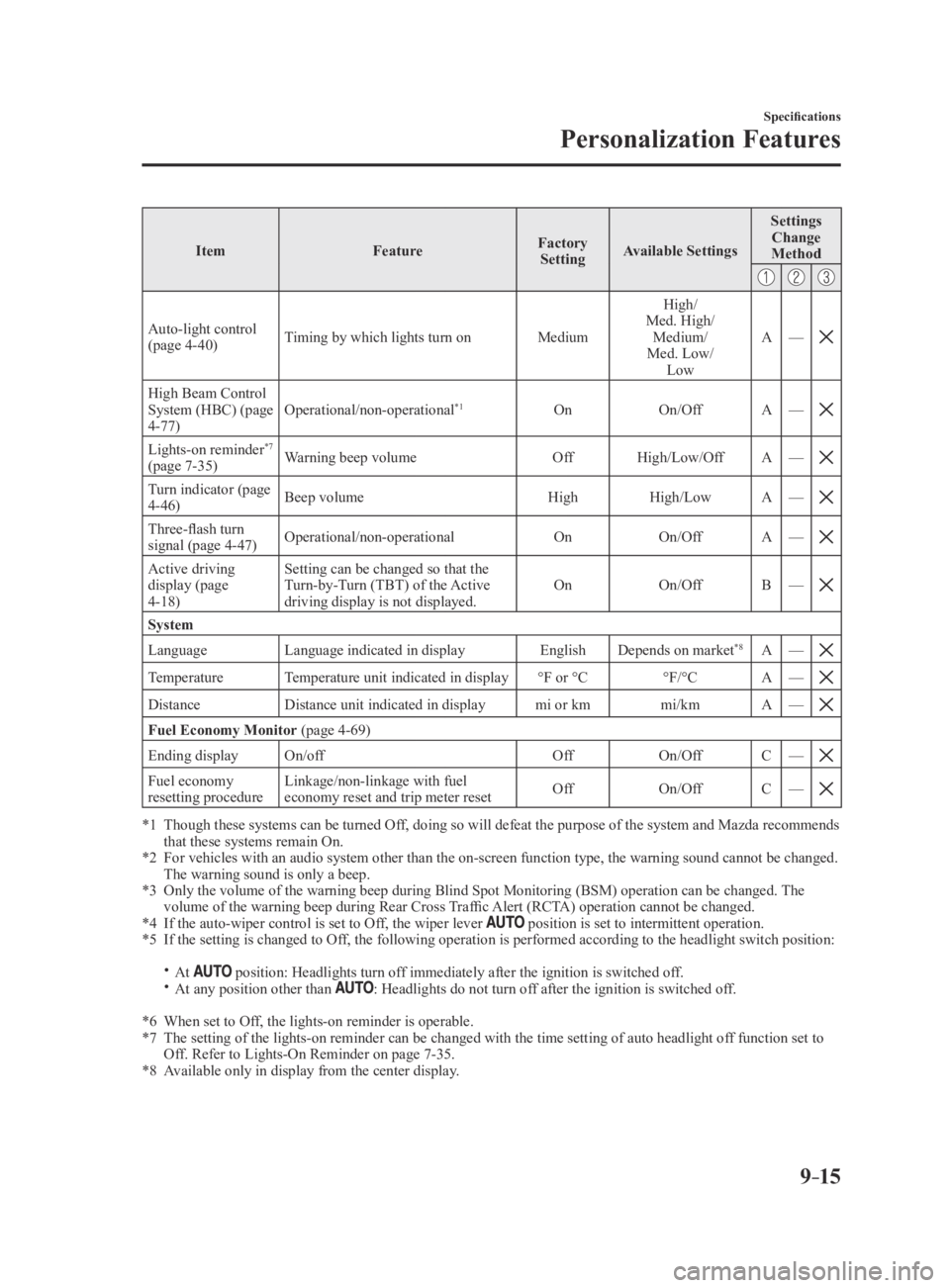
Personalization Features
ItemFeatureFactory
Setting Available Settings Settings
Change
Method
Auto-light control (page 4-40) Timing by which lights turn on
MediumHigh/
Med. High/ Medium/
Med. Low/ Low A
—
High Beam Control System (HBC) (page 4-77) Operational/non-operational
*1On
On/OffA—
Lights-on reminder*7
(page 7-35) Warning beep volume
OffHigh/Low/Off A—
Turn indicator (page 4-46) Beep volume
HighHigh/Low A—
Three-flash turn signal (page 4-47) Operational/non-operational
OnOn/OffA—
Active driving display (page 4-18) Setting can be changed so that the
Turn-by-Turn (TBT) of the Active
driving display is not displayed.
On
On/OffB—
System
Language Language indicated in display EnglishDepends on market*8A—
TemperatureTemperature unit indicated in display °F or °C°F/°CA—
DistanceDistance unit indicated in display mi or kmmi/kmA—
Fuel Economy Monitor (page 4-69)
Ending display On/off OffOn/OffC—
Fuel economy resetting procedure Linkage/non-linkage with fuel
economy reset and trip meter reset
Off
On/OffC—
*1 Though these systems can be turned Of f, doing so will defeat the purpose of the system and Mazda recommends that these systems remain On.*2 For vehicles with an audio system other than the on-screen function type\
, the warning sound cannot be changed. The warning sound is only a beep.*3 Only the volume of the warning beep during Blind Spot Monitorin g (BSM) operation can be changed. The volume of the warning beep during Rear Cross Traffic Alert (RCTA) operation cannot be changed.*4 If the auto-wiper control is set to Off, the wiper lever position is set to intermittent operation.*5 If the setting is changed to Off, the following operation is performed according to the headlight switc\
h position:
At position: Headlights turn off immediately after the ignition is switched off. At any position other than : Headlights do not turn off after the ignition is switched off.
*6 When set to Off, the lights-on reminder is operable.*7 The setting of the lights-on reminder can be changed with the time setti\
ng of auto headlight of f function set to Off. Refer to Lights-On Reminder on page 7-35.*8 Available only in display from the center display.
Mazda3_8FA4-EA-15G_Edition3.indb 152015/12/04 19:26:19