ignition MAZDA MODEL 3 5-DOOR 2016 Workshop Manual
[x] Cancel search | Manufacturer: MAZDA, Model Year: 2016, Model line: MODEL 3 5-DOOR, Model: MAZDA MODEL 3 5-DOOR 2016Pages: 598, PDF Size: 30.13 MB
Page 175 of 598

4–47
When Driving
Switches and Controls
NOTE
If an indicator light stays on without
flashing or if it flashes abnormally, one
of the turn signal bulbs may be burned
out.
A personalized function is available to
change the turn indicator sound volume.
(page 9-12)
Lane-Change Signals
Move the lever halfway toward the
direction of the lane change—until the
indicator flashes— and hold it there. It will
return to the off position when released.
Three-Flash Turn Signal
After releasing the turn signal lever, the
turn signal indicator flashes three times.
The operation can be cancelled by moving
the lever in the direction opposite to which
it was operated.
NOTE
The three-flash turn signal function can be
switched to operable/inoperable using the
personalization function.
Refer to Personalization Features on page
9-12.
Windshield Wipers and
Washer
The ignition must be switched ON to use
the wipers.
WARNING
Use only windshield washer fluid or
plain water in the reservoir:Using radiator antifreeze as washer
fluid is dangerous. If sprayed on the
windshield, it will dirty the windshield,
affect your visibility, and could result in
an accident.
Only use windshield washer fluid mixed
with anti-freeze protection in freezing
weather conditions: Using windshield washer fluid without
anti-freeze protection in freezing
weather conditions is dangerous as
it could freeze on the windshield and
block your vision which could cause
an accident. In addition, make sure
the windshield is sufficiently warmed
using the defroster before spraying the
washer fluid.
Mazda3_8FA4-EA-15G_Edition1.indb 472015/05/11 14:00:51
Page 178 of 598
4–50
When Driving
Switches and Controls
CAUTION
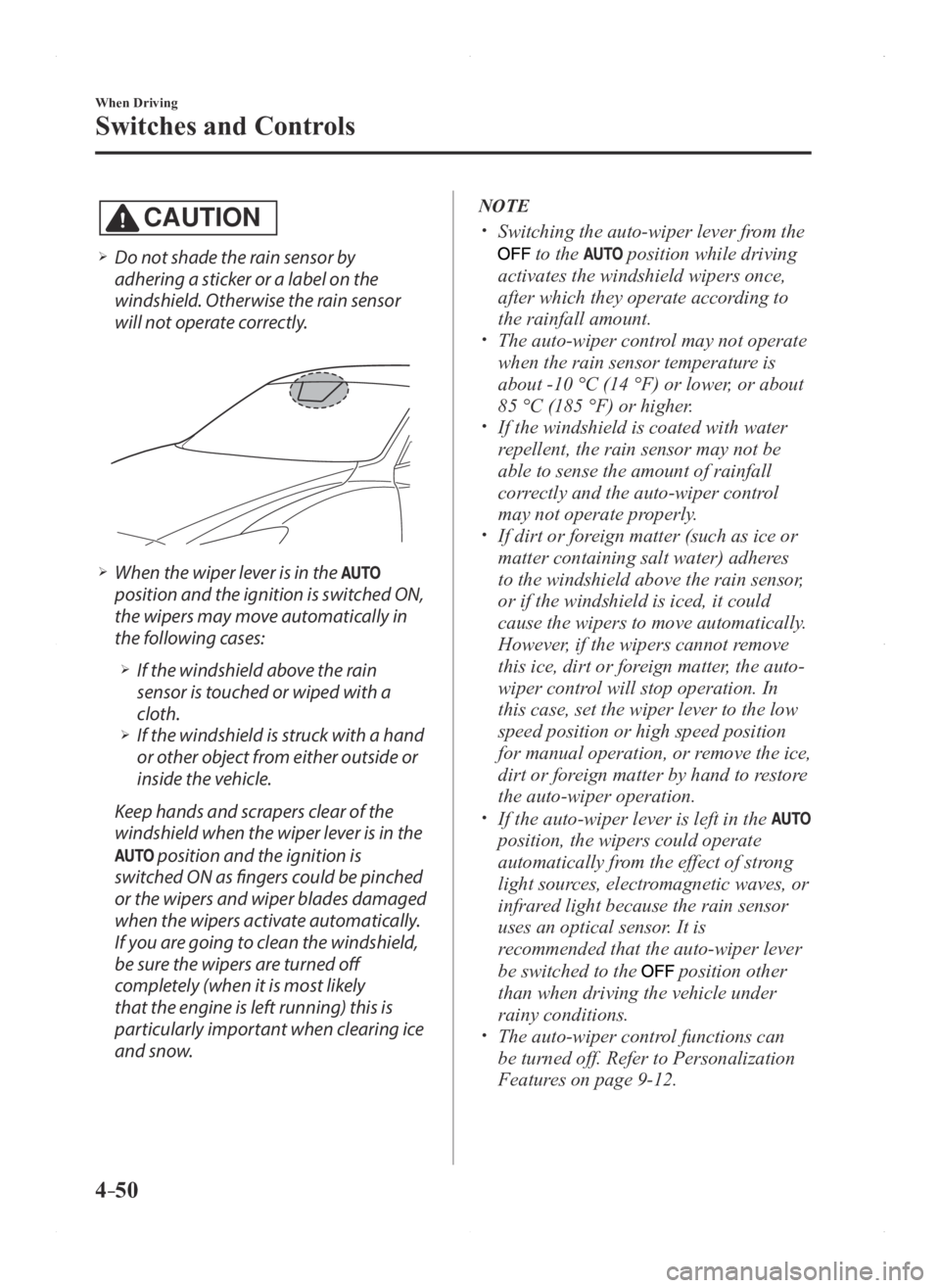
Do not shade the rain sensor by
adhering a sticker or a label on the
windshield. Otherwise the rain sensor
will not operate correctly.
When the wiper lever is in the
position and the ignition is switched ON,
the wipers may move automatically in
the following cases:
If the windshield above the rain
sensor is touched or wiped with a
cloth.
If the windshield is struck with a hand
or other object from either outside or
inside the vehicle.
Keep hands and scrapers clear of the
windshield when the wiper lever is in the
position and the ignition is
switched ON as fingers could be pinched
or the wipers and wiper blades damaged
when the wipers activate automatically.
If you are going to clean the windshield,
be sure the wipers are turned off
completely (when it is most likely
that the engine is left running) this is
particularly important when clearing ice
and snow.
NOTE
Switching the auto-wiper lever from the
to the position while driving
activates the windshield wipers once,
after which they operate according to
the rainfall amount.
The auto-wiper control may not operate
when the rain sensor temperature is
about -10 °C (14 °F) or lower, or about
85 °C (185 °F) or higher.
If the windshield is coated with water
repellent, the rain sensor may not be
able to sense the amount of rainfall
correctly and the auto-wiper control
may not operate properly.
If dirt or foreign matter (such as ice or
matter containing salt water) adheres
to the windshield above the rain sensor,
or if the windshield is iced, it could
cause the wipers to move automatically.
However, if the wipers cannot remove
this ice, dirt or foreign matter, the auto-
wiper control will stop operation. In
this case, set the wiper lever to the low
speed position or high speed position
for manual operation, or remove the ice,
dirt or foreign matter by hand to restore
the auto-wiper operation.
If the auto-wiper lever is left in the
position, the wipers could operate
automatically from the effect of strong
light sources, electromagnetic waves, or
infrared light because the rain sensor
uses an optical sensor. It is
recommended that the auto-wiper lever
be switched to the
position other
than when driving the vehicle under
rainy conditions.
The auto-wiper contr ol functions can
be turned off. Refer to Personalization
Features on page 9-12.
Mazda3_8FA4-EA-15G_Edition1.indb 502015/05/11 14:00:52
Page 179 of 598

4–51
When Driving
Switches and Controls
*Some models.
Windshield Washer
Pull the lever toward you and hold it to
spray washer fluid.
Washer
OFF
NOTE
If the windshield washer is turned on when
the windshield wipers are not operating,
the windshield wipers operate a few times.
If the washer does not work, inspect the
fluid level (page 6-32). If the fluid level
is normal, consult an Authorized Mazda
Dealer.
Rear Window Wiper and
Washer*
The ignition must be switched ON to use
the wiper.
Rear Window Wiper
Turn the wiper on by turning the rear
wiper/washer switch.
Switch
Position Wiper operation
Stop
Intermittent
Normal
Rear Window Washer
To spray washer fluid, turn the rear wiper/
washer switch to either of the
position.
After the switch is released, the washer
will stop.
If the washer does not work, inspect the
fluid level (page
6-32). If the fluid
level is normal and the washer still does
not work, consult an Authorized Mazda
Dealer.
Mazda3_8FA4-EA-15G_Edition3.indb 512015/12/04 19:23:02
Page 180 of 598

4–52
When Driving
Switches and Controls
Rear Window Defogger
The rear window defogger clears fog from
the rear window.
The ignition must be switched ON to use
the defogger.
Press the switch to turn on the rear
window defogger. The rear window
defogger operates for about 15 minutes
and then turns off automatically.
The indicator light illuminates when the
defogger is operating.
To turn off the rear window defogger
before the 15 minutes has elapsed, press
the switch again.
Manual Climate Control
Indicator light
Automatic Climate Control
Indicator light
Dual-Zone Automatic Climate Control
Indicator light
CAUTION
Do not use sharp instruments or
window cleaners with abrasives to
clean the inside of the rear window
surface. They may damage the
defogger grid inside the window.
NOTE
This defogger is not designed for melting
snow. If there is an accumulation of snow
on the rear window, remove it before using
the defogger.
Mazda3_8FA4-EA-15G_Edition1.indb 522015/05/11 14:00:53
Page 181 of 598
4–53
When Driving
Switches and Controls
*Some models.
Mirror Defogger*
To turn on the mirror defoggers, switch
the ignition ON and press the rear window
defogger switch (page 4-52).
Horn
To sound the horn, press the mark on
the steering wheel.
Mazda3_8FA4-EA-15G_Edition1.indb 532015/05/11 14:00:53
Page 191 of 598

4–63
When Driving
ABS/TCS/DSC
Traction Control System
(TCS)
The Traction Control System (TCS)
enhances traction and safety by controlling
engine torque and braking. When the TCS
detects driving wheel slippage, it lowers
engine torque and operates the brakes to
prevent loss of traction.
This means that on a slick surface, the
engine adjusts automatically to provide
optimum power to the drive wheels,
limiting wheel spin and loss of traction.
The warning light turns on when the
system has a malfunction.
Refer to Warning Lights on page 4-21.
WARNING
Do not rely on the Traction Control
System (TCS) as a substitute for safe
driving:
The Traction Control System (TCS)
cannot compensate for unsafe and
reckless driving, excessive speed,
tailgating (following another vehicle
too closely), and hydroplaning
(reduced tire friction and road contact
because of water on the road surface).
You can still have an accident.
Use snow tires or tire chains and drive at
reduced speeds when roads are covered
with ice and/or snow: Driving without proper traction devices
on snow and/or ice-covered roads
is dangerous. The Traction Control
System (TCS) alone cannot provide
adequate traction and you could still
have an accident.
NOTE
To turn off the TCS, press the DSC OFF
switch (page 4-65).
TCS/DSC Indicator Light
This indicator light stays on for a few
seconds when the ignition is switched
ON. If the TCS or DSC is operating, the
indicator light flashes.
If the light stays on, the TCS, DSC
or the brake assist system may have a
malfunction and they may not operate
correctly. Take your vehicle to an
Authorized Mazda Dealer.
NOTE
In addition to the indicator light
flashing, a slight lugging sound will
come from the engine. This indicates
that the TCS/DSC is operating properly.
On slippery surfaces, such as fr esh
snow, it will be impossible to achieve
high rpm when the TCS is on.
Mazda3_8FA4-EA-15G_Edition1.indb 632015/05/11 14:00:56
Page 192 of 598

4–64
When Driving
ABS/TCS/DSC
Dynamic Stability
Control (DSC)
The Dynamic Stability Control (DSC)
automatically controls braking and engine
torque in conjunction with systems such
as ABS and TCS to help control side slip
when driving on slippery surfaces, or
during sudden or evasive maneuvering,
enhancing vehicle safety.
Refer to ABS (page 4-62) and TCS
(page 4-63).
DSC operation is possible at speeds
greater than 20 km/h (12 mph).
The warning light turns on when the
system has a malfunction.
Refer to Warning Lights on page 4-21.
WARNING
Do not rely on the Dynamic Stability
Control as a substitute for safe driving:
The Dynamic Stability Control (DSC)
cannot compensate for unsafe and
reckless driving, excessive speed,
tailgating (following another vehicle
too closely), and hydroplaning
(reduced tire friction and road contact
because of water on the road surface).
You can still have an accident.
CAUTION
The DSC may not operate correctly
unless the following are observed:
Use tires of the correct size specified
for your Mazda on all four wheels. Use tires of the same manufacturer,
brand and tread pattern on all four
wheels.
Do not mix worn tires.
The DSC may not operate correctly when
tire chains are used or a temporary spare
tire is installed because the tire diameter
changes.
TCS/DSC Indicator Light
This indicator light stays on for a few
seconds when the ignition is switched
ON. If the TCS or DSC is operating, the
indicator light flashes.
If the light stays on, the TCS, DSC
or the brake assist system may have a
malfunction and they may not operate
correctly. Take your vehicle to an
Authorized Mazda Dealer.
Mazda3_8FA4-EA-15G_Edition1.indb 642015/05/11 14:00:56
Page 193 of 598

4–65
When Driving
ABS/TCS/DSC
DSC OFF Indicator Light
This indicator light stays on for a few
seconds when the ignition is switched ON.
It also illuminates when the DSC OFF
switch is pressed and TCS/DSC is
switched off.
Refer to DSC OFF Switch on page 4-65.
If the light remains illuminated and the
TCS/DSC is not switched off, take your
vehicle to an Authorized Mazda Dealer.
The DSC may have a malfunction.
DSC OFF Switch
Press the DSC OFF switch to turn off the
TCS/DSC. The DSC OFF indicator light
in the instrument cluster will illuminate.
Press the switch again to turn the TCS/
DSC back on. The DSC OFF indicator
light will turn off.
NOTE
When DSC is on and you attempt to free
the vehicle when it is stuck, or drive
it out of freshly fallen snow, the TCS
(part of the DSC system) will activate.
Depressing the accelerator will not
increase engine power and freeing
the vehicle may be difficult. When this
happens, turn off the TCS/DSC.
If the TCS/DSC is off when the engine
is turned off, it automatically activates
when the ignition is switched ON.
Leaving the TCS/DSC on will provide
the best traction. If the DSC OFF switch is pressed and
held for 10 seconds or more, the DSC
OFF switch malfunction detection
function operates and the DSC system
activates automatically. The DSC OFF
indicator light turns off while the DSC
system is operative.
Mazda3_8FA4-EA-15G_Edition1.indb 652015/05/11 14:00:56
Page 200 of 598

4–72
When Driving
Drive Selection
Drive Selection Switch
The SPORT mode indicator light in the
instrument cluster is illuminated while in
SPORT mode.
NOTE
If the SET/ SET Switch of the Mazda
Radar Cruise Control (MRCC) system/
cruise control is pressed while in
SPORT mode, SPORT mode is
automatically switched off.
When the ignition is switched off,
SPORT mode is also switch off. When SPORT mode is selected, the
transaxle may automatically shift down
or the vehicle speed may accelerate
depending on the vehicle speed.
SPORT Mode Indicator Light
Type A
T
ype B
The light is illuminated while in SPORT
mode.
NOTE
The indicator light flashes a few times to
indicate that the mode cannot be switched
to SPORT mode even if the drive select
switch is pressed under the following
conditions:
ABS/TCS/DSC is operating The Mazda Radar Cruise Contr ol
(MRCC) system/cruise control is
operating.
The vehicle is making a turn or driving
on a curved road.
Mazda3_8FA4-EA-15G_Edition1.indb 722015/05/11 14:00:59
Page 204 of 598

4–76
When Driving
i-ACTIVSENSE
Adaptive Front Lighting
System (AFS)
The adaptive front lighting system (AFS)
automatically adjusts the headlight beams
to the left or right in conjunction with the
operation of the steering wheel after the
headlights have been turned on.
AFS OFF Indicator Light
When illuminated
This indicator light illuminates briefly
when the ignition is switched ON, and
then turns off. Pressing the AFS OFF
switch cancels the AFS function and
illuminates the indicator light.
When flashing
The indicator light flashes continuously if
the system is malfunctioning. Consult an
Authorized Mazda Dealer.
NOTE
Even if the AFS is not operating due to
some malfunction, the normal headlight
function is still operable.
If there is a malfunction with the
headlight auto-leveling function, the
indicator light flashes.
AFS OFF switch
Pressing the AFS OFF switch turns off the
AFS. The AFS OFF indicator light in the
instrument cluster illuminates.
Pressing the AFS OFF switch again turns
off the switch illumination and turns on
the AFS operation. The AFS OFF indicator
light turns off.
Mazda3_8FA4-EA-15G_Edition1.indb 762015/05/11 14:01:00