ABS MAZDA MODEL 3 5-DOOR 2017 User Guide
[x] Cancel search | Manufacturer: MAZDA, Model Year: 2017, Model line: MODEL 3 5-DOOR, Model: MAZDA MODEL 3 5-DOOR 2017Pages: 612
Page 251 of 612
4–121
When Driving
i-ACTIVSENSE
The Lane-keep Assist System (LAS) & Lane Departure Warning System (LDWS) goes on
stand-by status in the following cases:
The system cannot detect white (yellow) lane lines. The vehicle speed is less than about 60 km/h (37 mph). The ABS/TCS/DSC is operating. The DSC is turned off.
(If the DSC is turned of f while the system is operational, a warning beep is heard and the
system goes on standby.) The vehicle is making a sharp curve. The steering wheel is operated abruptly . The brake pedal is depressed. The width of a lane is excessively narrow or wide.
NOTE
The Lane-keep Assist System (LAS) & Lane Departure Warning System (LDWS) does not
operate until the system detects white (yellow) lane lines on either t\
he left or right. When the system detects a white (yellow) lane line on one side only , the system will not
activate warnings for the lane line on the side that is not being detect\
ed. The warning is
only for a lane deviation on the side that is being detected.
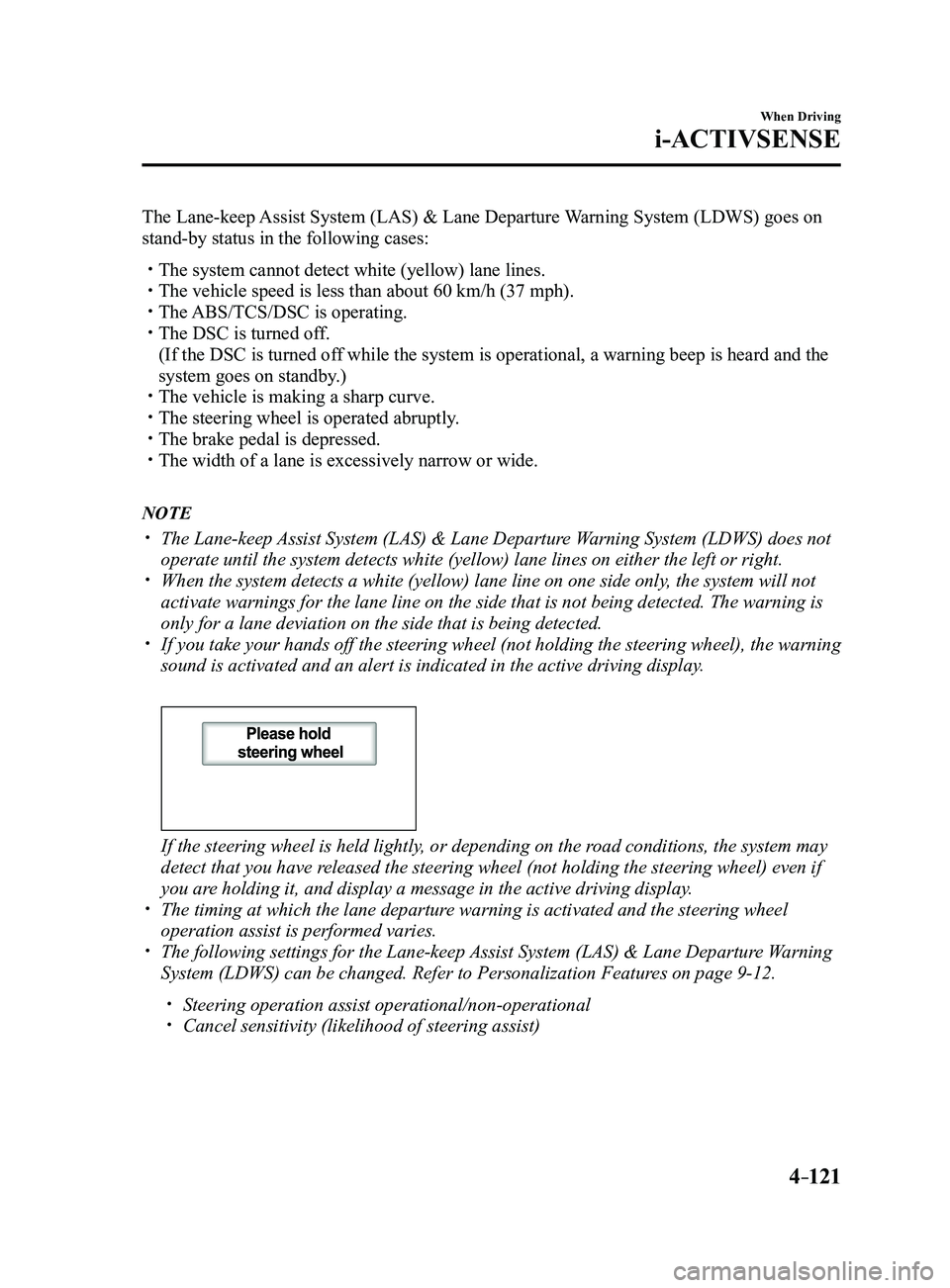
If you take your hands off the steering wheel (not holding the steering\
wheel), the warning
sound is activated and an alert is indicated in the active driving displ\
ay.
If the steering wheel is held lightly, or depending on the road conditions, the system may
detect that you have released the steering wheel (not holding the steering wheel) even if
you are holding it, and display a message in the active driving display.
The timing at which the lane departur e warning is activated and the steering wheel
operation assist is performed varies. The following settings for the Lane-keep Assist System (LAS) & Lane Departure Warning
System (LDWS) can be changed. Refer to Personalization Features on page 9-12.
Steering operation assist operational/non-operational Cancel sensitivity (likelihood of steering assist)
Mazda3_8FL6-EA-16F_Edition2.indb 1212016/08/10 17:36:53
Page 281 of 612
 monitors the air pressure of all\
four tires. If
the ai")
4–151
When Driving
Tire Pressure Monitoring System
*Some models.
Tire Pressure Monitoring System*
The Tire Pressure Monitoring System (TPMS) monitors the air pressure of all\
four tires. If
the air pressure of one or more tires is too low, the system warns the driver by indicating the
tire pressure monitoring system warning light in the instrument cluster \
and operating a beep
sound. The system monitors the tire pressures indirectly using the data sent from the ABS
wheel speed sensors.
To allow the system to operate correctly, the system needs to be initialized with the specified
tire pressure (value on the tire pressure label). Follow the procedure\
and perform the
initialization.
Refer to Tire Pressure Monitoring System Initialization on page
4-154.
The warning light flashes when the system has a malfunction.
Refer to Warning Lights on page
4-24.
ABS wheel speed sensor
Mazda3_8FL6-EA-16F_Edition2.indb 1512016/08/10 17:37:03
Page 292 of 612
4–162
When Driving
Rear View Monitor
Picture Quality Adjustment
WARNING
Always adjust the picture quality of the rear view monitor while the vehicle is stopped:
Do not adjust the picture quality of the rear view monitor while driving the vehicle.
Adjusting the picture quality of the rear view monitor such as brightness, contrast, color,
and tint while driving the vehicle is dangerous as it could distract your attention from the
vehicle operation which could lead to an accident.
Picture quality adjustment can be done while the shift lever is in reverse (R).
There are four settings which can be adjusted including, brightness, con\
trast, tint, and color.
When adjusting, pay sufficient attention to the vehicle surroundings.
1. Select the icon on the screen to display the tabs.
2. Select the desired tab item.
3. Adjust the brightness, contrast, tint, and color using the slider .
If you need to reset, press the reset button.
4. Select the icon on the screen to close the tab.
Mazda3_8FL6-EA-16F_Edition2.indb 1622016/08/10 17:37:09
Page 465 of 612
6–53
Maintenance and Care
Owner Maintenance
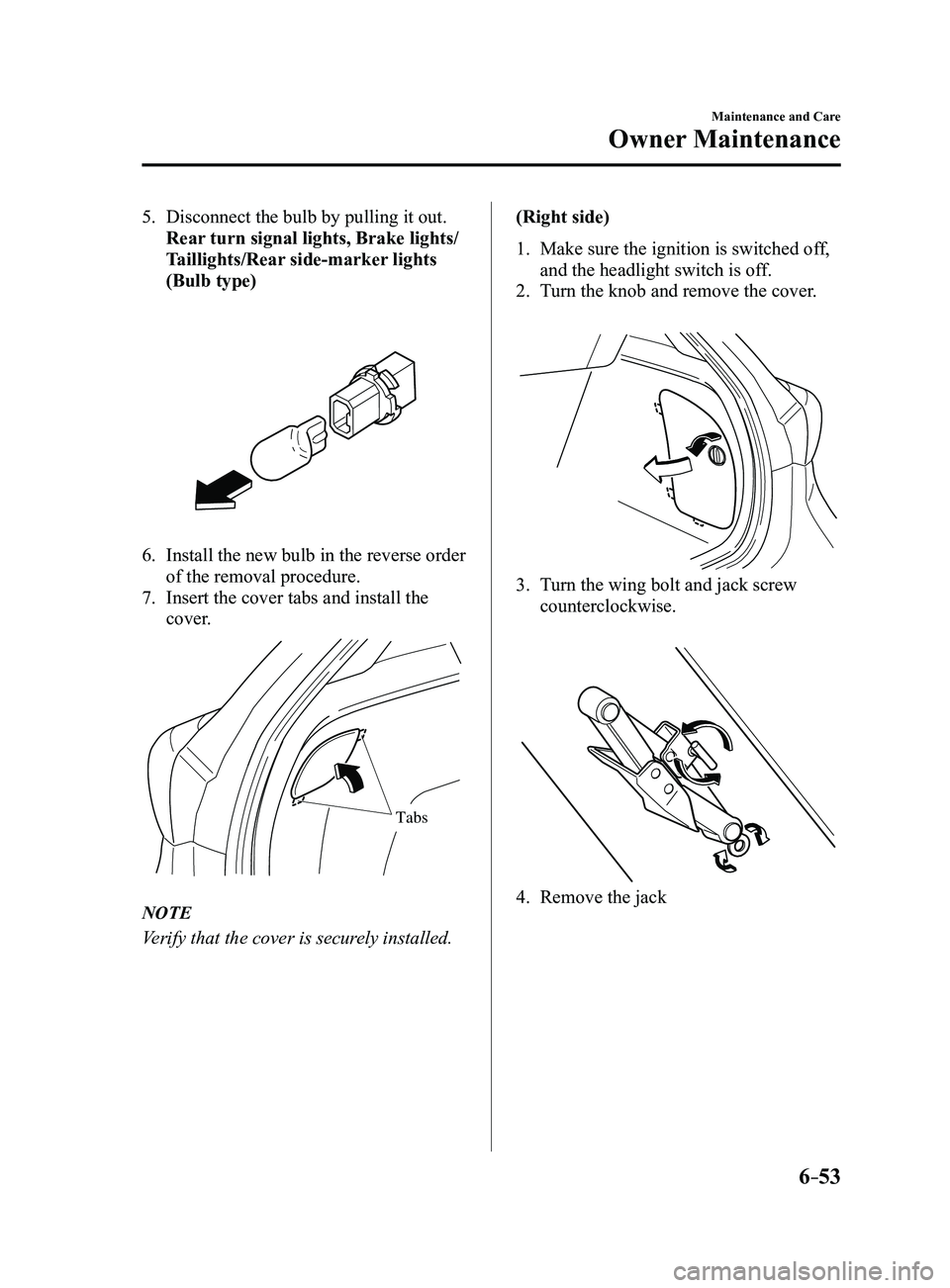
5. Disconnect the bulb by pulling it out.
Rear turn signal lights, Brake lights/
Taillights/Rear side-marker lights
(Bulb type)
6. Install the new bulb in the reverse order
of the removal procedure.
7. Insert the cover tabs and install the
cover.
Tabs
NOTE
Verify that the cover is securely installed.(Right side)
1. Make sure the ignition is switched of
f,
and the headlight switch is off.
2. Turn the knob and remove the cover.
3. Turn the wing bolt and jack screw
counterclockwise.
4. Remove the jack
Mazda3_8FL6-EA-16F_Edition2.indb 532016/08/10 17:38:55
Page 467 of 612
6–55
Maintenance and Care
Owner Maintenance
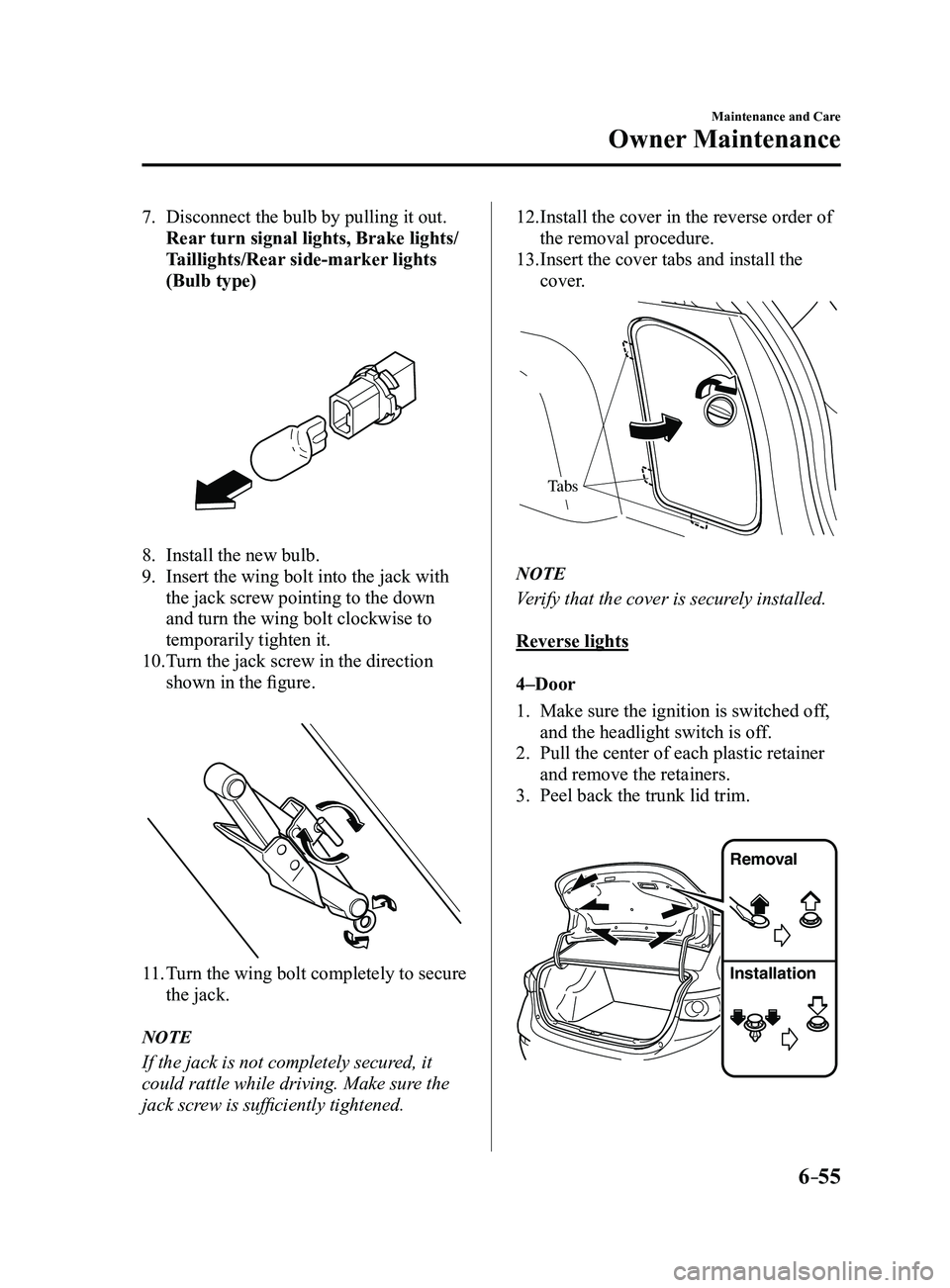
7. Disconnect the bulb by pulling it out.
Rear turn signal lights, Brake lights/
Taillights/Rear side-marker lights
(Bulb type)
8. Install the new bulb.
9. Insert the wing bolt into the jack with
the jack screw pointing to the down
and turn the wing bolt clockwise to
temporarily tighten it.
10. Turn the jack screw in the direction
shown in the figure.
11. Turn the wing bolt completely to secure
the jack.
NOTE
If the jack is not completely secured, it
could rattle while driving. Make sure the
jack screw is sufficiently tightened.
12. Install the cover in the reverse order of
the removal procedure.
13. Insert the cover tabs and install the
cover.
Tabs
NOTE
Verify that the cover is securely installed.
Reverse lights
4–Door
1. Make sure the ignition is switched off,
and the headlight switch is off.
2. Pull the center of each plastic retainer
and remove the retainers.
3. Peel back the trunk lid trim.
Removal
Installation
Mazda3_8FL6-EA-16F_Edition2.indb 552016/08/10 17:38:56
Page 475 of 612
6–63
Maintenance and Care
Owner Maintenance
*Some models.
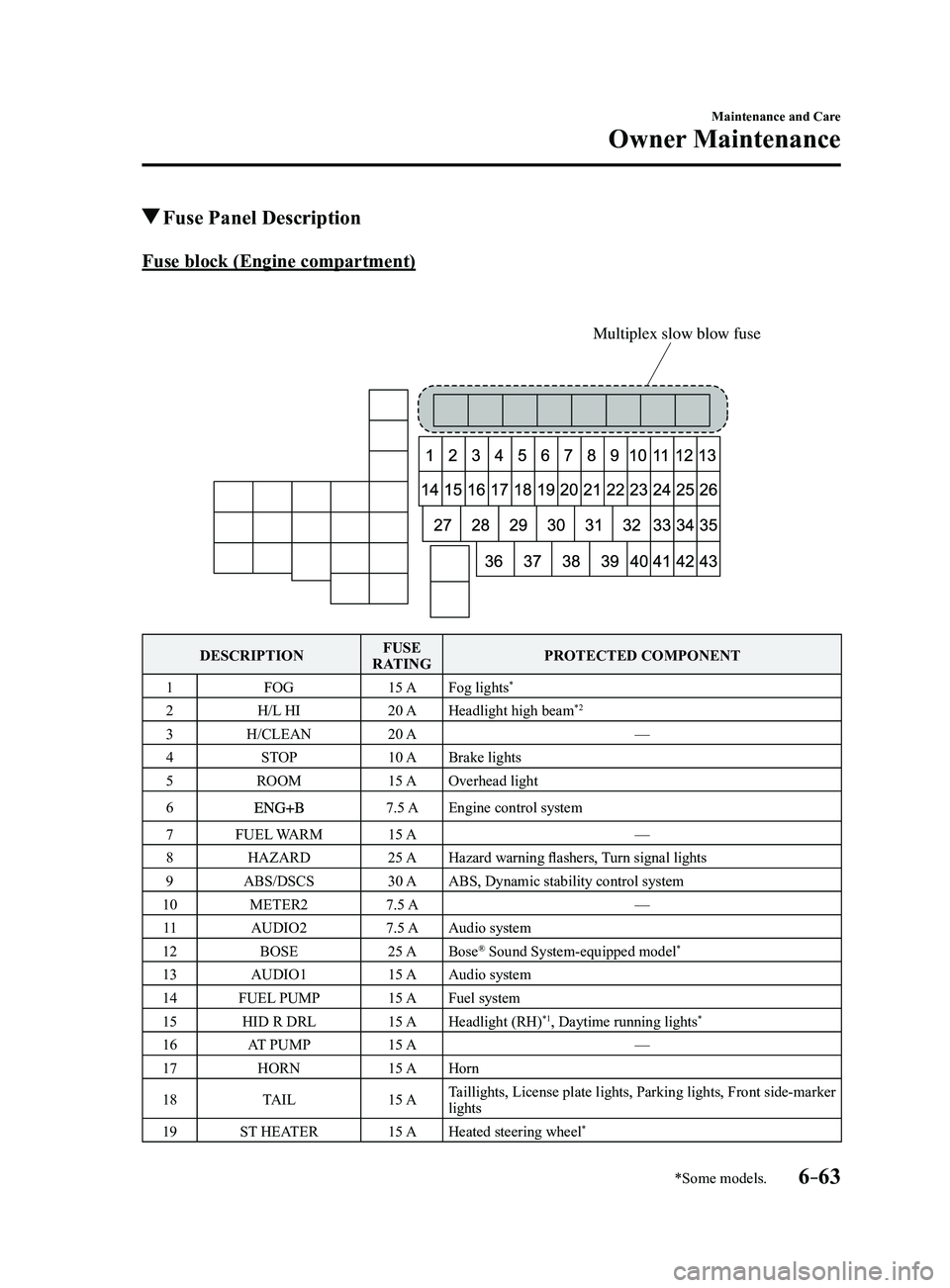
Fuse Panel Description
Fuse block (Engine compartment)
Multiplex slow blow fuse
DESCRIPTIONFUSE
RATING PROTECTED COMPONENT
1 FOG 15 AFog lights
*
2 H/L HI 20 AHeadlight high beam*2
3 H/CLEAN 20 A —
4 STOP 10 ABrake lights
5 ROOM 15 AOverhead light
6
7.5 AEngine control system
7 FUEL WARM 15 A —
8 HAZARD 25 AHazard warning flashers, Turn signal lights
9 ABS/DSCS 30 AABS, Dynamic stability control system
10 METER2 7.5 A —
11 AUDIO2 7.5 AAudio system
12 BOSE 25 ABose
® Sound System-equipped model*
13 AUDIO1 15 AAudio system
14 FUEL PUMP 15 AFuel system
15 HID R DRL 15 AHeadlight (RH)
*1, Daytime running lights*
16 AT PUMP 15 A —
17 HORN 15 AHorn
18 TAIL 15 ATaillights, License plate lights, Parking lights, Front side-marker
lights
19 ST HEATER 15 AHeated steering wheel
*
Mazda3_8FL6-EA-16F_Edition2.indb 632016/08/10 17:39:02
Page 477 of 612
6–65
Maintenance and Care
Owner Maintenance
*Some models.
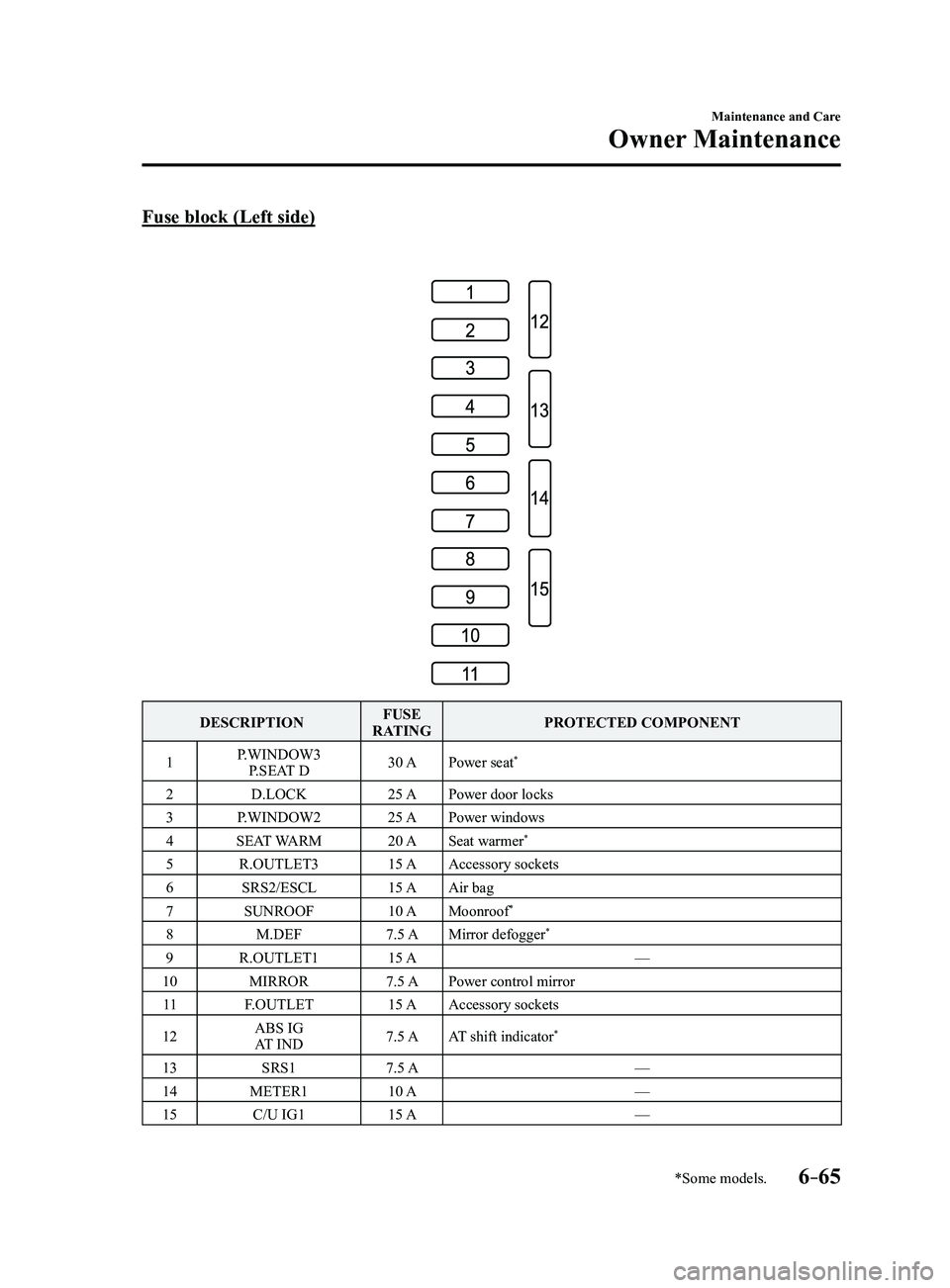
Fuse block (Left side)
DESCRIPTIONFUSE
RATING PROTECTED COMPONENT
1 P.WINDOW3
P.SEAT D 30 A
Power seat
*
2 D.LOCK 25 APower door locks
3 P.WINDOW2 25 APower windows
4 SEAT WARM 20 ASeat warmer
*
5 R.OUTLET3 15 AAccessory sockets
6 SRS2/ESCL 15 AAir bag
7 SUNROOF 10 AMoonroof
*
8 M.DEF 7.5 AMirror defogger*
9 R.OUTLET1 15 A —
10 MIRROR 7.5 APower control mirror
11 F.OUTLET 15 AAccessory sockets
12 ABS IG
AT IND 7.5 A
AT shift indicator
*
13 SRS1 7.5 A —
14 METER1 10 A —
15 C/U IG1 15 A —
Mazda3_8FL6-EA-16F_Edition2.indb 652016/08/10 17:39:03
Page 492 of 612
7–4
If Trouble Arises
Flat Tire
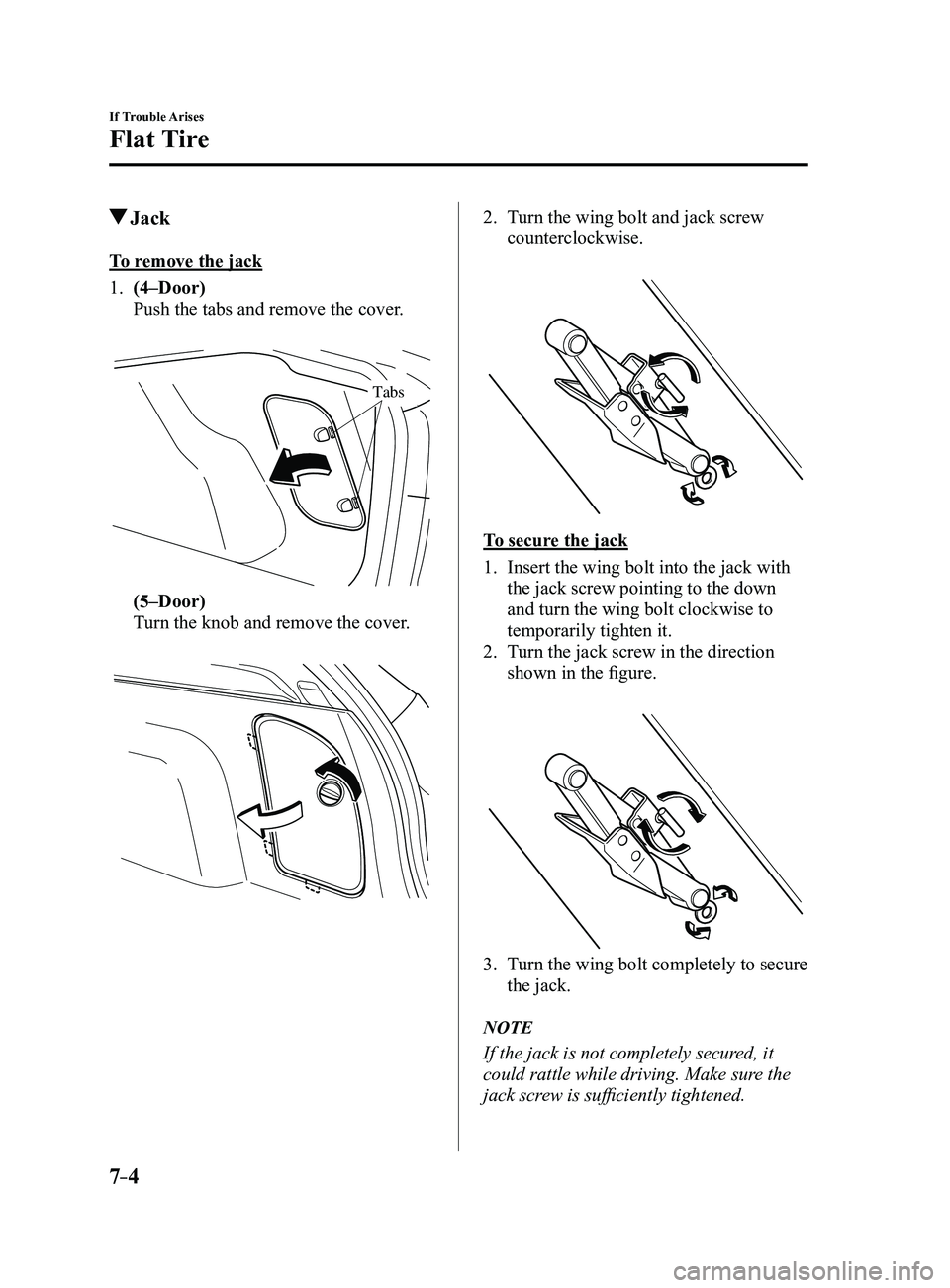
Jack
To remove the jack
1. (4–Door)
Push the tabs and remove the cover.
Tabs
(5–Door)
Turn the knob and remove the cover.
2. Turn the wing bolt and jack screw
counterclockwise.
To secure the jack
1. Insert the wing bolt into the jack with
the jack screw pointing to the down
and turn the wing bolt clockwise to
temporarily tighten it.
2. Turn the jack screw in the direction
shown in the figure.
3. Turn the wing bolt completely to secure
the jack.
NOTE
If the jack is not completely secured, it
could rattle while driving. Make sure the
jack screw is sufficiently tightened.
Mazda3_8FL6-EA-16F_Edition2.indb 42016/08/10 17:39:09
Page 493 of 612
7–5
If Trouble Arises
Flat Tire
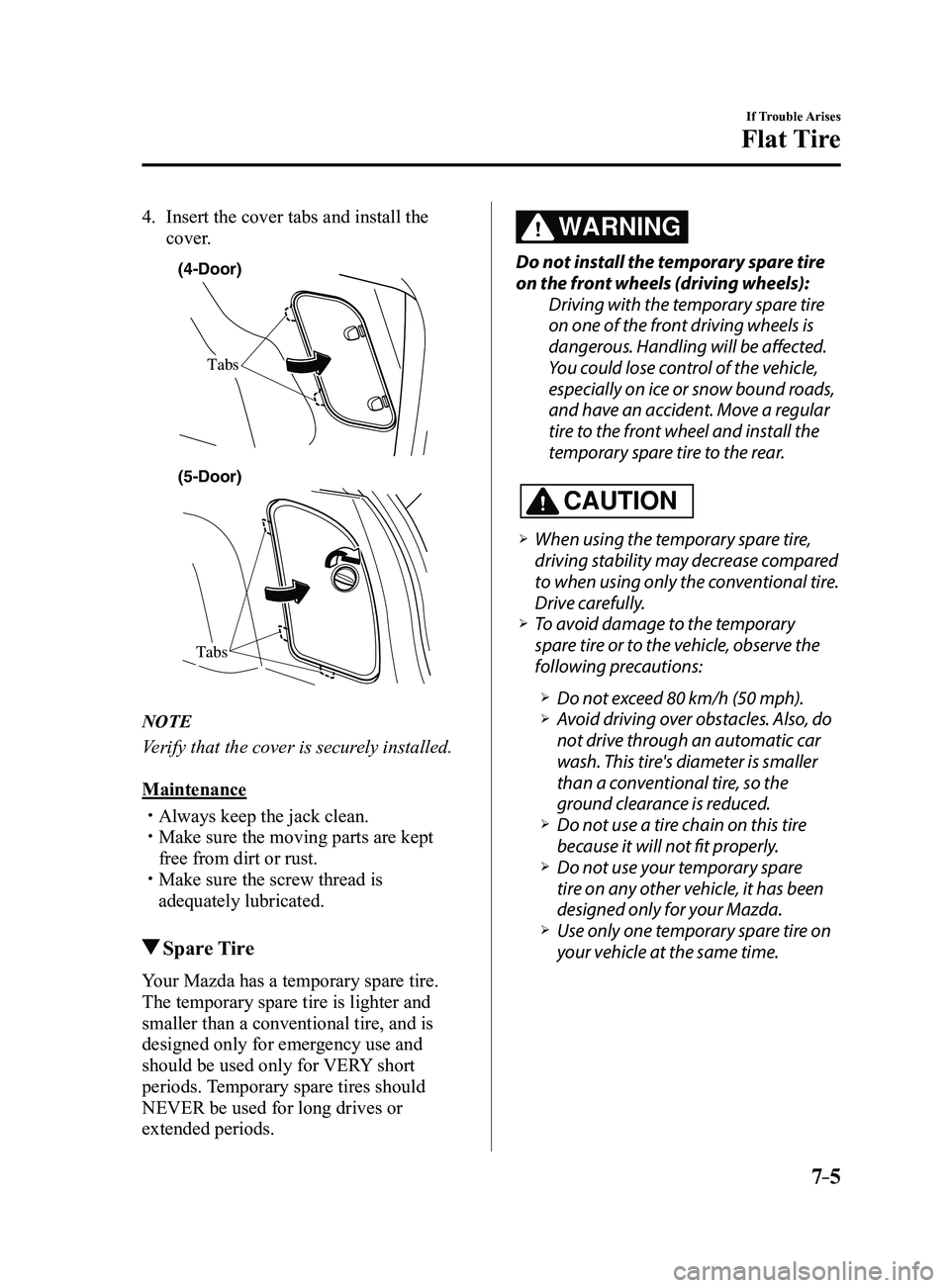
4. Insert the cover tabs and install the
cover.
(4-Door)
Tabs
Tabs
(5-Door)
NOTE
Verify that the cover is securely installed.
Maintenance
Always keep the jack clean. Make sure the moving parts are kept
free from dirt or rust. Make sure the screw thread is
adequately lubricated.
Spare Tire
Your Mazda has a temporary spare tire.
The temporary spare tire is lighter and
smaller than a conventional tire, and is
designed only for emergency use and
should be used only for VERY short
periods. Temporary spare tires should
NEVER be used for long drives or
extended periods.
WARNING
Do not install the temporary spare tire
on the front wheels (driving wheels):Driving with the temporary spare tire
on one of the front driving wheels is
dangerous. Handling will be affected.
You could lose control of the vehicle,
especially on ice or snow bound roads,
and have an accident. Move a regular
tire to the front wheel and install the
temporary spare tire to the rear.
CAUTION
When using the temporary spare tire,
driving stability may decrease compared
to when using only the conventional tire.
Drive carefully.
To avoid damage to the temporary
spare tire or to the vehicle, observe the
following precautions:
Do not exceed 80 km/h (50 mph). Avoid driving over obstacles. Also, do
not drive through an automatic car
wash. This tire's diameter is smaller
than a conventional tire, so the
ground clearance is reduced.
Do not use a tire chain on this tire
because it will not fit properly. Do not use your temporary spare
tire on any other vehicle, it has been
designed only for your Mazda.
Use only one t emporary spare tire on
your vehicle at the same time.
Mazda3_8FL6-EA-16F_Edition2.indb 52016/08/10 17:39:09
Page 515 of 612
7–27
If Trouble Arises
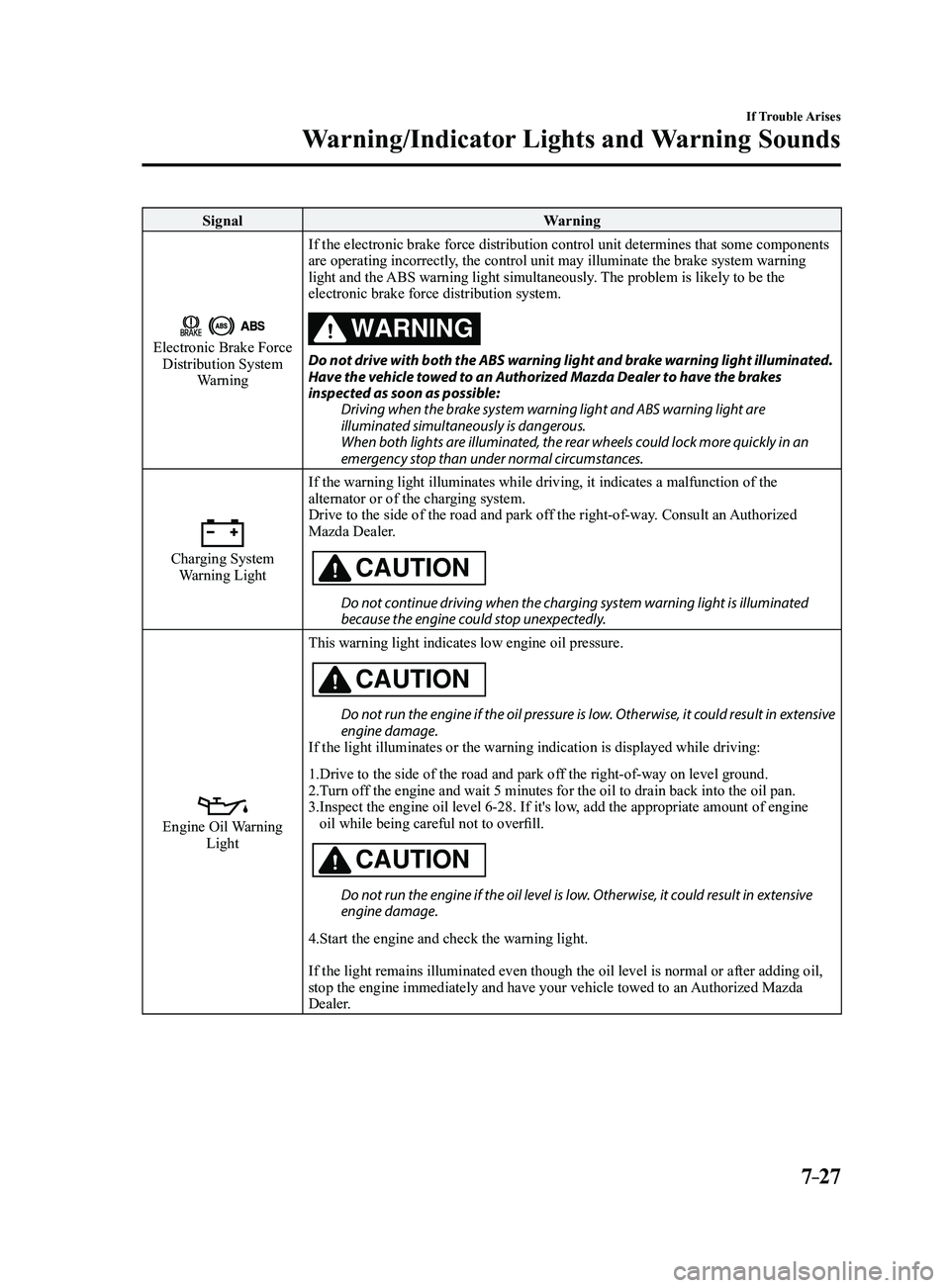
Warning/Indicator Lights and Warning Sounds
SignalWarning
Electronic Brake Force Distribution System
Warning If the electronic brake force distribution control unit determines that \
some components
are operating incorrectly, the control unit may illuminate the brake system warning
light and the ABS warning light simultaneously. The problem is likely to be the
electronic brake force distribution system.
WARNING
Do not drive with both the ABS warning light and brake warning light illuminated. Have the vehicle towed to an Authorized Mazda Dealer to have the brakes
inspected as soon as possible:
Driving when the brake system warning light and ABS warning light are
illuminated simultaneously is dangerous.
When both lights are illuminated, the rear wheels could lock more quickly in an
emergency stop than under normal circumstances.
Charging System Warning Light If the warning light illuminates while driving, it indicates a malfuncti\
on of the
alternator or of the charging system.
Drive to the side of the road and park off the right-of-way. Consult an Authorized
Mazda Dealer.CAUTION
Do not continue driving when the charging system warning light is illuminated because the engine could stop unexpectedly.
Engine Oil Warning LightThis warning light indicates low engine oil pressure.
CAUTION
Do not run the engine if the oil pressure is low. Otherwise, it could result in extensive engine damage.
If the light illuminates or the warning indication is displayed while dr\
iving:
1.Drive to the side of the road and park off the right-of-way on level ground.
2.Turn off the engine and wait 5 minutes for the oil to drain back into the oil p\
an.
3. Inspect the engine oil level 6-28. If it's low, add the appropriate amount of engine
oil while being careful not to overfill.
CAUTION
Do not run the engine if the oil level is low. Otherwise, it could result in extensive engine damage.
4.Start the engine and check the warning light.
If the light remains illuminated even though the oil level is normal or \
after adding oil,
stop the engine immediately and have your vehicle towed to an Authorized Mazda
Dealer.
Mazda3_8FL6-EA-16F_Edition2.indb 272016/08/10 17:39:23