USB MAZDA MODEL 3 5-DOOR 2017 User Guide
[x] Cancel search | Manufacturer: MAZDA, Model Year: 2017, Model line: MODEL 3 5-DOOR, Model: MAZDA MODEL 3 5-DOOR 2017Pages: 612
Page 349 of 612
5–57
Interior Features
Audio System
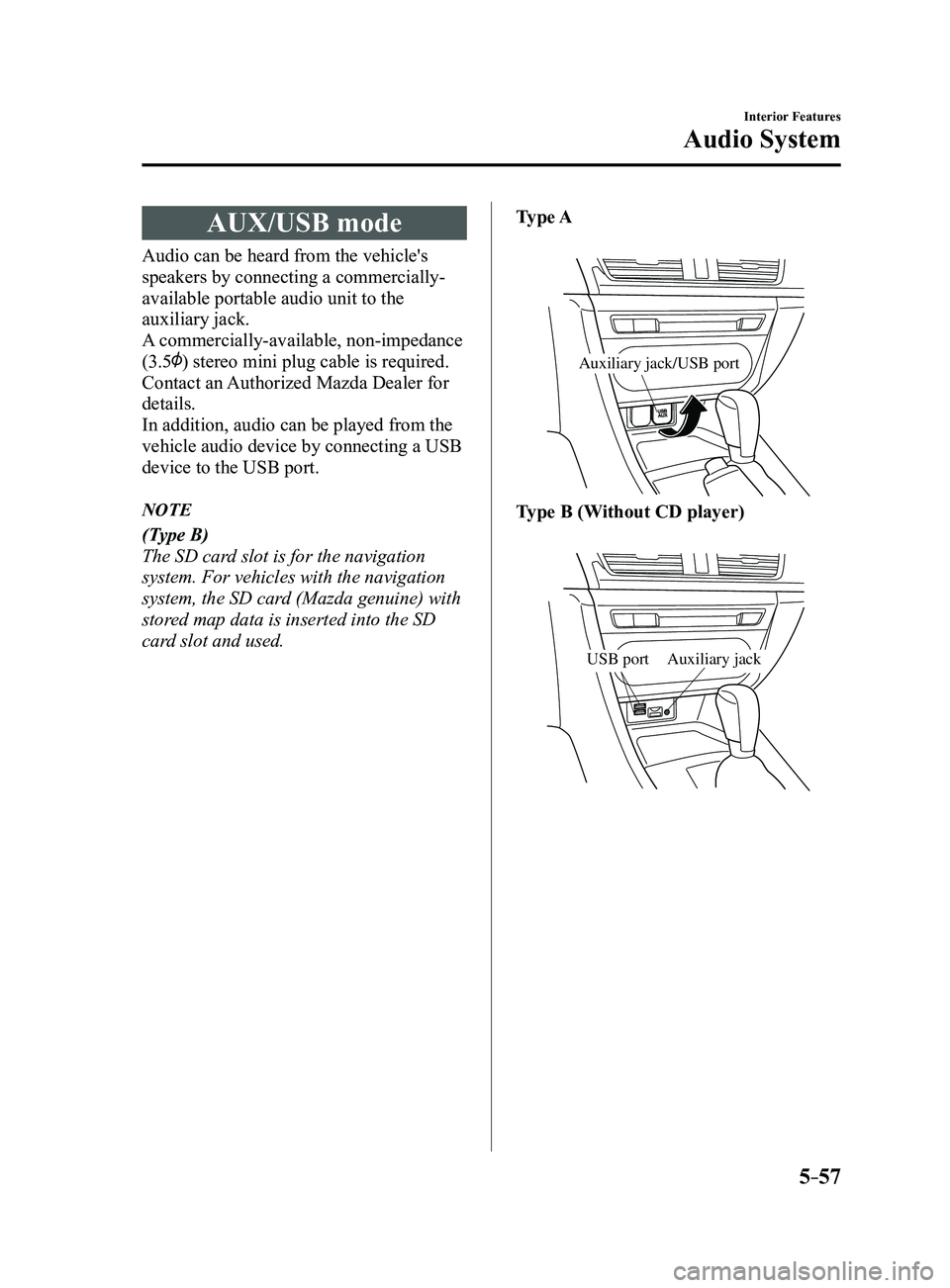
AUX/USB mode
Audio can be heard from the vehicle's
speakers by connecting a commercially-
available portable audio unit to the
auxiliary jack.
A commercially-available, non-impedance
(3.5
) stereo mini plug cable is required.
Contact an Authorized Mazda Dealer for
details.
In addition, audio can be played from the
vehicle audio device by connecting a USB
device to the USB port.
NOTE
(Type B)
The SD card slot is for the navigation
system. For vehicles with the navigation
system, the SD card (Mazda genuine) with
stored map data is inserted into the SD
card slot and used.Type A
Auxiliary jack/USB port
Type B (Without CD player)
Auxiliary jackUSB port
Mazda3_8FL6-EA-16F_Edition2.indb 572016/08/10 17:37:48
Page 350 of 612
5–58
Interior Features
Audio System
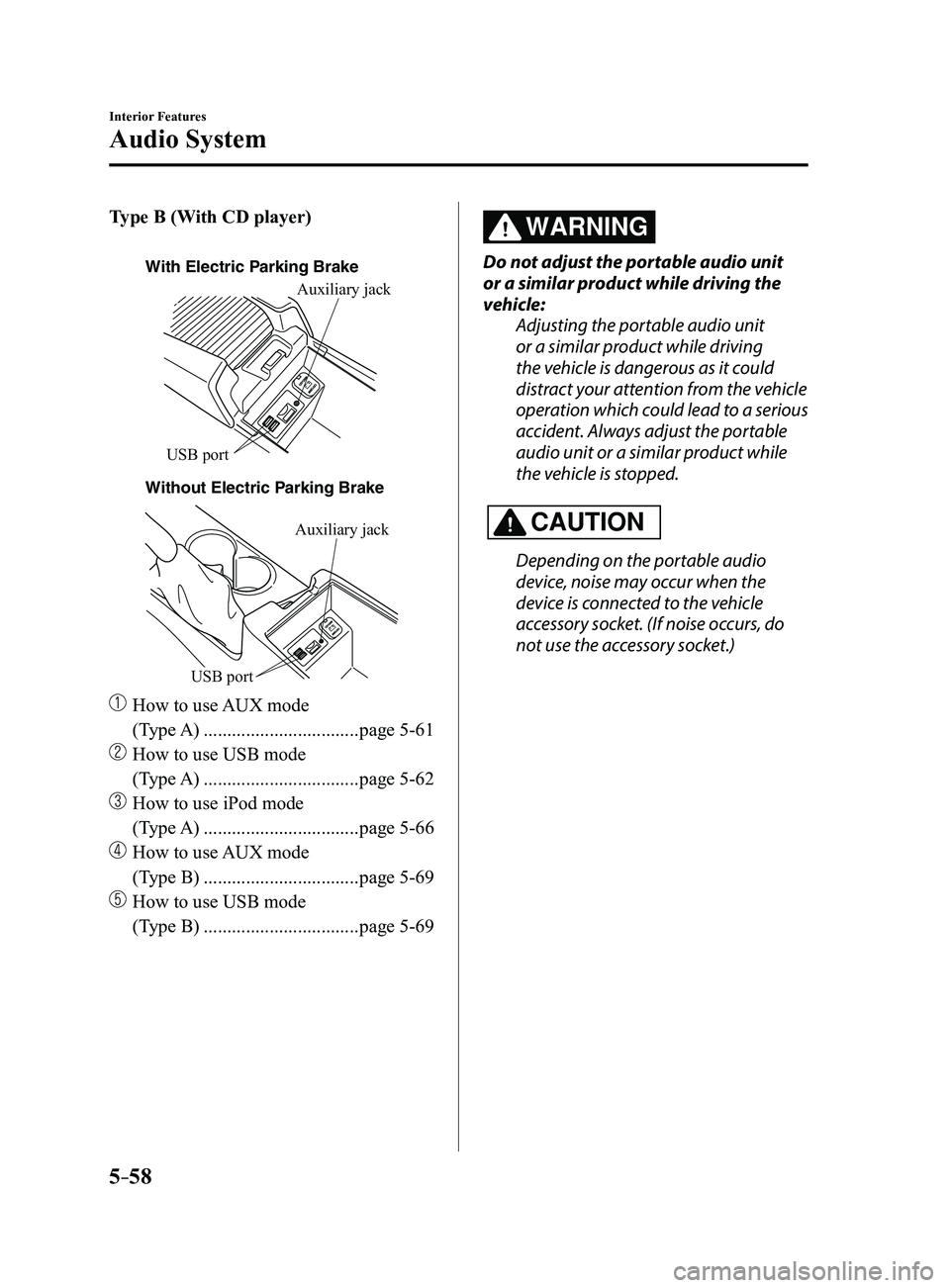
Type B (With CD player)
With Electric Parking Brake
Without Electric P
arking BrakeAuxiliary jack
USB port
Auxiliary jack
USB port
How to use
AUX mode
(Type A)
.................................page 5-61
How to use USB mode
(Type A)
.................................page 5-62
How to use iPod mode
(Type A)
.................................page 5-66
How to use AUX mode
(Type B)
.................................page 5-69
How to use USB mode
(Type B)
.................................page 5-69
WARNING
Do not adjust the portable audio unit
or a similar product while driving the
vehicle: Adjusting the portable audio unit
or a similar product while driving
the vehicle is dangerous as it could
distract your attention from the vehicle
operation which could lead to a serious
accident. Always adjust the portable
audio unit or a similar product while
the vehicle is stopped.
CAUTION
Depending on the portable audio
device, noise may occur when the
device is connected to the vehicle
accessory socket. (If noise occurs, do
not use the accessory socket.)
Mazda3_8FL6-EA-16F_Edition2.indb 582016/08/10 17:37:49
Page 351 of 612
5–59
Interior Features
Audio System
NOTE
This mode may not be usable depending
on the portable audio device to be
connected.
Before using the auxiliary jack/USB
port, refer to the instruction manual for
the portable audio device.
Use a commercially-available, non-
impedance (3.5) stereo mini plug for
connecting the portable audio unit to
the auxiliary jack. Before using the
auxiliary jack, read the manufacturer's
instructions for connecting a portable
audio unit to the auxiliary jack.
To prevent discharging of the battery,
do not use the auxiliary input for long
periods with the engine off or idling.
When connecting a device to the
auxiliary jack or USB port, noise may
occur depending on the connected
device. If the device is connected to the
vehicle's accessory socket, the noise can
be reduced by unplugging it from the
accessory socket.
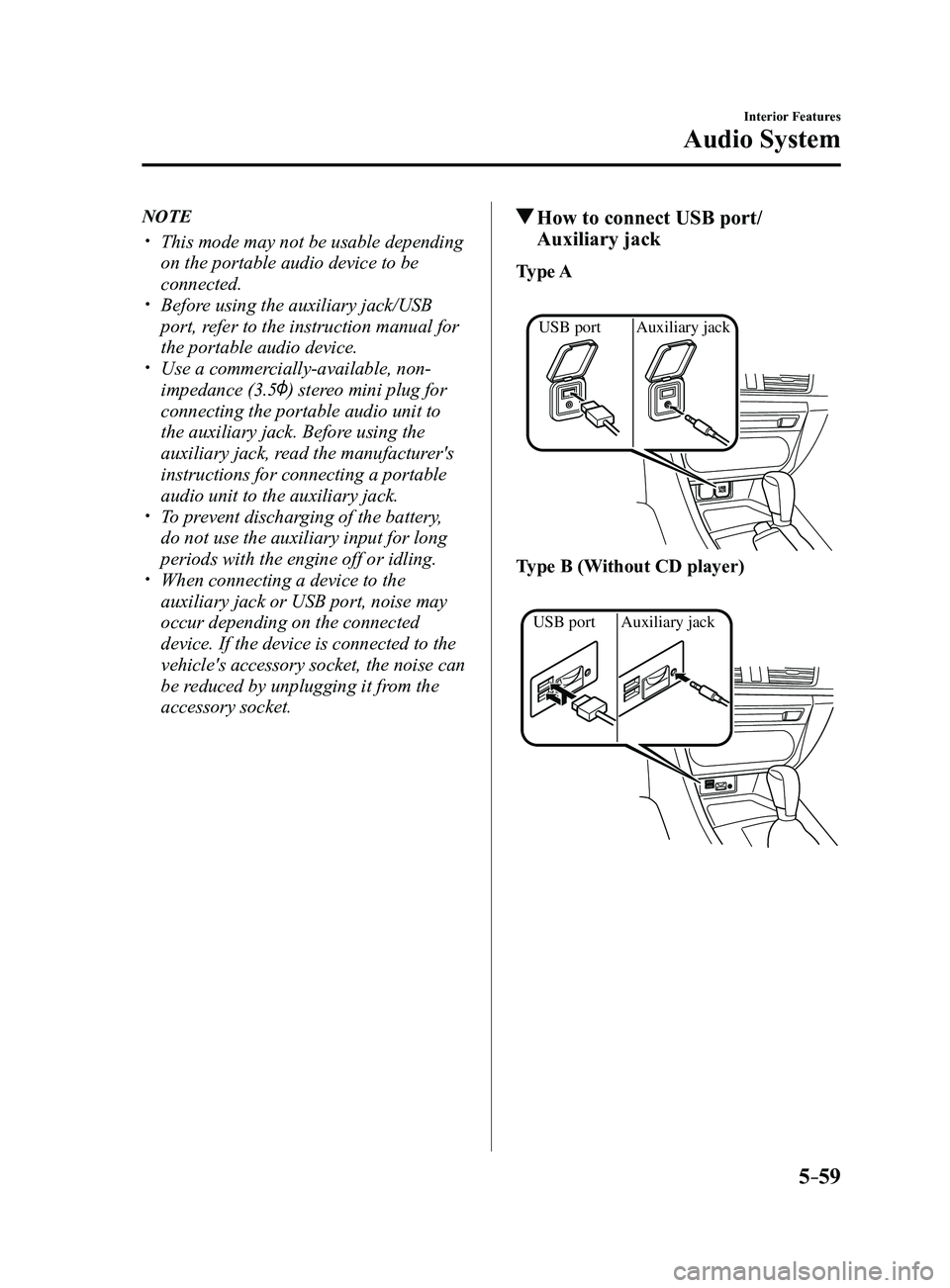
How to connect USB port/
Auxiliary jack
Type A
Auxiliary jack
USB port
Type B (Without CD player)
Auxiliary jack
USB port
Mazda3_8FL6-EA-16F_Edition2.indb 592016/08/10 17:37:50
Page 352 of 612
5–60
Interior Features
Audio System
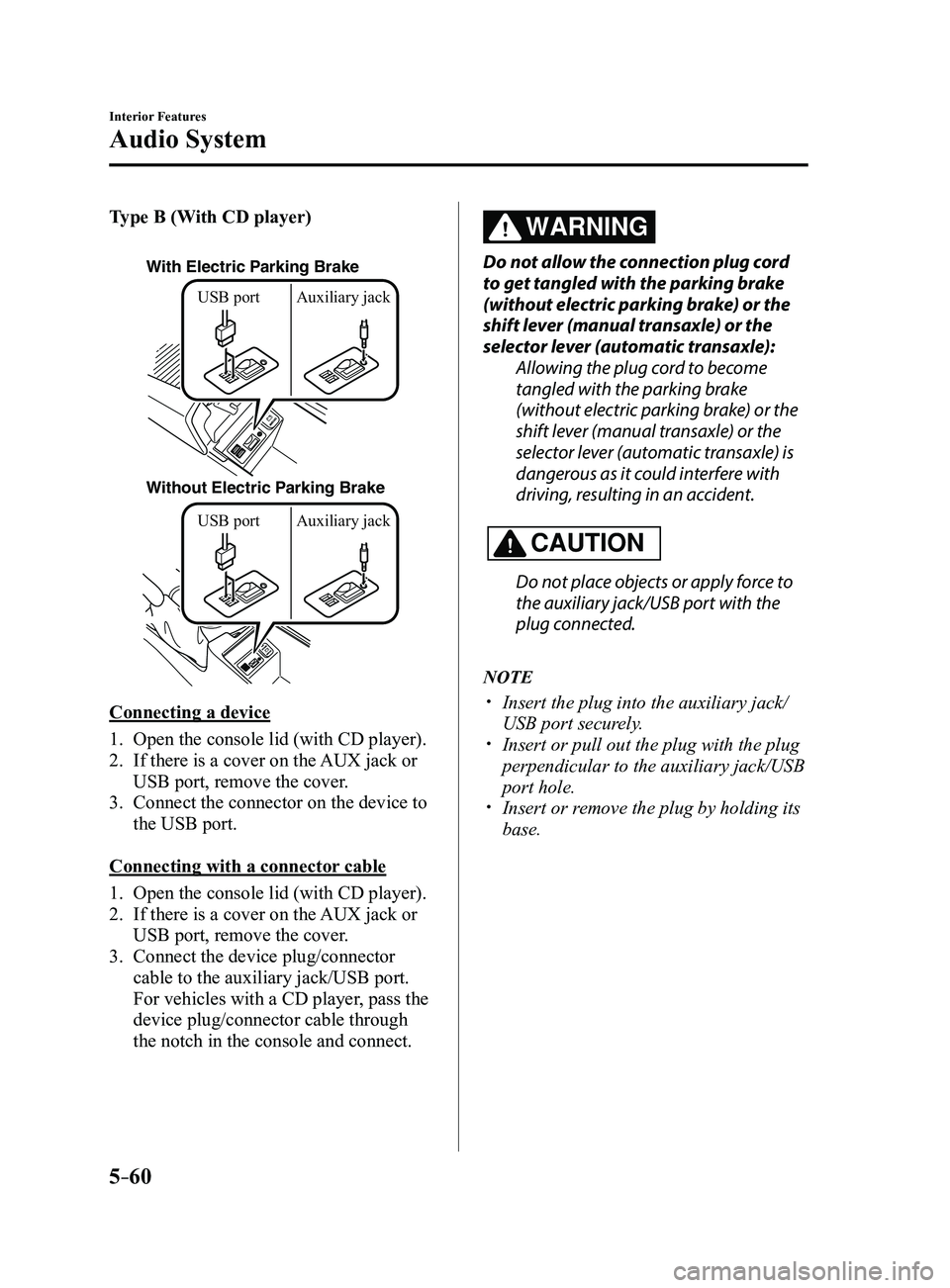
Type B (With CD player)
With Electric Parking Brake
Without Electric Parking BrakeUSB port Auxiliary jack USB port Auxiliary jack
Connecting a device
1. Open the console lid (with CD player).
2. If there is a cover on the AUX jack or
USB port, remove the cover.
3. Connect the connector on the device to
the USB port.
Connecting with a connector cable
1. Open the console lid (with CD player).
2. If there is a cover on the AUX jack or
USB port, remove the cover.
3. Connect the device plug/connector
cable to the auxiliary jack/USB port.
For vehicles with a CD player, pass the
device plug/connector cable through
the notch in the console and connect.
WARNING
Do not allow the connection plug cord
to get tangled with the parking brake
(without electric parking brake) or the
shift lever (manual transaxle) or the
selector lever (automatic transaxle):
Allowing the plug cord to become
tangled with the parking brake
(without electric parking brake) or the
shift lever (manual transaxle) or the
selector lever (automatic transaxle) is
dangerous as it could interfere with
driving, resulting in an accident.
CAUTION
Do not place objects or apply force to
the auxiliary jack/USB port with the
plug connected.
NOTE
Insert the plug into the auxiliary jack/
USB port securely. Insert or pull out the plug with the plug
perpendicular to the auxiliary jack/USB
port hole.
Insert or remove the plug by holding its
base.
Mazda3_8FL6-EA-16F_Edition2.indb 602016/08/10 17:37:50
Page 354 of 612
5–62
Interior Features
Audio System
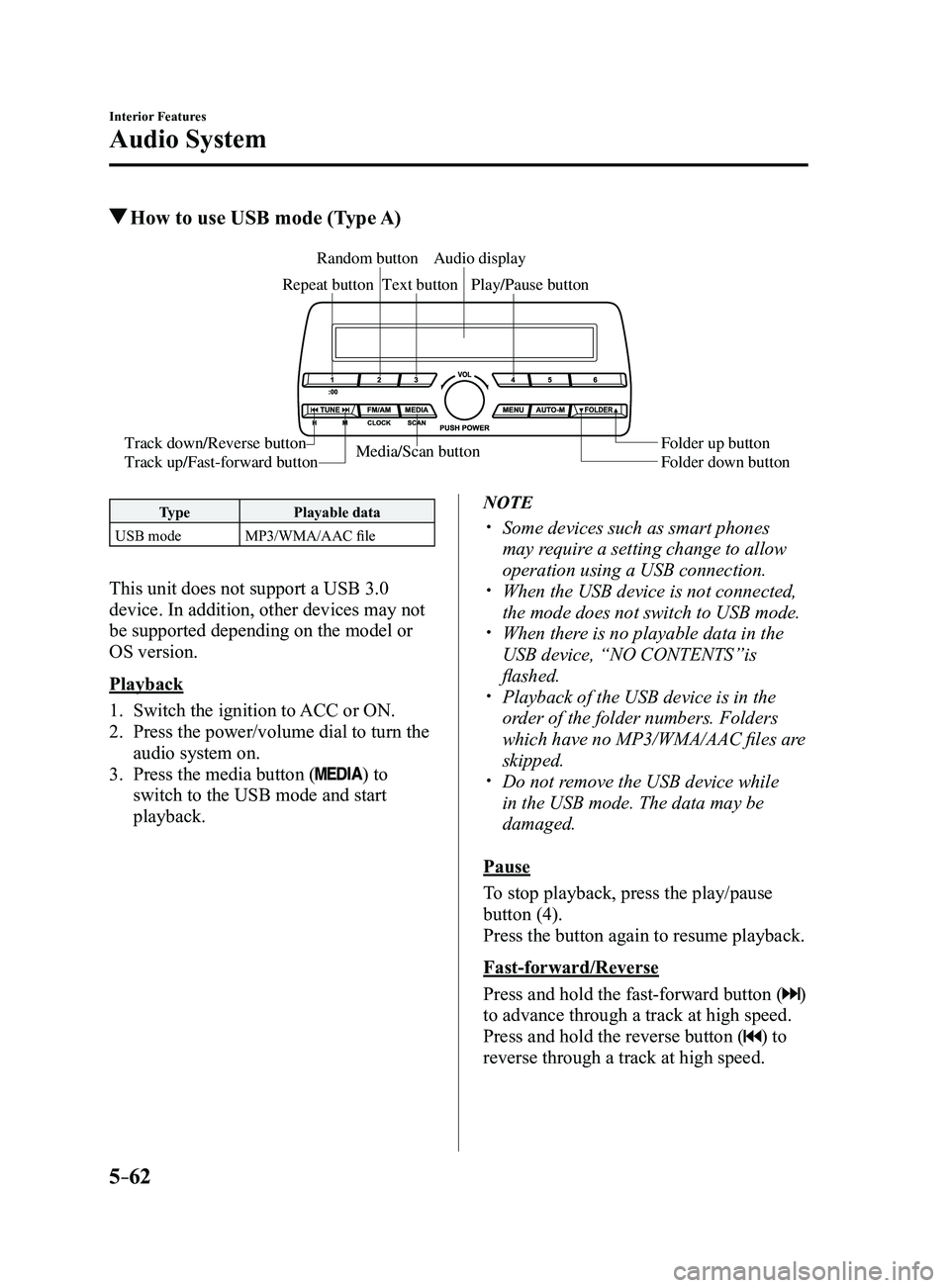
How to use USB mode (Type A)
Media/Scan button
Folder down button Folder up button
Play/Pause button
Random button
Repeat button
Audio display
Text button
Track down/Reverse button
Track up/Fast-forward button
Type
Playable data
USB mode MP3/WMA/AAC file
This unit does not support a USB 3.0
device. In addition, other devices may not
be supported depending on the model or
OS version.
Playback
1. Switch the ignition to ACC or ON.
2. Press the power/volume dial to turn the
audio system on.
3. Press the media button () to
switch to the USB mode and start
playback.
NOTE
Some devices such as smart phones
may require a setting change to allow
operation using a USB connection.
When the USB device is not connected,
the mode does not switch to USB mode. When there is no playable data in the
USB device, “NO CONTENTS”is
flashed.
Playback of the USB device is in the
order of the folder numbers. Folders
which have no MP3/WMA/AAC files are
skipped.
Do not remove the USB device while
in the USB mode. The data may be
damaged.
Pause
To stop playback, press the play/pause
button (4).
Press the button again to resume playback.
Fast-forward/Reverse
Press and hold the fast-forward button (
)
to advance through a track at high speed.
Press and hold the reverse button (
) to
reverse through a track at high speed.
Mazda3_8FL6-EA-16F_Edition2.indb 622016/08/10 17:37:51
Page 355 of 612
5–63
Interior Features
Audio System
Track search
Press the track up button (
) once to skip
forward to the beginning of the next track.
Press the track down button (
) within a
few seconds after playback begins to track
down to the beginning of the previous
track.
Press the track down button (
) after a
few seconds have elapsed to start playback
from the beginning of the current track.
Folder search
To change to the previous folder, press the
folder down button (
), or press the folder
up button (
) to advance to the next
folder.
Music scan
This function scans the titles in a folder
currently being played and plays ten
seconds of each song to aid you in finding
a song you want to listen to.
Press and hold the scan button (
)
during playback to start the scan play
operation (the track number will flash).
Press and hold the scan button (
)
again to cancel scan playback.
NOTE
If the unit is left in scan, normal playback
will resume where scan was selected.
Repeat playback
Track repeat
1. Press the repeat button (1) during
playback to play the current track
repeatedly. “TRACK RPT” is displayed
(
is displayed next to RPT at the
bottom of the display area).
2. To cancel the repeat playback, press the
button again after 3 seconds.
Folder repeat
1. Press the repeat button (1) during
playback, and then press the button
again within 3 seconds to play the
tracks in the current folder repeatedly.
“FOLDER RPT” is displayed (
is
displayed next to RPT at the bottom of
the display area).
2. Press the button again to cancel the
repeat playback.
Random playback
Tracks are randomly selected and played.
Folder random
1. Press the random button (2) during
playback to play the tracks in the folder
randomly. “FOLDER RDM” is
displayed (
is displayed next to RDM
at the bottom of the display area).
2. To cancel the random playback, press
the button again after 3 seconds.
All random
1. Press the random button (2) during
playback, and then press the button
again within 3 seconds to play the
tracks in the USB device randomly.
“ALL RDM” is displayed (
is
displayed next to RDM at the bottom of
the display area).
2. Press the button again to cancel the
random playback.
Mazda3_8FL6-EA-16F_Edition2.indb 632016/08/10 17:37:52
Page 356 of 612
5–64
Interior Features
Audio System
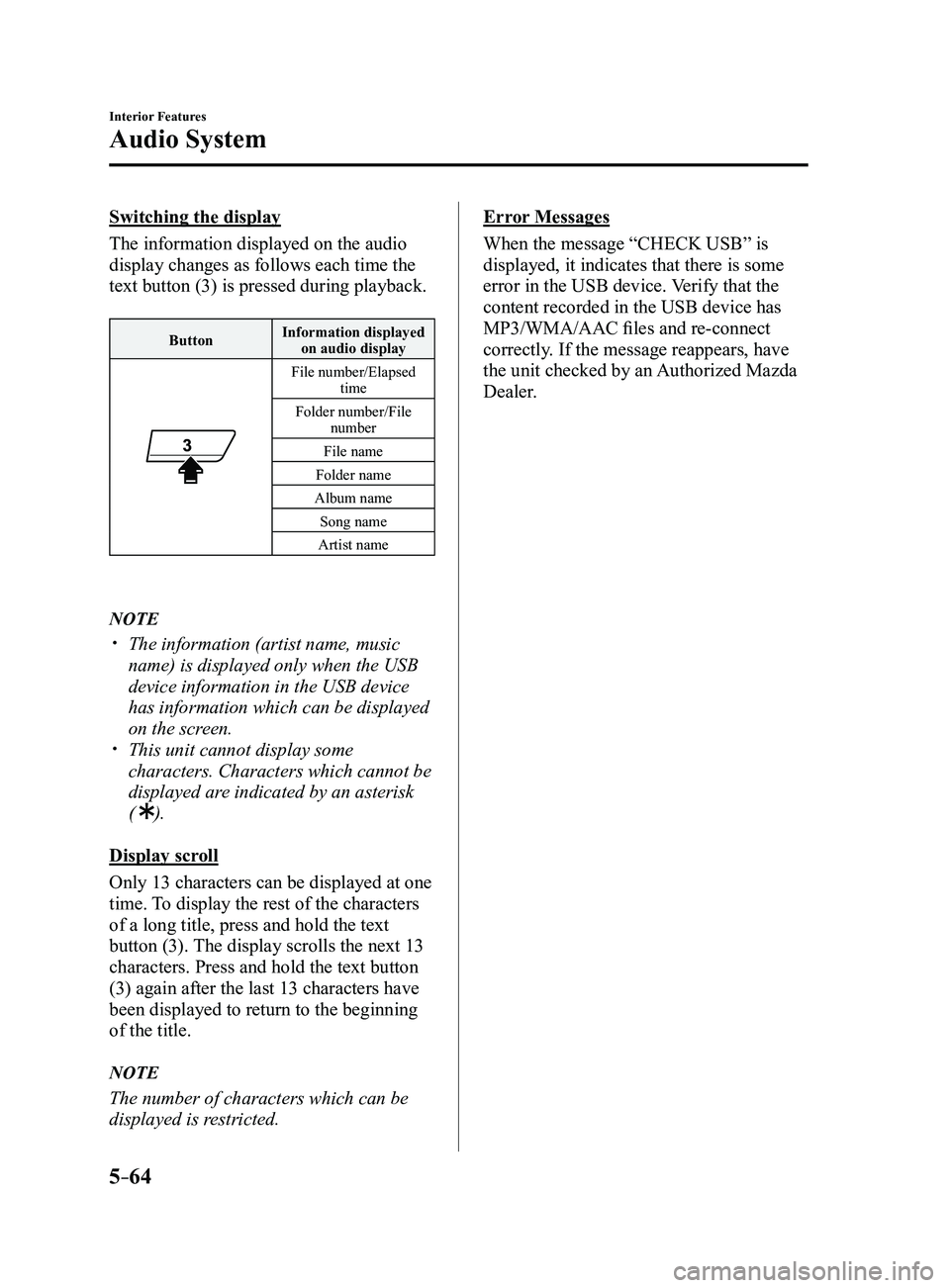
Switching the display
The information displayed on the audio
display changes as follows each time the
text button (3) is pressed during playback.
ButtonInformation displayed
on audio display
File number/Elapsed time
Folder number/File number
File name
Folder name
Album name Song name
Artist name
NOTE
The information (artist name, music
name) is displayed only when the USB
device information in the USB device
has information which can be displayed
on the screen.
This unit cannot display some
characters. Characters which cannot be
displayed are indicated by an asterisk
(
).
Display scroll
Only 13 characters can be displayed at one
time. To display the rest of the characters
of a long title, press and hold the text
button (3). The display scrolls the next 13
characters. Press and hold the text button
(3) again after the last 13 characters have
been displayed to return to the beginning
of the title.
NOTE
The number of characters which can be
displayed is restricted.
Error Messages
When the message “CHECK USB” is
displayed, it indicates that there is some
error in the USB device. Verify that the
content recorded in the USB device has
MP3/WMA/AAC files and re-connect
correctly. If the message reappears, have
the unit checked by an Authorized Mazda
Dealer.
Mazda3_8FL6-EA-16F_Edition2.indb 642016/08/10 17:37:53
Page 360 of 612
5–68
Interior Features
Audio System
NOTE
The information (artist name, music
name) is displayed only when the iPod
has information which can be displayed.
This unit cannot display some
characters. Characters which cannot be
displayed are indicated by an asterisk
(
).
Display scroll
13 characters can be displayed at one
time. To display the rest of the characters
of a long title, press and hold the text
button (3). The display scrolls the next 13
characters. Press and hold the text button
(3) again after the last 13 characters have
been displayed to return to the beginning
of the title.
NOTE
The number of characters which can be
displayed is restricted.
Error Messages
If the message “CHECK iPod” is
displayed, it indicates that there is a
malfunction in the iPod. Verify that the
content recorded in the iPod has playable
files and connect correctly. If the message
reappears, have the unit checked by an
Authorized Mazda Dealer.
Error Indications (Type A)
If you see an error indication on the
display, find the cause in the chart. If you
cannot clear the error indication, take the
vehicle to an Authorized Mazda Dealer.
Indication Cause Solution
CHECK
USB USB device
malfunction Verify that the content
recorded in the USB
device has MP3/WMA/
AAC files and re-
connect correctly.
If the error indication
continues to display,
consult an Authorized
Mazda Dealer.
CHECK
iPod iPod
malfunction Verify that the content
recorded in the iPod
has playable files and
re-connect correctly.
If the error indication
continues to display,
consult an Authorized
Mazda Dealer.
Mazda3_8FL6-EA-16F_Edition2.indb 682016/08/10 17:37:54
Page 361 of 612
5–69
Interior Features
Audio System
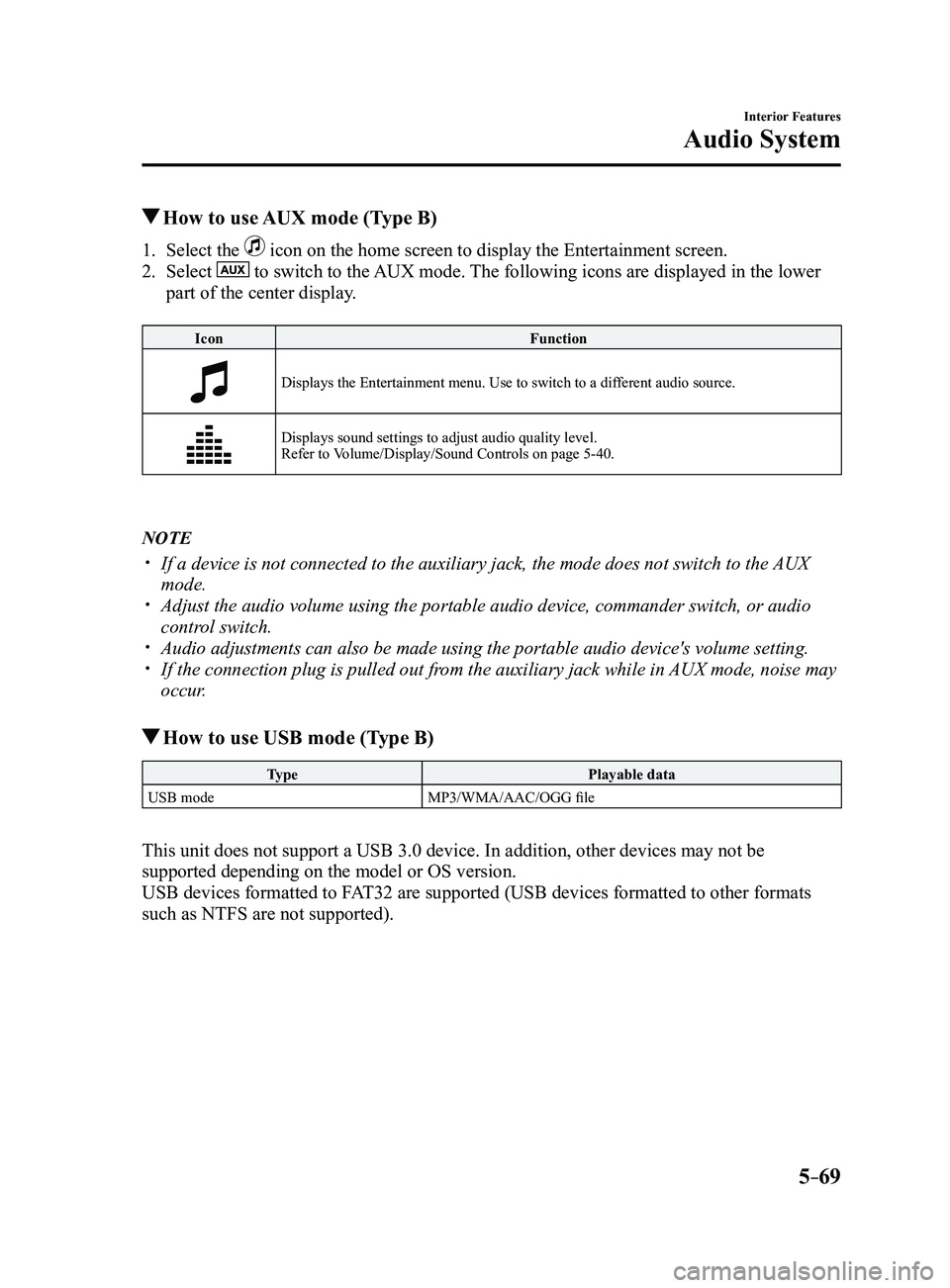
How to use AUX mode (Type B)
1. Select the icon on the home screen to display the Entertainment screen.
2. Select to switch to the AUX mode. The following icons are displayed in the lower
part of the center display.
Icon Function
Displays the Entertainment menu. Use to switch to a different audio source.
Displays sound settings to adjust audio quality level.
Refer to Volume/Display/Sound Controls on page 5-40.
NOTE
If a device is not connected to the auxiliary jack, the mode does not sw\
itch to the AUX
mode. Adjust the audio volume using the portable audio device, commander switc\
h, or audio
control switch. Audio adjustments can also be made using the portable audio device's vol\
ume setting. If the connection plug is pulled out from the auxiliary jack while in AUX mode, noise may
occur.
How to use USB mode (Type B)
Type Playable data
USB mode MP3/WMA/AAC/OGG file
This unit does not support a USB 3.0 device. In addition, other devices may not be
supported depending on the model or OS version.
USB devices formatted to FAT32 are supported (USB devices formatted to other formats
such as NTFS are not supported).
Mazda3_8FL6-EA-16F_Edition2.indb 692016/08/10 17:37:54
Page 362 of 612
5–70
Interior Features
Audio System
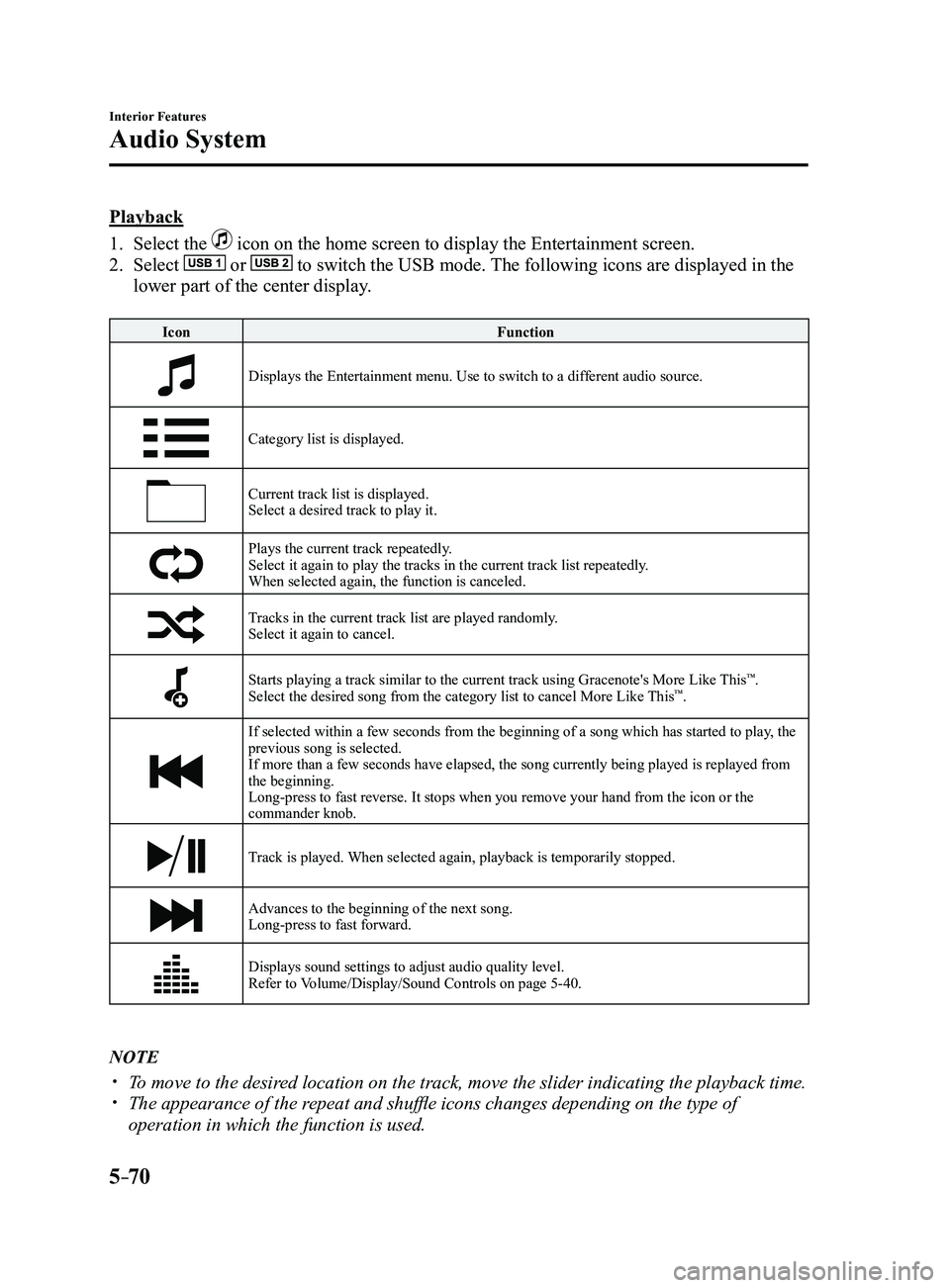
Playback
1. Select the icon on the home screen to display the Entertainment screen.
2. Select or to switch the USB mode. The following icons are displayed in the
lower part of the center display.
IconFunction
Displays the Entertainment menu. Use to switch to a different audio source.
Category list is displayed.
Current track list is displayed.Select a desired track to play it.
Plays the current track repeatedly.Select it again to play the tracks in the current track list repeatedly.
When selected again, the function is canceled.
Tracks in the current track list are played randomly.Select it again to cancel.
Starts playing a track similar to the current track using Gracenote's More Like This™.
Select the desired song from the category list to cancel More Like This™.
If selected within a few seconds from the beginning of a song which has \
started to play, the
previous song is selected.
If more than a few seconds have elapsed, the song currently being played\
is replayed from
the beginning.
Long-press to fast reverse. It stops when you remove your hand from the \
icon or the
commander knob.
Track is played. When selected again, playback is temporarily stopped.
Advances to the beginning of the next song.
Long-press to fast forward.
Displays sound settings to adjust audio quality level.
Refer to Volume/Display/Sound Controls on page 5-40.
NOTE
To move to the desired location on the track, move the slider indicating the playback time. The appearance of the r epeat and shuffle icons changes depending on the type of
operation in which the function is used.
Mazda3_8FL6-EA-16F_Edition2.indb 702016/08/10 17:37:55